Criterion D: development and testing
Reach the top band of Criterion D by choosing the right techniques, presenting and evaluating them with code excerpts, and testing for correctness, reliability and efficiency with evidence you can justify.
- IB Computer Science
- Internal assessment
- SL and HL
Criterion D is the largest criterion in the internal assessment: 12 of the 30 marks, and about 1,000 of your 2,000 words. It assesses two things at once: the product you built, and your understanding of how you built it. The product's functionality is judged mainly from the video; your understanding is judged from the documentation, where you explain and evaluate the techniques you used and justify your testing.
The examples use the sample project from the other IA pages: a practice-room booking system for a school music department, in Python with Flask and SQLite, with success criteria SC1 to SC8. The project and its test results are invented for teaching; the code was run for real.
What Criterion D rewards
Organise the documentation for Criterion D around its three demands.
The structure of the product: justify how the product is organised and why that structure suits the problem.
Techniques: show the techniques used to implement the algorithms from Criterion C (loops, data structures, existing libraries and the integration of software tools are the examples the guide gives), and highlight the code that matters for the product to run efficiently.
Testing: test for correctness, reliability and efficiency, describe and justify the testing in the documentation, and show examples of it in the video.
The markbands in plain language
Each markband has four strands, and the command terms climb across them, so moving up a band depends on the depth of your writing as well as the size of the product.
Marks | Product | Techniques | Choices made to implement the algorithms | Testing strategy |
|---|---|---|---|---|
1–3 | Very limited functionality | No appropriate techniques | States them | States the strategy used |
4–6 | Limited functionality | At least one appropriate technique | Outlines them | States its effectiveness |
7–9 | Partial functionality | Some appropriate techniques | Explains them | Describes its effectiveness |
10–12 | Fully functional | Appropriate techniques | Evaluates them | Justifies its effectiveness |
Reading across a row shows what has to change to move up a band. Here is what each verb for the choices asks of you, applied to one technique:
States: names the choice. "I used a set."
Outlines: adds what it does. "A set holds the day's taken slots so the grid can be drawn."
Explains: adds reasons and mechanism. "Checking membership of a set takes about the same time however large it is, so the 126 grid cells need 126 fast look-ups instead of 126 database queries."
Evaluates: weighs it against alternatives with evidence and limitations, and reaches a judgement. "With 2,000 bookings, one query per cell took 11 ms against 0.5 ms, and grew in proportion to the number of bookings. The set costs a little memory for one day's bookings, which is negligible, so it is the better choice."
For testing, "states its effectiveness" is a claim ("the testing worked"), "describes" says what the tests showed, and "justifies" argues from evidence that the testing was enough to trust the product.
Justifying the structure of the product
Start Criterion D with a short account of how the product is organised, referring to the system model from Criterion C, and the reason that organisation fits the problem. The booking system has a web layer (Flask routes), a rules layer (bookings.py, checkin.py, reports.py) and the SQLite database.
Choosing which techniques to show
In 1,000 words you can discuss four to six techniques that together carry the product, each with an excerpt. Choose techniques that:
implement an algorithm from Criterion C and delivers one or more success criteria;
required a decision between alternatives (so there is something to evaluate);
matter for correctness or efficiency;
are your own development, not a library call you only configured.
For the booking system, the candidates map onto the success criteria like this.
Technique | Success criteria | What there is to evaluate |
|---|---|---|
Weekly limit: a loop totalling a student's minutes in the week | SC3 | Loop in Python vs |
Booking inside one transaction with a parameterised clash query | SC2, SC7 | Correctness when two people book at once |
Loading the day grid with one query and a set | SC1, SC8 | The main efficiency decision, with timings |
Releasing no-shows every minute | SC4 | Scheduler vs checking on each page load |
Weekly report and no-show rate | SC6 | Aggregation in SQL vs in Python; hand-checked results |
Password hashing with a library | SC1 | Why a tested library beats your own code |
Simple features (signing out, listing rooms) must work and appear in the video, but need no excerpt.
Presenting and evaluating a technique
Each technique follows the same four-part pattern.
What and why: one or two sentences naming the technique, the algorithm from C it implements and the success criteria it serves.
The excerpt: a short, commented code excerpt labelled with its file and line numbers in the appendix.
How it works: the key decisions in the code, not a line-by-line narration.
Evaluation: the alternatives you considered, evidence (a test or a timing) for the choice, its limitations, and a judgement.
Technique 1: the weekly limit (SC3)
The weekly limit totals the minutes a student already holds in the Monday-to-Sunday week of the new booking; the booking is refused if the request is longer than the minutes left, and the message shows what remains.
Python
from datetime import datetime, timedelta

WEEKLY_LIMIT = 180  # minutes in one Monday-Sunday week (SC3)


def week_start(moment):
    # Midnight on the Monday of the week that contains moment
    monday = moment - timedelta(days=moment.weekday())
    return monday.replace(hour=0, minute=0, second=0, microsecond=0)


def minutes_left(bookings, new_start):
    # bookings: (start, end) pairs for one student's active bookings
    first = week_start(new_start)
    last = first + timedelta(days=7)
    used = 0
    for start, end in bookings:
        if first <= start < last:  # only bookings in the same week count
            used += (end - start) // timedelta(minutes=1)
    return WEEKLY_LIMIT - used
Java version
Java
import java.time.DayOfWeek;
import java.time.Duration;
import java.time.LocalDateTime;
import java.util.ArrayList;

public class Weekly {
    static final int WEEKLY_LIMIT = 180; // minutes in one Monday-Sunday week (SC3)

    // Midnight on the Monday of the week that contains moment
    static LocalDateTime weekStart(LocalDateTime moment) {
        int daysSinceMonday = moment.getDayOfWeek().getValue() - DayOfWeek.MONDAY.getValue();
        return moment.minusDays(daysSinceMonday).toLocalDate().atStartOfDay();
    }

    // bookings: {start, end} pairs for one student's active bookings
    static long minutesLeft(ArrayList<LocalDateTime[]> bookings, LocalDateTime newStart) {
        LocalDateTime first = weekStart(newStart);
        LocalDateTime last = first.plusDays(7);
        long used = 0;
        for (LocalDateTime[] b : bookings) {
            // only bookings in the same week count
            if (!b[0].isBefore(first) && b[0].isBefore(last)) {
                used += Duration.between(b[0], b[1]).toMinutes();
            }
        }
        return WEEKLY_LIMIT - used;
    }
}
Unit tests U1 to U6 check it with normal and boundary data.
Technique 2: booking inside a transaction (SC2 and SC7)
The clash test from Criterion C (two bookings overlap when each starts before the other ends) runs in SQL, in the same transaction as the insert. BEGIN IMMEDIATE takes SQLite's write lock before the check, so two students cannot both see a slot as free and both book it. Values reach the query only through ? placeholders, which also prevents SQL injection. The connection is opened with sqlite3.connect(path, isolation_level=None), so the code, not the sqlite3 module, decides when each transaction starts and ends.
Python
import sqlite3

# Counts active bookings and blocks in the room that overlap the request
CLASH_SQL = """
SELECT (SELECT COUNT(*) FROM booking
        WHERE room_id = ? AND status IN ('booked', 'checked_in')
          AND start_time < ? AND ? < end_time)
     + (SELECT COUNT(*) FROM block
        WHERE room_id = ? AND start_time < ? AND ? < end_time)
"""


def book(conn, student_id, room_id, start, end):
    # start and end are text 'YYYY-MM-DD HH:MM', which sorts in time order
    cur = conn.cursor()
    cur.execute("BEGIN IMMEDIATE")  # take the write lock before checking
    try:
        cur.execute(CLASH_SQL, (room_id, end, start, room_id, end, start))
        if cur.fetchone()[0] > 0:
            cur.execute("ROLLBACK")
            return "Refused: slot taken."
        cur.execute(
            "INSERT INTO booking (student_id, room_id, start_time, end_time, status) "
            "VALUES (?, ?, ?, ?, 'booked')",
            (student_id, room_id, start, end))
        cur.execute("COMMIT")
        return "Booked."
    except sqlite3.Error:
        cur.execute("ROLLBACK")  # leave the database unchanged (SC7)
        raise
Java version
Java
import java.sql.Connection;
import java.sql.PreparedStatement;
import java.sql.ResultSet;
import java.sql.SQLException;

public class Book {
    // Counts active bookings and blocks in the room that overlap the request
    static final String CLASH_SQL =
        "SELECT (SELECT COUNT(*) FROM booking"
        + " WHERE room_id = ? AND status IN ('booked', 'checked_in')"
        + " AND start_time < ? AND ? < end_time)"
        + " + (SELECT COUNT(*) FROM block"
        + " WHERE room_id = ? AND start_time < ? AND ? < end_time)";

    // start and end are text 'YYYY-MM-DD HH:MM', which sorts in time order
    static String book(Connection conn, int studentId, String roomId, String start, String end)
            throws SQLException {
        conn.setAutoCommit(false); // begin the transaction (takes the write lock)
        try {
            PreparedStatement check = conn.prepareStatement(CLASH_SQL);
            String[] values = {roomId, end, start, roomId, end, start};
            for (int i = 0; i < values.length; i++) {
                check.setString(i + 1, values[i]);
            }
            ResultSet rs = check.executeQuery();
            rs.next();
            int clashes = rs.getInt(1);
            check.close(); // also closes rs, so no read lock is left open
            if (clashes > 0) {
                conn.rollback();
                return "Refused: slot taken.";
            }
            PreparedStatement insert = conn.prepareStatement(
                "INSERT INTO booking (student_id, room_id, start_time, end_time, status)"
                + " VALUES (?, ?, ?, ?, 'booked')");
            insert.setInt(1, studentId);
            insert.setString(2, roomId);
            insert.setString(3, start);
            insert.setString(4, end);
            insert.executeUpdate();
            insert.close();
            conn.commit();
            return "Booked.";
        } catch (SQLException e) {
            conn.rollback(); // leave the database unchanged (SC7)
            throw e;
        } finally {
            conn.setAutoCommit(true); // end the transaction and release the lock
        }
    }
}
The Java version uses JDBC with the SQLite JDBC driver on the class path. The connection URL ends in ?transaction_mode=IMMEDIATE, so setAutoCommit(false) begins the same kind of transaction as BEGIN IMMEDIATE; commit() or rollback() ends it, and setAutoCommit(true) in the finally block returns the connection to normal mode. Closing the clash query before the insert matters in Java, because an open result set keeps a read lock that would stop another connection from committing.
Called on a test database holding one booking in room P3 from 10:00 to 10:30 and an exam block from 13:00 to 15:00, a back-to-back request for 10:30–11:00 is accepted, a request for 10:45–11:15 is refused because it overlaps the new booking, and a request for 14:30–15:00 is refused because of the block. Only one row is added.
Plain text
Booked.
Refused: slot taken.
Refused: slot taken.
2 bookings stored
The evaluation compares it with the obvious alternative: load the room's bookings into Python, check them in a loop, then insert. That is easier to read but leaves a gap between check and insert in which a second request can pass the same check (test T18). A UNIQUE constraint on room and start time catches only identical starts, not a 10:45 booking over one from 10:30. The cost of BEGIN IMMEDIATE, requests queuing for a moment, is irrelevant for six rooms and 120 students.
Testing your product
Testing has to cover three qualities, each with its own evidence.
Quality | Question it answers | Typical evidence in the booking system |
|---|---|---|
Correctness | Right results for valid input? | Unit tests of the rules; the weekly report matches hand-calculated values (SC6) |
Reliability | Keeps working with invalid input, at boundaries, with several users, over time? | Invalid input rejected, database unchanged (SC7); two simultaneous bookings; a two-week client trial |
Efficiency | Fast enough with realistic and larger data? | Day grid timed with 2,000 to 200,000 bookings (SC8) |
The test data uses normal, boundary and erroneous data (subtopic B2.1, Programming fundamentals). Your test plan from Criterion C lists them with expected outcomes; Criterion D reports what actually happened.
Unit, integration and acceptance testing
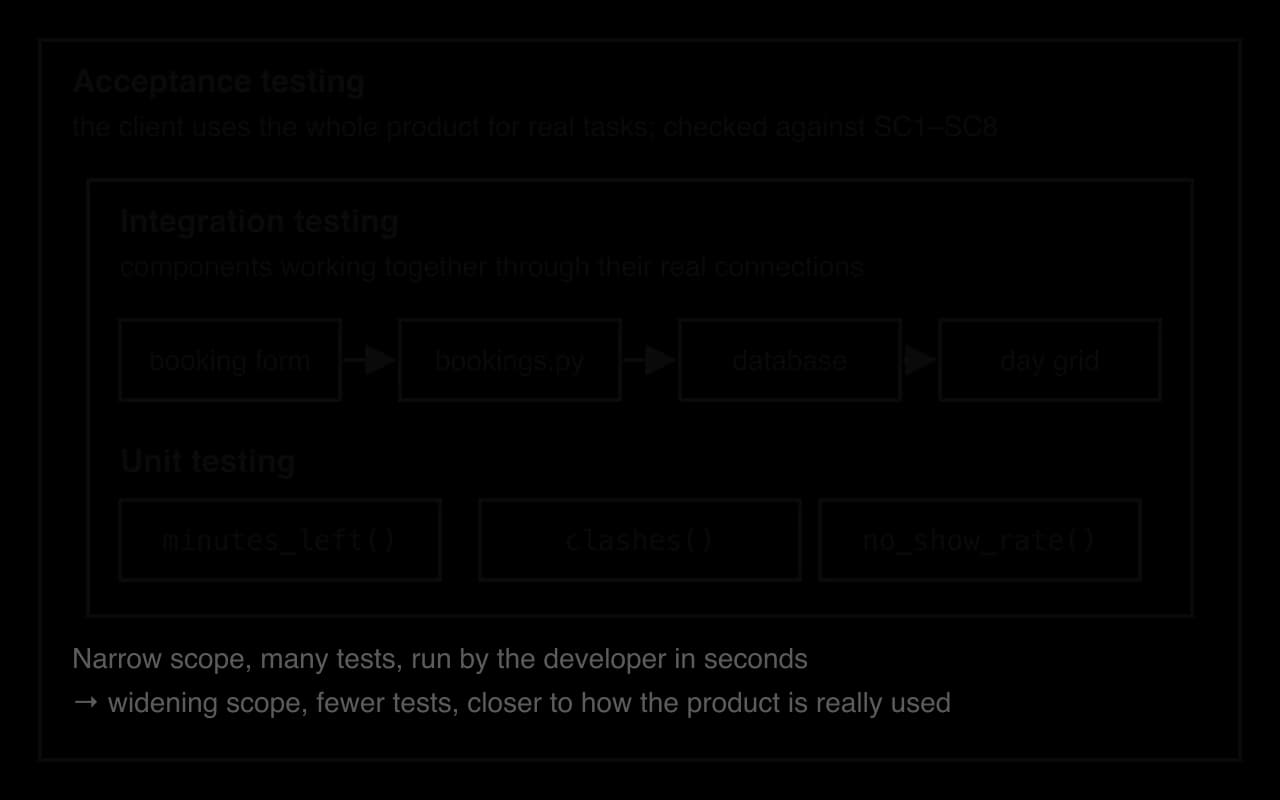
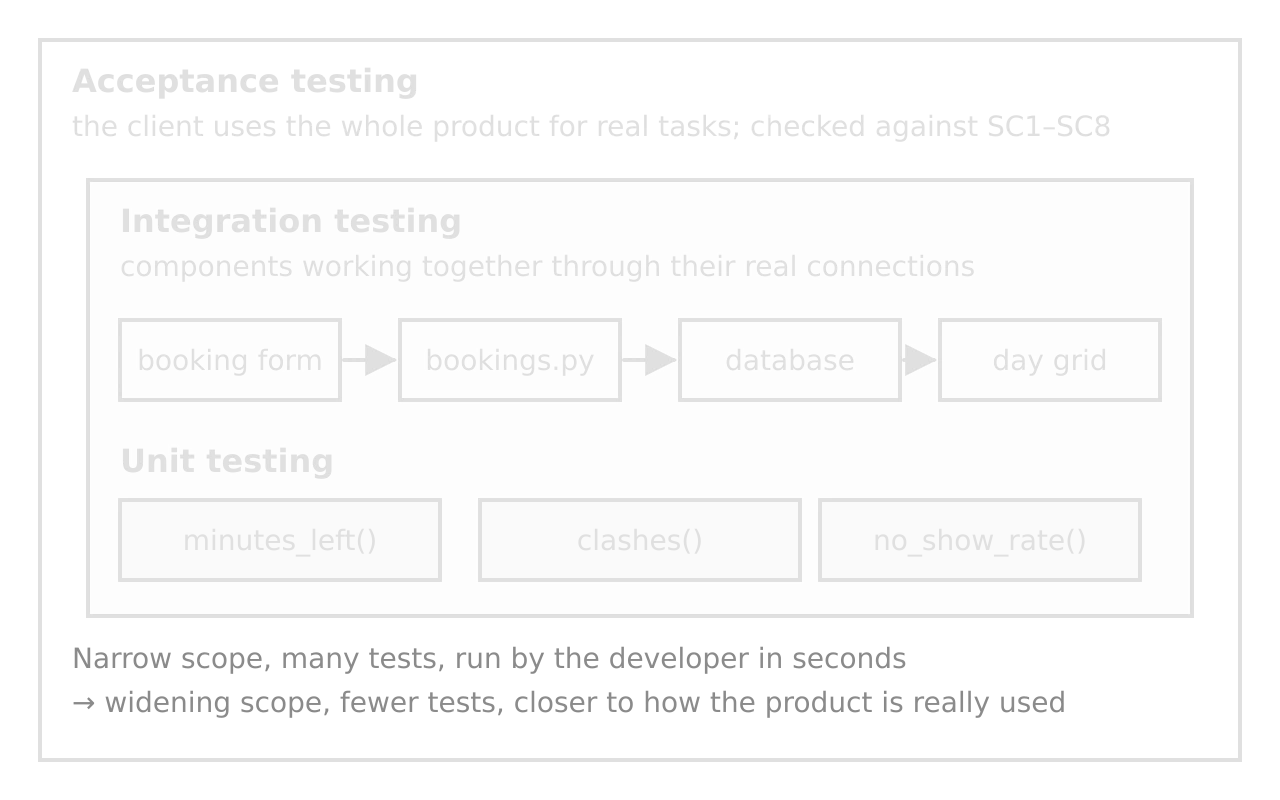
Testing happens at three levels, which differ in how much of the product each test covers.
Unit tests are quick to run and pin a fault to one function, which suits the booking system's rules layer.
The diagram of the three levels shows how each one widens the scope of the one inside it.
The unit tests for minutes_left() print one row of a test log each. The boundary tests matter most: the first slot of the week must count; the last slot of the previous week and the first of the next must not.
Python
def check(test_id, actual, expected):
    # Prints one row of the test log
    result = "pass" if actual == expected else "FAIL"
    print(test_id, "| expected", expected, "| actual", actual, "|", result)


def booking(month, day, hour, minute, length):
    start = datetime(2027, month, day, hour, minute)
    return (start, start + timedelta(minutes=length))


friday = datetime(2027, 3, 5, 12, 0)  # a request in the week of Monday 1 March
check("U1 normal: no bookings", minutes_left([], friday), 180)
check("U2 normal: one hour held", minutes_left([booking(3, 1, 16, 0, 60)], friday), 120)
check("U3 boundary: first slot of the week", minutes_left([booking(3, 1, 7, 30, 30)], friday), 150)
check("U4 boundary: last slot of last week", minutes_left([booking(2, 26, 17, 30, 30)], friday), 180)
check("U5 boundary: first slot of next week", minutes_left([booking(3, 8, 7, 30, 30)], friday), 180)
check("U6 boundary: limit used exactly", minutes_left([booking(3, 2, 9, 0, 180)], friday), 0)
Java version
Java
// In a test class that also contains weekStart and minutesLeft from Weekly
// Prints one row of the test log
static void check(String testId, long actual, long expected) {
    String result = (actual == expected) ? "pass" : "FAIL";
    System.out.println(testId + " | expected " + expected + " | actual " + actual + " | " + result);
}

// A list holding one booking
static ArrayList<LocalDateTime[]> booking(int month, int day, int hour, int minute, int length) {
    ArrayList<LocalDateTime[]> list = new ArrayList<>();
    LocalDateTime start = LocalDateTime.of(2027, month, day, hour, minute);
    list.add(new LocalDateTime[] {start, start.plusMinutes(length)});
    return list;
}

public static void main(String[] args) {
    LocalDateTime friday = LocalDateTime.of(2027, 3, 5, 12, 0);
    check("U1 normal: no bookings", minutesLeft(new ArrayList<>(), friday), 180);
    check("U2 normal: one hour held", minutesLeft(booking(3, 1, 16, 0, 60), friday), 120);
    check("U3 boundary: first slot of the week", minutesLeft(booking(3, 1, 7, 30, 30), friday), 150);
    check("U4 boundary: last slot of last week", minutesLeft(booking(2, 26, 17, 30, 30), friday), 180);
    check("U5 boundary: first slot of next week", minutesLeft(booking(3, 8, 7, 30, 30), friday), 180);
    check("U6 boundary: limit used exactly", minutesLeft(booking(3, 2, 9, 0, 180), friday), 0);
}
All six tests pass in both languages.
Plain text
U1 normal: no bookings | expected 180 | actual 180 | pass
U2 normal: one hour held | expected 120 | actual 120 | pass
U3 boundary: first slot of the week | expected 150 | actual 150 | pass
U4 boundary: last slot of last week | expected 180 | actual 180 | pass
U5 boundary: first slot of next week | expected 180 | actual 180 | pass
U6 boundary: limit used exactly | expected 0 | actual 0 | pass
A worked test table
Report testing as a table that continues the test plan from Criterion C: the same IDs and expected outcomes, plus the actual result and any fix. The sample table mixes levels and data types.
ID | SC | Level | Data | Input | Expected | Actual | Result |
|---|---|---|---|---|---|---|---|
T1 | SC1 | Integration | Normal | P2, Tue 16:00–16:30 | Saved; grid shows "Yours" | Saved; grid shows "Yours" | Pass |
T2 | SC1 | Integration | Boundary | P2, Tue 17:30–18:00 (last slot) | Saved | Refused: "Outside opening hours" | Fail. End check used |
T5 | SC2 | Unit | Normal | P1 10:15–11:00, existing 10:00–10:30 | Refused: "Slot taken" | Refused: "Slot taken" | Pass |
T6 | SC2 | Unit | Boundary | P1 10:30–11:00, existing 10:00–10:30 | Saved | Saved | Pass |
T9 | SC3 | Unit | Boundary | Student with 180 min books 30 min | Refused: "0 minutes left this week" | As expected | Pass |
T15 | SC7 | Integration | Erroneous | P4, 16:30–16:00 | Refused; BOOKING row count unchanged | Refused; count unchanged | Pass |
T17 | SC8 | Integration | Efficiency | 2,000 bookings; load Tue grid 5 times | Every load under 2 s | Grid data built in under 1 ms each time | Pass |
T18 | SC2 | Integration | Normal | Two browsers book P1 10:00 at the same moment (added during development) | One saved, one refused | One saved, one refused | Pass |
The table shows an extract of the plan's 17 tests, with the same IDs as the test plan in Criterion C, plus T18, added when the transaction was written. T2 is the most useful row: a boundary test found a real fault, and the fix and retest are recorded. A table in which every test passed first time gives no evidence that the tests could have found a fault.
Efficiency testing
Efficiency testing measures how speed changes as data grows. Test at the target in SC8 (2,000 bookings), then at ten and a hundred times as much, because a product that only just meets its target may fail as data builds up. Repeat each timing and keep the fastest, so one-off delays don't distort it.
The day grid has 6 rooms × 21 half-hour slots. The first version ran one query per cell; the second runs one query for the day and puts the taken slots in a set.
Python
def grid_per_cell(conn, day):
    # Version 1: one query for every cell of the grid (6 x 21 = 126 queries)
    grid = {}
    for room in ROOMS:
        for slot in SLOTS:
            start, end = day + " " + slot, day + " " + end_of(slot)
            count = conn.execute(
                "SELECT COUNT(*) FROM booking WHERE room_id = ? "
                "AND start_time < ? AND ? < end_time", (room, end, start)).fetchone()[0]
            grid[(room, slot)] = count > 0
    return grid


def grid_one_query(conn, day):
    # Version 2: one query for the whole day, then a set for O(1) look-ups
    taken = set()
    rows = conn.execute(
        "SELECT room_id, start_time, end_time FROM booking "
        "WHERE start_time >= ? AND start_time < ?", (day + " 00:00", day + " 23:59"))
    for room, start, end in rows:
        slot = start[11:]
        while slot < end[11:]:  # mark every half-hour slot the booking covers
            taken.add((room, slot))
            slot = end_of(slot)
    grid = {}
    for room in ROOMS:
        for slot in SLOTS:
            grid[(room, slot)] = (room, slot) in taken
    return grid
Java version
Java
// Inside a class Grid with ROOMS (array of room IDs), SLOTS (ArrayList<String>)
// and endOf(slot); uses java.sql and java.util.HashMap/HashSet
// Version 1: one query for every cell of the grid (6 x 21 = 126 queries)
static HashMap<String, Boolean> gridPerCell(Connection conn, String day) throws SQLException {
    HashMap<String, Boolean> grid = new HashMap<>();
    PreparedStatement q = conn.prepareStatement(
        "SELECT COUNT(*) FROM booking WHERE room_id = ? AND start_time < ? AND ? < end_time");
    for (String room : ROOMS) {
        for (String slot : SLOTS) {
            q.setString(1, room);
            q.setString(2, day + " " + endOf(slot));
            q.setString(3, day + " " + slot);
            ResultSet rs = q.executeQuery();
            rs.next();
            grid.put(room + " " + slot, rs.getInt(1) > 0);
        }
    }
    return grid;
}

// Version 2: one query for the whole day, then a set for O(1) look-ups
static HashMap<String, Boolean> gridOneQuery(Connection conn, String day) throws SQLException {
    HashSet<String> taken = new HashSet<>();
    PreparedStatement q = conn.prepareStatement(
        "SELECT room_id, start_time, end_time FROM booking WHERE start_time >= ? AND start_time < ?");
    q.setString(1, day + " 00:00");
    q.setString(2, day + " 23:59");
    ResultSet rs = q.executeQuery();
    while (rs.next()) {
        String slot = rs.getString(2).substring(11);
        String end = rs.getString(3).substring(11);
        while (slot.compareTo(end) < 0) { // mark every half-hour slot the booking covers
            taken.add(rs.getString(1) + " " + slot);
            slot = endOf(slot);
        }
    }
    HashMap<String, Boolean> grid = new HashMap<>();
    for (String room : ROOMS) {
        for (String slot : SLOTS) {
            grid.put(room + " " + slot, taken.contains(room + " " + slot));
        }
    }
    return grid;
}
Timed in the same way, the Java version gave 9.9, 93.3 and 960.6 ms for the per-cell version and 0.3, 0.9 and 7.8 ms for the single query, the same pattern as Python.
A timing harness filled an in-memory database with 2,000, 20,000 and 200,000 bookings, checked that both versions build identical grids (a faster version must also be correct), then timed each one.
Plain text
   2000 bookings: per cell     11.3 ms, one query    0.5 ms, one query + index  0.38 ms
  20000 bookings: per cell    102.1 ms, one query    1.1 ms, one query + index  0.30 ms
 200000 bookings: per cell   1042.9 ms, one query    9.1 ms, one query + index  0.32 ms
Timings measured with Python 3.13 and SQLite in memory on an Apple M1 Max laptop, October 2026; times on other machines differ, but the pattern does not.
Both versions pass SC8 at 2,000 bookings; the trend separates them. Each of the 126 per-cell queries scans the whole table, so ten times the data takes about ten times as long. The single query scans once, and with an index on start_time reads only the day's rows, so its time barely changes. Timing at several sizes gives measured evidence for the algorithmic efficiency of each version.
- per cell
- one query
Justifying the effectiveness of your testing
The top band asks you to justify the testing: argue, with evidence, that it was enough to trust the product. Cover four points.
Coverage: every success criterion has tests, and each has normal, boundary and erroneous data where input is involved.
Levels: rules were unit tested, connections integration tested, and the whole product acceptance tested with the client.
What the tests found: faults found and fixed (like T2), which shows the tests were capable of failing.
Limits: what was not tested and why that is acceptable (for example, timings were taken on one laptop, the same model the school uses).
Checklist
- To do:
My Criterion D opens with the structure of the product and justifies it against the problem and the success criteria.
- To do:
I show four to six techniques that implement the algorithms from Criterion C, each with a short, commented excerpt referenced to the appendix.
- To do:
For each technique I give the alternative I considered, evidence, a limitation and a judgement (evaluate, not only explain).
- To do:
I don't narrate code line by line.
- To do:
My testing covers correctness, reliability and efficiency.
- To do:
I used unit, integration and acceptance testing, with normal, boundary and erroneous data for every criterion that takes input.
- To do:
My test table continues the test plan from Criterion C, with actual results, failures and fixes recorded.
- To do:
My efficiency testing measures at the target size and beyond it, repeats each timing and checks correctness first.
- To do:
I justify why the testing was enough, including what wasn't tested and why.
- To do:
Every feature and the key tests appear in the video, and the full source code is in the appendix.
Carry on with Computer Science in Augment
With a free account, Augment remembers where you stopped in the notes and which questions you have marked.