Paper 2: reading and writing code
Read, trace, correct and write Python or Java code by hand for Paper 2, replace prohibited built-in functions with your own loops, and check your answers with a quick trace.
- IB Computer Science
- Exam skills
- SL and HL
Two versions of every code question
Paper 2 examines theme B: computational thinking, programming, object-oriented programming and, at HL, abstract data types. Every question that contains code is printed in two equivalent versions, one in Python and one in Java, set in the same context and testing the same skills. You sit the version for the language your school taught, and every code answer you write is in that language. There is no IB pseudocode in this course, so code in the paper is real Python or real Java, and so is yours.
One Paper 2 question focuses on algorithmic thinking with no code to read or write; it has its own page in Exam skills ("The algorithmic thinking question"). Every other question asks you to read code, write code, or both. On earlier IB papers most questions mixed the two: a short program was printed, then the parts asked for its output, a trace, a fault and finally a related function of your own.
Because the two versions match, nothing in a question depends on a feature only one language has. A Python question that uses a list is matched by a Java question that uses an array or an ArrayList, and a Python try/except by a Java try/catch. Your job is to read your own language fluently, including the small differences that change a result.
Reading code: the differences that change a result
Most of what you read in a Paper 2 program is ordinary sequence, selection and iteration (subtopic B2.3, Programming constructs). The places where students misread code are the few where Python and Java behave differently, or where both behave differently from everyday maths. The table lists the ones that most often change an answer.
Idea | Python | Java | What to watch |
|---|---|---|---|
Dividing two integers |
|
| Java integer division silently drops the fraction; with negatives the two differ ( |
Remainder |
|
| used to test even or odd; the same for positive numbers, but |
Length |
|
| three different spellings in Java |
Comparing strings |
|
| a Java |
Counted loop |
|
| the end value is excluded in both |
Multi-way selection |
|
| same logic, different keyword |
Blocks | indentation | braces | in Python the indentation is the structure |
Scope | a variable made inside a loop still exists after it | a variable declared inside a block disappears at its | matters when a later line uses the variable |
The safest way to read any unfamiliar line is to give it real values. Pick the first item of the data, run the line in your head, and write the result down. If a line still seems unclear, check how its result is used two lines later: a variable compared with 0 each pass is probably a counter, and one that keeps the biggest value seen so far is a running maximum.
Writing code by hand
You write Paper 2 code on paper or in a plain answer box, with no editor to indent, colour or check it. The examiner reads it once, line by line, and can credit a feature only if it is clear exactly what each line does. Layout earns no marks of its own, but unclear indentation or a missing brace can make a correct loop impossible to credit.
Indentation. In Python, indentation decides which lines are inside a loop or an
if, so it must be unmistakable. Indent each level by a clear, consistent step (about the width of four letters). In Java, put each{at the end of the line that opens the block and each}on its own line, lined up with the start of that line, and indent the body as well.Names. Use the names the question gives for the function, its parameters and any variables it mentions. For your own variables, choose names that say what they hold (
count,largest,total_hours), notxortemp2.Headers. Write the full header:
def count_rises(temps):in Python,public static int countRises(int[] temps)in Java, with the return type and parameter types the question implies.Comments. A short comment helps only where the purpose of a line is not obvious (
# start at 1: day 0 has no day before it). Never use a comment instead of code.Corrections. Cross out a wrong line with a single line and write the replacement next to it. Do not squeeze extra lines between existing ones; draw an arrow to where an added line belongs.
Do only what is asked. A question that says "construct a function that returns…" does not want input statements or a menu around it. Writing a whole program costs time and adds lines that can contradict your answer.
How code answers are marked
On earlier IB Computer Science papers, code answers were marked on features of the algorithm, not on the program as a whole. A markscheme for a construct question lists the separate things a correct answer must do, and each earns a mark wherever it appears in your code: a correct header with the right parameters, correct initialisation before a loop, a loop with the right bounds, the right condition, the right update or accumulation, and the right return or output. The annotated answer to a five-mark question shows how the marks are spread.
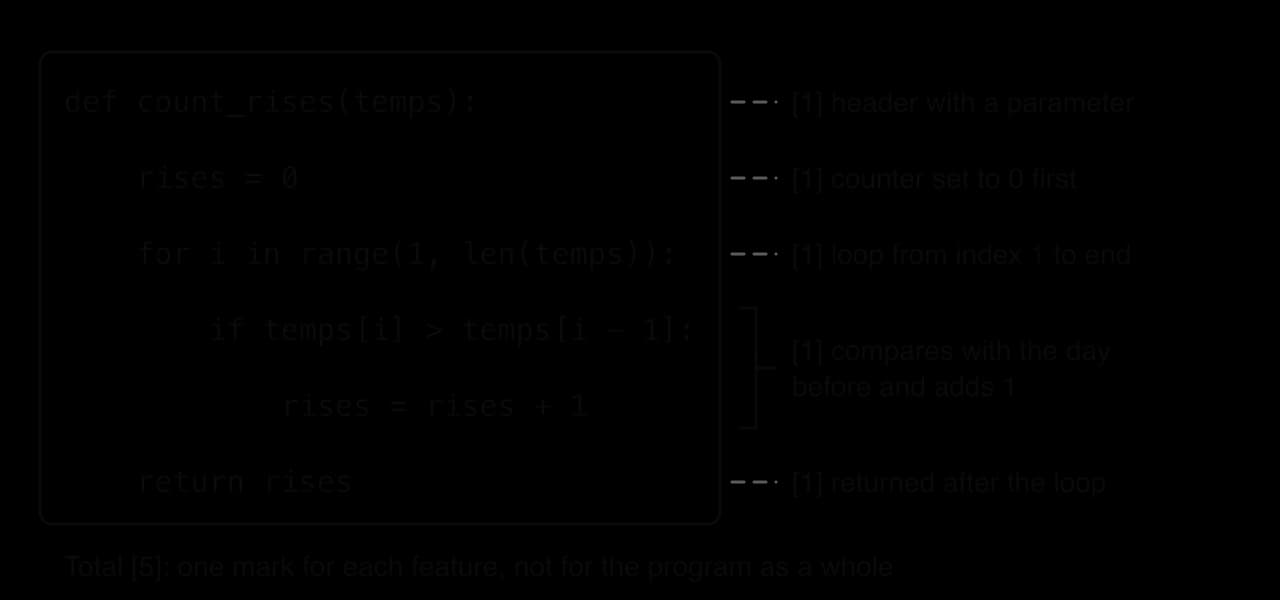
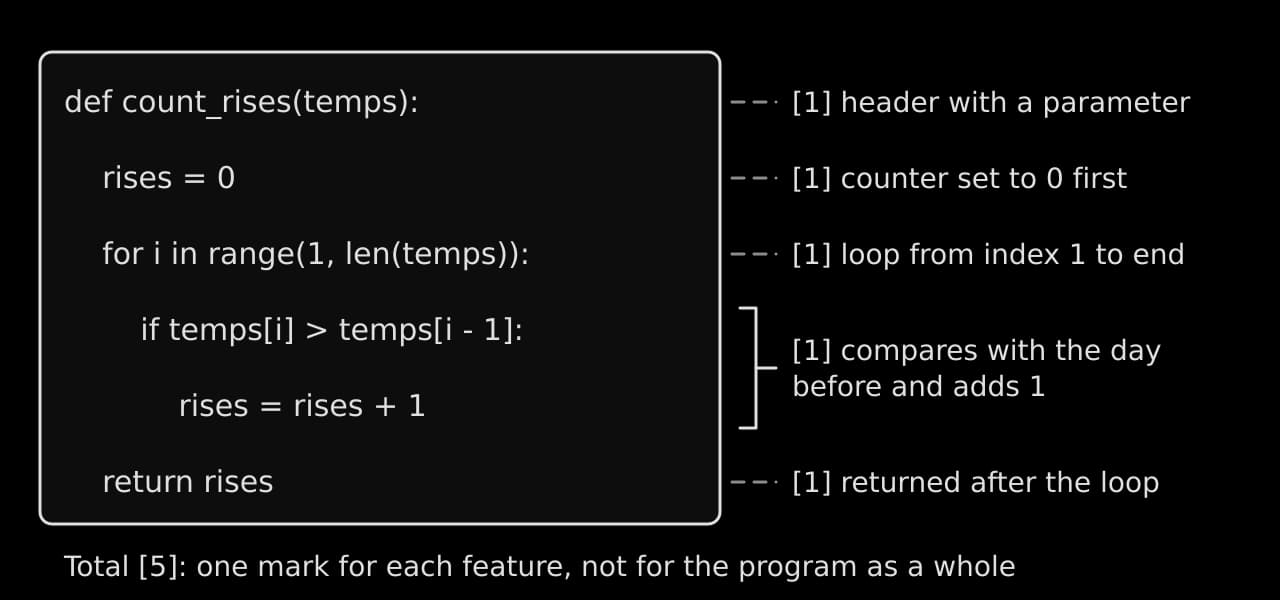
A partly correct answer therefore still scores. If you cannot finish a function, write the parts you can (the header, the initialisation, the loop), because each is credited on its own. The same feature-by-feature reading explains what is and is not penalised.
Usually not penalised | Usually penalised |
|---|---|
A missing colon or semicolon | A loop bound that misses the first or last element |
|
|
A different but correct approach (a | A counter or total reset inside the loop |
Extra brackets that do not change the meaning |
|
Using a different variable name consistently | Using a built-in function the question prohibits |
A markscheme gives one model answer, but any code that does the same job is credited, while a wrong index, two dependent lines in the wrong order or a variable that was never given a value loses the mark for that feature. Where one part of a question uses your answer to an earlier part, a wrong earlier value used correctly later can still earn the later marks (error carried forward).
Question types and model answers
Code questions on earlier papers came in a small number of shapes. The command term tells you which shape you are facing (command terms are explained in full on their own Exam skills page): state and identify want a short answer with no reasons, trace wants a full record of the values, explain wants a reason, and construct wants working code.
State the output and identify parts of a program
The function mystery processes a list of whole numbers.
Python
def mystery(values):
    result = 0
    for v in values:
        if v % 2 == 0:
            result = result + v
        else:
            result = result - 1
    return result


print(mystery([4, 7, 10, 3]))
Java version
Java
public class Mystery {
    public static int mystery(int[] values) {
        int result = 0;
        for (int v : values) {
            if (v % 2 == 0) {
                result = result + v;
            } else {
                result = result - 1;
            }
        }
        return result;
    }

    public static void main(String[] args) {
        int[] data = {4, 7, 10, 3};
        System.out.println(mystery(data));
    }
}A "state" answer needs only the value, but a short working (here the four values of result) protects your method marks if the final value is wrong. An "identify" answer must name exactly one item from the code, written exactly as it appears; a description ("the list") does not earn the mark.
Trace
To trace code is to follow it line by line and record every change to its variables (tracing). The record is a trace table: one column per variable, in the order the variables appear, an optional column for a condition, and a column for output; a new row each time a value changes or each time the loop runs. The program digits counts and adds up the digits of a number using the remainder and integer division.
Python
n = 4071
total = 0
count = 0
while n > 0:
    digit = n % 10
    total = total + digit
    count = count + 1
    n = n // 10
print(count, total)
Java version
Java
public class Digits {
    public static void main(String[] args) {
        int n = 4071;
        int total = 0;
        int count = 0;
        while (n > 0) {
            int digit = n % 10;
            total = total + digit;
            count = count + 1;
            n = n / 10;
        }
        System.out.println(count + " " + total);
    }
}
In Java, n / 10 divides two int values, so it already drops the fraction; Python needs // to do the same. Both versions give the same trace.
Find and correct errors
A program with a fault is printed and you must identify the faulty line, explain what goes wrong and correct it. The faults are usually logic errors: the code runs but gives the wrong answer. The function count_passes should return how many marks are at or above the pass mark.
Python
def count_passes(marks, pass_mark):
    for m in marks:
        count = 0
        if m > pass_mark:
            count = count + 1
    return count


print(count_passes([55, 40, 70, 50], 50))
Java version
Java
public class Passes {
    public static int countPasses(int[] marks, int passMark) {
        int count = 0;
        for (int m : marks) {
            count = 0;
            if (m > passMark) {
                count = count + 1;
            }
        }
        return count;
    }

    public static void main(String[] args) {
        int[] marks = {55, 40, 70, 50};
        System.out.println(countPasses(marks, 50));
    }
}
The program prints 0, although three of the four marks (55, 70 and 50) are at or above 50.
A good test for any "find the error" question is a value exactly on the boundary. The mark of 50 exposes the > error at once, so when the question gives data, check first whether any value is boundary data.
Construct a function or method
Construct questions ask you to write code that does a stated job, usually a single function (Python) or method (Java) with given parameters. They usually carry the most marks in a question and are marked feature by feature.
The loop starts at index 1 because the first day has no day before it. Starting at 0 would compare temps[0] with temps[-1], which in Python is silently the last element and in Java throws an ArrayIndexOutOfBoundsException. The fault is the same off-by-one in both languages, but only the Java version stops with an error.
Exception handling
Exception handling questions ask you to keep a program running when something goes wrong: text where a number was expected, a missing file, a division by zero. Python uses try and except; Java uses try and catch; both can add finally. The function read_tickets keeps asking until the user types a whole number of at least 1.
Python
def read_tickets():
    while True:
        text = input("Number of tickets: ")
        try:
            tickets = int(text)
            if tickets >= 1:
                return tickets
            print("Enter at least 1")
        except ValueError:
            print("Enter a whole number")


print("Booked", read_tickets())
Java version
Java
import java.util.Scanner;

public class Tickets {
    public static int readTickets(Scanner input) {
        while (true) {
            System.out.print("Number of tickets: ");
            String text = input.nextLine();
            try {
                int tickets = Integer.parseInt(text);
                if (tickets >= 1) {
                    return tickets;
                }
                System.out.println("Enter at least 1");
            } catch (NumberFormatException e) {
                System.out.println("Enter a whole number");
            }
        }
    }

    public static void main(String[] args) {
        Scanner input = new Scanner(System.in);
        System.out.println("Booked " + readTickets(input));
    }
}
With the inputs two, 0 and 3, both versions produce the same run:
Plain text
Number of tickets: two
Enter a whole number
Number of tickets: 0
Enter at least 1
Number of tickets: 3
Booked 3Name the specific exception when you write a handler (ValueError, FileNotFoundError, NumberFormatException, IOException). A bare except: or catch (Exception e) works, but it also hides faults you did not expect, and an "explain" answer about it is weaker because it cannot say which error is being handled.
File processing
File questions ask you to read a text file line by line, process each line, and often write results to another file. A common shape is a file of records, one per line, with fields separated by commas. The function copy_passes reads lines such as Amira,72 and writes the names of students at or above the pass mark to a new file, returning how many it wrote.
Python
def copy_passes(in_name, out_name, pass_mark):
    written = 0
    try:
        source = open(in_name, "r")
        target = open(out_name, "w")
        for line in source:
            parts = line.strip().split(",")
            name = parts[0]
            score = int(parts[1])
            if score >= pass_mark:
                target.write(name + "\n")
                written = written + 1
        source.close()
        target.close()
    except FileNotFoundError:
        print("File not found:", in_name)
    return written


print(copy_passes("scores.txt", "passed.txt", 50))
Java version
Java
import java.io.BufferedReader;
import java.io.FileNotFoundException;
import java.io.FileReader;
import java.io.FileWriter;
import java.io.IOException;

public class Passed {
    public static int copyPasses(String inName, String outName, int passMark) {
        int written = 0;
        try {
            BufferedReader source = new BufferedReader(new FileReader(inName));
            FileWriter target = new FileWriter(outName);
            String line = source.readLine();
            while (line != null) {
                String[] parts = line.split(",");
                String name = parts[0];
                int score = Integer.parseInt(parts[1]);
                if (score >= passMark) {
                    target.write(name + "\n");
                    written = written + 1;
                }
                line = source.readLine();
            }
            source.close();
            target.close();
        } catch (FileNotFoundException e) {
            System.out.println("File not found: " + inName);
        } catch (IOException e) {
            System.out.println("Could not read or write a file");
        }
        return written;
    }

    public static void main(String[] args) {
        System.out.println(copyPasses("scores.txt", "passed.txt", 50));
    }
}
With a scores.txt holding Amira,72, Ben,45, Chen,50 and Dara,38, the program prints 2 and passed.txt contains Amira and Chen. Called with a file name that does not exist, it prints File not found: missing.txt and returns 0.
The marking points for a file question follow the life of the file: open it in the right mode ("r", "w" or "a"; in Java new FileWriter(name, true) appends), read every line with a loop that stops at the end of the file, split and convert each line, process it, write with an explicit "\n", and close both files. Java's FileReader and FileWriter throw checked exceptions, so Java code must catch IOException or declare it with throws; Python code has no such rule but should still handle FileNotFoundError when the question mentions a missing file.
Classes, objects and comparing algorithms
Two more shapes recur. Object-oriented questions (subtopic B3.1) give a description or a UML class diagram and ask you to construct a class: private attributes, a constructor that sets them from its parameters, accessor and mutator methods, and sometimes a method that uses the attributes. Marks go to each attribute, the constructor's assignments, each method's header and its return. Algorithm questions (subtopic B2.4) ask you to compare linear and binary search, or bubble and selection sort, in Big O terms and in practice; a full answer names the complexity of each, says what it means for large inputs, and adds a condition such as "binary search needs the data to be sorted first".
Prohibited built-in functions
Python has many built-in functions that do common jobs in one call. Their use is encouraged in your internal assessment, but some Paper 2 questions prohibit specific ones so that you have to show the algorithm yourself. Each question that does this says so clearly.
Recognising the instruction
The guide says only that such questions will be clearly indicated. Expect wording such as "Do not use the built-in functions max or min", "You must not use any built-in sort function" or "without using len", and underline it as soon as you read it. Check which part or parts it covers, and read every later part for a restriction of its own.
A prohibition also covers anything that does the same job in disguise. If sort is prohibited, sorted(items) and items.sort() both break the rule. If max is prohibited, sorting the list and taking the last element breaks it too, because the question wants your own comparison loop. The guide names only Python built-ins, and the Java version of a question states its own restrictions. Treat the library methods that do the same jobs (Arrays.sort, Collections.sort, Collections.max, an ArrayList's contains and indexOf) the same way.
Prohibited | Hand-written replacement | The idea |
|---|---|---|
| count the items with a loop | counter starts at 0, add 1 per item |
| keep the best value seen so far | start with the first item, compare each other item |
| running total | accumulator starts at 0, add each item |
| compare each item with the target, return its position or −1 | |
| repeated comparisons and swaps | |
| swap from both ends towards the middle | two indexes moving inwards |
| an array-based stack with a top index | read |
Hand-written replacements
The first set of replacements makes one pass through the data. The same five-line patterns appear inside many larger answers, so learn them by heart.
Python
def length(items):
    count = 0
    for item in items:
        count = count + 1
    return count


def largest(items):
    best = items[0]
    for item in items:
        if item > best:
            best = item
    return best


def total(items):
    running = 0
    for item in items:
        running = running + item
    return running


def find(items, target):
    i = 0
    for item in items:
        if item == target:
            return i
        i = i + 1
    return -1


def count_of(items, target):
    count = 0
    for item in items:
        if item == target:
            count = count + 1
    return count


data = [12, 5, 31, 8, 5]
print(length(data), largest(data), total(data))
print(find(data, 8), find(data, 99), count_of(data, 5))
Java version
Java
import java.util.ArrayList;

public class ByHand {
    public static int length(ArrayList<Integer> items) {
        int count = 0;
        for (int item : items) {
            count = count + 1;
        }
        return count;
    }

    public static int largest(int[] items) {
        int best = items[0];
        for (int item : items) {
            if (item > best) {
                best = item;
            }
        }
        return best;
    }

    public static int total(int[] items) {
        int running = 0;
        for (int item : items) {
            running = running + item;
        }
        return running;
    }

    public static int find(int[] items, int target) {
        for (int i = 0; i < items.length; i++) {
            if (items[i] == target) {
                return i;
            }
        }
        return -1;
    }

    public static int countOf(int[] items, int target) {
        int count = 0;
        for (int item : items) {
            if (item == target) {
                count = count + 1;
            }
        }
        return count;
    }

    public static void main(String[] args) {
        int[] data = {12, 5, 31, 8, 5};
        ArrayList<Integer> list = new ArrayList<Integer>();
        for (int x : data) {
            list.add(x);
        }
        System.out.println(length(list) + " " + largest(data) + " " + total(data));
        System.out.println(find(data, 8) + " " + find(data, 99) + " " + countOf(data, 5));
    }
}
Plain text
5 31 61
3 -1 2
The Python find keeps its own index i so that it needs no len; when len is allowed, for i in range(len(items)) is just as good. The return i inside the loop is correct here because the task is to stop at the first match, while every other function returns after the loop because it must see every item.
The second set rearranges the data. Sorting and reversing work in place, changing the list they are given, and the stack keeps a top index instead of calling pop.
Python
def bubble_sort(items):
    n = len(items)
    swapped = True
    while swapped:
        swapped = False
        for i in range(n - 1):
            if items[i] > items[i + 1]:
                temp = items[i]
                items[i] = items[i + 1]
                items[i + 1] = temp
                swapped = True
        n = n - 1


def reverse(items):
    left = 0
    right = len(items) - 1
    while left < right:
        temp = items[left]
        items[left] = items[right]
        items[right] = temp
        left = left + 1
        right = right - 1


stack = [0] * 5
top = -1


def push(value):
    global top
    top = top + 1
    stack[top] = value


def pop():
    global top
    value = stack[top]
    top = top - 1
    return value


data = [12, 5, 31, 8, 5]
bubble_sort(data)
print(data)
reverse(data)
print(data)
push(4)
push(9)
print(pop(), pop(), top)
Java version
Java
import java.util.Arrays;

public class ByHand2 {
    static int[] stack = new int[5];
    static int top = -1;

    public static void bubbleSort(int[] items) {
        int n = items.length;
        boolean swapped = true;
        while (swapped) {
            swapped = false;
            for (int i = 0; i < n - 1; i++) {
                if (items[i] > items[i + 1]) {
                    int temp = items[i];
                    items[i] = items[i + 1];
                    items[i + 1] = temp;
                    swapped = true;
                }
            }
            n = n - 1;
        }
    }

    public static void reverse(int[] items) {
        int left = 0;
        int right = items.length - 1;
        while (left < right) {
            int temp = items[left];
            items[left] = items[right];
            items[right] = temp;
            left = left + 1;
            right = right - 1;
        }
    }

    public static void push(int value) {
        top = top + 1;
        stack[top] = value;
    }

    public static int pop() {
        int value = stack[top];
        top = top - 1;
        return value;
    }

    public static void main(String[] args) {
        int[] data = {12, 5, 31, 8, 5};
        bubbleSort(data);
        System.out.println(Arrays.toString(data));
        reverse(data);
        System.out.println(Arrays.toString(data));
        push(4);
        push(9);
        int first = pop();
        int second = pop();
        System.out.println(first + " " + second + " " + top);
    }
}
Plain text
[5, 5, 8, 12, 31]
[31, 12, 8, 5, 5]
9 4 -1
The Java listing uses Arrays.toString only to display the result; it plays no part in the algorithms. The swap needs a temporary variable in both languages: writing items[i] = items[i + 1] first would overwrite the value before it is copied. If len is prohibited as well, the Python bubble_sort and reverse can get the length from the hand-written length function instead.
Checking your own code with a quick trace
Before you move on from a construct answer, trace it with a tiny input. It takes a minute and catches most logic errors, because a wrong initial value, a missed element or a misplaced return shows up after two or three rows. Choose the input deliberately:
A small normal case with three or four items, where you can work out the right answer in your head.
A case that tests the edges: the answer is the first item, the last item, or a value on a boundary (exactly the pass mark).
An awkward case if the task allows one: a single item, no matching items, or (where the question allows it) an empty list.
Then trace your code, not the code you meant to write, writing each variable's value as it changes, and compare the result with the answer you expected. The function smallest was written as an answer to "construct a function that returns the smallest value in a non-empty list, without using min".
Python
def smallest(values):
    low = 0
    for i in range(1, len(values)):
        if values[i] < low:
            low = values[i]
    return low
Java version
Java
public static int smallest(int[] values) {
    int low = 0;
    for (int i = 1; i < values.length; i++) {
        if (values[i] < low) {
            low = values[i];
        }
    }
    return low;
}If the trace shows the loop running one time too many or too few, check the end value of range or the < versus <= in the Java loop condition first, because most off-by-one errors come from one of those two places.
Checklist
- To do:
I know which language version of Paper 2 I will sit, and I write every code answer in it.
- To do:
I can read the Python and Java spellings of length, integer division, string comparison and loops without slowing down.
- To do:
I can predict when Java integer division drops a fraction.
- To do:
I write hand-written code with clear indentation, full headers and the names the question gives.
- To do:
I check whether the question says "returns" or "outputs" and answer with
returnor a print accordingly. - To do:
I know code is marked by features: header, initialisation, loop bounds, condition, update, return.
- To do:
I can state the output of a short program and identify a parameter, argument, local variable, counter or accumulator in it.
- To do:
I can trace a loop in a trace table, one row per pass, with output written exactly as printed.
- To do:
I can find and correct a reset accumulator, a wrong comparison and an off-by-one loop bound.
- To do:
I can write exception handling for invalid input and a missing file in my language.
- To do:
I can read a text file line by line, split each line, and write results to another file.
- To do:
I underline any prohibited built-in function and know the hand-written replacement for
len,max,min,sum, searching, sorting, reversing andpop. - To do:
I check every construct answer with a quick trace on a small normal case and an edge case.
Carry on with Computer Science in Augment
With a free account, Augment remembers where you stopped in the notes and which questions you have marked.