Discuss how well firewalls and NAT protect a network, describe symmetric and asymmetric encryption, digital signatures and certificates, and (HL) describe common network attacks and the countermeasures against them.
Each is in the Computer Science glossary, with every other term in the subject.
The symmetric block cipher standardised by the US National Institute of Standards and Technology (NIST) in 2001, which encrypts data in 128-bit blocks using a key of 128, 192 or 256 bits.
Encryption that uses a mathematically related pair of keys, in which data encrypted with one key of the pair can only be decrypted with the other.
A list of items, such as IP addresses, ports, websites or devices, that are explicitly blocked, with everything not on the list allowed by default.
A network of devices infected with malware that an attacker controls remotely, usually through a command-and-control server, without the owners' knowledge.
An attack that tries every possible key or password in turn until the correct one is found.
A trusted organisation that checks that an applicant controls a domain or identity and then issues digital certificates signed with its own private key.
The sequence of certificates from a website's certificate through any intermediate certificates to a root certificate, in which each certificate is signed by the one above it and the root is already trusted by the device.
The unreadable data produced by encrypting plaintext.
Describe how a firewall inspects and filters incoming and outgoing traffic using rules, whitelists and blacklists.
Discuss the effectiveness of firewalls at protecting a network, including the role of network address translation (NAT).
Describe the difference between symmetric and asymmetric cryptography, and how public and private keys are used.
Describe the role of digital certificates in setting up a secure network connection.
Explain why encryption key management matters.
Describe common network vulnerabilities, including DDoS, insecure protocols, malware, man-in-the-middle attacks, phishing, SQL injection, cross-site scripting, unpatched software, weak authentication and zero-day exploits. (HL only)
Describe common network countermeasures and identify the vulnerabilities each one addresses. (HL only)
Explain why regular security testing and employee training matter. (HL only)
Any network connected to the internet can be reached by billions of other devices, and some of them are controlled by people who want to steal data, disrupt services or demand money. Network security is the combination of technology and practice that keeps data confidential (readable only by the people meant to read it), keeps it intact (unchanged by anyone without permission) and keeps services available to the people entitled to use them. Its main tools are firewalls, which control what traffic may cross the edge of a network, and encryption, which makes data useless to anyone who intercepts it, supported by digital certificates that prove who is at the other end of a connection.
Failures affect millions of people at once. In 2017 attackers entered the credit agency Equifax through a web application that had not been updated and took the personal records of 147.9 million Americans, and they went unnoticed for weeks partly because a monitoring device's digital certificate had expired. One lapse was a missed software update and the other a neglected certificate, and both had well-known fixes.
103 exam-style questions on this subtopic, written in the style of the IB papers. The first has its markscheme open. Counted on
An accountancy firm lets its staff work from home two days a week. Staff connect to the firm's office network through a virtual private network (VPN) using their home broadband.
Explain how the VPN keeps client financial data confidential as it travels between a member of staff's home and the office.
4 marks
Award [1] per point, up to [4 max].
the VPN client (on the laptop) authenticates with the VPN server / gateway at the office (e.g. with a password, certificate or second factor);
so only authorized staff can join the office network;
a (secure) tunnel is set up across the public internet;
the data is encrypted before it leaves the laptop / inside the tunnel;
and is only decrypted by the VPN server at the office;
so anyone intercepting the packets (e.g. on the home network or at the ISP) sees only unreadable ciphertext;
the original packets are encapsulated inside new packets, so internal (office) addresses are also hidden;
the member of staff's laptop behaves as if it is on the office LAN (so files can be accessed securely);
Outline one limitation of using the VPN for home working.
2 marks
Award [1] for a limitation and [1] for a development, up to [2 max].
the encryption/encapsulation adds overhead / extra processing;
One of 65 short multiple-choice questions on A2.4. Pick an answer to see why it's right or wrong.
Why does an organisation send simulated phishing emails to its own staff?
The official deck for this part of the syllabus.
Network security keeps:
data […]: readable only by the people meant to read it
data intact: unchanged by anyone without permission
services available: usable by the people entitled to use them
Main tools of network security:
[…] control what traffic may cross the edge of a network.
Encryption makes data useless to anyone who intercepts it.
Digital certificates prove who is at the other end of a connection.
With a free account, Augment remembers where you stopped and what you have practiced.
A set of rules a website sends to the browser in an HTTP header, stating which sources of scripts, styles and other content the browser may load and run for that site.
An attack in which a website includes untrusted input in a page without encoding it, so that a script supplied by the attacker runs in other users' browsers with the trusted site's permissions.
An algorithm that turns input of any length into a fixed-length value (a digest) in such a way that the same input always gives the same digest, any change to the input gives a completely different digest, and the input cannot practically be worked out from the digest.
Techniques and services that keep a service available during a DDoS attack, such as rate limiting, filtering traffic through a scrubbing service and spreading load across a large distributed network.
A security strategy that uses several independent layers of protection, so that an attack that defeats one layer is stopped or detected by another.
An attack that makes a service unavailable to its legitimate users by overloading it with traffic or requests, or by exploiting a flaw that makes it crash.
An electronic document, digitally signed by a certificate authority, that binds a public key to the identity of its owner, such as a website's domain name, for a stated period.
A value created by processing a digest of a message with the sender's private key, which anyone holding the sender's public key can check to confirm who sent the message and that it has not been changed.
A denial-of-service attack in which the traffic comes from many devices at once, usually the members of a botnet, so that it cannot be stopped by blocking a single source.
Scanning incoming email for spam, phishing and malware, and blocking, quarantining or labelling suspicious messages before they reach users.
A network protocol that encrypts the data it carries and authenticates the other party, so that intercepted traffic cannot be read or altered undetected.
The process of converting readable data into an unreadable form using an algorithm and a key, so that only someone with the correct key can convert it back (decryption).
A secret value, usually a long string of bits, that controls how an encryption algorithm transforms plaintext into ciphertext and back.
A hardware device or software program that monitors the network traffic entering and leaving a network or device and allows or blocks it according to a set of security rules.
A condition on fields of network traffic, such as direction, source or destination IP address, protocol and port, paired with an action that allows or denies the traffic that matches it.
A network protocol that sends data, including login details, without encryption or without checking the identity of the other party, so that it can be read or altered in transit.
A system that monitors network traffic or device activity for signs of attack and alerts administrators, without blocking the traffic itself.
A system placed in the path of network traffic that detects signs of attack and blocks or drops the malicious traffic automatically.
The difficulty of getting a shared secret key to both parties of a symmetric encryption system without anyone else obtaining it, especially when they can only communicate over an insecure network.
The secure handling of cryptographic keys throughout their life, including how they are generated, stored, distributed, used, rotated, revoked and destroyed.
A wireless security measure in which an access point allows (whitelist) or refuses (blacklist) connections from devices according to their MAC address.
Software designed to damage, disrupt or gain unauthorised access to a computer system.
An attack in which the attacker secretly places themselves between two communicating parties, relaying their messages so that they can read or alter the traffic while both parties believe they are talking directly to each other.
Authentication that requires two or more independent factors from different categories: something the user knows (a password), something the user has (a phone or security key) and something the user is (a fingerprint or face).
A firewall that, in addition to stateful inspection, examines the contents of packets to identify the application and user behind the traffic and to block known attack patterns.
Converting characters that have a special meaning in the destination format, such as <, > and " in HTML, into harmless equivalents before untrusted data is inserted into a page, so that the data is displayed as text and never run as code.
A firewall technique that examines each packet's header fields, such as IP addresses, protocol and port, on their own and compares them with the rules, without considering earlier packets or the packet's contents.
A database query whose SQL text is fixed in advance with placeholders, and whose input values are sent to the database separately as data, so that the input can never change the structure of the query.
A set of rules an organisation enforces for passwords, such as minimum length, a ban on common or previously breached passwords, no reuse across systems and a limit on failed login attempts.
An update released by a software developer to fix a bug or security vulnerability in a program that is already in use.
An authorised, simulated attack on an organisation's systems, carried out by security professionals to find vulnerabilities before real attackers do.
A social-engineering attack that uses fraudulent messages, usually emails or text messages, that appear to come from a trusted source, in order to trick the recipient into revealing information, sending money or installing malware.
Data in its original, readable form, before encryption or after decryption.
The key of an asymmetric key pair that is kept secret by its owner, used to decrypt data encrypted with the matching public key and to create digital signatures.
The key of an asymmetric key pair that is shared openly, used by others to encrypt data for the key's owner or to verify the owner's digital signatures.
Malware that encrypts a victim's files or locks the device and demands payment, usually in cryptocurrency, for the key to restore them.
Relying on the secrecy of a system's design or details, rather than on a sound security mechanism, to protect it.
A temporary symmetric key created for a single connection or session and discarded when it ends.
Manipulating people into breaking normal security procedures, such as revealing passwords or granting access, by exploiting trust, fear, urgency or helpfulness.
Phishing aimed at a specific person or organisation, using personal details such as names, job titles and current projects to make the message convincing.
Malware that secretly monitors a user's activity, such as keystrokes, browsing or location, and sends the information to a third party.
An attack in which input containing SQL syntax is entered into an application that inserts it directly into a database query, so that the input changes the meaning of the query and can read, alter or delete data.
A firewall technique that records each connection opened from inside the network in a state table and allows an inbound packet only if it belongs to a connection already in the table.
Encryption in which the same secret key is used both to encrypt the plaintext and to decrypt the ciphertext, so the sender and receiver must both hold that key.
The sequence of messages at the start of a TLS connection in which the client and server agree the protocol version and algorithms, the server proves its identity with its certificate, and both sides establish a shared session key.
A protocol that creates an encrypted, authenticated connection between two programs across a network, using certificates and asymmetric cryptography to set up the connection and symmetric encryption for the data.
Malware disguised as legitimate software, which the user installs willingly and which then carries out hidden harmful actions.
Software that is missing an available security update and therefore still contains a vulnerability that is publicly known and may already be exploited.
Malware that inserts copies of itself into other files or programs and runs when an infected file is opened, so it spreads only when users share and open infected files.
A weakness in hardware, software, configuration or human behaviour that an attacker could use to gain unauthorised access, steal or change data, or disrupt a service.
A login process that an attacker can pass without being the genuine user, because the evidence it asks for is easy to guess, steal or bypass.
A list of items, such as IP addresses, ports, applications or devices, that are explicitly permitted, with everything not on the list blocked by default.
A family of security standards (WPA2, WPA3) that authenticate devices joining a wireless network and encrypt the traffic between the devices and the access point.
Standalone malware that copies itself across a network by exploiting vulnerabilities, without needing to attach to a file or be opened by a user.
An attack that uses a vulnerability unknown to the software's developer, so no patch exists and the developer has had "zero days" to fix it.
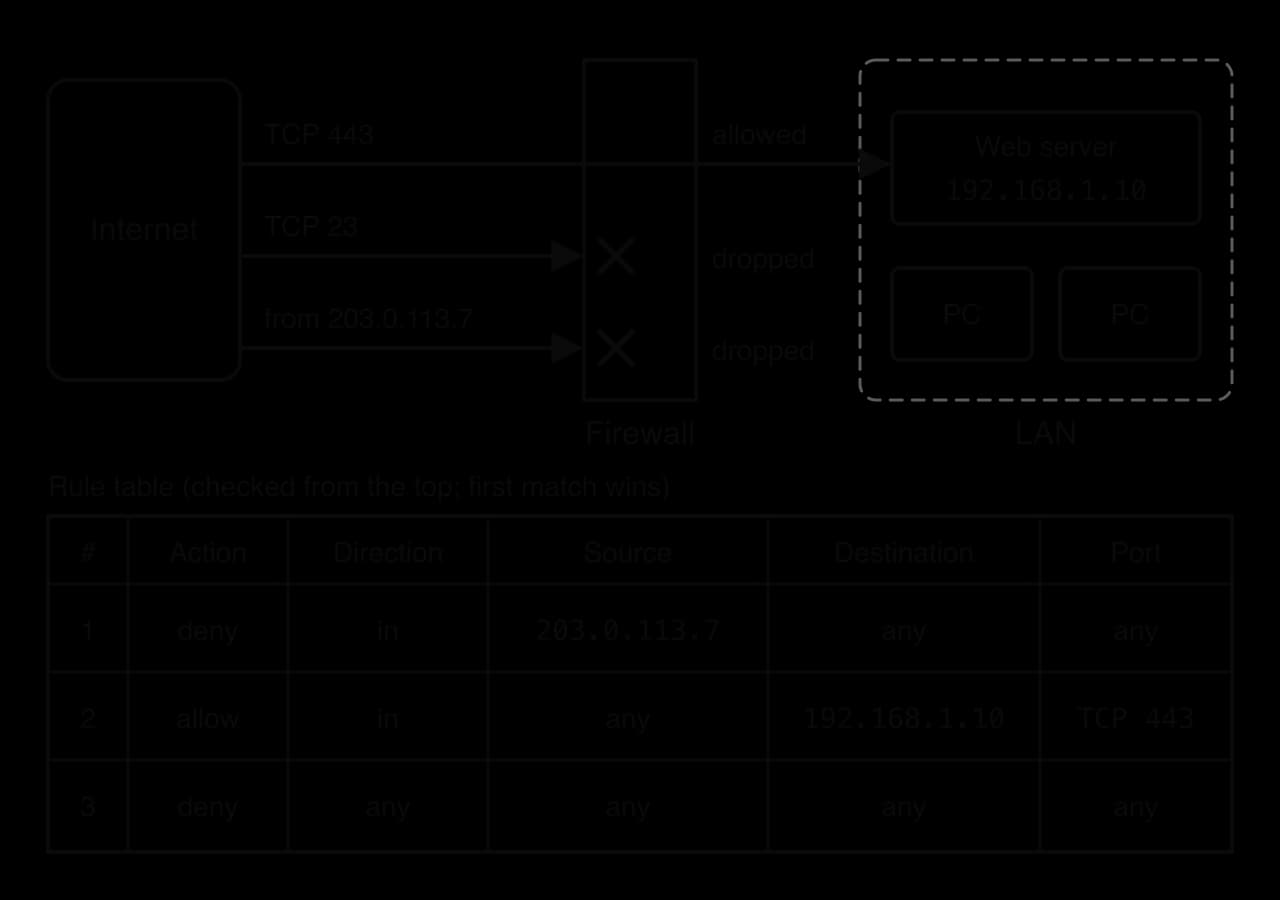
Every device on the internet receives traffic it never asked for: automated scans looking for open ports, connection attempts from infected machines, and messages aimed at known software flaws. A firewall sits at the boundary between a trusted network and an untrusted one and checks each piece of traffic against its rules before letting it cross. Data travels in packets, and each packet's header carries the source and destination IP addresses, the protocol in use and a port number. These header fields are the information a basic firewall examines.
Firewalls come in two physical forms. A hardware firewall is a dedicated device, or a function built into a router, at the edge of a network, so it protects every device behind it at once. A software firewall, also called a host firewall, runs on one computer as part of its operating system and protects only that machine. A host firewall keeps protecting a laptop when it is carried to a café or plugged into a hotel network, where the company's hardware firewall can no longer help.
Hardware firewall | Software (host) firewall | |
|---|---|---|
Where it runs | A dedicated device or router at the network boundary | On each individual computer |
What it protects | Every device behind it | Only the computer it runs on |
Traffic it sees | Only traffic crossing the boundary | All traffic to and from that computer, including traffic from inside the LAN |
Management | Configured once, in one place | Configured on every device (often pushed out centrally) |
Performance | Uses its own processor, so users' machines are not slowed | Uses the host's CPU and memory |
Away from the network | Gives no protection once a laptop leaves | Travels with the device |
Most organisations use both. The hardware firewall filters what crosses the boundary, and host firewalls stop an infected computer inside the LAN from attacking its neighbours, traffic that never passes the boundary firewall at all.
A firewall's behaviour is set entirely by its rule set (also called a rule base or access control list). Each rule is a condition and an action: if a packet matches the condition, the action is applied.
The fields a rule can test are the ones in the header. Direction is inbound (from outside into the network) or outbound. The source and destination are IP addresses or whole ranges of addresses. The protocol is usually TCP or UDP, and the destination port identifies the service: 443 for HTTPS, 80 for HTTP, 22 for SSH and 23 for Telnet. A rule may use "any" for a field it does not care about. The action is to allow the packet or to deny it, either by dropping it silently or by rejecting it with an error message to the sender; silent dropping gives an attacker less information.
Rules are checked in order from the top, and the first rule that matches determines what happens to the packet. If no rule matches, a default action applies, usually written as a final rule that matches everything. Rule order therefore matters as much as the rules themselves: a narrow deny rule placed after a broad allow rule is never reached.
The rule table in the firewall diagram protects a small network that runs one public web server. Rule 2 lets the public reach the web server over HTTPS and nothing else. Rule 1 blocks one address known to be hostile, and it works only because it sits above rule 2. A Telnet connection attempt on port 23 matches neither rule 1 nor rule 2, so it falls through to rule 3, the default deny.
The function check_packet models first-match filtering. Each rule is a list of five strings (action, direction, source IP, protocol and destination port), and the helper matches treats "any" as a wildcard. The loop stops at the first matching rule, exactly as a real packet filter does.
# Each rule: [action, direction, source IP, protocol, destination port]
# "any" in a rule matches every value.
rules = [
    ["deny", "in", "203.0.113.7", "any", "any"],
    ["allow", "in", "any", "TCP", "443"],
    ["allow", "in", "any", "TCP", "80"],
    ["allow", "out", "any", "any", "any"],
    ["deny", "any", "any", "any", "any"],
]


def matches(rule_value, packet_value):
    return rule_value == "any" or rule_value == packet_value


def check_packet(rules, packet):
    # packet: [direction, source IP, protocol, destination port]
    for i in range(len(rules)):
        rule = rules[i]
        if (matches(rule[1], packet[0]) and matches(rule[2], packet[1])
                and matches(rule[3], packet[2]) and matches(rule[4], packet[3])):
            return rule[0] + " (rule " + str(i + 1) + ")"
    return "deny (no rule matched)"


packets = [
    ["in", "198.51.100.20", "TCP", "443"],
    ["in", "203.0.113.7", "TCP", "443"],
    ["in", "198.51.100.20", "TCP", "23"],
    ["out", "192.168.1.15", "UDP", "53"],
]
for packet in packets:
print("[" + ", ".join(packet) + "] -> " + check_packet(rules, packet))public class Firewall {
// Each rule: {action, direction, source IP, protocol, destination port}
// "any" in a rule matches every value.
static String[][] rules = {
{"deny", "in", "203.0.113.7", "any", "any"},
{"allow", "in", "any", "TCP", "443"},
{"allow", "in", "any", "TCP", "80"},
{"allow", "out", "any", "any", "any"},
{"deny", "any", "any", "any", "any"}
};
static boolean matches(String ruleValue, String packetValue) {
return ruleValue.equals("any") || ruleValue.equals(packetValue);
}
// packet: {direction, source IP, protocol, destination port}
static String checkPacket(String[][] rules, String[] packet) {
for (int i = 0; i < rules.length; i++) {
String[] rule = rules[i];
if (matches(rule[1], packet[0]) && matches(rule[2], packet[1])
&& matches(rule[3], packet[2]) && matches(rule[4], packet[3])) {
return rule[0] + " (rule " + (i + 1) + ")";
}
}
return "deny (no rule matched)";
}
public static void main(String[] args) {
String[][] packets = {
{"in", "198.51.100.20", "TCP", "443"},
{"in", "203.0.113.7", "TCP", "443"},
{"in", "198.51.100.20", "TCP", "23"},
{"out", "192.168.1.15", "UDP", "53"}
};
for (int i = 0; i < packets.length; i++) {
String[] p = packets[i];
System.out.println("[" + p[0] + ", " + p[1] + ", " + p[2] + ", " + p[3] + "] -> "
+ checkPacket(rules, p));
}
}
}Both versions print the same four decisions. Java compares strings with .equals(), because == on two String objects tests whether they are the same object in memory, not whether they hold the same characters; Python's == compares the characters directly. In the Python output line, ", ".join(packet) joins the items of the list into one string with a comma and a space between them.
[in, 198.51.100.20, TCP, 443] -> allow (rule 2)
[in, 203.0.113.7, TCP, 443] -> deny (rule 1)
[in, 198.51.100.20, TCP, 23] -> deny (rule 5)
[out, 192.168.1.15, UDP, 53] -> allow (rule 4)A small company protects a web server (10.0.0.5) and a file server (10.0.0.9) with the following firewall rule table; 192.0.2.50 is the home IP address of the network administrator.
Rule | Action | Direction | Source IP | Destination IP | Protocol | Port |
|---|---|---|---|---|---|---|
1 | allow | in | any | 10.0.0.5 | TCP | 443 |
2 | allow | in | 192.0.2.50 | 10.0.0.9 | TCP | 22 |
3 | deny | in | any | any | TCP | 22 |
4 | allow | out | any | any | any | any |
5 | deny | any | any | any | any | any |
Every rule set also needs a default for traffic that its specific rules do not mention, and there are two opposite starting points.
A whitelist (now often called an allow list) puts the burden of proof on the traffic: unless it has been approved, it does not get through. Traffic from a new, previously unseen attack is not on the list, so it is blocked along with everything else that has not been approved. The price is administration: every legitimate new need, from a video-conferencing tool to a teacher's new website, must be added by hand, and until it is, users meet failures they do not understand.
A blacklist (or block list) works the other way round. It is easy to run and rarely gets in users' way, but it blocks only threats that someone has already identified and listed. A new attack server, or an old one that has changed its address, passes straight through. Attackers can change addresses far faster than defenders can list them, so a blacklist used alone leaves new attack sources unblocked until someone adds them.
Whitelist (default deny) | Blacklist (default allow) | |
|---|---|---|
Default for unlisted traffic | Blocked | Allowed |
Protection against new, unknown threats | Strong: unknown traffic is not on the list | Weak: unknown traffic is not on the list either, so it passes |
Effort to maintain | High: every legitimate need must be added | Lower: only known threats are added |
Effect on users | Legitimate traffic may be blocked until approved | Legitimate traffic rarely blocked |
Typical use | Inbound traffic to an organisation; servers that offer one service | Known malicious addresses and websites; outbound web filtering |
Real firewalls combine the two. Inbound traffic is normally default deny with a short whitelist of the services the organisation offers, while a blacklist of known-malicious addresses sits at the top of the rule set as an extra filter, like rule 1 in the firewall diagram. Outbound traffic is often default allow with a blacklist of dangerous destinations, because users need to reach millions of legitimate websites that no one could list in advance.
Firewalls differ in how much of each packet they read and how much they remember. There are three main designs, each building on the one before.
A packet filter is fast and simple, but it has no memory. That causes a problem with replies. When a user inside the network loads a web page, the web server's replies arrive inbound, from port 443 on the server. To let them in, a packet filter must allow inbound traffic from port 443, and an attacker can then send unwanted packets that claim to come from port 443 and pass the filter.
A stateful firewall solves the reply problem. When a computer inside the network opens a connection, the firewall adds the connection (both IP addresses, both ports and the protocol) to its state table. Inbound packets that belong to a recorded connection are let in; an inbound packet that matches no entry is unsolicited and is dropped, even if it pretends to come from port 443. The cost is memory and processing for the table, which an attacker can try to fill with half-open connections.
A next-generation firewall (NGFW) uses deep packet inspection: it reads the payload as well as the header. It can recognise an application whatever port it uses, apply rules per user rather than per IP address, and block known malicious content. To inspect HTTPS traffic it must decrypt and re-encrypt it, which requires its own trusted certificate on every client, adds delay and raises privacy questions about reading employees' encrypted traffic.
Packet filtering | Stateful inspection | Next-generation firewall | |
|---|---|---|---|
What it reads | Header of each packet | Header plus the state table of connections | Header, state and packet contents |
Memory of earlier packets | None | Tracks every open connection | Tracks connections and applications |
Handles replies safely | No: must open whole port ranges | Yes: only replies to known connections | Yes |
Stops attacks hidden in allowed traffic | No | No | Partly: known attack patterns |
Speed and cost | Fastest, cheapest | Moderate | Slowest, most expensive |
 YouTube
Most homes and schools reach the internet through a router that performs network address translation (NAT), usually in the form of port address translation (PAT), which lets many devices with private IP addresses share one public address. Subtopic A2.3, Data transmissions, explains how the translation works. NAT was designed to save IPv4 addresses, but it also changes what an outsider can reach.
When a device inside the network sends a request, the router replaces the private source address and port with its own public address and a new port, and records the pair in its NAT table. A reply addressed to that public port is looked up in the table and passed to the right device. An unsolicited inbound packet, one that is not a reply to anything, has no entry in the table, so the router has no device to send it to and drops it.
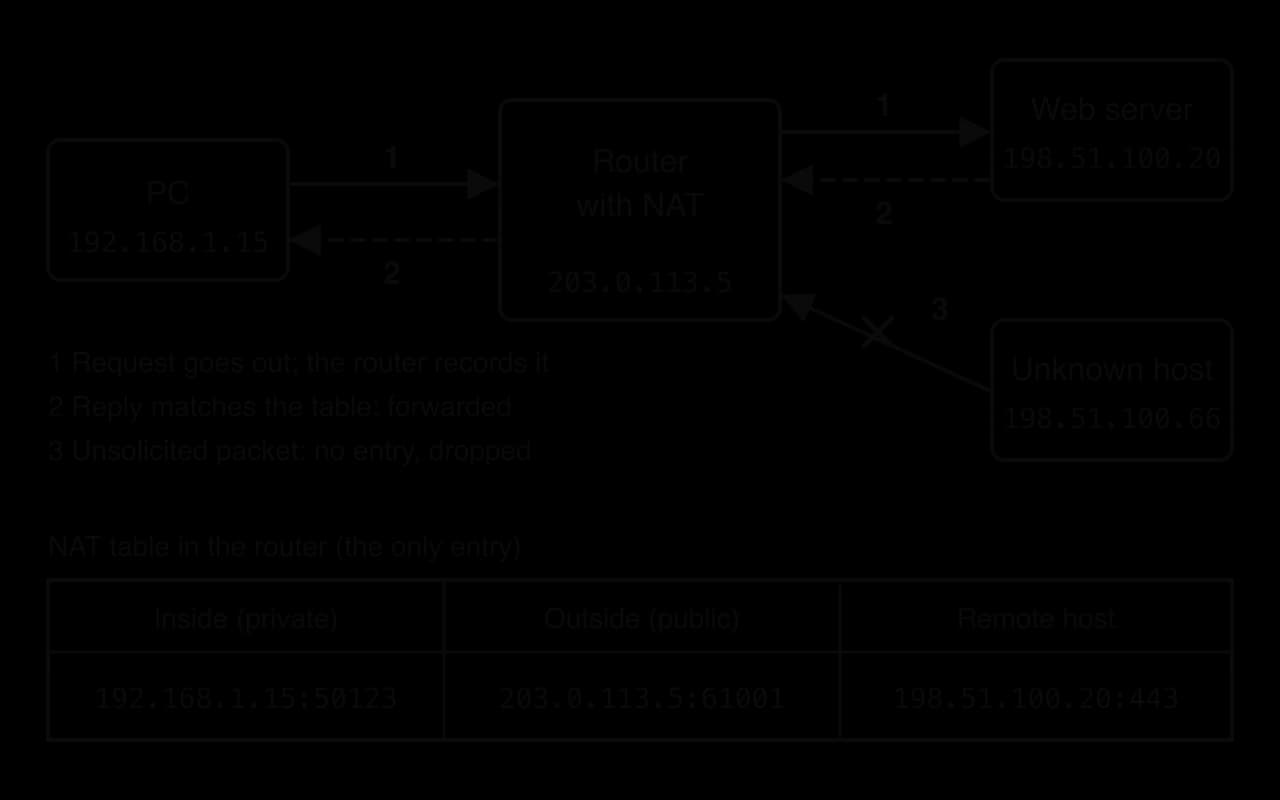
The NAT diagram shows both security effects. Devices inside the network cannot be addressed directly from the internet, because their private addresses are not routed on the internet. Unsolicited connection attempts, such as the packet from the unknown host, fail at the router. An outsider also learns nothing about how many devices sit behind the public address or how they are numbered.
NAT's protection is a side effect of a feature designed to save addresses, and it has clear limits. NAT does not inspect content, so any reply, including malware that a user downloads on purpose, passes straight in. Port forwarding, set up so that a game console or camera can be reached from outside, punches a permanent hole through it, and some devices open such holes automatically. Malware already inside the network can make outbound connections to its controller, which NAT treats like any other request. IPv6 gives every device a public address, so networks that rely on NAT for protection lose it as they move to IPv6 unless a real firewall is configured.
A correctly configured firewall gives a network real protection.
It blocks unsolicited inbound connections, so services that should never be reachable from outside, such as file sharing or remote desktop, cannot be attacked from the internet.
It enforces one policy for a whole network. An administrator changes one rule set instead of configuring hundreds of devices, and the policy applies even to devices that cannot run security software, such as printers and cameras.
It blocks known-hostile addresses and services, cutting off traffic from addresses linked to attacks.
It can restrict outbound traffic. Blocking unusual outbound connections can stop malware reporting to its controller or sending stolen data out.
It records what it sees. Logs show scans, repeated blocked attempts and unusual traffic, giving early warning and evidence after an incident.
It can divide a network internally. Firewalls between segments (see network segmentation in subtopic A2.2, Network architecture) stop an attacker who gets into one part of the network from moving freely to the rest.
A firewall controls only whether traffic may cross a boundary, so anything that arrives through permitted traffic, starts inside the network or avoids the boundary altogether is outside its reach.
Attacks can arrive through allowed traffic. A public web server must accept connections on port 443, so an attack carried inside an ordinary HTTPS request, such as SQL injection, passes a packet filter or stateful firewall unchallenged.
Encrypted traffic cannot be read. Unless the firewall decrypts it, at a cost in speed, money and privacy, malicious content inside TLS is invisible to it.
People inside the network are trusted. A phishing email arrives through the allowed mail service, and the employee who opens its attachment is already inside the boundary. An insider who misuses legitimate access never crosses the firewall at all.
Traffic can bypass it. A USB flash drive, a laptop infected at home or a phone using mobile data never passes through the network's firewall. The Stuxnet worm, discovered in 2010, is thought to have reached isolated industrial control computers on infected USB flash drives, a route no network firewall could see.
Misconfiguration. A rule that is too broad, in the wrong order or left over from a test opens a hole, and large rule sets with thousands of rules are hard to check.
Single point of failure and bottleneck. Every packet passes through it, so if it fails the network is cut off (or, if it fails open, unprotected), and deep inspection slows traffic. A large enough flood can overwhelm it.
It cannot fix flaws behind it. If a server runs software with a known weakness on an allowed port, the firewall cannot tell an attack on that weakness from a normal request.
Weighing the strengths against the limitations leads to the usual conclusion: a firewall is necessary but not sufficient. Without one, every device is exposed to every scan on the internet; with one, the remaining risks come through the traffic the firewall must allow, through people, and through routes that bypass it. Security therefore relies on several independent layers.
In a defence-in-depth design the firewall is the outer layer. Behind it sit software updates, encryption of data in transit and at rest, strong authentication, access control that gives each user only what they need, monitoring that raises alerts on unusual activity, backups, and training for staff. No layer is perfect, but an attacker must defeat all of them, and each extra layer gives defenders another chance to notice.
A firewall controls which traffic crosses a boundary, but once data leaves a building it travels through cables, radio links and routers that belong to other people. Anyone within range of a Wi-Fi network can record its radio signals, and every router on the path handles the packets. Confidentiality on a network cannot depend on keeping data away from other people's equipment, so it depends on making the data unreadable to them.
The readable input is the plaintext, and the scrambled output is the ciphertext. Decryption runs the process in reverse with the right key.
Plaintext does not have to be text: a photo, a sound file or a database record is plaintext before it is encrypted. The algorithm turns it into ciphertext, which looks like random bytes to anyone without the key.
The key allows one algorithm to produce a different scramble for every pair of users. The same algorithm with a different key gives completely different ciphertext, so the algorithm can be public and widely studied while each pair of users keeps only its key secret.
The idea that a system should stay secure even if everything about it except the key is public is called Kerckhoffs's principle. It is the opposite of security through obscurity. Modern algorithms such as AES are published in full and have been attacked by researchers for decades; their strength comes from the size of the key space, not from secrecy about how they work.
The Caesar cipher replaces every letter with the letter a fixed number of places further along the alphabet, wrapping from Z back to A. The number of places is the key. It is far too weak for real use, but it shows every part of the process: plaintext, algorithm, key, ciphertext and decryption with the same key.
def shift_text(text, key):
    result = ""
    for ch in text:
        if "A" <= ch <= "Z":
            position = (ord(ch) - ord("A") + key) % 26
            result = result + chr(position + ord("A"))
        else:
            result = result + ch
    return result


def encrypt(plaintext, key):
    return shift_text(plaintext, key)


def decrypt(ciphertext, key):
    return shift_text(ciphertext, 26 - key)


ciphertext = encrypt("MEET AT NOON", 7)
print("Ciphertext:", ciphertext)
print("Decrypted with key 7:", decrypt(ciphertext, 7))

# An attacker without the key simply tries every possible key.
for key in range(1, 26):
print(key, decrypt(ciphertext, key))public class Caesar {
static String shiftText(String text, int key) {
String result = "";
for (int i = 0; i < text.length(); i++) {
char ch = text.charAt(i);
if (ch >= 'A' && ch <= 'Z') {
int position = (ch - 'A' + key) % 26;
result = result + (char) (position + 'A');
} else {
result = result + ch;
}
}
return result;
}
static String encrypt(String plaintext, int key) {
return shiftText(plaintext, key);
}
static String decrypt(String ciphertext, int key) {
return shiftText(ciphertext, 26 - key);
}
public static void main(String[] args) {
String ciphertext = encrypt("MEET AT NOON", 7);
System.out.println("Ciphertext: " + ciphertext);
System.out.println("Decrypted with key 7: " + decrypt(ciphertext, 7));
// An attacker without the key simply tries every possible key.
for (int key = 1; key < 26; key++) {
System.out.println(key + " " + decrypt(ciphertext, key));
}
}
}Each letter's position (0 for A to 25 for Z) is shifted and taken modulo 26 so that it wraps round. Python gets a character's code with ord() and turns a code back into a character with chr(); Java does the same arithmetic directly on char values and casts the result back with (char). Decryption shifts by 26 - key, which undoes the original shift. The output, shortened, shows the encrypted message and the attacker's search:
Ciphertext: TLLA HA UVVU
Decrypted with key 7: MEET AT NOON
1 SKKZ GZ TUUT
2 RJJY FY STTS
...
6 NFFU BU OPPO
7 MEET AT NOON
8 LDDS ZS MNNM
...
25 UMMB IB VWWV
The weakness is the key space. There are only 25 useful keys, so the loop tries them all instantly, and only key 7 gives English. Trying every key in turn is a brute-force attack, and the defence against it is a key space so large that trying every key is impossible in practice.
The Caesar cipher is symmetric: the same key encrypts and decrypts. Every fast modern cipher works the same way.
Symmetric algorithms scramble data with fast operations on blocks of bits (substitutions, shuffles and mixing with the key, repeated over several rounds), which modern processors carry out at gigabytes per second. Many CPUs include special instructions just for this. That speed makes symmetric encryption the choice for bulk data: whole disks, database files, Wi-Fi traffic and the contents of every HTTPS connection.
The main weakness of symmetric encryption lies in setting it up rather than in the algorithm. Both parties need the same key before they can communicate securely, but sending the key over the network in plaintext would let an eavesdropper copy it, and encrypting it would need another key that has the same problem.
The problem grows quickly with the number of users. Each pair of people who want to talk privately needs its own key, otherwise one user could read messages meant for another. For users that is one key per pair:
Asymmetric encryption, also called public-key cryptography, removes the need to share a secret in advance. Each user has two keys that are generated together and are mathematically linked.
One key of the pair is published to anyone, and the other is kept secret by its owner.
The pair is built from a mathematical problem that is easy in one direction and infeasible in the other: the public key can be calculated quickly from the private key, but recovering the private key from the public key would take an impractically long time. RSA, for example, relies on the fact that multiplying two very large prime numbers is easy while finding them again from the product is not.
For confidentiality, the sender encrypts with the receiver's public key. Anyone can do this, because the public key is public, but only the receiver's private key can decrypt the result, so only the receiver can read it. A useful picture is an open padlock: the owner hands out copies of the open padlock (the public key) to anyone, anyone can snap one shut on a box, and only the owner has the key that opens it (the private key).
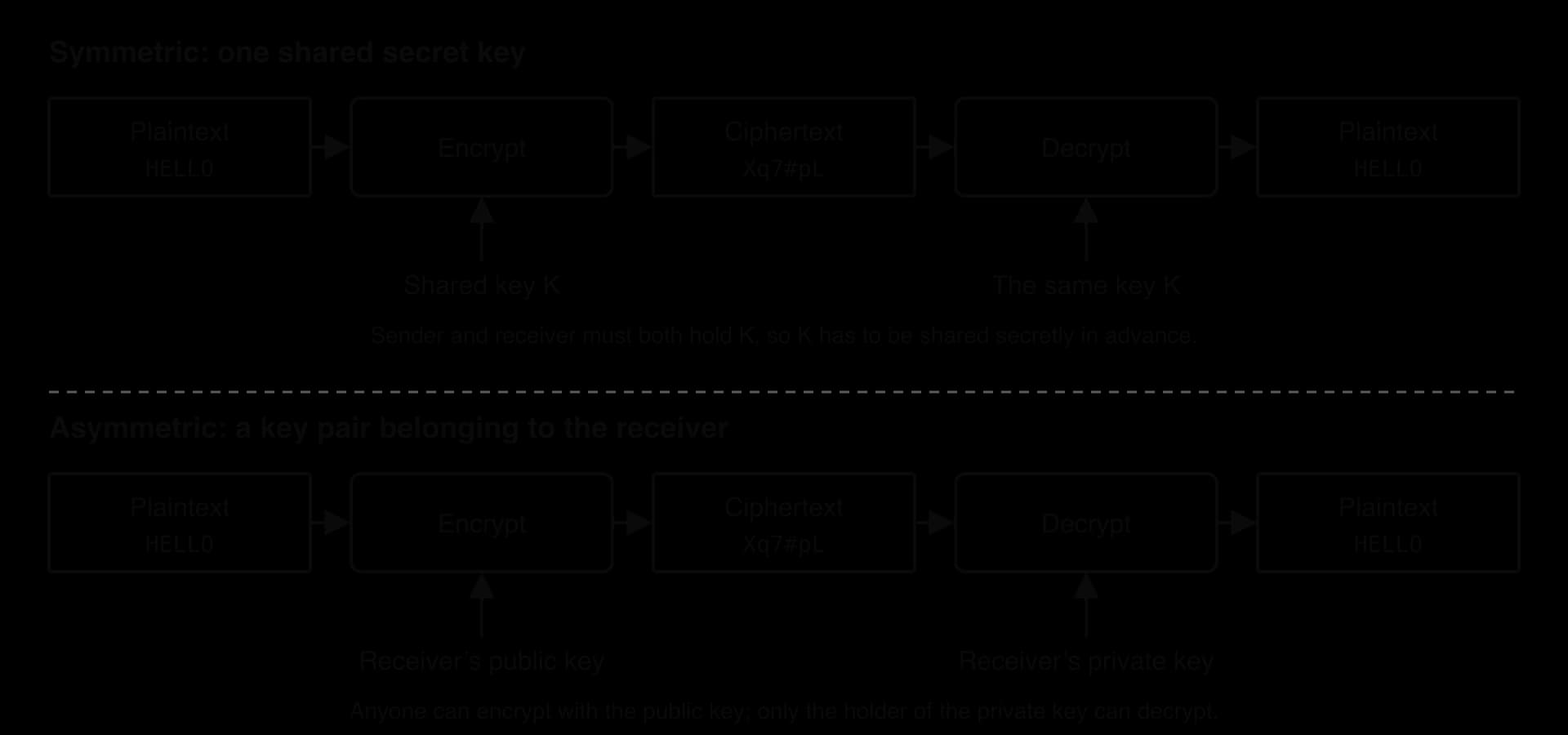
The comparison diagram shows why asymmetric encryption solves the key distribution problem: nothing secret ever has to be sent, because the encrypting key is public. It does not replace symmetric encryption, though. Asymmetric operations are built on arithmetic with very large numbers and are far slower than symmetric ones, so encrypting a film or a whole web session with RSA would be impractical.
Symmetric encryption | Asymmetric encryption | |
|---|---|---|
Keys | One shared secret key | A key pair: public key and private key |
Who holds the secret | Both sender and receiver | Only the owner of the private key |
Key distribution | Key must be shared secretly in advance | Public key can be published openly |
Keys for users | (one pair each) | |
Speed | Fast; suited to bulk data | Much slower; suited to small data such as keys and signatures |
Typical key length | 128 or 256 bits (AES) | 2048 bits or more (RSA); 256 bits (ECC) |
Main uses | Encrypting files, disks, Wi-Fi and session data | Exchanging keys, digital signatures, certificates |
Examples | AES | RSA, ECC |
Asymmetric algorithms in use today rely on mathematical problems that would become easy for a large enough quantum computer. Subtopic A4.4, Ethical considerations, discusses this threat and post-quantum cryptography, the new algorithms designed to resist it.
Encryption hides data, but on a network it is just as important to know that data really comes from the claimed sender and has not been changed on the way. Digital signatures provide both, using a hash function together with a key pair.
The hash function used in a hash table (subtopic B4.1, Fundamentals of abstract data types) and a cryptographic hash function share the idea of turning data into a fixed-size value, but their goals differ: a hash table needs speed and an even spread of values, while a cryptographic hash must make it impossible to find two inputs with the same digest or to reverse the digest. The program uses SHA-256 from each language's standard library to hash two messages that differ in a single character.
import hashlib

messages = ["Pay Lena 100 euros", "Pay Lena 900 euros"]
for message in messages:
    digest = hashlib.sha256(message.encode("utf-8")).hexdigest()
    print(message)
print(digest)import java.nio.charset.StandardCharsets;
import java.security.MessageDigest;
import java.security.NoSuchAlgorithmException;
public class Digest {
public static void main(String[] args) throws NoSuchAlgorithmException {
String[] messages = {"Pay Lena 100 euros", "Pay Lena 900 euros"};
MessageDigest sha256 = MessageDigest.getInstance("SHA-256");
for (int i = 0; i < messages.length; i++) {
byte[] hash = sha256.digest(messages[i].getBytes(StandardCharsets.UTF_8));
String hex = "";
for (int j = 0; j < hash.length; j++) {
hex = hex + String.format("%02x", hash[j]);
}
System.out.println(messages[i]);
System.out.println(hex);
}
}
}Both versions turn the text into bytes in UTF-8 first, because hash functions work on bytes, not characters. Python's hexdigest() returns the digest as hexadecimal text; in Java, digest() returns 32 bytes and the inner loop formats each byte as two hexadecimal digits with String.format("%02x", …).
Pay Lena 100 euros
2848ae607604e01df9e148a67f8b1f99a30ca82ee75b571dbfe2d6f97fbdde4e
Pay Lena 900 euros
43a13d4a54081d287ba38817decffcb3131bc8a2d01c9bc5bef6e77e3a82f984
Changing one digit of the message changes the digest beyond recognition: 111 of the 256 bits are different, close to the half that a random change would give. So a digest acts as a fingerprint of the message. If a single bit of the message is altered in transit, the receiver's digest will not match.
Signing and verifying follow a fixed sequence:
The sender hashes the message to get its digest.
The sender signs the digest with the sender's private key, producing the signature.
The message and signature are sent together. (The message itself is not hidden unless it is also encrypted.)
The receiver hashes the received message to get digest A.
The receiver checks the signature with the sender's public key, which recovers or confirms digest B.
If A equals B, the message came from the holder of the private key and was not changed. If not, it is rejected.
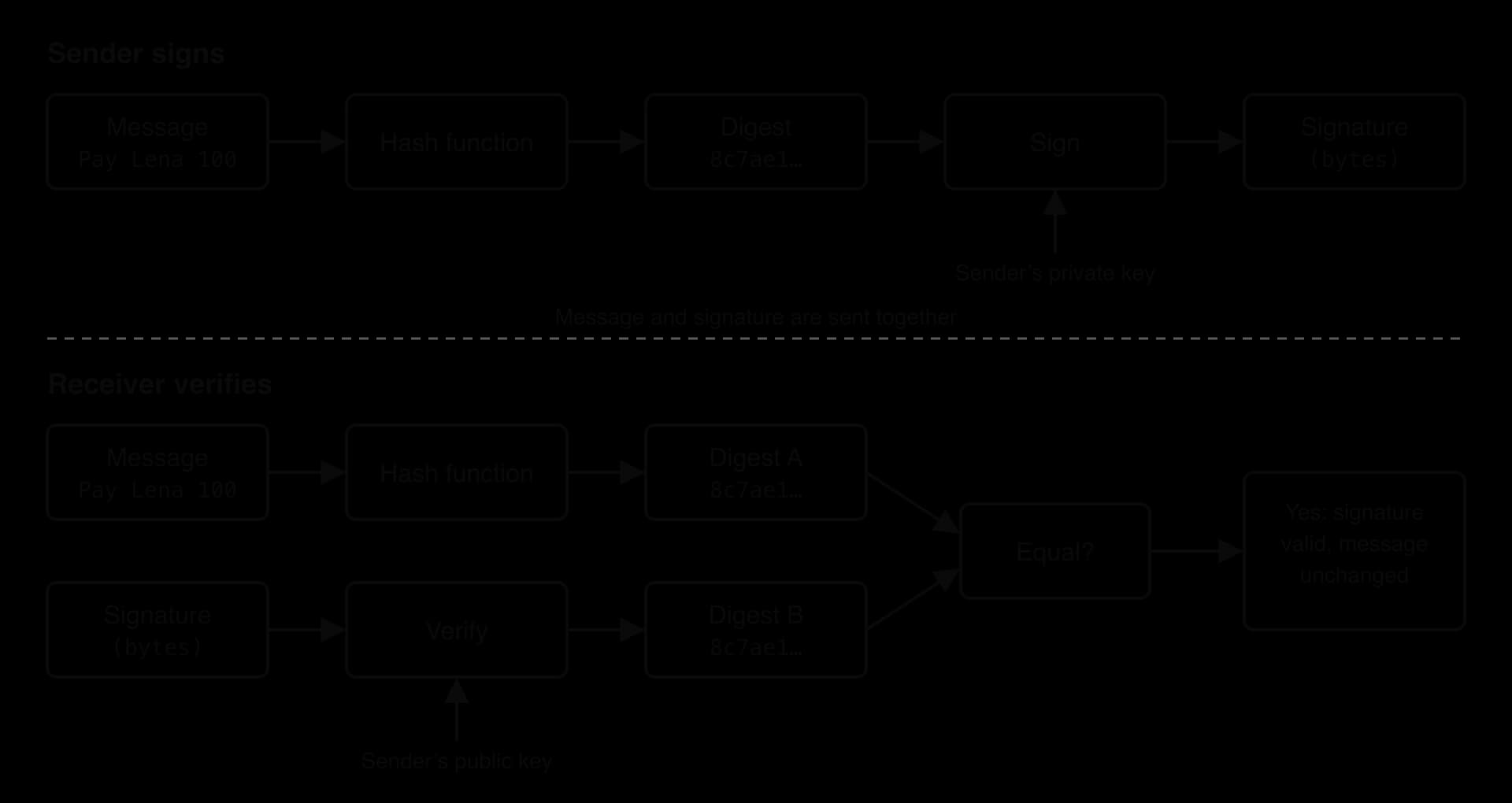
The signature diagram shows why each check works. Only the holder of the private key could have produced a signature that verifies with the matching public key, which gives authenticity; any change to the message changes digest A, which gives integrity. Because nobody else holds the private key, the sender also cannot later deny having signed, which is called non-repudiation. Signing the short digest rather than the whole message keeps the slow asymmetric step small.
Symmetric encryption is fast but needs a shared key; asymmetric encryption needs no shared secret but is slow. Secure network protocols combine them: asymmetric cryptography is used once, at the start, to prove identity and agree a key, and symmetric encryption with that key protects everything after. This is hybrid encryption, and the protocol that uses it to protect web traffic, email and many apps is TLS.
TLS replaced the older Secure Sockets Layer (SSL) protocol, developed by Netscape in the mid-1990s. Every version of SSL has been withdrawn because of security flaws, the last (SSL 3.0) in 2015, and the current version, TLS 1.3, was published in 2018. The old name survives in everyday speech: "SSL", "SSL/TLS" and "SSL certificate" almost always mean TLS today.
The handshake ends with both sides holding the same symmetric key, which is used only for that connection.

The TLS handshake diagram follows these steps:
ClientHello. The browser sends the TLS versions and the cipher suites (combinations of algorithms) it supports, and a random number.
ServerHello and certificate. The server chooses a version and cipher suite and sends its digital certificate, which contains its public key.
Certificate check. The browser verifies the certificate: it was signed by a trusted certificate authority, it names the domain the browser asked for, and it is within its validity dates. If any check fails, the browser shows a warning.
Key exchange. The two sides exchange the values needed to create a shared secret. In the simplest version (used by older TLS), the client generates a random secret and encrypts it with the server's public key, so only the server's private key can recover it.
Session key. Both sides compute the same symmetric session key from the shared secret and the random numbers. The session key itself is never sent.
Finished. Each side sends a message encrypted with the session key, which proves that both computed the same key and that nobody tampered with the handshake.
Encrypted data. The HTTP requests and responses now travel encrypted with a fast symmetric cipher such as AES.
TLS 1.3 refines step 4. Instead of the client encrypting a secret with the server's public key, both sides send one-time key-agreement values (using Diffie–Hellman key exchange) in their hello messages, and the server signs the handshake with the private key that matches its certificate. Because the session key depends only on one-time values that are thrown away, an attacker who records the traffic and later steals the server's private key still cannot decrypt it, a property called forward secrecy.
 YouTube
Public-key cryptography on its own cannot show who owns a key. When a browser receives a public key that claims to belong to a bank, nothing in the key itself proves that. An attacker sitting between the browser and the bank could send their own public key instead, decrypt everything, then pass it on, and the browser would never know. Digital certificates solve this by having a trusted third party vouch that a public key belongs to a particular name.
A website's certificate contains several fields, and the browser checks most of them:
Field | What it holds | Why it matters |
|---|---|---|
Subject | The domain name(s) the certificate is for, such as | The browser checks it matches the site it asked for |
Public key | The site's public key | Used in the handshake to authenticate the server |
Issuer | The certificate authority that signed it | Tells the browser whose signature to check |
Validity period | "Not before" and "not after" dates | An expired certificate is rejected |
Serial number | A unique number from the issuer | Identifies the certificate if it has to be revoked |
Signature | The issuer's digital signature over all the other fields | Proves the fields have not been altered and that the issuer vouches for them |
A browser cannot hold the public key of every website in the world, but it can hold the public keys of a few hundred certificate authorities. These root certificates come pre-installed in the operating system or browser, in its trust store. Root CAs rarely sign website certificates directly; they sign the certificates of intermediate CAs, which sign the websites' certificates, so the root's private key can be kept offline and safe.
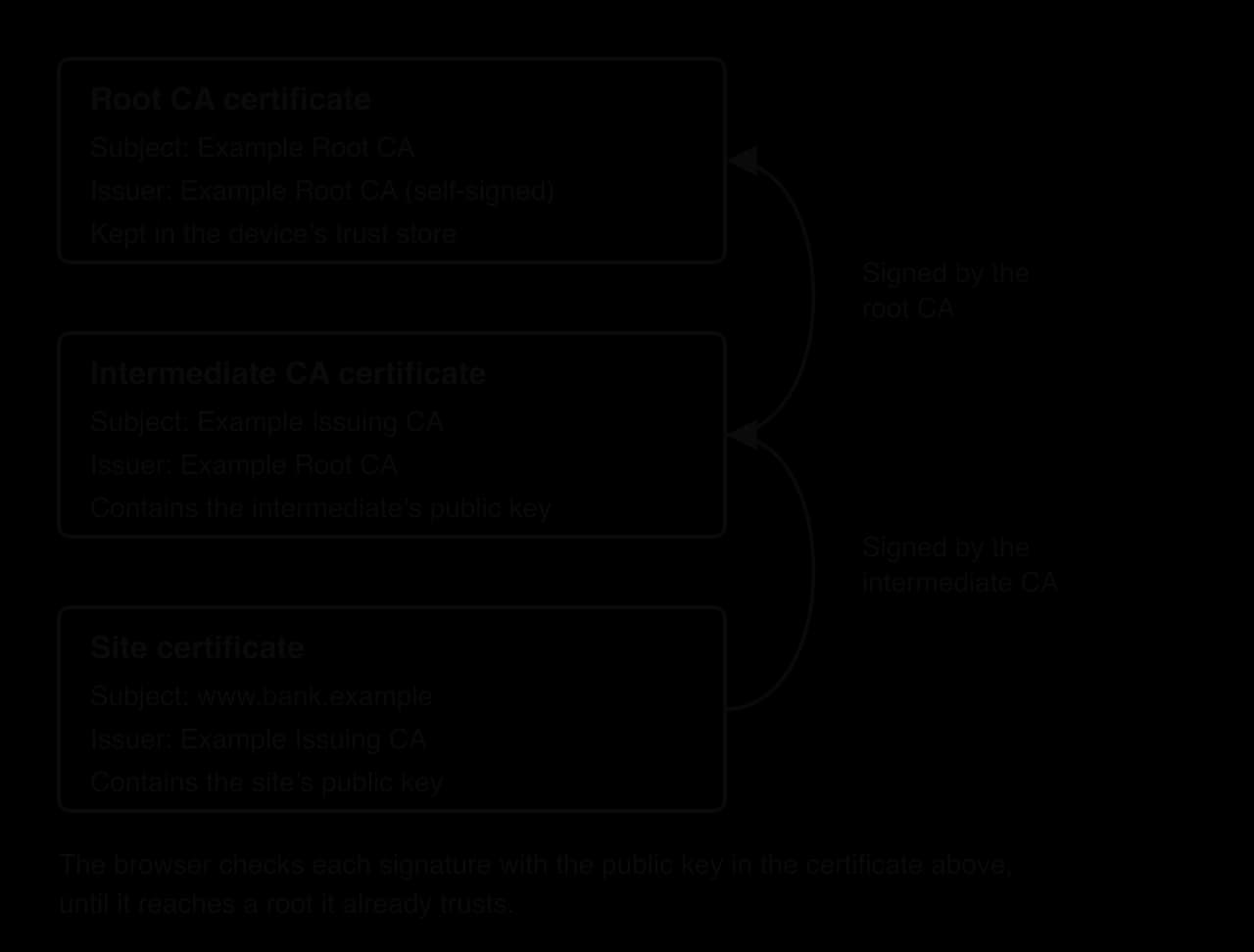
The certificate chain diagram shows how a browser decides to trust www.bank.example. It checks the site certificate's signature with the intermediate CA's public key, then the intermediate certificate's signature with the root CA's public key. The root certificate is self-signed, so its signature proves nothing by itself; it is trusted only because it was already in the trust store. If every signature verifies, the domain matches and no certificate has expired or been revoked, the browser shows the padlock.
What the padlock means is narrower than many users believe. It shows that the connection is encrypted and that the server has proved it holds the private key for a certificate issued for that domain name. It says nothing about whether the organisation behind the domain is honest: a phishing site at a look-alike domain can obtain a valid certificate for its own name in minutes.
The whole system depends on certificate authorities being trustworthy. In 2011 attackers broke into DigiNotar, a Dutch certificate authority, and issued at least 531 fraudulent certificates, including a wildcard certificate for *.google.com, valid for every Google subdomain. That certificate was used in a man-in-the-middle attack against about 300,000 Iranian Gmail users, whose browsers trusted it because it chained to DigiNotar's trusted root. Browser and operating system makers removed DigiNotar's root certificates from their trust stores, every certificate it had issued stopped working, and the company was declared bankrupt in September 2011.
Sources: Fox-IT, "Black Tulip" investigation report, 2012; "DigiNotar", Wikipedia, accessed October 2026.
Strong algorithms do not protect data if the keys are handled carelessly. By Kerckhoffs's principle the algorithm is public, so the key is the only secret; whoever holds it can read, change or sign as if they were the owner.
Each stage of a key's life has its own risks:
Generation. Keys must be long enough and truly random. A key made from a predictable value, such as the time or a weak random number generator, can be guessed without brute force.
Storage. Private and symmetric keys must never be written into source code, emailed or left in shared folders. High-value keys are kept in a hardware security module (HSM), a tamper-resistant device that uses a key without ever revealing it.
Distribution. Symmetric keys must reach their users securely (the key distribution problem); public keys must be bound to the right owner, which is what certificates do.
Rotation. Keys are replaced at regular intervals, so a key stolen without anyone noticing stops being useful and less data depends on any one key. Certificates expire for the same reason.
Revocation. If a key is stolen or suspected stolen, the matching certificate is revoked so that browsers stop trusting it, and a new key pair is issued.
Destruction. Old keys are deleted securely once nothing needs them, so old backups cannot be decrypted by whoever finds them.
The Heartbleed bug (CVE-2014-0160) showed why these stages matter. A missing bounds check in OpenSSL, the TLS software used by a large share of web servers, let anyone request up to 64 KiB of the server's memory at a time, and that memory could contain the server's private key. When the bug was disclosed and fixed on 7 April 2014, installing the fix was not enough: every affected site had to assume its private key was stolen, generate a new key pair, obtain new certificates and revoke the old ones. Sites that patched but kept the same key stayed exposed.
Source: "Heartbleed", Wikipedia, accessed October 2026.
Automation has made rotation much easier. Let's Encrypt, a free non-profit certificate authority used by more than 700 million websites, issues certificates that are valid for only 90 days by default and are renewed automatically by software on the server. A key that leaks is therefore useful to an attacker for weeks rather than years, and no administrator has to remember a renewal date.
Firewalls and encryption protect a network only where they are applied and only against the threats they were designed for. Attackers look for the gaps: a service left on an old protocol, a server that has not been updated, a member of staff who trusts an email, or a web form that accepts any input. Security professionals study these weaknesses so that they can close them before someone else finds them.
A vulnerability is the weakness itself; an attack or exploit is the act of using it; a threat is anyone or anything that might do so. The same network can have many vulnerabilities, and most real incidents combine more than one, for example a phishing email that steals a password, followed by weak internal controls that let the stolen account reach a database.
Vulnerability | What it targets | Main effect |
|---|---|---|
DDoS | Availability of a service | Real users cannot reach the service |
Insecure protocols | Data in transit | Data or passwords read or changed |
Malware | Devices and their files | Data stolen, encrypted or destroyed; device controlled |
Man-in-the-middle | A connection between two parties | Traffic read or changed without either side knowing |
Phishing | People | Passwords or money handed over; malware installed |
SQL injection | A database behind a web application | Data read, changed or deleted |
Cross-site scripting | Users of a website | Sessions hijacked; pages altered |
Unpatched software | Known bugs in programs | Any of the effects above, through a published weakness |
Weak authentication | Login systems | Accounts taken over |
Zero-day exploit | A bug unknown to the vendor | Any of the effects above, with no patch available |
 YouTube
A server can answer only a limited number of requests each second, and its network link can carry only a limited amount of data. A denial-of-service attack uses up one of these limits deliberately, so that legitimate users are turned away.
An attack from a single computer is fairly easy to stop: the target, or its internet provider, blocks traffic from that one IP address. Attackers therefore spread the attack over thousands of machines at once.
The devices sending a DDoS flood rarely belong to the attacker. They are ordinary computers, routers, cameras and video recorders that have been infected without their owners' knowledge and now wait for instructions.
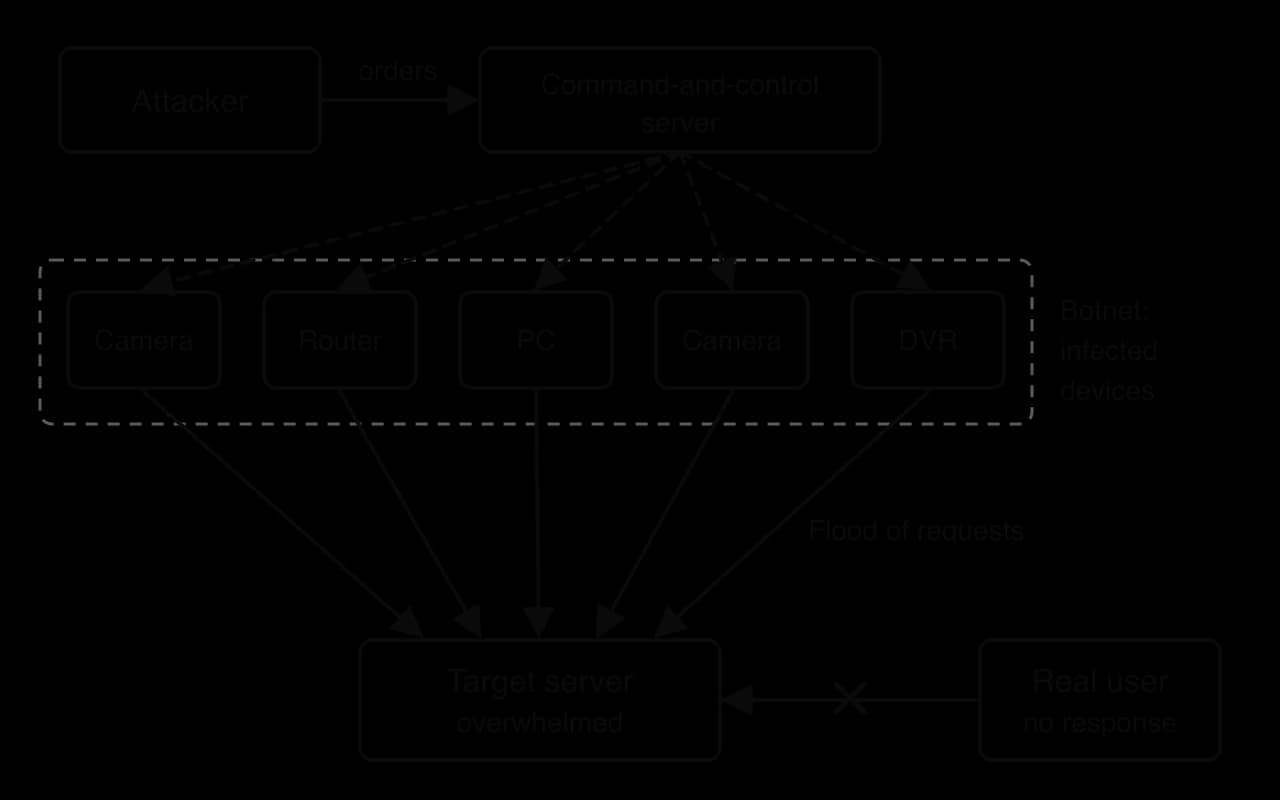
The botnet diagram shows why DDoS is hard to defend against. Each infected device sends what looks like normal traffic, so the target cannot easily tell attack requests from real ones. The total volume can exceed the capacity of the target's internet connection, in which case nothing the target does on its own servers helps: the traffic must be filtered further upstream, before it reaches the target's network.
The Mirai botnet of 2016 was built almost entirely from such devices. Mirai searched the internet for devices such as cameras and home routers, and tried to log in to each one with a list of more than 60 common factory-default usernames and passwords. Large numbers of devices whose owners had never changed the default login were taken over and then used for some of the largest DDoS attacks recorded at the time.
Source: "Mirai (malware)", Wikipedia, accessed October 2026.
Many of the protocols designed in the early years of the internet assumed that everyone on the network could be trusted, so they send everything, passwords included, as plaintext. Anyone who can capture the packets, on a shared Wi-Fi network or at any router along the route, can read them.
Insecure protocol | What it does | Secure replacement |
|---|---|---|
Telnet (port 23) | Remote command-line login | SSH (Secure Shell, port 22) |
FTP (port 21) | File transfer | SFTP (over SSH) or FTPS (over TLS) |
HTTP (port 80) | Web pages | HTTPS (HTTP over TLS, port 443) |
POP3 / IMAP without TLS | Receiving email | POP3S / IMAPS (over TLS) |
Insecure protocols survive because old equipment and old software still use them. Network printers, industrial controllers and cheap Internet of Things devices often offer Telnet or plain HTTP for configuration, and the Mirai botnet in fact spread through Telnet. Disabling an unused insecure service removes the vulnerability completely, which is cheaper than any other defence.
Malware is any program written to harm a device, its user or the network it belongs to. The categories differ in how the program spreads and what it does once it arrives.
A virus needs a host and a human action to spread: it attaches itself to a file or program and runs when that file is opened.
A worm needs no human action at all. It uses a network vulnerability to copy itself from one device to the next, which is why worms can spread around the world within hours.
A Trojan relies on deception rather than technical flaws: the user installs it willingly because it looks like something useful, such as a free game, a codec or a fake software update.
What malware does after it arrives is called its payload. Two payloads are common enough to have their own names.
Spyware works quietly instead, collecting information for as long as it remains undetected.
The WannaCry attack of May 2017 combined two categories. It was ransomware, encrypting files and demanding payment, but it spread as a worm, using a flaw in the Windows file-sharing protocol to jump between computers on the same network without anyone opening an attachment. It infected more than 300,000 computers in 150 countries, including machines across the UK's National Health Service, where appointments and operations had to be cancelled.
Source: "WannaCry ransomware attack", Wikipedia, accessed October 2026.
Two parties who communicate over a network usually cannot see each other. If an attacker can place a device on the path between them, both parties send their traffic to the attacker, who passes it on so that nothing seems wrong.

The fake hotspot in the MitM diagram is one common way of getting into the middle; others include taking over a router or misdirecting DNS lookups. Encryption alone does not defeat the attack if the victim agrees an encryption key with the attacker instead of with the bank. The attack is defeated by authentication of the server, because the digital certificate checked during the TLS handshake proves that the public key belongs to the bank, so an attacker without the bank's private key cannot complete the handshake without the browser showing a warning. This is why users are taught never to click past a certificate warning.
Many successful attacks bypass technology completely by deceiving a person who already has access.
Phishing is the most common form of social engineering. The message imitates a trusted sender, such as a bank, a delivery company or the organisation's own IT department, and creates a reason to act quickly.
Mass phishing sends the same message to millions of addresses and succeeds if a small fraction respond. Targeted phishing takes more effort and succeeds far more often.
Typical signs of a phishing message include a sender address that does not match the organisation, a link whose real destination differs from its text, an urgent threat, such as a warning that the account will be closed the same day, and a request for a password or payment details that a genuine organisation would never ask for by email. Phishing matters to network security because one stolen password gives the attacker a legitimate account inside the network, which firewalls are designed to trust.
Many websites store their data in a relational database and build SQL queries from what users type into forms (subtopic A3.3, Database programming). If a program builds a query by joining the user's input directly onto the SQL text, the database cannot tell where the programmer's SQL ends and the user's data begins.
In a vulnerable login or search form, characters such as a quotation mark in the input can close the value the programmer intended and add conditions or commands of the attacker's own. The database then runs a different query from the one the programmer wrote, for example one whose condition is always true, so it returns every row instead of one. The flaw lies entirely in how the program builds the query; the database itself works correctly. The standard countermeasure is the parameterised query, which sends the input to the database separately from the SQL text so that it can only ever be treated as a value.
Cross-site scripting attacks the users of a website rather than the website's database. It is possible when a site takes text supplied by one user, such as a comment, a profile name or a search term, and includes it in a page shown to other users without treating it safely.
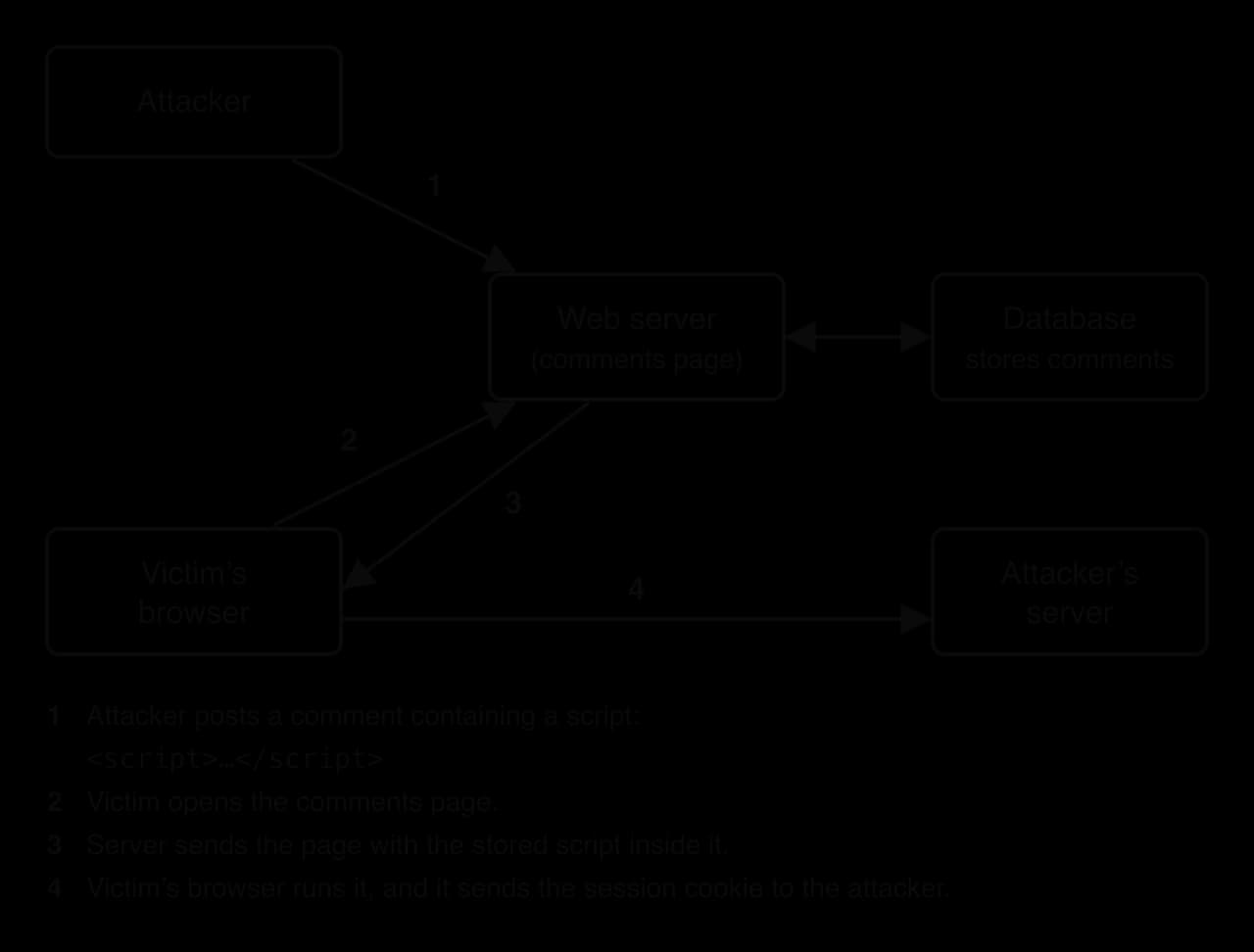
The four steps in the XSS diagram show why the attack works. A browser trusts any script that arrives inside a page from a site, so a script injected into the page can read the user's session cookie, change what the page displays or make requests as if the user had made them. With the session cookie the attacker can often use the victim's account without knowing the password. Both attacks come from input being treated as code: in SQL injection the database runs part of the input as SQL, and in XSS the victim's browser runs part of it as script.
All large programs contain bugs, and some bugs are security vulnerabilities. When the developer learns of one, it releases a fix.
Releasing a patch also tells attackers exactly where the weakness was, and they can study the fix and build an attack within days. Any system that has not yet installed the patch is then exposed to a vulnerability that is publicly known.
Organisations delay patches for understandable reasons: an update might break a system that must keep running, testing takes time, and nobody may know every device the organisation owns. WannaCry spread through a flaw that Microsoft had patched on 14 March 2017, 59 days before the attack began on 12 May 2017; the computers it infected were those that had not installed the patch.
A more dangerous case is a vulnerability that attackers find first.
Patching cannot stop a zero-day exploit, because there is nothing yet to install. Defences that do not depend on knowing the specific flaw are needed instead: anomaly-based intrusion detection, network segmentation that limits how far an attacker can move, least-privilege accounts and good backups. Zero-days are rare and valuable, so they are usually used against high-value targets, while most attacks rely on unpatched software.
An authentication process can be no more secure than the evidence it asks the user for, and many breaches start with a login that was too easy to guess, reuse or steal.
Common forms of weak authentication include:
Default credentials left unchanged on routers, cameras and other devices, as in the Mirai botnet.
Short or common passwords that a brute-force or dictionary attack guesses quickly.
Password reuse: when one website is breached, attackers try the leaked email and password pairs on other sites, a technique called credential stuffing.
No limit on attempts, which lets an attacker try millions of guesses against a login form.
Single-factor authentication, where a stolen password is all an attacker needs.
No single countermeasure stops every attack, so organisations combine several in layers, the defence in depth idea used for firewalls. The table maps each vulnerability to its main defences; the subsections explain how each defence works.
Vulnerability | Main countermeasures |
|---|---|
DDoS | DDoS mitigation services, rate limiting, spare capacity |
Insecure protocols | Encrypted protocols (SSH, SFTP, HTTPS), VPNs |
Malware | Software updates, email filtering, anti-malware, IDS/IPS, backups |
Man-in-the-middle | TLS with certificate checking, VPNs on untrusted networks |
Phishing | Email filtering, MFA, employee training |
SQL injection | Parameterised queries, input validation |
Cross-site scripting | Output encoding, input validation, content security policy |
Unpatched software | Regular software updates, security testing |
Weak authentication | Password policies, MFA, lockout after failed attempts |
Zero-day exploits | IDS/IPS, network segmentation, least privilege, backups |
The direct remedy for insecure protocols is to replace each one with its encrypted equivalent and disable the old service.
Encrypted protocols such as HTTPS depend on digital certificates. The certificate, often called an SSL or TLS certificate, proves the server's identity, which is what stops a man-in-the-middle from posing as the server. A virtual private network (VPN) protects all of a device's traffic at once by sending it through an encrypted tunnel to a trusted endpoint, which is especially useful on public Wi-Fi where the local network cannot be trusted.
A password policy sets rules that make passwords harder to guess and limit the damage when one is stolen.
Length matters more than complexity. Each extra character multiplies the number of possible passwords, while rules forcing symbols and frequent changes tend to produce predictable patterns such as Summer2026!. Current guidance therefore favours long passphrases, checks against lists of breached passwords and account lockout or delays after repeated failures, rather than forced changes every few months.
Even a strong password can be phished or leaked, so high-value accounts require a second, independent piece of evidence.
With MFA, a password stolen by phishing is not enough on its own, because the attacker does not also have the user's phone or security key. Factors from the same category do not count as multi-factor: a password and a security question are both "something the user knows".
Injection attacks succeed when a program treats data as code. The defences make sure input is always handled as data.
Input validation checks that input matches what the program expects before using it (validation in programs is part of subtopic B2.3, Programming constructs). Whitelisting accepts only input that matches an allowed pattern, for example a student ID of the letter S followed by three digits; filtering removes or rejects characters that are not allowed. Whitelisting is stronger, because a filter must anticipate every dangerous input, while a whitelist only needs to describe the valid ones. Validation reduces risk but is not enough on its own, because many legitimate inputs, such as the surname O'Brien, contain characters that have special meaning in SQL or HTML.
The program uses a placeholder (?) in the SQL and passes the student ID as a separate value. The second call passes text containing quotation marks and SQL keywords, which the database simply looks for as a student ID; no student has that ID, so the result is an empty list.
import sqlite3

connection = sqlite3.connect(":memory:")
cursor = connection.cursor()
cursor.execute("CREATE TABLE Student (studentID TEXT, name TEXT, grade INTEGER)")
cursor.execute("INSERT INTO Student VALUES ('S101', 'Amira', 6)")
cursor.execute("INSERT INTO Student VALUES ('S102', 'Ben', 4)")
cursor.execute("INSERT INTO Student VALUES ('S103', 'Chloe', 7)")


def find_grade(student_id):
    # SAFE: the query text is fixed; the input is sent separately as data
    query = "SELECT name, grade FROM Student WHERE studentID = ?"
    cursor.execute(query, (student_id,))
    return cursor.fetchall()


print(find_grade("S102"))
print(find_grade("x' OR '1'='1"))import java.sql.Connection;
import java.sql.DriverManager;
import java.sql.PreparedStatement;
import java.sql.ResultSet;
import java.sql.SQLException;
import java.sql.Statement;
public class Param {
static Connection connection;
// SAFE: the query text is fixed; the input is sent separately as data
static String findGrade(String studentId) throws SQLException {
String query = "SELECT name, grade FROM Student WHERE studentID = ?";
PreparedStatement statement = connection.prepareStatement(query);
statement.setString(1, studentId);
ResultSet rows = statement.executeQuery();
String result = "[";
boolean first = true;
while (rows.next()) {
if (!first) {
result = result + ", ";
}
result = result + "('" + rows.getString("name") + "', " + rows.getInt("grade") + ")";
first = false;
}
return result + "]";
}
public static void main(String[] args) throws SQLException {
connection = DriverManager.getConnection("jdbc:sqlite::memory:");
Statement setup = connection.createStatement();
setup.executeUpdate("CREATE TABLE Student (studentID TEXT, name TEXT, grade INTEGER)");
setup.executeUpdate("INSERT INTO Student VALUES ('S101', 'Amira', 6)");
setup.executeUpdate("INSERT INTO Student VALUES ('S102', 'Ben', 4)");
setup.executeUpdate("INSERT INTO Student VALUES ('S103', 'Chloe', 7)");
System.out.println(findGrade("S102"));
System.out.println(findGrade("x' OR '1'='1"));
}
}The Java version uses JDBC's PreparedStatement, and needs a JDBC driver for SQLite on the class path.
Both versions print the same result: one row for a real ID, and nothing for the hostile input, because it is compared as a whole against the studentID column.
[('Ben', 4)]
[]
Output encoding does for web pages what parameterised queries do for databases. Before user-supplied text is placed in a page, every character with a special meaning in HTML is replaced by an entity that the browser displays but never runs.
The function replaces each special character with its HTML entity, character by character, so a comment that contains a script tag reaches the browser as visible text.
def encode_html(text):
result = ""
for ch in text:
if ch == "&":
result = result + "&"
elif ch == "<":
result = result + "<"
elif ch == ">":
result = result + ">"
elif ch == '"':
result = result + """
elif ch == "'":
result = result + "'"
else:
result = result + ch
return result
def render_comment(name, comment):
# SAFE: special characters become harmless text
return "<p><b>" + encode_html(name) + "</b>: " + encode_html(comment) + "</p>"
print(render_comment("Mallory", "Nice page<script>alert('XSS')</script>"))public class Encode {
static String encodeHtml(String text) {
String result = "";
for (int i = 0; i < text.length(); i++) {
char ch = text.charAt(i);
if (ch == '&') {
result = result + "&";
} else if (ch == '<') {
result = result + "<";
} else if (ch == '>') {
result = result + ">";
} else if (ch == '"') {
result = result + """;
} else if (ch == '\'') {
result = result + "'";
} else {
result = result + ch;
}
}
return result;
}
// SAFE: special characters become harmless text
static String renderComment(String name, String comment) {
return "<p><b>" + encodeHtml(name) + "</b>: " + encodeHtml(comment) + "</p>";
}
public static void main(String[] args) {
System.out.println(renderComment("Mallory", "Nice page<script>alert('XSS')</script>"));
}
}The output contains no <script> tag any more, only entities that the browser displays as the characters the commenter typed.
<p><b>Mallory</b>: Nice page<script>alert('XSS')</script></p>A content security policy adds a second layer in the browser itself, in case an encoding mistake lets a script through.
A policy that allows scripts only from the site's own files, and forbids scripts written inside the page, means that an injected script is blocked by the browser even if it reaches the page.
A firewall controls which connections are allowed; it does not usually examine whether the content of an allowed connection is malicious. Intrusion detection and prevention systems inspect the traffic itself.
An IPS sits directly in the path of the traffic, so it can act on what it finds.
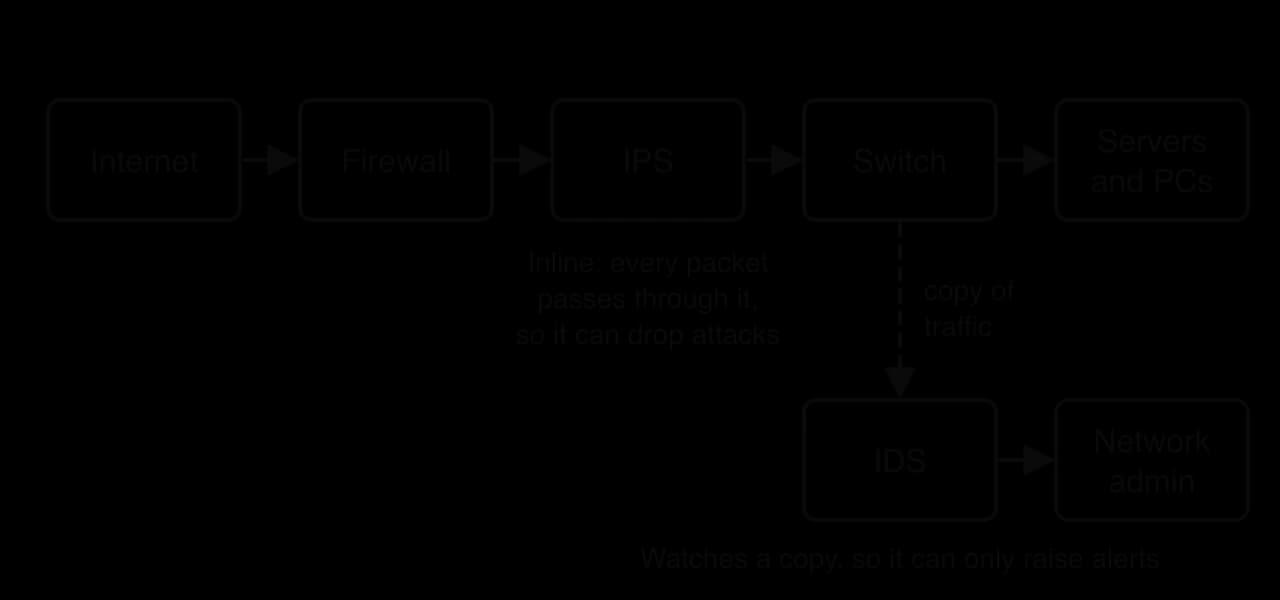
Both systems detect attacks in two ways. Signature-based detection compares traffic with a database of patterns from known attacks; it is accurate for known threats but cannot recognise new ones. Anomaly-based detection learns what normal traffic looks like and flags unusual behaviour, such as a server suddenly sending large amounts of data abroad at 3 a.m.; it can catch zero-day attacks but produces more false alarms. As the placement diagram shows, the choice between IDS and IPS is a trade-off: an IPS stops attacks automatically, but a false alarm blocks real users, while an IDS never blocks anything but relies on a person responding in time.
DDoS traffic is too large to filter at the target's own servers, so mitigation happens further out.
Rate limiting caps the number of requests a single source may make in a given time. A scrubbing service receives all of the target's traffic during an attack, removes the attack traffic and passes on the rest. Large providers also spread a website across many data centres through a content delivery network, so that the attack traffic is divided across a network with far more capacity than any botnet.
Email is the most common route for phishing and malware, so organisations filter it before it reaches users.
Filters check the sender's domain against authentication records, compare links and attachments with lists of known malicious sites and files, open attachments in an isolated test environment and score each message's wording. No filter is perfect, which is why filtering is combined with MFA and training.
The countermeasure for unpatched software is a patch management process: keeping an inventory of every device and program, monitoring for security updates, testing them quickly and installing them within a set time, with critical patches first. Automatic updates make this easy for personal devices. In organisations the inventory is often the weak point, because a system missing from the inventory never appears on anyone's list of devices to update.
A wireless network extends beyond the walls of the building, so anyone within range can attempt to connect or capture its traffic. Its main protection is encryption of the wireless link itself.
Some networks also keep a whitelist or blacklist of the MAC addresses allowed to connect.
MAC filtering is a weak control on its own. MAC addresses are sent unencrypted in every frame, so an attacker within range can observe an allowed address and configure their own device to use it, a technique called MAC spoofing. It is useful as an extra layer on top of WPA2 or WPA3, never as a substitute for encryption.
Countermeasures must be checked, because configurations drift, new vulnerabilities are published every day and systems are added without anyone reviewing them.
Regular security testing includes automated vulnerability scans that compare every device with lists of known flaws, penetration tests that probe defences as an attacker would, and reviews of firewall rules and user accounts. Each test produces a list of weaknesses to fix, and repeating the tests shows whether they were fixed.
Employee training addresses risks that come from people's behaviour rather than from equipment. Staff who can recognise a phishing message, who report suspicious activity quickly and who understand why they must not reuse passwords close the routes that most attacks use. Many organisations send simulated phishing emails to their own staff, then give extra training to those who click, which measures and improves the human defence in the same way that penetration testing measures the technical one.
Equifax is one of the three main credit-reporting agencies in the United States, holding financial histories on hundreds of millions of people. In 2017 attackers stole personal records of 147.9 million Americans from it, including names, dates of birth, Social Security numbers and addresses. The breach brings together several common vulnerabilities and countermeasures.
Date | Event |
|---|---|
7 March 2017 | Apache releases a patch for a critical vulnerability in Struts, a web application framework Equifax used for a customer dispute website |
10 March 2017 | Attackers are seen scanning the internet for websites that have not applied the patch |
12 May 2017 | Attackers enter Equifax's dispute portal through the unpatched Struts vulnerability |
May–July 2017 | The intrusion continues undetected for 76 days while data is taken out of the network |
29 July 2017 | Equifax renews an expired certificate on a device that inspects network traffic; the device starts seeing the attackers' encrypted traffic and the breach is discovered |
July 2019 | Equifax agrees a settlement of up to about $575 million with the US Federal Trade Commission and other regulators |
Source: "2017 Equifax data breach", Wikipedia, accessed October 2026; US Federal Trade Commission, 2019.
Unpatched software was the way in. The Struts patch had been available for more than two months when the attackers entered. An internal audit in 2015 had already found that Equifax was not keeping to its own patching schedules, had no complete inventory of its IT assets and relied on an honour system for patching. Patch management depends on knowing every system an organisation runs and checking that each one has been updated.
Weak internal controls let the attack spread. Once inside, the attackers found employee credentials and used them to query databases more than 9,000 times while appearing to be authorised users. Network segmentation and least-privilege access would have limited what one compromised web application could reach.
An expired certificate hid the data theft. The traffic-inspection device that should have spotted the data leaving the network could not decrypt and inspect TLS traffic because its certificate had expired nine months earlier. When the certificate was renewed, the suspicious traffic became visible at once, so a lapse in certificate management had disabled the organisation's intrusion detection.
Evaluation. The attackers needed no unusual technique, because every failure was a known vulnerability with a known countermeasure. The case supports the defence-in-depth argument, since any one layer working correctly (patching, segmentation or monitoring) would have stopped or shortened the attack, and it shows that countermeasures fail when they depend on manual processes that nobody checks.
Network security is examined in Paper 1, Section A. SL questions cover firewalls and NAT (describe, outline, and discuss their effectiveness) and encryption and certificates (describe symmetric and asymmetric encryption, the role of certificates, and explain key management). HL questions add describe for vulnerabilities and countermeasures, usually applied to a short scenario: identifying the vulnerability shown, describing how it could be exploited and recommending a countermeasure with a reason. Expect 2–4 mark parts, with a 6–8 mark "discuss" part on firewalls or on a combination of measures.
The most common reason for lost marks is a description that names a measure without saying how it works or which threat it stops. A second is confusing encryption with authentication: encryption hides the content, while certificates and signatures prove who sent it.
State the difference between a whitelist and a blacklist in a firewall. [2]
Outline one limitation of stateless packet filtering compared with stateful inspection. [2]
Describe the key distribution problem in symmetric encryption. [2]
Explain how a digital signature shows that a message has not been altered. [3]
Explain why a website's private key must be replaced, and its certificate revoked, after a bug that may have exposed server memory. [3]
(HL only) Distinguish between a virus and a worm. [2]
(HL only) Describe how a botnet is used in a DDoS attack, and one way of mitigating it. [3]
(HL only) Explain why multi-factor authentication reduces the risk from phishing. [2]
(HL only) Compare an intrusion detection system with an intrusion prevention system. [3]
(HL only) A company relies on MAC address filtering to secure its Wi-Fi. Evaluate this approach. [4]
A whitelist allows only the traffic that matches its rules and blocks everything else (default deny) [1]; a blacklist blocks only the traffic that matches its rules and allows everything else (default allow) [1].
A stateless filter judges each packet alone, so it cannot tell whether an incoming packet is a reply to a connection started from inside [1]; it must therefore leave more ports open or block legitimate replies, while stateful inspection tracks connections and admits only matching replies [1].
Both parties need the same secret key [1]; the key must be shared before any secure channel exists, and anyone who intercepts it while it is being shared can decrypt everything [1].
The sender hashes the message and signs the hash with their private key to form the signature [1]; the receiver checks the signature with the sender's public key to recover the original hash, and hashes the received message [1]; if the two hashes match, the message has not been changed, because any change would produce a different hash [1].
An attacker may have copied the private key from memory [1]; with it they could impersonate the site or decrypt traffic, even after the bug is fixed [1]; revoking the certificate tells browsers to stop trusting the old key, and a new key pair and certificate restore security [1].
A virus attaches itself to a file and spreads only when an infected file is opened [1]; a worm is standalone and spreads across a network by itself, exploiting vulnerabilities, without user action [1].
The attacker controls many infected devices through a command-and-control server [1] and orders them all to send requests to the target at once, overwhelming its capacity so real users are refused [1]; mitigation: a scrubbing service/rate limiting/content delivery network that filters or absorbs the traffic [1].
Phishing typically steals a password [1]; with MFA the attacker also needs a second factor, such as a code from the user's phone, which the phishing message does not give them [1].
Both inspect traffic for signs of attack using signatures or anomalies [1]; an IDS watches a copy and only alerts administrators, so it cannot stop an attack itself [1]; an IPS is inline and blocks malicious traffic automatically, but can block legitimate traffic after a false alarm and adds delay [1].
MAC filtering stops casual, unknown devices from joining [1]; but MAC addresses are visible in every frame, so an attacker can copy an allowed address (MAC spoofing) [1]; it does not encrypt traffic, so data can still be captured [1]; conclusion: weak on its own; acceptable only as an extra layer on top of WPA2/WPA3 [1].
A firewall filters traffic by comparing packets with ordered rules; whitelists deny by default and blacklists allow by default; stateful and next-generation firewalls inspect more context than simple packet filters.
Firewalls cannot stop attacks that use allowed traffic or start inside the network, so they are one layer in defence in depth; NAT hides internal addresses but is not a firewall.
Symmetric encryption uses one shared key and is fast but has a key distribution problem; asymmetric encryption uses a public and private key pair; TLS combines them by using asymmetric encryption to agree a symmetric session key.
Digital signatures (hash plus private key) prove who sent a message and that it is unchanged; digital certificates, signed by certificate authorities, bind a public key to an identity.
Key management covers generating, storing, distributing, rotating, revoking and destroying keys; a stolen key defeats any algorithm.
(HL) Common vulnerabilities: DDoS, insecure protocols, malware (viruses, worms, Trojans, ransomware, spyware), man-in-the-middle attacks, phishing, SQL injection, XSS, unpatched software, weak authentication and zero-day exploits.
(HL) Countermeasures match vulnerabilities: encrypted protocols and VPNs, password policies and MFA, parameterised queries, input validation and output encoding, CSP, IDS/IPS, DDoS mitigation, email filtering, patching, WPA2/WPA3, regular security testing and employee training.
I can describe how a firewall applies ordered rules to a packet, including the default rule.
I can distinguish between whitelists and blacklists, and between packet filtering, stateful inspection and next-generation firewalls.
I can discuss the strengths and limitations of firewalls and explain the security role of NAT.
I can describe symmetric and asymmetric encryption and the key distribution problem.
I can explain how public and private keys are used for confidentiality and for digital signatures.
I can describe how a digital certificate and the chain of trust are used during a TLS handshake.
I can explain each stage of key management and why it matters.
I can identify each common network vulnerability in a scenario and describe how it could be exploited. (HL only)
I can distinguish between a virus, a worm and a Trojan, and between a zero-day exploit and unpatched software. (HL only)
I can describe how a parameterised query prevents SQL injection and how output encoding prevents XSS. (HL only)
I can match each vulnerability to suitable countermeasures and explain how each countermeasure works. (HL only)
I can compare an IDS with an IPS, and evaluate MAC address filtering. (HL only)
I can explain why regular security testing and employee training are needed alongside technical measures. (HL only)
it depends on the home broadband connection;
so if the home internet is slow or fails, staff cannot reach the office systems;
a VPN does not protect against malware / phishing on the laptop itself;
so an infected laptop could still spread malware into the office network through the tunnel;
the office VPN server is a single point of failure / has limited capacity;
so if it fails or is overloaded, no one can work remotely;
if a staff member's VPN credentials are stolen;
an attacker gains access to the office network as if they were inside it;
A regional bus company has a head office and four bus depots spread across a large county. Each depot has its own network of computers used by the depot managers and the maintenance team.
Identify the type of network used inside each depot.
1 mark
Outline why a wide area network (WAN) is needed to connect the depots to the head office.
2 marks
The company is considering two ways of building the WAN: leasing private lines between every depot and head office, or connecting each depot to the public internet and using a site-to-site VPN.
Describe how a site-to-site VPN would connect a depot to the head office.
3 marks
A manager says: "Once the VPN is in place, our network will be safe from viruses."
Explain why the manager is wrong.
2 marks
Evaluate the use of a site-to-site VPN over the internet rather than leased private lines for the bus company.
4 marks
An online pharmacy lets customers order prescriptions and pay by card on its website. All pages are served using the hypertext transfer protocol secure (HTTPS).
State one difference between HTTP and HTTPS.
1 mark
Explain how HTTPS protects a customer's card details when they place an order.
3 marks
Outline one risk to the customer's data that HTTPS does not protect against.
2 marks