A2 Networks
How network fundamentals, architecture, data transmission and security fit together, which statements are HL only, and how networks link to the rest of the course.
- IB Computer Science
- SL and HL
What A2 covers
From the subject guide: what you need to know and be able to do.
How networks are built, how data moves across them and how they are kept secure.
4 subtopics in Networks
Each one has its own page once something is published for it.
- A2.1Network fundamentals113 questions · notes · 60 quick fire
- A2.2Network architecture69 questions · notes · 55 quick fire
- A2.3Data transmissions66 questions · notes · 60 quick fire
- A2.4Network security103 questions · notes · 65 quick fire
An overview of A2 Networks
Introduction
Networks explains how computers exchange data, from two phones sharing a file over Bluetooth to the billions of devices joined by the internet. It covers the hardware that links devices, the protocols that fix the rules of each exchange, the ways networks are arranged, how data is addressed and moved in packets, and how networks are protected against attack.
Almost every modern system depends on a network: web pages, cloud storage, online games, card payments and the database servers behind school and hospital records. The speed, reliability and security of such a system therefore depend as much on its network as on its software, and many failures that users notice, from slow pages to stolen passwords, start there.
How the subtopics connect
The subtopics follow data on its journey. Subtopic A2.1, Network fundamentals, introduces the types of network (LAN, WAN, PAN and VPN), the digital infrastructure built on them, such as the internet, cloud and edge computing, the devices that connect them (switches, routers, access points, modems) and the protocols TCP, UDP, HTTP, HTTPS and DHCP.
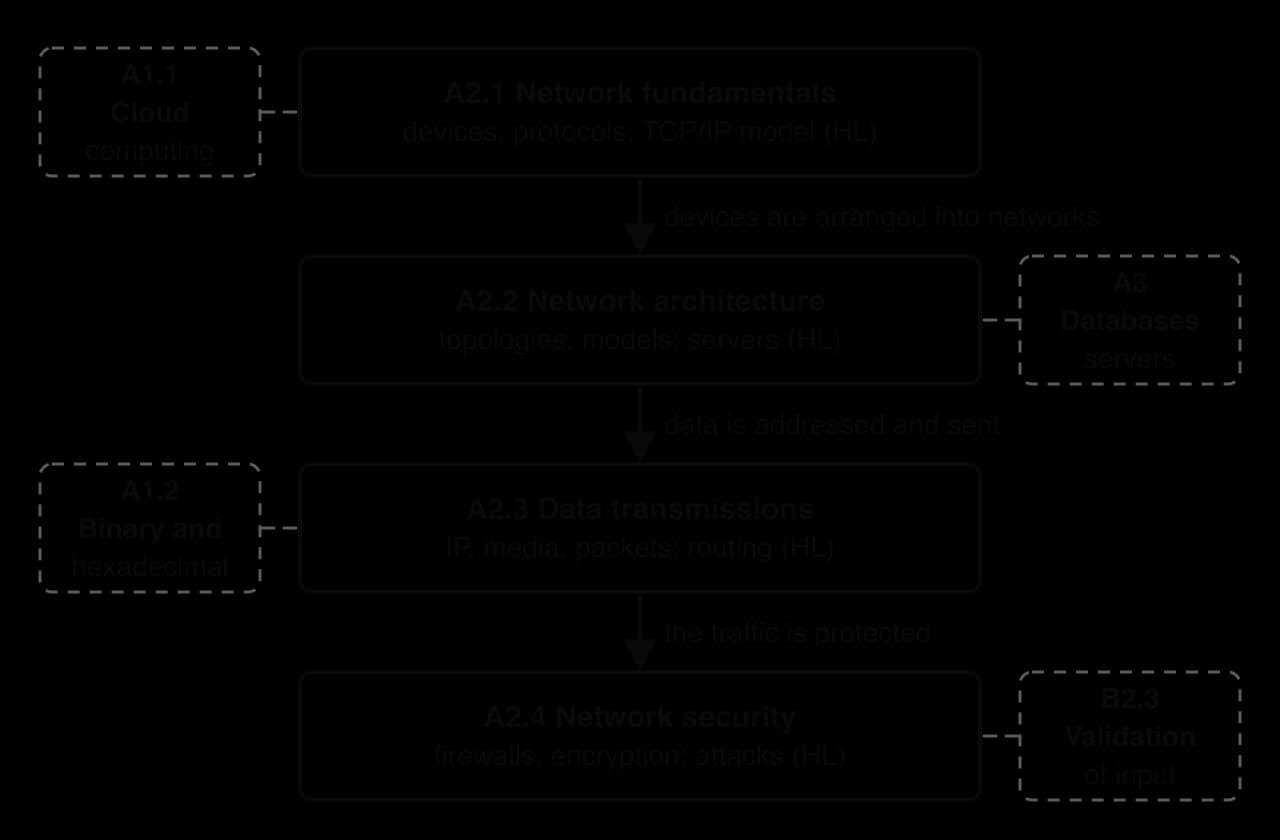
Subtopic A2.2, Network architecture, arranges those devices: star, mesh and hybrid topologies, the client–server and peer-to-peer models, and segmentation by subnetting and VLANs. Subtopic A2.3, Data transmissions, follows the data itself: IP addresses (IPv4 and IPv6, public and private, NAT), the transmission media that carry the signal, and packet switching. Subtopic A2.4, Network security, protects the traffic with firewalls, encryption and digital certificates.
Subtopics at SL and HL
All four subtopics are studied at SL and HL, and each of them contains HL-only statements. HL students study those extra statements inside the SL pages, where each one has a heading marked "(HL only)" and opens with an HL box. SL students can pass over those sections, although A2.4 shrinks the most: at SL it covers firewalls, encryption and certificates only.
Subtopic | Level | HL-only statements inside it |
|---|---|---|
A2.1 Network fundamentals | SL and HL | A2.1.5: the roles of the four layers of the TCP/IP model and how they work together through encapsulation |
A2.2 Network architecture | SL and HL | A2.2.2: the function of DNS, DHCP, file, mail, proxy and web servers, with their scalability, reliability and security |
A2.3 Data transmissions | SL and HL | A2.3.4: static and dynamic routing, including how routing tables are built and how routers converge after a change |
A2.4 Network security | SL and HL | A2.4.2: common vulnerabilities such as DDoS attacks, malware, man-in-the-middle attacks, phishing, SQL injection and cross-site scripting. A2.4.3: countermeasures such as multi-factor authentication, intrusion detection, parameterised queries and patching |
The TCP/IP model crosses the line between the levels. SL students name its four layers (application, transport, internet and network interface) and place each device in one; HL students explain what each layer does and how data is wrapped and unwrapped as it moves between them.
Links to other topics
Networks draws on computer fundamentals throughout. IPv4 addresses are written in dotted decimal and IPv6 addresses in hexadecimal, subnet masks are applied with the AND operation of subtopic A1.2, and cloud computing services from subtopic A1.1 reach their users over the internet.
Networks also link forward. Databases in topic A3 sit on servers reached over a network, and SQL injection (HL) attacks them through a web form, which is why validating input in programs (subtopic B2.3) is a security measure as well as a programming habit.
Flashcards for A2
The official decks for this part of the syllabus.
- A2.1 Network fundamentals344 cards
- A2.2 Network architecture312 cards
- A2.3 Data transmissions278 cards
- A2.4 Network security387 cards
Carry on with A2 in Augment
With a free account, Augment remembers where you stopped and what you have practiced.