 YouTube
Explain how a relational database organises data in related tables with primary, foreign and composite keys, why that brings consistency, integrity and safe concurrent use, and where the relational model struggles.
Each is in the Computer Science glossary, with every other term in the subject.
Data sets so large, so fast-growing or so varied in form that they cannot be stored and processed efficiently with traditional single-server database tools.
A primary key made of two or more fields, whose combined values are unique for each record even though each field on its own may repeat.
The methods a DBMS uses to manage transactions that run at the same time so that they do not interfere with each other and the result is the same as if they had run one after another.
The state in which every copy, view and use of a piece of data shows the same value, so that no two parts of the database contradict each other.
The same value or set of values stored more than once, in the same table or in different tables or files.
The accuracy, validity and reliability of data over its whole life, maintained by rules that the data must obey whenever it is entered or changed.
Data that is unnecessary because the same information is already stored elsewhere in the database or can be derived from other stored data.
An organised, persistent collection of related data, stored so that it can be searched, updated and shared by many users and programs.
Outline what a database and a database management system (DBMS) are, and why a relational database replaces a flat file.
Describe the features of a relational database: tables, primary keys, foreign keys, composite keys and relationships.
Identify the primary, foreign and composite keys in a set of tables, and the type of each relationship.
Explain how a relational database reduces data duplication and redundancy and keeps data consistent.
Explain how integrity constraints maintain entity, referential and domain integrity.
Explain how transactions, locking and concurrency control keep data correct when many users work at once.
Explain the benefits of data retrieval, scalability, security features and community support.
Explain the limitations of a relational database: "big data" scalability, design complexity, hierarchical data, rigid schema, object-relational impedance mismatch and unstructured data.
Evaluate whether a relational database suits a given scenario.
Almost every system that stores information about people, products or events keeps it in a database: a school's attendance records, a bank's accounts, a phone's contacts and messages, a shop's stock and orders. Most of these use the relational model, first described by Edgar F. Codd at IBM in 1969 and published in 1970 as "A Relational Model of Data for Large Shared Data Banks". The model stores data in tables that are linked by shared values, and more than fifty years later it is still the default choice for data that has a clear, regular structure.
The relational model brings real benefits (each fact stored once, rules the data must obey, safe use by many people at once) and real costs (a fixed structure, awkward handling of trees, images and very large volumes). Knowing both is what allows a designer to choose the right kind of database for a problem.
87 exam-style questions on this subtopic, written in the style of the IB papers. The first has its markscheme open. Counted on
A veterinary clinic stores details of pets and their owners in a relational database. Sample data from two of its tables is shown.
Owner
OwnerID | OwnerName | Phone |
|---|---|---|
OW101 | Amira Haddad | 0412 556 019 |
OW102 | Tomas Lindqvist | 0420 773 145 |
OW103 | Grace Okafor | 0433 908 262 |
Pet
PetID | PetName | Species | OwnerID |
|---|---|---|---|
P5001 | Biscuit | Dog | OW102 |
P5002 | Luna | Cat | OW101 |
P5003 | Pepper | Rabbit | OW102 |
P5004 | Max | Dog | OW103 |
One of 50 short multiple-choice questions on A3.1. Pick an answer to see why it's right or wrong.
In a database, what is a transaction?
The official deck for this part of the syllabus.
What is a database?
What is a flat-file database?
With a free account, Augment remembers where you stopped and what you have practiced.
The software that creates and maintains a database and controls every access to it, handling storage, retrieval, integrity rules, concurrent use, security and recovery.
The rule that every value in a field belongs to the field's allowed set of values (its domain), defined by its data type, length, format and range.
A person, object, place, event or concept about which data is stored.
The rule that every record has a primary key value that is not null and is unique within its table, so that every record can be identified.
One column of a table, holding a single property of the entity, with the same data type in every record.
A database that stores all its data in a single table or file, with no links to other tables.
A field in one table whose values must match values of the primary key in another table (or the same table), creating a link between the records.
Data organised as a tree, in which each item has one parent (except the item at the top) and may have any number of children, to any depth.
A rule stored in the database schema that the DBMS checks on every insert, update and delete, rejecting any change that would break it.
A marker that a transaction places on a piece of data (a record, a page or a whole table) so that other transactions cannot change it, or sometimes even read it, until the lock is released.
The set of difficulties that arise when data held as objects in an object-oriented program must be stored in, and rebuilt from, the flat tables of a relational database.
A software library that converts automatically between objects in a program and rows in relational tables, generating the SQL needed to save and load objects.
A field, or a set of fields, whose value uniquely identifies each record in a table; it can never be empty (null) and no two records may share it.
One row of a table, holding all the stored data about a single instance of the entity.
The rule that every foreign key value must match an existing primary key value in the table it refers to (or be null where that is allowed), so that no link points to a record that does not exist.
A database that organises data into tables of rows and columns, where tables are linked to each other through shared key values.
A link between two tables, made by a foreign key, that states how many records in one table can be associated with a record in the other: one-to-one (1:1), one-to-many (1:M) or many-to-many (M:N).
A database structure that is fixed in advance, so that every record in a table must have exactly the defined fields and types, and any change to the structure must be made to the whole table.
A set of data about one entity, arranged in rows and columns, in which every row has the same fields.
A sequence of database operations that is treated as one indivisible unit of work, so that either all of its changes are made or none of them are.
Data with no predefined model of fields and types, whose meaning cannot be split into the columns of a table.
YouTubeA program can store data in an ordinary file, such as a text file with one line per record and commas between the values. For a small list that works. Problems start when the same file must hold several kinds of fact at once, and when several people or programs need it at the same time.
The simplest way to organise a database is a single table holding everything, much like one sheet of a spreadsheet.
A school library that records loans in a flat file needs one row per loan, and each row must repeat everything about the member and the book, because there is nowhere else to put it. The flat file of loans shows the result. (Good Omens was written by Terry Pratchett and Neil Gaiman together; Mort is by Pratchett and Coraline by Gaiman.)
LoanID | MemberName | YearGroup | Title | Authors | Genre | LoanDate |
|---|---|---|---|---|---|---|
1 | Aisha Khan | 12 | Good Omens | Terry Pratchett, Neil Gaiman | Fantasy | 2026-09-01 |
2 | Lucas Silva | 11 | Coraline | Neil Gaiman | Horror | 2026-09-02 |
3 | Aisha Khan | 12 | Mort | Terry Pratchett | Fantasy | 2026-09-08 |
4 | Mei Chen | 12 | Good Omens | Terry Pratchett, Neil Gaiman | Fantasy | 2026-09-09 |
5 | Aisha Khan | 12 | Coraline | Neil Gaiman | Horror | 2026-09-15 |
6 | Lucas Silva | 11 | Good Omens | Terry Pratchett, Neil Gaiman | Fantasy | 2026-09-22 |
Aisha's name and year group are stored three times, and the details of Good Omens three times. If Aisha moves into Year 13, three rows must change; if one is missed, the file gives two different answers to the question "which year is Aisha in?". A member who has never borrowed a book cannot be recorded at all, because every row is a loan, and deleting the only loan of Mort also deletes the only record that the library owns Mort. These faults are called update, insertion and deletion anomalies, and subtopic A3.2, Database design, shows how normalisation removes them.
A relational database solves the problem by splitting the data into several tables, one for each kind of thing: members in one table, books in another, loans in a third. Each table holds only the facts about its own kind of thing, and the tables are joined by shared values.
In the relational version of the library, the Loan table stores only a member's ID and a book's ID with the date. To find the name of the member who borrowed a book, the software looks up that ID in the Member table. Aisha's year group is stored once, in one row of the Member table, so a change happens in one place and every loan sees it.
The data in a database lives in files on secondary storage, but users and programs almost never touch those files directly. They send requests to a program that manages the files for them.
The diagram of a DBMS shows why it matters. Every application (the library app, the school website, a reporting tool) talks to the DBMS, and only the DBMS reads and writes the database files, so every request passes the same checks.
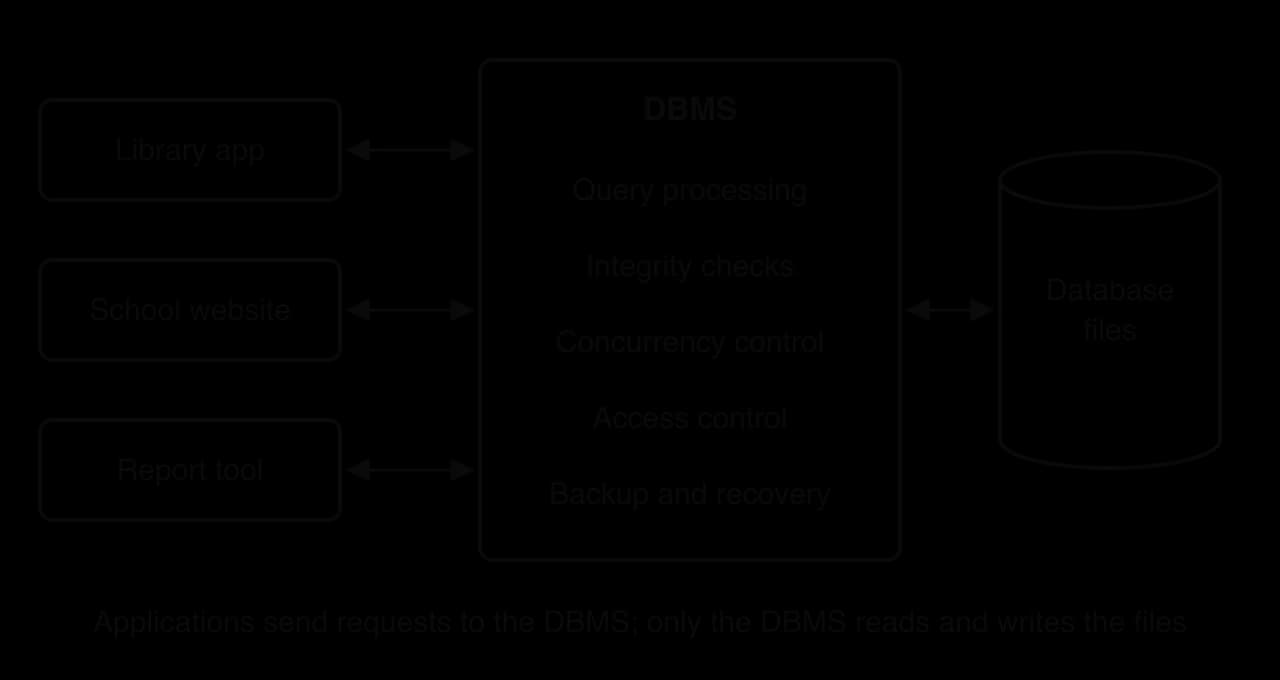
This single point of control explains most of the benefits of a relational database. Rules are written into the database once, not into each program; two programs cannot corrupt each other's changes; and the DBMS can restore the data after a crash. A flat file read by several programs has none of this: each program must enforce its own rules, and a bug in any one of them can damage the data for all.
The five features of a relational database are tables, primary keys, foreign keys, composite keys and relationships. Each answers one question: where the data is kept, how each record is identified, how records in different tables are linked, how a record is identified when no single field is enough, and how many records on each side of a link can be connected.
 YouTube
Each table in a relational database stores data about one kind of real-world thing, called an entity.
The anatomy of the Member table shows the vocabulary. Each row is a record about one member; each column is a field holding one property; and the value where a row meets a column is a single field value, such as Aisha's year group.
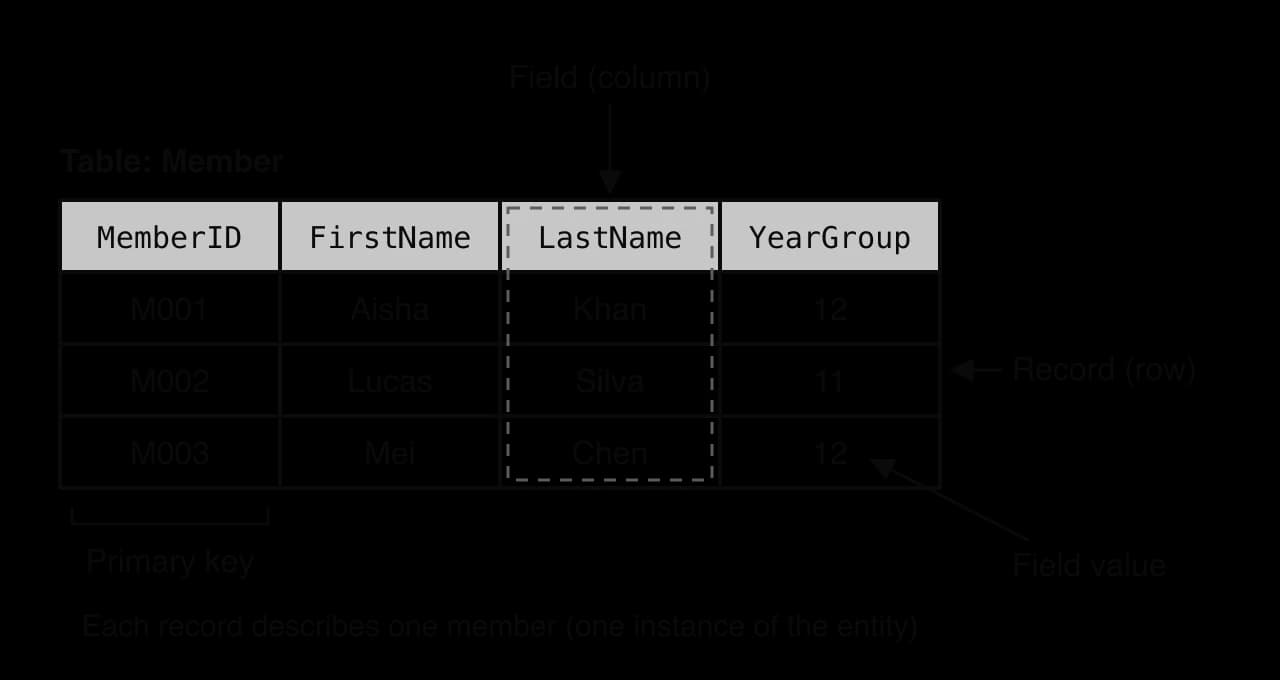
Every value in a field has the same data type and meaning: YearGroup always holds a whole number for a year group, never a name or a date. The DBMS stores the type of each field as part of the table's schema, the description of the tables, fields and links that the data must fit.
The library may have two members called Mei Chen, and two copies of the same book. If records could be picked out only by name, no query could single out one of the two members. Every table therefore has a primary key.
A good primary key has three properties. It is unique (no two records ever share a value), it is never null (every record has one) and it is stable (it does not change during the record's life). Names fail the first test, and phone numbers or email addresses fail the third, since people change them. For this reason, most tables use an ID created for the purpose, such as MemberID or BookID, which carries no meaning beyond identifying the record.
A primary key identifies a record inside its own table. To link records in two tables, the primary key of one table is stored as an ordinary field in the other.
In the library, the Loan table stores MemberID and BookID. Each is a foreign key: Loan.MemberID refers to Member.MemberID, and Loan.BookID refers to Book.BookID. The diagram of the two linked tables shows the reference as an arrow from the foreign key to the primary key it must match.
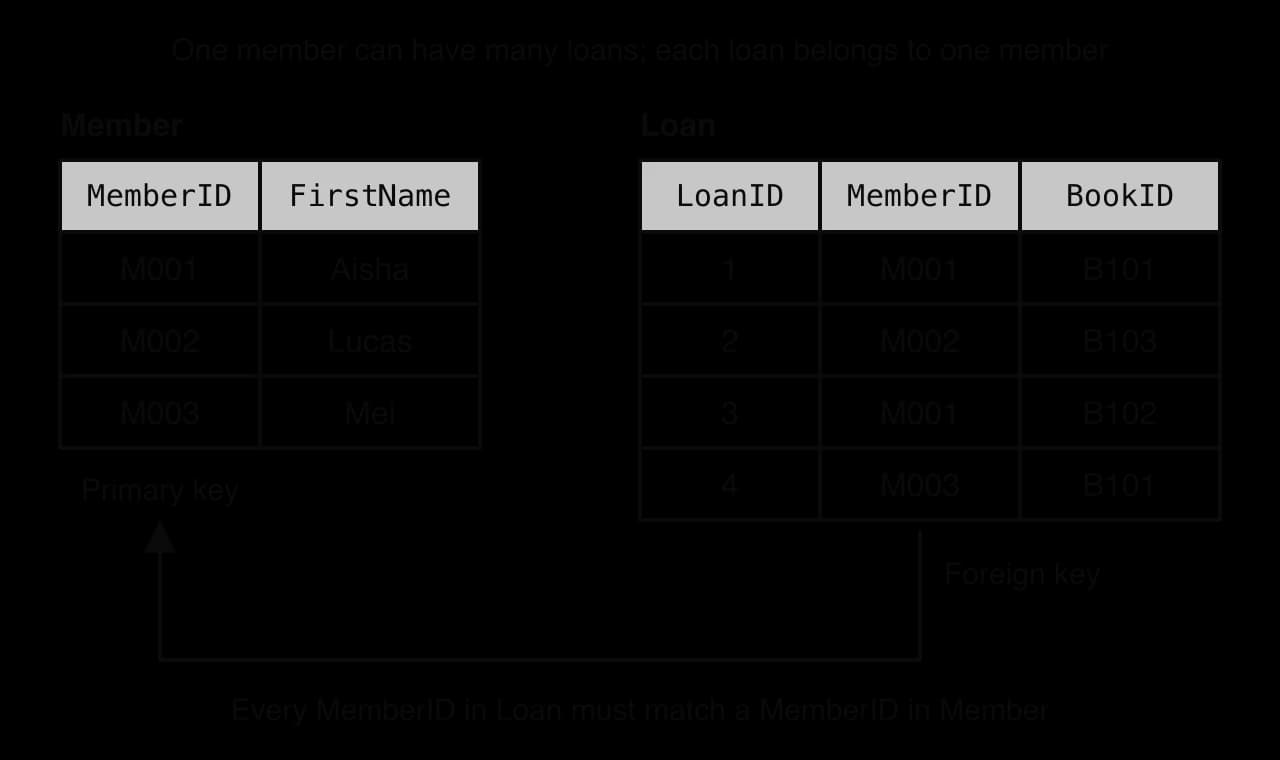
A loan for member M001 holds only the value M001; Aisha's name is found by matching that value with the Member table. Retrieving data from two tables by matching a foreign key with a primary key is called a join, and writing joins in Structured Query Language (SQL) is part of subtopic A3.3, Database programming.
A foreign key may also refer to the primary key of its own table. A Staff table with a ManagerID field that holds another member of staff's StaffID links each employee to their manager inside one table. Self-referencing tables of this kind are the usual relational way to store trees such as staff and their managers, although querying a whole tree through them is awkward, one of the limitations of the relational model.
The link created by a foreign key is a relationship, and every relationship has a type that says how many records on each side can be connected.
Type | Meaning | Library example | How it is built |
|---|---|---|---|
One-to-one (1:1) | Each record on one side links to at most one on the other | A member and their library card | A foreign key that is also unique, or the two tables merged into one |
One-to-many (1:M) | One record links to many, but each of those links back to only one | One member has many loans; each loan belongs to one member | The foreign key goes in the table on the "many" side (Loan) |
Many-to-many (M:N) | Records on both sides can link to many on the other | One book can have several authors; one author writes many books | Cannot be stored directly: a link table is added between them |
One-to-many is by far the most common type. A useful check for which side is "many": read the relationship both ways. "One member has many loans" and "one loan has one member" confirm that Loan is the "many" side, so the foreign key MemberID belongs in Loan. Putting it the other way round, a LoanID field in Member, would let a member have only one loan.
Some tables have no single field that is unique. In the library, Good Omens has two authors and Terry Pratchett wrote many books, so Book and Author have a many-to-many relationship. A relational table cannot store a list of authors in one field of a book, or a list of books in one field of an author, so a third table, a link table, records each book–author pair as its own row.
In the BookAuthor link table, BookID repeats (B101 has two authors) and AuthorID repeats (A01 wrote two books), so neither field alone can be the primary key. The pair of values together is unique, because the same author is listed against the same book only once.
The diagram of the link table shows the result: the many-to-many relationship between Book and Author becomes two one-to-many relationships, each built from an ordinary foreign key.
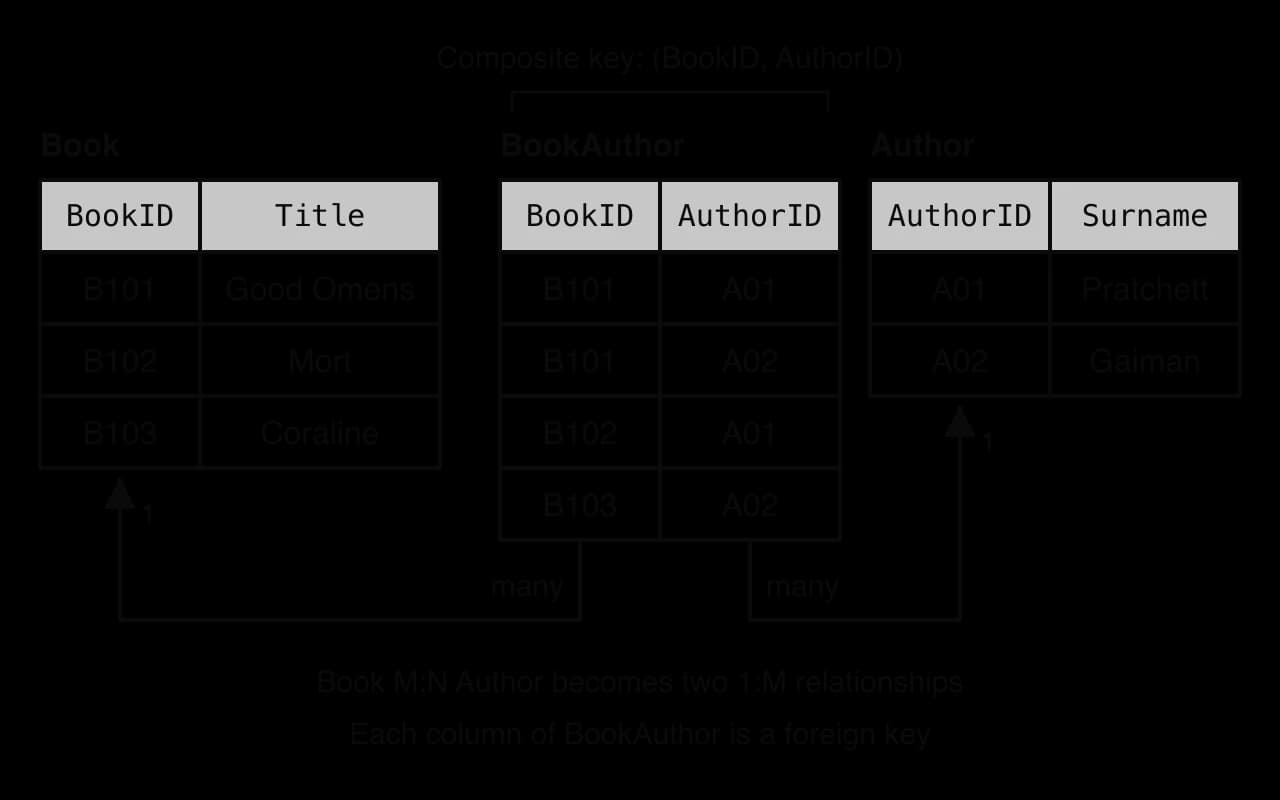
Composite keys also appear outside link tables. A school timetable might identify a lesson by (RoomID, Day, Period), since a room holds only one lesson at a time. Some designers prefer to add a single generated ID to every table instead; subtopic A3.2, Database design, compares these choices.
The flat file of loans stored the same values again and again. Two closely related terms describe this.
Duplication describes copies of a value, whereas redundancy describes whether a value is needed at all. A value is redundant when removing it would lose no information, because it is already stored elsewhere or can be worked out from other data.
The two terms are often used as if they meant the same thing, and in most cases they describe the same problem. The difference matters at the edges. The foreign key M001 stored in each of Aisha's loan rows is duplication but not redundancy, because each copy records a different loan. Aisha's year group stored in three loan rows is both: the copies add nothing, since one copy says it all.
A relational database reduces both because each fact has exactly one home. Aisha's name and year group live in one Member record; the title and genre of each book in one Book record. The only values repeated across tables are short key values, and those repeats are what link the tables.
Storing each fact once also saves the database from holding two copies of a fact that disagree.
In the flat file, an update that changes two of Aisha's three rows leaves the file inconsistent: one query reports Year 13 and another Year 12, and nothing shows which is right. In the relational design Aisha's year group exists in one record, so every loan, report and screen that needs it reads that single value, and one update changes it for all of them at once.
The DBMS can refuse data that breaks rules written into the schema. This protects the quality of the data far better than checks scattered through each application.
Relational databases enforce three standard kinds of integrity, each tied to one of the features already described.
Entity integrity is what the primary key guarantees. Without it two members could both be M002, and a loan recorded against M002 would be ambiguous.
Referential integrity is what the foreign key guarantees. The DBMS refuses a loan for member M009 if no such member exists, and it refuses to delete member M001 while loans still refer to that member, unless the designer has told it to delete or update the linked records too (a "cascade").
Domain integrity comes from the data types chosen for each field and from extra checks. A YearGroup field defined as a whole number from 7 to 13 cannot hold 15 or "twelve". Subtopic A3.2, Database design, explains how to choose data types such as CHAR and VARCHAR.
The rules are written into the schema as constraints.
The SQL statements that create the library's tables show each kind of constraint. SQL is taught in subtopic A3.3, Database programming; here only the constraint keywords matter.
CREATE TABLE Member (
    MemberID  CHAR(4)     NOT NULL PRIMARY KEY,
    FirstName VARCHAR(30) NOT NULL,
    LastName  VARCHAR(30) NOT NULL,
    YearGroup INTEGER     CHECK (YearGroup BETWEEN 7 AND 13)
);

CREATE TABLE Book (
    BookID CHAR(4)      NOT NULL PRIMARY KEY,
    Title  VARCHAR(100) NOT NULL,
    Genre  VARCHAR(20)
);

CREATE TABLE Loan (
    LoanID   INTEGER NOT NULL PRIMARY KEY,
    MemberID CHAR(4) NOT NULL,
    BookID   CHAR(4) NOT NULL,
    LoanDate DATE    NOT NULL,
    FOREIGN KEY (MemberID) REFERENCES Member (MemberID),
    FOREIGN KEY (BookID) REFERENCES Book (BookID)
);
With members M001 to M003, books B101 to B103 and three loans already stored, the following five changes were sent to the DBMS (SQLite 3.43, with foreign key checks switched on).
Change attempted | What it tries to do |
|---|---|
1 | Add a new member with |
2 | Add member M004 with |
3 | Add a loan for member |
4 | Delete member M001, who has two loans |
5 | Add a member with no |
Every one was rejected. The messages are those printed by SQLite.
1  UNIQUE constraint failed: Member.MemberID
2  CHECK constraint failed: YearGroup BETWEEN 7 AND 13
3  FOREIGN KEY constraint failed
4  FOREIGN KEY constraint failed
5 NOT NULL constraint failed: Member.MemberIDConstraints check only that data is valid (of the right form and linked correctly), not that it is true. A loan dated 2026-09-01 that really happened on 2026-09-10 passes every constraint, as does a member whose surname is misspelt. Accuracy still depends on careful data entry and on validation in the programs that collect the data.
Many changes to a database come in groups that only make sense together. Moving 100 euros from one bank account to another is two changes: subtract 100 from the first balance, add 100 to the second. If the system fails between the two, the money has left one account and arrived nowhere.
The DBMS keeps a record of the changes a transaction makes until the transaction finishes. If every step succeeds the transaction is committed and its changes become permanent; if any step fails, or the system crashes part-way, the DBMS rolls back the partial changes, as if the transaction had never started. The library's "borrow a book" action is a transaction too: insert a Loan record and mark the book as on loan, both or neither.
A school library with one librarian rarely has two changes at the same moment. A concert ticket website, a bank or an airline booking system has thousands. When two transactions read and change the same data at the same time, their steps interleave, and without control they can produce results that neither user intended.
The classic case is the lost update. A concert has one seat left. Two customers press "Book" at almost the same moment, and each booking transaction reads the number of seats left, checks that it is above zero, then writes the new value.
Time | Transaction T1 (Aisha) | Transaction T2 (Lucas) | SeatsLeft stored |
|---|---|---|---|
t1 | Reads SeatsLeft = 1 | 1 | |
t2 | Reads SeatsLeft = 1 | 1 | |
t3 | 1 > 0, so writes SeatsLeft = 0 and confirms a seat | 0 | |
t4 | 1 > 0 (from its earlier read), so writes SeatsLeft = 0 and confirms a seat | 0 |
Both customers receive a ticket for the same seat. T2's decision was based on a value that T1 had already made out of date, and T1's update is lost underneath T2's, even though each transaction would have worked correctly if it had run alone.
The most common method is locking.
With locking, T1 locks the concert's record before reading it. T2 must wait for the lock, and when it finally reads the record, it sees the up-to-date value.
Time | Transaction T1 (Aisha) | Transaction T2 (Lucas) | SeatsLeft stored |
|---|---|---|---|
t1 | Locks the record, reads SeatsLeft = 1 | 1 | |
t2 | Requests the lock: must wait | 1 | |
t3 | Writes SeatsLeft = 0, confirms a seat, commits and releases the lock | 0 | |
t4 | Gets the lock, reads SeatsLeft = 0, refuses the booking | 0 |
The result is the same as if T1 had run completely before T2: one ticket sold, one customer told the event is full. Locks have costs. A transaction that waits is slower, so locks are held for as short a time as possible and usually on single records rather than whole tables. Two transactions can also each hold a lock the other needs and wait forever, a deadlock; a DBMS detects this and rolls one of them back so that the other can finish.
Transactions and concurrency control together give reliable transaction processing: every transaction either happens completely or not at all, concurrent transactions do not corrupt each other, and committed changes survive power cuts and crashes because the DBMS writes them to non-volatile storage, with a log it can replay, before it confirms them. These guarantees are a main reason why banks, airlines, hospitals and shops keep their core records in relational databases. A customer who is told "payment complete" can trust that the payment is recorded exactly once, even if the server fails one second later.
Data is stored in order to be found again. A relational database answers questions in SQL, a declarative language: the user states what result is wanted ("the titles of all books borrowed by members in Year 12 in September") and the DBMS works out how to find it, choosing which tables to read first and whether to use an index. The same small set of operations (select rows, choose columns, join tables, group and sort) answers almost any question, including questions nobody thought of when the database was designed.
Question about the library | Tables the DBMS combines |
|---|---|
Which books has member M001 borrowed? | Loan (rows for M001), then Book (titles) |
Which members have borrowed Good Omens? | Book (find B101), then Loan, then Member (names) |
Which books by Neil Gaiman are in the library? | Author, then BookAuthor, then Book |
Which members have never borrowed a book? | Member, checked against Loan |
Because the data is held in separate, linked tables, a query can combine them in any direction: all loans of one member, all members who borrowed one book, every book never borrowed. A flat file supports only the questions its layout was built for, and anything else needs a new program to read and filter it. Indexes, sorted lookup structures that the DBMS keeps for chosen fields, let it find matching records without reading every row, so retrieval stays fast as tables grow to millions of records.
Scalability is the ability of a system to handle a growing amount of data and users by adding resources. Relational databases scale well in two common ways:
Vertical scaling: moving the database to a more powerful server with more processor cores, more memory and faster storage. One modern server can hold billions of rows and serve thousands of transactions per second.
Read replicas: keeping copies of the database on extra servers that answer read-only queries, while one main server handles every change. A news site with millions of readers and a few editors fits this well.
Both approaches have limits, and these limits underlie the "big data" scalability problem. Vertical scaling stops at the largest machine that can be bought, and read replicas do not help a system whose problem is too many writes.
Because every request passes through the DBMS, the DBMS can control who does what. Relational DBMSs typically provide:
User accounts and authentication: each person or program logs in, so the DBMS knows who is making each request.
Privileges (access control): each account is granted only the operations it needs on each table. A library assistant may read and add loans but not delete members; a reporting program may only read.
Views: a stored query that shows a user only some rows or columns of a table, such as members' names without their home addresses.
Encryption of the stored files and of connections, so stolen disks or intercepted traffic do not reveal the data.
Audit logs recording who changed what and when, which help detect misuse and are often required for personal data.
These features matter because databases hold the most sensitive data an organisation has: names, addresses, health records, payments. Data protection laws such as the General Data Protection Regulation (GDPR) require organisations to protect personal data and to limit who can see it, and a DBMS's privileges and logs are the usual way to show that they do.
Relational databases have been in wide use since the late 1970s, so a very large body of knowledge surrounds them. Community support includes official documentation, books and courses, public forums where problems have already been asked and answered, free open-source systems (PostgreSQL, MySQL, SQLite) and tools for design, backup and monitoring. SQL itself is an international standard, first adopted by ANSI in 1986, so the skills transfer between systems with only small differences in syntax.
For an organisation, this lowers risk and cost. Developers who know SQL are easy to hire; bugs and security flaws in popular systems are found and fixed quickly because many people use them; and a system chosen today will still be supported in ten years. A newer kind of database may suit a problem better on paper but come with fewer experts, less documentation and less certainty about its future.
Some organisations collect data on a scale that no single server can hold or process.
Handling big data means spreading it across many servers, each holding part of the data. Relational databases find this hard for two reasons. A join must match records that may sit on different machines, so the data travels across the network before the query can finish. And a transaction that changes records on several servers must lock and commit on all of them together, which means rounds of messages between servers for every change. As the number of servers grows, this coordination slows writes and makes failures harder to handle.
Cassandra, now Apache Cassandra, is one example. Engineers at Facebook built it to store the data for Facebook's inbox search, where the volume of messages and the rate of new ones suited a store spread across many machines better than a relational database, and Facebook released it as open-source software in July 2008. Systems of this kind, called NoSQL databases, usually give up joins and some transaction guarantees in exchange for spreading data easily; they are HL content in subtopic A3.4.
A relational database works well only if its tables are designed well, and good design takes skill. The designer must identify the entities, decide which fields belong in which table, choose primary keys, add link tables for many-to-many relationships and apply normalisation so that no fact is stored twice. A library needs three or four tables; a hospital or an online shop may need hundreds, with relationships that are hard to see as a whole.
Design decision | What the designer must work out | Cost of getting it wrong |
|---|---|---|
Entities and tables | Which things the system must remember | Facts with no home, or one table mixing two entities |
Fields in each table | Which table each property belongs to | Duplication and inconsistency |
Primary keys | What identifies each record for its whole life | Duplicate or changing keys break every link |
Relationship types | Whether each link is 1:1, 1:M or M:N | A member limited to one loan, or a book to one author |
Data types and constraints | The allowed values of every field | Invalid data accepted, or valid data refused |
Poor design decisions are costly to reverse. A field put in the wrong table, or a relationship modelled as one-to-many when it is really many-to-many, may only be discovered when the database holds years of data and dozens of programs depend on its layout. Normalised designs also spread data across many tables, so even simple questions need several joins, which makes queries harder to write and, on large tables, slower to run. Subtopic A3.2, Database design, covers the methods (entity–relationship diagrams, normalisation) and when designers deliberately undo normalisation for speed.
Before any data can be stored, a relational database needs its schema: every table, field, data type and constraint defined in advance.
The rigid schema is the source of many benefits: because every record has the same fields and types, the DBMS can check domain integrity, store records compactly and plan queries efficiently. It becomes a limitation when the data changes shape. If the library starts lending laptops, which have a serial number and a charger but no author or genre, it must either add fields that are empty for every book or design new tables. On a table of millions of records, adding or changing a column can take a long time and may lock the table while it happens, and every program that reads the table may need updating. Data whose structure varies from record to record, or changes every few weeks, fits a rigid schema badly.
Much real data forms trees: a company's staff and managers, a folder structure, the categories of a library catalogue, a discussion thread where replies have replies.
A relational table stores a tree with a self-referencing foreign key: each record holds the ID of its parent. The library's category table holds Fiction, then Fantasy (parent Fiction), then Comic fantasy (parent Fantasy). Storing the tree is straightforward, but following it is harder, because a single join moves only one level, and the number of levels varies from one branch to another. The function path_to_top walks up the tree from any category to the top, one lookup per level, and counts the lookups.
# Each row of the Category table: [CategoryID, Name, ParentID]
categories = [
    [1, "Fiction", None],
    [2, "Fantasy", 1],
    [3, "Comic fantasy", 2],
    [4, "Non-fiction", None],
    [5, "Science", 4],
    [6, "Astronomy", 5],
]


def find_row(category_id):
    for row in categories:
        if row[0] == category_id:
            return row
    return None


def path_to_top(category_id):
    path = ""
    lookups = 0
    current = category_id
    while current is not None:
        row = find_row(current)  # one lookup per level
        lookups = lookups + 1
        if path == "":
            path = row[1]
        else:
            path = row[1] + " > " + path
        current = row[2]
    return path, lookups


path, lookups = path_to_top(6)
print(path)
print("Lookups needed:", lookups)
path, lookups = path_to_top(3)
print(path)
print("Lookups needed:", lookups)public class Tree {
// Each row of the Category table: {CategoryID, Name, ParentID}; null means no parent
static String[][] categories = {
{"1", "Fiction", null},
{"2", "Fantasy", "1"},
{"3", "Comic fantasy", "2"},
{"4", "Non-fiction", null},
{"5", "Science", "4"},
{"6", "Astronomy", "5"}
};
static String[] findRow(String categoryId) {
for (String[] row : categories) {
if (row[0].equals(categoryId)) {
return row;
}
}
return null;
}
static void printPathToTop(String categoryId) {
String path = "";
int lookups = 0;
String current = categoryId;
while (current != null) {
String[] row = findRow(current); // one lookup per level
lookups = lookups + 1;
if (path.equals("")) {
path = row[1];
} else {
path = row[1] + " > " + path;
}
current = row[2];
}
System.out.println(path);
System.out.println("Lookups needed: " + lookups);
}
public static void main(String[] args) {
printPathToTop("6");
printPathToTop("3");
}
}Both versions print the same output. The Python version marks a category with no parent by None; the Java version stores every value in a String[][] array, so IDs are strings and a missing parent is null.
Non-fiction > Science > Astronomy
Lookups needed: 3
Fiction > Fantasy > Comic fantasy
Lookups needed: 3
Each lookup in the loop stands for one query to the database, so a tree ten levels deep needs ten queries, and the program cannot know the depth in advance. Questions such as "every reply anywhere under this comment" are harder still. Standard SQL added recursive queries in 1999 to handle this, but they are harder to write than ordinary queries and can be slow on large, deep trees. Graph databases, an HL topic in subtopic A3.4, store links between items directly and follow them without joins.
A relational table expects every value to be small, typed and meaningful on its own: a name, a number, a date. Much of the data that organisations now collect does not look like that.
A relational database can store an image or a document as one large binary value, but it cannot look inside it. A query cannot ask for "photos containing a dog" or "emails that sound angry", because to the DBMS the value is only a sequence of bytes with no fields inside it. Data that is partly structured, such as JSON documents whose fields vary from one record to the next, is semi-structured data; it fits a relational table only after being forced into fixed columns or stored whole as text. Systems that hold large amounts of unstructured data (search engines, social media, sensor archives) usually keep it in file stores or non-relational databases, often with a relational database alongside for the structured parts, such as user accounts and payments.
Most programs that use a database are written in object-oriented languages such as Python and Java, where data is held in objects created from classes. An object can contain a list, refer to other objects and inherit from a parent class. A table can contain none of these: every field holds one simple value.
A Book object naturally holds its list of authors. To store it, the program must split the object across two tables (a row in Book and one row per author in BookAuthor), and to load it again it must collect the rows and rebuild the list. The program does both. For brevity, the link rows hold author names rather than AuthorID values.
class Book:
    def __init__(self, book_id, title, authors):
        self.book_id = book_id
        self.title = title
        self.authors = authors  # a list inside one object


def to_link_rows(book):
    link_rows = []
    for author in book.authors:
        link_rows.append([book.book_id, author])
    return link_rows


def from_rows(book_row, link_rows):
    authors = []
    for row in link_rows:
        if row[0] == book_row[0]:
            authors.append(row[1])
    return Book(book_row[0], book_row[1], authors)


omens = Book("B101", "Good Omens", ["Terry Pratchett", "Neil Gaiman"])
book_row = [omens.book_id, omens.title]
link_rows = to_link_rows(omens)
print("Book table row: (" + book_row[0] + ", " + book_row[1] + ")")
for row in link_rows:
    print("BookAuthor table row: (" + row[0] + ", " + row[1] + ")")
rebuilt = from_rows(book_row, link_rows)
print("Rebuilt object: " + rebuilt.title + " by " + " and ".join(rebuilt.authors))import java.util.ArrayList;
public class Mismatch {
static class Book {
String bookId;
String title;
ArrayList<String> authors; // a list inside one object
Book(String bookId, String title, ArrayList<String> authors) {
this.bookId = bookId;
this.title = title;
this.authors = authors;
}
}
// Each link row is a String[] of {BookID, author}
static ArrayList<String[]> toLinkRows(Book book) {
ArrayList<String[]> linkRows = new ArrayList<String[]>();
for (String author : book.authors) {
linkRows.add(new String[] {book.bookId, author});
}
return linkRows;
}
static Book fromRows(String[] bookRow, ArrayList<String[]> linkRows) {
ArrayList<String> authors = new ArrayList<String>();
for (String[] row : linkRows) {
if (row[0].equals(bookRow[0])) {
authors.add(row[1]);
}
}
return new Book(bookRow[0], bookRow[1], authors);
}
public static void main(String[] args) {
ArrayList<String> names = new ArrayList<String>();
names.add("Terry Pratchett");
names.add("Neil Gaiman");
Book omens = new Book("B101", "Good Omens", names);
String[] bookRow = {omens.bookId, omens.title};
ArrayList<String[]> linkRows = toLinkRows(omens);
System.out.println("Book table row: (" + bookRow[0] + ", " + bookRow[1] + ")");
for (String[] row : linkRows) {
System.out.println("BookAuthor table row: (" + row[0] + ", " + row[1] + ")");
}
Book rebuilt = fromRows(bookRow, linkRows);
System.out.println("Rebuilt object: " + rebuilt.title + " by " + String.join(" and ", rebuilt.authors));
}
}The two programs print identical output. Java holds the authors in an ArrayList<String> because its length can grow, and each table row in a fixed-length String[] array, where Python uses lists for both.
Book table row: (B101, Good Omens)
BookAuthor table row: (B101, Terry Pratchett)
BookAuthor table row: (B101, Neil Gaiman)
Rebuilt object: Good Omens by Terry Pratchett and Neil Gaiman
One object became three rows in two tables, and rebuilding it needed a search through the link rows. A real application repeats this for every class, and the mismatch goes further than lists: tables have no inheritance (a Laptop subclass of LibraryItem has no direct table equivalent), objects refer to each other by memory reference while rows refer by key value, and object identity (the same object in memory) differs from row identity (the same primary key).
An ORM removes most of the repetitive conversion code, but it does not remove the mismatch itself. It can generate inefficient queries, for example one query per object where a single join would do, and developers still need to understand the tables underneath to find out why a program is slow.
The benefits and limitations are two sides of the same design choices. Fixed tables with typed fields give integrity and efficient queries, and the same fixity makes change slow and unstructured data awkward. Splitting data into linked tables removes duplication and gives consistency, and the same splitting makes design complex and big-data scaling hard.
Design choice | Benefit it brings | Limitation it causes |
|---|---|---|
Data split into linked tables | Reduced duplication and redundancy; consistency | Design complexity; joins across servers hinder big-data scaling |
Schema with types and constraints | Data integrity; efficient retrieval | Rigid schema; poor fit for unstructured data |
Rows of simple values | Simple, general query language | Impedance mismatch with objects; awkward hierarchical data |
Transactions with locking | Concurrency control; reliable transaction processing | Coordination slows writes across many servers |
A relational database is the strong choice when the data has a stable, regular structure, when correctness matters more than raw speed, and when many users change shared records: banking, bookings, school records, stock control, payroll. It is a weaker choice for data that is huge and spread across many servers, changes shape often, is mostly free text or media, or is mainly a network of links. Many real systems combine both, using a relational database for accounts and payments and another store for the rest.
SQLite is a relational database engine designed by D. Richard Hipp in 2000; version 1.0 was released in August 2000. Unlike most relational DBMSs, it does not run as a separate server. It is a small library compiled into the application that uses it, and it keeps a complete database (tables, indexes, constraints) in one ordinary file. Its developers describe it as "the most widely deployed database engine", because it is built into every Android and iOS device, every Windows 10 and 11 installation, and the Firefox, Chrome and Safari browsers.
Fact | Detail |
|---|---|
First release | Version 1.0, August 2000 |
Licence | Public domain: free to copy and use for any purpose |
Architecture | In-process library; no server; one file per database |
Where it runs | Every Android and iOS device, every Mac, every Windows 10/11 installation, the main web browsers, many televisions and cars |
Developers' estimate of use | Over one trillion SQLite databases in active use |
Concurrency | Any number of simultaneous readers, but one writer at a time per database |
Testing (version 3.42.0, 2023) | About 155.8 thousand lines of library code and 590 times as much test code |
Source: sqlite.org ("About SQLite", "Most Widely Deployed and Used Database Engine", "Appropriate Uses For SQLite", "How SQLite Is Tested"), October 2026.
SQLite is a clear example of community support. Being public domain, it costs nothing to include in any product, its documentation is extensive, and its very wide use means problems are found and fixed quickly; its developers write about 590 lines of test code for every line of the library. A student can install it in minutes, and Python includes it in its standard library as the sqlite3 module, which makes it a convenient engine for practising SQL.
SQLite also shows data integrity, transactions and concurrency control in a small package. It supports primary keys, foreign keys, NOT NULL, UNIQUE and CHECK constraints, and its changes are made in transactions that either complete or roll back, even if the device loses power part-way through a write. It controls concurrency by locking the database file, so a phone's messaging app and its backup service can use the same database without corrupting it.
SQLite | Client–server DBMS (for example PostgreSQL) | |
|---|---|---|
Where it runs | Inside the application, on the same device as the data | As a separate server that applications reach over a network |
Set-up | None: open a file | Install, configure and administer a server |
Concurrent writers | One at a time per database | Many at once, with record-level locking |
Typical use | Phones, browsers, desktop apps, embedded devices | Websites, banks, booking systems with many users |
The single-writer design is a deliberate trade-off. Its developers state that SQLite allows only one writer at any instant, with other writers queuing; for a phone app or a browser this is never a problem, but a website where thousands of users change data every second needs a client–server DBMS such as PostgreSQL. SQLite's own documentation recommends a client–server database when the data is separated from the application by a network, a clear example of choosing the database for the scale of the problem.
SQLite also shows how a default setting can weaken integrity. For compatibility with older programs, it does not check foreign key constraints unless each connection switches them on, and it allows null values in most primary key columns unless the column is declared NOT NULL (which is why the library's tables declare it). The library database in the constraint test rejected the loan for member M009 only because foreign key checks had been switched on. The same loan, sent twice to the library database with the setting off and then on, shows the difference.
-- Default connection: foreign key checks are off
INSERT INTO Loan VALUES (4, 'M009', 'B101', '2026-09-10');

-- SQLite-specific command that switches the checks on for this connection
PRAGMA foreign_keys = ON;
INSERT INTO Loan VALUES (5, 'M009', 'B101', '2026-09-10');
The first INSERT succeeds and stores loan 4 for a member who does not exist; the second fails with FOREIGN KEY constraint failed. A developer using SQLite must therefore switch the checks on in every connection for referential integrity to be enforced.
Database fundamentals are examined in Section A of Paper 1, usually as the first parts of a longer question set around a scenario such as a library, school, clinic or online shop. Questions on database fundamentals lean on the command term explain, so the later parts of a question expect a reason or mechanism, not just a name. Expect a mix of:
identify or state parts (1–2 marks): the primary key of a table, a foreign key, the type of a relationship, a composite key in a link table;
outline or describe parts (2–3 marks): what a foreign key does, how a link table resolves a many-to-many relationship;
explain parts (2–6 marks): a benefit such as concurrency control or referential integrity, or two limitations for a given kind of data, each with its reason in the scenario.
SQL and table design are examined through the same scenarios, in subtopics A3.2 and A3.3, so the keys and relationships identified in early parts are often reused later.
The commonest way to lose marks on database fundamentals is to name a benefit or limitation without its mechanism or context. Marks for explain come in pairs: what the feature does, and why that matters for the data in the question.
Define the term foreign key. [1]
State two properties that every primary key value must have. [2]
Outline the difference between data duplication and data redundancy. [2]
A hospital stores Doctor(DoctorID, Name), Patient(PatientID, Name) and Appointment(DoctorID, PatientID, AppointmentDateTime, Room). A doctor sees only one patient at a time. Identify the primary key of Appointment, and state the relationship between Doctor and Patient that Appointment resolves. [2]
Distinguish between data consistency and data integrity. [2]
Explain how a relational database maintains entity integrity and domain integrity. [4]
A bank transfers money between two accounts. Explain why the transfer is processed as a transaction. [3]
Explain why a relational database is difficult to scale to the volume of data produced by a global social network. [3]
Explain the object-relational impedance mismatch, with reference to an object that holds a list. [3]
A small charity wants a system to record donors, donations and the campaigns they support. Evaluate the use of a relational database for this system. [6]
A field in one table whose values must match the primary key values of another (or the same) table, creating a link between records.
Unique (no two records share it); never null (every record has a value). Accept: stable / does not change.
Duplication is the same data stored more than once; redundancy is data that is unnecessary because the information already exists elsewhere or can be derived. Foreign key values are duplicated but not redundant; a copy of a member's address in every loan record is both.
Primary key: (DoctorID, AppointmentDateTime), since a doctor sees one patient at a time; accept (DoctorID, PatientID, AppointmentDateTime). It resolves the many-to-many relationship between Doctor and Patient (a doctor sees many patients and a patient sees many doctors).
Consistency: all copies and uses of a value agree, so the database never contradicts itself. Integrity: the data obeys the rules set for it (valid keys, valid links, values in range). Consistent data can still break an integrity rule, and vice versa.
Entity integrity: every table has a primary key [1]; the DBMS rejects any record whose key is null or duplicates an existing key [1]. Domain integrity: each field has a data type and possibly a range or format [1]; the DBMS rejects values outside it, such as text in a number field or a year group of 15 [1].
A transfer is two changes: debit one account and credit the other [1]. If only one were made (for example, a crash between them), money would disappear or be created [1]. As a transaction, both are committed together or, on failure, both are rolled back, so balances stay correct [1].
The data must be spread over many servers (horizontal scaling) [1]; joins then need records from different servers to be sent across the network [1]; transactions changing data on several servers need coordination/locking across them, which slows writes and complicates failures [1].
Programs hold data as objects that can contain lists, references and inheritance, while tables hold only simple values in fixed fields [1]. An object such as a Book with a list of authors must be split into a row in one table and several rows in a link table [1], and rebuilt by collecting those rows when it is loaded, which adds code and queries (ORMs automate this) [1].
Strengths (up to 3): the data is structured with clear entities and keys (Donor, Donation, Campaign); a donation is one-to-many from donor and from campaign, so foreign keys link them and referential integrity stops donations for unknown donors; donor details are stored once, so they stay consistent; free systems such as SQLite or PostgreSQL and wide community support keep costs low; privileges protect donors' personal data. Limitations (up to 2): design needs skill the charity may not have; the schema must be planned in advance and changed with care if new kinds of data appear. Judgement [1]: a relational database suits this small, structured, integrity-sensitive system well; big-data and unstructured-data limits do not apply at this scale.
A database is an organised, persistent collection of related data; a DBMS is the software that controls all access to it and enforces its rules for every application.
A flat file repeats data in every row, which causes inconsistency and update, insertion and deletion anomalies; a relational database splits data into linked tables.
Features: tables (one per entity) of records (rows) and fields (columns); a primary key identifies each record; a foreign key matches the primary key of another table; a composite key uses two or more fields; relationships are 1:1, 1:M or M:N, with M:N resolved through a link table.
Storing each fact once reduces duplication and redundancy and keeps the data consistent.
Integrity constraints enforce entity integrity (unique, non-null keys), referential integrity (foreign keys match real records) and domain integrity (values of the right type and range); they check validity, not truth.
Transactions are all-or-nothing units of work; concurrency control, usually by locking, stops interleaved transactions from causing lost updates, giving reliable transaction processing.
Further benefits: flexible declarative retrieval with indexes, vertical scaling and read replicas, security features (accounts, privileges, views, encryption, audit logs) and strong community support.
Limitations: big data is hard to spread across many servers; design is complex; the schema is rigid; trees need one join per level; unstructured data cannot be queried by content; objects do not map neatly to tables (impedance mismatch, eased by ORMs).
Benefits and limitations come from the same design choices, so the right database depends on the structure, size and use of the data.
I can explain why a flat file leads to duplicated and inconsistent data, using a table of my own.
I can label a table's records, fields, field values and primary key.
I can choose a primary key for a table and justify why other fields are unsuitable.
I can identify the foreign keys in a set of tables and say which primary key each refers to.
I can state the type of each relationship and place the foreign key on the "many" side.
I can resolve a many-to-many relationship with a link table and identify its composite key.
I can distinguish data duplication from data redundancy, and data consistency from data integrity.
I can identify which kind of integrity (entity, referential, domain) a constraint protects.
I can explain why integrity constraints cannot guarantee that data is true.
I can trace a lost update between two transactions and show how locking prevents it.
I can explain each benefit with its mechanism and a consequence in a scenario.
I can explain each limitation with its cause, including big-data scaling, rigid schema and impedance mismatch.
I can evaluate whether a relational database suits a given system and reach a justified judgement.
Identify the primary key of the Owner table.
1 mark
OwnerID;
Note: Do not accept OwnerName or Phone.
Identify the foreign key in the Pet table.
1 mark
OwnerID (in Pet);
Explain why the value OW102 may appear more than once in the Pet table but only once in the Owner table.
2 marks
Award [1] for the Owner side and [1] for the Pet side.
In Owner, OwnerID is the primary key so each value must be unique / identifies exactly one owner;
In Pet, OwnerID is a foreign key, which does not need to be unique;
because one owner can have many pets / one-to-many relationship (Tomas owns Biscuit and Pepper);
Note: Award [2 max].
A secondary school records the grade each student achieves in each course. Students who fail a course may retake it in a later term. Sample data from the Result table is shown.
StudentID | CourseCode | Term | Grade |
|---|---|---|---|
S2231 | CHEM1 | 2025-T1 | 3 |
S2231 | CHEM1 | 2025-T3 | 5 |
S2231 | HIST2 | 2025-T1 | 6 |
S2304 | CHEM1 | 2025-T1 | 4 |
S2304 | HIST2 | 2025-T3 | 7 |
Explain why StudentID cannot be the primary key of the Result table on its own.
2 marks
Identify a suitable composite primary key for the Result table and justify your choice.
3 marks
A bike-sharing company in a large city currently keeps its records in several spreadsheets: one for bikes, one for customers and one for rides. Each row in the rides spreadsheet repeats the customer's name, email address and the bike's docking station. The company plans to move to a relational database.
State what is meant by a relationship in a relational database.
1 mark
Outline two benefits to the company of storing these records in a relational database rather than in the spreadsheets.
4 marks
Explain how a foreign key in the rides table helps to maintain data integrity when a new ride is recorded.
3 marks
The company expects to record the GPS position of every bike every five seconds.
Explain one limitation of a relational database for storing this data.
3 marks