Describe IPv4, IPv6, public, private, static and dynamic addresses and NAT; compare fibre, twisted pair and wireless media; explain packet switching and (HL) static and dynamic routing.
Each is in the Computer Science glossary, with every other term in the subject.
The gradual loss of strength of a signal as it travels through a transmission medium, which limits how far it can go before it must be amplified or regenerated.
The maximum amount of data that a link can carry per second, measured in bits per second.
A value calculated from a block of data and sent with it, so that the receiver can repeat the calculation and detect whether the data was corrupted in transit.
A method of communication in which a dedicated path with a fixed capacity is set up between two devices before any data is sent and reserved for them until the communication ends.
The state in which, after a change in the network, every router has received the updates and recalculated its routes, so that all routing tables agree on the new topology; convergence time is how long this takes.
Interference in which the signal carried by one wire or pair of wires is picked up by an adjacent wire or pair in the same cable.
An IP address that is assigned automatically by a DHCP server for a limited lease period and may change when the lease ends or the device reconnects.
A method of routing in which routers exchange information about the networks they can reach and use it to build and update their routing tables automatically, so that routes change when the network changes.
Describe the difference between IPv4 and IPv6 addresses, and convert an IPv4 address between dotted decimal and binary.
Describe the differences between public and private IP addresses, and between static and dynamic IP addresses.
Explain how network address translation (NAT) reduces the number of public IP addresses needed and lets devices on a private network communicate with the internet.
Compare fibre-optic cable, twisted-pair cable and wireless transmission in terms of bandwidth, installation, cost, range, interference, attenuation, reliability and security.
Calculate the time needed to transmit data over a link of a given bandwidth.
Explain how packet switching sends data across a network, including the roles of switches and routers.
Distinguish between packet switching and circuit switching.
Explain how static routing and dynamic routing move data between local area networks, and evaluate them for a given network (HL only).
Every message, web page and video call crosses a network as electrical, light or radio signals that carry bits. For those bits to reach the right device, each device needs an address that other devices can use, a physical medium to carry the signal, and a method of moving data through the many networks between sender and receiver. Those three needs are met by IP addressing, transmission media, and packet switching with routing.
The three ideas fit together in every transfer. When a phone in a café downloads a photo, the server splits the file into packets, each labelled with a destination IP address; routers pass the packets from network to network over fibre-optic links; and the last few metres are crossed by Wi-Fi radio. Each stage has its own limits: the supply of IPv4 addresses ran out in the 2010s, every medium loses signal over distance, and each router on the route must pick the right next step for every packet.
66 exam-style questions on this subtopic, written in the style of the IB papers. The first has its markscheme open. Counted on
A family home has a laptop, two phones, a smart TV and a games console. They all connect to a home router that uses network address translation (NAT). The internet service provider gives the router one public IP address.
Outline how NAT allows all five devices to share the single public IP address.
2 marks
Award [2 max].
Each device has a private IP address that is used only inside the home network;
the router replaces the private (source) address of outgoing packets with its public address;
it records the translation (private address and port ↔ public port) in a NAT table;
replies arriving at the public address are translated back and forwarded to the correct device;
Explain how NAT helps to protect the devices from attackers on the internet.
3 marks
Award [3 max].
The private IP addresses of the devices are hidden / never appear on the internet;
so an attacker cannot address a device in the home directly;
an inbound packet is only forwarded if it matches an entry in the NAT table created by an outgoing request;
unsolicited inbound packets have no matching entry and are dropped;
so connections can only be started from inside the network;
One of 60 short multiple-choice questions on A2.3. Pick an answer to see why it's right or wrong.
Which describes circuit switching?
The official deck for this part of the syllabus.
What is the Internet Protocol (IP)?
What does it mean that IP is a "best effort" protocol?
With a free account, Augment remembers where you stopped and what you have practiced.
Unwanted electrical noise induced in a transmission medium by nearby electrical equipment or radio signals, which can corrupt the data being carried.
A cable that carries data as pulses of light along thin strands of glass or plastic, guided by total internal reflection.
One step in a packet's journey, from one router (or host) to the next device along the route.
The protocol at the internet layer of the TCP/IP model that gives each host a logical address and carries data between hosts, across any number of networks, as independently addressed packets.
A logical numeric address, assigned by software, that identifies a network interface on an IP network and the network it belongs to.
Version 4 of the Internet Protocol, which uses 32-bit addresses written in dotted decimal notation as four numbers from 0 to 255.
The depletion of the pool of unallocated IPv4 addresses, so that new devices and networks can no longer be given new public IPv4 addresses freely.
Version 6 of the Internet Protocol, which uses 128-bit addresses written as eight groups of four hexadecimal digits separated by colons.
A technique in which a router rewrites the private source IP address of each outgoing packet to its own public IP address, records the mapping in a translation table, and uses the table to send each reply back to the right private device.
A group of exactly 8 bits; an IPv4 address is made of four octets.
A small unit of data sent across a network, made up of a header holding control information and a payload holding part of the data being transmitted.
The control information at the start of a packet, such as the source and destination addresses, sequence number and time to live, that lets the network deliver the packet and the receiver put the data back together.
A method of sending data across a network in which the data is split into packets that are each routed independently, possibly by different paths, and reassembled in order at the destination.
The part of a packet that carries the actual data being transmitted, as opposed to the control information in the header.
A form of NAT in which many private devices share one public IP address, each connection being given a different public port number so that replies can be told apart.
An IP address from a range reserved for use inside private networks, which is not routed on the public internet and can be reused by any number of separate networks.
An IP address that is globally unique and can be routed across the internet, assigned to an organisation or customer by an internet service provider or regional internet registry.
Putting the payloads of received packets back together in the order given by their sequence numbers to rebuild the original data, after any missing packets have been sent again.
An organisation that allocates blocks of IP addresses to internet service providers and other organisations within one region of the world.
The process of selecting a path for packets across one or more networks and forwarding them, router by router, towards their destination.
A set of rules that routers follow to share information about the networks they can reach and to calculate the best routes from that information.
A table stored in a router that lists destination networks and, for each one, the next hop and the interface to use to forward packets towards it.
An IP address that is configured manually, or permanently reserved for one device, so that it stays the same until an administrator changes it.
A method of routing in which a network administrator enters the routes in each router's routing table manually, and the routes do not change unless the administrator changes them.
A counter in a packet's header that each router reduces by one; when it reaches zero the packet is discarded, which stops packets from circulating for ever.
The physical path, such as a copper cable, an optical fibre or the air, along which signals carrying data travel from one device to another.
The time taken to send a given amount of data over a link, calculated as the size of the data in bits divided by the bandwidth in bits per second.
A cable made of pairs of insulated copper wires twisted around each other, which carries data as electrical signals and is the standard medium for wired Ethernet LANs.
Sending data through the air as electromagnetic waves, usually radio or microwaves, between antennas, without a physical cable.
A network can deliver data only if every device on it can be identified. Inside one LAN, devices are found by their MAC address, which is fixed to the network hardware. MAC addresses say nothing about where a device is, so they cannot be used to find a route across the world. The internet therefore adds a second, logical address that reflects which network a device belongs to.
The addresses that IP uses work like postal addresses. Part of the address identifies the network, as a postcode identifies an area, and the rest identifies one host on that network, as a house number does. A router's table needs one entry for each network, not one for every device, which keeps routing tables small enough to work on a global scale.
Two versions of IP are in use today. IPv4 dates from 1981 and is still used by most devices; IPv6 was designed in the 1990s to replace it. Both coexist on the internet, and many modern devices hold an address of each kind.
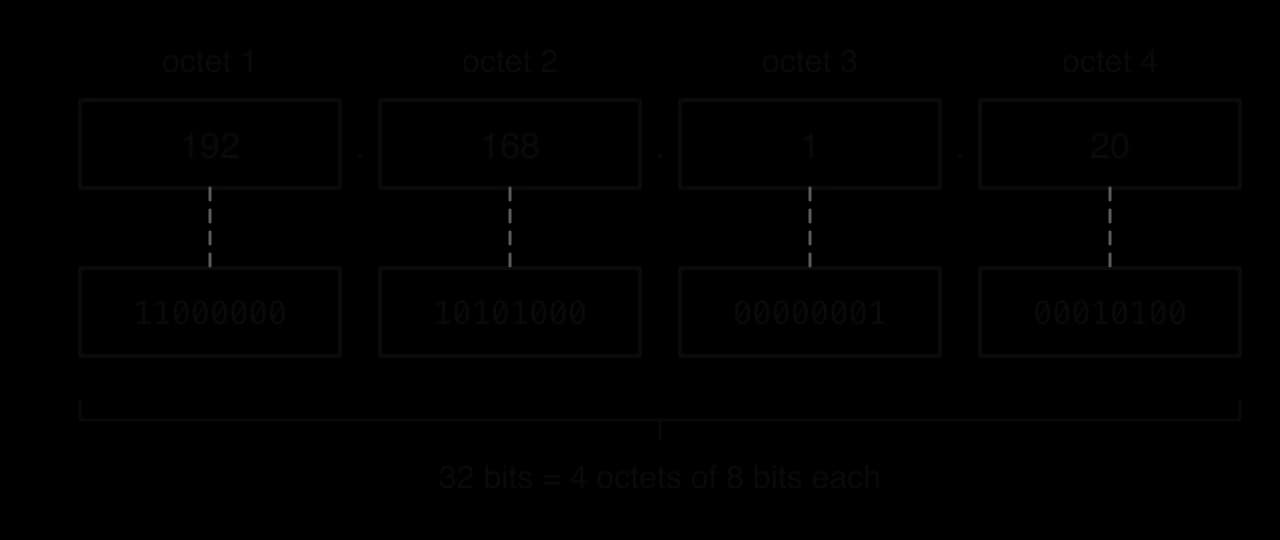
An IPv4 address is 32 bits long. Long strings of bits are hard for people to read and type, so each address is written in dotted decimal: the 32 bits are split into four groups of 8 bits, each group is converted to denary, and the four numbers are separated by dots.
Each group of 8 bits is called an octet. Because one octet has 8 bits, it can hold values, from 0 (00000000) to 255 (11111111). A number above 255, such as 192.168.1.300, can never appear in a valid IPv4 address.
The diagram of the address 192.168.1.20 shows each octet converted to 8-bit binary. Every octet always takes exactly 8 bits, so small values are padded with leading zeros: 1 becomes 00000001, not 1.
With 32 bits there are
possible IPv4 addresses, about 4.3 billion. Some of them are reserved for special uses, such as private networks, testing and multicast, so fewer can be given to devices on the public internet. In the 1980s this looked like plenty; by the 2010s there were more internet-connected devices than addresses.
The conversion also works in reverse. To turn a binary address into dotted decimal, split the 32 bits into four groups of 8 and add the place values of the 1 bits in each group.
Conversion between dotted decimal and binary is a short algorithm: split the text at the dots, check that there are four parts, check that each is from 0 to 255, then convert each part to 8 bits by repeated division by 2. The Python function ipv4_to_binary follows exactly these steps, without using a built-in binary formatter.
def octet_to_binary(value):
    bits = ""
    for i in range(8):
        bits = str(value % 2) + bits
        value = value // 2
    return bits


def ipv4_to_binary(address):
    parts = address.split(".")
    if len(parts) != 4:
        return "invalid: needs four octets"
    binary_parts = []
    for part in parts:
        value = int(part)
        if value < 0 or value > 255:
            return "invalid: " + part + " is not 0-255"
        binary_parts.append(octet_to_binary(value))
    return ".".join(binary_parts)


print(ipv4_to_binary("192.168.1.20"))
print(ipv4_to_binary("10.0.0.255"))
print(ipv4_to_binary("172.16.300.1"))public class Ipv4 {
static String octetToBinary(int value) {
String bits = "";
for (int i = 0; i < 8; i++) {
bits = (value % 2) + bits;
value = value / 2;
}
return bits;
}
static String ipv4ToBinary(String address) {
String[] parts = address.split("\\.");
if (parts.length != 4) {
return "invalid: needs four octets";
}
String result = "";
for (int i = 0; i < parts.length; i++) {
int value = Integer.parseInt(parts[i]);
if (value < 0 || value > 255) {
return "invalid: " + parts[i] + " is not 0-255";
}
if (i > 0) {
result = result + ".";
}
result = result + octetToBinary(value);
}
return result;
}
public static void main(String[] args) {
System.out.println(ipv4ToBinary("192.168.1.20"));
System.out.println(ipv4ToBinary("10.0.0.255"));
System.out.println(ipv4ToBinary("172.16.300.1"));
}
}Each pass of the loop in octet_to_binary takes the remainder after division by 2 as the next bit and places it in front of the bits found so far, so the most significant bit ends up on the left. The loop always runs 8 times, which pads small values with leading zeros. In Java, split takes a regular expression, in which a plain dot means "any character", so the dot must be written "\\."; Python's split(".") treats the dot literally. Java's / on two int values already gives integer division, where Python needs //.
11000000.10101000.00000001.00010100
00001010.00000000.00000000.11111111
invalid: 300 is not 0-255A public address must be unique across the whole internet, so addresses are handed out through a hierarchy. The Internet Assigned Numbers Authority (IANA) holds the whole address space and gives large blocks to five regional organisations. They pass smaller blocks to internet service providers and large organisations, which assign single addresses to customers and devices.
Because IPv4 has only about 4.3 billion addresses and demand kept growing, IANA's free pool ran out in February 2011, and each RIR then ran out at a different date (the case study "Running out of IPv4 addresses" gives the dates).
Three responses to exhaustion explain why the other kinds of addressing exist. Private addresses let millions of networks reuse the same address ranges internally; NAT lets many devices share one public address; and IPv6 provides so many addresses that sharing is no longer needed.
A public IP address is unique across the whole internet, so any router in the world can deliver a packet to it. Web servers, mail servers and the internet-facing side of every home router need one. A private IP address is chosen from a range that is set aside for use inside private networks; the same private addresses are used in millions of homes, schools and offices at once.
The private ranges are defined in a standard called RFC 1918. No routes to these ranges are carried on the public internet, and ISPs discard packets addressed to them, since the same address exists in countless separate networks and there would be no way to tell which one was meant.
Private range | Written in CIDR notation | Number of addresses | Typical use |
|---|---|---|---|
10.0.0.0 to 10.255.255.255 | 10.0.0.0/8 | 16,777,216 | Large organisations and ISPs |
172.16.0.0 to 172.31.255.255 | 172.16.0.0/12 | 1,048,576 | Medium-sized networks |
192.168.0.0 to 192.168.255.255 | 192.168.0.0/16 | 65,536 | Home and small office routers |
Source: RFC 1918, Address Allocation for Private Internets, IETF, 1996.
The suffix after the slash is CIDR notation, covered with subnetting in subtopic A2.2: it gives the number of leading bits that are fixed for the whole range. The counts follow from the bits that remain free: /8 leaves 24 host bits, so addresses; /12 leaves 20, so ; /16 leaves 16, so .
Private addressing has three advantages. It saves public addresses, because a whole network of devices needs only one public address between them; it lets an organisation number its devices freely without asking anyone; and devices with private addresses cannot be reached directly from the internet unless the router is set up to allow it. Its main limitation is that a private address cannot be used on the internet at all, so some form of translation, NAT, is always needed at the boundary.
How an address is given to a device is a second, separate question. A static address is entered by hand by an administrator, or reserved permanently for one device, and does not change. A dynamic address is handed out automatically for a limited time by a DHCP server, which takes it back when the lease runs out and may give the device a different one next time.
Devices that others must find at a known address need static addresses: servers, network printers, routers and the default gateway of a LAN. If a school's file server changed its address every day, every computer configured to use it would lose its connection.
Laptops and phones that join and leave networks all day use dynamic addresses, and because leases are reused, a network can serve more visitors over a day than it has addresses. Home internet connections usually receive a dynamic public address from the ISP as well; a customer who runs a server at home may pay extra for a static one.
The two pairs of terms describe different things and combine freely. Public or private is which range an address comes from; static or dynamic is how it is assigned.
Static | Dynamic | |
|---|---|---|
Public | A company web server at a fixed public address | A home router's internet-facing address, assigned by the ISP |
Private | A network printer fixed at | A phone given |
Choosing between static and dynamic assignment is a trade-off between reachability and effort. The comparison table sets out the five factors that decide it.
Factor | Static address | Dynamic address |
|---|---|---|
Configuration | Entered by hand on each device or reserved on the DHCP server | Automatic; device needs no setup |
Errors | Typing errors and duplicate addresses possible | Duplicates avoided by the DHCP server |
Reachability | Others can always find the device at the same address | Address can change, so others cannot rely on it |
Use of the address pool | Each address is tied up even when the device is off | Addresses are reused when leases expire |
Suited to | Servers, printers, routers, gateways | Laptops, phones, guests, home connections |
A home network has many devices with private addresses but usually only one public address, held by the router. Network address translation is the technique that lets all of them use the internet through that one address.
The simplest form of NAT maps one private address to one public address, which saves nothing. The form used in almost every home and office router also rewrites the port number, so that many private devices can share a single public address at the same time.
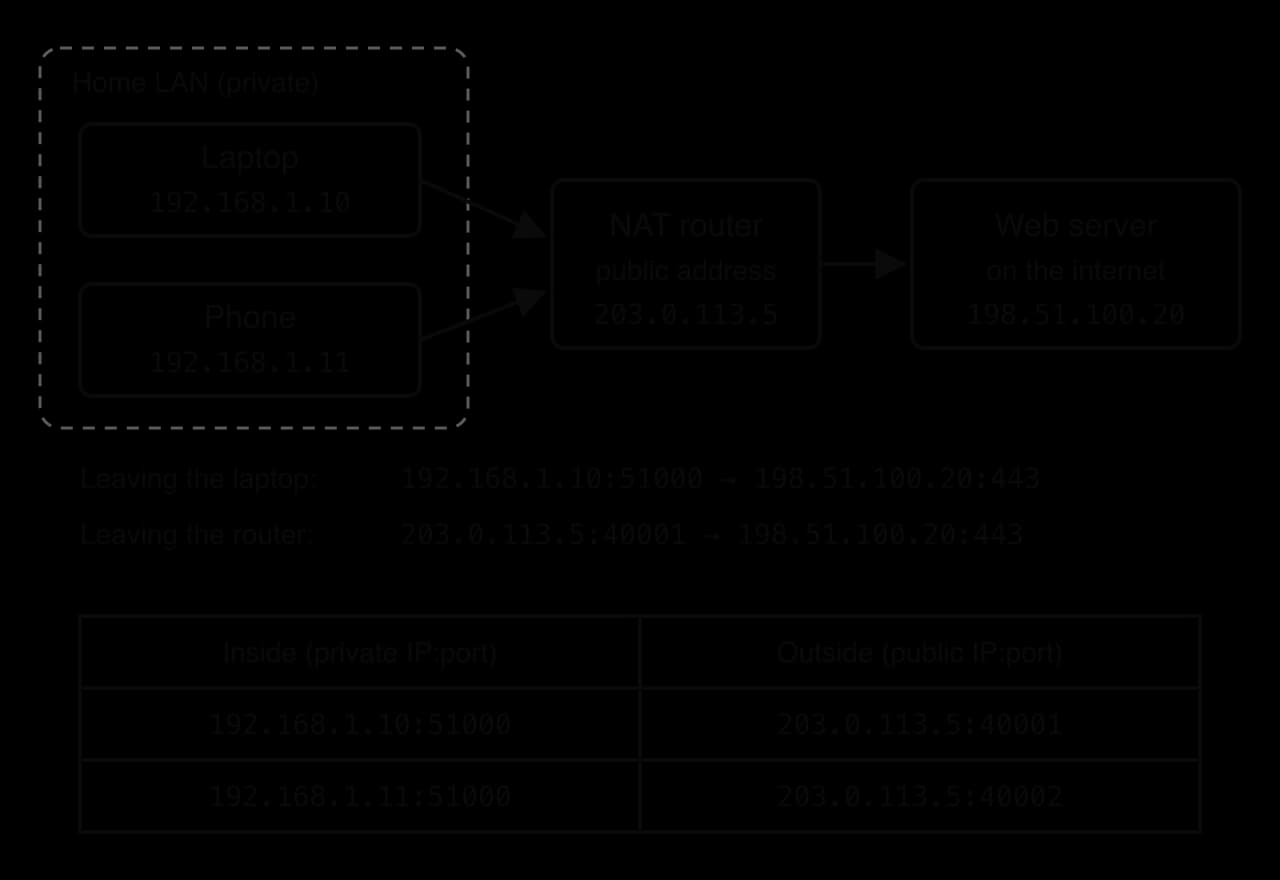
The NAT diagram follows one connection from a laptop in a home network. Two devices, a laptop and a phone, both open connections from private port 51000 to the same web server; the router gives each a different public port, and the translation table records both mappings.
The process, step by step:
The laptop (192.168.1.10) sends a packet from its port 51000 to the web server 198.51.100.20 on port 443.
The router receives the packet on its LAN side. It replaces the source address with its public address 203.0.113.5, chooses an unused public port (40001) and records 192.168.1.10:51000 ↔ 203.0.113.5:40001 in its translation table.
The packet crosses the internet. The web server sees only 203.0.113.5:40001 as the sender.
The server's reply is addressed to 203.0.113.5:40001. The router looks up port 40001 in its table, rewrites the destination to 192.168.1.10:51000 and forwards the packet into the LAN.
When the connection has been idle for a while, the router deletes the entry so the public port can be reused.
 YouTube
A short program shows the logic of the translation table. The two dictionaries outbound and inbound hold the same mappings in both directions, so that the router can look up a private address and port when a packet leaves and a public port when a reply arrives.
PUBLIC_IP = "203.0.113.5"
outbound = {}   # "private IP:port" -> public port
inbound = {}    # public port -> "private IP:port"
next_port = 40001


def send_out(private_ip, private_port):
    global next_port
    key = private_ip + ":" + str(private_port)
    if key not in outbound:
        outbound[key] = next_port
        inbound[next_port] = key
        next_port = next_port + 1
    return PUBLIC_IP + ":" + str(outbound[key])


def receive(public_port):
    if public_port in inbound:
        return "deliver to " + inbound[public_port]
    return "drop: no table entry"


print(send_out("192.168.1.10", 51000))
print(send_out("192.168.1.11", 51000))
print(send_out("192.168.1.10", 51000))
print(receive(40002))
print(receive(40009))import java.util.HashMap;
public class Pat {
static final String PUBLIC_IP = "203.0.113.5";
static HashMap<String, Integer> outbound = new HashMap<String, Integer>();
static HashMap<Integer, String> inbound = new HashMap<Integer, String>();
static int nextPort = 40001;
static String sendOut(String privateIp, int privatePort) {
String key = privateIp + ":" + privatePort;
if (!outbound.containsKey(key)) {
outbound.put(key, nextPort);
inbound.put(nextPort, key);
nextPort = nextPort + 1;
}
return PUBLIC_IP + ":" + outbound.get(key);
}
static String receive(int publicPort) {
if (inbound.containsKey(publicPort)) {
return "deliver to " + inbound.get(publicPort);
}
return "drop: no table entry";
}
public static void main(String[] args) {
System.out.println(sendOut("192.168.1.10", 51000));
System.out.println(sendOut("192.168.1.11", 51000));
System.out.println(sendOut("192.168.1.10", 51000));
System.out.println(receive(40002));
System.out.println(receive(40009));
}
}The third call reuses the existing entry, because the laptop's connection is already in the table. The last call shows what happens to a packet that arrives for a public port with no entry: there is no private device to deliver it to, so it is dropped. In Python, next_port is changed inside a function, so it must be declared global; in Java it is a static field of the class.
203.0.113.5:40001
203.0.113.5:40002
203.0.113.5:40001
deliver to 192.168.1.11:51000
drop: no table entryNAT has three main benefits. It saves public IPv4 addresses, because a home or a whole school needs only one; it lets private networks and the public internet communicate even though private addresses cannot be routed; and it hides the internal addresses and layout of the network from outside. As a side effect, a device on the inside cannot be contacted by an outside device that it has not contacted first, because an unsolicited packet finds no table entry. Subtopic A2.4, Network security, looks at this side effect in detail.
NAT also has limitations. It breaks the original design of the internet, in which any host could contact any other host directly: a game console or a video-calling app behind NAT cannot simply accept incoming connections, so applications need workarounds such as port forwarding (a fixed table entry set up by an administrator) or relay servers. The router must rewrite every packet and keep a table entry for every connection, which uses memory and processing time and can become a bottleneck. Many ISPs now also run carrier-grade NAT, in which thousands of customers share a small pool of public addresses, adding a second layer of translation. Using an IPv6 address for each device removes the need for any of this.
IPv6 replaces the 32-bit address with a 128-bit one. Writing 128 bits as denary octets would need sixteen numbers, so IPv6 addresses are written in hexadecimal: eight groups of four hex digits, separated by colons. Each hex digit stands for 4 bits, so each group holds 16 bits and the eight groups hold bits.
The number of possible IPv6 addresses is
which is about times as many as IPv4. At that scale every device, sensor and appliance on Earth can have its own globally unique address, with no need for private ranges and NAT to stretch the supply.
Full IPv6 addresses are long, so two rules shorten them. Both are designed so that the full form can always be rebuilt from the short one, and the IPv6 compression diagram applies them to one address.
Drop leading zeros in any group: 0db8 becomes db8, 0042 becomes 42 and 0000 becomes 0. Trailing zeros must stay (ff00 stays ff00).
Replace one run of consecutive all-zero groups with a double colon ::. This may be done only once in an address; with two double colons there would be no way to know how many zero groups each one stands for.
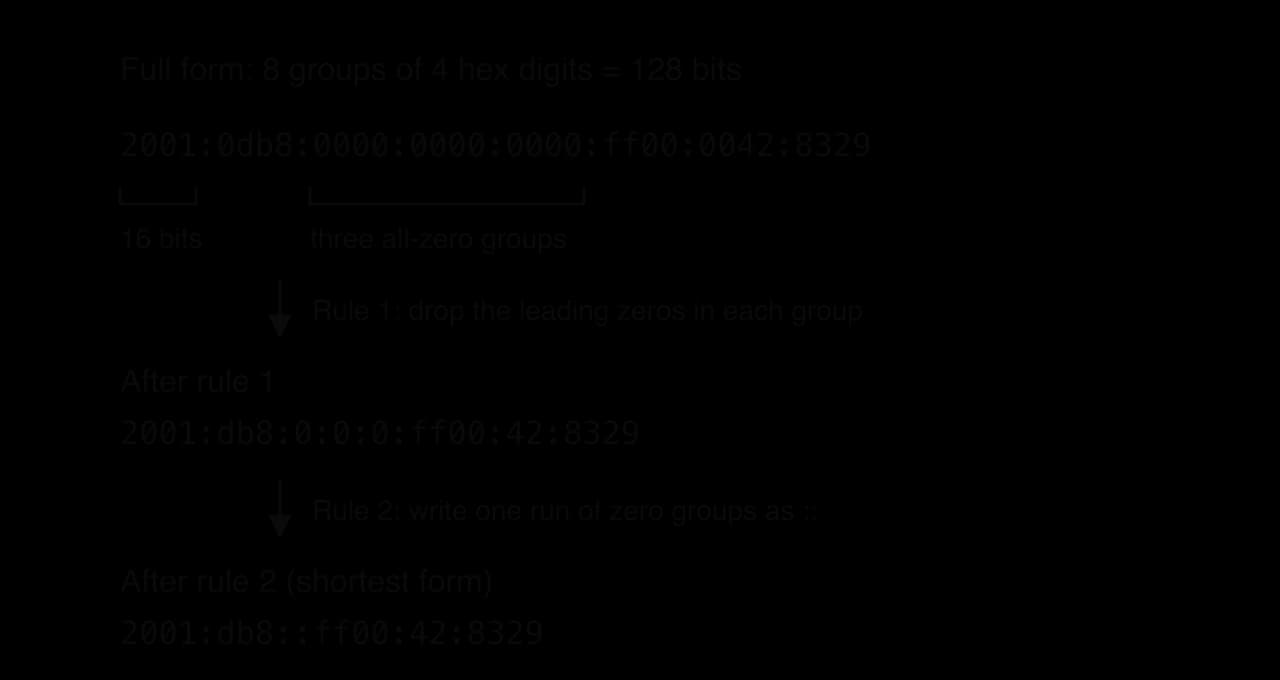
To expand a shortened address, count the groups that are still written, subtract from eight to find how many zero groups the :: stands for, then pad every group back to four digits.
IPv6 is a separate protocol with its own packet format. A device that understands only IPv4 cannot read an IPv6 packet. During the long changeover, most devices and networks therefore run dual stack, holding an IPv4 and an IPv6 address and using whichever the other end supports.
Feature | IPv4 | IPv6 |
|---|---|---|
Address length | 32 bits | 128 bits |
Notation | Dotted decimal, four octets: | Hexadecimal, eight 16-bit groups with colons: |
Number of addresses | , about 4.3 billion | , about |
Address supply | Exhausted; NAT and private ranges stretch it | Enough for every device to have a public address |
NAT | Needed in almost every home and office | Not needed to save addresses |
Configuration | Manual or by DHCP | Manual, DHCPv6, or automatic: a device can create its own address from the network prefix the router advertises |
Header | 20 to 60 bytes, includes a header checksum that every router must recalculate | Fixed 40 bytes, no header checksum, so routers process it more simply |
Hop counter | Time to live (TTL) | Hop limit (same purpose) |
Every link in a network carries bits as a physical signal: a changing voltage in copper wire, pulses of light in glass, or radio waves through the air. The material or space that carries the signal sets how fast data can travel, how far it can go before it must be boosted, and how easily it can be disturbed or intercepted.
The most important property of a link is how much data it can carry each second. Bandwidth is measured in bits per second (bit/s), usually with decimal prefixes: 1 Mbit/s is bits per second and 1 Gbit/s is . Network speeds use a small b because they are given in bits, while file sizes are usually given in bytes (capital B), and one byte is 8 bits.
Bandwidth is not the same as latency. Bandwidth is how many bits can be sent each second, like the number of lanes on a road; latency is how long one bit takes to arrive, like the travel time from one town to the next. A satellite link can have high bandwidth but high latency, because the signal travels about 36,000 km up to a geostationary satellite and the same distance back down.
The formula gives the time to push the data onto the link. The total time for a transfer also includes the latency of the route, and in practice the throughput is lower than the bandwidth, so real transfers take longer.
As a signal travels along any medium, it loses strength. In copper the energy is lost as heat in the wire's resistance and as radiation; in glass, light is scattered and absorbed by the material; in air, radio waves spread out and are absorbed by walls, furniture and people. When the signal becomes too weak to tell a 1 from a 0 reliably, errors appear.
Attenuation is measured in decibels (dB), usually per kilometre or per 100 m of cable. The decibel scale is logarithmic: every 10 dB of loss divides the power by 10, so a 20 dB loss leaves 1% of the signal and a 30 dB loss leaves 0.1%. Long links place repeaters or amplifiers at intervals to restore the signal before it fades below a usable level, which adds cost and points that can fail.
A signal can also be damaged by other signals. Motors, fluorescent lights, power cables and radio transmitters all produce electromagnetic fields, and a copper wire picks these up as unwanted voltages, just as an aerial picks up radio.
Inside a cable that holds several pairs of wires, the signal in one pair can leak into its neighbours. This form of interference grows with the frequency of the signals and with the length of cable that the wires run side by side.
Both attenuation and interference reduce the usable bandwidth and range of a medium, because the receiver can only decode a signal that stands clearly above the noise. They are the main reasons why the three media differ.
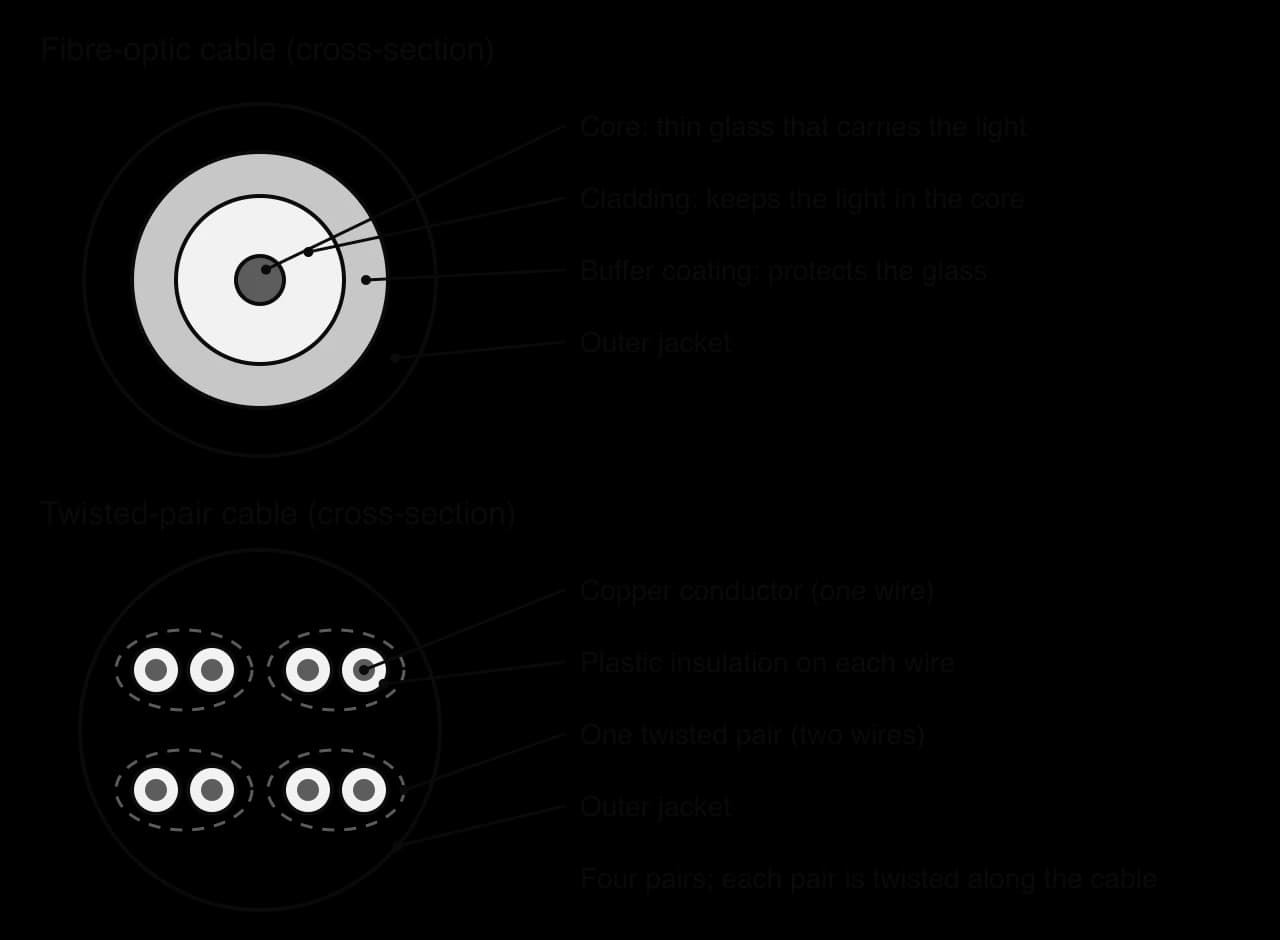
The cable that connects most desktop computers, printers and access points to a switch is twisted-pair copper cable, often just called an "Ethernet cable" because it carries Ethernet. It contains four pairs of thin insulated copper wires, and the two wires in each pair are twisted around each other along the whole length of the cable.
Twisting the wires lets the cable carry fast signals in spite of interference. The two wires of a pair carry the same signal with opposite polarity, and the receiver measures the difference between them. Interference from outside reaches both wires almost equally, because twisting keeps swapping which wire is closer to the source, so it shifts both voltages by the same amount and disappears when the difference is taken. Each pair is twisted at a different rate, so neighbouring pairs never run in parallel for long, which reduces crosstalk.
The cross-sections of the two kinds of cable show their layers. A twisted-pair cable holds four pairs of copper conductors, each wire in its own plastic insulation; a fibre-optic cable has a glass core surrounded by cladding, a protective coating and an outer jacket.
Twisted-pair cable is made in categories. Higher categories are built more precisely, with tighter twists and sometimes a foil shield, so they carry higher frequencies and therefore more data.
Category | Highest signal frequency | Typical Ethernet speed | Maximum length at that speed |
|---|---|---|---|
Cat 5e | 100 MHz | 1 Gbit/s | 100 m |
Cat 6 | 250 MHz | 1 Gbit/s (10 Gbit/s up to 55 m) | 100 m |
Cat 6A | 500 MHz | 10 Gbit/s | 100 m |
Source: Category 5 and Category 6 cable standards (TIA), summarised on Wikipedia, accessed October 2026.
The 100 m limit is set by attenuation and the timing rules of Ethernet: beyond it, the signal is too weak and distorted to decode reliably, so a switch is needed every 100 m. Twisted pair is cheap, light and flexible, and it is easy to install: a technician can cut it to length and fit the plug (an RJ45 connector) on site with a hand tool. Most cable is unshielded (UTP); shielded versions (STP) wrap the pairs in foil for factory floors with heavy motors, at extra cost.
Its weaknesses all come from carrying electricity. Copper picks up EMI near motors, lift machinery or power lines, it suffers from crosstalk, and its 100 m range makes it unsuitable for links between buildings. A cable also gives off a weak electromagnetic field and can be tapped by anyone with physical access to a socket or switch, so wired networks still need physical security.
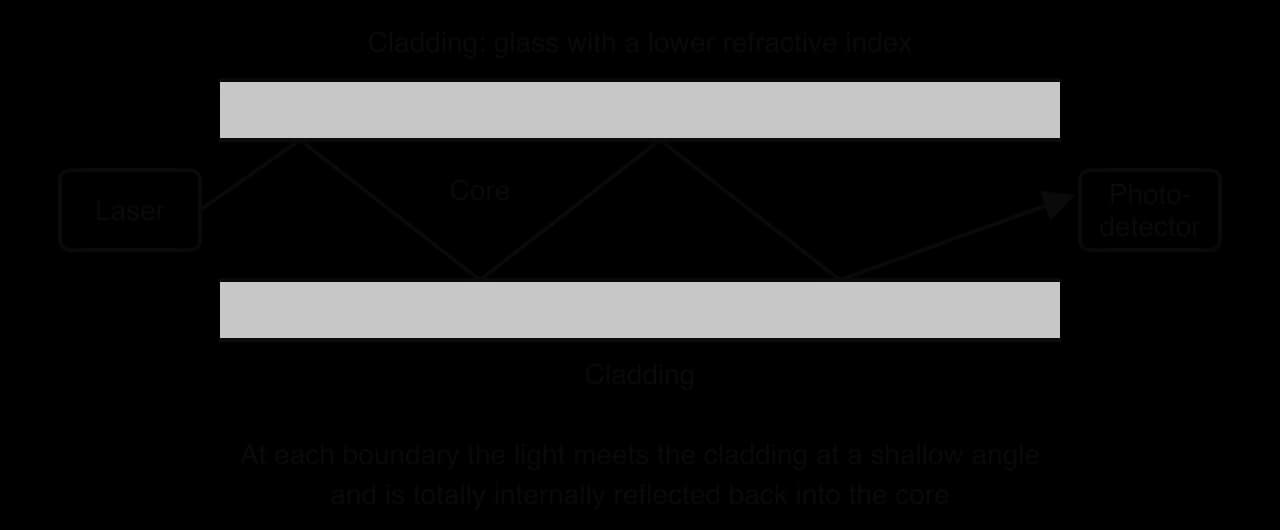
Each strand of very pure glass is thinner than a human hair. A laser or LED at one end switches on and off billions of times a second, and a photodetector at the other end turns the light pulses back into bits.
The light stays inside the glass because of total internal reflection. The core is surrounded by cladding made of glass with a slightly lower refractive index. When light in the core hits the boundary at a shallow angle, it is reflected back in completely, so it zig-zags (or, in thin single-mode fibre, travels almost straight) along the core even when the cable bends gently, as the reflection diagram shows. Two types are common:
Multimode fibre has a wider core that lets light take several paths. It is cheaper to connect but the paths arrive at slightly different times, which smears the pulses, so it is used for links up to a few hundred metres inside buildings and data centres.
Single-mode fibre has a core only about 9 micrometres across, so light takes one path. It carries signals for tens of kilometres between amplifiers and is used for long-distance, undersea and ISP links.
Fibre's strengths come from using light in glass. Its attenuation is extremely low, so signals travel far without boosting, and it can carry very high frequencies, giving huge bandwidth; a single fibre can carry many wavelengths of light at once, each a separate channel. Light is not affected by electromagnetic fields, so fibre is immune to EMI and crosstalk, and can run beside power cables or through factories. It gives off no electromagnetic signal, so it cannot be read from outside; tapping it means physically bending or cutting the glass, which causes a loss the network equipment can detect.
Fibre's limitations are cost and handling. The cable itself is now cheap, but the lasers, receivers and switches with optical ports cost more than copper equipment. Joining two fibres (splicing) needs the glass ends to be cleaved perfectly flat and aligned to a fraction of a micrometre, which requires trained technicians and special tools. Glass can crack if the cable is bent too tightly or crushed, and the electronics at each end still need electrical power, which fibre cannot carry.
Low attenuation is the reason fibre works over long distances. The total loss on a link is the loss per kilometre multiplied by the length, and the decibel rule gives the fraction of power left.
The fall in attenuation was the breakthrough that made fibre networks possible. In 1965 Charles Kao and George Hockham argued that impurities, not the glass itself, caused most of the loss, and that fibre would be practical below 20 dB/km; Corning reached 17 dB/km in 1970, and modern low-loss single-mode fibre loses 0.148 dB/km at a wavelength of 1550 nm, so that 71% of the light remains after 10 km. Kao received the Nobel Prize in Physics in 2009 for this work.
Source: "Optical fiber", Wikipedia, citing Corning, accessed October 2026.
Wireless transmission carries data as electromagnetic waves through the air, with no cable at all. In a Wi-Fi network, devices exchange radio signals with a wireless access point connected to the wired LAN; a mobile network covers a wide area with cells, each served by a mast; and satellites relay signals to places with no cables.
Wireless has two big advantages: mobility, because devices can move freely while connected, and easy installation, because adding a device needs no cable through walls or ceilings. An access point can serve a classroom, a café or a lecture hall full of phones that would be impossible to cable, and a temporary event can be networked in an hour.
Its disadvantages come from sharing open space. All the devices on one access point share the same radio channel and largely take turns to transmit on it, so the bandwidth is divided among users and each device's share falls as more join. Radio signals weaken quickly with distance and are absorbed by walls, floors, water and metal, so the range is a few tens of metres indoors. Wi-Fi in the 2.4 GHz band shares its frequencies with Bluetooth, microwave ovens and neighbouring networks, so interference is common. The newest standard, Wi-Fi 7, has a theoretical maximum of 23 Gbit/s in a single band, but real throughput is much lower because of distance, walls, other users and interference.
Wireless is also the least secure medium. Radio signals spread in every direction, well beyond the walls of a building, so anyone within range can receive them without touching the network. Without strong encryption, data can be read by an eavesdropper; without strong authentication, outsiders can join the network. Subtopic A2.4, Network security, covers the protections used on Wi-Fi.
The table compares the three media across the eight factors used to choose between them. Values are typical for current equipment; any of them can change with the exact standard used.
Factor | Fibre-optic cable | Twisted-pair cable | Wireless (Wi-Fi) |
|---|---|---|---|
Bandwidth | Highest: 10–100 Gbit/s per link is routine, terabits per second over one fibre using many wavelengths | Up to 1–10 Gbit/s (Cat 5e to Cat 6A) | Shared between all users on a channel; real throughput usually hundreds of Mbit/s |
Installation complexity | High: splicing and connecting need specialist tools and training; glass must not be bent tightly | Low: cut to length and fit RJ45 plugs on site | Lowest: no cables to devices; access points need careful placing and a site survey |
Cost | Highest equipment and installation cost per link | Low cable and equipment cost | Low per device; cost grows with the number of access points needed |
Range | Hundreds of metres (multimode) to tens of kilometres (single-mode) between amplifiers | About 100 m per segment | Tens of metres indoors from each access point |
Susceptibility to interference | Immune to electromagnetic interference and crosstalk | Affected by EMI and crosstalk; reduced by twisting and shielding | Most affected: walls, other networks, Bluetooth, microwave ovens |
Attenuation | Very low (below 0.2 dB/km in modern single-mode fibre) | High; limits segments to about 100 m | Very high; signal falls quickly with distance and through obstacles |
Reliability | Very reliable once installed; fragile if crushed or cut | Reliable; connectors and cables can be damaged or unplugged | Least reliable: dead spots, congestion and interference cause drops |
Security | Hardest to tap: no signal escapes, and tapping causes detectable loss | Can be tapped with physical access to the cable or a socket | Signals spread beyond the building, so encryption and authentication are essential |
No medium is best on every factor, which is why real networks combine them. A typical school uses single-mode or multimode fibre between buildings and between the server room and each floor (the backbone), twisted pair from each floor's switch to the desks and access points, and Wi-Fi for laptops and phones. The worked example applies the same reasoning to a choice between two media.
A file, an email or a video stream is far too large to send as one block. If a 1 GB file were sent in one piece, it would hold a link for the whole transfer, every other user would have to wait, and a single corrupted bit near the end would mean sending the whole gigabyte again. Data sent over the internet is therefore split into small pieces, each sent separately.
Each packet is a self-contained unit with everything a router needs to forward it. On the internet a packet is usually at most about 1,500 bytes, the largest unit an Ethernet link carries in one go, so a 5 MB photo becomes several thousand packets.
The data itself travels behind the header. Only the hosts at each end look inside it; the routers in between read only the header.
The packet structure diagram shows the three parts of the packet model used to explain packet switching: a header, a payload and a trailer holding an error check.

The trailer holds a checksum, a short value calculated from the bits of the data. The receiver repeats the calculation on what arrived; if the two values differ, some bits were changed on the way, and the damaged data is discarded and sent again.
On the real internet these fields are spread across the layers of the TCP/IP model. The IP header holds the addresses and the time to live; the sequence number belongs to the TCP header inside the payload of the IP packet; and the error-checking trailer is added to each frame on each link, with IPv4 also carrying a checksum of its own header. The three-part model brings these fields together in one simple picture of a packet.
Packet switching is the method the internet uses to move data. It works like sending a long letter as many separate postcards, each numbered and each addressed to the same house: every postcard goes through the postal system on its own, and the receiver sorts them by number.
The process for one transfer, step by step:
Splitting. The sending host splits the data into pieces small enough to fit in a packet.
Adding headers. Each piece is given a header with the source and destination IP addresses, a sequence number showing its position in the data, a time to live, and other control information. A checksum is calculated so that damage can be detected.
Sending independently. Each packet is passed to the first router (the default gateway). From then on it travels on its own, and the network keeps no record that it belongs with the others.
Routing at each hop. Every router that receives a packet reads its destination address, looks it up in its routing table and forwards it on the link to the next router. Different packets of the same message may be sent different ways, for example when a link becomes congested or fails.
Arriving. Packets can arrive in a different order from the one in which they were sent, and some may be lost or damaged.
Reassembling. The receiving host holds the packets in a buffer, uses the checksums to discard damaged ones, puts the rest in order by sequence number, requests any missing ones again, and joins the payloads back into the original data.
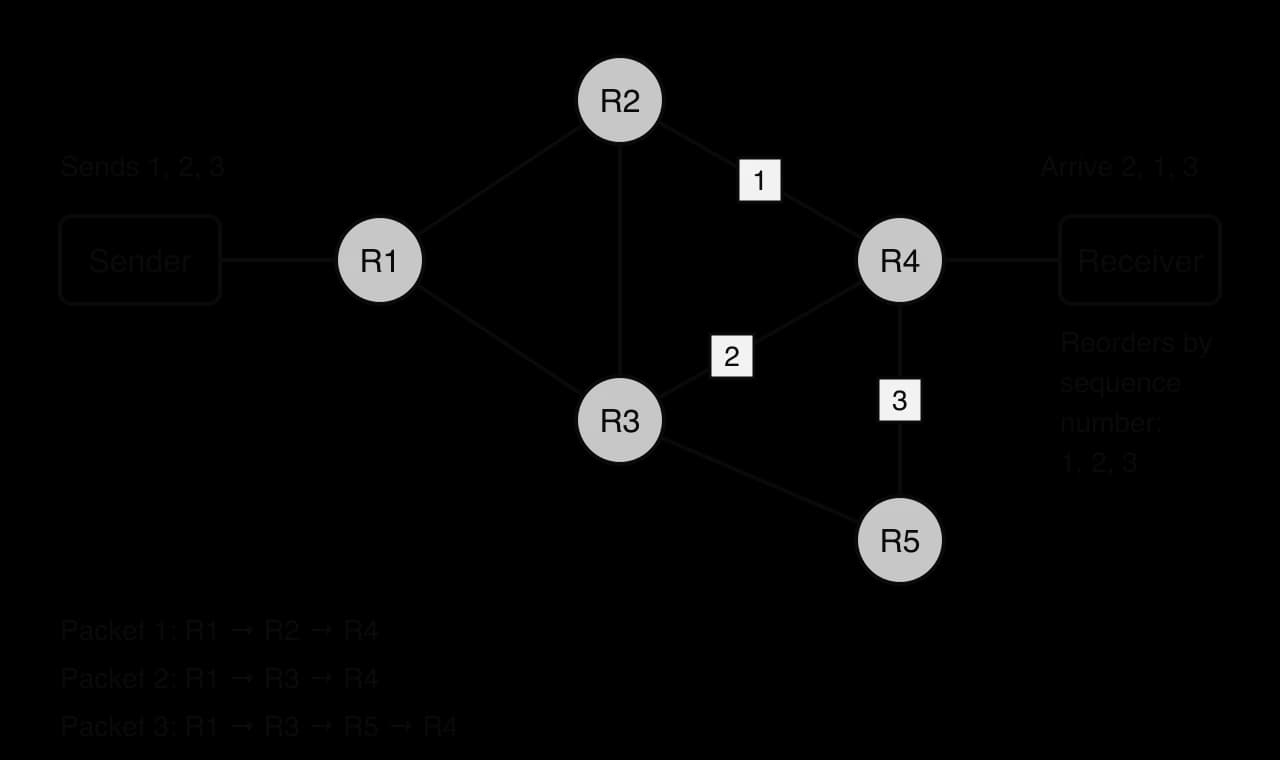
The routes diagram follows three packets of one message across a small network. Packet 3 takes a longer path through R5 and packet 1 is delayed in a queue at R2, so packet 2 arrives first. Because each packet carries its sequence number, the receiver can still rebuild the message correctly. Moving each packet towards its destination, one router at a time, is called routing.
Each router holds a table of the networks it knows how to reach. For every destination network, the table gives the next router to send packets to (the next hop) and the interface to send them out of. A router's table does not hold the whole route, only the best next step; the next router's table holds the step after that.
A simplified routing table for a school's router shows the idea. The last row, the default route 0.0.0.0/0, matches every address that no other row matches, and sends it to the ISP.
Destination network | Next hop | Interface |
|---|---|---|
| Directly connected | LAN 1 |
| Directly connected | LAN 2 |
|
| Link to science block |
|
| Internet link |
Each step from one router to the next is called a hop. A packet travelling between continents, from a laptop in London to a server in Singapore for example, often crosses a dozen or more hops.
A mistake in routing tables can send packets round in a loop, from router A to B to C and back to A, for ever. To stop such packets clogging the network, every packet carries a counter. Each router that forwards the packet subtracts 1, and a router that reduces it to 0 discards the packet and sends an error message back to the sender. Common starting values are 64 and 128.
At the destination, the receiving host rebuilds the data from the packets that have arrived.
In the internet, reassembly and recovery of lost packets are carried out by TCP on the receiving host. TCP acknowledges what has arrived; if the sender gets no acknowledgement for some data in time, it sends that data again. The routers in between do none of this: they forward each packet as best they can and drop it if their queues are full. A short Khan Academy lesson with Vint Cerf, one of the designers of TCP/IP, follows a message as it is broken into packets, routed independently and checked for completeness on arrival.
 YouTube
The program make_packets splits a short message into packets with 6-character payloads, each stored as a sequence number and a payload. The function reassemble then puts packets that arrived in any order back into slots by sequence number, and reports any that are missing.
PAYLOAD_SIZE = 6


def make_packets(message):
    # Each packet is [sequence number, payload]
    packets = []
    sequence = 0
    for start in range(0, len(message), PAYLOAD_SIZE):
        payload = message[start:start + PAYLOAD_SIZE]
        packets.append([sequence, payload])
        sequence = sequence + 1
    return packets


def reassemble(arrived, total):
    slots = [None] * total
    for packet in arrived:
        slots[packet[0]] = packet[1]
    missing = ""
    result = ""
    for i in range(total):
        if slots[i] is None:
            missing = missing + str(i) + " "
        else:
            result = result + slots[i]
    if missing != "":
        return "request again: " + missing.strip()
    return result


packets = make_packets("MEET AT THE LIBRARY AT 4")
for packet in packets:
    print(str(packet[0]) + " [" + packet[1] + "]")
arrived = [packets[2], packets[0], packets[3], packets[1]]
print(reassemble(arrived, len(packets)))
lost = [packets[3], packets[0], packets[1]]
print(reassemble(lost, len(packets)))public class Packets {
static final int PAYLOAD_SIZE = 6;
// Each packet is {sequence number, payload}, both stored as strings
static String[][] makePackets(String message) {
int total = (message.length() + PAYLOAD_SIZE - 1) / PAYLOAD_SIZE;
String[][] packets = new String[total][2];
for (int sequence = 0; sequence < total; sequence++) {
int start = sequence * PAYLOAD_SIZE;
int end = Math.min(start + PAYLOAD_SIZE, message.length());
packets[sequence][0] = String.valueOf(sequence);
packets[sequence][1] = message.substring(start, end);
}
return packets;
}
static String reassemble(String[][] arrived, int total) {
String[] slots = new String[total];
for (int i = 0; i < arrived.length; i++) {
int sequence = Integer.parseInt(arrived[i][0]);
slots[sequence] = arrived[i][1];
}
String missing = "";
String result = "";
for (int i = 0; i < total; i++) {
if (slots[i] == null) {
missing = missing + i + " ";
} else {
result = result + slots[i];
}
}
if (!missing.equals("")) {
return "request again: " + missing.trim();
}
return result;
}
public static void main(String[] args) {
String[][] packets = makePackets("MEET AT THE LIBRARY AT 4");
for (int i = 0; i < packets.length; i++) {
System.out.println(packets[i][0] + " [" + packets[i][1] + "]");
}
String[][] arrived = {packets[2], packets[0], packets[3], packets[1]};
System.out.println(reassemble(arrived, packets.length));
String[][] lost = {packets[3], packets[0], packets[1]};
System.out.println(reassemble(lost, packets.length));
}
}The packets arrive in the order 2, 0, 3, 1, yet the message is rebuilt correctly because each payload is placed in the slot given by its sequence number, not in the order it arrived. In the second run packet 2 never arrives, so its slot stays empty and the receiver requests it again. Java has no simple built-in pair type, so the Java version stores each packet as a two-element String array and works out the number of packets with integer division rounded up, .
0 [MEET A]
1 [T THE ]
2 [LIBRAR]
3 [Y AT 4]
MEET AT THE LIBRARY AT 4
request again: 2
Splitting data into packets has a cost: every packet carries its own header, so more data is sent than the file itself, and the overhead grows as the packet size falls.
Two kinds of device move packets on their way, and each works at a different scale. A switch moves data within one LAN; a router moves packets between networks.
Inside a LAN, the switch reads the destination MAC address of each frame and sends it only out of the port leading to that device, using a table of which MAC address is reached through which port. It does not read IP addresses and holds no information about networks beyond the LAN. When a packet must leave the LAN, the host sends it to the MAC address of its default gateway, the router.
A router reads the destination IP address in the packet header, finds the matching network in its routing table and forwards the packet towards the next hop. Before sending it on, the router subtracts 1 from the TTL and wraps the packet in a new frame with new source and destination MAC addresses for the next link. The IP addresses stay the same from one end of the journey to the other (unless NAT rewrites them at the edge), while the MAC addresses change at every hop.
Switch | Router | |
|---|---|---|
Works | Within one LAN | Between networks (LAN to LAN, LAN to ISP, across the internet) |
Reads | Destination MAC address | Destination IP address |
Uses | A MAC address table (which port leads to which device) | A routing table (which next hop leads to which network) |
Changes the data | Forwards the frame unchanged | Reduces the TTL and puts the packet in a new frame for the next link |
Role in packet switching | Carries packets over the first and last stages, inside the LANs at each end | Chooses the next hop for every packet at every step across the internet |
TCP/IP layer | Network interface layer | Internet layer |
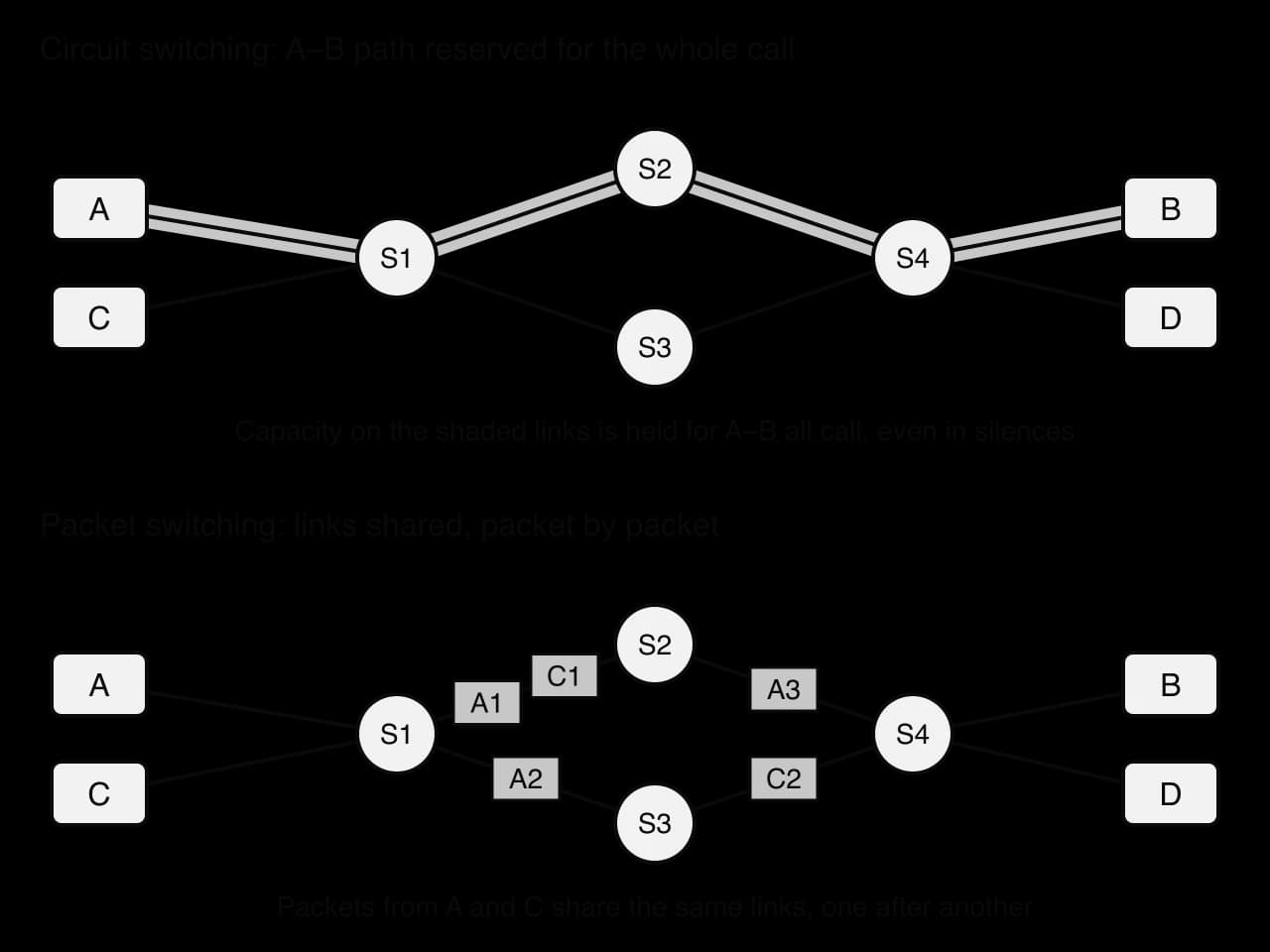
The telephone network that came before the internet worked differently. Before a call could start, the exchanges reserved a complete path from caller to receiver, and that path was held for the call's whole length, whether anyone was speaking or not.
The diagram of the two methods uses the same small network, whose switching nodes S1 to S4 stand for telephone exchanges in a circuit-switched network and for routers in a packet-switched one. With circuit switching, capacity on every link of the path from A to B is held for the call, even in silences; with packet switching, packets from A and from C take turns on whatever links are free.
Feature | Circuit switching | Packet switching |
|---|---|---|
Path | One dedicated path set up before data is sent | No set path; each packet routed independently |
Use of links | Capacity reserved for one conversation, wasted in silences | Links shared among all users; capacity used whenever there is data |
Order of arrival | Data arrives in order along one path | Packets can arrive out of order and must be reassembled |
Delay | Set-up delay, then constant, predictable delay | No set-up, but delay varies with queues at routers |
Effect of a failed link | Communication cut off; must be set up again | Packets are routed around the failure |
Busy network | New calls are refused ("all lines busy") | All traffic slows down; packets may be delayed or dropped |
Overhead | Little per unit of data once the circuit exists | Every packet carries a header |
Typical use | Traditional landline telephone network | The internet: web, email, file transfer, video, VoIP calls |
Packet switching suits computer data because it is bursty: a browser sends nothing for seconds, then a page's worth of requests at once. Holding a circuit for each user would leave most of the capacity idle, whereas packets from thousands of users can fill the same link continuously. It is also resilient, because no path is fixed in advance: when a router or link fails, the remaining routers send packets another way. Its weakest point is variable delay (jitter), which matters for live voice and video; video-calling applications smooth it with small buffers, and networks can give such traffic priority in their queues.
A router knows its directly connected networks as soon as its interfaces are given addresses: a router with one interface on 192.168.1.0/24 and another on a link to a second router can reach both without being told. Every other network in its routing table must be added in one of two ways. An administrator can type the routes in by hand, or the routers can work them out for themselves by exchanging information. These two methods are static and dynamic routing.
The triangle network is used for both methods. Three routers each serve one LAN, and the routers are joined in a ring, so there are always two possible paths between any two LANs.
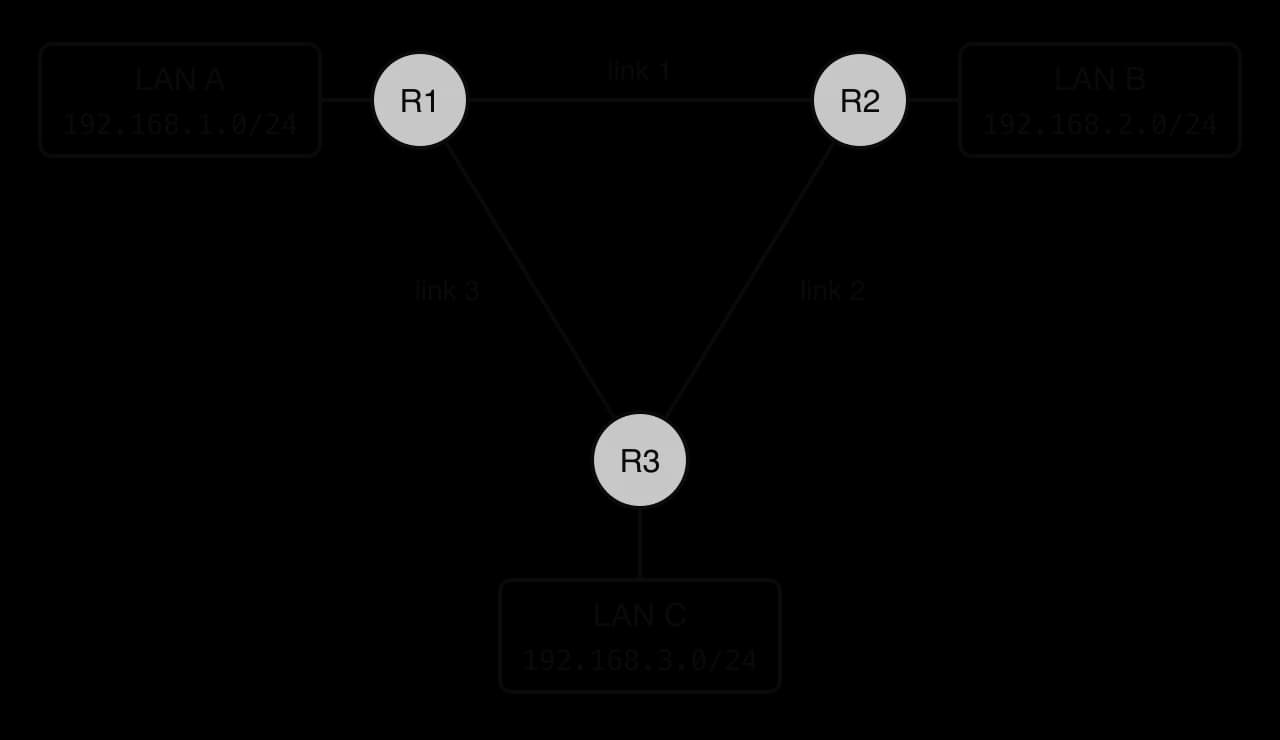
In static routing, a network administrator enters each route into each router by hand. For every network that is not directly connected, the administrator types the destination network, its mask and the next hop. The router uses exactly those routes until someone changes them.
For the triangle network, the administrator might give R1 these routes. The first row appears automatically; the other two are typed in.
Destination network | Next hop | Link | How it got there |
|---|---|---|---|
| Directly connected | LAN A interface | Automatic |
| R2 | Link 1 | Typed in by the administrator |
| R3 | Link 3 | Typed in by the administrator |
The process of static routing, step by step:
The administrator plans the network and decides the best path from every router to every network.
On each router, the administrator enters one static route for every network that is not directly connected, giving the destination network and the next hop.
When a packet arrives, the router matches its destination address against the table and forwards it to the next hop given.
If the network changes (a new LAN is added, a link fails or is moved), nothing happens automatically: the administrator must log in to every affected router and edit its routes.
Static routing has clear advantages. It uses no processor time, memory or bandwidth for exchanging routes, so even a small, cheap router can handle it. The routes are completely predictable: the administrator knows exactly which way every packet goes. It is also more secure, because the routers accept no routing information from other devices, so an attacker cannot inject false routes to redirect traffic.
Its disadvantages grow with the size of the network. Every route must be typed in, and in a network where each of routers serves one LAN and must reach the other , the administrator has to enter routes. Typing errors can create loops or black holes, where packets are sent to a router with no onward route. Most importantly, static routes do not adapt to failures: if link 3 fails, R1 keeps sending LAN C's packets towards R3 over the dead link, and they are lost until the administrator notices and changes the route, even though a working path through R2 exists all along.
A common compromise is the floating static route: a second, back-up static route to the same network through a different next hop, marked as less preferred. The router uses it only if the main route's link goes down. It adds some resilience but still covers only the failures the administrator thought of in advance.
In dynamic routing, the routers build and update their own routing tables. Each router runs the same routing protocol, finds its neighbours, and regularly sends them a list of the networks it can reach and the cost of reaching each. From the information it receives, each router works out the best path to every network.
The rules for this exchange are set by a routing protocol. The method can be understood without the details of any one protocol, but their names appear in real networks: RIP and OSPF are used inside an organisation's network, and BGP is used between the networks that make up the internet.
The process of dynamic routing, step by step:
Configuration. The administrator turns on the routing protocol on each router and tells it which of its networks to advertise. No individual routes are typed in.
Discovery. Each router finds its neighbouring routers by sending small "hello" messages on its links.
Exchange. Neighbours send each other the networks they can reach and a metric (cost) for each, such as the number of hops or a value based on the bandwidth of the links.
Calculation. Each router selects, for every network, the path with the lowest total metric and puts its next hop in the routing table.
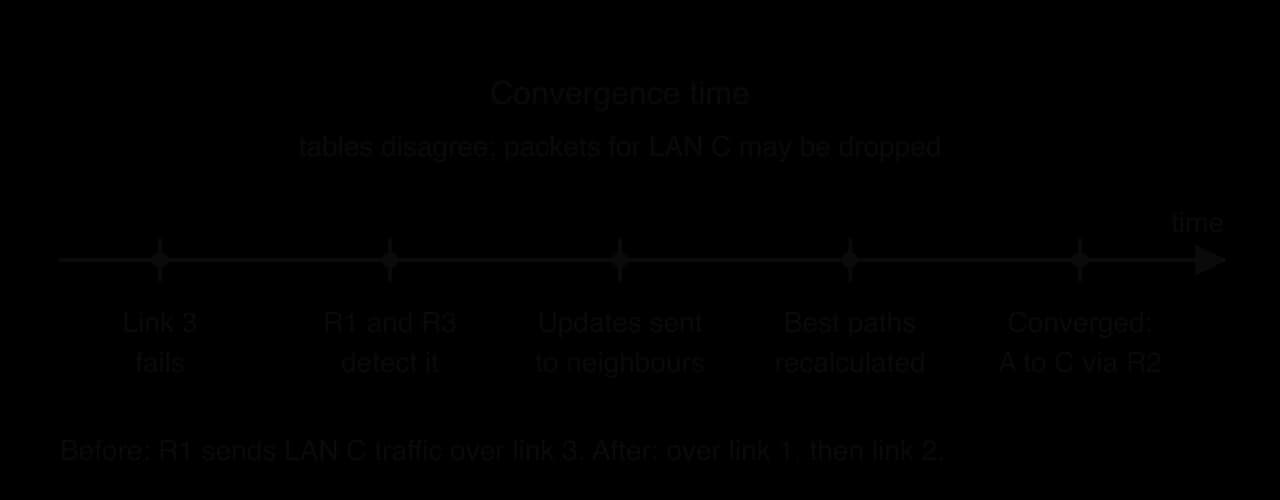
Adapting. Routers keep exchanging updates. When a link fails, the routers at each end detect it (the interface goes down, or hello messages stop arriving) and send updates; every other router recalculates its routes, and traffic moves to the best remaining path.
In the triangle network, if link 3 fails, R1 and R3 detect it within seconds and send updates to R2, and all three recalculate. R1's route to LAN C changes from "R3 over link 3" to "R2 over link 1", and R2 forwards those packets over link 2. No one has to touch the routers. The time this takes is the convergence time.
The convergence timeline follows the triangle network after link 3 fails. Until all the routers have converged, their tables disagree, so some packets are sent towards the failed link or round a loop and are lost.
Dynamic routing's advantages are that it adapts automatically to failures and changes, finding a new path without human action, and that it scales: adding a new LAN means advertising it on one router, and every other router adds it to its table automatically. On a network with several possible paths, it can also choose the best one by its metric and move traffic away from slow or broken links.
Its disadvantages are cost and complexity. Every router spends processor time and memory running the protocol and storing the routes it receives, and the update messages use bandwidth on every link. The protocols are complex to set up and troubleshoot, and a mistake can spread: a router that advertises a wrong route can mislead all the others. Updates from outside must also be protected, because a device that sends false routing information can redirect traffic. During convergence, routes are inconsistent and packets can be lost.
The table compares the two methods across the seven factors used to choose between them.
Factor | Static routing | Dynamic routing |
|---|---|---|
Configuration | Every route typed in by hand on every router | Protocol turned on and networks advertised; routes found automatically |
Maintenance | Every change in the network needs manual edits on each affected router | Changes are learned automatically; administrator monitors the protocol |
Complexity | Simple to understand and check for a small network | Complex protocols that need expert knowledge to set up and troubleshoot |
Resource usage | No extra processor, memory or bandwidth | Uses processor time and memory on each router and bandwidth for updates |
Convergence | Does not converge by itself; adapts only when the administrator acts | Converges automatically after a change, usually within seconds to minutes |
Scalability | Poor: the number of routes grows with and so does the risk of error | Good: new networks are learned by every router automatically |
Network size | Small networks, and stub networks with a single way out (such as a default route to an ISP) | Medium to large networks with several paths, and the internet itself |
Static and dynamic routing are often combined. A home or small office router uses a single static default route to its ISP; there is only one way out, so dynamic routing would add nothing. The ISP and the internet's core use dynamic routing, because their networks are huge, constantly changing and full of alternative paths.
Early allocations of IPv4 addresses were generous. Organisations that joined in the 1980s and early 1990s, mostly in North America and Europe, often received very large blocks of addresses, some with millions of addresses for a single company or university. As home broadband, mobile phones and connected devices spread around the world, demand rose far beyond the 4.3 billion addresses that 32 bits allow, and the shortage was spread unevenly, hitting hardest the regions that came online later and grew fastest.
The central pool held by IANA ran out first. On 3 February 2011, IANA gave its last five blocks of 16.8 million addresses (each a /8), one to each regional internet registry. Each RIR then ran out on its own date, depending on how fast demand was growing in its region.
APNIC, the Asia–Pacific registry, ran out first, about ten weeks after IANA, because its region had the fastest-growing number of internet users and had received fewer addresses in the early years. Since then, a new network in most of the world can obtain public IPv4 addresses only by buying or renting them from an organisation that has spare ones, or by waiting for recovered addresses.
Registry | Region | Date its free pool ran out |
|---|---|---|
IANA | Global pool | 3 February 2011 |
APNIC | Asia–Pacific | 15 April 2011 |
LACNIC | Latin America and the Caribbean | 10 June 2014 |
ARIN | North America | 24 September 2015 |
AFRINIC | Africa | 21 April 2017 |
RIPE NCC | Europe, the Middle East and Central Asia | 25 November 2019 |
Source: "IPv4 address exhaustion", Wikipedia, accessed October 2026. The RIRs still hand out small numbers of recovered addresses.
Three stopgaps and one replacement kept the internet growing despite the shortage, as the table of responses sets out. Private addresses and NAT with PAT carried most of the load. NAT was first described in 1994 as a "short-term solution" to address depletion, and more than thirty years later it is still in almost every home router, with ISPs adding carrier-grade NAT on top.
Source: RFC 1631, The IP Network Address Translator (NAT), IETF, May 1994.
Response | How it eases the shortage | Limitation |
|---|---|---|
Private addresses | The same ranges are reused inside millions of networks | Cannot be used on the internet without translation |
NAT with PAT | Thousands of devices share one public address, told apart by port | Devices cannot easily accept incoming connections; routers must track every connection |
Carrier-grade NAT | Many customers of an ISP share a small pool of public addresses | A second layer of translation; harder to trace who used an address |
IPv6 | addresses, enough for every device to have a public one | Not compatible with IPv4; every device, network and application must support both during the change |
The long-term answer is IPv6, and its adoption has been slow but steady. IPv6 traffic to Google passed 50% of the total for the first time on 28 March 2026, and in April 2026 the share was about 45–50% depending on the day of the week. Adoption differs greatly between countries and between ISPs, so some countries send most of their traffic over IPv6 while others send almost none.
Source: Google IPv6 statistics, reported in "IPv6 deployment", Wikipedia, accessed October 2026.
The case shows the main trade-off of NAT. It solved the immediate shortage cheaply, with no change to the devices behind the router, at the price of the internet's original property that any device could be reached directly, so peer-to-peer applications, online games and home servers have needed workarounds ever since.
It also shows why replacing a protocol is so hard. IPv6 is not directly compatible with IPv4, so every device, router, application and ISP has to support both during the change, which costs money and offers little benefit to any one organisation while NAT still works. The changeover therefore depends on many independent organisations acting together, and after about three decades it is only half complete.
Data transmissions is examined in Paper 1, Section A, in structured questions built around a scenario such as a school, hotel or small business network. Short parts ask you to state a fact (the length of an IPv6 address, a private range), identify a private address or calculate a transmission time or a binary conversion, for 1–2 marks each. Describe parts on IP addressing and NAT need the features or steps in order, for 2–4 marks. Compare parts on media need both media referred to in every point, usually for 4–6 marks, and explain parts on packet switching need the stages with the reason for each, for 4–6 marks. HL papers add parts on static and dynamic routing, usually "explain an advantage and a disadvantage" or an evaluation for a given network, judged against the factors of configuration, maintenance, complexity, resource usage, convergence, scalability and network size.
Vague answers such as "NAT hides your IP" or "the router sends it" lose most marks on IP addressing, media and packet switching. Every answer should name the mechanism (32 bits against 128 bits, low attenuation, a translation table, a routing table look-up) and, for explain and compare questions, give its consequence.
State two private IPv4 address ranges. [2]
Identify whether each of these addresses is public or private: 172.32.4.1, 10.200.0.1, 192.168.255.1. [3]
Convert the binary address 00001010.00000001.11001000.00000011 to dotted decimal. [2]
Write the IPv6 address fe80:0000:0000:0000:0000:0000:1a2b:3c4d in its shortest form. [2]
Distinguish between a static IP address and a dynamic IP address, and state one device that should have a static address. [3]
Explain why NAT is needed by a home network that uses IPv4. [3]
Calculate the minimum time to transmit a 25 MB file over a link with a bandwidth of 20 Mbit/s (1 MB = bytes). [2]
Outline the purpose of the time to live (TTL) field in a packet header. [2]
Compare circuit switching and packet switching. [4]
(HL only) Explain the meaning of convergence in dynamic routing, and why a long convergence time is a problem. [3]
Any two of: 10.0.0.0 to 10.255.255.255 (10.0.0.0/8); 172.16.0.0 to 172.31.255.255 (172.16.0.0/12); 192.168.0.0 to 192.168.255.255 (192.168.0.0/16).
172.32.4.1 public (the private range stops at 172.31); 10.200.0.1 private; 192.168.255.1 private.
10.1.200.3 (00001010 = 10, 00000001 = 1, 11001000 = 128 + 64 + 8 = 200, 00000011 = 3).
fe80::1a2b:3c4d (leading zeros dropped; the run of five zero groups replaced by ::).
A static address is set manually (or reserved permanently) and stays the same; a dynamic address is assigned automatically by a DHCP server for a lease period and can change. Devices that others must find at a known address need a static one: a server, network printer or router.
The home has only one public IPv4 address (IPv4 addresses are exhausted) but many devices; the devices use private addresses, which cannot be routed on the internet; NAT on the router translates their private addresses (and ports) to the single public address and maps replies back, so all devices can share it.
bits; s.
The TTL is a counter that each router reduces by 1; when it reaches 0 the packet is discarded, so packets caught in a routing loop do not circulate for ever and use up bandwidth.
Similarity: both carry data between two devices across a network of switching nodes. Differences: circuit switching sets up a dedicated path before sending and reserves it for the whole communication, whereas packet switching sends each packet independently with no reserved path; circuit switching delivers data in order with constant delay, whereas packets can arrive out of order with variable delay and must be reassembled; circuit switching wastes reserved capacity when no data is sent, whereas packet switching shares links efficiently; a failed link ends a circuit, whereas packets are routed around the failure.
Convergence is the point at which, after a change such as a link failure, all routers have exchanged updates and recalculated their routes so their tables agree. Until then, routers have inconsistent routes, so packets may be sent to a failed link or round a loop and be lost; a long convergence time means a longer interruption to traffic.
An IP address is a logical address that identifies a device and its network. IPv4 uses 32 bits written as four denary octets (about 4.3 billion addresses); IPv6 uses 128 bits written as eight groups of four hex digits (about addresses), shortened by dropping leading zeros and replacing one run of zero groups with ::.
Public addresses are globally unique and routable on the internet; private addresses (10.0.0.0/8, 172.16.0.0/12, 192.168.0.0/16) are reused inside private networks and never routed on the internet.
Static addresses are configured manually and stay the same (servers, printers, routers); dynamic addresses are leased automatically by DHCP and can change (laptops, phones).
NAT, usually as PAT, rewrites private source addresses and ports to one public address, records each mapping in a translation table and maps replies back, saving IPv4 addresses. It is not a firewall.
Bandwidth is the maximum data rate of a link in bits per second; transmission time = data size in bits ÷ bandwidth. Attenuation is signal loss over distance; EMI and crosstalk are unwanted signals.
Fibre-optic cable has the highest bandwidth, lowest attenuation and longest range, is immune to EMI and hard to tap, but costs most and is hardest to install. Twisted pair is cheap and easy but limited to about 100 m and affected by EMI. Wireless is mobile and easy to deploy but has short range, shared bandwidth, high interference and the weakest security.
In packet switching, data is split into packets, each with a header (addresses, sequence number, TTL) and payload; packets are routed independently, hop by hop, using routing tables, may arrive out of order and are reassembled by sequence number at the destination.
Switches forward frames within a LAN using MAC addresses; routers forward packets between networks using IP addresses and routing tables. Circuit switching reserves a dedicated path; packet switching shares links and survives failures.
(HL) Static routes are typed in by an administrator: simple, secure and resource-free, but they do not adapt to failures and scale poorly. Dynamic routing protocols share reachability between routers and recalculate routes automatically, scaling to large networks and converging after failures, at the cost of resources and complexity.
I can convert an IPv4 address between dotted decimal and 32-bit binary.
I can work out how many addresses IPv4 and IPv6 provide from their number of bits.
I can shorten and expand an IPv6 address using the two compression rules, and explain why :: may appear only once.
I can identify whether an IPv4 address is private, including addresses at the edges of the 172.16.0.0/12 range.
I can distinguish public from private addresses and static from dynamic addresses, with a suitable device for each.
I can describe step by step how NAT with PAT translates an outgoing packet and its reply, using a translation table.
I can explain why NAT saves public IPv4 addresses and why it is not a firewall.
I can calculate a transmission time, converting bytes to bits and using powers of ten for prefixes.
I can explain how twisting reduces interference in twisted-pair cable and how total internal reflection keeps light in a fibre.
I can compare fibre-optic cable, twisted-pair cable and wireless across all eight factors, applied to a scenario.
I can describe the header, payload and trailer of a packet and the purpose of each field.
I can explain each stage of packet switching, including why packets arrive out of order and how they are reassembled.
I can trace the TTL of a packet across a series of routers.
I can distinguish the roles of switches and routers, and compare circuit switching with packet switching.
I can construct a static routing table for a small network and evaluate static and dynamic routing for a given network, including convergence (HL only).
A design studio's router uses NAT. Its public IP address is 203.0.113.40. Part of the router's NAT table is shown in Table 1.
Table 1
Private IP address | Private port | Public port |
|---|---|---|
192.168.0.12 | 51234 | 40001 |
192.168.0.15 | 49820 | 40002 |
192.168.0.12 | 51240 | 40003 |
A reply packet from a web server arrives at 203.0.113.40, port 40002. State the private IP address and port that the router forwards it to.
1 mark
State how many different devices in the studio appear in Table 1.
1 mark
An attacker sends a packet to 203.0.113.40, port 40007. Explain what the router does with this packet and why this improves the studio's security.
3 marks
A start-up sells smart light bulbs. Each bulb connects to the home network and needs an IP address. The company's documentation says the bulbs support both IPv4 and IPv6.
State the number of bits in an IPv4 address.
1 mark
State the number of bits in an IPv6 address.
1 mark
Outline one reason why IPv6 was introduced.
2 marks