Describe and choose network topologies, compare client–server and peer-to-peer models, explain segmentation with subnets and VLANs, and (HL) describe the function of the main types of server.
Each is in the Computer Science glossary, with every other term in the subject.
The set of devices that receive a broadcast sent by any device in the set; a router marks its boundary.
A topology in which all nodes share a single cable, the backbone, so every transmission reaches every node.
A way of writing an IP network as an address followed by a slash and the number of bits in its network part.
A device, or a program running on one, that requests a service or resource from a server.
A networking model in which central servers store resources and provide services, and clients send requests to the servers and receive responses.
The part of a network in which a transmission from one device can collide with a transmission from another.
The condition in which more traffic is sent across a link or device than it can carry, causing delays and lost packets.
A group of servers in many locations that store copies of content and deliver each request from the server nearest the user.
Describe the functions and practical applications of star, mesh and hybrid topologies.
Describe how each topology performs on reliability, transmission speed, scalability, data collisions and cost, and choose a topology for a given setting.
Describe the function of DNS, DHCP, file, mail, proxy and web servers, including their scalability, reliability and security (HL only).
Compare and contrast the client–server and peer-to-peer models, with their benefits and drawbacks.
Identify real-world applications of each networking model, including web browsing, email, online banking, file sharing, VoIP and blockchain.
Explain how network segmentation improves performance and security, reduces congestion and helps manage resources.
Explain how subnetting divides an IP network, using a subnet mask, CIDR notation and the binary AND operation.
Explain how VLANs separate traffic on shared switches, and how they differ from subnets.
Network architecture is the overall design of a network: how its devices are physically and logically connected, which devices provide services and which consume them, and how the whole network is divided into manageable parts. The same handful of devices from subtopic A2.1, Network fundamentals (switches, routers, wireless access points and servers), can be arranged in very different ways, and each arrangement changes how reliable, fast, secure and expensive the network is. A dentist's surgery with six computers and a university with 40,000 devices both use switches and cables, but they cannot be designed the same way.
Design decisions in networking are trade-offs. Extra cables add backup paths but cost money; a central server is easy to manage but becomes a target; one large network is simple to set up but lets every fault, broadcast and intruder reach every device. Good network architecture states the requirements of a setting first, then weighs the options against them.
69 exam-style questions on this subtopic, written in the style of the IB papers. The first has its markscheme open. Counted on
A dental clinic has the network shown in Figure 1. Every device is connected by its own cable to one switch.
Identify the topology used inside the clinic.
1 mark
Star (topology);
Outline the effect on the clinic if the cable to Surgery 2 PC is cut.
2 marks
Award [1] for the effect on Surgery 2 PC and [1] for the effect on the rest of the network.
Surgery 2 PC can no longer reach the file server / printer / internet;
the other devices carry on working normally / are unaffected (because each has its own link to the switch);
Outline the effect on the clinic if the switch fails.
2 marks
Award [1] for the effect and [1] for the reason.
No device can communicate with any other device / no PC can reach the file server, printer or internet;
One of 55 short multiple-choice questions on A2.2. Pick an answer to see why it's right or wrong.
Two hosts have the addresses 172.16.9.40 and 172.16.9.70, both with prefix /26. Are they on the same subnet?
The official deck for this part of the syllabus.
What is a network topology?
What does a topology diagram show, and what does it not show?
With a free account, Augment remembers where you stopped and what you have practiced.
The corruption of two transmissions that are sent at the same time on a shared medium, so that both must be sent again.
A server that automatically assigns IP addresses and other network settings to devices from a pool of addresses, each for a limited lease period.
A server that receives a client's DNS query and finds the answer, from its cache or by querying root, top-level domain and authoritative servers in turn, before returning it to the client.
The hierarchical, distributed system of servers that translates domain names into the IP addresses that computers use to find each other.
Automatically switching a service to a standby server, link or device when the active one fails.
A server that stores files centrally and lets authorised users on the network open, save and share them.
A central connecting device that repeats every signal it receives out of all its other ports, without reading any addresses.
A topology that combines two or more basic topologies, such as star networks joined to each other through a mesh or star backbone.
Spreading incoming requests across several servers that provide the same service, so that no single server is overloaded.
A server that sends email to other mail servers, receives email for its own users and stores it until they collect it.
A topology in which nodes are connected to several other nodes, giving multiple paths between them; in a full mesh every node is linked directly to every other node.
Any device attached to a network that can send, receive or forward data.
Dividing a network into smaller, separate parts, called segments, so that traffic between them can be limited and controlled.
The arrangement of the nodes in a network and the links that connect them.
A networking model in which each computer, called a peer, acts as both client and server, sharing resources directly with other peers without depending on a central server.
A server that acts as an intermediary between clients and other servers, forwarding the clients' requests and returning the responses.
The inclusion of extra components or paths that are not needed for normal operation but take over when a component fails.
A topology in which each node is connected to exactly two others, forming a closed loop around which data travels from node to node.
The ability of a system to handle growth, in users, devices or data, without a major redesign or a serious loss of performance.
A computer, or a program running on one, that provides a service or resource to other devices over a network when they request it.
A component whose failure stops the whole system, or a large part of it, from working.
A topology in which every node is connected by its own link to a single central device, usually a switch, through which all traffic passes.
A 32-bit number, with 1s in the positions of the network part of an IP address and 0s in the positions of the host part, used to find the network an address belongs to.
Dividing one IP network into several smaller networks, called subnets, by lengthening the network part of the address with a longer subnet mask.
A logical network created by configuring switches, so that a group of devices behaves as one separate LAN and broadcast domain whatever their physical location or switch.
Adding a VLAN identifier to each Ethernet frame sent across a trunk link between switches, so that frames from several VLANs can share one link and stay separated.
The transmission of voice calls as data packets over an IP network such as the internet, instead of over the traditional telephone network.
A server that stores or generates web pages and other web content and sends them to clients in response to HTTP or HTTPS requests.
A network is made of devices and the connections between them. Drawing a network as boxes and lines, without worrying about the exact cable lengths or where the rooms are, shows the shape that matters for its behaviour: which devices depend on which, and how many routes data can take.
The devices in a topology diagram are called nodes. Some nodes are end devices that people use, such as laptops, phones and printers; others are intermediate devices, such as switches and routers, that pass data on.
Topologies are described at two levels. The physical topology is how the cables and radio links actually connect the devices; the logical topology is the path data follows. The two can differ: a set of computers cabled to a central hub forms a physical star, but because a hub repeats every signal to every port, data behaves as if all computers shared one cable. The topologies that follow are physical topologies unless stated otherwise.
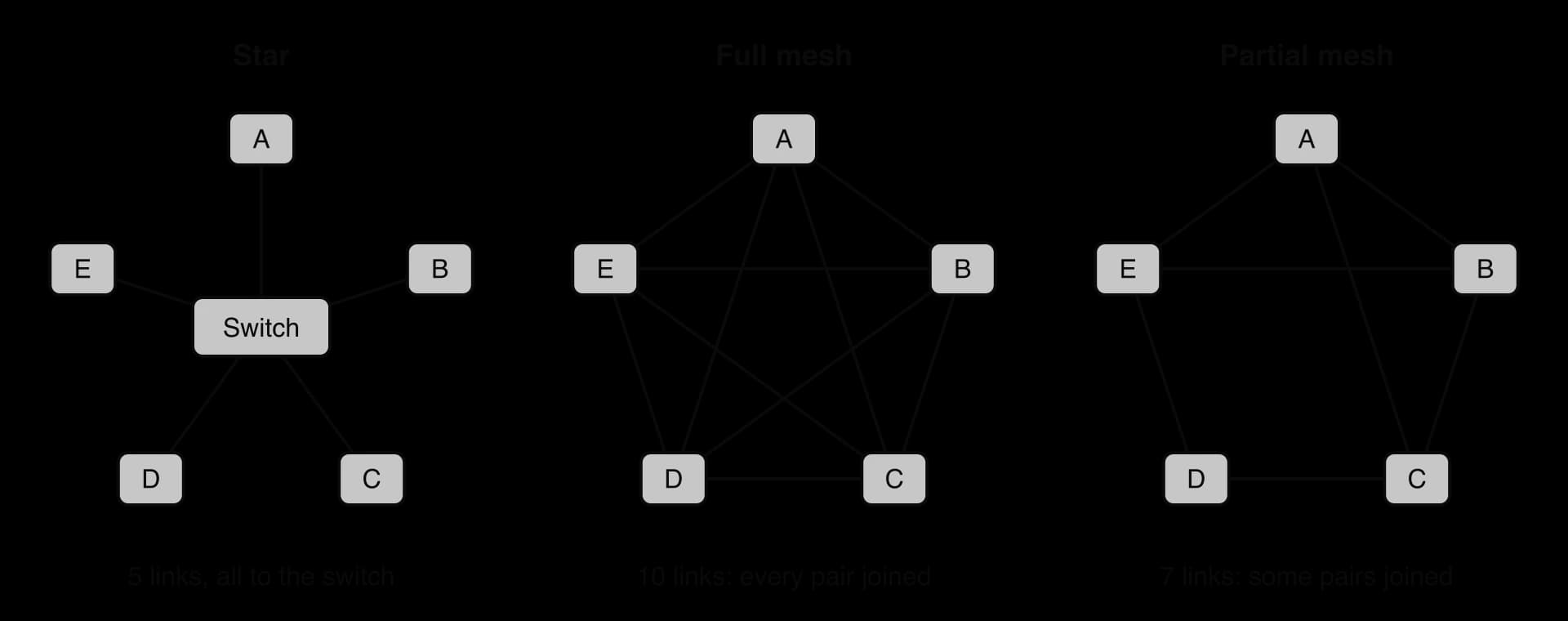
In a star topology every end device has its own cable to one central device, almost always a switch in a modern local area network (LAN). Data from one computer to another travels in two hops: from the sender to the switch, then from the switch to the receiver. No end device ever forwards data for another.
A switch keeps a table of which device is attached to which port. When a frame arrives, the switch reads its source MAC address and records the port that device is on; it then looks up the destination MAC address in the table and sends the frame out of only the matching port (a frame for an address not yet in the table is sent out of every other port, once, until the reply fills in the entry). Two computers on different ports can therefore send at the same time without interfering, and the other computers never see traffic that is not addressed to them.
The star topology diagram of nodes A to E shows both the strength and the weakness of this design. If the cable to node C breaks, only C is cut off; A, B, D and E carry on as before, and the faulty cable is easy to find because each cable serves one device. If the switch fails, every node loses its only path to every other node.
The star is the standard design for home networks, offices and each floor of larger buildings. A home router is itself a small star: its built-in switch and wireless access point are the centre, and every phone, laptop and smart TV connects to it. Adding a device means adding one cable to a free switch port (or joining the Wi-Fi), with no change to any other device.
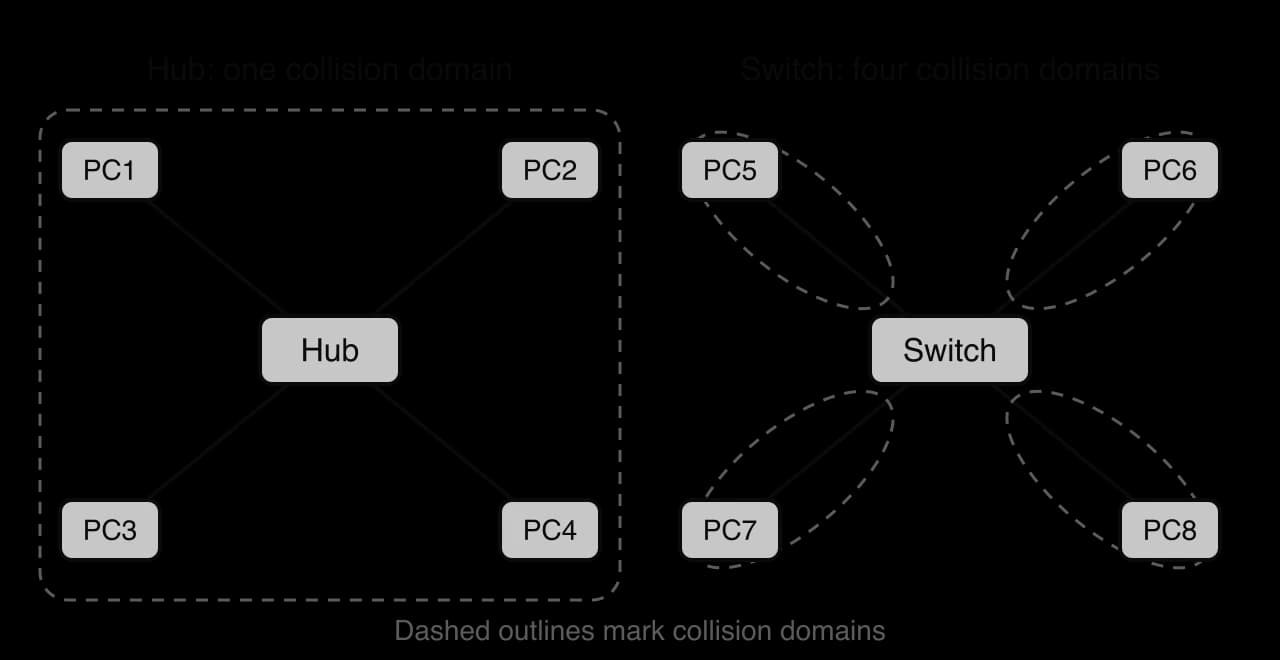
Early star networks used a hub at the centre. A hub reads no addresses and keeps no table, so it copies every incoming signal to every other port. If two computers send at the same moment, their electrical signals meet on the shared medium and both are destroyed.
Shared-medium Ethernet dealt with this by a rule called carrier sense multiple access with collision detection (CSMA/CD): a device listens before sending, and if it detects a collision while sending it stops, waits a random time and tries again. The rule keeps the network working, but every collision wastes time, and the more devices share the medium, the more often collisions happen.
The part of a network in which two devices can collide is called a collision domain. All the devices on a hub share one collision domain. A switch gives each of its ports a separate collision domain, and with full-duplex links (sending and receiving on separate wire pairs at the same time) a switched port has no collisions at all.
Wireless networks are a shared medium again: all devices on one Wi-Fi channel use the same radio frequencies. Wi-Fi cannot detect collisions while transmitting, so it tries to avoid them instead (devices wait for a quiet channel and a random back-off before sending). As more devices join one access point, more airtime is lost to waiting, which is one reason a crowded classroom Wi-Fi network slows down while the wired network in the same room does not.
In a mesh topology nodes are joined to several other nodes, so there is more than one route between them. Data can be forwarded through intermediate nodes, and if one link or node fails, traffic is sent around the fault along another path.
A full mesh links every pair of nodes. With nodes, each node links to the other , and each link is shared by two nodes, so the number of links is
A partial mesh adds only some of these links, usually between the most important nodes or wherever a single failure would cut off part of the network. Most real meshes are partial, because the full-mesh formula grows with the square of the number of nodes.
Multiple paths give a mesh its main strength, called redundancy: there are spare routes that are not needed while everything works but carry traffic when something fails.
Redundancy has costs. Every extra link needs a cable (or radio link), a port at both ends and configuration, and the routers have to run routing protocols that choose between the paths, which adds processing and complexity. A mesh is therefore used where downtime costs more than the extra equipment: the routers at the core of the internet and of large organisations' wide area networks (WANs) are joined in partial meshes, and home Wi-Fi mesh systems place several access points around a house that relay data for each other, so a weak link to one point can be bypassed through another.
Two older topologies explain how hybrid networks are named and why the star took over. In a bus topology every node is attached to a single shared cable (the backbone), with a terminator at each end to stop signals reflecting back. In a ring topology each node is joined to exactly two neighbours, forming a loop, and data passes round the ring from node to node until it reaches its destination.
A bus is cheap to cable, but it is one collision domain, and a single break in the backbone splits the network. A ring has no collisions when only the node holding permission (a "token") may send, but a single break stops traffic unless a second ring runs the other way round. Both are now rare in LANs; their names survive in larger designs such as a ring of fibre linking city exchanges, or a "backbone" cable joining the floors of a building.
Large networks combine topologies so that each part uses the design that suits it. The most common combination is a star of stars (also called a tree or hierarchical topology): each floor or building has a switch with its devices in a star, and those switches connect up to a central switch, itself the centre of a star. Larger sites go further and join the central switches in a mesh, so that losing one central switch or one cable does not cut off a building.
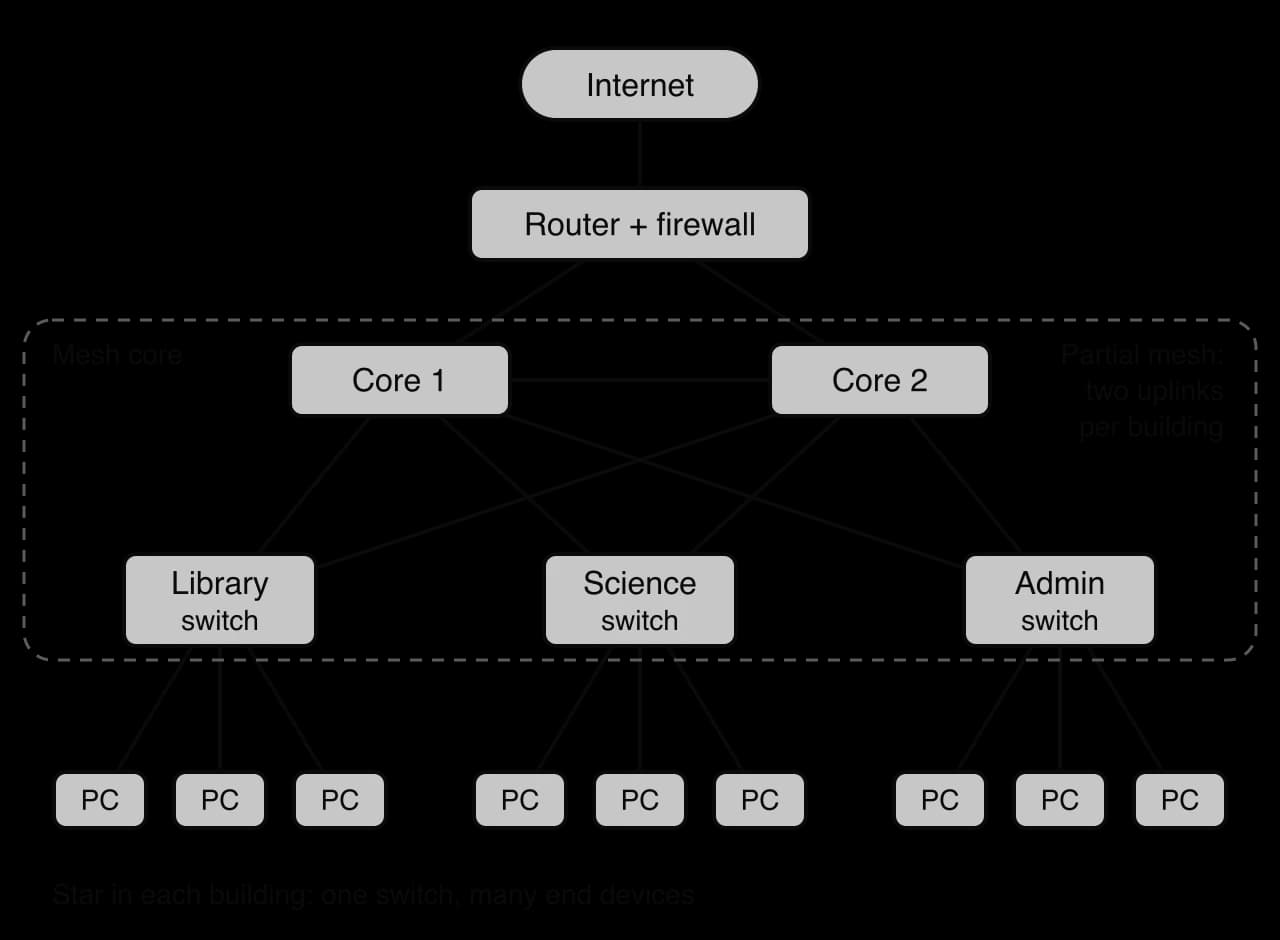
The campus diagram shows where a hybrid places its money. End devices are many and individually unimportant, so each gets one cheap cable to its building switch, as in a star. Building switches serve hundreds of people, so each has two uplinks, one to each core switch. The core carries everyone's traffic, so it is duplicated and cross-linked. The remaining single points of failure are the building switches (each serves only one building) and the single router and firewall to the internet, which a larger organisation would also duplicate.
 YouTube
A topology is chosen by weighing five factors: reliability, transmission speed, scalability, data collisions and cost. Scalability, the ability of a network to grow, applies to much more than topologies and recurs when comparing networking models and servers.
Factor | Star | Mesh | Hybrid |
|---|---|---|---|
Reliability | One cable fault affects one node; the central switch is a single point of failure | Very high: multiple paths, so traffic is rerouted round a failed link or node | High where the core is meshed or duplicated; each star still depends on its own switch |
Transmission speed | Fast: every node has a dedicated full-duplex link to the switch; two hops between any two nodes | Depends on the links and the load; a direct link in a full mesh is one hop, but in a partial mesh data may cross several nodes | Fast within a star; traffic between buildings shares the uplinks, which are usually faster links |
Scalability | Easy until the switch runs out of ports, then another switch must be added (becoming a hybrid) | Poor for a full mesh: links grow as ; a partial mesh scales better | Good: add another star to the core without changing the others |
Data collisions | None with a switch (each port is its own collision domain); one collision domain with a hub | None on point-to-point links; wireless meshes share radio channels | None on switched parts; depends on the components |
Cost | Moderate: one cable per node plus a switch | High: many links, ports and configuration | Moderate to high, depending on how much of the network is meshed |
Transmission speed needs careful wording. A mesh is not automatically faster: its extra paths provide redundancy and spread the load, but each hop through an intermediate node adds a small delay, and the speed of any path is limited by its slowest link. In a star the switch forwards frames in microseconds, and the speed between two nodes depends mainly on the link speed (for example 1 Gbit/s per port).
Practical applications follow from the factors. Home and small-office networks, where the few devices must simply keep working with little technical support, use a single star around a router with a built-in switch: it is cheap, easy to fix and has no collisions, and its one single point of failure is a cheap device that can be swapped quickly. Corporations, government departments and college campuses use hybrids: stars for the many end devices, plus a meshed or duplicated core for the links that everyone depends on. Network backbones, between cities or data centres, use partial meshes, because an outage there affects millions of people.
A topology describes how devices are wired together; a networking model describes which devices provide services and which use them. The two ideas are independent. A client–server application and a peer-to-peer application can both run over the same star-shaped school network.
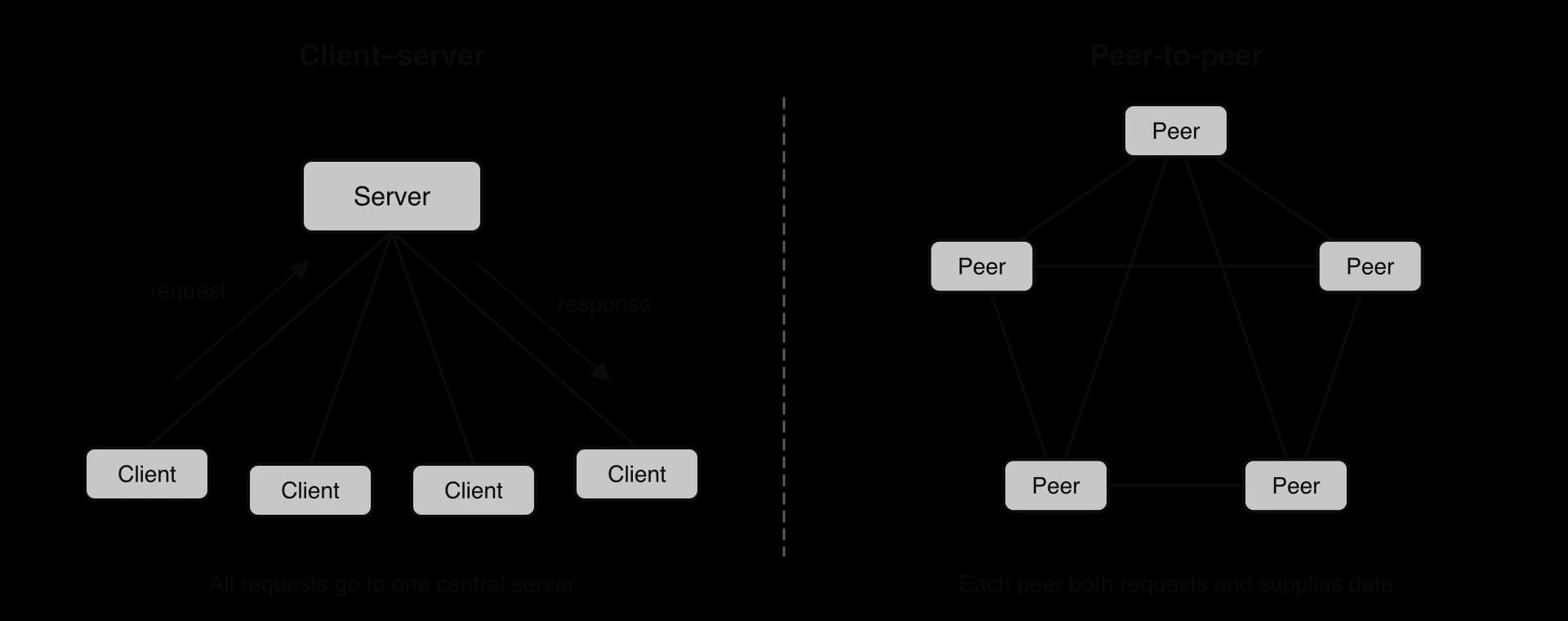
In the client–server model, some computers (servers) hold resources and provide services, and other computers (clients) request them. A web browser is a client; the computer that stores and sends the web page is a server. The client always starts the conversation by sending a request; the server waits for requests and sends responses.
The term describes a role rather than a type of hardware. A powerful machine in a data centre is usually a server, but a laptop running a file-sharing program is also acting as a server while others download from it. A single physical server often runs several server programs, each listening on its own port number.
Central control is the reason organisations choose client–server. Data lives in one place, so it is consistent (every client sees the same bank balance), it can be backed up in one place, and access can be controlled by one set of rules: the server checks each user's authentication and permissions before answering. Software updates are applied once on the server rather than on every client.
The same centralisation causes the model's drawbacks. The server is a single point of failure unless it is duplicated; all requests compete for its processing power and its network link, so it can become a bottleneck at busy times; and servers, their licences, power and expert staff are expensive. A central store of valuable data is also an attractive target: client–server is easier to secure, because there is one place to defend, but a successful attack on that place exposes everything.
In a peer-to-peer (P2P) network there is no permanent distinction between clients and servers. Every computer, called a peer, can request resources from other peers and supply resources to them, often at the same time. A peer downloading part of a file from one peer may be uploading another part to a third.
Capacity in a P2P network grows with its users. Every new peer adds demand, but it also adds upload bandwidth, storage and processing that other peers can use, so a popular file becomes easier to obtain the more people have it. No single machine has to be bought, powered or maintained by one organisation, and there is no central server whose failure stops the service.
The drawbacks come from the lack of central control. Peers join and leave at will, so a resource is only available while some peer holding it is online. Nobody guarantees that the data a peer supplies is correct or safe, so P2P systems must check what they receive (for example with a cryptographic hash of each piece). Backups, access control and updates have to be organised by each peer, and a peer's IP address is visible to the others, which raises privacy concerns. P2P networks have also been widely used to share copyrighted material, which has given the model a poor reputation even though the architecture itself is lawful and widely used.
The two models share their purpose and much of their machinery: both let computers share resources over a network, both work over the same physical networks and protocols (TCP, IP), and both have a computer acting as a server whenever it answers a request. The differences lie in who holds the resources and who is in control.
Aspect | Client–server | Peer-to-peer |
|---|---|---|
Roles | Fixed: servers provide, clients request | Every peer can both request and provide |
Where data is stored | Centrally, on servers | Spread across the peers |
Control and management | Central: one place for accounts, permissions, backups and updates | Distributed: each peer manages itself; hard to enforce rules |
Security | Easier to secure in one place; the server is a high-value target | Hard to secure: untrusted peers, visible IP addresses, unverified content unless checked |
Reliability | Server is a single point of failure unless duplicated | No central failure point; a file disappears if no peer holding it is online |
Scalability | Adding clients loads the server; scaling means buying more server capacity | Each new peer adds capacity as well as demand |
Cost | High: servers, data-centre space, staff | Low for the provider: peers supply the hardware and bandwidth |
Consistency | One authoritative copy | Copies may differ until they are synchronised |
Typical uses | Web browsing, email, online banking | BitTorrent file sharing, blockchain ledgers, early Skype calls |
The scalability row is the deepest difference, and it can be estimated with numbers. Suppose one copy of a file must reach every one of many downloaders. In client–server, the server must upload every copy itself; in P2P, every peer that has received a piece can upload it to others, so the total upload capacity grows with the number of peers.
The common applications of the two models differ in what they need most: central control and one authoritative copy, or low cost and capacity that grows with users. When a browser fetches a page, for example, it sends an HTTP request for a URL to a web server, never to another browser.
Application | Usual model | Reason |
|---|---|---|
Web browsing | Client–server | The browser sends an HTTP request for a URL and a web server returns the page; busy sites spread the load over many servers, but browsers never fetch pages from each other |
Client–server | Mail servers hold each message until the recipient's device collects it, even while that device is switched off, which a P2P design could not guarantee | |
Online banking | Client–server | The bank needs one authoritative record of every balance, strict access control, audit logs and backups, all of which require central control |
File sharing | Either | A cloud storage service is client–server (central control, guaranteed availability); BitTorrent is P2P (low cost, scales with demand) |
VoIP calls | Often a hybrid | Servers find and ring the other user; the audio can then flow directly between the callers |
Blockchain | Peer-to-peer | Every full node keeps its own copy of the ledger, so there is no central server to shut down or alter the records |
Voice and video calls are carried over IP networks as packets of digitised sound, a technique called VoIP. Calls show why many real systems are hybrids of the two models.
A VoIP call has two parts. Signalling (finding the other person, ringing their device, agreeing on how to encode the sound) is usually handled by servers, because they know where each user is currently connected. The media (the audio itself) can then flow directly between the two callers, peer-to-peer, which cuts delay and server costs, or be relayed through a server when firewalls block a direct connection. Skype, released in 2003, originally used a hybrid peer-to-peer design in which some users' computers relayed traffic for others; after Microsoft bought it in 2011 the relaying moved to Microsoft-run servers (2012) and then to a fully central, cloud-based service (2017), and Skype was retired on 5 May 2025 in favour of Microsoft Teams.
Source: Wikipedia, "Skype", accessed October 2026.
Blockchain systems such as Bitcoin are P2P: every full node keeps its own copy of the ledger and passes new transactions and blocks to its peers, so there is no central server to shut down or to alter the records. The cost is that the peers must agree on the correct ledger without trusting each other, which requires a consensus method; subtopic A2.1 covers the blockchain as a distributed system.
BitTorrent is a peer-to-peer file-sharing protocol designed by the programmer Bram Cohen in April 2001, with the first version released on 2 July 2001. It was built to make large files quick to download by fetching them from many sources at once instead of from one server.
BitTorrent splits each file into equal-sized pieces (for example, a 10 MB file might be split into forty 256 KB pieces). A small .torrent file (or a magnet link) holds the file's metadata: the names and sizes of the files, the piece size and a cryptographic hash of every piece. Peers sharing the same file form a swarm.
Term | Meaning |
|---|---|
Piece | One equal-sized part of the shared file, checked by its own hash |
Swarm | All the peers currently sharing one file |
Seed | A peer that has the complete file and only uploads |
Leecher | A peer that is still downloading (and also uploads the pieces it has) |
Tracker | A server that tells each peer the IP addresses of other peers in the swarm |
A new peer obtains the .torrent file and contacts a tracker, a server that lists the IP addresses of other peers in the swarm. Later clients can also find peers without a tracker, through a distributed hash table spread across the peers themselves, and by peer exchange.
The peer connects to several peers at once and requests different pieces from each, usually starting with the rarest pieces in the swarm so that every piece stays available.
Each piece is checked against its hash on arrival. A piece that does not match, through damage or tampering, is thrown away and fetched again.
As soon as a piece has been verified, the peer starts uploading it to others. The original seed may only need to upload each piece once; the swarm does the rest.
Pieces arrive out of order and are reassembled into the complete file. A download can stop and resume later without losing the verified pieces.
The design shows the strengths and weaknesses of P2P clearly. Distribution cost moves from the publisher to the downloaders, and popular files become faster to get as the swarm grows. Hash checks make up for the lack of trust between peers. However, the tracker is a single point of failure for finding peers (a weakness the distributed hash table removes), a file disappears when no seed is online, and every peer's IP address is visible to the swarm.
BitTorrent has many lawful uses. Game companies such as Blizzard have delivered patches through it, Facebook and Twitter have used it to distribute software updates to their own servers, and the Internet Archive added BitTorrent downloads for more than 1.3 million files in August 2012. Its reputation was shaped by sites indexing copyrighted films and music. Its share of internet traffic, about a third in 2004 by one estimate, has since declined considerably.
Source: Wikipedia, "BitTorrent", accessed October 2026.
Every type of server follows the client–server pattern, but each provides a different service and fails in a different way. Three techniques recur so often in making servers scalable and reliable that they are named first: load balancing, failover and content delivery networks.
A load balancer sits in front of a group of identical servers and passes each new request to one of them (in turn, or to the least busy). Capacity is increased by adding servers to the group, which is called scaling out. Because the load balancer stops sending requests to a server that does not respond, the group also survives the failure of one server.
The third technique moves copies of content closer to users. A content delivery network keeps copies of a website's images, videos and scripts on servers in many cities, and each user is directed to the nearest copy. Pages load faster because data travels a shorter distance, and the origin server receives far fewer requests.
People use domain names such as www.example.org, but packets are delivered to IP addresses. The Domain Name System translates one into the other. It is not a single server but a worldwide, hierarchical database split across millions of servers, each responsible for its own part of the namespace.
The hierarchy follows the parts of a domain name, read from right to left. Root servers know where to find the servers for every top-level domain. Top-level domain (TLD) servers know which servers are responsible for each domain inside .org, .com, .uk and so on. Authoritative servers, run by a domain's owner or its DNS provider, hold the actual records, such as the IP address of www.example.org. Most clients ask a resolver (usually run by their ISP or organisation) to do the work for them.
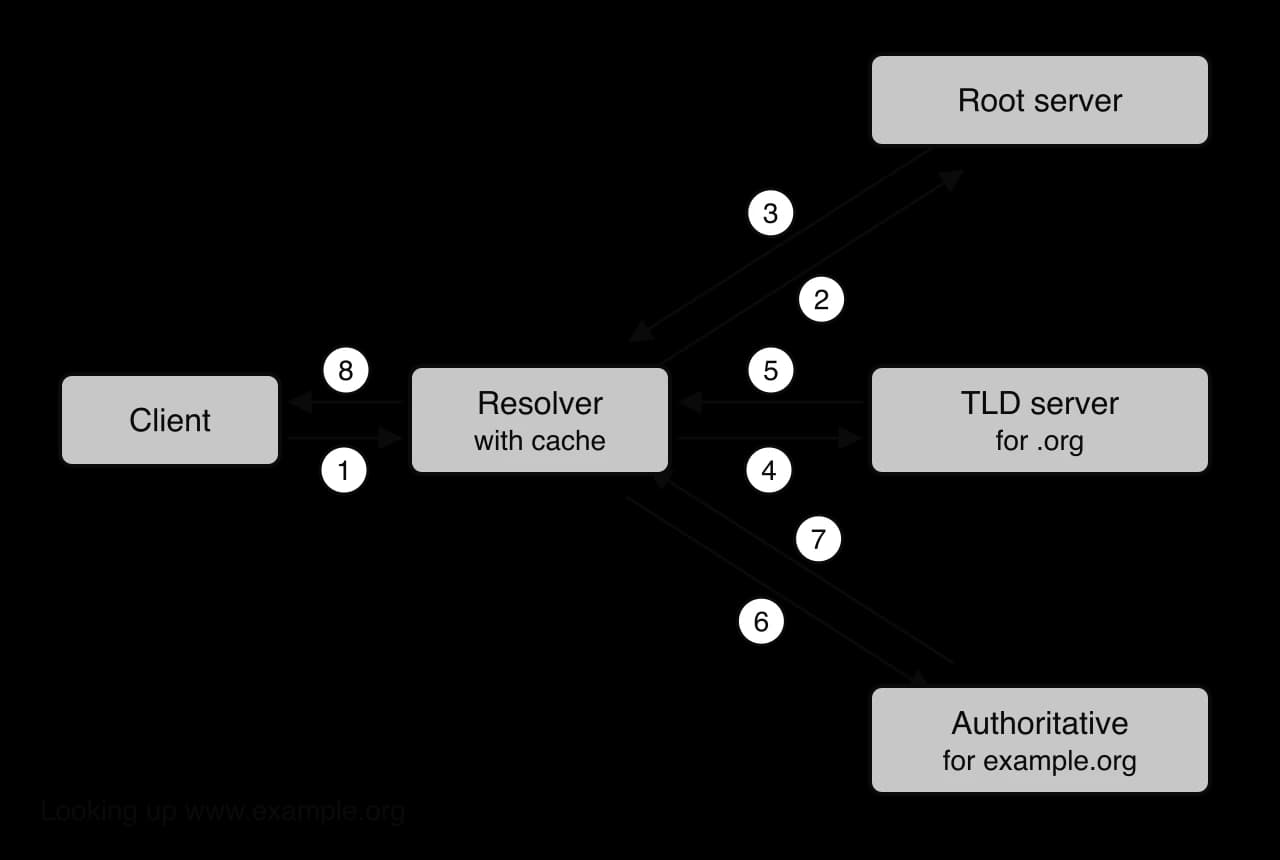
The numbered steps in the DNS diagram for a lookup of www.example.org are:
The client asks its resolver for the IP address of www.example.org.
The resolver has no cached answer, so it asks a root server.
The root server replies with the addresses of the .org TLD servers.
The resolver asks a .org TLD server.
The TLD server replies with the addresses of the authoritative servers for example.org.
The resolver asks an authoritative server.
The authoritative server replies with the IP address of www.example.org.
The resolver stores the answer in its cache and returns it to the client, whose browser can now open a connection to that IP address.
Caching makes DNS fast and scalable. Every record carries a lifetime in seconds set by the domain's owner, and resolvers, operating systems and browsers keep answers until the lifetime runs out. Most lookups are answered from a cache on the device or at the resolver in a few milliseconds, and root servers only receive the small share of queries that no cache can answer.
 YouTube
DNS is built for reliability through redundancy at every level. Each domain is normally given at least two authoritative servers, and most domain registries insist on it. There are 13 named root servers (a.root-servers.net to m.root-servers.net), run by 12 independent organisations, and each name is served by many copies around the world through a routing technique called anycast, in which the same IP address is announced from many places and each query reaches the nearest copy: 2,047 instances were operating in October 2026.
Source: root-servers.org, 14 October 2026.
Security is the weak point of the original design, which trusts any answer that looks correct. An attacker who tricks a resolver into caching a false record (cache poisoning) sends every user of that resolver to a fake server. DNSSEC adds digital signatures so that resolvers can check that records are genuine, and DNS queries can also be encrypted between client and resolver. DNS servers are also targets for distributed denial-of-service (DDoS) attacks, because taking DNS away makes every site that depends on it unreachable even though the sites' own servers are still running.
The DDoS risk to DNS became visible on 21 October 2016, when three waves of attacks hit Dyn, a company that ran authoritative DNS for many large websites. The traffic came from tens of millions of IP addresses, largely Internet of Things devices such as cameras and home routers infected with the Mirai malware, and sites including Twitter, Netflix, Reddit, GitHub, Spotify and PayPal were unreachable for many users in North America and Europe. Companies that had used Dyn as their only DNS provider had a single point of failure; the lesson drawn was to spread authoritative DNS across two independent providers.
Source: Wikipedia, "DDoS attacks on Dyn", accessed October 2026.
A device joining a network needs an IP address, a subnet mask, the address of its default gateway (router) and the address of a DNS resolver. A DHCP server hands out all four automatically, using the DHCP protocol's discover, offer, request and acknowledge messages taught in subtopic A2.1.
Function: the DHCP server keeps a pool of free addresses and a record of which device holds which address until when. Because each lease expires unless renewed, addresses from devices that leave (a visitor's phone) return to the pool. Administrators can also reserve a fixed address for a device such as a printer, identified by its MAC address, so it always receives the same one.
Scalability: one DHCP server can serve thousands of devices, because each conversation is a few small messages. A network split into several subnets either runs a DHCP service in each or lets routers relay requests to one central server, which then needs a separate pool for each subnet. Reliability: if the DHCP server fails, devices that already hold leases keep working until their leases run out, but new devices cannot join, so organisations run two servers that split the pool or share lease records with failover. Security: DHCP has no authentication, so a "rogue" DHCP server plugged into the network (by accident or by an attacker) can hand out its own gateway and DNS addresses and redirect traffic; managed switches can block DHCP offers from any port that is not the real server's.
A file server stores files centrally so that users can open and save them from any computer on the network, as if they were on a local drive.
Function: users see shared folders (a home folder for each user, plus department folders), and the server applies access control so that, for example, students can read a course folder but only teachers can change it. Because files are in one place, they can be backed up together every night, and nobody loses work when one laptop is stolen.
Scalability comes from adding disks or moving to larger storage arrays, and from splitting users across several file servers. Reliability comes from redundancy inside the server (several disks storing the same data, so one disk failure loses nothing, plus duplicate power supplies), backups held in another place, and sometimes a replica server for failover. Security relies on authentication, permissions on every folder, encryption of stored files, and protection against ransomware, which encrypts everything a compromised account can write to; read-only snapshots of earlier versions let files be restored after such an attack.
Email is delivered by a chain of mail servers using different protocols for sending and for collecting.
Function: a mail program sends a new message to its own mail server using the Simple Mail Transfer Protocol (SMTP). That server looks up, through DNS, which mail server accepts mail for the recipient's domain and relays the message to it, again by SMTP. The receiving server stores the message in the recipient's mailbox. The recipient's mail program then collects it with IMAP (Internet Message Access Protocol), which keeps messages on the server and synchronises folders across all the user's devices, or POP3 (Post Office Protocol version 3), which downloads messages to one device and usually deletes them from the server.
Scalability: large providers spread mailboxes across many servers behind load balancers. Reliability: a domain can list several receiving servers with priorities, and a sending server that cannot deliver keeps the message in a queue and retries for days, so a short outage loses no mail. Security: mail servers filter spam and malware, check whether the sending server is allowed to send for that domain (to detect forged senders), and use TLS to encrypt connections between clients and servers and between servers.
A proxy server is an intermediary: clients send their requests to the proxy, and the proxy makes the request to the destination server on their behalf, then passes the response back. To the destination server, every request appears to come from the proxy.
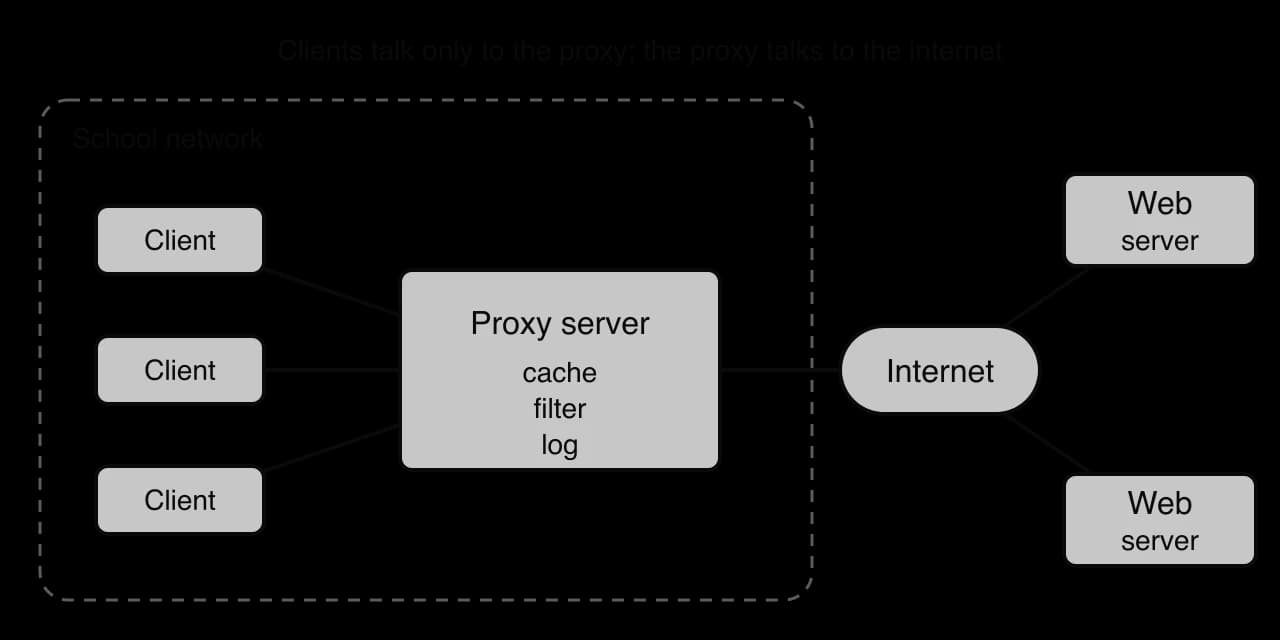
The position of the proxy in the diagram gives it four functions. Caching: the proxy keeps copies of recent responses, so when 30 students open the same page, the proxy fetches it once and serves the other 29 from its cache, which is faster and saves internet bandwidth. Content filtering: the proxy refuses requests for blocked sites or categories, as schools and some countries do. Logging: it records which user requested what and when, for monitoring. Anonymity: the destination sees the proxy's IP address, not the client's. A reverse proxy works the other way round: it sits in front of an organisation's web servers, receives requests from the internet, and passes them to the servers, which lets it balance load, cache content and hide the servers' internal structure.
For scalability, proxies are deployed in groups behind a load balancer; for reliability, a second proxy takes over by failover, because if the only proxy fails nobody can reach the web. Security is a double-edged factor. A proxy protects clients by filtering malicious sites, and a reverse proxy protects servers from direct exposure. However, a proxy that inspects encrypted HTTPS traffic must decrypt it in the middle, so it holds sensitive data, and its logs raise privacy questions.
A web server stores websites and sends their content to browsers that request it with HTTP or HTTPS.
Function: a static page is a file sent unchanged to every visitor, such as a school's contact page. A dynamic page is generated for each request by a program on the server, often using data from a database, such as an online shop's basket. The web server listens on port 80 for HTTP and 443 for HTTPS, and every response carries a status code such as 200 (OK) or 404 (not found).
Scalability: a busy site runs many identical web servers behind load balancers and uses a CDN so that most images and videos never reach its own servers. Reliability: servers in more than one data centre with failover between them. Security: HTTPS with a valid certificate so that data cannot be read or altered in transit, regular patching, input validation on dynamic pages, a firewall that allows only web traffic in, and DDoS protection, often provided by the CDN.
Server | Function | Scalability | Reliability | Security |
|---|---|---|---|---|
DNS | Translates domain names to IP addresses | Hierarchy splits the work; caching answers most queries locally | At least two authoritative servers per domain; anycast copies of root servers; two providers | Cache poisoning countered by DNSSEC; DDoS protection; encrypted queries |
DHCP | Leases IP address, mask, gateway and DNS settings | One server serves thousands; relays let one server cover many subnets | Two servers sharing the pool; existing leases survive a short outage | No built-in authentication; switches block rogue DHCP servers |
File | Stores and shares files centrally with permissions | Add disks, storage arrays or servers | Redundant disks, backups elsewhere, replica server | Permissions, encryption, snapshots against ransomware |
Sends (SMTP), receives and stores email, delivered by IMAP or POP3 | Mailboxes spread across many servers | Several receiving servers; queues retry for days | Spam and malware filtering, sender checks, TLS | |
Proxy | Forwards client requests; caches, filters, logs | Groups of proxies behind a load balancer | Failover proxy, since all web traffic depends on it | Filters malicious sites; hides clients (or servers); holds sensitive logs |
Web | Sends static or dynamic web pages over HTTP(S) | Load balancing and CDNs | Several data centres with failover | HTTPS, patching, input validation, firewall, DDoS protection |
A small network can be one flat LAN in which every device can reach every other directly. As a network grows, that flatness causes three problems: unnecessary traffic reaches every device, one compromised device can reach everything, and every group of users shares the same rules. Network segmentation divides the network into smaller parts, each with its own traffic and its own rules.
Performance is the first reason. Some traffic is sent to every device on a LAN: a broadcast. DHCP discover messages are broadcasts, and so is ARP, the protocol a device uses to find the MAC address that belongs to an IP address on its own network. On a network of thousands of devices, each device spends bandwidth and processing on broadcasts that are meant for others. Routers do not forward broadcasts, so each segment limits broadcasts to its own devices.
Segmentation also reduces congestion. When too much traffic competes for one link or device, frames and packets wait in queues or are dropped, and everything slows down. Keeping local traffic local (a department's printing and file copying stay inside its segment) leaves the links between segments free for the traffic that really must cross them.
Security is the second reason. In a flat network, an attacker who gains control of one device, through a phishing email or an insecure smart camera, can reach every other device. In a segmented network, traffic between segments passes through a router or firewall whose rules allow only the communication each segment needs. Guests reach the internet but not the staff segment; card-payment terminals reach the payment server and nothing else. A breach is contained in the segment where it starts.
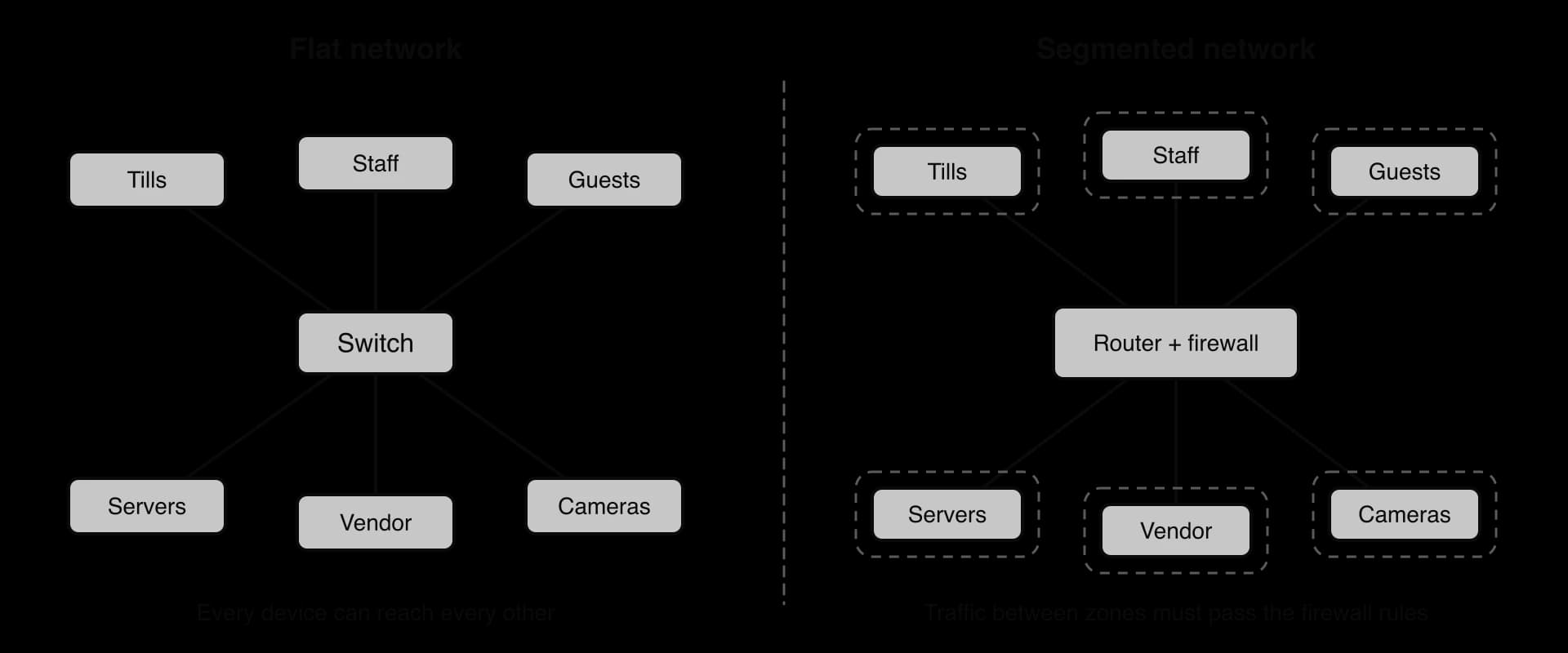
The Target data breach of late 2013 is a widely cited example of weak separation. Up to 110 million customers had their data stolen. The attackers are reported to have first entered Target's network with credentials stolen from a heating, air-conditioning and refrigeration contractor, which had remote access for electronic billing, contract submission and project management; once inside, they installed malware to collect customers' data. A later US Senate committee staff analysis concluded that Target had failed to isolate its most sensitive assets from the rest of its network. Segmentation addresses this weakness directly: a vendor zone whose firewall rules allow only the billing and project systems keeps stolen vendor credentials from leading anywhere else.
Sources: Wikipedia, "Target Corporation", accessed October 2026 (size of the breach); CBS News, 25 March 2014, reporting the staff report of the US Senate Committee on Commerce, Science and Transportation (vendor route and findings).
Managing resources is the third reason. Each segment can have its own policies: quality of service that gives video calls priority in the staff segment, bandwidth limits on guest Wi-Fi, separate address pools, and monitoring focused on the server segment. Problems are also easier to locate when the network is divided into named zones.
There are costs. Segmentation needs managed switches, routers or firewalls able to route between segments, and careful planning; every rule between segments must be written and maintained, and a wrong rule can block a service that people need. Traffic that must cross segments passes through an extra device, which adds a small delay.
Aim | How segmentation helps | Cost or limit |
|---|---|---|
Performance | Broadcasts stay inside their segment; local traffic stays local, reducing congestion on shared links | Traffic between segments crosses a router or firewall, adding a small delay |
Security | Rules between segments allow only needed traffic; a breach is contained in one segment | Rules must be written and maintained; a mistake can block a needed service or leave a gap |
Resource management | Separate policies, address pools, bandwidth limits and monitoring per segment | More devices and configuration to plan, document and troubleshoot |
Segments are created at two levels. Subnetting divides the IP addressing of a network, so that devices in different subnets must communicate through a router. VLANs divide the switches, so that devices on the same physical switch can be kept apart. Most organisations use both together.
An IPv4 address is 32 bits long, written as four 8-bit numbers in denary separated by dots, such as 192.168.10.77. Each of the four numbers is between 0 and 255, because 8 bits can hold values. Subtopic A2.3, Data transmissions, covers IP addressing in full.
Every IPv4 address has two parts. The network part (the leftmost bits) identifies the network the device is on; the host part (the remaining bits) identifies the device within that network. Two devices with the same network part are on the same network and can send to each other directly through switches; if the network parts differ, the data must go through a router.
A device works out where the network part ends using a subnet mask: a 32-bit pattern with 1s for every bit of the network part and 0s for every bit of the host part.
The mask 255.255.255.0 is 24 ones followed by 8 zeros, so the first three octets are the network part. Because the 1s always come first, a mask can be written more briefly as the number of 1s after a slash: 192.168.10.0/24.
CIDR stands for Classless Inter-Domain Routing. The number after the slash is called the prefix length. A prefix of /24 leaves host bits, so the network contains addresses. Two of these cannot be given to devices: the address with all host bits 0 is the network address (it names the network itself) and the address with all host bits 1 is the broadcast address (a message to it reaches every device on the subnet). The number of usable host addresses is therefore
A device finds the network address of any IP address by combining it with the mask bit by bit, using the AND operation from subtopic A1.2: a 1 in the mask keeps the address bit (network part), and a 0 in the mask turns it into 0 (host part removed).
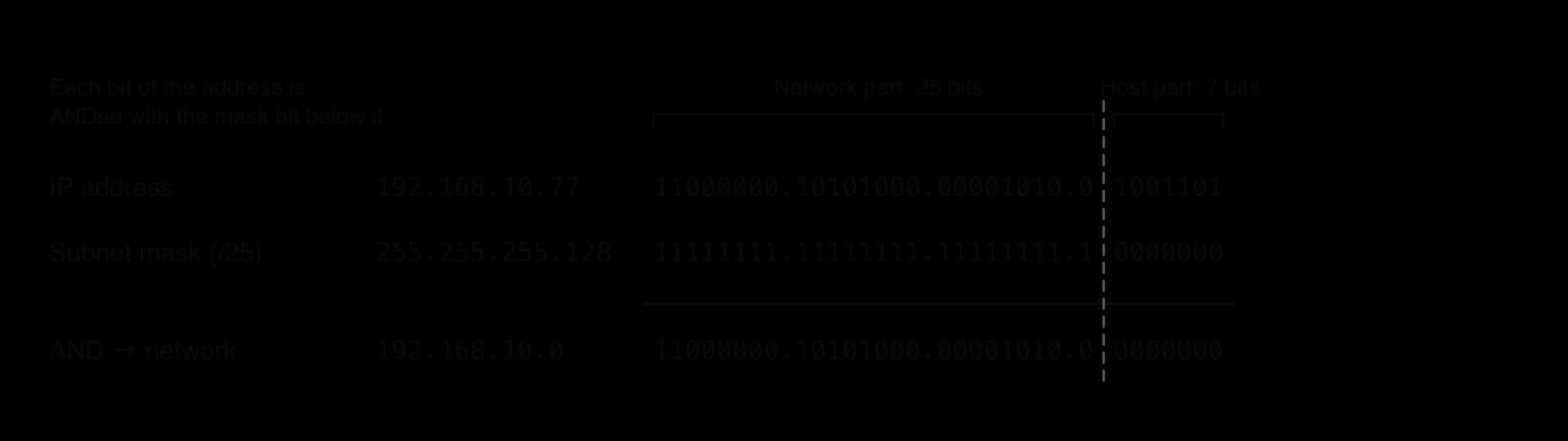
Only the last octet needs working in the AND example, because the mask's first three octets are 255 (all 1s), which leaves those octets unchanged:
So 192.168.10.77/25 is on the network 192.168.10.0/25.
Working out the address ranges of subnets is an extension beyond the minimal picture of a mask applied with AND. It supports understanding rather than adding a separate skill: the ranges and broadcast addresses of real subnets show why two hosts end up in different broadcast domains, and why traffic between them needs a router.
Subnetting borrows bits from the host part and uses them as extra network bits. Each borrowed bit doubles the number of subnets and halves the size of each.
A school has the network 192.168.10.0/24 (256 addresses). Borrowing one bit gives a /25 mask (255.255.255.128) and two subnets of 128 addresses each. The borrowed bit is the first bit of the last octet: 0 for the first subnet (last octet 0–127) and 1 for the second (128–255).
Subnet | Network address | Usable host addresses | Broadcast address | Usable hosts |
|---|---|---|---|---|
Original network | 192.168.10.0/24 | 192.168.10.1 to 192.168.10.254 | 192.168.10.255 | 254 |
Subnet 1 | 192.168.10.0/25 | 192.168.10.1 to 192.168.10.126 | 192.168.10.127 | 126 |
Subnet 2 | 192.168.10.128/25 | 192.168.10.129 to 192.168.10.254 | 192.168.10.255 | 126 |
Splitting the network costs two addresses (subnet 1's broadcast address and subnet 2's network address) and produces two broadcast domains. Hosts in subnet 1 now reach hosts in subnet 2 only through a router, and that router's rules (or a firewall beside it) decide which traffic is allowed to cross. Staff computers in subnet 1 and student computers in subnet 2 share the same building and cables, yet a student device cannot reach a staff device unless the router allows it.
The same AND step can be programmed. The function network_address splits an address into its four octets, builds the mask from the prefix length and ANDs each pair of octets; same_subnet compares two network addresses. Python's & and Java's & are the bitwise AND operator on integers.
def mask_from_prefix(prefix):
    """Return the subnet mask for a CIDR prefix as a list of four octets."""
    mask = []
    for i in range(4):
        bits = prefix - 8 * i  # mask bits that fall in this octet
        if bits >= 8:
            mask.append(255)
        elif bits <= 0:
            mask.append(0)
        else:
            mask.append(256 - 2 ** (8 - bits))
    return mask


def network_address(ip, prefix):
    """AND each octet of the IP address with the matching mask octet."""
    parts = ip.split(".")
    mask = mask_from_prefix(prefix)
    network = []
    for i in range(4):
        network.append(int(parts[i]) & mask[i])
    return network


def to_dotted(octets):
    text = str(octets[0])
    for i in range(1, 4):
        text = text + "." + str(octets[i])
    return text


def same_subnet(ip_a, ip_b, prefix):
    return network_address(ip_a, prefix) == network_address(ip_b, prefix)


for prefix in [24, 25, 26]:
    hosts = 2 ** (32 - prefix) - 2
    print("/" + str(prefix), to_dotted(mask_from_prefix(prefix)), hosts, "hosts")
print(to_dotted(network_address("192.168.10.77", 25)))
print(same_subnet("192.168.10.77", "192.168.10.140", 24))
print(same_subnet("192.168.10.77", "192.168.10.140", 25))public class Subnet {
// Return the subnet mask for a CIDR prefix as four octets.
static int[] maskFromPrefix(int prefix) {
int[] mask = new int[4];
for (int i = 0; i < 4; i++) {
int bits = prefix - 8 * i; // mask bits that fall in this octet
if (bits >= 8) {
mask[i] = 255;
} else if (bits <= 0) {
mask[i] = 0;
} else {
mask[i] = 256 - (int) Math.pow(2, 8 - bits);
}
}
return mask;
}
// AND each octet of the IP address with the matching mask octet.
static int[] networkAddress(String ip, int prefix) {
String[] parts = ip.split("\\.");
int[] mask = maskFromPrefix(prefix);
int[] network = new int[4];
for (int i = 0; i < 4; i++) {
network[i] = Integer.parseInt(parts[i]) & mask[i];
}
return network;
}
static String toDotted(int[] octets) {
String text = String.valueOf(octets[0]);
for (int i = 1; i < 4; i++) {
text = text + "." + octets[i];
}
return text;
}
static boolean sameSubnet(String ipA, String ipB, int prefix) {
int[] a = networkAddress(ipA, prefix);
int[] b = networkAddress(ipB, prefix);
for (int i = 0; i < 4; i++) {
if (a[i] != b[i]) {
return false;
}
}
return true;
}
public static void main(String[] args) {
int[] prefixes = {24, 25, 26};
for (int prefix : prefixes) {
int hosts = (int) Math.pow(2, 32 - prefix) - 2;
System.out.println("/" + prefix + " " + toDotted(maskFromPrefix(prefix)) + " " + hosts + " hosts");
}
System.out.println(toDotted(networkAddress("192.168.10.77", 25)));
System.out.println(sameSubnet("192.168.10.77", "192.168.10.140", 24));
System.out.println(sameSubnet("192.168.10.77", "192.168.10.140", 25));
}
}The two languages differ in small ways. Python's split(".") takes a plain string, while Java's split takes a regular expression, in which a dot means "any character", so it must be written "\\.". Python compares two lists with == element by element; Java's == on arrays only checks whether two variables refer to the same array, so sameSubnet compares the octets in a loop. The output (Java prints true and false in lower case) is:
/24 255.255.255.0 254 hosts
/25 255.255.255.128 126 hosts
/26 255.255.255.192 62 hosts
192.168.10.0
True
FalseSubnetting divides the addresses, but devices in different subnets plugged into the same switch still share that switch's broadcast traffic unless the switch itself separates them. A VLAN makes one physical switch (or a set of connected switches) behave like several separate switches.
An administrator assigns each switch port to a VLAN, identified by a number such as 10 or 20. The switch then forwards frames only between ports in the same VLAN, and broadcasts from VLAN 10 never leave VLAN 10. A staff computer on floor 1 and a staff computer on floor 2 can be in the same VLAN, while the student computer in the next socket on floor 2 is in a different one. Moving a person to another room means changing a port setting, not re-cabling.
When a VLAN spans several switches, the switches are joined by a trunk link that carries frames for all the VLANs. Each frame on the trunk carries a tag saying which VLAN it belongs to, so the receiving switch knows which ports may receive it.
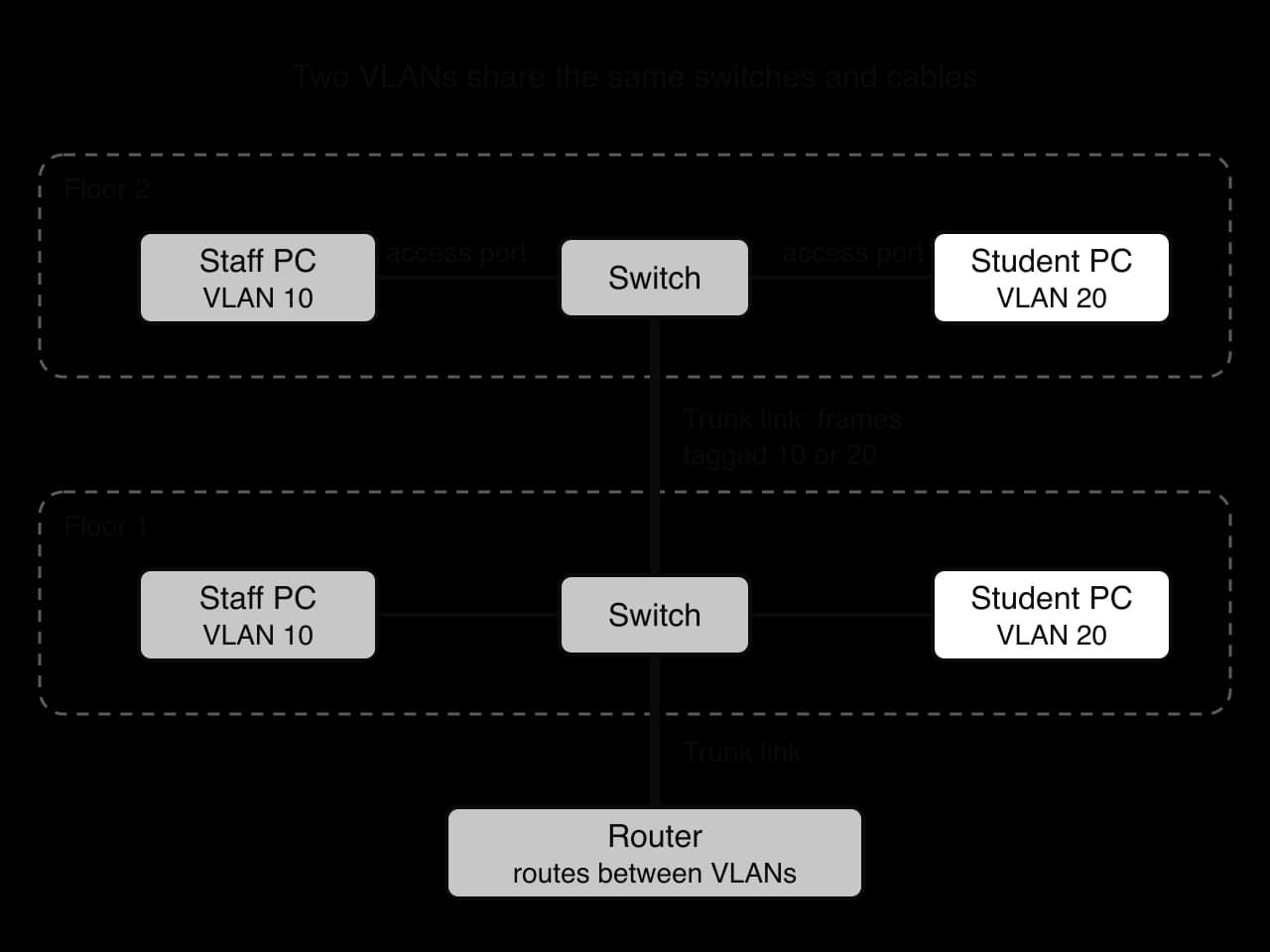
The standard for tagging, IEEE 802.1Q, inserts a 4-byte tag into the Ethernet frame. Twelve bits of the tag hold the VLAN number, so values 1 to 4094 are available (0 and 4095 are reserved). End devices never see the tag: the switch adds it when a frame enters the trunk and removes it before delivering the frame to an access port.
Source: Wikipedia, "IEEE 802.1Q", accessed October 2026.
Devices in different VLANs cannot talk to each other through the switch at all. For staff to reach a shared printer in another VLAN, the traffic must pass through a router (or a switch with routing built in), and in practice each VLAN is given its own subnet, so the router sees each VLAN as a separate network and its rules decide what may cross. VLANs therefore give the benefits of segmentation (smaller broadcast domains, contained breaches, separate policies) without separate cabling or switches for each group.
 YouTube
VLANs have limits. They are only as secure as the switch configuration: a port left in the wrong VLAN puts a device in the wrong segment, and badly configured trunks can let an attacker send frames into another VLAN. Routing between VLANs needs a capable router or layer 3 switch, which can become a bottleneck. Many VLANs spread across many switches are hard to document and troubleshoot.
Technique | Where it works | What it separates | Main use |
|---|---|---|---|
Physical segmenting | Separate switches and cables, joined by routers or firewalls | Everything: no shared hardware | Highest-security zones, such as payment systems |
Subnetting | IP addressing, enforced by routers | Networks at the IP level; each subnet is its own broadcast domain | Organising addresses; controlling traffic between groups with router and firewall rules |
VLANs | Switch configuration and frame tags | Frames on shared switches; each VLAN is its own broadcast domain | Separating groups that share physical switches and cables, independent of location |
Network architecture is examined in Paper 1 Section A. Questions are usually built around one setting (a school, a hospital, a business with several branches), with parts of rising demand. Short parts ask you to state or identify a topology, a single point of failure or a subnet mask [1–2]; describe and sketch parts ask for a topology drawn and described for the setting [2–4]; explain parts ask how segmentation, VLANs or a hybrid design improve performance or security [4]; and compare and contrast parts ask about client–server and peer-to-peer for a given service [4–6]. HL papers add parts on servers, such as describing the function of a DNS or proxy server, or explaining how one is made scalable, reliable or secure.
The statements use Describe (topologies, HL servers), Compare and contrast (networking models) and Explain (segmentation). Describe needs a detailed account but no reasons; Explain needs the reason or mechanism each time ("because", "so"); Compare and contrast needs similarities as well as differences, with both items mentioned in each point.
Common shapes and pitfalls specific to network architecture:
A reliability answer about a star should name the central switch as the single point of failure, then say how to reduce the risk (a spare switch, a second switch with redundant links).
Answers about collisions should say that switches remove them (each port is its own collision domain) and that hubs and shared media cause them.
For segmentation, name the mechanism (VLAN on switches, subnet with a mask, firewall rules between segments) and its effect (smaller broadcast domains, contained breaches, separate policies).
Define the term network topology. [1]
Identify the single point of failure in a star topology, and state the effect of its failure. [2]
Calculate the number of links in a full mesh of 12 nodes, and outline why full meshes are rarely used in LANs. [3]
Distinguish between a hub and a switch in terms of data collisions. [2]
A university campus has ten buildings. Explain why a hybrid topology is more suitable than a single star. [4]
Compare and contrast the client–server and peer-to-peer models for distributing a new version of a free video game to millions of players. [6]
Outline how VoIP can use both the client–server and peer-to-peer models in one call. [2]
A host has the address 172.16.5.200 with prefix /26. Determine its network address, showing the AND step, and state whether the host 172.16.5.130 is on the same subnet. [3]
Explain two ways in which network segmentation improves the security of a company network. [4]
(HL only) Describe how a proxy server can improve performance and security, and state one way it differs from a firewall. [5]
The arrangement of the nodes in a network and the links between them.
The central switch [1]; if it fails, no node can communicate with any other [1].
links [1]. Each device would need 11 network ports and 11 cables [1]; cost and configuration grow with the square of the number of nodes, while a switched star already gives fast collision-free links [1].
A hub repeats every signal to all ports, so all devices share one collision domain and simultaneous transmissions collide [1]; a switch sends each frame only to the destination's port, so each port is its own collision domain and full-duplex links have no collisions [1].
Award [1] per developed point, up to [4]: each building can be a star around its own switch, so a fault affects one building [1]; building switches linked to a meshed or duplicated core give redundant paths, so a single uplink or core switch failure does not cut off a building [1]; new buildings are added as another star without redesigning the others (scalability) [1]; a single star would need cables from every device to one central switch, impractical over long distances and a single point of failure for the whole campus [1].
Similarities: both deliver the same files over the internet; both use TCP/IP; in both, a computer acts as a server when it supplies data [1–2]. Differences: client–server needs the publisher to provide upload capacity for every copy, P2P uses players' own upload bandwidth, so P2P scales as more players join [1]; client–server costs the publisher more in servers and bandwidth [1]; P2P exposes players' IP addresses and uses their upload allowance, while client–server does not [1]; client–server guarantees availability and authenticity centrally, P2P must verify pieces with hashes [1]. Up to [6], with at least one similarity.
Servers handle signalling: locating the other user and setting up the call [1]; the audio packets then travel directly between the two devices, peer-to-peer, reducing delay and server load [1].
Mask /26 has last octet 192.
Award [1] for each mechanism and [1] for its effect, twice: traffic between segments must pass through a router or firewall, so only permitted communication is allowed; a compromised device is contained in its segment, so an attacker cannot reach servers or payment systems directly; separate segments for guests or vendors stop outsiders reaching internal systems; sensitive segments can be monitored more closely.
Performance: caches frequently requested content, so repeat requests are served from the LAN, faster and using less internet bandwidth [1–2]. Security: filters requests and blocks malicious or banned sites; logs activity; hides clients' IP addresses from outside servers [1–2]. Difference: a proxy makes requests on behalf of clients for particular applications, whereas a firewall only allows or blocks traffic according to rules [1].
A network topology is the arrangement of nodes and links. A star joins every node to a central switch; a mesh gives multiple paths (a full mesh needs links); a hybrid combines topologies, typically stars joined by a meshed core.
In a star, one cable fault affects one node, but the central switch is a single point of failure. Redundant links and devices remove single points of failure at extra cost.
Collisions happen on shared media (hubs, bus cables, Wi-Fi channels). A switch makes each port its own collision domain, so switched full-duplex links have none.
Topologies are chosen by weighing reliability, transmission speed, scalability, data collisions and cost against the setting: stars for homes and small offices, hybrids for campuses and corporations, partial meshes for backbones.
In the client–server model, central servers provide services to clients: central control, security, backup and consistency, but cost, bottlenecks and a single point of failure. In peer-to-peer, every peer is both client and server: low cost and capacity that grows with users, but weak control, security and availability.
Web browsing, email and online banking are client–server; BitTorrent and blockchains are P2P; VoIP often combines server signalling with peer-to-peer media.
Segmentation divides a network into parts to reduce broadcasts and congestion, contain breaches and apply separate policies. Subnetting does this at the IP level with a longer subnet mask; VLANs do it on switches, with 802.1Q tags on trunk links.
A subnet mask is ANDed with an IP address to find its network address; two hosts with the same network address are on the same subnet. A prefix of length leaves host bits.
(HL) DNS, DHCP, file, mail, proxy and web servers each provide one service, and each is made scalable (load balancing, caching, CDNs), reliable (redundancy, failover) and secure (authentication, encryption, filtering) in ways suited to its function.
I can define network topology and network node, and tell physical from logical topology.
I can sketch star, full mesh, partial mesh and hybrid topologies with correct labels.
I can calculate the number of links in a full mesh of nodes.
I can identify every single point of failure in a network diagram and suggest how to remove it.
I can explain why a hub causes data collisions and a switch does not, using collision domains.
I can evaluate star, mesh and hybrid topologies against the five factors for a given setting.
I can compare and contrast the client–server and peer-to-peer models with similarities and differences.
I can explain, with numbers, why peer-to-peer distribution scales better than client–server.
I can classify web browsing, email, online banking, file sharing, VoIP and blockchain by networking model, with a reason.
I can explain how segmentation reduces broadcast traffic and congestion and contains security breaches.
I can apply a subnet mask with AND to find a network address, and decide whether two hosts are on the same subnet.
I can split a /24 network into equal subnets and list their address ranges (extension).
I can explain how VLANs and trunk links work, and how VLANs differ from subnets.
I can describe the function of DNS, DHCP, file, mail, proxy and web servers (HL only).
I can explain how load balancing, failover, caching and CDNs make servers scalable and reliable (HL only).
Explain how using a switch at the centre of the star helps to avoid data collisions on the clinic's network.
3 marks
Award [1] per point, up to [3 max].
Each device has its own dedicated link/port to the switch;
the switch reads the destination (MAC) address of each frame;
and forwards it only to the port of the destination device / does not send it to every device;
so two devices can transmit at the same time without their signals interfering;
(full-duplex links mean) a device can send and receive at the same time;
any frames arriving together for the same port are buffered/queued by the switch rather than colliding;
The clinic manager suggests replacing the star with a full mesh, in which every device is cabled directly to every other device.
Discuss whether this would be a sensible change for the clinic.
4 marks
Award [1] for each relevant point, up to [3 max] for points on one side only, and [1] for a conclusion that follows from the points made, up to [4 max].
For a mesh: no single point of failure / losing one link or device does not cut off the others;
traffic has alternative paths so reliability is higher;
Against a mesh: the number of cables grows rapidly / the 7 devices (including the router) would need 21 links instead of 7;
each device would need many network ports/NICs, raising the cost;
installation and fault-finding are far more complex;
the clinic is small, so the extra reliability is not worth the cost / a spare switch would be cheaper;
the router/internet link would still be a single point of failure;
Conclusion: e.g. a mesh is not sensible; a spare switch or a second switch with redundant links gives most of the benefit at far lower cost;
Note: Accept a conclusion in favour of the mesh if it is justified by the clinic's need for reliability.
A payments company links the five core switches in its data centre as shown in Figure 1. Each line is a separate cable.
State the name of this topology.
1 mark
The company plans to add three more core switches and keep the same topology. Calculate the total number of links that will be needed, showing your working.
2 marks
Explain why the company has chosen this topology for its core switches.
3 marks
Outline one disadvantage of this topology as the data centre grows.
2 marks
A logistics company has six warehouses, P to U. Their routers are connected by leased lines as shown in Figure 1.
Identify the topology shown in Figure 1.
1 mark
Identify the warehouse that would be cut off from all the others if a single line failed.
1 mark
The line between Q and S fails. Explain whether P can still exchange data with T.
2 marks
Suggest one extra line that would most improve the reliability of the network, and justify your choice.
2 marks
Explain why the company has not connected every warehouse directly to every other warehouse.
3 marks
172.16.5.192172.16.5.130172.16.5.128