 YouTube
Describe LANs, WANs, PANs and VPNs, the internet and other digital infrastructure, the job of each network device, and the TCP, UDP, HTTP, HTTPS and DHCP protocols; at HL, the four layers of the TCP/IP model and encapsulation.
Each is in the Computer Science glossary, with every other term in the subject.
A message from the receiver confirming that data has arrived, which in TCP gives the sequence number of the next byte the receiver expects.
The top layer of the TCP/IP model, which holds the protocols that programs use to exchange data for a particular service.
A distributed, append-only record of transactions, grouped into blocks that each contain a cryptographic hash of the previous block and are copied across many nodes in a peer-to-peer network.
Two or more computing devices connected by a transmission medium so that they can exchange data and share resources.
The principle that data is subject to the laws of the country in which it is physically stored or processed.
The period for which a DHCP server allows a client to use an assigned IP address before the client must renew it or give it up.
The shared networks, data centres, services and connected devices that other systems and organisations rely on to store, process and transmit data.
A group of networked computers that coordinate their actions by passing messages, so that together they appear to users as a single system.
Describe the purpose and characteristics of local area networks, wide area networks, personal area networks and virtual private networks.
Describe the purpose, benefits and limitations of modern digital infrastructure: the internet, cloud computing, distributed systems, edge computing and mobile networks.
Distinguish between the internet and the World Wide Web.
Describe the function of gateways, hardware firewalls, modems, network interface cards, routers, switches and wireless access points, and identify the TCP/IP layer at which each one works.
Describe how TCP and UDP transport data, and explain which one suits a given application.
Describe the HTTP, HTTPS and DHCP protocols and the steps each one follows.
Describe the function of the TCP/IP model: the role of each layer and how the layers interact through encapsulation (HL only).
A computer on its own can only use its own files, programs and printer. Once it is joined to other computers it can share all of these, send messages in a fraction of a second and reach services on the other side of the world. Every web page, video call, online game, cloud document and contactless payment depends on networks and on the rules, called protocols, that let devices made by different manufacturers understand each other.
Networks come in different sizes, from the few metres between a phone and a pair of wireless earbuds to the internet, which links billions of devices. The hardware that joins them (cards, switches, routers, modems) and the protocols that run over them (TCP, UDP, HTTP, DHCP) are the same building blocks whether the network is a home, a school or a global company.
113 exam-style questions on this subtopic, written in the style of the IB papers. The first has its markscheme open. Counted on
A national weather service is replacing part of its traditional forecasting with machine learning models trained on 40 years of satellite, radar and weather-station records. The data takes up several petabytes. The service owns a high-performance computing (HPC) centre.
Outline what is meant by a high-performance computing (HPC) centre.
2 marks
Award [1] for the point and [1] for the development.
A facility with a very large number of powerful computers / nodes (CPUs and GPUs);
linked by very high-speed interconnects so they work together on one problem (in parallel);
with large, fast shared storage;
used for very large scientific / research computations;
Describe three hardware requirements for training models on this data.
3 marks
Award [1] per requirement, up to [3 max].
Very large storage capacity (petabytes) / distributed storage;
fast storage and high bandwidth so data reaches processors quickly;
many GPUs / accelerators for parallel computation;
large amounts of RAM / GPU memory to hold data and model during training;
high-speed network / interconnect between nodes;
reliable power and cooling;
Note: Award [1] for a requirement only if it is linked to the size or nature of the task.
One of 60 short multiple-choice questions on A2.1. Pick an answer to see why it's right or wrong.
A shop has 4 security cameras, each producing a 5 Mbit/s video stream. How much data would be uploaded to the cloud in one hour if nothing were processed at the edge? (1 GB = bytes)
The official deck for this part of the syllabus.
What is a computer network?
Give three kinds of transmission medium a network can use.
With a free account, Augment remembers where you stopped and what you have practiced.
A human-readable name that identifies a server or group of servers on the internet and is translated into an IP address before data can be sent.
An application-layer protocol that automatically gives a device joining a network its IP address, subnet mask, default gateway and DNS server address, taken from a pool managed by a DHCP server.
Processing data on or near the device that produces it, at the "edge" of the network, in place of sending it all to a distant cloud data centre.
The process in which each layer of the TCP/IP model, on the sending host, wraps the data from the layer above with its own header (and sometimes a trailer), with the reverse process, de-encapsulation, removing each layer's header on the receiving host.
The family of standards (IEEE 802.3) for cabled local area networks, which defines the cables, connectors, signals and frame format that devices use to exchange data.
The ability of a system to keep working correctly, possibly at reduced performance, when one or more of its components fail.
The unit of data at the network interface layer, made of a header with source and destination MAC addresses, the packet being carried, and a trailer with an error-checking value.
A network node that connects two networks and passes traffic between them, translating between different protocols or formats where the networks use different ones.
HTTP sent through an encrypted connection created by Transport Layer Security (TLS), so that requests and responses cannot be read or altered in transit and the server's identity is checked.
A three-digit number in an HTTP response that reports the result of the request, with the first digit giving its class (2 for success, 3 for redirection, 4 for a client error, 5 for a server error).
The application-layer protocol of the World Wide Web, in which a client sends a request for a resource and a server returns a response containing a status code and, usually, the resource.
The global system of interconnected computer networks that exchange data using the TCP/IP family of protocols.
The TCP/IP layer that gives each host a logical IP address and moves packets from the source host to the destination host across any number of networks, with routers choosing the path.
Everyday physical objects fitted with processors, sensors and network connections so that they can collect and exchange data without a person operating them.
An organisation that connects its customers' devices and networks to the internet, usually for a fee.
A network that connects devices within a small geographic area, typically one building or site, and is usually owned and managed by a single organisation.
A 48-bit identifier assigned to a network interface, used to deliver data between devices on the same local network.
A wide area wireless network in which the coverage area is divided into cells, each served by a base station, so that devices keep their connection while moving between cells.
A device that converts digital data from a network into a signal suited to a particular transmission line (modulation) and converts incoming signals back into digital data (demodulation).
The hardware component that connects a device to a network, converting data into signals for the transmission medium and receiving signals addressed to the device.
The bottom layer of the TCP/IP model, which moves data across a single physical link between two directly connected devices, using MAC addresses and turning frames into signals on the medium.
A seven-layer reference model of network communication (physical, data link, network, transport, session, presentation, application), used mainly to describe and compare networking functions.
A short-range network, typically a few metres across, that connects the devices of one person.
A 16-bit number from 0 to 65,535 that identifies a particular program or service on a host, so that the transport protocol can deliver incoming data to it.
An agreed set of rules that defines the format, order and meaning of the messages exchanged between devices, and the actions taken on sending and receiving them.
A network device that connects two or more networks and forwards packets between them, choosing where to send each packet according to its destination IP address.
The unit of data at the transport layer, made of a transport header (with port numbers and, for TCP, a sequence number) and a piece of application data.
The number carried by each TCP segment that gives the position, in the stream of bytes sent, of the first byte of data in that segment.
A network device that connects devices within a LAN and forwards each unit of data only to the port leading to its destination, using the destination MAC address.
A four-layer model of how data is communicated across the internet, in which the application, transport, internet and network interface layers each perform one part of the job and use the services of the layer beneath them.
The exchange of three messages, SYN, SYN-ACK and ACK, that opens a TCP connection and lets each side choose and confirm its starting sequence number.
A connection-oriented transport protocol that delivers a stream of data between two programs reliably and in order, by numbering the data, acknowledging what arrives and resending what is lost.
The TCP/IP layer that provides communication between programs on two hosts, using port numbers to identify the programs and, with TCP, splitting data into numbered segments and ensuring reliable, ordered delivery.
Carrying a network packet inside another packet, usually encrypted, so that it can cross a network that would otherwise not carry it privately or at all.
A text address that identifies a resource on the web and how to retrieve it, made up of the protocol, the domain name of the server, and the path to the resource.
A connectionless transport protocol that sends each message as an independent unit, with no handshake, no acknowledgements, no retransmission and no guarantee of order.
An encrypted connection across a public network, usually the internet, that lets a remote device or network communicate as if it were directly connected to a private network.
The family of standards (IEEE 802.11) for wireless local area networks, in which devices exchange data with a wireless access point by radio.
A network that connects devices and smaller networks across a large geographic area, spanning cities, countries or continents, usually over transmission links owned by telecommunications companies.
A network device that sends and receives Wi-Fi radio signals, connecting wireless devices to a wired LAN.
A system of linked documents and other resources, identified by URLs and transferred over the internet using HTTP or HTTPS.
Scope: The IB course covers the purpose and characteristics of LANs, WANs, PANs and VPNs; modern digital infrastructure (the internet, cloud computing, distributed systems, edge computing and mobile networks); the function of seven network devices and their TCP/IP layers; and the protocols TCP, UDP, HTTP, HTTPS and DHCP. Statement A2.1.5, the function of the four-layer TCP/IP model and encapsulation, is HL only. The seven-layer OSI model is not required.
YouTubeA network exists to let devices share. They share data (a file saved on a server and opened from any classroom), hardware (one printer for a whole floor), an internet connection (one line for every device in a home) and communication (email, messaging, video calls). A network also allows central management: an administrator can install software, apply security updates and back up files for hundreds of computers from one place.
Networks are classified mainly by their geographic scale, and scale brings other characteristics with it. A network that covers one building can be owned by one organisation and wired with its own cables, so it is fast and cheap to run. A network that crosses countries must use cables, satellites and radio links that other companies own, so it is slower, costs more and is managed by many parties. Five characteristics describe any network type: its purpose, its scale, who owns it, the transmission media it uses and its typical speed.
A school, an office or a home has its own network that connects the devices inside it.
Because one organisation owns every cable and device in a LAN, it can choose fast equipment and decide who may connect. Data travels only a short distance, so delay is low and transfer rates are high, commonly 1 Gbit/s to each desktop over cable. LANs use two families of technology: cabled Ethernet and wireless Wi-Fi. A wireless LAN (WLAN) is a LAN whose devices connect by radio.
Ethernet cables give reliable, high-speed connections that are hard to intercept without physical access, but every device needs a cable run to it. Wi-Fi removes the cables at the cost of speed that falls with distance and walls, interference from neighbouring networks, and a signal that anyone within range can receive (so it must be encrypted).
A company with offices in Geneva, Singapore and São Paulo has a LAN in each office. To join them it needs a network that crosses borders and oceans.
An organisation rarely owns the long-distance links of its WAN. It leases lines from a telecommunications company or sends its data across the internet, often protected by a virtual private network. The internet itself is the largest WAN. A WAN is slower and has more delay than a LAN, because data crosses long distances and passes through many devices, and it costs more because the organisation pays for capacity on someone else's infrastructure.
Homes and schools reach the internet through a company that sells that connection.
The smallest network type surrounds one person. A phone connected to wireless earbuds, a smartwatch and a fitness tracker forms a network a few metres across.
Most PANs use Bluetooth, whose most common mode has a range of up to about 10 metres. A PAN needs no setup by a network administrator: devices are paired once by the user, use very little power, and carry small amounts of data such as audio or step counts. Its limits come from the same design choices: short range, low speed compared with Wi-Fi, and devices that must stay close to each other. A USB cable between a phone and a laptop also forms a PAN.
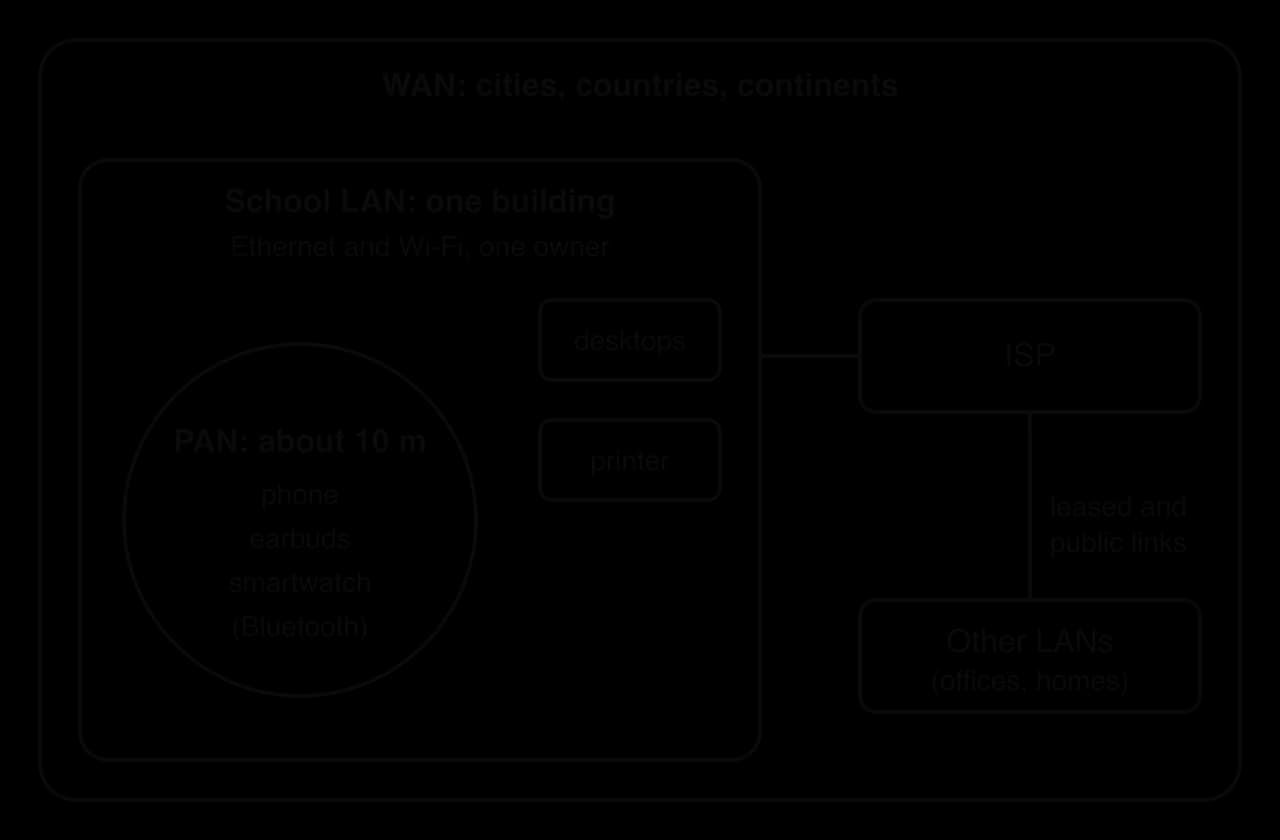
The three types differ in scale, and the other characteristics follow from scale. The nested diagram of network scale shows a PAN inside a LAN inside a WAN.
Characteristic | PAN | LAN | WAN |
|---|---|---|---|
Purpose | Connect one person's devices | Share resources inside one site | Join sites and networks far apart |
Geographic scale | About 10 m | One building or site | Cities, countries, continents |
Ownership | The individual | One organisation or household | Mostly telecommunications companies; leased by users |
Typical media | Bluetooth, USB | Ethernet cable, Wi-Fi | Fibre-optic cable, leased lines, satellite, mobile radio |
Typical speed | Low (a few Mbit/s) | High (often 1 Gbit/s or more per device) | Varies; usually slower per user than a LAN, with more delay |
Example | Phone and smartwatch | A school network | A company's offices joined across countries; the internet |
Other names describe networks between these sizes. A campus or metropolitan area network (CAN, MAN) covers a university or a city, and a storage area network (SAN) is a dedicated high-speed network that links servers to shared disk storage. These follow the same pattern: larger scale, more shared ownership, longer links.
A teacher working from home needs the school's internal grade system, which is reachable only from inside the school LAN. Running a private cable from her home to the school is impossible, but she can create a private path across the public internet.
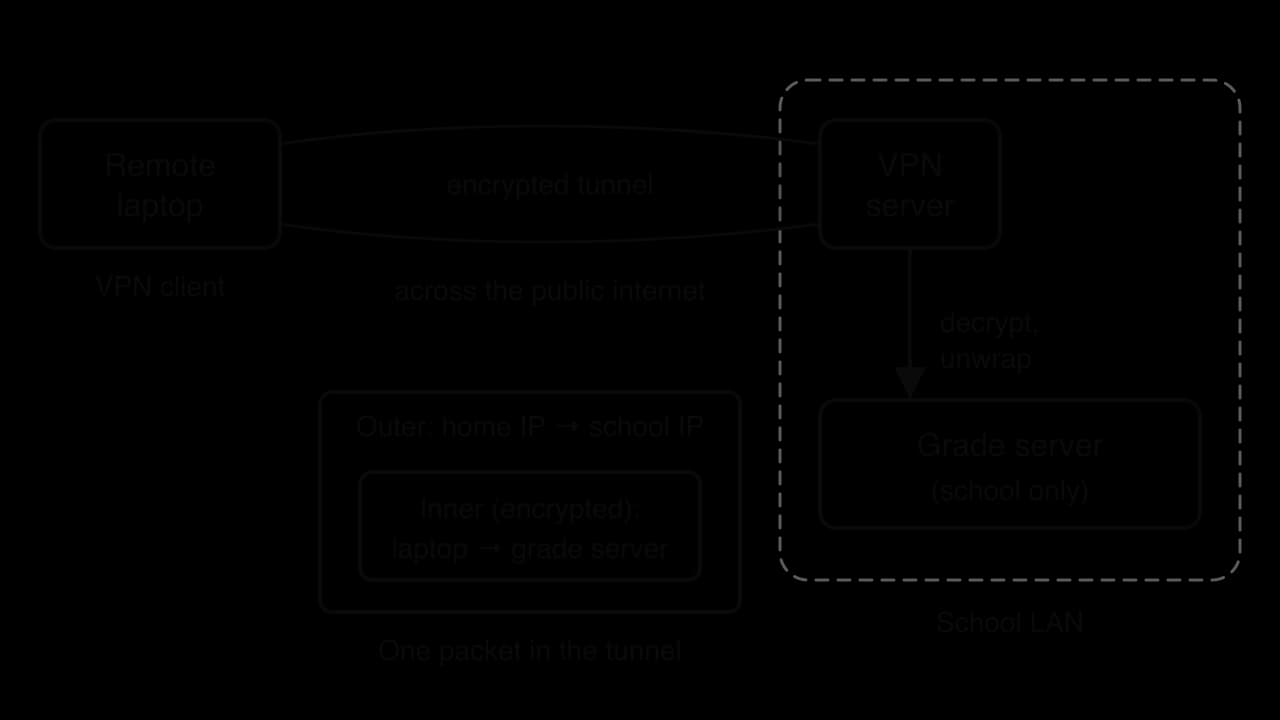
A VPN works by tunnelling. VPN software on the teacher's laptop takes each packet it is about to send, encrypts it, and places it inside a new packet addressed to the school's VPN server. Every packet starts with a header, a short block of control information that includes the sender's and receiver's addresses. Routers on the internet can read only the outer packet's header, which carries the IP addresses of her home connection and the school; the inner packet is encrypted. The VPN server removes the outer packet, decrypts the inner one and passes it into the school LAN, where it looks as if it came from a device inside the building.
The VPN tunnel diagram follows one request from the remote laptop to the school's server.
VPNs have three main uses. Remote access lets employees and students reach internal systems from anywhere. A site-to-site VPN joins the LANs of two offices across the internet, which is much cheaper than leasing a private line. Privacy VPNs, sold to consumers, hide the user's traffic from the local Wi-Fi network and their ISP, and make websites see the VPN server's IP address in place of the user's.
The limits of a VPN follow from where the tunnel ends. Traffic is encrypted only between the device and the VPN server: after that it travels normally, so the VPN provider can see everything the ISP could have seen. Encryption and the extra trip to the VPN server add delay and reduce speed. A VPN does not stop malware, phishing or a website from tracking a logged-in user, and in some countries using a VPN is restricted or illegal. Subtopic A2.4, Network security, treats the VPN as one countermeasure among several.
Homes, schools, hospitals, banks and governments now depend on a shared set of networked systems in the same way they depend on roads and electricity.
The five main kinds are the internet, cloud computing, distributed systems, edge computing and mobile networks. Each has a purpose, benefits and limitations, and most real services combine several of them: a ride-hailing app runs on a phone connected by a mobile network, sends requests over the internet to servers in the cloud, and those servers form a distributed system.
The internet is a network of networks. No single organisation owns it: millions of separate networks, run by ISPs, universities, companies and governments, agree to exchange traffic using the same protocols.
The internet's main benefit is global reach: any connected device can exchange data with any other, whatever network each one sits on. Its decentralised design means there is no central point whose failure stops the whole system; if one link breaks, packet switching lets data take another route. Its standards are open, published documents that anyone may implement, so devices from any manufacturer can join.
The limitations come from the same openness. Anyone can connect, including attackers, so security has to be added at the edges (firewalls, encryption). Access is unequal: the digital divide separates people with fast, affordable connections from those with slow, expensive or no access. Societies that move banking, healthcare and government services online also become dependent on a system that can fail, be censored or be monitored.
The internet grew out of a research network funded by the United States Department of Defense. Its history shows why the internet's design is decentralised and why one shared set of protocols matters.
Date | Event | What it shows |
|---|---|---|
1969 | The first ARPANET computers are connected, at UCLA, the Stanford Research Institute, UC Santa Barbara and the University of Utah | The first wide-area packet-switched network |
29 October 1969 | First host-to-host connection, UCLA to SRI; the remote computer crashes after two characters of "login", then works about an hour later | Even simple remote access needs agreed rules on both ends |
1971 | ARPANET declared operational | Remote login and file transfer become routine |
1 January 1983 | TCP/IP (version 4) becomes the protocol for production use on ARPANET | Separate networks can now join one "network of networks" |
1990 | ARPANET is decommissioned as commercial networks take over | The internet no longer depends on one owner |
Source: Wikipedia, "ARPANET", accessed October 2026.
ARPANET was built to let researchers share expensive computers at distant universities, a resource-sharing purpose that all networks still have. It used packet switching, which divides messages into small units that travel independently, so no single line or switching computer had to work for the network as a whole to keep running. This is the origin of the internet's fault-tolerant, decentralised design.
The most important change came on 1 January 1983, when ARPANET switched to TCP/IP. Before then, ARPANET and other networks (radio and satellite packet networks, university networks) each used their own rules. TCP/IP let any network join as long as it spoke the same protocols at its border, so the internet could grow by adding networks without any central owner redesigning it. When the ARPANET itself was switched off in 1990, the internet kept running, which shows that no single network had become essential. The same openness that allowed this growth also brought the security and governance problems that subtopic A2.4, Network security, addresses.
Many people use "the internet" and "the web" to mean the same thing, but they are different layers of the same system. The internet is the network that carries data; the web is one service that runs on it, alongside email, video calls, online games, file transfer and many others.
Tim Berners-Lee proposed the web at CERN in March 1989 to help researchers share and find documents; he had a working browser and web server by the end of 1990, and CERN made the technology free for anyone to use on 30 April 1993. By then the internet had been running TCP/IP for ten years. The web added three things on top of it: a way to name each resource (the URL), a protocol to fetch it (HTTP) and a language for documents with links (HTML).
Cloud computing means renting processing, storage and software from a provider's data centres over the internet, in place of owning the hardware. Subtopic A1.1, Computer hardware and operation, explains the three service models (IaaS, PaaS and SaaS); here the cloud matters as infrastructure that whole organisations run on.
Its purpose is to give computing power on demand. The benefits are scalability (a shop can rent ten times more servers for a sale weekend and release them afterwards), a pay-per-use cost model in place of large up-front spending, professional maintenance and backup, and access from any connected device. A school that moves its email and documents to a cloud service no longer needs its own email server or a technician to patch it.
The limitations follow from depending on someone else's computers across a network. Without a working internet connection the service is unusable. Moving to another provider can be difficult and expensive once data and programs are built around one company's tools, a problem called vendor lock-in. An outage at a large provider stops many organisations at once. The data may also be stored in another country, which raises a legal question.
Data sovereignty matters when a school in the European Union stores student records with a provider whose data centres are in another country: the records may then fall under that country's laws on access by its authorities. Many organisations therefore choose a provider region inside their own country or legal area, or keep sensitive data on their own servers.
A single computer, however powerful, has limits: it can fail, and it can serve only so many users at once. A distributed system spreads the work across many computers that cooperate.
Search engines, streaming services, online banking and multiplayer games all run as distributed systems. The benefits are scale (more computers can be added as demand grows), speed (work is split and done in parallel) and resilience.
Fault tolerance in a distributed system comes from redundancy: the same data is stored on several computers, so if one fails the others still hold it. The limitations are complexity and consistency. When several computers hold copies of the same data, every change must reach all of them, and if the network between them fails, two copies can disagree. Finding the cause of a fault is harder when it involves messages between dozens of machines, and the system needs a fast, reliable network to work at all.
A blockchain is a distributed system with no central owner at all. Every participating computer (a node) keeps a full copy of a shared record of transactions, and the nodes agree among themselves which new entries to add.
Bitcoin, the first cryptocurrency, started running in January 2009. Each node holds the whole blockchain and checks new transactions. Nodes reach agreement through proof of work: special computers called miners compete to solve a deliberately hard computational puzzle, and the winner adds the next block, about every ten minutes on average. Because each block contains the hash of the one before it, changing an old transaction would change every later block, and an attacker would have to redo the work faster than the rest of the network combined.
Bitcoin shows both sides of distributed systems clearly. It has no single point of failure or control: no bank can freeze an account and no server outage stops it. The price of this independence is low efficiency. Every node stores and checks every transaction, block size limits keep the number of transactions per second low, and proof of work uses a great deal of electricity: about 138 TWh a year, around 0.5% of the world's electricity consumption.
Source: Cambridge Centre for Alternative Finance estimate for 2025, reported in Wikipedia, "Environmental impact of bitcoin", accessed October 2026.
Sending every piece of data to a distant data centre and waiting for an answer takes time. For some systems that delay is too long.
The delay between sending a request and receiving a reply is latency. A round trip to a cloud data centre hundreds of kilometres away commonly takes tens to hundreds of milliseconds, and much longer when the network is congested. A braking decision in a self-driving car, such as a Waymo robotaxi, cannot wait that long, so the car's own computers process its camera, lidar and radar data on board. A smart traffic light that counts waiting vehicles and changes its timing likewise decides at the junction.
Many edge devices belong to the internet of things.
Edge computing has three benefits: low latency, because decisions are made locally; lower bandwidth use, because only summaries are sent to the cloud, not raw video; and continued operation when the internet link fails. It also keeps raw personal data, such as camera images, closer to where it was captured. The limitations are management and cost: thousands of small devices in streets and buildings must each be updated, secured and repaired, they can be stolen or tampered with, and each has far less processing power than a data centre. Most real systems therefore combine edge and cloud: the edge reacts in real time and the cloud stores history and trains better models.
A mobile network carries data and calls to devices that move.
Each base station (a mast with antennas) serves the phones in its cell and is connected by cable or fibre to the operator's core network and on to the internet. When a phone moves out of one cell and into the next, the network hands it over to the new base station without dropping the connection. Each generation has added speed and capacity: 4G made mobile video streaming routine, and 5G, first offered commercially in South Korea on 3 April 2019, adds higher data rates, lower latency and room for many more connected devices per square kilometre.
The benefit of mobile networks is access anywhere there is coverage, which makes them the main or only internet connection for many people, especially in places without cabled broadband. They also connect IoT devices such as delivery trackers and remote sensors. The limitations are patchy coverage in rural areas and inside some buildings, data that is often more expensive than fixed broadband, congestion when many users share one cell (a stadium or a festival), and speeds that change with distance from the mast. High-frequency 5G bands carry more data but travel shorter distances, so they need many more masts.
Real services combine these kinds of infrastructure. The table matches four common examples to the infrastructure they rely on.
Example | Infrastructure used | Benefit gained | Limitation faced |
|---|---|---|---|
The World Wide Web | The internet; web servers in the cloud; content copied to servers in many countries | Any page reachable from any connected device | Useless without a connection; open to attack |
Cryptocurrency blockchains | A distributed peer-to-peer system over the internet | No central owner; no single point of failure | Slow, energy-hungry consensus; every node stores everything |
Smart traffic lights | Edge computing, IoT sensors, a mobile or fibre link to the city | Real-time decisions at the junction | Many devices to maintain and secure on the street |
A school | A LAN (Ethernet and Wi-Fi), an ISP link, cloud services, VPN for staff at home | Shared resources and central management | Depends on the ISP and cloud provider; must protect student data |
A network needs hardware to connect each device, to move data inside a LAN, to move data between networks, and to control what is allowed through. Seven devices do these jobs. Most homes and many small offices combine several of them in one box that is commonly called a "router", but each job is still done separately inside it.
The TCP/IP model describes networking as four layers stacked on top of each other. Each layer does one part of the job of moving data and relies on the layer beneath it for the rest, and each device works mainly at one of the layers. The layers identify destinations with different kinds of address: a MAC address identifies a network interface on one local network, an IP address identifies a device anywhere on the internet (subtopic A2.3, Data transmissions, explains IP addressing), and a port number identifies one program running on that device. Each layer also adds its own header to the data and gives the result a name: a segment at the transport layer, a packet at the internet layer and a frame at the network interface layer. The full role of each layer, and how this wrapping works, is HL only; the table gives what every student needs to place each device.
Layer | Its job in one line | Address it uses |
|---|---|---|
Application | The programs and their protocols, such as web browsing (HTTP) | None (names such as URLs) |
Transport | Delivery between programs on two hosts (TCP or UDP) | Port numbers |
Internet | Moving packets between networks | IP addresses |
Network interface | Moving data across one physical link | MAC addresses |
A device that only has to move data across one link (a switch) needs only the network interface layer; a device that chooses a path between networks (a router) must also read the internet layer. The higher the layer a device works at, the more of each message it has to inspect.
Every device that joins a network needs hardware that turns its data into signals on the medium and back again.
Despite its name, a NIC is now usually a chip built into the motherboard, not a separate card. A laptop typically has two: one for Wi-Fi and one for Ethernet (or a USB adapter). The NIC works at the network interface layer, because its job is sending and receiving data across one physical link. Each NIC is given a permanent identifier when it is manufactured.
A MAC address is written as twelve hexadecimal digits in six pairs, such as 3C:22:FB:9A:41:07. The first three bytes form the organisationally unique identifier (OUI), which the IEEE assigns to the manufacturer; the manufacturer sets the last three bytes so that each interface it makes is different. MAC addresses are used only within one local network: when data leaves the LAN through a router, the MAC addresses are replaced for the next link, while the IP address stays the same from source to destination.
Inside a LAN, many devices connect by cable to a switch, which passes each message only to the device it is meant for.
A switch learns where each device is. When data arrives on a port, the switch records the sender's MAC address against that port in its MAC address table. When data arrives for a MAC address already in the table, the switch sends it out of that one port; when the destination is not yet known, it sends a copy out of every other port and records the destination's port when the destination replies. Because each conversation goes only to the port that needs it, several pairs of devices can communicate at full speed at the same time.
An older device, the hub, copied every message to every port. All devices on a hub shared the bandwidth and their signals could collide, and any device could read data meant for the others. Switches replaced hubs because they keep traffic separate. A switch works at the network interface layer: it reads MAC addresses only and never looks at IP addresses.
Step | Data arrives on port | Source MAC | Destination MAC | Switch action | MAC table afterwards |
|---|---|---|---|---|---|
1 | 1 | AA | CC | CC unknown: send out of ports 2, 3, 4 | AA → 1 |
2 | 3 | CC | AA | AA known: send out of port 1 only | AA → 1, CC → 3 |
3 | 1 | AA | CC | CC known: send out of port 3 only | AA → 1, CC → 3 |
4 | 2 | BB | AA | AA known: send out of port 1 only | AA → 1, CC → 3, BB → 2 |
The MAC address table trace shows that the switch floods only while it is still learning; once both devices have sent something, their traffic goes to one port each and the other devices never receive it.
A switch connects cabled devices. Wireless devices need a device that bridges radio and cable.
A school mounts access points in ceilings throughout its buildings, each cabled to a switch. Every access point broadcasts the same network name (SSID), so a laptop moves from one to the next as a student walks between classrooms. Each access point's radio capacity is shared by every device connected to it, so a room of thirty laptops on one access point gets far less speed per laptop than one laptop alone. A WAP works at the network interface layer: it converts between radio frames and Ethernet frames for the same LAN and does not route between networks.
A switch moves data inside one network. Moving data from one network to another, such as from the school LAN to the internet, is the router's job.
On the internet, data travels as packets, each carrying a source and destination IP address. When a packet arrives, the router reads its destination IP address, looks it up in its routing table and sends it out of the interface that leads towards that network, or to the next router on the way. A route between two computers on different continents passes through many routers, each of which selects only the next step. Because a router reads IP addresses, it works at the internet layer. Subtopic A2.3, Data transmissions, explains packet switching and routing in full.
The cable that brings the internet into a building (a telephone line, a television cable or an optical fibre) carries signals in a form the LAN cannot use directly.
The name is short for modulator–demodulator. A DSL modem places data on a copper telephone line as high-frequency signals; a cable modem uses a television cable; a fibre connection uses an optical network terminal (ONT) that converts light pulses into electrical signals. The ISP has the matching equipment at the other end of the line. A modem works at the network interface layer, because its job is putting bits onto one physical medium. It does not read IP addresses or choose routes.
Networks that use different protocols cannot exchange data directly. A gateway sits between them and translates.
The term is used in two ways. In everyday configuration, the default gateway is the router that a device sends every packet to when the destination is outside its own network; a laptop on a school LAN has the school router's IP address set as its default gateway. In the broader sense, a gateway translates between protocols: an IoT gateway collects readings from sensors that use a low-power radio protocol and forwards them over the internet using TCP/IP, and an email gateway converts between different mail systems. Because a translating gateway may have to understand whole messages, it can work up to the application layer.
A network joined to the internet receives traffic from anyone, so it needs a device that checks traffic against rules and blocks what is not allowed. A hardware firewall is a dedicated device (or a function in a router) placed between the LAN and the internet, so it filters traffic for every device behind it. Its rules allow or block traffic by source and destination IP address, protocol and port number, for example "allow incoming web traffic to the school web server only". Simple firewalls work at the internet and transport layers; next-generation firewalls inspect content up to the application layer. Subtopic A2.4, Network security, explains how a firewall decides, its types and its limits.
Each device works mainly at one layer, because each needs to read only one kind of address or information to do its job.
Device | Function | Address or information it reads | TCP/IP layer |
|---|---|---|---|
Network interface card | Connects one device to the medium | Its own MAC address | Network interface |
Switch | Forwards data within a LAN to the right port | Destination MAC address | Network interface |
Wireless access point | Joins Wi-Fi devices to the wired LAN | MAC addresses | Network interface |
Modem | Converts between digital data and the line's signal | None (bits only) | Network interface |
Router | Forwards packets between networks | Destination IP address | Internet |
Hardware firewall | Allows or blocks traffic by rules | IP addresses and port numbers (content in next-generation firewalls) | Internet and transport (up to application) |
Gateway | Joins networks and translates protocols | Depends on the protocols translated | Up to application |
The school network diagram places every device in a typical school, labelled with its layer.
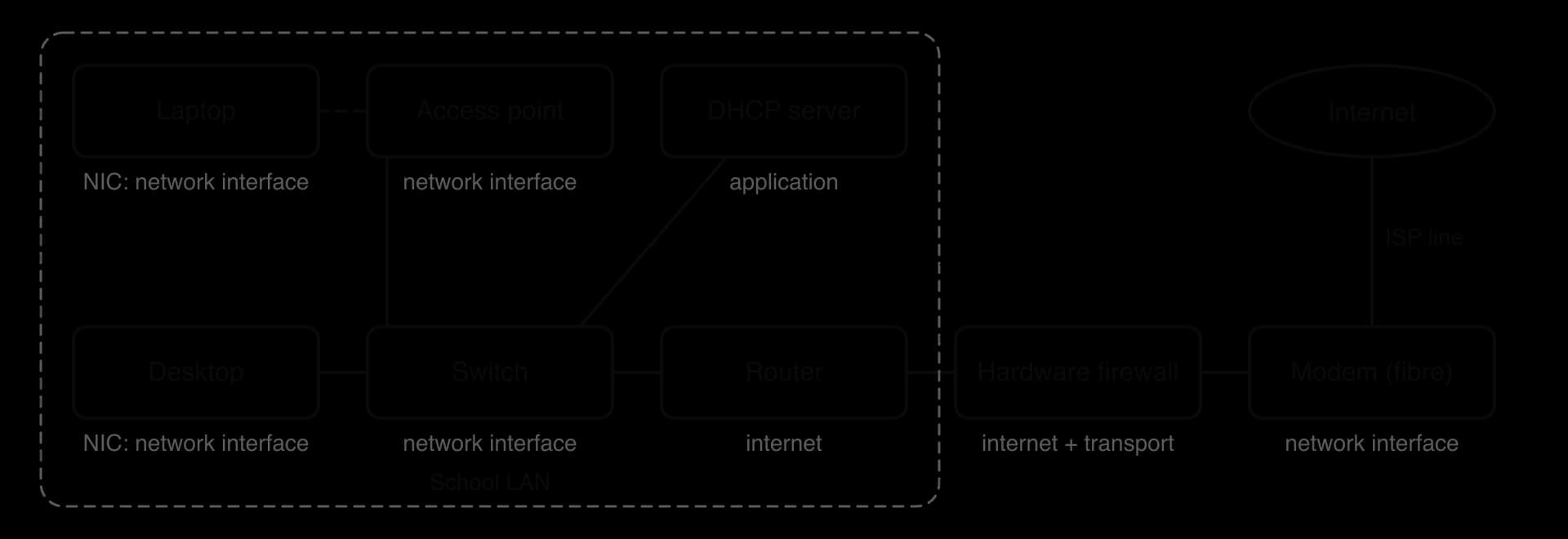
The single box an ISP supplies to a home usually contains five devices: a modem for the ISP's line, a router between the home network and the ISP, a small switch with four Ethernet ports, a wireless access point, and a basic firewall. It also runs a DHCP server, which gives each device in the home its network settings. Calling the whole box a router is normal in everyday speech, but each of its five functions is a separate job done by separate hardware or software inside it.
Two devices can only communicate if they agree in advance on the format of messages, the order of steps and what to do when something goes wrong.
Protocols are published as open standards, so a phone from one manufacturer can load a web page from a server built by another. Each protocol does one job. Transport protocols move data between two programs on different computers; application protocols define what those programs say to each other. TCP and UDP are the two transport protocols of the internet, and both rely on IP, the Internet Protocol, to carry their data from one host to another.
A computer runs many networked programs at once: a browser, a music app, a game, an email client. The IP address brings data to the right computer; a port number brings it to the right program on that computer.
Servers listen on well-known ports so that client programs can find them. A client program is given a temporary port number by the operating system for each connection, so replies come back to the right program. An IP address and a port together, written 203.0.113.10:443, identify one end of a conversation exactly.
Port | Protocol | Service |
|---|---|---|
53 | DNS (usually UDP) | Looking up IP addresses from domain names |
67 and 68 | DHCP (UDP) | Server (67) and client (68) for automatic address configuration |
80 | HTTP (TCP) | Web pages without encryption |
443 | HTTPS (TCP) | Web pages encrypted with TLS |
49,152 to 65,535 | TCP or UDP | Temporary client ports chosen by the operating system (the range the internet's numbering authority, IANA, recommends; some operating systems use a different one) |
Most internet traffic, including web pages, email and file downloads, must arrive complete and in the right order. A single missing byte would corrupt a downloaded program.
TCP sends data in segments: blocks of data, each with a TCP header at its start that holds the port numbers, a sequence number and flags marking special messages such as the start of a connection. TCP gives four guarantees that IP alone does not. It sets up a connection before any data is sent. It delivers data reliably, resending anything not acknowledged. It delivers data in order, using sequence numbers to put the pieces back together. It also controls the rate: flow control stops a fast sender overwhelming a slow receiver, and congestion control slows every sender down when routers on the path start dropping packets.
 YouTube
Before sending data, the two ends of a TCP connection exchange three messages to agree that both are ready and to choose their starting sequence numbers.
SYN: the client sends a segment with the SYN (synchronise) flag set and its chosen initial sequence number, .
SYN-ACK: the server replies with both flags set. It chooses its own initial sequence number and acknowledges the client's with acknowledgement number .
ACK: the client acknowledges the server's number with acknowledgement number . The connection is open, and data can flow in both directions.
The handshake sequence diagram shows the three messages with example numbers.
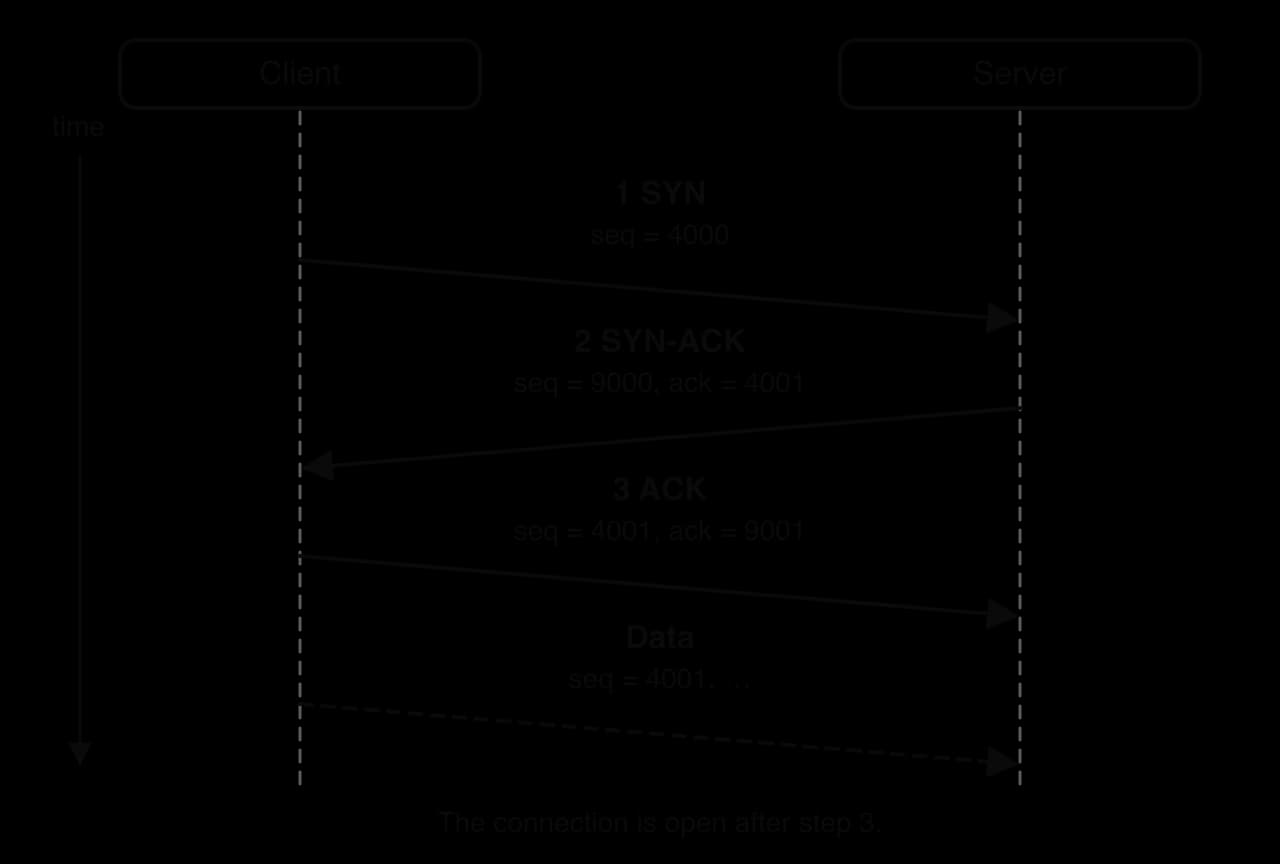
Three messages are the fewest that let both sides confirm two-way communication. The SYN-ACK confirms to the client that the server receives and replies; the final ACK confirms to the server that the client receives its messages too. The cost is time: the handshake takes one full round trip before the first byte of data can be sent, which matters on links with high latency. A connection is closed with a similar exchange of FIN (finish) segments and acknowledgements.
TCP numbers every byte it sends. Each piece of data carries the number of its first byte, so the receiver can place it exactly in the stream.
The receiver replies with acknowledgements that say how much has arrived.
If a piece of data is lost, the receiver keeps acknowledging the same "next expected" number. The sender also starts a timer when it sends each segment; if the acknowledgement does not arrive in time, it retransmits the data. Pieces that arrive out of order are held in a buffer until the gap is filled, then passed to the program in the correct order. The program using TCP receives only a complete, ordered stream of bytes.
The Python program models a receiver. Segments arrive out of order, each with a sequence number; the program rebuilds the message from the starting byte and prints the acknowledgement number it would send, which shows whether a gap remains.
def reassemble(segments, first_seq):
    """Rebuild data from (sequence number, text) pairs.
    Return the text received in order and the next byte expected."""
    store = {}
    for seq, data in segments:
        store[seq] = data
    message = ""
    next_seq = first_seq
    while next_seq in store:
        data = store[next_seq]
        message = message + data
        next_seq = next_seq + len(data)
    return message, next_seq


arrived = [(1010, "RLD"), (1001, "HELLO"), (1006, ", WO")]
text, ack = reassemble(arrived, 1001)
print("In order:", text)
print("ACK", ack)

missing = [(1001, "HELLO"), (1010, "RLD")]
text, ack = reassemble(missing, 1001)
print("In order:", text)
print("ACK", ack)import java.util.HashMap;
public class Reassembly {
static int nextSeq;
// Rebuild data from sequence numbers and texts; set nextSeq to the next byte expected.
static String reassemble(int[] seqs, String[] data, int firstSeq) {
HashMap<Integer, String> store = new HashMap<Integer, String>();
for (int i = 0; i < seqs.length; i++) {
store.put(seqs[i], data[i]);
}
String message = "";
nextSeq = firstSeq;
while (store.containsKey(nextSeq)) {
String part = store.get(nextSeq);
message = message + part;
nextSeq = nextSeq + part.length();
}
return message;
}
public static void main(String[] args) {
int[] seqs = {1010, 1001, 1006};
String[] parts = {"RLD", "HELLO", ", WO"};
String text = reassemble(seqs, parts, 1001);
System.out.println("In order: " + text);
System.out.println("ACK " + nextSeq);
int[] seqs2 = {1001, 1010};
String[] parts2 = {"HELLO", "RLD"};
text = reassemble(seqs2, parts2, 1001);
System.out.println("In order: " + text);
System.out.println("ACK " + nextSeq);
}
}In order: HELLO, WORLD
ACK 1013
In order: HELLO
ACK 1006In the first run the segments arrive in the order 1010, 1001, 1006. The program stores them all, then starts at byte 1001: "HELLO" is 5 bytes long, so the next byte expected is 1006; ", WO" is 4 bytes, giving 1010; "RLD" is 3 bytes, giving 1013. Every gap is filled, so the receiver acknowledges 1013. In the second run the segment starting at byte 1006 never arrives, so the receiver can pass on only "HELLO" and keeps acknowledging 1006; the segment it holds for byte 1010 waits in the buffer until the sender retransmits the missing data.
Some applications care more about speed than completeness. In a video call, a piece of audio that arrives half a second late is useless, because the conversation has already moved on.
UDP adds very little to IP: port numbers so the data reaches the right program, a length and a checksum so a damaged message can be detected and thrown away. Its header is 8 bytes, against at least 20 bytes for TCP. There is no connection to set up, so the first message can be sent at once, and there is nothing to wait for if a message is lost. The application program handles losses itself: a video call simply plays the next piece of audio, and a game uses the next position update.
UDP suits traffic where late data is worthless or where messages are tiny: voice and video calls, live streaming of events, fast-action online games, and DNS lookups, where a single small question and answer would be slowed down by a handshake. If a DNS reply is lost, the client just asks again.
Feature | TCP | UDP |
|---|---|---|
Connection | Connection-oriented: three-way handshake first | Connectionless: sends at once |
Reliability | Acknowledges data and retransmits losses | No acknowledgements; lost data stays lost |
Order | Sequence numbers put data back in order | Messages may arrive in any order |
Speed and latency | Slower to start; waits for retransmissions | Lower latency; no waiting |
Overhead | Header at least 20 bytes, plus ACK traffic | Header 8 bytes |
Flow and congestion control | Yes | No (the application must take care) |
Typical uses | Web pages (HTTP, HTTPS), email, file transfer, online banking | Video and voice calls, live streaming, online games, DNS lookups |
Transport protocols move bytes between programs. Application protocols give those bytes meaning: a request for a web page, a reply containing the page, a request for an IP address.
The web runs on one application protocol.
HTTP follows the client–server model: a browser (the client) sends requests and a web server answers them. Every request names a resource with a URL.
The URL https://www.example.org/library/opening-hours.html has three main parts: the scheme https (the protocol), the domain name www.example.org (the server) and the path /library/opening-hours.html (the resource on that server). A URL can also give a port number after the domain and a query after a question mark, such as ?term=autumn.
Computers send packets to IP addresses, not names. Before the browser can connect, it sends a query to the Domain Name System (DNS) for the IP address that belongs to the domain name; subtopic A2.2, Network architecture, explains how DNS finds it. The browser then opens a TCP connection to that IP address on port 80 (HTTP) or 443 (HTTPS) and sends its request.
HTTP messages are lines of text. A request starts with a method, the path and the HTTP version, followed by header lines that give extra information.
GET /library/opening-hours.html HTTP/1.1
Host: www.example.org
User-Agent: Mozilla/5.0
Accept: text/html
The two most common methods are GET, which asks for a resource, and POST, which sends data to the server, such as a completed form. The server's response starts with a status line, then its own headers, a blank line and the body (here, the HTML of the page).
HTTP/1.1 200 OK
Content-Type: text/html; charset=utf-8
Content-Length: 1532

<!DOCTYPE html>
<html> ... the page ... </html>
The number in the status line tells the browser what happened.
Code | Meaning | Typical cause |
|---|---|---|
200 OK | Success; the resource is in the body | A normal page load |
301 Moved Permanently | The resource has a new URL, given in the response | A site reorganised its pages |
304 Not Modified | The copy the browser already holds is still current | The browser checked its cached copy |
403 Forbidden | The server refuses to send the resource | The user lacks permission |
404 Not Found | No resource exists at that path | A mistyped URL or a deleted page |
500 Internal Server Error | The server failed while handling the request | A bug in the server's program |
503 Service Unavailable | The server cannot handle the request right now | Overload or maintenance |
HTTP is stateless: each request is handled on its own, and the server keeps no memory of earlier requests. Websites that need to recognise a returning user, such as a shopping basket, send a small piece of data called a cookie that the browser returns with each later request. HTTP also sends everything as plain text, so anyone who can see the traffic, such as another user on the same public Wi-Fi network, can read the pages and any passwords typed into forms.
The Python function reads the status line of a response and reports the code and its class, using the first digit as the table of codes describes.
def describe_status(status_line):
    parts = status_line.split(" ", 2)
    code = int(parts[1])
    first_digit = code // 100
    if first_digit == 2:
        kind = "success"
    elif first_digit == 3:
        kind = "redirection"
    elif first_digit == 4:
        kind = "client error"
    elif first_digit == 5:
        kind = "server error"
    else:
        kind = "other"
    return str(code) + " " + parts[2] + " (" + kind + ")"


print(describe_status("HTTP/1.1 200 OK"))
print(describe_status("HTTP/1.1 404 Not Found"))
print(describe_status("HTTP/1.1 503 Service Unavailable"))public class Status {
static String describeStatus(String statusLine) {
String[] parts = statusLine.split(" ", 3);
int code = Integer.parseInt(parts[1]);
int firstDigit = code / 100;
String kind;
if (firstDigit == 2) {
kind = "success";
} else if (firstDigit == 3) {
kind = "redirection";
} else if (firstDigit == 4) {
kind = "client error";
} else if (firstDigit == 5) {
kind = "server error";
} else {
kind = "other";
}
return code + " " + parts[2] + " (" + kind + ")";
}
public static void main(String[] args) {
System.out.println(describeStatus("HTTP/1.1 200 OK"));
System.out.println(describeStatus("HTTP/1.1 404 Not Found"));
System.out.println(describeStatus("HTTP/1.1 503 Service Unavailable"));
}
}200 OK (success)
404 Not Found (client error)
503 Service Unavailable (server error)Both versions split the line at most twice, so the reason phrase "Not Found" stays in one piece, and both use integer division by 100 to get the first digit (// in Python, / on two int values in Java).
Plain HTTP is unsafe for passwords, payments or personal data. HTTPS adds protection without changing how HTTP itself works.
Before any HTTP message is sent, the browser and server set up a TLS connection on port 443. The server presents a digital certificate that proves it owns the domain name, and the two sides agree on keys for encryption. Every HTTP request and response then travels inside that encrypted connection. HTTPS gives three protections:
Confidentiality: an eavesdropper on the network sees only encrypted data, not the page or the password.
Integrity: any change to the data in transit is detected, so an attacker cannot insert content into the page.
Authentication: the certificate shows that the browser is talking to the genuine server for that domain name, not an impostor.
Browsers now mark HTTP pages as "not secure", and most of the web uses HTTPS. Subtopic A2.4, Network security, explains how TLS, certificates and keys achieve these protections.
Every device on a network needs an IP address, a subnet mask, the address of its default gateway and the address of a DNS server. Typing these into every phone and laptop by hand would be slow and error-prone, and two devices given the same address would both stop working properly.
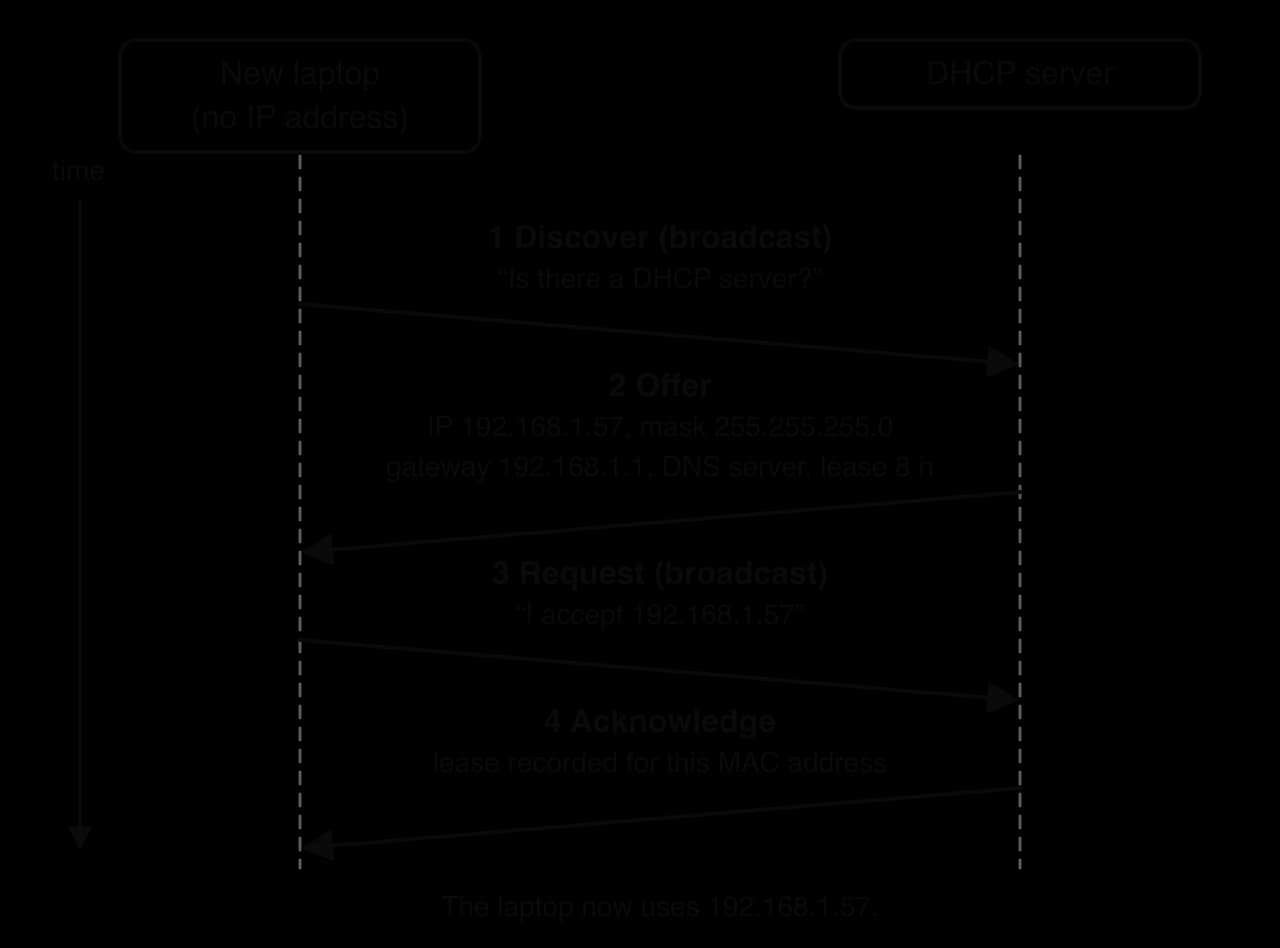
A newly connected device has no IP address yet, so it cannot address a message to a server whose address it does not have. DHCP solves this with broadcasts: messages sent to every device on the local network. It uses UDP (server port 67, client port 68), because each step is a single short message and the client sends it again if one is lost. The four messages are remembered by the initials DORA.
Discover: the client broadcasts "Is there a DHCP server?", giving its MAC address so a reply can reach it.
Offer: each DHCP server that hears it offers an available IP address, with the subnet mask, gateway, DNS server and the length of time the address may be used.
Request: the client broadcasts a request for one offer. Broadcasting it tells any other servers that their offers were declined.
Acknowledge: the chosen server confirms, and records which address it has given to which MAC address. The client configures itself and can now use the network.
The DORA sequence diagram shows the exchange with example values.
The address is not given permanently.
A client normally tries to renew its lease when half of it has passed, by sending a Request straight to the server that gave it the address. If that server does not reply, the client tries any DHCP server when seven-eighths of the lease have passed, and if the lease runs out it must stop using the address and start again with Discover. Leases let a network reuse addresses: a café gives short leases because customers come and go, so a limited pool of addresses can serve many visitors, while an office gives longer leases to its fixed desktop computers.
DHCP saves administrators from configuring each device, prevents two devices being given the same address, and lets visitors join a network instantly. Its weakness is that a client accepts an offer from any server that answers: a rogue DHCP server on the network could hand out its own address as the default gateway and see all traffic. Servers and printers that others must always find are often given a fixed address, either set by hand or reserved for their MAC address on the DHCP server; subtopic A2.3, Data transmissions, compares dynamic and static IP addresses.
Sending a web page across the internet involves many separate jobs: formatting the request, splitting it into pieces, numbering and acknowledging them, addressing them to the right computer, choosing a route through many networks, and turning bits into electrical, light or radio signals. Putting all of this in one program would make it impossible to change one part without breaking the rest. Networking therefore divides the work into layers.
Each layer on the sending computer exchanges messages with the same layer on the receiving computer, using that layer's protocol, while relying on the layers beneath it to carry the messages. The transport layer on a laptop uses TCP to exchange segments with the transport layer on a web server, and it works the same whether the bits travel over Wi-Fi, fibre or a mobile network.
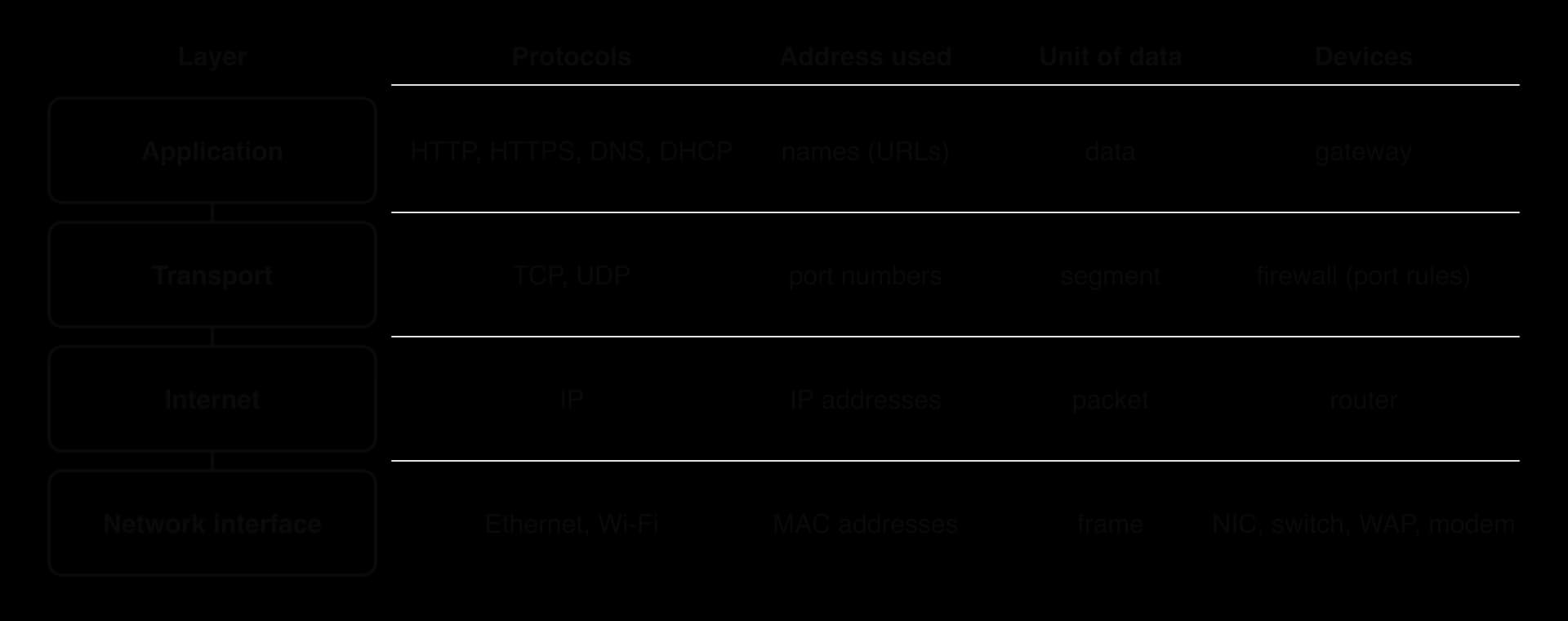
Browsers, email programs and other networked applications work here. HTTP and HTTPS fetch web pages, DNS turns domain names into IP addresses, DHCP configures devices, and SMTP sends email. This layer defines what is said, such as "GET /index.html", but not how it is delivered. It hands its data to the transport layer, choosing TCP or UDP and the destination port.
The transport layer gives process-to-process delivery: the IP address gets data to the right computer, and the port number gets it to the right program. With TCP, it divides a long stream of data into segments small enough to fit in one packet, numbers them, acknowledges them, resends lost ones and reorders them at the receiver. With UDP, it adds only ports and a checksum. This is the layer where reliability is achieved, end to end, between the two hosts; routers in between do not take part in it.
The Internet Protocol (IP) works at this layer. It places each segment inside a packet whose header holds the source and destination IP addresses, and every router on the way reads only this header to select where to send the packet next. IP is a best-effort service: it does not promise that packets arrive, arrive once, or arrive in order. That is why TCP, one layer up, adds reliability. Splitting the jobs this way keeps routers simple and fast, because they never have to track whole connections.
Ethernet and Wi-Fi are protocols of this layer. It places each packet inside a frame, adds the MAC addresses of the sender and the next device on this link (not the final destination), and adds a check value at the end so that damaged frames are detected and discarded. The NIC then sends the frame as electrical, light or radio signals.
When data moves down the layers on the sending host, each layer treats everything it receives from the layer above as its data and adds its own header (and, at the bottom, a trailer). This wrapping is encapsulation.
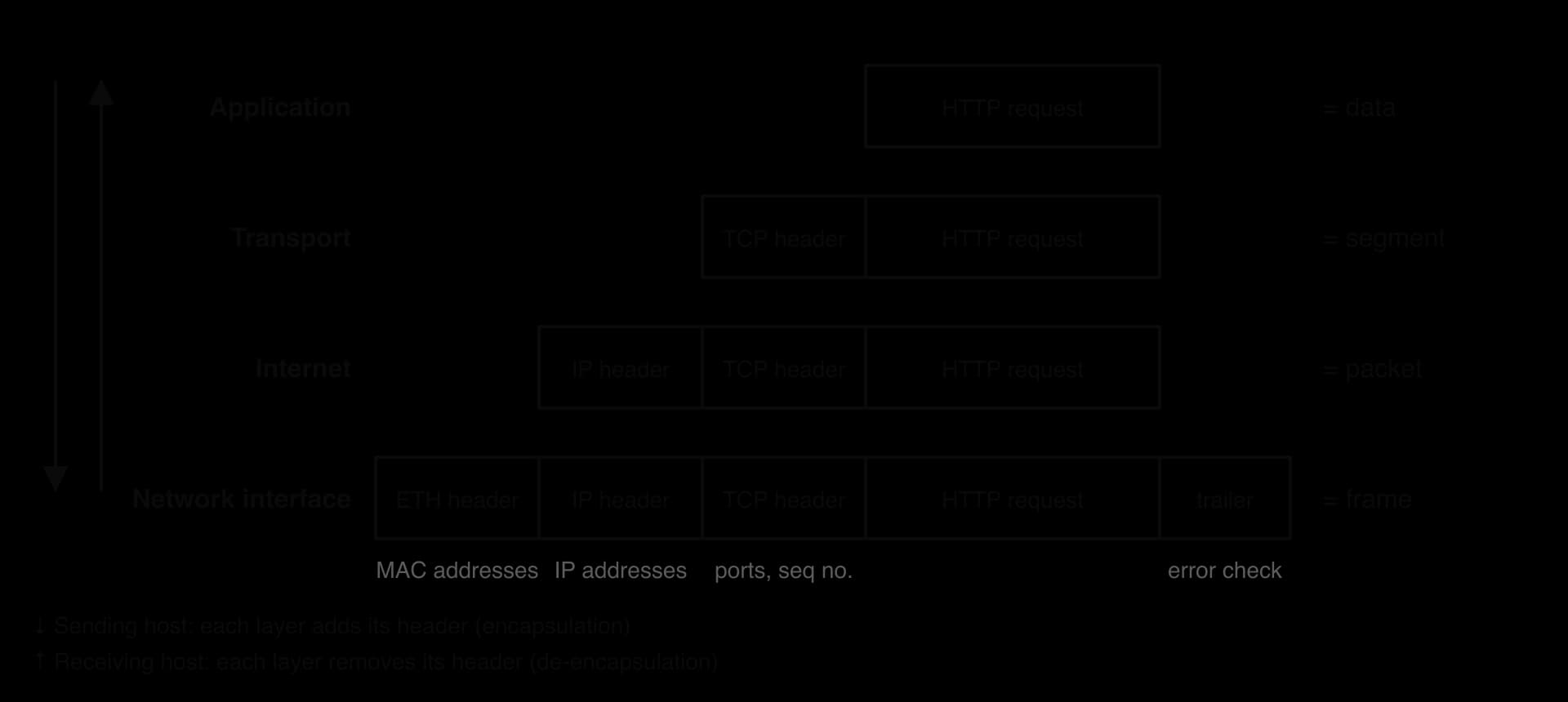
Following one HTTPS request from a laptop to a web server shows each step.
Application: the browser creates the HTTP request GET /index.html (encrypted by TLS) and passes it to the transport layer.
Transport: TCP adds a header with the source port (say 52344, chosen by the operating system), the destination port 443 and a sequence number. The result is a segment.
Internet: IP adds a header with the laptop's IP address and the server's IP address. The result is a packet.
Network interface: Ethernet or Wi-Fi adds a header with the laptop's MAC address and the MAC address of the default gateway (the next device, not the server), plus a trailer with an error check. The result is a frame, sent as signals.
Across the network: each router removes the frame, reads the IP header, chooses the next hop, and wraps the same packet in a new frame with new MAC addresses for the next link. The IP addresses and everything inside stay unchanged.
At the server: de-encapsulation runs upwards. The network interface layer checks and removes the frame; the internet layer checks the destination IP address and removes the IP header; the transport layer uses the port number 443 to pass the data to the web server program, reordering and acknowledging segments; the application layer receives the HTTP request.
The layers interact only through their boundaries. Each layer uses the service of the layer beneath it without depending on how that layer works, and provides a service to the layer on top of it. A browser works the same whether the laptop is on Ethernet, Wi-Fi or 5G, because only the network interface layer changes. A new application protocol can be added without touching any router, because routers never look above the internet layer. This separation is what lets the internet run over very different hardware and support new applications without redesign.
Together, the layers give reliable transmission even though the lower layers are unreliable. The network interface layer detects damaged frames and throws them away; the internet layer delivers packets on a best-effort basis by whatever route works; the transport layer notices any data that never arrived or arrived out of order and fixes it by retransmission and reordering; the application receives the complete message.
Every header adds bytes that carry no application data, so the layers cost bandwidth. The overhead matters most for small messages, which is one reason real-time applications use UDP's smaller header.
 YouTube
The Python program models encapsulation as text, wrapping the data in each layer's header on the way down and removing them in reverse on the way up.
LAYERS = ["TCP", "IP", "ETH"]


def encapsulate(data):
    unit = data
    for header in LAYERS:
        unit = "[" + header + "]" + unit
        if header == "ETH":
            unit = unit + "[CHECK]"
        print(header.ljust(4), unit)
    return unit


def de_encapsulate(frame):
    unit = frame
    i = len(LAYERS) - 1
    while i >= 0:
        header = "[" + LAYERS[i] + "]"
        unit = unit[len(header):]
        if LAYERS[i] == "ETH":
            unit = unit[:len(unit) - len("[CHECK]")]
        print(LAYERS[i].ljust(4), unit)
        i = i - 1
    return unit


frame = encapsulate("GET /index.html")
print("received:", de_encapsulate(frame))public class Encapsulation {
static final String[] LAYERS = {"TCP", "IP", "ETH"};
static String encapsulate(String data) {
String unit = data;
for (int i = 0; i < LAYERS.length; i++) {
unit = "[" + LAYERS[i] + "]" + unit;
if (LAYERS[i].equals("ETH")) {
unit = unit + "[CHECK]";
}
System.out.println(String.format("%-4s", LAYERS[i]) + " " + unit);
}
return unit;
}
static String deEncapsulate(String frame) {
String unit = frame;
for (int i = LAYERS.length - 1; i >= 0; i--) {
String header = "[" + LAYERS[i] + "]";
unit = unit.substring(header.length());
if (LAYERS[i].equals("ETH")) {
unit = unit.substring(0, unit.length() - "[CHECK]".length());
}
System.out.println(String.format("%-4s", LAYERS[i]) + " " + unit);
}
return unit;
}
public static void main(String[] args) {
String frame = encapsulate("GET /index.html");
System.out.println("received: " + deEncapsulate(frame));
}
}TCP [TCP]GET /index.html
IP [IP][TCP]GET /index.html
ETH [ETH][IP][TCP]GET /index.html[CHECK]
ETH [IP][TCP]GET /index.html
IP [TCP]GET /index.html
TCP GET /index.html
received: GET /index.htmlThe output shows the frame growing as it moves down and shrinking in exactly the reverse order as it moves up; the outermost header added last is the first one removed. Real headers are binary fields of fixed size, not text, but the order of wrapping is the same.
Network fundamentals is examined in Paper 1, Section A, through structured questions set in a context such as a school, a hospital or a small business. Most questions on network fundamentals ask you to identify, outline, describe or distinguish (2–4 marks each), but explain appears when a question asks why one protocol or infrastructure suits a scenario. Recurring shapes are: characteristics of a network type; one benefit and one limitation of an infrastructure for a named system; the function of a device or the difference between two devices; the steps of the three-way handshake or of DHCP; why an application uses TCP or UDP. At HL, extra parts ask for the role of a TCP/IP layer or how data is encapsulated.
When a question says distinguish, write each point as a pair joined by "whereas", comparing the same aspect of both items. Two separate descriptions ("A switch connects devices. A router connects networks.") may earn less than one clear contrast, because the difference is left for the examiner to infer.
State the typical range of a personal area network and identify the technology most PANs use. [2]
Outline two differences between a LAN and a WAN. [4]
Distinguish between the internet and the World Wide Web. [2]
Describe one benefit and one limitation of storing a company's files with a cloud provider in another country. [4]
Describe the function of a modem. [2]
State the three messages of the TCP three-way handshake, in order. [3]
A TCP segment with sequence number 7001 carries 400 bytes. State the acknowledgement number the receiver sends if it has received all earlier data. [1]
An online multiplayer game sends player positions 30 times a second. Explain why it uses UDP for these updates. [3]
Explain why a laptop may receive a different IP address from DHCP on different days. [2]
(HL only) Describe the role of the transport layer of the TCP/IP model. [3]
Up to about 10 metres [1]; Bluetooth [1].
Any two, each with a contrast: a LAN covers one building or site, whereas a WAN covers cities or countries [2]; a LAN is owned by one organisation, whereas a WAN mostly uses links leased from telecommunications companies [2]; a LAN has higher speed and lower latency than a WAN [2].
The internet is the global network of networks (hardware and TCP/IP) that carries data [1]; the web is one service running on it, made of linked resources fetched with HTTP/HTTPS [1].
Benefit: the company can scale storage up or down and pays only for what it uses / no server hardware to maintain [2]. Limitation: data sovereignty: the files fall under the other country's laws, which may allow access by its authorities or conflict with local data protection law / dependent on the internet connection [2].
Converts digital data from the network into a signal suited to the transmission line (modulation) [1] and converts received signals back into digital data (demodulation) [1].
SYN [1]; SYN-ACK [1]; ACK [1].
7401 (7001 + 400).
Positions are out of date within a fraction of a second [1], so retransmitting a lost update would deliver it too late to be useful [1]; UDP has no handshake or retransmission, so lower latency, and the next update replaces any lost one [1].
DHCP leases addresses for a limited time [1]; when the lease expires (for example overnight), the address returns to the pool and may be given to another device, so the laptop may be offered a different one [1].
Delivers data between programs (processes) on the two hosts, using port numbers to identify them [1]; with TCP, divides data into numbered segments and reassembles them in order [1]; acknowledges segments and retransmits lost ones to give reliable delivery (or with UDP, sends quickly without these guarantees) [1].
A computer network connects devices so they can share data, hardware, an internet connection and communication. LANs cover one site under one owner; WANs cover large areas over leased links (the internet is the largest); PANs cover about 10 m around one person.
A VPN tunnels encrypted packets across a public network so a remote device acts as if it were on the private network; it protects data in transit but does not make users anonymous.
The internet is a decentralised network of networks using TCP/IP; the World Wide Web is one service on it, built from URLs, HTTP and HTML.
Cloud computing gives scalable, pay-per-use computing but depends on connectivity and raises vendor lock-in and data sovereignty. Distributed systems gain scale and fault tolerance at the cost of complexity and consistency; blockchains are distributed ledgers with no central owner.
Edge computing processes data near its source for low latency and less bandwidth, at the cost of many devices to manage; mobile networks give access on the move but suffer from coverage gaps, cost and congestion.
NICs, switches, WAPs and modems work at the network interface layer (MAC addresses or signals); routers work at the internet layer (IP addresses); firewalls filter at the internet and transport layers or higher; gateways translate between protocols.
TCP is connection-oriented and reliable: three-way handshake, sequence numbers, acknowledgements and retransmission. UDP is connectionless with lower overhead and latency, suiting real-time traffic.
HTTP is a stateless, plain-text request–response protocol (port 80) with status codes such as 200 and 404; HTTPS sends HTTP through TLS (port 443) for confidentiality, integrity and server authentication. DHCP gives devices their network settings through Discover, Offer, Request and Acknowledge, on a lease.
HL: the TCP/IP model has four layers (application, transport, internet, network interface); data is encapsulated as segment, packet and frame on the way down and de-encapsulated on the way up, with each layer using only the service of the layer beneath it.
I can describe the purpose, scale, ownership, media and speed of a LAN, a WAN and a PAN, with an example of each.
I can describe how a VPN uses tunnelling and encryption, and state what a VPN does not protect against.
I can distinguish between the internet and the World Wide Web.
I can describe a benefit and a limitation of cloud computing, distributed systems, edge computing and mobile networks for a named system.
I can explain what data sovereignty and fault tolerance mean for an organisation choosing infrastructure.
I can describe the function of a NIC, switch, WAP, router, modem, gateway and hardware firewall, and give the TCP/IP layer of each.
I can distinguish between a switch and a router, and between a modem and a router.
I can identify the manufacturer's part of a MAC address and explain why MAC addresses change at each router while IP addresses do not.
I can describe the three-way handshake and work out sequence and acknowledgement numbers.
I can explain why an application uses TCP or UDP.
I can describe an HTTP request and response and say what common status codes mean.
I can describe the three protections HTTPS adds and what it does not hide.
I can describe the four DORA steps of DHCP and calculate lease renewal and expiry times.
I can describe the role of each TCP/IP layer and the unit of data at each one (HL only).
I can describe encapsulation and de-encapsulation step by step and calculate header overhead (HL only).
The service is considering moving the training to a cloud-based platform instead of upgrading its HPC centre.
Compare an HPC centre and a cloud-based platform for this task.
4 marks
Award [1] per valid comparison, up to [4 max]. Each mark must refer to both.
The HPC centre needs a large capital cost to upgrade whereas the cloud is paid for as it is used;
the cloud can scale up or down on demand whereas the HPC centre has a fixed capacity;
moving petabytes of data to the cloud takes a long time / costs a lot in transfer fees whereas data is already on site at the HPC centre;
the service controls its own HPC centre (security, scheduling) whereas in the cloud it depends on a third party;
both provide massive parallel processing (GPUs / many nodes);
for continuous, heavy use, owning HPC can be cheaper over time whereas the cloud suits irregular demand;
the HPC centre needs specialist staff to maintain it whereas the provider maintains the cloud;
Note: Award [1 max] for points about only one option.
Once trained, a model produces a new forecast every hour. Outline why running the trained model needs far less hardware than training it.
2 marks
Award [1] for the point and [1] for the development.
Training processes the whole historical data set many times / adjusts the model's parameters repeatedly;
running (inference) applies the finished model once to the latest data;
so it needs far fewer calculations / less memory;
and can be done on a single server rather than the whole centre;
A fitness-tracker company has 12 million users. Each wristband uploads heart rate, steps, sleep and GPS running routes to the company's servers several times an hour. The app shows each user live statistics, maps their runs, and compares them with friends. The company also wants to sell anonymised, long-term trend reports to health researchers.
The company currently stores everything in one relational database on servers in a single data centre, which is struggling with the volume of data.
Identify two types of database, other than relational, that could store parts of this data.
2 marks
To what extent should the company replace its single relational database with a combination of alternative databases (for example NoSQL, spatial, in-memory and cloud databases) and a data warehouse?
In your answer you should consider performance, consistency, cost and the needs of the health researchers.
12 marks
A network technician is recording the MAC addresses of a school's laptops. A MAC address is 48 bits long and is normally written in hexadecimal.
Two bytes of one address are 1010 1101 and 0000 1110. Convert each byte to hexadecimal.
2 marks
Another address starts with the byte 3C. Convert this byte to 8-bit binary.
1 mark
State the number of hexadecimal digits needed to write a full MAC address.
1 mark