Notes on A1.4 Translation
Learning objectives
Describe how a compiler translates a whole program into machine code before it runs.
Describe how an interpreter translates and executes a program one statement at a time.
Explain how bytecode and a virtual machine make one compiled program run on many platforms.
Explain how just-in-time (JIT) compilation uses profiling to speed up hot spots in a running program.
Compare compilers, interpreters, bytecode interpreters and JIT compilers in terms of error detection, translation time, execution speed and portability.
Evaluate the translation approaches for rapid development and testing, performance-critical applications and cross-platform development.
Introduction
A central processing unit can only execute machine code, yet almost every program is written in a language such as Python or Java that people can read. Every one of those programs therefore passes through a translator before it does anything. The choice of translator determines when errors are found, how long a program waits before it starts, how fast it then runs, and whether one copy of it works on Windows, macOS, Linux and Android or must be rebuilt for each.
Real systems rarely use one approach on its own. Python and Java, the two course languages, both compile source code into an intermediate form called bytecode and then run it on a virtual machine, and Java's main virtual machine also compiles the busiest parts of a program into machine code while it runs. The reasons they are built this way explain most of the trade-offs between translation approaches.
 YouTube
Why programs need translating
From machine code to high-level languages
A CPU decodes and executes machine code: binary instructions, each an opcode with its operands, drawn from the instruction set of that particular processor family. The fetch–decode–execute cycle works only on these patterns of bits. A program written in any other form must be converted into machine code before the CPU can carry it out.
Writing machine code by hand is slow and error-prone, so languages were built in layers above it. A low-level language stays close to the hardware: an assembly language gives each machine instruction a short name such as ADD or LOAD, but a program still has one line per instruction and works for one processor family only. A high-level language such as Python or Java describes what should happen in terms closer to the problem (variables, loops, functions, objects), and one statement can become dozens of machine instructions.
The same calculation looks very different at each level. The table shows one Java statement, a possible assembly-language version, and the kind of machine code an assembler would produce from it.
Level | Example | Who can read it | Runs on |
|---|---|---|---|
High-level language |
| Any programmer | Any platform with a translator |
Low-level: assembly language |
| Programmers who know this processor | One processor family |
Low-level: machine code |
| The CPU | One processor family |
The program a programmer writes is the source code. It is plain text, usually spread over many files, and it is the version that people edit, store in version control and read when they fix a bug.
Translators
The program that converts source code into a form the computer can run is a translator. Three kinds matter here: compilers, interpreters and the hybrid systems built from both, which use bytecode and just-in-time compilation. An assembler, which converts assembly language into machine code one instruction at a time, is a fourth kind.
The translator itself is a program running on the CPU, so it is made of machine code too. A Python interpreter, for example, is mostly written in C and compiled into machine code for the computer it runs on. As a result, an interpreter can only run on a platform for which someone has already built it.
How a compiler works
A compiler reads the whole of a program's source code, checks it, and translates it into machine code for one target platform before the program is run. The output is a separate file that can be run again and again without the compiler or the source code.
The result of compiling is a file the computer can run on its own.
Stages inside a compiler
A compiler works in stages, each passing its result to the next. The compiler stages diagram follows one Java statement, total = total + i * i;, from text to machine code.
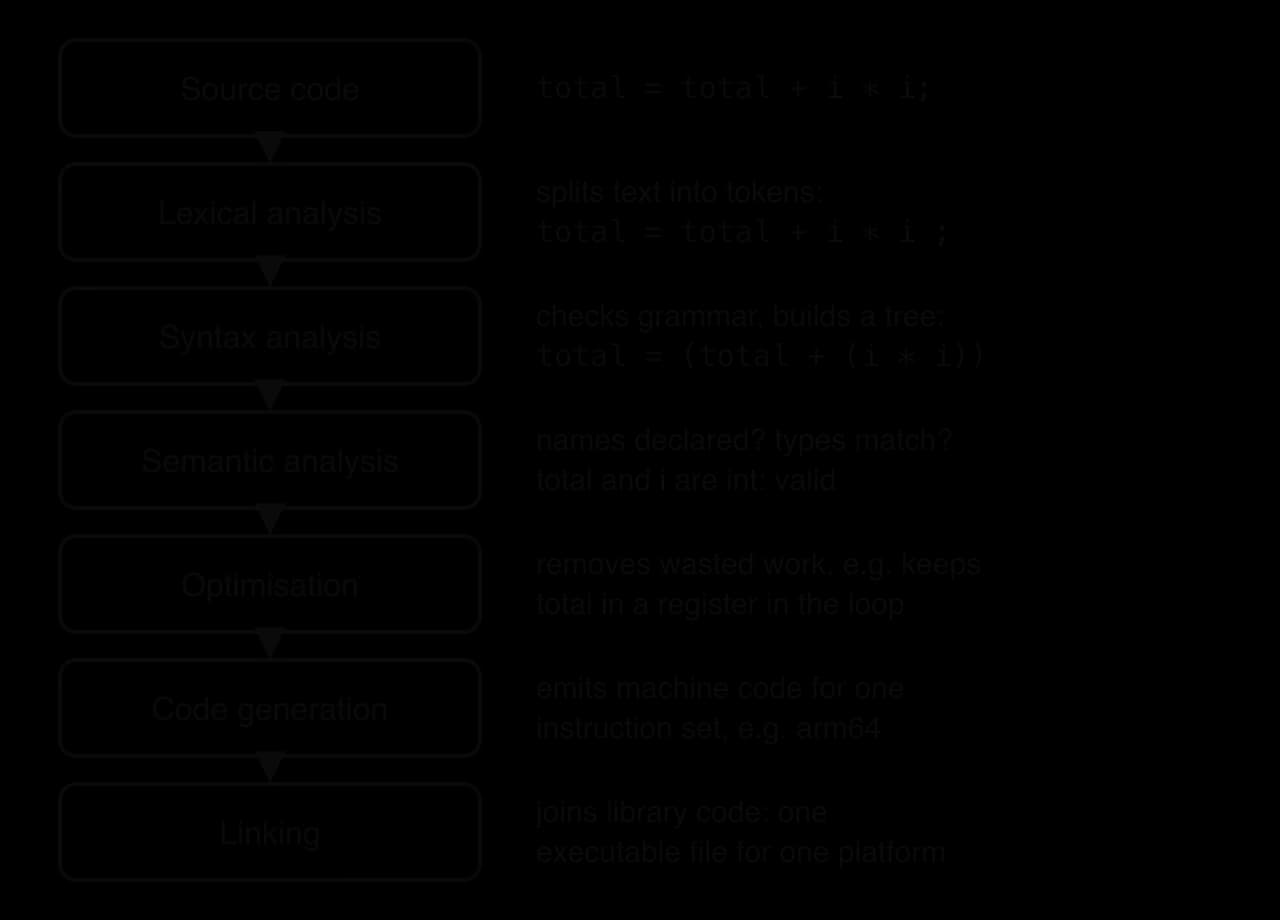
Lexical analysis reads the characters of the source code and groups them into tokens: names (
total,i), operators (=,+,*), literal values and punctuation (;). Spaces and comments are removed. A character the language does not allow, such as#in the middle of Java code, is reported here.Syntax analysis (parsing) checks that the tokens are in an order the language's grammar allows and builds a tree that shows the structure of each statement. The tree records that
i * iis worked out before the addition. A missing semicolon or bracket is a syntax error found at this stage.Semantic analysis checks meaning: that every variable is declared before it is used, that it is in scope, and that the types fit together. In a language with static typing such as Java, storing a
Stringin anintvariable is rejected here.Optimisation rewrites the program so it does the same work with fewer or cheaper instructions: keeping a running total in a register instead of memory during a loop, removing calculations whose result is never used, or working out
60 * 60once at compile time.Code generation produces machine code for the target instruction set (for example x86-64 or arm64).
Linking (done by a separate tool, the linker) joins the program's machine code with the library code it calls, such as the code that prints to the screen, to make one executable.
Because the analysis stages cover the whole program before any code is generated, the compiler reports the errors it finds across every file in one list, not only the first one. Many compilers, javac among them, check grammar first and check types only once the grammar is correct, so fixing the syntax errors can reveal a second batch of errors on the next compile. Only when no errors remain does the compiler produce its output.
What a compiler catches, and what it cannot
The Java compiler, javac, checks the whole program before anything runs. The following Python program and its Java version contain the same typing mistake: the last calculation uses score, the loop variable, where scores, the list, was meant.
Python
print("Report starting")
scores = [72, 85, 64]
total = 0
for score in scores:
    total = total + score
print("Total:", total)
print("Average:", total / len(score))
print("Report finished")
Java version
Java
public class Report {
    public static void main(String[] args) {
        System.out.println("Report starting");
        int[] scores = {72, 85, 64};
        int total = 0;
        for (int score : scores) {
            total = total + score;
        }
        System.out.println("Total: " + total);
        System.out.println("Average: " + total / score.length);
        System.out.println("Report finished");
    }
}
Python starts running the program and only meets the problem at line 7. By then two lines of output have already appeared. After a Python for loop finishes, score still holds the last value, 64, so the error is a runtime error (an integer has no length), not a missing name.
Plain text
Report starting
Total: 221
Traceback (most recent call last):
  File "report.py", line 7, in <module>
    print("Average:", total / len(score))
                              ~~~^^^^^^^
TypeError: object of type 'int' has no len()
The Java compiler rejects the program before anything runs. In Java, the variable score exists only inside the loop, so semantic analysis finds a name that is out of scope, no .class file is created, and not even "Report starting" is printed.
Plain text
Report.java:10: error: cannot find symbol
        System.out.println("Average: " + total / score.length);
                                                 ^
  symbol:   variable score
  location: class Report
1 error
Compiling does not remove every error. A compiler checks the form and the types of a program, but it cannot know the values the program will meet when it runs. Dividing by a value that turns out to be zero, reading past the end of an array, or opening a file that does not exist all pass compilation and fail later.
Python
counts = [4, 0, 2]
for count in counts:
    print(12 // count)
Java version
Java
public class Div {
    public static void main(String[] args) {
        int[] counts = {4, 0, 2};
        for (int count : counts) {
            System.out.println(12 / count);
        }
    }
}
Both versions print 3 and then stop with a runtime error on the second value: Python raises ZeroDivisionError and Java throws java.lang.ArithmeticException: / by zero. The Java program compiled without a single error message. A logic error, such as using < where <= was meant, is never reported by any translator, because the program is valid; it simply does the wrong thing.
Platform-specific executables
The machine code a compiler generates belongs to one instruction set, and the executable file is wrapped in the format of one operating system. An executable built for Windows on an x86-64 processor will not run on an arm64 Mac, and a Linux executable will not run on Windows, even when the processors match. To support three operating systems on two processor families, a developer compiles the same source code up to six times, once per target, and tests each build.
This style of compiling the whole program to native machine code before it is shipped is called ahead-of-time (AOT) compilation, to tell it apart from the just-in-time compilation that happens while a program runs.
Strengths and limitations of compiling
A compiled program starts quickly and runs fast. All the translation work, including heavy optimisation, has been done in advance, so the CPU spends its time on the program itself. The compiler can take as long as it needs to optimise, because that time is spent once, by the developer, not every time a user starts the program.
Strengths | Limitations |
|---|---|
Fast execution: optimised native machine code, no translation at run time | Every change means recompiling before it can be tested; large programs can take minutes to rebuild |
Syntax and type errors are reported for the whole program before it runs | Errors are reported only after a full pass, so the edit–test cycle is slower |
Users need only the executable, not the compiler | The executable runs on one platform (instruction set and OS) only; each platform needs its own build |
Source code is not distributed, which protects the developer's work | Debugging is harder because the running machine code no longer matches the source line by line |
How an interpreter works
An interpreter takes a different route. It never produces a separate machine-code file. Instead, it reads a statement, works out what it means and carries it out straight away, using routines inside the interpreter that already exist as machine code, then moves on to the next statement.
The interpreter flowchart shows the cycle it repeats. Each statement is analysed and then executed before the next one is read, so analysing and executing are interleaved.
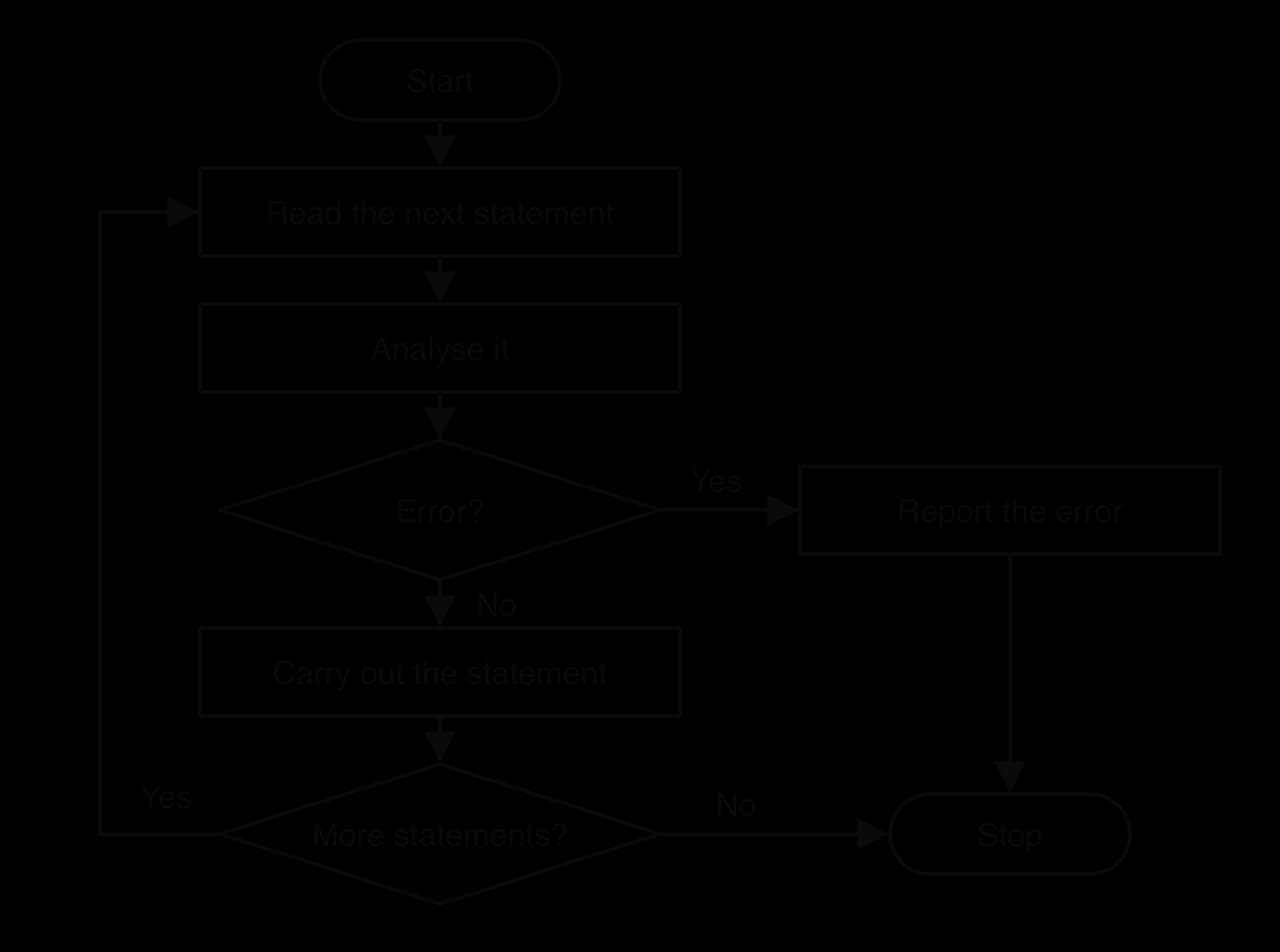
To carry out total = total + score, the interpreter looks up the current values of total and score in its own table of variables, calls its own addition routine and stores the result back in the table. The CPU is executing the interpreter's machine code throughout; the program being interpreted is data that the interpreter reads.
Errors in interpreted code
Because statements are analysed only when they are reached, an interpreter finds an error at the moment the faulty statement is about to run. Every statement before it has already been executed: output has been printed, files may have been changed, and the program stops in a half-finished state. This was the behaviour of the Python version of the report program.
A second consequence is more serious. An error inside a branch that is rarely taken can stay hidden through many test runs. The function grade has a spelling mistake (mrak for mark) on a line that runs only when a student fails.
Python
def grade(mark):
    if mark >= 50:
        return "Pass"
    else:
        return "Fail: " + mrak


print(grade(72))
print(grade(85))
print(grade(31))
Java version
Java
public class Grade {
    public static String grade(int mark) {
        if (mark >= 50) {
            return "Pass";
        } else {
            return "Fail: " + mrak;
        }
    }

    public static void main(String[] args) {
        System.out.println(grade(72));
        System.out.println(grade(85));
        System.out.println(grade(31));
    }
}
In Python, the first two calls work and print Pass twice. Only the third call reaches the else branch, and only then does the error appear:
Plain text
Pass
Pass
Traceback (most recent call last):
  File "branch_demo.py", line 10, in <module>
    print(grade(31))
          ~~~~~^^^^
  File "branch_demo.py", line 5, in grade
    return "Fail: " + mrak
                      ^^^^
NameError: name 'mrak' is not defined
If the test data had contained only passing marks, the program would have seemed correct. The Java compiler reports cannot find symbol ... variable mrak at line 6 before the program runs at all, whatever data it is tested with. This is one reason large teams often prefer a compiled, statically typed language, and why Python developers rely on thorough testing and on tools that check code before it runs. Python's dynamic typing makes such checks harder, because the type of a variable is known only when the program runs.
The program stock_check.py prints the stock of two items from a dictionary; its line numbers are shown on the left.
Plain text
1  print("Loading")
2  stock = {"pens": 12, "rulers": 5}
3  print("Pens:", stock["pens"])
4  print("Glue:", stock["glue"])
5 print("Done")Python's interpreter compiles first
The standard Python implementation, CPython, does not interpret the source text line by line. Before running a file, it compiles the whole file into bytecode, a compact intermediate code that a virtual machine runs. That compilation step checks the grammar of the entire file, so a syntax error anywhere stops the program before its first line runs.
Python
print("Line 1 runs")
total = 0
for value in [3, 4, 5]
    total = total + value
print(total)
Java version
Java
public class SyntaxDemo {
    public static void main(String[] args) {
        System.out.println("Line 1 runs");
        int total = 0
        System.out.println(total);
    }
}
Neither version prints "Line 1 runs". Python reports SyntaxError: expected ':' at line 3 and Java reports ';' expected at line 4, both before execution begins. CPython therefore finds syntax errors in the whole file up front, like a compiler, but finds name, type and value errors only when a statement runs, like an interpreter. The phrase "an interpreter stops at the first error" is true of runtime errors in Python, not of syntax errors.
The read–eval–print loop
Interpreters make it possible to type one statement and see its result immediately. This interactive mode is a read–eval–print loop (REPL): it reads a line, evaluates it, prints the result and waits for the next line, keeping every variable from earlier lines.
Typing python3 with no file name opens the Python REPL. Java, normally a compiled language, gained its own REPL, JShell, in JDK 9 (2017). The two sessions try the same three lines; the Java one also shows that / between two int values is integer division.
Plain text
>>> price = 40
>>> price * 3
120
>>> price / 3
13.333333333333334
JShell shows each result with a name ($2, $3) so it can be reused in later lines:
Plain text
jshell> int price = 40
price ==> 40

jshell> price * 3
$2 ==> 120

jshell> price / 3
$3 ==> 13
With a REPL, a programmer can check how a library function behaves, try a calculation or explore a data file in seconds, without writing, saving and compiling a whole program.
Strengths and limitations of interpreting
A pure interpreter repeats its analysis every time a statement runs. A loop body executed 10,000 times is analysed 10,000 times, and the whole program is analysed again on the next run. Looking up variables by name and checking types while running also costs time. For these reasons interpreted code is usually much slower than compiled code doing the same work.
Strengths | Limitations |
|---|---|
A program starts at once: no separate compile step, so the edit–run cycle is fast | Slower execution: statements are analysed every time they run |
Errors are reported at the exact statement that failed, with the program's state still available for debugging | Errors are found only when a statement is reached; untested branches can hide errors |
Source code runs unchanged on any platform that has the interpreter | The interpreter must be installed on every machine that runs the program |
Supports a REPL for experimenting and testing small pieces of code | The source code is usually distributed, so others can read and copy it |
Bytecode and virtual machines
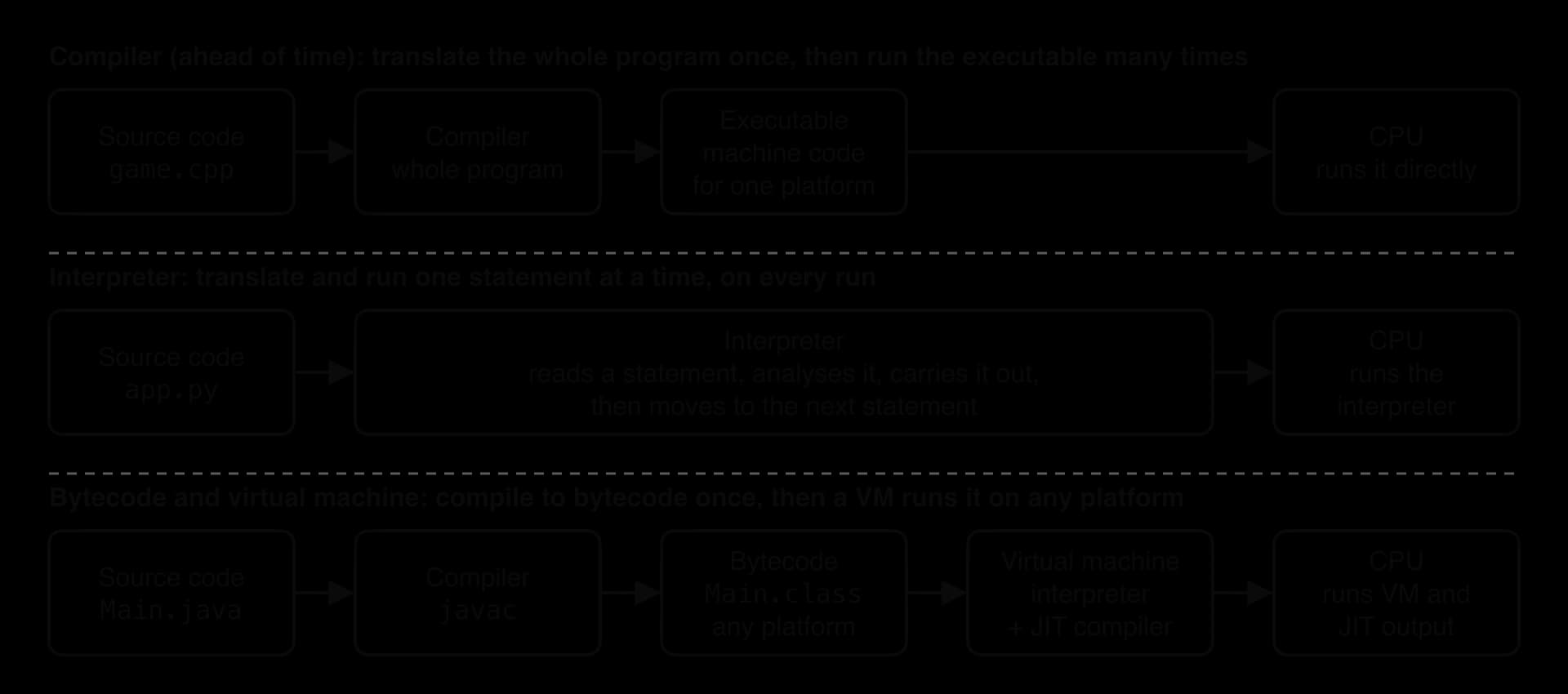
Pure compilers and pure interpreters each give up something important: compiled code is fast but tied to one platform, while interpreted code is portable but slow. Most modern language implementations split translation into two steps to get some of both. First, a compiler translates the source code into bytecode, a compact set of instructions for an imaginary processor. Then a virtual machine on each real computer runs that bytecode.
The three translation pipelines diagram sets the hybrid route beside the two pure ones.
The Java route: javac, .class files and the JVM
The Java compiler, javac, performs the analysis stages of a compiler on the whole program, so it reports syntax, scope and type errors before anything runs. Instead of machine code, it generates bytecode: one .class file for each class. Every .class file starts with the same four bytes, CA FE BA BE in hexadecimal, followed by a version number, whichever computer it was compiled on.
When java Main is run, the OS starts the JVM as a process. The JVM's class loader reads the .class files, a bytecode verifier checks that the bytecode is well formed and cannot break the JVM's safety rules (for example, jumping outside the method or misusing a value's type), and then execution begins. The name "virtual machine" here means a program that behaves like a processor for bytecode; it is a different idea from the virtual machine of subtopic A1.3, which imitates a whole computer so that it can run a complete operating system.
The method sumSquares adds up the squares of 1 to n. The Python version uses the standard dis module to print the bytecode CPython generated for the function; for Java, the JDK tool javap -c SumSquares prints the bytecode inside the compiled .class file.
Python
import dis


def sum_squares(n):
    total = 0
    for i in range(1, n + 1):
        total = total + i * i
    return total


print(sum_squares(10))
dis.dis(sum_squares)
Java version
Java
public class SumSquares {
    public static int sumSquares(int n) {
        int total = 0;
        for (int i = 1; i <= n; i++) {
            total = total + i * i;
        }
        return total;
    }

    public static void main(String[] args) {
        System.out.println(sumSquares(10));
    }
}
Both programs print 385. The bytecode javac produced for sumSquares, as printed by javap -c, is:
Plain text
 0: iconst_0
 1: istore_1
 2: iconst_1
 3: istore_2
 4: iload_2
 5: iload_0
 6: if_icmpgt     21
 9: iload_1
10: iload_2
11: iload_2
12: imul
13: iadd
14: istore_1
15: iinc          2, 1
18: goto          4
21: iload_1
22: ireturn
Each line is one bytecode instruction: the number is its position in bytes and the name says what it does. The JVM is a stack machine: instructions take their inputs from the top of an operand stack and push their results back. iload_2 pushes local variable 2 (i), imul pops two values and pushes their product, iadd adds the top two values, and istore_1 pops the top value into local variable 1 (total). Local variable 0 is the parameter n. The loop is just a comparison (if_icmpgt, "jump if greater than") and a jump back (goto 4).
Bytecode interpreters
The simplest way for a virtual machine to run bytecode is with a bytecode interpreter: a loop that fetches the next bytecode instruction, decodes its opcode and jumps to a routine that carries it out, then moves on. It is a software copy of the fetch–decode–execute cycle.
A bytecode interpreter is much faster than an interpreter that works on source code, for three reasons. The expensive analysis (tokens, grammar, names, and in Java types) has already been done once by the compiler. Each bytecode instruction is small and simple, so decoding it is quick. Variables have been turned into numbered slots (istore_1 rather than the name total), so there is no searching by name. It is still slower than native code, because every bytecode instruction costs several real machine instructions to fetch, decode and dispatch.
The Python route: CPython's bytecode
CPython follows the same plan. When a file is run, CPython compiles it to bytecode in memory and its bytecode interpreter, a loop written in C, executes it. When a module is imported, CPython also saves the bytecode in a __pycache__ folder so that the next run can skip compilation, as long as the source file has not changed. Part of the bytecode printed by the Python listing under CPython 3.13 is shown here (other versions print slightly different instructions):
Plain text
  7           LOAD_FAST_LOAD_FAST     18 (total, i)
              LOAD_FAST                2 (i)
              BINARY_OP                5 (*)
              BINARY_OP                0 (+)
              STORE_FAST               1 (total)
              JUMP_BACKWARD           12 (to L1)
The instructions mirror the Java ones: push total and i, push i again, multiply, add, store into total, jump back to the start of the loop. One difference matters for speed. Java's imul multiplies two int values whose type was checked at compile time, while Python's BINARY_OP (*) must first check at run time what kinds of objects it has been given, because a variable in Python can hold any type.
Python's bytecode files are named after the interpreter version, for example sum_squares.cpython-313.pyc for CPython 3.13. Python bytecode is not guaranteed to stay the same from one release to the next, so the .pyc file is a cache that speeds up start-up, not a portable file to distribute. Python programs are shared as source code, and portability comes from installing an interpreter on each platform. Java takes the opposite approach: the .class format is part of the Java platform's specification, and old .class files keep running on newer JVMs.
Portability and cross-platform development
Bytecode separates two jobs. Compilation to bytecode depends only on the language, so it is the same everywhere. Executing the bytecode depends on the hardware and OS, so that job is given to the virtual machine, which is ported to each platform once by its developers. Any program compiled to that bytecode then runs on every platform that has the virtual machine.
Portability is a matter of degree: a program may need only a recompile, small changes, or a complete rewrite to move. Software that needs no change at all, because the same file or source code runs everywhere, is called cross-platform.
Sun Microsystems promoted Java in 1995 with the slogan "write once, run anywhere": a .class file compiled on a Windows laptop runs unchanged on a Linux server or a Mac. Three limits apply. The target computer needs a suitable virtual machine installed or bundled with the program. Small differences between platforms (file paths, fonts, how windows are drawn) can still make the same program behave differently. Mobile platforms add their own layer: Android apps are usually written in Java or Kotlin and compiled to Java bytecode, which the build tools then convert into Android's own bytecode format (DEX) for the Android Runtime, ART.
Just-in-time compilation
A bytecode interpreter gives portability, but every instruction still costs several machine instructions to dispatch. Just-in-time (JIT) compilation removes most of that cost. While the program runs, the virtual machine measures which parts are used most and compiles those parts from bytecode into native machine code for the processor it is running on. From then on the CPU executes that machine code directly.
Profiling and hot spots
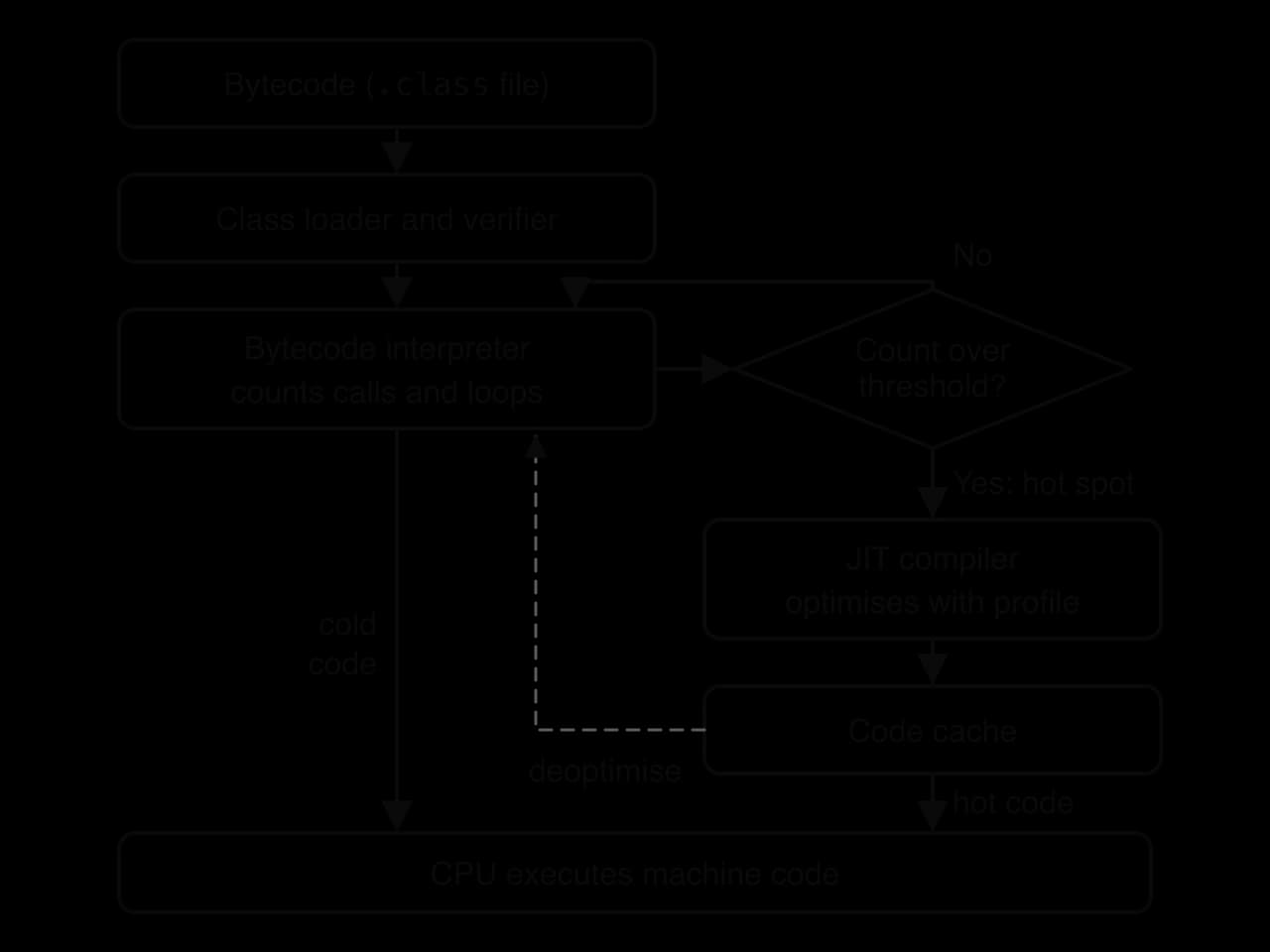
Compiling every method as soon as it is loaded would delay start-up and waste effort: most code in a large program runs once or never, and translating it costs more than interpreting it. A JIT compiler therefore first measures. This profiling happens as the program runs: the virtual machine keeps counters for how often each method is called and how often each loop jumps back, and records extra facts, such as which types of object actually reach a given instruction.
When a counter passes a threshold, that method or loop is a hot spot. A small share of the code usually accounts for most of the running time, so compiling just the hot spots gives most of the speed-up for a small share of the compiling effort.
The flow of code through a JVM shows the two paths that run side by side: cold code is interpreted, hot code is compiled once and then run as machine code from the code cache.
 YouTube
How a JIT compiler gets its speed
A JIT compiler produces machine code for the exact processor in front of it, so it can use instructions that a generic ahead-of-time build might avoid for compatibility. It can also optimise using the profile. If one branch of an if has never been taken, the compiled code can be laid out for the other branch; if a method call has always reached the same method, the compiler can copy that method's body into the caller (inlining) and skip the call.
These optimisations rest on assumptions about the past. If the program later does something new, such as calling the method with a different type of object, the virtual machine deoptimises: it discards the compiled code, returns that method to the bytecode interpreter, and may compile it again later with the new profile. The compiled code is used only while its assumptions hold, so a wrong prediction costs time but never produces a wrong result.
Java's HotSpot JVM uses tiered compilation. A quick compiler, C1, produces reasonably good machine code soon and adds counters for profiling. Code that stays hot is compiled again by the slower optimising compiler, C2, using the profile. The tiers that appear in HotSpot's compilation log are summarised in the table.
Tier | What runs the code | Speed of the code | Cost of getting there |
|---|---|---|---|
0 | Bytecode interpreter, counting calls and loops | Slowest | None: starts immediately |
3 | Machine code from C1, with profiling counters added | Faster | Quick compile, small delay |
4 | Machine code from C2, optimised using the profile | Fastest | Slow compile, done only for code that stays hot |
Measuring the warm-up
The cost of JIT compilation shows up as warm-up: a JIT-compiled program is slow at first, while it is interpreted and profiled, and fast later. The WarmUp program times the same piece of work eight times in a row. The Python version uses time.perf_counter_ns() and the Java version System.nanoTime(); both return a time in nanoseconds, and the difference between two readings is the time taken.
Python
import time


def work(n):
    total = 0
    for i in range(1, n + 1):
        total = total + i * i % 7
    return total


for round_number in range(1, 9):
    start = time.perf_counter_ns()
    result = work(1000000)
    micros = (time.perf_counter_ns() - start) // 1000
    print("Round " + str(round_number) + ": " + str(micros) + " microseconds (result " + str(result) + ")")
Java version
Java
public class WarmUp {
    public static long work(int n) {
        long total = 0;
        for (int i = 1; i <= n; i++) {
            total = total + (long) i * i % 7;
        }
        return total;
    }

    public static void main(String[] args) {
        for (int round = 1; round <= 8; round++) {
            long start = System.nanoTime();
            long result = work(1000000);
            long micros = (System.nanoTime() - start) / ;
            System.out.println( + round +  + micros +  + result + );
        }
    }
}
The Java version uses long because the product i * i reaches when i is 1,000,000, far more than the largest int (2,147,483,647); the cast (long) i makes the multiplication happen in 64 bits. Python's integers have no fixed size, so the Python version needs no such care. One run of the Java version on the computer used for the timing table printed:
Plain text
Round 1: 2367 microseconds (result 1999999)
Round 2: 1320 microseconds (result 1999999)
Round 3: 1101 microseconds (result 1999999)
Round 4: 1033 microseconds (result 1999999)
Round 5: 656 microseconds (result 1999999)
Round 6: 659 microseconds (result 1999999)
Round 7: 656 microseconds (result 1999999)
Round 8: 655 microseconds (result 1999999)
Running HotSpot with the option -XX:+PrintCompilation lists its decisions. The extract comes from a run of the WarmUp program (the first column is milliseconds since the JVM started; the rest of the log is omitted):
Plain text
31    8 %     3       WarmUp::work @ 4 (29 bytes)
31    9       3       WarmUp::work (29 bytes)
31   10 %     4       WarmUp::work @ 4 (29 bytes)
32   10 %     4       WarmUp::work @ 4 (29 bytes)   made not entrant: uncommon trap
Round 1: 2358 microseconds (result 1999999)
40   62 %     4       WarmUp::work @ 4 (29 bytes)
41   63       4       WarmUp::work (29 bytes)
Round 2: 1273 microseconds (result 1999999)
Within about 31 ms of starting, the loop inside work had become hot and was compiled at tier 3 (C1 with profiling) and then at tier 4 (C2). The % marks on-stack replacement: the loop was compiled while it was still running, and the JVM switched to the compiled version partway through it. One C2 version was "made not entrant" (discarded) after an uncommon trap, which is a deoptimisation; the JVM recompiled it with better information at 40 ms.
The same work was timed in four ways on one computer: CPython, the JVM with its JIT switched off (option -Xint, so it only interprets bytecode), the normal JVM, and the same loop written in C and compiled ahead of time with Clang. Each figure is the median of seven runs.
Translation approach | Round 1 (ms) | Round 8 (ms) | Changes between rounds? |
|---|---|---|---|
CPython 3.13 (bytecode interpreter) | 53.4 | 53.6 | No |
JVM, bytecode interpreter only ( | 9.2 | 9.1 | No |
JVM with JIT (HotSpot, default) | 2.0 | 0.66 | Yes: faster after warm-up |
C compiled ahead of time (Clang | 0.61 | 0.62 | No |
Source: the time taken by one call of work(1000000) in rounds 1 and 8 of the WarmUp program (and of the same loop in C), measured on an Apple M1 Max laptop with Python 3.13.7, OpenJDK 25.0.2 and Apple Clang 17, October 2026; median of 7 runs of each program. Exact times vary between computers and runs.
The graph of the JVM timings shows the warm-up curve between the two fixed approaches.
The data supports four conclusions. JIT compilation made the same bytecode about 14 times faster than interpreting it (9.2 ms against 0.66 ms). Once warm, the JIT-compiled Java came within about 7% of the C program compiled ahead of time (0.66 ms against 0.62 ms in round 8). The first round, which included interpreting, profiling and compiling, took about three times as long as later rounds. CPython, which in its standard build interprets bytecode with no JIT, took about 80 times as long as warm Java for this loop, partly because each Python operation checks the types of its values at run time.
Costs and limits of JIT compilation
JIT compilation is not free. The compiler runs on the same computer as the program, competing for CPU time and memory, and the code cache, the profiling data and the compiler itself all take memory. Programs are slow during warm-up, which matters for short command-line tools, for serverless functions that start often, and for anything that must respond fast from the first second. Running times are also less predictable, because a deoptimisation or a compilation can happen at any moment; for this reason hard real-time systems usually avoid JIT compilers.
JIT compilers in other languages
The pattern of an interpreter for cold code and an optimising compiler for hot code appears across modern language implementations.
Google V8, the JavaScript engine in Chrome (2008), added the Ignition bytecode interpreter in 2016 and since 2017 runs every script through Ignition first and compiles the hottest functions with its optimising compiler, TurboFan; faster intermediate compilers (Sparkplug in 2021, Maglev in 2023) now sit between the two. Every browser ships its own engine, so one JavaScript file runs on phones, laptops and servers.
PyPy is an alternative implementation of Python with a JIT compiler. Pure Python code often runs much faster on it than on CPython, but code that depends on CPython's C extensions may not work, which is one reason CPython remains the standard.
CPython 3.13 (2024) added an experimental JIT compiler that is switched off by default, so the CPython that most people run still interprets its bytecode.
Android's runtime, ART, has used both approaches. From Android 5.0 it compiled apps ahead of time when they were installed, which made installs and system updates slow and used more storage. Since Android 7.0 it runs new apps with a JIT compiler, profiles them, and compiles the hot code ahead of time while the phone is idle and charging.
Comparing the translation approaches
Point-by-point comparison
The comparison table lines up the four approaches against the criteria used to evaluate them.
Criterion | Compiler (AOT) | Interpreter | Bytecode + bytecode interpreter | Bytecode + JIT |
|---|---|---|---|---|
When translation happens | Once, before running, for the whole program | Every time each statement runs | Source → bytecode once; bytecode interpreted each run | Source → bytecode once; hot bytecode → machine code during the run |
Error detection | Syntax and type errors in the whole program reported before running | Each error found only when its statement runs | Compile step finds syntax (and in Java, type) errors; the rest at run time | Same as bytecode interpreter |
Translation time | Long compile before testing; large programs take minutes | None up front | Short compile to bytecode | Short compile, plus JIT work during the run |
Start-up | Fastest: machine code ready | Fast: starts at once | Fast, but the VM must start | VM start, then slow warm-up |
Execution speed | Fastest | Slowest | Moderate | Close to AOT once warm |
Portability | Executable runs on one platform; recompile for each | Source runs anywhere with the interpreter | Bytecode runs anywhere with the VM | Bytecode runs anywhere with the VM |
What is distributed | Executable only (source kept private) |
Start-up and translation time
Start-up is easy to overlook. The table shows how long each approach took to run a program that prints one word and exits, on the same computer as the warm-up test.
Program and approach | Time to start, print and exit (ms) |
|---|---|
C executable, compiled ahead of time | 4 |
Python script, run by CPython | 18 |
Java | 40 |
Java source file run directly with | 277 |
Source: wall-clock time to start each program, print one word and exit, measured on an Apple M1 Max laptop with Python 3.13.7, OpenJDK 25.0.2 and Apple Clang 17, October 2026; median of at least 5 runs.
The ahead-of-time executable needs no translator at all, so it starts fastest. CPython starts quickly because its virtual machine is small and the script's bytecode compiles almost instantly. The JVM has more to set up before running the first instruction. When the compile step is folded into the run, as in the last row, the cost of compiling is paid on every start. For a five-line program every approach starts in well under a second; the differences become important for large programs, for tools that are started thousands of times a day, and for phones, where start-up delay is visible to users.
Choosing an approach for a scenario
Evaluating a translation approach means weighing its strengths and limitations against what one particular scenario needs, then reaching a judgement. Three kinds of scenario come up again and again.
Rapid development and testing
When the code changes every few minutes (a prototype, a data analysis, a school project, a script to tidy a folder of files), the time between making a change and seeing its effect matters more than how fast the finished program runs. An interpreter fits: there is no compile step, a REPL lets the programmer test one function at a time, and an error message points at the line that failed with the program's variables still available to inspect.
The same features bring limitations. Errors in untested branches stay hidden until those branches run, so a quick prototype can contain errors that only appear later. Interpreted code runs slowly, which hardly matters for a script that runs for a second but matters a great deal for a program that processes millions of records. Most developers who choose Python or JavaScript for rapid development add automated tests and a code checker to make up for the lack of compile-time checking, and move hot spots into faster code if speed becomes a problem.
Performance-critical applications
Some software must make the fullest use of the hardware: an operating system kernel, a game engine drawing a new frame every few milliseconds, a video encoder, a database engine, the control software of a car, or trading software where a delay of microseconds loses money. These are normally written in C, C++ or Rust and compiled ahead of time. The Linux kernel, for example, is written in C and built with the GCC compiler.
Ahead-of-time compilation suits these programs for several reasons. The compiler can spend minutes optimising, because that time is spent once on the developer's machine. The machine code runs at full speed from the first instruction, with no warm-up and no interpreter in memory. Timing is predictable because no compilation or deoptimisation can interrupt the program, which matters for real-time control. An OS kernel also has no choice: it runs before any virtual machine exists, so it must already be machine code.
The costs are portability and development speed. Each platform needs its own build and its own testing, a full rebuild of a large program can take a long time, and errors that a virtual machine would catch safely (reading past the end of an array, for example) can make a compiled C program crash or corrupt memory. A JIT-compiled language can approach AOT speed once warm, as the warm-up test showed, and is often fast enough for servers that run for days; the remaining gap is in start-up, memory use and predictability.
Cross-platform development
When one program must run on many kinds of device (Windows, macOS and Linux desktops; Android phones; web browsers), the cost of building, testing and distributing a separate version for each platform dominates. Bytecode with a virtual machine fits this case best: the developer compiles once, ships one bytecode file, and the virtual machine on each device does the platform-specific work, using a JIT compiler to recover most of the speed lost to interpretation.
The case against comes from the virtual machine itself. Each target device needs a compatible VM, which adds to download size and memory use, and the program pays for VM start-up and warm-up every time it runs. Platform differences in user interfaces and file systems still need testing. Ahead-of-time compilation can also be cross-platform if the developer compiles the same source code once per target, but that multiplies the number of builds, and an interpreted language is cross-platform if every device has the interpreter, at the cost of speed and of shipping the source code. JavaScript in the web browser shows the bytecode-plus-JIT model at its largest scale: the developer ships source code, and each browser's engine (V8 in Chrome) compiles it to bytecode and JIT-compiles the hot parts.
Case study: Java HotSpot and "one build, many platforms"
A developer who writes a desktop application in C++ and wants to sell it for Windows, macOS and Linux on both x86-64 and arm64 processors must compile and test up to six separate executables, because each contains machine code for one instruction set in the format of one operating system. A developer who writes it in Java compiles it once with javac and ships the same .class files (usually packed into a .jar archive) to every customer. HotSpot is the JVM that made the second option fast enough to compete.
Target platform | C++ (compiled ahead of time) | Java (bytecode) |
|---|---|---|
Windows, x86-64 | Its own executable | The same |
Windows, arm64 | Its own executable | The same |
macOS, x86-64 | Its own executable | The same |
macOS, arm64 | Its own executable | The same |
Linux, x86-64 | Its own executable | The same |
Linux, arm64 | Its own executable | The same |
Builds to compile and test | 6 | 1 (plus a JVM per platform, built by the JVM's developers) |
Sun Microsystems released the Java HotSpot Performance Engine on 27 April 1999. Its name describes its method: it starts by interpreting bytecode, profiles the running program to find the hot spots, and spends its compiling effort only on them. HotSpot remains the JVM inside OpenJDK, and it is the JVM that produced the compilation log and warm-up timings for the WarmUp program. The timeline shows how the approach developed and spread.
Year | Event |
|---|---|
1997 | Sun buys Animorphic, the company behind Strongtalk, a fast Smalltalk virtual machine whose ideas HotSpot builds on |
1999 | HotSpot released (27 April): bytecode interpreter plus JIT compilation of hot spots |
2011 | Java 7 offers tiered compilation, using the quick C1 and optimising C2 compilers together |
2014 | Java 8 makes tiered compilation the default; Android 5.0 replaces its JIT-based Dalvik VM with ART, which compiles apps ahead of time at install |
2016 | Android 7.0 makes ART a hybrid: JIT compilation and profiling first, AOT compilation of hot code while the phone is idle and charging |
Source: Wikipedia, "HotSpot (virtual machine)", "Android Runtime" and "Java version history", accessed October 2026.
The case shows each criterion of the comparison at work.
Criterion | What HotSpot shows |
|---|---|
Portability | One |
Error detection |
|
Execution speed | Interpreting alone was about 14 times slower than the JIT-compiled code in the warm-up test; after warm-up, the JIT-compiled loop came within about 7% of C compiled ahead of time. |
Costs | Every user needs a JVM; start-up is slower than a native executable (40 ms against 4 ms for the one-line program); memory goes on the JVM, the profiler and the code cache. Bytecode keeps much of the program's structure, so it is easier to decompile than machine code. |
The same ideas were reworked for phones. Android apps written in Java or Kotlin are compiled to Java bytecode, converted to Android's DEX format, and run by ART. ART's move from pure ahead-of-time compilation to the hybrid of Android 7.0 was made because compiling every app in full at install time made installs and system updates slow and used extra storage. For Java on the server, the opposite trade-off is available: GraalVM Native Image compiles a Java program ahead of time into a single executable that starts fast and needs no JVM, but runs only on the platform it was built for.
Evaluation. For software that must reach many platforms, bytecode with a JIT-compiling virtual machine gives one build with speed close to native code for long-running programs, at the cost of start-up time, memory and the need for a VM. Where start-up or predictable timing matters more than portability, as in a game engine or an OS kernel, ahead-of-time compilation is still the better choice, which is why Java's own platform now offers both.
Exam focus
Translation is examined in Paper 1, Section A, as HL-only parts added to a question on computer fundamentals. Expect short Outline, Describe or Identify parts (2–3 marks) on how a compiler, interpreter, bytecode or JIT compilation works, an Explain part (3–4 marks) asking why an approach has a given effect, and an Evaluate or Discuss part (4–6 marks) set in a scenario: rapid development and testing, a performance-critical application, or cross-platform development. Evaluate answers need strengths and limitations of the approach in that scenario and a justified judgement; a one-sided list does not reach the top marks. The scenario must appear in the answer, not just in the question.
Translation questions often reward the correct description of the hybrid models. Python and Java are the languages you know best, so be ready to describe exactly what happens to your own code: source code compiled to bytecode, bytecode run by a virtual machine, and (for Java's JVM) hot spots JIT-compiled to machine code.
Practice questions
Define the term translator. [1]
State two differences between source code and machine code. [2]
Identify the stage of compilation that detects each of these: (a) a missing closing bracket; (b) a variable used before it is declared. [2]
Outline why a program run by an interpreter may produce some output before it stops with an error. [2]
Explain why CPython reports a syntax error on line 40 of a file before running line 1, but reports a division by zero on line 40 only after lines 1 to 39 have run. [3]
Describe the role of profiling in just-in-time compilation. [3]
A method takes 6 ms per call when interpreted and 0.5 ms per call once compiled; compiling it takes 33 ms. Calculate the minimum number of calls after which JIT compilation saves time. [2]
Distinguish between a Java Virtual Machine and the kind of virtual machine a hypervisor runs. [2]
Evaluate the use of ahead-of-time compilation for the software inside a car's engine control unit. [6]
Discuss the advantages and disadvantages of distributing a program as bytecode rather than as source code to be interpreted. [6]
Answers
A program that converts code written in one programming language into another form, such as machine code or bytecode, so that it can be executed.
Any two: source code is written by people in a (usually high-level) language, machine code is binary instructions; source code can be read and edited by programmers, machine code is executed directly by the CPU; source code is largely platform-independent, machine code belongs to one instruction set.
(a) Syntax analysis (parsing). (b) Semantic analysis.
An interpreter translates and executes one statement at a time, so statements before the faulty one have already been executed (and their output printed); the error is found only when its statement is reached.
CPython compiles the whole file to bytecode before running it; the compiler checks the grammar of every line, so a syntax error anywhere stops compilation and nothing runs. Division by zero depends on the values at run time; the line is grammatically valid, so it compiles, and the error appears only when the bytecode for line 40 is executed, after lines 1 to 39 have run.
While the program runs, the virtual machine counts how often each method is called and each loop repeats (and records, for example, which types reach each instruction); code whose counts pass a threshold is identified as a hot spot; only hot spots are compiled into machine code, and the profile is used to optimise them; so compiling effort goes where it saves most time.
gives
Summary
The CPU executes only machine code, so source code in a high-level language must be translated by a compiler, an interpreter or a hybrid of both.
A compiler analyses the whole program (lexical, syntax and semantic analysis), reports syntax and type errors from the whole program before anything runs, and generates an optimised executable for one platform; runtime and logic errors remain possible.
An interpreter analyses and executes one statement at a time: it starts at once, supports a REPL and reports errors at the failing line, but runs slowly, finds errors only when they are reached and must be installed on each machine.
Bytecode is a platform-independent intermediate code; a virtual machine on each platform runs it, so one build runs anywhere with a VM ("write once, run anywhere").
Java compiles to
.classbytecode run by the JVM; CPython compiles to bytecode (cached as.pyc) and interprets it, so neither language is purely compiled or purely interpreted.JIT compilation profiles the running program and compiles hot spots into native machine code, reaching near-native speed after a warm-up, at the cost of start-up delay, memory and less predictable timing.
Rapid development and testing suits an interpreter or REPL; performance-critical software suits ahead-of-time compilation; cross-platform software suits bytecode with a JIT-compiling virtual machine.
An evaluation weighs error detection, translation time, execution speed and portability against the scenario's main requirement and ends with a justified judgement.
Self-check
- To do:
I can explain why every high-level program must be translated before the CPU can run it.
- To do:
I can define source code, translator, compiler, interpreter, executable and bytecode.
- To do:
I can name the analysis stages of a compiler and say which kinds of error each finds.
- To do:
I can state what output a program produces before an interpreter stops at a runtime error.
- To do:
I can explain why a compiled program can still have runtime and logic errors.
- To do:
I can explain why CPython finds syntax errors before running but other errors only when a line runs.
- To do:
I can describe what a REPL is and why it helps rapid development and testing.
- To do:
I can describe the route from a
.javafile to running code on a JVM, namingjavac, the.classfile and the JVM. - To do:
I can trace a short sequence of stack-based bytecode instructions.
- To do:
I can explain how bytecode makes a program cross-platform, and what the target computer still needs.
- To do:
I can explain how profiling, hot spots and deoptimisation work in a JIT compiler.
- To do:
I can calculate after how many calls JIT compilation of a method saves time.