 YouTube
Describe what an operating system does, compare CPU scheduling algorithms with Gantt charts, evaluate polling and interrupts, and (HL) explain multitasking, deadlock and control systems.
Each is in the Computer Science glossary, with every other term in the subject.
The security function that decides which users and programs may use which resources, and in what way (read, write or execute), according to rules set by the owner or administrator.
The operating system function that records how much of each resource (CPU time, memory, storage, network data) each user and process uses, for monitoring, quotas and billing.
An output device that converts a control signal into physical action.
A technique that prevents starvation by gradually raising the priority of a process the longer it waits in the ready queue.
A documented set of functions, rules and data formats that one piece of software offers so that other software can use its services without knowing how they are implemented.
Software that performs a specific task for the user, rather than managing the computer itself.
The process of checking the identity of a user, device or program before it is given access.
A control algorithm in which the actuator is switched fully on or fully off depending on whether the measured value is below or above the set point, often with hysteresis (separate on and off thresholds) to stop rapid switching.
Describe the role of an operating system in hiding the complexity of the hardware and managing system resources.
Describe the functions of an operating system, including how it keeps the system intact while background tasks run.
Compare first-come first-served, round robin, priority and multilevel queue scheduling.
Construct Gantt charts for a set of processes and calculate waiting, turnaround and response times.
Evaluate the use of polling and interrupt handling in a given scenario.
Explain the role of the operating system in managing multitasking and resource allocation, including resource contention and deadlock (HL only).
Describe the components of open-loop and closed-loop control systems (HL only).
Explain the use of control systems in real-world applications (HL only).
Every program on a laptop, phone or games console runs on top of an operating system. The operating system loads programs into memory, shares one processor between dozens of running tasks, stores files, talks to every device and keeps users and programs from interfering with each other. Without it, each program would need its own code to drive the screen, the keyboard and the storage, and two programs could never run safely at the same time.
The same ideas reach far beyond desktop computers. A washing machine, a lift or a self-driving car contains small computers that read sensors and switch motors on and off many times a second. These control systems must respond on time, every time, because a late response can damage equipment or hurt people. Their safety therefore depends on how the computer shares its time between tasks and how it detects events in the outside world.
65 exam-style questions on this subtopic, written in the style of the IB papers. The first has its markscheme open. Counted on
A medical company is developing the software for an infusion pump that delivers drugs to hospital patients at a precise rate. One engineer proposes writing the control software in an interpreted scripting language so that it can be updated easily; another insists it must be compiled.
Discuss which translation method should be used for the pump's control software.
6 marks
Award [1] per relevant point, up to [2] for arguments for compiling, [2] for arguments for interpreting (or against compiling), [1] for a limitation of the preferred method and [1] for a conclusion, up to [6 max].
For compiling:
The pump is safety-critical / real-time: doses must be delivered at exact intervals;
compiled code has predictable, fast execution with no translation at run time;
all syntax and type errors are found before the software is installed;
the same tested executable is installed on every pump, so what was certified is what runs;
no interpreter needs to be included, reducing the code that must be verified;
For interpreting:
updates can be made by changing scripts without rebuilding the firmware;
faster development and testing of new dosing features;
Against interpreting:
some errors appear only when a line is reached, possibly while treating a patient;
interpretation adds overhead and can make timing less predictable;
Limitation of compiling:
updates need a full rebuild, re-test and reinstall;
Conclusion, e.g. compiling is the safer choice because predictable timing and early error detection outweigh the convenience of easy updates;
Note: Accept a conclusion favouring interpretation only if it is supported by the arguments given.
One of 70 short multiple-choice questions on A1.3. Pick an answer to see why it's right or wrong.
In round robin scheduling, the time slice is made longer than every process's burst time. How does the scheduler then behave?
The official deck for this part of the syllabus.
What is an operating system (OS)?
Give three examples of operating systems.
With a free account, Augment remembers where you stopped and what you have practiced.
A control system that measures its output with sensors and feeds the measurement back to the controller, which compares it with the desired value and adjusts the output to reduce the difference.
The four conditions that must all hold at once for deadlock to occur: mutual exclusion, hold and wait, no pre-emption and circular wait.
A user interface in which the user types text commands and the system replies with text output.
The act of saving the state of the process currently using the CPU and loading the saved state of another process, so that the CPU can be passed between processes without either losing its place.
The set of rules, implemented in software, that a controller uses to calculate its outputs from the sensor inputs and the set point.
A system of hardware and software that manages the behaviour of a device or process by processing inputs and producing outputs that act on it, often using feedback to keep a measured quantity close to a target value.
The component of a control system that receives data from sensors, compares it with the set point using a control algorithm, and sends output signals to the actuators.
The build-up of short processes waiting behind one long process under first-come, first-served scheduling, which raises the average waiting time and leaves devices idle while the long process holds the CPU.
A situation in which two or more processes are each waiting for a resource held by another process in the same group, so that none of them can ever continue.
A program that lets the operating system communicate with one particular type of hardware device by translating general requests into the commands that the device understands.
A named container in a file system that holds files and other directories, so that files can be organised in a hierarchy.
A computer system with a dedicated function that is built into a larger mechanical or electronic device, usually with limited memory, processing power and user interface.
The difference between the set point and the measured value of the controlled quantity, which the controller uses to decide its next output.
A design feature that makes a system move to, or stay in, a safe state when a component fails or power is lost.
Information about the output of a system, measured by sensors and returned to the controller as an input so that the output can be corrected.
The part of the operating system that organises data on secondary storage into named files and directories, records where each file's data is stored, and controls how files are created, read, changed and deleted.
A non-pre-emptive scheduling algorithm that runs processes in the order in which they arrive in the ready queue, each until its CPU burst is complete.
A horizontal timeline divided into labelled blocks that shows which task runs during each interval of time; in CPU scheduling, each block is a period in which one process uses the CPU.
A user interface in which the user interacts with the computer through visual elements such as windows, icons, menus and a pointer, or by touch.
Software that creates and runs virtual machines, sharing the physical computer's CPU, memory, storage and network between them and keeping them isolated from each other.
A signal from a device or program to the CPU indicating that an event needs immediate attention, causing the CPU to suspend its current task and run code that handles the event.
A short routine, usually part of the operating system or a device driver, that the CPU runs in response to a particular interrupt in order to deal with the event that caused it.
The central part of an operating system that stays in memory and has complete control of the hardware, managing the CPU, memory, devices and the other parts of the system.
The delay between an event or request and the system's response to it.
The operating system function that allocates memory to processes when they need it, frees it when they finish and protects each process's memory from access by others.
A small computer on a single integrated circuit, containing a processor, memory and input/output ports, designed to control one device or task.
A scheduling method that divides ready processes into several separate queues by type of process, schedules each queue with its own algorithm, and shares the CPU between the queues, usually by fixed priority.
The ability of an operating system to run several processes over the same period by rapidly switching the CPU between them, or by running them on different cores, so that all appear to run at the same time.
A control system in which the output is decided by the input and the control algorithm alone, with no measurement of the result fed back to the controller.
System software that manages a computer's hardware and resources and provides common services to the programs that run on it.
A memory management technique that divides a process's memory into fixed-size pages and physical memory into frames of the same size, so that any page can be placed in any free frame and pages can be moved between RAM and secondary storage.
A method of handling input and output in which the CPU repeatedly checks the status of a device, at regular intervals or in a continuous loop, to find out whether it needs attention.
Scheduling in which the operating system can interrupt a running process and move it back to the ready queue, so that another process can use the CPU; in non-pre-emptive scheduling a process keeps the CPU until it finishes or waits.
A situation in which a high-priority process is forced to wait for lower-priority processes, because a low-priority process holds a resource it needs and is itself kept from running by a medium-priority process.
A scheduling algorithm that always gives the CPU to the ready process with the highest priority; it can be non-pre-emptive, or pre-emptive, so that a newly arrived process with a higher priority takes the CPU from the running process.
A program that is being executed, together with its current state: its code, data, memory space, register values and the resources it is using.
The current condition of a process as recorded by the operating system, such as new, ready (waiting for the CPU), running (using the CPU), blocked (waiting for an event or resource) or terminated.
A rugged industrial computer that monitors inputs from sensors and controls machinery and processes by running a program in a fast, repeating cycle.
A computer system that must respond to inputs within a guaranteed time limit, because a late response counts as a failure.
A diagram that shows processes and resources as nodes, with assignment edges from each resource to the process holding it and request edges from each process to the resource it is waiting for.
A conflict that arises when several processes or threads need the same limited resource at the same time.
The time from when a process arrives until it first starts running on the CPU.
A pre-emptive scheduling algorithm in which each process in the ready queue receives the CPU for at most one fixed time slice in turn; a process that has not finished at the end of its slice goes to the back of the queue.
The operating system function that determines the order in which ready processes are given the CPU, and for how long, to make the best use of the processor and give each process fair service.
An input device that measures a physical quantity and converts it into an electrical signal that a controller can process.
The desired value of the quantity that a control system is trying to maintain.
A situation in which a ready process waits indefinitely for a resource because other processes are always given it first.
A request from a running program to the kernel for a service that the program is not allowed to perform itself.
Software that runs and manages the computer system itself and provides a platform for other software, rather than doing a task for the user.
A single sequence of instructions within a process that can be scheduled to run independently, sharing the process's memory and resources with the other threads of the same process.
The fixed maximum length of time for which a process may use the CPU before it is pre-empted under round robin scheduling.
A device that converts one form of energy or signal into another.
The total time from when a process arrives in the ready queue until it completes, including the time spent running and the time spent waiting.
A software-based computer that runs its own operating system and applications, using hardware resources shared out by a hypervisor on a physical computer.
A technique in which the operating system uses part of secondary storage as if it were extra RAM, so that programs can use more memory than is physically installed.
The use of software to create virtual versions of hardware resources, so that one physical computer can behave as several separate computers, or so that resources appear larger or simpler than they really are.
The total time a process spends in the ready queue waiting for the CPU, not counting the time it spends running.
Scope: The IB course covers the role and functions of an operating system, four scheduling approaches (first-come first-served, round robin, priority and multilevel queue), and an evaluation of polling against interrupts. HL students also study multitasking and resource allocation, including deadlock (A1.3.5), the components of control systems (A1.3.6) and their real-world uses (A1.3.7); these statements are HL only. Shortest-job-first scheduling, multilevel feedback queues and the mathematics of PID control are not required.
YouTubeA computer's hardware understands only machine code: patterns of bits that move data between registers, memory and devices. Writing a program at that level is slow, and the program would only work on one exact model of computer. The operating system sits between the hardware and the programs people use, so that programs can ask for services ("save this file", "draw this window") instead of controlling every component themselves.
Software is divided into two broad kinds. System software keeps the computer itself running, and the operating system is its most important part; utilities such as backup tools and disk checkers also belong here. Application software does a task for the user, such as editing a document, browsing the web or playing a game.
The two kinds depend on each other. A word processor does not contain code for any particular printer or SSD; it relies on the operating system to provide those services, so the same word processor runs on thousands of different hardware combinations.
The layer diagram of a computer system shows where the operating system fits. The user works with applications; applications make requests to the operating system; the operating system controls the hardware. Each layer only needs to know how to talk to the layer next to it, which is why a new graphics card does not mean rewriting every game.
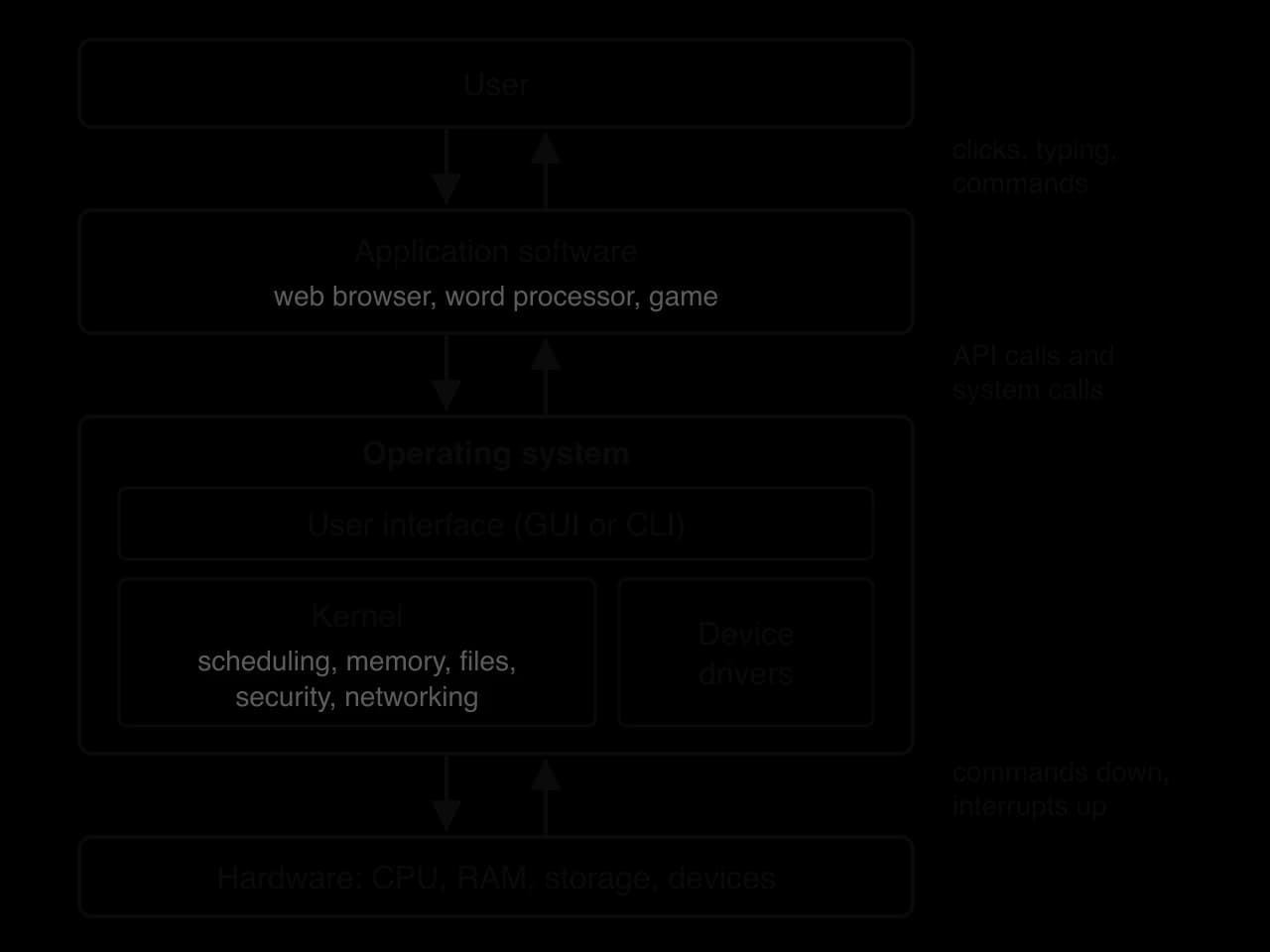
The core of the operating system is the kernel. It is loaded into memory when the computer starts and stays there until it shuts down. The kernel runs in a privileged state of the CPU called kernel mode, in which every instruction and every memory address is allowed. Applications run in user mode, in which instructions that control hardware directly are blocked; an attempt to use one raises an error, and control passes to the kernel.
The split between kernel mode and user mode is a hardware feature, and the operating system depends on it. A bug in a game can crash the game, but it cannot overwrite another program's memory or erase the disk, because only the kernel can carry out those operations.
The operating system uses abstraction to hide hardware detail. A program that saves a file sees a simple operation: open a file by name, write some bytes, close it. Underneath, the data must be split into blocks, free blocks must be found on the drive, the drive controller must be sent commands in its own format and the directory must be updated. The program sees none of this.
Three mechanisms provide the abstraction. A device driver turns general requests into the commands one model of device understands. A system call is the way a program asks the kernel to do something on its behalf. An application programming interface (API) is the set of documented functions a programmer uses, which in turn makes the system calls.
Manufacturers write drivers for their own devices, so the operating system does not need to know the internal design of every product on the market. A faulty driver is dangerous because drivers usually run in kernel mode: a bug in one can crash the whole system, which is why operating systems now check that drivers are digitally signed before loading them.
A system call switches the CPU from user mode to kernel mode, runs the kernel's code and switches back. This switch costs time, so programs group work together (for example, writing a whole block of data in one call rather than one byte per call).
The path of one "save" request, from a Python program calling open("notes.txt", "w") and write() down to the SSD, shows the layers working together.
Layer | What happens when a program saves a file |
|---|---|
Application | The program calls |
API | The language library packages the request in the form the operating system expects. |
System call | The CPU switches to kernel mode and the kernel takes over. |
File system (kernel) | Free blocks are found, the data is placed in them and the directory entry is updated. |
Device driver | The general "write these blocks" request is turned into commands for this model of SSD. |
Hardware | The SSD controller stores the bits in flash memory. |
The second part of the role is managing resources: the CPU, random-access memory (RAM), secondary storage, network connections and devices such as printers and cameras. Several programs and often several users want these at the same time, and there is only a fixed amount of each. The operating system allocates each resource by fixed rules, setting which program gets it and for how long, and makes sure that no program can take what belongs to another.
A single laptop shows the scale of the task. A typical session may have a browser with many tabs, a music player, a messaging app, cloud sync and dozens of background services running at once, yet the computer may have only a few processor cores. The operating system switches the CPU between these tasks hundreds of times a second, so each one appears to be running continuously.
Operating system | Main devices | Notes |
|---|---|---|
Windows | Desktop and laptop PCs | Most widely used desktop operating system; GUI-based, with the PowerShell CLI |
macOS | Apple desktops and laptops | Built on a Unix-like kernel |
Linux | Servers, supercomputers, embedded devices | Open source; developed by contributors around the world |
Android | Smartphones and tablets | Built on the Linux kernel |
iOS | iPhones | Designed for touch input and strong app isolation |
The role of the operating system is carried out by a set of functions. Each one manages one kind of resource or provides one kind of service. Before looking at them, two terms are needed: the operating system manages programs as processes, and a process can contain several threads.
A program is a file of instructions sitting on a drive; a process is that program loaded and running. The operating system records each process in a data structure called a process control block, which holds its identifier, its state, its saved register values (including the program counter), its memory allocation and the files it has open. When the process stops running, these values are saved so that it can continue later exactly where it left off.
A web browser can use one thread to download a page, another to draw it on screen and another to respond to the mouse. Threads share memory, so they can exchange data quickly, but this also means one thread can change data while another is using it, a problem taken up in subtopic B2.3 as a race condition.
Every process needs memory for its code and data, and RAM is limited. Memory management keeps track of which parts of memory are in use, gives memory to processes when they start or ask for more, takes it back when they finish, and stops one process from reading or writing another's memory.
Protection works with help from the hardware. Each process sees its own set of addresses, starting from zero, and the operating system and the CPU translate these into real addresses in RAM. A process has no way to name another process's memory, so it cannot damage it. If a program tries to use an address that does not belong to it, the CPU raises an error and the operating system ends the program; Windows reports an "access violation" and Linux a "segmentation fault".
When the processes running need more memory than the RAM holds, the operating system uses virtual memory: part of the secondary storage acts as an overflow area for RAM. Data that has not been used recently is moved out to the drive, and moved back when it is needed.
Virtual memory is organised by paging. Memory is divided into fixed-size blocks: pages in each process's addresses and frames of the same size in physical RAM. A page table for each process records which frame holds each page, or that the page is currently on the drive. Pages of 4 KiB (4,096 bytes) are common.
Because every page and frame has the same size, any page fits in any free frame, so memory does not need to be in one continuous block. When a process uses a page that is not in RAM, the hardware signals a page fault; the operating system then finds a free frame (moving another page out to the drive if necessary), loads the page and lets the process continue.
Virtual memory has a cost. Secondary storage is thousands of times slower than RAM, so a process whose pages keep being moved in and out runs slowly. When RAM is badly overloaded, the computer spends more time moving pages than running programs, a state called thrashing: the drive light stays on and the system almost stops responding. Adding RAM, or running fewer programs at once, is the cure.
Secondary storage holds billions of bytes with no structure of its own. The file system gives that storage an organisation: named files, grouped in directories (folders), with information about each file such as its size, its owner, when it was last changed and who may read it.
Directories form a hierarchy, or tree. The top directory is the root; each directory can hold files and further directories; and every file is found by a path that lists the directories from the root, such as /home/ana/cs/notes.txt on Linux or C:\Users\Ana\cs\notes.txt on Windows. The same file name can appear in different directories without a clash.
Behind the names, the file system manages file allocation. The drive is divided into blocks (often 4 KiB), and a file is stored in as many blocks as it needs, not always next to each other. The file system keeps a table of which blocks belong to which file and which blocks are free. Modern file systems also keep a journal: before changing the structure of the drive, they write a note of the change, so that if the power fails midway the change can be completed or undone when the computer restarts. The allocation table for a small drive shows a file stored in blocks that are not next to each other: when notes.txt grew, the next free block was 42.
Block | Contents |
|---|---|
17 |
|
18 |
|
19 |
|
42 |
|
43 | free |
Each file also carries permissions that say which users may read it, change it or run it. On Linux a file can be readable by everyone but writable only by its owner; on Windows an access control list can name individual users and groups. These permissions are one form of access control, part of the operating system's security function.
Every input and output device works differently, and most are far slower than the CPU. Device management installs and uses the right driver for each device, sends requests to devices, and handles their replies. It also shares devices that cannot be used by two programs at once, such as a printer, by queuing the requests.
Speed differences are handled with buffers: areas of memory where data waits until the slower side is ready. A printer may print a page in several seconds, so the operating system stores the whole document in a buffer on the drive (a technique called spooling) and the application can carry on immediately. Devices signal that they have finished or that data has arrived by sending interrupts.
There are usually far more processes ready to run than there are processor cores. Scheduling determines which process runs on each core and for how long, switching between them quickly enough that several programs appear to run at the same time. The choice of scheduling algorithm affects how quickly programs respond, how much work is finished per second and whether any process is left waiting too long.
The operating system protects data and resources from users and programs that have no right to them. It does so in three main ways.
Authentication checks who a user is before letting them in, usually by a password, a PIN, a fingerprint or a face scan, sometimes combined as multi-factor authentication.
Access control decides what each authenticated user and each program may do: which files they can read or change, which devices they can use and which settings they can alter.
Process isolation keeps each process in its own memory space and, on phones, in its own "sandbox", so that a malicious or faulty app cannot reach other apps' data.
Authentication establishes who a user is, and access control then sets what that user may do. A student logged into a school computer has been authenticated, but access control still stops them opening the teachers' files or installing software.
The operating system also protects itself. Security updates fix weaknesses that attackers could use; a built-in firewall filters network traffic; and on phones, an app must ask the user before it can use the camera, microphone or location, and the permission can be withdrawn later.
The operating system keeps records of how resources are used: how much CPU time, memory, storage and network data each user and each process has consumed. This accounting serves several purposes. Administrators use it to find which program is slowing a server down; schools and companies use it to enforce quotas such as a storage limit per user; and cloud computing providers use it to bill customers for each second of processor time they rent.
The user interface is how a person gives commands to the operating system and sees the results. Two kinds dominate. A graphical user interface (GUI) uses windows, icons, menus and a pointer (often called WIMP), or touch gestures on phones and tablets. A command-line interface (CLI) accepts typed text commands and replies in text.
A CLI needs the user to remember commands, but one command can act on thousands of files, and commands can be saved as a script and run again automatically.
Feature | GUI | CLI |
|---|---|---|
Ease of learning | Easy: options are visible and can be explored | Harder: commands and their options must be learned |
Speed for experts | Slower for repeated tasks | Fast; many files can be handled in one command |
Automation | Limited | Commands can be stored in scripts |
Resources needed | More memory and processing for graphics | Very little; works over a slow remote connection |
Typical users | General users, phone and tablet users | System administrators, programmers, servers |
Virtualisation uses software to create a simulated version of hardware. Its main form runs several complete operating systems, each in its own virtual machine (VM), on one physical computer. Each virtual machine behaves as if it had its own CPU, memory, disk and network card; in fact a program called a hypervisor shares the real hardware between them.
The same idea already appears in other operating system functions: virtual memory gives each process the appearance of its own large memory, and the scheduler gives each the appearance of its own CPU. Virtual machines extend it to a whole computer.
There are two types of hypervisor. A type 1 (bare-metal) hypervisor runs directly on the hardware, with no host operating system; data centres use this type (VMware ESXi, Microsoft Hyper-V, Xen). A type 2 (hosted) hypervisor runs as an application on an ordinary operating system, such as Oracle VirtualBox on a laptop, so a student can run Linux inside Windows.
Virtualisation has clear benefits. One large server can replace many lightly used ones, saving money and energy; a virtual machine can be copied, backed up or moved to another server while it runs; software can be tested on several operating systems on one computer; and a virus inside a virtual machine cannot easily reach the host. The costs are some loss of speed (the hypervisor itself uses resources), and a single point of failure, since one hardware fault stops every virtual machine on that server. Cloud computing, taught in subtopic A1.1, is built on virtualisation.
Almost every computer is now connected to a network, and the operating system provides the networking function. It contains the software that implements the network protocols of the TCP/IP model, drives the network hardware, gives each program a simple way to send and receive data (a socket), and keeps track of which incoming data belongs to which program. It also lets users share files and printers on a local network and manages Wi-Fi and Bluetooth connections. Subtopic A2.1 explains the protocols themselves.
While users work, the operating system runs many background operations: tasks with no window that keep the system healthy. System integrity means that the system, its files and its data stay correct, complete and consistent while all of this happens. A background task must never leave a file half-written, corrupt the file system or stop the computer from starting.
Background operation | What it does | How integrity is kept |
|---|---|---|
Software updates | Downloads and installs fixes for the OS and drivers | Updates are checked with digital signatures and applied in steps that can be rolled back if one fails |
Logging | Records events and errors in system logs | Logs give a record to diagnose faults and detect attacks |
Error checking | Scans the file system and memory for faults | Journaling and file system checks repair damage after a crash |
Backups | Copies files to another drive or the cloud | Data can be restored after deletion, failure or ransomware |
Malware scanning | Checks files and downloads for malware | Infected files are isolated before they run |
Indexing | Builds a search index of file contents | Runs at low priority so it does not slow the user's work |
The operating system protects these operations in several ways. Critical system files can be changed only in kernel mode or by an administrator. Changes to the file system are journaled so they complete fully or not at all. Background tasks run at low priority, so they use the CPU only when interactive programs do not need it, and many updates wait for a restart so that no program is using the files being replaced.
A process does not use the CPU all the time. It alternates between CPU bursts, when it calculates, and waits for input or output, such as reading a file or waiting for a key press. While one process waits, the CPU would sit idle unless another process could use it. The operating system therefore keeps several processes in memory at once and moves the CPU between them, so that the processor is kept busy and every process makes progress.
Processes that are ready to run, and are waiting only for the CPU, are held in the ready queue, a queue of processes in memory. The part of the operating system that selects the next process from the ready queue is the scheduler; the rule it follows is the scheduling algorithm.
Moving the CPU from one process to another is a context switch. The operating system saves the current process's state (its register values, program counter and other details) into its process control block, then loads the saved state of the next process so that it continues exactly where it stopped. During the switch no user process runs, so every context switch is overhead: time spent managing processes instead of running them.
Scheduling algorithms fall into two groups. In non-pre-emptive scheduling, a process that has the CPU keeps it until it finishes its burst or chooses to wait (for input, for example). In pre-emptive scheduling, the operating system can take the CPU away from a running process, because its time is up or because a more important process has arrived, and return it to the ready queue.
Pre-emption needs a hardware timer that interrupts the CPU at regular intervals, giving control back to the scheduler even if the running program never gives it up. It is the reason one program stuck in an endless loop does not freeze a modern computer. The price is more context switches, and the risk that a process is interrupted while it is changing shared data.
To compare scheduling algorithms, each one is run on the same set of processes and measured. A process's arrival time is when it enters the ready queue, its burst time is how much CPU time it needs, and its completion time is when it finishes.
Turnaround time matters most for long batch jobs, where the user wants the final result. Waiting time and response time matter more for interactive programs, where the user is watching the screen.
Three further measures compare whole systems rather than single processes. Throughput is the number of processes completed per unit of time. Fairness is whether every process gets a reasonable share of the CPU; a schedule in which one process waits forever is unfair however good its average. Overhead is the time lost to context switching and to running the scheduler itself.
A schedule is drawn as a Gantt chart: a horizontal bar divided into blocks, one for each period a process runs, labelled with the process name and the times at which each block starts and ends.
Every algorithm is applied to the same four processes, so the results can be compared fairly. Times are in milliseconds (ms). A lower priority number means a more important process, so priority 1 is the highest. The "class" column is used only by multilevel queue scheduling.
Process | Arrival time | Burst time | Priority | Class |
|---|---|---|---|---|
P1 | 0 | 5 | 3 | Batch |
P2 | 1 | 3 | 1 | Interactive |
P3 | 2 | 8 | 4 | Batch |
P4 | 3 | 2 | 2 | Interactive |
The total burst time is ms, so every schedule of these processes with no idle time ends at 18 ms. The algorithms differ only in the order in which the 18 ms are shared out, and that order changes every waiting time.
First-come, first-served runs processes in the order they arrive, each to the end of its burst. It is non-pre-emptive and works exactly like a queue at a shop counter: the ready queue is a first-in, first-out queue, new processes join the back, and the scheduler always takes the process at the front.
Applied to the process set, P1 arrives first at 0 and runs to 5. By then P2, P3 and P4 have all arrived, and they run in arrival order.
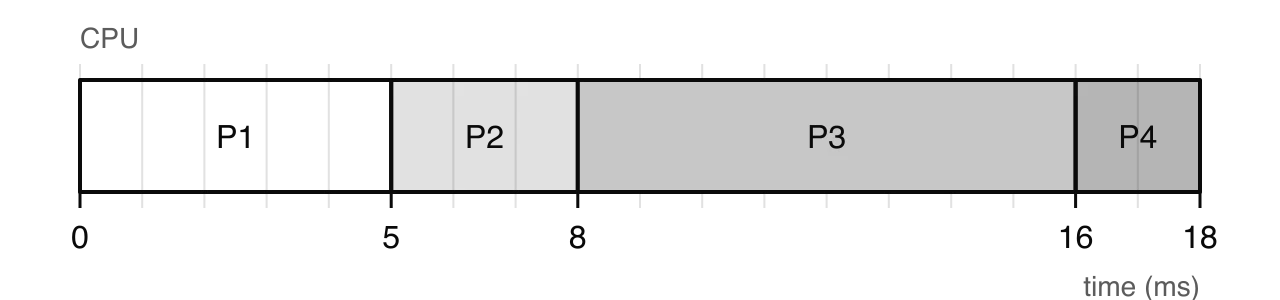
Process | Completion | Turnaround (completion − arrival) | Waiting (turnaround − burst) |
|---|---|---|---|
P1 | 5 | 5 − 0 = 5 | 5 − 5 = 0 |
P2 | 8 | 8 − 1 = 7 | 7 − 3 = 4 |
P3 | 16 | 16 − 2 = 14 | 14 − 8 = 6 |
P4 | 18 | 18 − 3 = 15 | 15 − 2 = 13 |
Average | 10.25 | 5.75 |
FCFS is simple to understand and to program, it has the smallest possible overhead (only one context switch per process), and no process waits forever, because every process eventually reaches the front of the queue. Its weakness is that the waiting time depends heavily on the order of arrival. A long process at the front holds up every short process behind it, like a slow lorry on a single-lane road with a line of cars behind. This is the convoy effect.
While a long calculation holds the CPU, short processes that would quickly have started a disk read or a network request sit in the ready queue, so the disk and network also stand idle. FCFS is therefore a poor choice for interactive systems, where a user who clicks a button should not wait for someone else's long job.
Round robin gives each process a fixed, short amount of CPU time in turn, called a time slice or quantum. The ready queue is still first-in, first-out, but a process that has not finished when its time slice runs out is pre-empted and sent to the back of the queue. The CPU cycles through the ready processes like a teacher going round a class, giving each student one question at a time.
The length of the time slice is the most important setting in round robin. Each slice ends with a timer interrupt and, usually, a context switch.
Tracing round robin requires keeping track of the queue at every step, and a tie rule is needed for one case. When a new process arrives at the same moment that a time slice ends, the usual convention is that the new process joins the queue before the pre-empted one; a question may state the opposite rule, and then that rule is followed instead. The trace for the process set with a time slice of 2 ms uses the usual convention, which matters at 2 ms, when P3 arrives just as P1's slice ends.
Time | Event | Ready queue afterwards (front first) |
|---|---|---|
0 | P1 arrives and starts | (empty) |
2 | P1's slice ends (3 left); P2 and P3 have arrived | P2, P3, P1 |
2–4 | P2 runs; P4 arrives at 3 | P3, P1, P4 |
4 | P2's slice ends (1 left) | P3, P1, P4, P2 |
4–6 | P3 runs (6 left after) | P1, P4, P2, P3 |
6–8 | P1 runs (1 left after) | P4, P2, P3, P1 |
8–10 | P4 runs and finishes | P2, P3, P1 |
10–11 | P2 runs its last 1 ms and finishes | P3, P1 |
11–13 | P3 runs (4 left after) | P1, P3 |
13–14 | P1 runs its last 1 ms and finishes | P3 |
14–18 | P3 runs two more slices and finishes | (empty) |
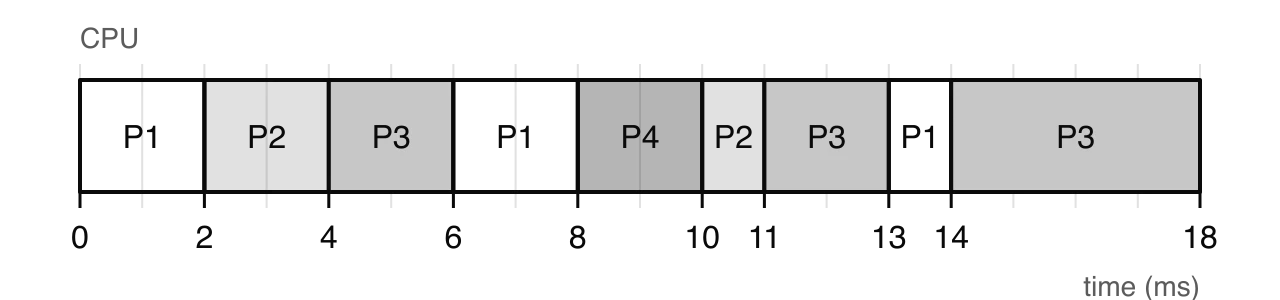
Process | Completion | Turnaround | Waiting | Response |
|---|---|---|---|---|
P1 | 14 | 14 | 9 | 0 |
P2 | 11 | 10 | 7 | 1 |
P3 | 18 | 16 | 8 | 2 |
P4 | 10 | 7 | 5 | 5 |
Average | 11.75 | 7.25 | 2.0 |
The figures show the trade-off. Average response time falls from 5.75 ms under FCFS to 2.0 ms, so interactive programs feel faster. But the average waiting time rises from 5.75 ms to 7.25 ms, because long processes are split into pieces that each wait their turn again. Round robin is fair: no process can hold the CPU for more than one slice while others wait, and no process waits forever.
If the time slice is very long, every process finishes within its first slice and round robin becomes FCFS, with the convoy effect. With this process set, a slice of 8 ms gives exactly the FCFS schedule. If the slice is very short, response time is excellent but the CPU spends a growing share of its time on context switches. The process set needs 13 context switches with a 1 ms slice, 8 with a 2 ms slice and only 3 with FCFS.
The share of time lost can be estimated. If a context switch takes and the time slice is , each slice of useful work costs , so the fraction of time spent switching is
A good time slice is long enough that most interactive bursts (a key press, a mouse click) finish within one slice, and short enough that users do not notice the wait between turns. In practice this is a few milliseconds, many times longer than a context switch.
In priority scheduling, each process is given a priority, and the scheduler always runs the ready process with the highest priority. Priorities can be set by the operating system (system tasks above user tasks), by the user (lowering the priority of a long download) or by measured behaviour. Processes with equal priority are usually served FCFS.
In the non-pre-emptive version, a running process finishes its burst even if a more important process arrives. Applied to the process set: only P1 has arrived at time 0, so it runs to 5. At 5, the ready queue holds P2 (priority 1), P3 (priority 4) and P4 (priority 2), so P2 runs, then P4, then P3.
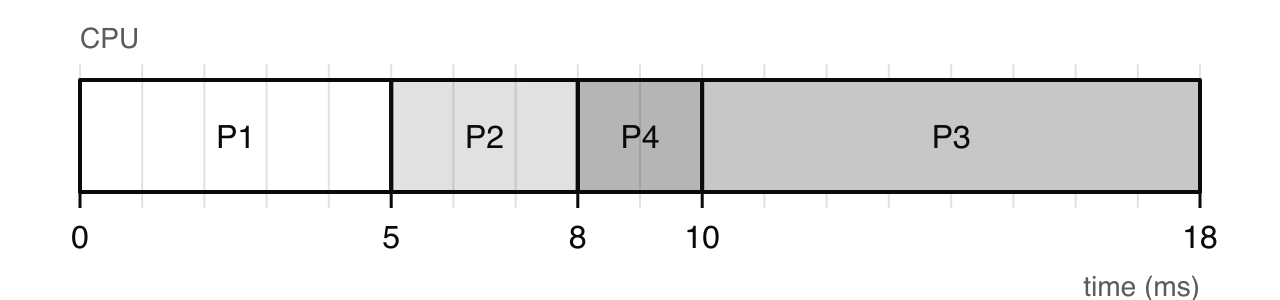
Process | Completion | Turnaround | Waiting |
|---|---|---|---|
P1 | 5 | 5 | 0 |
P2 | 8 | 7 | 4 |
P4 | 10 | 7 | 5 |
P3 | 18 | 16 | 8 |
Average | 8.75 | 4.25 |
Priority scheduling serves the most important work first, which is what a system needs when some tasks have deadlines. Its great weakness is starvation. If high-priority processes keep arriving, a low-priority process may never reach the front. In a busy system, P3 could wait indefinitely.
Starvation is solved by ageing: the longer a process waits, the higher its priority becomes. A low-priority process that has waited long enough eventually has the highest priority of all and runs. Once it has run, its priority returns to normal.
Priority scheduling has protected real missions. During the Apollo 11 Moon landing in July 1969, the lunar module's guidance computer showed "1202" and "1201" program alarms: it was being given more work than it had time for, because a radar left switched on was stealing processor cycles. The computer's operating system used priority scheduling, so it restarted and dropped low-priority jobs (including a display that the crew had requested) while keeping the high-priority guidance and control tasks running. Mission control judged it safe to continue, and the landing went ahead.
Source: Wikipedia, "Apollo Guidance Computer", section "1201 and 1202 program alarms" (accessed October 2026).
Real systems run very different kinds of process. Interactive programs need quick responses; background jobs such as a large file backup just need to finish eventually; system processes must always run promptly. Multilevel queue scheduling keeps a separate ready queue for each class of process. Each process is placed permanently in one queue when it is created, each queue has its own scheduling algorithm, and a second rule decides which queue gets the CPU.
A typical arrangement has three queues, each with an algorithm suited to its processes.
Queue (highest priority first) | Example processes | Algorithm within the queue |
|---|---|---|
System | Kernel tasks, device handling | Priority or FCFS |
Interactive (foreground) | Text editor, browser, game | Round robin, short time slice |
Batch (background) | Backups, large calculations, indexing | FCFS |
Between the queues, the usual rule is fixed priority: a lower queue runs only when every higher queue is empty, and a process arriving in a higher queue pre-empts a process from a lower one. An alternative is time-sharing between queues, where each queue receives a fixed share of CPU time (for example 80% for interactive and 20% for batch), which stops the lower queues from starving.
Applied to the process set, the interactive processes P2 and P4 go into a foreground queue scheduled by round robin with a 2 ms slice; the batch processes P1 and P3 go into a background queue scheduled FCFS. The foreground queue has absolute priority.
0–1: only P1 (background) has arrived, so it runs.
1: P2 arrives in the foreground queue and pre-empts P1.
1–3: P2 runs a full 2 ms slice. At 3, P4 arrives at the moment P2's slice ends, so by the tie rule P4 joins the foreground queue ahead of P2 (1 ms left).
3–5: P4 runs and finishes. 5–6: P2 finishes.
6–10: the foreground queue is empty, so P1 completes its last 4 ms. 10–18: P3 runs.
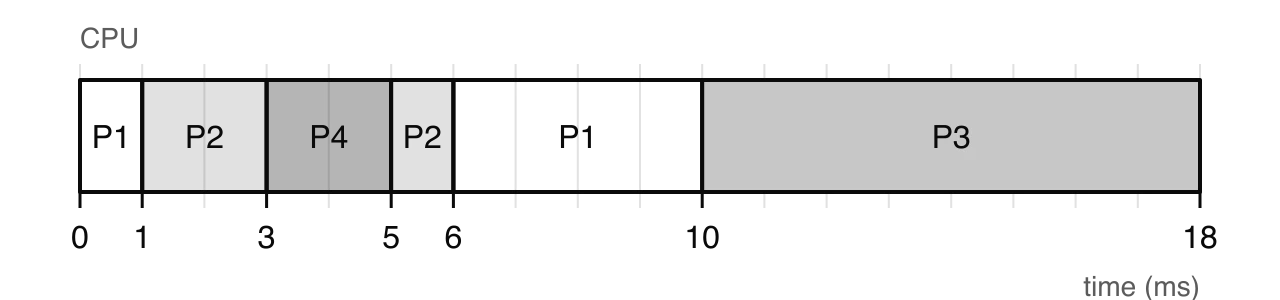
Process | Queue | Completion | Waiting | Response |
|---|---|---|---|---|
P1 | Background (FCFS) | 10 | 5 | 0 |
P2 | Foreground (RR) | 6 | 2 | 0 |
P3 | Background (FCFS) | 18 | 8 | 8 |
P4 | Foreground (RR) | 5 | 0 | 0 |
Average | 3.75 | 2.0 |
Multilevel queue scheduling is flexible, because each class gets an algorithm suited to it, and it gives interactive users fast responses. It is also more complex to set up: the number of queues, the algorithm for each and the rule between them must all be chosen. Because each process stays in one queue, a batch process cannot move up however long it waits, so with fixed priority between queues the background queue can starve on a busy system.
The same 18 ms of work gives quite different results under each algorithm.
Algorithm | Average waiting (ms) | Average turnaround (ms) | Average response (ms) | Context switches |
|---|---|---|---|---|
FCFS | 5.75 | 10.25 | 5.75 | 3 |
Round robin (slice 2 ms) | 7.25 | 11.75 | 2.0 | 8 |
Priority, non-pre-emptive | 4.25 | 8.75 | 4.25 | 3 |
Priority, pre-emptive | 3.5 | 8.0 | 2.25 | 4 |
Multilevel queue | 3.75 | 8.25 | 2.0 | 5 |
Context switches are counted as changes from one process to another after the first process starts.
No algorithm is best on every measure. Round robin has the worst average waiting time here but one of the best response times, while FCFS has the lowest overhead but lets the short process P4 wait 13 ms, so the right choice depends on what the system is for.
Criterion | FCFS | Round robin | Priority | Multilevel queue |
|---|---|---|---|---|
Pre-emptive? | No | Yes | Either | Yes, between queues |
Response time | Poor; depends on arrival order | Good; bounded by the time slice | Good for high priority, poor for low | Good for the top queues |
Fairness | Fair in order, but convoy effect | Very fair; equal shares | Unfair to low priority | Unfair to lower queues |
Starvation | No | No | Yes (fixed by ageing) | Yes, with fixed priority between queues |
Overhead | Lowest | Highest; switch every slice | Low to moderate | Moderate; several queues to manage |
Best suited to | Simple batch systems | Time-sharing, interactive systems | Systems with urgent tasks, real-time | General-purpose systems with mixed workloads |
General-purpose operating systems such as Windows, macOS and Linux combine these ideas: they give each thread a priority and a time slice, keep interactive work ahead of background work, and adjust priorities as threads run so that nothing starves.
Devices need attention at moments the CPU cannot predict: a key is pressed, a network packet arrives, a disk finishes reading a block, a sensor detects movement. The CPU can find out about these events in two ways. It can keep asking each device whether anything has happened (polling), or each device can signal the CPU when something happens (an interrupt). Both are used in real systems, and choosing between them is a trade-off.
In polling, the CPU, under the control of a program or the operating system, reads a device's status register at intervals to see whether the device is ready or has new data. If nothing has happened, the CPU goes back to its other work and checks again later. The time between checks is the polling interval.
The simplest form is a busy-wait loop that does nothing but check the device until it is ready, which is reasonable only when there is nothing else to do. More often the check is one step in a larger loop, so the program does some work, checks the device, does more work and checks again.
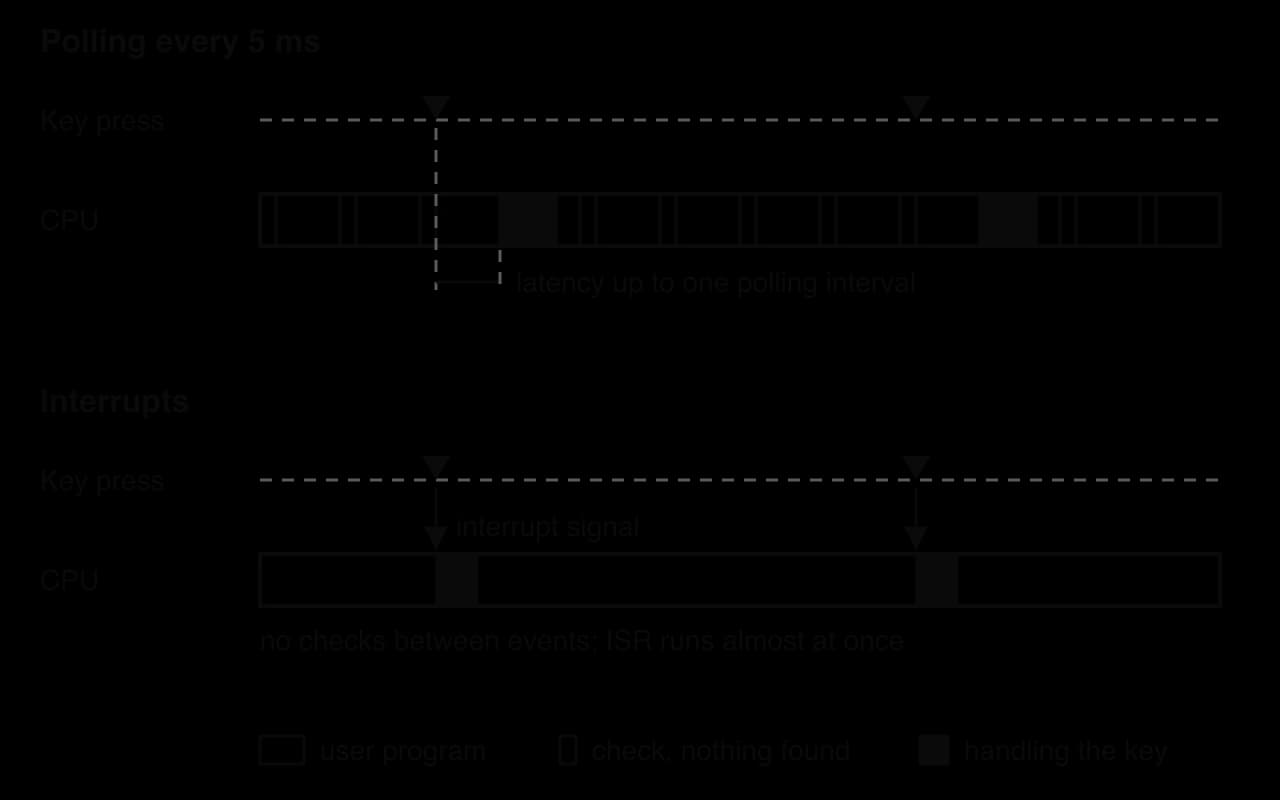
The delay between an event happening and the system responding to it is the event's latency. With polling, an event that happens just after a check is not noticed until the next one, so the worst-case latency is one whole polling interval, plus the time to handle the event.
Polling therefore has a built-in tension. Polling often gives low latency but wastes CPU time on checks that find nothing; polling rarely saves CPU time but makes the system slow to respond, and if data arrives faster than it is collected, a device's small buffer can overflow and data is lost.
With an interrupt, the device starts the exchange instead of the CPU. The device sends a signal to the CPU along a control line when it needs attention, and until then the CPU spends no time on it. Interrupts can come from hardware (a key press, a disk finishing a transfer, a timer reaching zero) or from software (a program making a system call, or an error such as dividing by zero).
The code that handles an interrupt is an interrupt service routine (ISR). Each type of interrupt has its own ISR, and the CPU finds the right one using a table of ISR addresses called the interrupt vector table.
The CPU does not stop in the middle of an instruction. It checks for interrupts at the end of each fetch–decode–execute cycle, and only then responds. The interrupt-handling flowchart shows the steps that follow.

The device raises an interrupt request, which sets an interrupt flag in the CPU.
The CPU finishes executing its current instruction.
It checks the flag. If interrupts are enabled and this interrupt has a higher priority than the current task, it responds.
The current state, including the program counter and the contents of the registers, is saved on the stack so that it can be restored later.
The address of the right ISR is found in the interrupt vector table and loaded into the program counter.
The ISR runs. It deals with the event, for example by copying a character from the keyboard's buffer into memory, and keeps its work as short as possible.
The saved state is restored from the stack, and the interrupted program continues from the next instruction.
Interrupts have priorities. A power failure warning or a timer interrupt is more urgent than a key press, so a high-priority interrupt can interrupt a lower-priority ISR (a nested interrupt), while a low-priority one waits until a higher-priority ISR has finished. The operating system can also mask (temporarily disable) some interrupts while it carries out a short piece of work that must not be broken up.
 YouTube
Interrupts make pre-emptive scheduling possible. A hardware timer raises an interrupt at the end of every time slice; its ISR passes control to the scheduler, which can then perform a context switch. When a process asks to read a file, it is moved out of the CPU until the disk's "transfer complete" interrupt arrives, and the CPU runs another process in the meantime. Without interrupts the operating system could take back the CPU only when a program chose to give it up.
The timeline comparison shows both methods responding to the same two key presses. With polling, the CPU stops its work every 5 ms to check, and most checks find nothing; a key press waits until the next check. With interrupts, the CPU is never disturbed until a key is pressed, and the ISR starts almost at once.
Interrupts are not free, however. Each one costs a save and a restore of the CPU's state, often with a context switch, and disturbs the CPU's cache with the ISR's code and data. If events are very frequent, the cost of thousands of interrupts per second can exceed the cost of simply checking at regular intervals. In the worst case, an interrupt storm keeps the CPU so busy entering and leaving ISRs that ordinary work almost stops.
Six factors determine which method suits a situation. Each factor favours one method in some circumstances and the other in others, so an evaluation applies each of them to the scenario in hand.
Factor | Polling | Interrupts |
|---|---|---|
Event frequency | Efficient when events are very frequent, because most checks find data | Efficient when events are rare, because no time is spent on empty checks |
CPU processing overheads | Cost of every check, even when nothing has happened | No cost between events, but each event costs a save, ISR and restore |
Power source | Poor on battery: the CPU must keep waking to check | Good on battery: the CPU can sleep until an event arrives |
Event predictability | Good for regular, predictable events (a sensor sampled every 10 ms) | Good for unpredictable events (a key press, an alarm) |
Controlled latency | Latency up to one polling interval, but known and bounded | Usually lower, but can vary when interrupts queue behind higher-priority ones |
Security concerns | Device state is read only when the program chooses; a flooded device cannot take over the CPU, though a flood of data can still overload the loop | ISRs run with full kernel privileges, so a faulty or malicious driver is dangerous; a device can flood the CPU with interrupts |
Event frequency and overheads. These two factors work together. Polling costs a fixed amount per check, multiplied by the polling rate; interrupts cost more per event (saving and restoring state, possibly a context switch and cache disruption) but nothing between events. When events are rare, almost every poll is wasted and interrupts are cheaper. When events arrive so fast that the device almost always has data waiting, nearly every poll finds work, while an interrupt for every event would mean thousands of state saves per second, so very high frequencies favour polling.
Power source and predictability. On mains power, a few wasted cycles cost little, but on a battery every wake-up drains energy, so phones, wearables and remote sensors use interrupts and let the processor sleep between events. An event that happens at a known rate, such as a temperature reading every second, can be polled at that rate with little waste. Random events, such as a door opening or a key press, suit interrupts because no polling rate fits them.
Controlled latency and security. Many systems need to know the worst-case response time, not just the average. Polling gives a fixed upper limit (the polling interval plus the handling time) that is easy to calculate and test; interrupts are usually faster, but a low-priority interrupt that arrives with others waits for them, so its latency varies with load. On security, ISRs and drivers run in kernel mode, so a bug or a malicious driver can compromise the whole system, and a faulty or attacked device can raise interrupts so often that useful work stops (a form of denial of service). Polling keeps the timing under the program's control, although a polling loop can still be overwhelmed if a device is flooded with data.
Real devices show that the line between the two methods is not sharp. Key presses are irregular and rare by processor standards, so keyboards use interrupts, but a USB mouse is polled by the USB host controller (by default 125 times a second), and the controller interrupts the CPU only when the mouse reports a change. A network card on a quiet connection raises an interrupt for each packet; under heavy load, Linux network drivers switch to a hybrid called NAPI, turning off the card's receive interrupts and polling it, collecting many packets per check, until traffic falls again.
Scenario | Method used | Main reason |
|---|---|---|
Keyboard | Interrupt for each key press | Events are rare and unpredictable |
USB mouse | Host controller polls at 125 times a second, then interrupts the CPU | The USB design has the host ask each device in turn; the CPU itself is interrupted only on a change |
Network card, light traffic | Interrupt per packet | Packets are occasional; low latency |
Network card, heavy traffic (Linux NAPI) | Polling in batches | Per-packet interrupts would cost more than regular checks |
Disk transfer | DMA, then one interrupt per completed block | The transfer is slow; the CPU runs other processes meanwhile |
Simple embedded controller | Polling in a loop | Few devices, nothing else to do, fixed worst-case latency |
Sources: Wikipedia, "PS/2 port" and "New API" (accessed October 2026).
Disk input and output. Reading from a drive takes far longer than running instructions. The operating system starts the transfer, the drive controller copies the data straight into memory using direct memory access (DMA), and the controller raises one interrupt when the whole block has arrived. Meanwhile, the scheduler gives the CPU to other processes, whereas polling the drive would waste the whole transfer time.
Embedded systems. An embedded system is a computer built into a larger device to do one job, such as the controller in a microwave oven, a digital watch or a car's anti-lock brakes. Many simple embedded systems use a super loop that polls each sensor and button in turn, forever. With few devices and nothing else to do, polling is simple to write, easy to test and has a fixed worst-case latency. Battery-powered embedded systems use interrupts so they can sleep.
Real-time systems. In a real-time system, a result that arrives after its deadline counts as a failure, even if its value is correct. A hard real-time system must never miss a deadline: an airbag controller must trigger the airbag within a few hundredths of a second of a crash. A soft real-time system can occasionally miss one with only a loss of quality, as when a video call drops a frame. Real-time systems use interrupts with carefully set priorities for urgent events, and often poll regular sensors at fixed rates, because a fixed rate gives a predictable, provable worst-case latency.
Multitasking is running several processes so that they all make progress over the same period. On a single-core processor, only one process runs at any instant; the operating system switches between them so quickly (often every few milliseconds) that they appear to run at the same time. This is concurrency: the processes are interleaved. On a multi-core processor, several processes really do run at the same moment, one per core, which is parallelism; each core still switches between many processes.
The operating system's tasks in multitasking build on the functions already described. The scheduler shares out CPU time; memory management gives each process its own protected memory; the file system and device management share files and devices; and interrupts and the timer let the operating system take back control. The extra challenge is coordination: processes that share data or devices must not interfere with each other, and none must be left waiting forever.
At any moment each process is in one of a small number of states, and the operating system moves it between them. The process state diagram shows the five states and the events that cause each change.

New: the process is being created; memory and a process control block are being set up.
Ready: the process could run and is waiting in the ready queue for the CPU.
Running: the process is executing on a core. A single core has exactly one running process.
Blocked (or waiting): the process cannot continue until something happens, such as a file read finishing, a key being pressed or a resource being released. It is not in the ready queue, so it uses no CPU time.
Terminated: the process has finished; the operating system reclaims its memory and other resources.
The difference between ready and blocked matters for efficiency. A blocked process is not given the CPU, so a program waiting for a slow network does not waste time slices; the scheduler runs ready processes instead, and the interrupt that signals the end of the wait moves the blocked process back to ready.
Processes share more than the CPU. They compete for memory, files, printers, network connections and data held in shared memory. Resource contention occurs when two or more processes need the same resource at the same time and it cannot serve them all at once.
Some resources can be shared freely: many processes can read the same file at once. Others must be used by one process at a time, such as a printer in the middle of a job or a record that is being updated. For these, the operating system provides locks (also called mutexes, from "mutual exclusion"): a process must acquire the lock before using the resource and release it afterwards, and any other process that asks for the lock is blocked until it is free.
Locks prevent race conditions, in which two threads change the same data at once and the result depends on the exact timing. But locks bring their own problems. A process waiting for a lock is blocked, so heavy contention slows everything down, and processes that hold some locks while waiting for others can block each other permanently.
A deadlock is a situation in which a group of processes are all blocked, each waiting for a resource that another process in the group holds. None of them can continue, so none will ever release what it holds. A classic example involves two processes and two resources: process P1 holds the printer and asks for a file; process P2 holds the file and asks for the printer. Each waits for the other forever.
Deadlock is often confused with starvation, but they are different. In starvation, the system as a whole keeps working, and one process is repeatedly passed over; it could run if the scheduler chose it. In deadlock, the processes involved are all blocked and none can make progress, whatever the scheduler does.
Deadlock can occur only when four conditions hold at the same time. They were set out by Edward Coffman and colleagues in 1971 and are known as the Coffman conditions.
Condition | Meaning | In the printer and file example |
|---|---|---|
Mutual exclusion | At least one resource can be used by only one process at a time | Only one process can print at once; only one can write the file |
Hold and wait | A process holds at least one resource while waiting for another | P1 holds the printer while waiting for the file |
No pre-emption | A resource cannot be taken from a process; it must be released voluntarily | The operating system cannot take the printer away from P1 mid-job |
Circular wait | A closed chain of processes exists, each waiting for a resource held by the next | P1 waits for P2's file; P2 waits for P1's printer |
A resource allocation graph shows which process holds which resource and which process is waiting for which. Processes are drawn as circles and resources as squares, with a dot for each instance of the resource. An arrow from a resource to a process is an assignment (the process holds it); an arrow from a process to a resource is a request (the process is waiting for it).
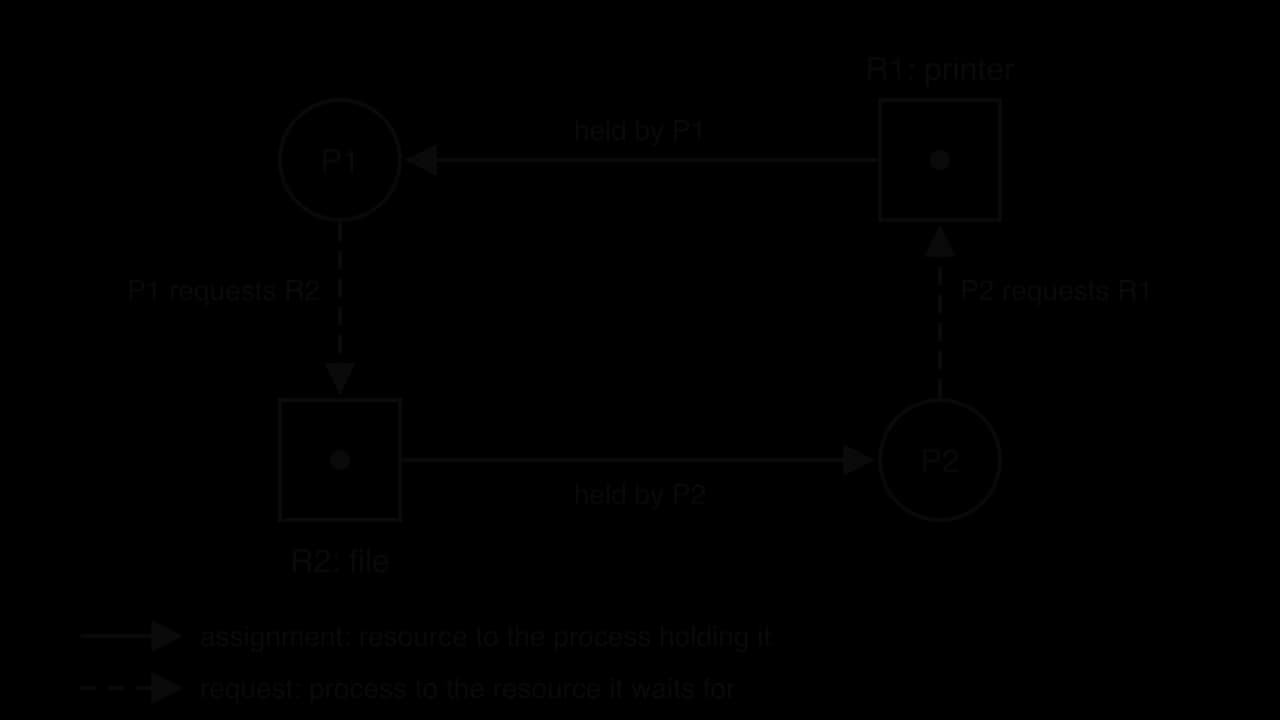
The rule for reading a graph is simple when each resource has only one instance: a cycle means deadlock, and no cycle means no deadlock. When resources have several instances (three identical printers, say), a cycle shows that deadlock is possible but not certain, because a free instance may still satisfy one of the requests.
Operating systems deal with deadlock in four ways.
Prevention: design the system so that at least one Coffman condition can never hold. The most practical is to break circular wait by numbering every resource and requiring processes to request resources in increasing order; then a chain can never loop back. Hold and wait can be broken by making a process request everything it needs at the start, and no pre-emption by forcing a process that is refused a resource to release what it holds and try again. Mutual exclusion usually cannot be removed, because some resources really cannot be shared.
Avoidance: before granting each request, the operating system checks whether granting it could lead to deadlock and makes the process wait if so.
Detection and recovery: let deadlocks happen, check the resource allocation graph for cycles from time to time, and break any cycle by ending one of the processes (often the one that has done the least work) or taking a resource from it.
Ignoring the problem: general-purpose operating systems mostly leave deadlocks between application threads to programmers, because prevention and detection cost time on every request and deadlocks are rare.
Method | Advantage | Disadvantage |
|---|---|---|
Prevention | Deadlock can never happen | Restricts how programs request resources; resources may be held longer than needed |
Avoidance | Allows more flexible requests than prevention | Needs advance knowledge of every process's maximum needs; costs a check on every request |
Detection and recovery | No restrictions in normal running | Work is lost when a process is ended; checking costs time |
Ignoring | No overhead at all | The user must notice and end the stuck program |
Priority scheduling and locks can combine to produce priority inversion. A high-priority process needs a lock held by a low-priority process, so it is blocked until the low-priority process releases it. That should be brief. But if a medium-priority process becomes ready in the meantime, it pre-empts the low-priority process (which has lower priority), so the lock is not released, and the high-priority process waits for the medium-priority one, even though the two share nothing.
The usual fix is priority inheritance: while a low-priority process holds a lock that a higher-priority process is waiting for, it temporarily runs at the waiting process's priority. The medium-priority process can no longer pre-empt it, so it finishes its work quickly, releases the lock and drops back to its normal priority.
NASA's Mars Pathfinder landed on Mars on 4 July 1997 and deployed the Sojourner rover. Its lander computer ran VxWorks, a real-time operating system with pre-emptive priority scheduling. From the day after landing, once the lander had begun gathering weather data, the computer started resetting itself; after each reset, the day's remaining operations were put off until the next day.
The lander used an "information bus", a shared memory area guarded by a lock, to pass data between its software tasks. Three tasks were involved.
Task | Priority | Use of the information bus |
|---|---|---|
Bus management | High | Ran frequently to move data in and out of the bus; needed the lock |
Communications | Medium | Long-running; did not use the lock |
Meteorological data gathering | Low | Ran occasionally; took the lock to publish weather data |
Very occasionally, the low-priority weather task held the lock when the high-priority bus task needed it, so the bus task was blocked. If the medium-priority communications task became ready at that moment, it pre-empted the weather task, which therefore could not release the lock. The bus task stayed blocked. A watchdog timer, a hardware safety device that resets a computer when expected activity stops, noticed that the bus task had not run for too long and reset the whole system.
Date (1997) | Event |
|---|---|
4 July | Pathfinder lands in Ares Vallis |
5 July | First system reset |
10, 11 and 14 July | Further resets |
21 July | Software patched from Earth to enable priority inheritance |
Sources: Wikipedia, "Mars Pathfinder" (accessed October 2026); Mike Jones, "What Happened on Mars?", December 1997, reporting the account given by Wind River, the makers of VxWorks.
Engineers at NASA's Jet Propulsion Laboratory reproduced the fault on an identical copy of the spacecraft on Earth, using a trace of every context switch and lock operation that VxWorks could record. The lock had been created with priority inheritance switched off. Because the spacecraft's software still contained a debugging feature that let engineers change settings remotely, they switched priority inheritance on with a small upload. No scientific or engineering data was lost in the resets.
The case brings several ideas together. Two tasks of different priority contended for one lock (resource contention); the scheduler correctly let the medium-priority task pre-empt the low-priority one, and the result was a priority inversion in which the highest-priority task waited for a task with which it shared nothing. The bus task had a real-time deadline, which is why the watchdog treated the delay as a fault. The fault had appeared in tests before launch but was rare and was given a lower priority than checking the landing software, which shows how a rare timing problem in testing can become a regular one in a busy real system.
Engineers kept priority scheduling and removed only the inversion. With inheritance enabled, the weather task ran at high priority while it held the lock, finished its short piece of work, and released the lock before the communications task could run.
A control system manages the behaviour of a machine or process so that it does what is wanted: a room stays at 20 °C, a lift stops level with the floor, a car stays in its lane. Many control systems are embedded systems, and most must respond in real time. Every control system follows the same pattern of input, process and output: it takes in information, processes it according to rules, and produces an output that acts on the physical world. Many add a fourth stage, feedback, in which the result of the output is measured and fed back as a new input.
The block diagrams of open-loop and closed-loop control show the difference that feedback makes. In both, a controller drives an actuator that acts on a physical process. Only the closed-loop system measures the result and corrects itself.
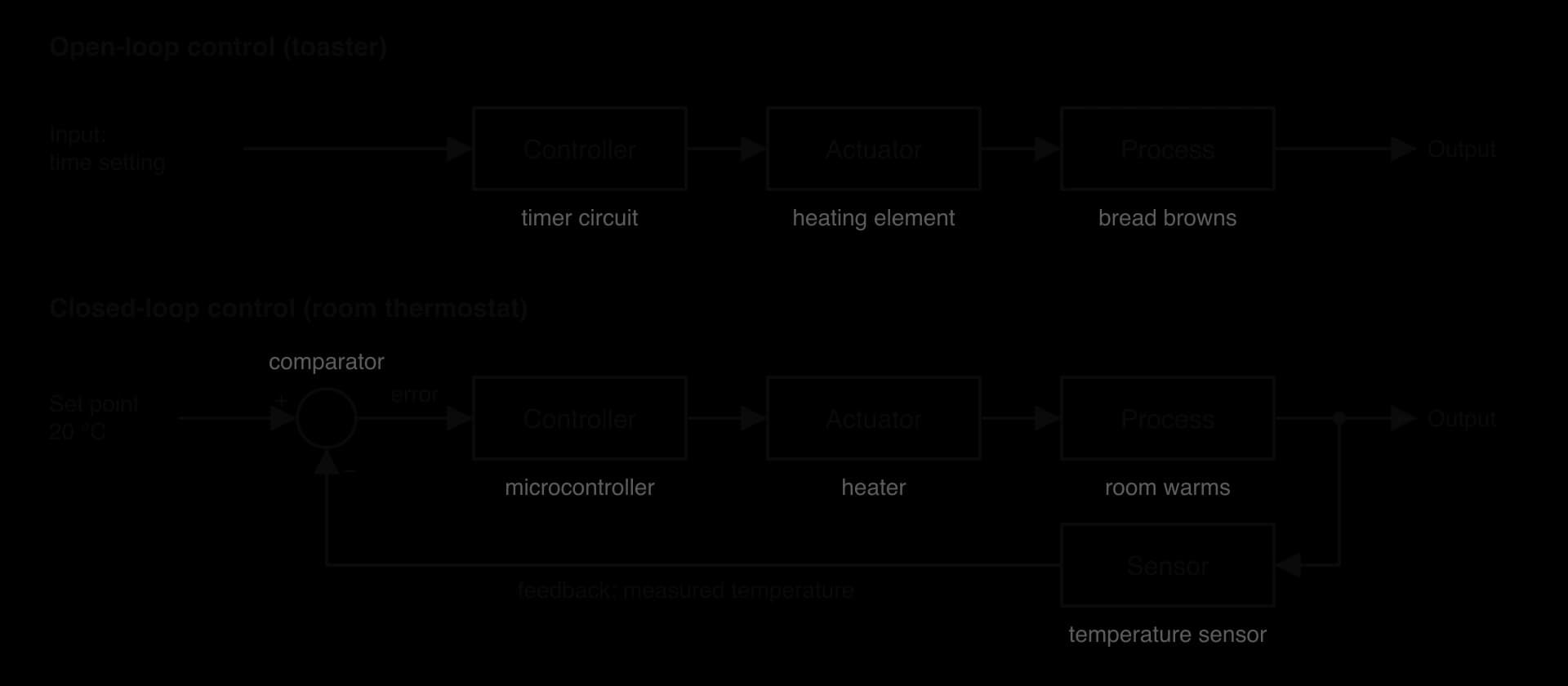
In open-loop control, the controller produces its output from the input alone and never checks the result. A toaster heats for the time set on its dial, whether the bread is thin or frozen; a garden sprinkler on a timer waters at 6 a.m. even if it is raining. Open-loop systems are simple and cheap, but they cannot correct for disturbances, so the result may be wrong.
In closed-loop control, a sensor measures the actual output and this measurement is fed back and compared with the desired value. The difference is used to adjust the output, so the system corrects itself when conditions change. A thermostat measures the room temperature and turns the heater on or off to hold it close to the setting, even when a window is opened.
Three terms describe the loop. The set point is the target value; feedback is the measured output sent back to the controller; and the error signal is the difference between them, calculated by a comparator.
A system with feedback keeps working towards its set point in a continuous cycle: measure, compare, act, measure again. The cycle repeats many times a second in fast systems (a drone's stabiliser) and every few minutes in slow ones (a greenhouse's watering).
With a set point of 20 °C and a measured temperature of 18.5 °C, the error is °C, so the controller must heat; at 21 °C the error is °C, so it must stop heating or cool. The sign of the error gives the direction of the correction, and its size shows how far the process is from the target.
Feature | Open-loop | Closed-loop |
|---|---|---|
Feedback | None | Sensor measures the output and feeds it back |
Responds to disturbances | No; the same output whatever happens | Yes; corrects when conditions change |
Accuracy | Depends on the settings being right | Holds the output close to the set point |
Cost and complexity | Low: no sensors or comparison | Higher: sensors, comparison, more careful design |
Risk | May give the wrong result unnoticed | A faulty sensor can drive the system wrongly |
Examples | Toaster, timed sprinkler, simple washing machine cycle | Thermostat, cruise control, lift, autopilot |
 YouTube
A control system meets the physical world at two points: sensors bring information in, and actuators produce physical action. Both are kinds of transducer.
A sensor measures a physical quantity and produces an electrical signal that represents it. Most sensors produce an analogue signal, a voltage that varies continuously, so an analogue-to-digital converter (ADC) turns it into binary numbers that the controller can process. A few sensors, such as a door switch, are already digital: on or off.
Sensor | Quantity measured | Typical use |
|---|---|---|
Thermistor | Temperature | Thermostats, ovens, engine cooling |
Light-dependent resistor (LDR) | Light level | Street lights, automatic screen brightness |
Passive infrared (PIR) | Movement of warm bodies | Alarms, automatic doors, security lights |
Ultrasonic | Distance (echo time) | Parking sensors, water tank level |
Pressure | Force or air pressure | Weighing lifts, tyre pressure, touch pads |
Soil moisture | Water content of soil | Irrigation systems |
Lidar | Distance by laser pulses, giving a 3D map | Autonomous vehicles |
Accelerometer and gyroscope | Acceleration and rotation | Drones, phones, airbags |
An actuator turns the controller's output into physical action. Controllers produce small electrical signals, so an actuator often needs a relay (an electrically operated switch) or a driver circuit to switch the larger power that a motor or heater needs. Where the actuator needs a varying signal rather than on or off, a digital-to-analogue converter (DAC) turns the controller's binary output into a voltage.
The controller is the decision-making part of the system. It reads the sensor data, applies the control algorithm and sends signals to the actuators. Two kinds of computer are used as controllers.
A microcontroller is a whole small computer on one chip: processor, memory and input/output ports. It costs very little, uses little power and is found in almost every household appliance. A programmable logic controller (PLC) is a rugged industrial computer built to run machinery in factories, power stations and water plants, where it must survive heat, dust and electrical noise and run reliably for years.
PLCs are programmed in simple, standard languages (such as ladder logic, which looks like an electrical circuit diagram) and scan their inputs, run their program and update their outputs in a repeating cycle many times a second. They connect easily to industrial sensors and motors and can be reprogrammed when a production line changes.
The control algorithm is the set of rules the controller follows to calculate its outputs. It is written as a program, and it determines how the system behaves: how fast it reacts, whether it overshoots the target and how often the actuators switch.
The simplest control algorithm is bang-bang (on/off) control: the actuator is either fully on or fully off. A basic thermostat switches the heater on when the room is too cold and off when it is warm enough. If both switching points were exactly 20.0 °C, the heater would switch on and off every few seconds as the temperature wobbled around 20.0, wearing out the relay and the boiler. Hysteresis solves this by using two switching points: on below 19.5 °C, off above 20.5 °C, and no change in between.
The program thermostat.py simulates 24 minutes of a room heated by bang-bang control with hysteresis. Each minute it reads the temperature, applies the control algorithm and then models the room: the temperature rises 0.4 °C in a minute while the heater is on and falls 0.2 °C while it is off.
SET_POINT = 20.0   # target temperature in °C
BAND = 0.5         # hysteresis: switch at 19.5 °C and 20.5 °C

temperature = 18.0  # first sensor reading
heater_on = False
for minute in range(0, 25):
    # control algorithm: compare the reading with the set point
    if temperature < SET_POINT - BAND:
        heater_on = True
    elif temperature > SET_POINT + BAND:
        heater_on = False
    if heater_on:
        state = "ON"
    else:
        state = "OFF"
    print(minute, format(temperature, ".1f"), state)
    # simulated room: the heater adds heat, the room always loses some
    if heater_on:
        temperature = temperature + 0.4
    else:
temperature = temperature - 0.2public class Thermostat {
public static void main(String[] args) {
final double SET_POINT = 20.0; // target temperature in °C
final double BAND = 0.5; // hysteresis: switch at 19.5 °C and 20.5 °C
double temperature = 18.0; // first sensor reading
boolean heaterOn = false;
for (int minute = 0; minute < 25; minute++) {
// control algorithm: compare the reading with the set point
if (temperature < SET_POINT - BAND) {
heaterOn = true;
} else if (temperature > SET_POINT + BAND) {
heaterOn = false;
}
String state;
if (heaterOn) {
state = "ON";
} else {
state = "OFF";
}
System.out.println(minute + " " + String.format("%.1f", temperature) + " " + state);
// simulated room: the heater adds heat, the room always loses some
if (heaterOn) {
temperature = temperature + 0.4;
} else {
temperature = temperature - 0.2;
}
}
}
}The if and elif (else if in Java) have no final else: between 19.5 °C and 20.5 °C the heater keeps its previous state, and that is the hysteresis. Python constants are written in capitals by convention only, while Java's final makes the compiler stop them being changed. Both versions print one line per minute with the minute, the temperature and the heater state, from 0 18.0 ON to 24 19.8 ON. The heater switches off at minute 7 (20.8 °C), on at minute 14 (19.4 °C), off at minute 17 (20.6 °C) and on again at minute 23 (19.4 °C), as the graph of the 25 readings shows.
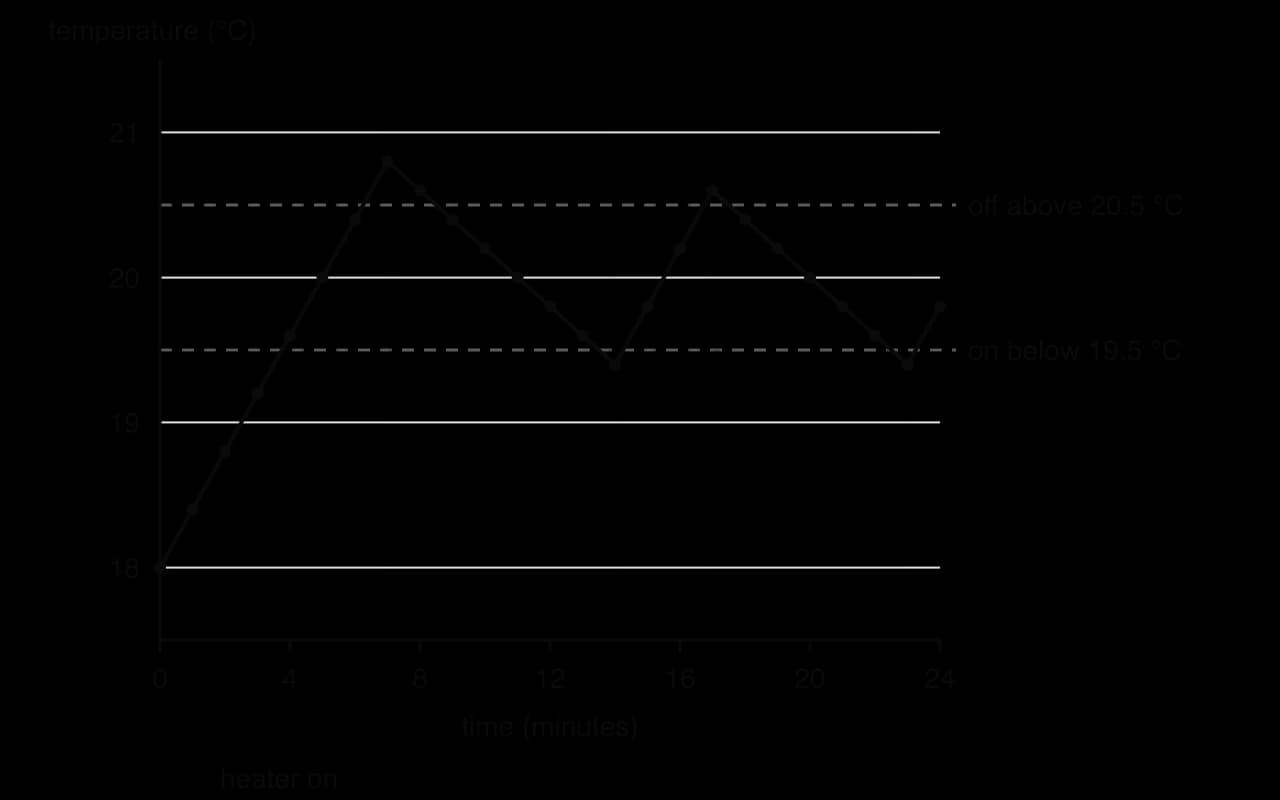
The temperature overshoots the band slightly (to 20.8 °C and down to 19.4 °C) because the controller only checks once a minute, so it reacts up to a minute after a threshold is crossed. Checking more often narrows the swing; widening the band reduces how often the heater switches. Choosing these settings is a trade-off between accuracy and wear on the equipment.
Bang-bang control suits systems that change slowly, such as heating a room or a fridge, where small swings do no harm. Systems that need smooth, precise control, such as a car's cruise control or a drone holding its height, vary the actuator's output in proportion to the error instead of switching it fully on or off. The best-known method, PID control (proportional, integral, derivative), combines the size of the error, how long it has lasted and how fast it is changing; it is used widely in industry.
An unfamiliar control system can be analysed in the same steps every time.
Purpose and set point: the quantity being controlled and its target value.
Sensors (inputs): what is measured and by which sensors, and whether an ADC is needed.
Controller and algorithm: the kind of controller and the rules it applies, including thresholds, timings and safety rules.
Actuators (outputs): the physical actions produced and the devices that produce them.
Feedback: whether a sensor measures the result of the actuators' action. If it does, the system is closed-loop; if not, it is open-loop.
Safety and reliability: the effect of a sensor or actuator failing, and the fail-safes built in.
The automatic irrigation system shows the steps applied to a farm or garden. A soil moisture sensor measures the water in the soil; the grower sets a target, say 30% moisture; the microcontroller switches a pump on through a relay when the soil is too dry and off when it is wet enough. The water raises the soil moisture, and the sensor measures the change, so the loop is closed.
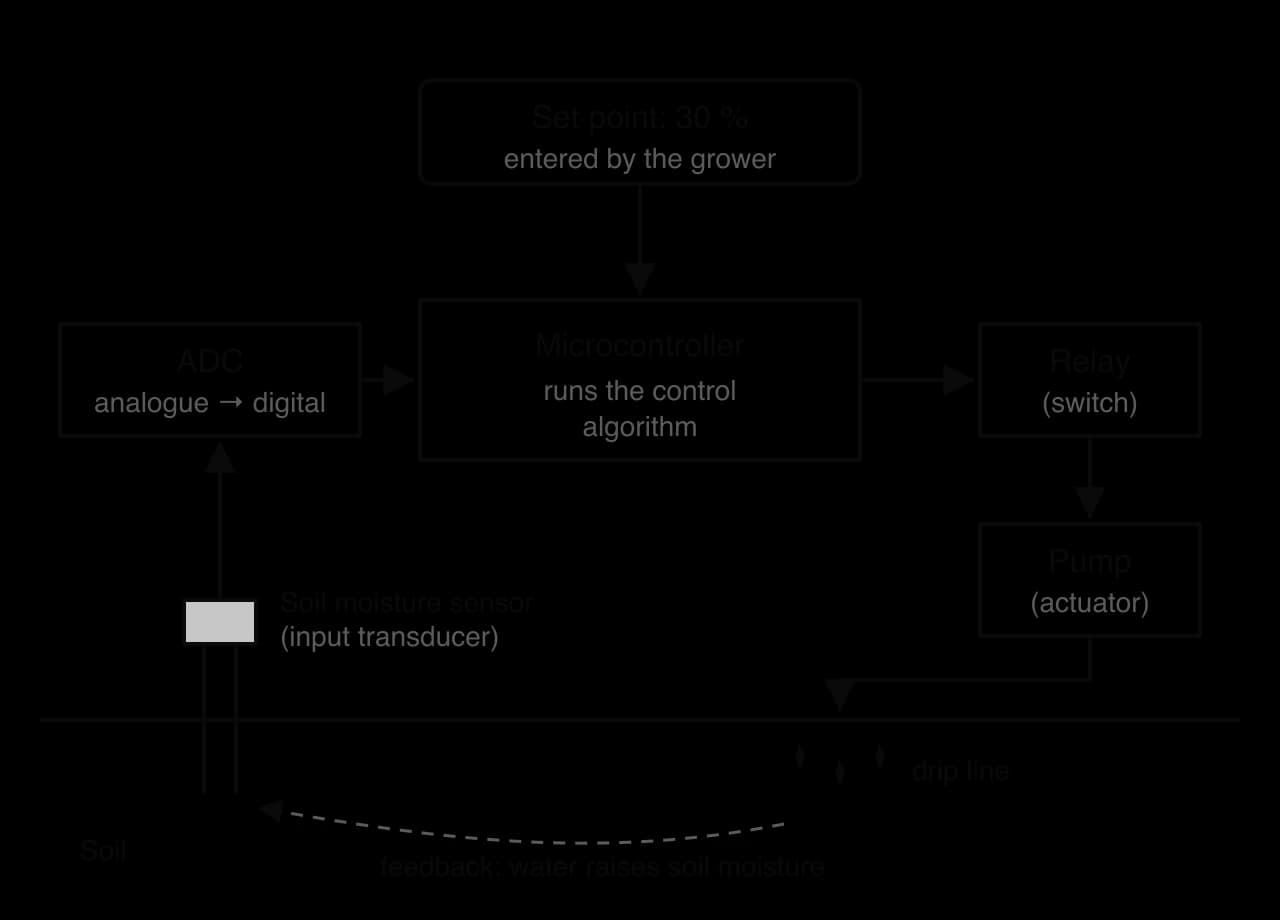
The table applies the same analysis to the other common applications.
Application | Sensors | Actuators | Controller logic | Loop |
|---|---|---|---|---|
Home thermostat | Temperature sensor; sometimes a motion sensor for occupancy | Relay switching the boiler or heat pump | Bang-bang with hysteresis around the set point; timetable for set points | Closed |
Automatic lift (elevator) | Floor position sensors, door sensors, load (weight) sensor, call buttons | Hoist motor, brakes, door motors | Serves calls in an efficient order; stops level with the floor; refuses to move with doors open or when overloaded | Closed |
Automatic washing machine | Water level, water temperature, drum speed, door lock | Water valves, heater, drum motor, pump, door lock | Runs programme stages; fills to the level and heats to the temperature measured | Closed for level and temperature; timed stages are open-loop |
Traffic signal control | Induction loops in the road, cameras, pedestrian buttons | Signal lights | Fixed timing (open-loop), or timing adjusted to the queues detected (closed-loop); never green in conflicting directions | Either |
Irrigation control | Soil moisture, rain sensor | Pump, valves | Water when moisture falls below the set point; skip if raining | Closed |
Home security system | PIR motion, door and window contacts, cameras, glass-break microphones | Siren, lights, phone notification | When armed, any trigger starts an entry delay, then the alarm | Event-driven, mostly open-loop |
Automatic doors | PIR or microwave motion sensor, safety beam across the doorway | Door motor | Open on approach; stay open while the beam is broken; close after a delay | Closed |
Autonomous vehicle | Lidar, radar, cameras, GPS, wheel speed sensors | Steering, accelerator and brake actuators | Builds a model of the surroundings, plans a path, and adjusts steering and speed continuously | Closed |
A self-driving car is a set of closed-loop control systems working together. Sensors build a picture of the road many times a second: lidar measures distances with laser pulses, radar tracks the speed of other vehicles even in rain or fog, and cameras read signs, lane markings and traffic lights. The controller combines these inputs, often using machine learning to recognise objects, plans a path, and sends signals to the steering, accelerator and brake actuators. The resulting motion changes what the sensors see on the next cycle, closing the loop.
Waymo, owned by Google's parent company Alphabet, runs one of the largest robotaxi services, and its scale shows how far such control systems are now trusted on public roads.
Waymo, June 2026 | Figure |
|---|---|
US metropolitan areas with public robotaxi service | 10 |
Robotaxis in service | 3,871 |
Paid rides per week | about 500,000 |
Sensors | Lidar, radar and cameras; long-range lidar detects objects up to about 300 m away |
Source: Wikipedia, "Waymo" (accessed October 2026).
The several kinds of sensor provide redundancy: when one is weak (cameras in low sun, lidar in heavy snow), the others still work. The control system must also respond in hard real time: at motorway speed a car covers about 30 metres every second, so a decision that arrives late can mean a collision.
The Nest Learning Thermostat, launched in 2011, added learning to the classic closed-loop thermostat. During its first weeks in a home, it records each manual change of temperature and turns these into a daily schedule, so the set point itself varies through the day. Its occupancy sensors, together with the locations of the residents' phones, show when the house is empty, and the set point then drops to an energy-saving value. Google bought Nest Labs for US$3.2 billion in January 2014.
Source: Wikipedia, "Nest Thermostat" and "Google Nest" (accessed October 2026).
The underlying loop is unchanged (measure, compare, switch the heating), but the controller now adjusts its own set point from data about the users, which saves energy while recording when people are at home, a privacy and security concern.
Control systems act on the physical world, so a fault can cause damage or injury. Designers therefore ask what happens when each component fails and build in fail-safes: the system is designed so that a failure leaves it in a safe state. A lift's brakes are held off by power, so a power cut applies them; a traffic controller that detects conflicting greens switches every signal to flashing amber or red; a gas boiler's valve closes if the flame sensor stops detecting a flame.
Other safety measures include redundancy (two or three sensors measuring the same quantity, with the controller comparing them and rejecting one that disagrees), watchdog timers that reset a controller that stops responding, limits that the control algorithm will never exceed, and the ability of a human operator to override the system.
The Boeing 737 MAX shows what can happen when a closed-loop system relies on a single sensor. Its Maneuvering Characteristics Augmentation System (MCAS) pushed the aircraft's nose down whenever the angle of attack (the angle between the wing and the oncoming air) read too high, using only one angle-of-attack sensor at a time. When that sensor failed and reported a falsely high angle, MCAS pushed the nose down again and again, against pilots who had not been told the system existed.
Item | Detail |
|---|---|
Control loop | Angle-of-attack sensor → flight control computer (MCAS) → horizontal stabiliser trim (actuator) → aircraft pitch |
Design flaw | Input from a single sensor; could activate repeatedly; not described in pilots' manuals or training |
Accidents | Lion Air Flight 610 (October 2018) and Ethiopian Airlines Flight 302 (March 2019): 346 deaths |
Grounding | Worldwide, March 2019 to December 2020 (about 20 months) |
Fix | MCAS needs agreement between two sensors, activates only once per event, and can be overridden by the pilots; new simulator training |
Source: Wikipedia, "Boeing 737 MAX groundings" (accessed October 2026).
Each part of the fix maps to a safety principle: two sensors give redundancy, so one faulty reading no longer drives the system; limiting activation keeps the controller's authority within safe bounds; and the pilot override and new training restore the human in the loop, which the original design had left out.
Control systems can also be attacked deliberately. Stuxnet, a computer worm discovered in June 2010, reprogrammed the Siemens programmable logic controllers that drove uranium-enrichment centrifuges at Iran's Natanz facility, speeding the motors up and slowing them down until the stress damaged the machines, while replaying normal-looking readings to the operators. It therefore attacked both halves of the loop, changing what the actuators did and faking the feedback that humans relied on. Control systems consequently need the same security as other computers: authentication before a controller's program can be changed, isolation from other networks and independent checks on sensor data.
Source: Wikipedia, "Stuxnet" (accessed October 2026).
Operating systems and control systems are examined in Paper 1, Section A, in extended-response questions that are broken into parts of rising difficulty. The SL statements use four command terms. Describe (the role and the functions of an operating system) needs a detailed account with specific features, not a list of names. Compare (scheduling approaches) needs similarities and differences that refer to both algorithms throughout, ideally point by point. Evaluate (polling and interrupts) needs strengths and limitations of both methods, applied to the scenario, and a supported conclusion. Gantt charts and waiting-time calculations appear as Construct and Calculate parts within scheduling questions.
On the HL paper, the same questions carry extra parts on the HL-only statements: Explain multitasking, resource contention and deadlock, usually with a scenario of named processes and resources; Describe the components of a control system; and Explain how a given control system works, often an unfamiliar one described in the question. Typical parts are worth 2–4 marks, with a final 4–6 mark Evaluate or Explain part.
The full exam-style question is set on a small office server running four processes, with times in milliseconds.
Process | Arrival time | Burst time |
|---|---|---|
A | 0 | 4 |
B | 1 | 3 |
C | 2 | 1 |
D | 4 | 2 |
Gantt chart questions are mechanical once the rules are fixed, so marks are usually lost on details: a process put back in the queue in the wrong place, an arrival missed, or a waiting time calculated as start time minus arrival time for a process that ran in several pieces.
On the HL paper, control system questions reward precise vocabulary. "Sensor", "actuator", "controller", "set point" and "feedback" each have exact meanings, and answers that mix them up (the sensor "turns on the heater") lose marks even when the idea is right.
Define the term operating system. [1]
Distinguish between a program and a process. [2]
Describe how virtual memory allows a computer to run more programs than its RAM can hold, and state one disadvantage. [3]
Outline the purpose of a device driver. [2]
Four processes arrive in the ready queue: W (arrival 0, burst 6), X (arrival 2, burst 2), Y (arrival 3, burst 4), Z (arrival 5, burst 1). Construct Gantt charts for FCFS and for round robin with a time slice of 3 ms, and calculate the average waiting time for each. Assume that a process arriving as a time slice ends joins the queue before the pre-empted process. [6]
Explain why priority scheduling can lead to starvation, and how ageing prevents it. [3]
Compare round robin scheduling with multilevel queue scheduling. [4]
A fitness tracker counts steps using an accelerometer and runs for a week on one charge. Evaluate the use of interrupts rather than polling to detect when the user starts moving. [4]
(HL only) Explain the difference between deadlock and starvation. [3]
(HL only) An automatic car park barrier opens when a valid ticket is inserted and closes when a sensor detects that the car has passed. Identify one sensor, one actuator and the role of the controller, and explain one fail-safe the barrier should have. [5]
System software that manages the computer's hardware and resources and provides common services to the programs that run on it.
A program is a file of instructions stored on a drive; it does nothing by itself. A process is a program being executed, with its own memory, register values and state, managed by the operating system; one program can run as several processes.
The operating system uses part of secondary storage as an extension of RAM, divided into pages; pages not currently in use are moved out to the drive and loaded back into a free frame when needed (after a page fault). So processes can use more memory than is installed. Disadvantage: the drive is far slower than RAM, so frequent swapping slows the computer, and with too little RAM it thrashes.
A device driver lets the operating system control a particular hardware device; it translates general requests from the operating system (such as "print this document") into the specific commands that model of device understands, so applications do not need device-specific code.
FCFS: W 0–6, X 6–8, Y 8–12, Z 12–13. Waiting: W 0, X 4, Y 5, Z 7; average 16 ÷ 4 = 4.0 ms. Round robin (slice 3): W 0–3, X 3–5, Y 5–8, W 8–11, Z 11–12, Y 12–13. (At 3, Y arrives and joins before W, giving queue X, Y, W; Z arrives at 5 behind W.) Waiting: W = 11 − 0 − 6 = 5; X = 5 − 2 − 2 = 1; Y = 13 − 3 − 4 = 6; Z = 12 − 5 − 1 = 6; average 18 ÷ 4 = 4.5 ms.
The scheduler always runs the ready process with the highest priority, so if higher-priority processes keep arriving, a low-priority process is always passed over and may wait indefinitely. Ageing raises a process's priority the longer it waits, so eventually it has the highest priority and runs.
Both are pre-emptive and both can use round robin (multilevel queue often uses it inside the interactive queue). Round robin keeps one queue and treats every process equally, giving each the same time slice; multilevel queue keeps separate queues for different classes of process, each with its own algorithm, and serves the queues by priority. Round robin cannot starve a process, whereas a lower queue in a multilevel queue can starve if higher queues are always busy. Multilevel queue gives interactive processes faster responses than batch jobs, but is more complex to configure.
Starting to move is unpredictable and, compared with processor speed, rare, so polling would waste most checks; with interrupts the processor can sleep until the accelerometer signals movement, which saves battery, the device's key constraint. Interrupts also give a fast response when movement starts. However, once the user is walking, step events are frequent and regular, so sampling (polling) the accelerometer at a fixed rate may then be simpler and cheaper than an interrupt per step. Conclusion: an interrupt to wake the device when movement starts, then regular sampling while moving, is the best combination.
In deadlock, two or more processes are each blocked waiting for a resource held by another in the group, in a circular wait, so none can ever continue whatever the scheduler does. In starvation, the process is ready and could run, but other processes are always chosen ahead of it; the rest of the system keeps working, and ageing can solve it.
Sensor: an induction loop in the road or an infrared beam across the exit, detecting that the car has passed (also accept the ticket reader as an input device). Actuator: the motor that raises and lowers the barrier arm. Controller: a microcontroller checks that the ticket is valid, sends the signal to raise the barrier, and lowers it only when the sensor shows that the car has passed. Fail-safe: the barrier must not close while a vehicle is under it, so a safety beam stops or reverses the motor if it is broken; or, on power failure, the barrier can be raised manually so cars are not trapped.
An operating system is system software that hides hardware complexity behind abstractions (APIs, system calls and device drivers) and manages the CPU, memory, storage and devices; the kernel runs in a privileged kernel mode.
Its functions are memory management (allocation, protection, virtual memory and paging), the file system (files, directories, permissions), device management, scheduling, security (authentication, access control, process isolation), accounting, the user interface (GUI or CLI), virtualisation (virtual machines run by a hypervisor) and networking, while background operations keep the system intact.
Scheduling shares the CPU between processes; each change of process is a context switch, which is overhead. Pre-emptive scheduling can take the CPU away from a running process.
Waiting time = turnaround time − burst time; turnaround time = completion time − arrival time; response time = first run − arrival time. A Gantt chart shows which process runs when.
FCFS is simple with low overhead but suffers the convoy effect; round robin is fair with good response time, but its overhead depends on the time slice; priority scheduling serves urgent work first but risks starvation, cured by ageing; multilevel queue gives each class of process its own queue and algorithm.
Polling checks devices at intervals: simple, with predictable latency, and efficient for very frequent or regular events, but wasteful and power-hungry for rare ones. Interrupts let devices signal the CPU, which saves its state, runs an ISR and restores its state: efficient and low-latency for rare, unpredictable events, but costly when events are very frequent.
HL: multitasking interleaves processes on each core; processes move between new, ready, running, blocked and terminated. Deadlock needs all four Coffman conditions (mutual exclusion, hold and wait, no pre-emption, circular wait) and shows as a cycle in a resource allocation graph; priority inversion is fixed by priority inheritance.
HL: open-loop control acts without measuring the result; closed-loop control uses sensors to feed back the output, compares it with the set point and acts on the error. Sensors and actuators are transducers; a microcontroller or PLC runs the control algorithm, such as bang-bang control with hysteresis.
HL: real control systems (thermostats, lifts, washing machines, traffic signals, irrigation, security systems, automatic doors, autonomous vehicles) are analysed by their sensors, actuators, controller logic and feedback, and need fail-safes and redundancy because failures can cause harm.
I can describe how an operating system hides hardware detail through APIs, system calls and device drivers.
I can explain the difference between kernel mode and user mode and why it protects the system.
I can describe each function of an operating system with a precise detail or example.
I can calculate a physical address from a page number, a frame number and an offset.
I can explain how background operations are run without harming system integrity.
I can draw a Gantt chart for FCFS, round robin, priority (both versions) and multilevel queue scheduling.
I can calculate waiting, turnaround and response times and their averages from a Gantt chart.
I can explain the convoy effect, starvation and ageing, and the effect of the time slice on round robin.
I can compare two scheduling algorithms point by point, with both in each point.
I can list the steps the CPU takes to handle an interrupt.
I can evaluate polling against interrupts for a named scenario using the six factors and reach a conclusion.
I can draw the process state diagram and explain each transition. (HL only)
I can state the four Coffman conditions, draw a resource allocation graph and decide whether it shows deadlock. (HL only)
I can explain priority inversion and priority inheritance using the Mars Pathfinder case. (HL only)
I can draw open-loop and closed-loop block diagrams and identify the sensors, actuators, controller and feedback in an unfamiliar control system. (HL only)
A company builds smart televisions. Its developers write streaming and gaming apps that run on top of the television's operating system (OS), and the same apps must run on several models with different processors, memory sizes and remote-control receivers.
State two hardware resources that the television's OS manages.
2 marks
Describe how the OS hides the complexity of the hardware from the app developers.
3 marks
Nurses at a hospital use shared workstations on every ward. Many different applications run at the same time, including a patient-records program, a drug-prescribing program and a messaging app.
Describe two functions of the workstation's operating system, other than scheduling, that support the nurses' work.
4 marks
Outline how the accounting function of the OS could help the hospital's IT department.
2 marks