A1.2 Data representation and computer logic
Convert integers between binary, denary and hexadecimal, explain how text, images, sound and video are stored as bits, and build, analyse and simplify logic circuits with truth tables, Boolean algebra and Karnaugh maps.
- IB Computer Science
- Part of A1 Computer fundamentals
- SL and HL
Key terms introduced here
Each is in the Computer Science glossary, with every other term in the subject.
- Absorption law
The rule that a term containing a variable is redundant when it is combined with that variable on its own: and .
- Analogue signal
A signal that varies continuously, so it can take any value within a range at any moment in time.
- Analogue-to-digital converter (ADC)
A circuit that measures an analogue signal at regular intervals and outputs each measurement as a binary number.
- AND gate
A logic gate whose output is 1 only when all of its inputs are 1.
- ASCII
The American Standard Code for Information Interchange, a 7-bit character set of 128 codes covering the English alphabet, digits, punctuation and control characters.
- Associative law
The rule that the grouping of three or more operands joined by the same operator does not change the result: and .
- Binary
The base-2 number system, which uses only the digits 0 and 1 and column values that are powers of 2 (1, 2, 4, 8, 16, …).
- Binary prefix
A unit prefix based on powers of 1024, as in kibibyte (KiB, 1024 bytes), mebibyte (MiB, bytes) and gibibyte (GiB, bytes).
- Bit
A binary digit, the smallest unit of data, which has one of two values, 0 or 1.
- Bit depth
The number of bits used to store each sample of a sound, which sets how many different amplitude levels ( for bits) can be recorded.
- Bitmap image
An image stored as a grid of pixels, with a binary value recording the colour of each pixel.
- Boolean algebra
The algebra of the two values true (1) and false (0), with operations such as AND, OR and NOT and laws for rewriting and simplifying expressions.
- Boolean expression
An expression built from Boolean variables, the constants 0 and 1, and Boolean operators, whose value is either true (1) or false (0).
- Boolean operator
An operation that combines or changes Boolean values: AND, OR, NOT, NAND, NOR, XOR or XNOR.
- Byte
A group of 8 bits, the standard unit for measuring storage and for addressing memory.
- Character code
The number that a character set assigns to one character, stored in binary to represent that character.
- Character set
An agreed list of characters in which each character is given a unique number, so that text can be stored and exchanged as binary.
- Colour depth
The number of bits used to store the colour of each pixel; a colour depth of bits allows different colours.
- Commutative law
The rule that the order of the operands of AND or OR does not change the result: and .
- Complement law
The rule that ANDing a variable with its inverse gives 0, and ORing a variable with its inverse gives 1: and .
- De Morgan's laws
The two rules and , which state that the inverse of an AND is the OR of the inverses, and the inverse of an OR is the AND of the inverses.
- Decimal prefix
A unit prefix based on powers of 1000, as in kilobyte (kB, 1000 bytes), megabyte (MB, bytes), gigabyte (GB, bytes) and terabyte (TB, bytes).
- Denary
The base-10 number system, which uses the ten digits 0 to 9 and column values that are powers of 10.
- Digital signal
A signal that can take only a limited set of discrete values, such as the binary values 0 and 1, at discrete moments in time.
- Digital-to-analogue converter (DAC)
A circuit that turns a sequence of binary numbers into a continuously varying analogue signal.
- Distributive law
The rule that an operator applied to a bracket can be applied to each term inside it: and .
- Double negation law
The rule that inverting a variable twice gives the original variable: .
- Frame rate
The number of frames (still images) shown per second of video, measured in frames per second (fps).
- Gray code
An ordering of binary values in which each value differs from the next in exactly one bit.
- Half adder
A logic circuit that adds two single bits, producing a sum bit (A XOR B) and a carry bit (A AND B).
- Hexadecimal
The base-16 number system, which uses sixteen digits, 0 to 9 and A to F (A = 10, B = 11, C = 12, D = 13, E = 14, F = 15), and column values that are powers of 16.
- Idempotent law
The rule that ANDing or ORing a variable with itself gives the same variable: and .
- Identity law
The rule that ANDing a variable with 1, or ORing it with 0, leaves it unchanged: and .
- Image resolution
The number of pixels in an image, usually given as width × height.
- Karnaugh map
A grid form of a truth table, with rows and columns labelled in Gray-code order so that adjacent cells differ in one input, used to simplify Boolean expressions by grouping adjacent 1s.
- Logic diagram
A diagram of a logic circuit that uses standard gate symbols connected by lines (wires) to show how the inputs are processed to produce the outputs.
- Logic gate
An electronic circuit that takes one or more binary inputs and produces a single binary output determined by a Boolean operation.
- Metadata
Data that describes other data, recording the properties needed to interpret, organise or find it.
- Most significant bit (MSB)
The leftmost bit of a binary number, which has the largest place value; the rightmost bit, with place value 1, is the least significant bit (LSB).
- NAND gate
A logic gate whose output is 0 only when all of its inputs are 1, equivalent to an AND gate followed by a NOT gate.
- Nibble
A group of 4 bits, half a byte, which can represent 16 values and is written as one hexadecimal digit.
- NOR gate
A logic gate whose output is 1 only when all of its inputs are 0, equivalent to an OR gate followed by a NOT gate.
- NOT gate
A logic gate with one input whose output is the opposite of the input, 1 for an input of 0 and 0 for an input of 1.
- Null law
The rule that ANDing a variable with 0 always gives 0, and ORing it with 1 always gives 1: and .
- OR gate
A logic gate whose output is 1 when at least one of its inputs is 1.
- Overflow
The error that occurs when the result of a calculation is too large to be represented in the fixed number of bits available.
- Pixel
The smallest single-coloured element of a bitmap image or display; its name is short for "picture element".
- Place value
The value of a digit's position in a number, equal to the base raised to the power of the position, counting from 0 at the right.
- Sampling
Measuring the amplitude of an analogue signal at regular, equally spaced moments and storing each measurement, called a sample, as a binary number.
- Sampling rate
The number of samples taken per second, measured in hertz (Hz).
- Sum of products
A form of Boolean expression made of AND terms (products) joined by OR (a sum).
- Truth table
A table that lists every possible combination of input values of a logic circuit or Boolean expression, with the output for each combination.
- Two's complement
A way of storing signed integers in which the most significant bit has a negative place value, so an -bit number holds values from to .
- Unicode
A universal character set that gives every character of the world's writing systems, together with symbols and emoji, its own number, called a code point.
- Universal gate
A logic gate from which any other logic gate, and therefore any logic circuit, can be built; NAND and NOR are the two universal gates.
- Unsigned integer
A whole number stored in binary without a sign, so it can only be zero or positive; with bits it can hold values from 0 to .
- UTF-8
A variable-length encoding of Unicode that stores each code point in one, two, three or four bytes, using a single byte for the 128 ASCII characters.
- Vector graphic
An image stored as a list of shapes (lines, curves, polygons and text) described by coordinates and properties such as colour and line width, which the computer draws when the image is displayed.
- XNOR gate
A logic gate whose output is 1 when its two inputs are equal (both 0 or both 1), equivalent to an XOR gate followed by a NOT gate.
- XOR gate
A logic gate whose output is 1 when exactly one of its two inputs is 1, that is, when the inputs are different.
Notes on A1.2 Data representation and computer logic
Learning objectives
Describe how integers are represented in binary and hexadecimal, including the range of values a fixed number of bits can hold.
Calculate the denary, binary and hexadecimal forms of an integer from any one of them, showing the working.
Explain how binary is used to store integers, characters and strings, and the effect of the encoding on storing and retrieving data.
Explain how images, audio and video are stored in binary, and calculate the storage they need.
Describe the purpose and use of logic gates, the seven Boolean operators AND, OR, NOT, NAND, NOR, XOR and XNOR, and their applications in computer systems.
Construct and analyse truth tables for logic circuits, Boolean expressions and problems described in words.
Construct simplified Boolean expressions using Boolean algebra and Karnaugh maps.
Construct logic diagrams from Boolean expressions and problem descriptions, and simplify them.
Introduction
Every value a computer handles, from a bank balance to a photograph or a voice message, is stored as a pattern of two states, written 0 and 1. The same physical signals that store those patterns also process them: tiny electronic switches combine 0s and 1s according to the rules of logic, and millions of these combinations make up the arithmetic and control circuits of a processor. Understanding both halves explains why a photo takes a certain number of megabytes, why an old system can fail when a counter runs out of bits, and how a processor turns a condition in a program into a decision made by hardware.
The subtopic has two parts. Data representation covers number systems (binary, denary and hexadecimal) and the way integers, text, images, sound and video are encoded as bits. Computer logic covers logic gates, truth tables, Boolean algebra, Karnaugh maps and logic diagrams, the tools for designing and simplifying the circuits that process those bits.
 YouTube
Number systems: binary, denary and hexadecimal
Why computers use two states
A computer stores and moves data as physical states: a high or low voltage on a wire, a charged or uncharged cell in memory, a magnetised region pointing one way or the other on a disk. Circuits that only need to tell two states apart are cheap to build and very reliable, because a small amount of electrical noise does not turn a "high" into a "low". Ten distinguishable voltage levels, one per decimal digit, would be far more sensitive to noise, so computers build every value from many two-state digits instead.
A single bit can only say "yes" or "no". Groups of bits can represent many more values: each extra bit doubles the number of possible patterns, because every existing pattern can be followed by either a 0 or a 1. Two bits give four patterns (00, 01, 10, 11), three bits give eight, and bits give .
Memory is organised in bytes: each byte has its own address, and larger values occupy several consecutive bytes. Half a byte also has a name, because it matches one hexadecimal digit exactly.
Place value in three number bases
People normally count in base 10, using ten digits (0 to 9). The value of a digit depends on its position: in 352 the 3 is worth 300 because it sits in the hundreds column. Binary and hexadecimal use the same positional idea with a different base.
In any base, each column is worth the base times the column to its right. The rightmost column is always worth 1 (the base to the power 0).
In denary the column values are 1, 10, 100 and 1000. The two number systems used in computing follow the same pattern with bases 2 and 16.
Binary maps directly onto two-state hardware, but long strings of 0s and 1s are hard for people to read, copy and compare. Hexadecimal gives a compact way of writing the same bit patterns.
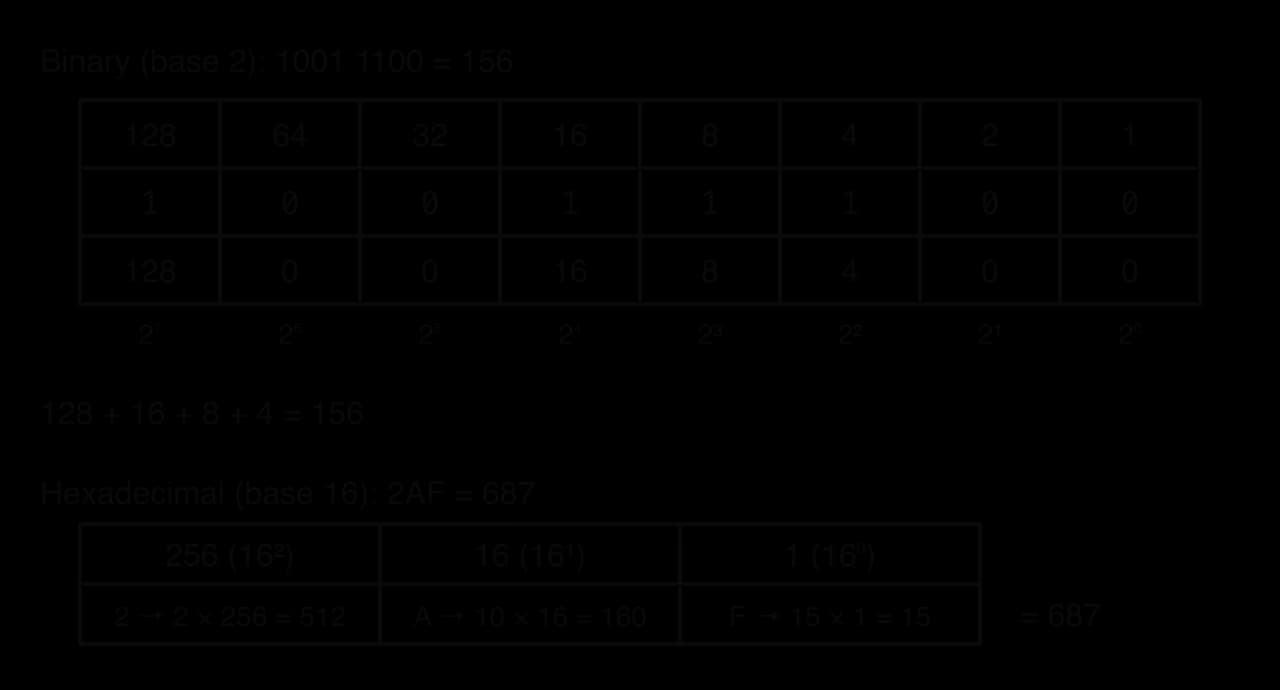
The place-value tables show the binary number 10011100 and the hexadecimal number 2AF broken into their columns. To find the value, multiply each digit by its column value and add the results.
The table of digit values is worth knowing by heart, because every conversion between binary and hexadecimal uses it.
Denary | Binary (4 bits) | Hex | Denary | Binary (4 bits) | Hex |
|---|---|---|---|---|---|
0 | 0000 | 0 | 8 | 1000 | 8 |
1 | 0001 | 1 | 9 | 1001 | 9 |
2 | 0010 | 2 | 10 | 1010 | A |
3 | 0011 | 3 | 11 | 1011 | B |
4 | 0100 | 4 | 12 | 1100 | C |
5 | 0101 | 5 | 13 | 1101 | D |
6 | 0110 | 6 | 14 | 1110 | E |
7 | 0111 | 7 | 15 | 1111 | F |
Within a binary number, the two ends have special names. The leftmost bit carries the largest place value and the rightmost bit the smallest, so a change in the leftmost bit changes the value most.
Converting binary to denary
To convert binary to denary, write the place values above the bits, starting with 1 on the right and doubling to the left, then add the place values of the columns that hold a 1. Columns holding 0 contribute nothing. Writing the number in groups of four (1011 0110) makes long numbers easier to read and does not change the value.
Converting denary to binary
There are two reliable methods. The subtraction method works from the left: find the largest place value that fits into the number, put a 1 in that column, subtract, and repeat with the remainder, putting 0 in every column that does not fit. The repeated division method works from the right: divide by 2 again and again, writing down each remainder, until the quotient reaches 0; the remainders read from the last to the first give the binary number.
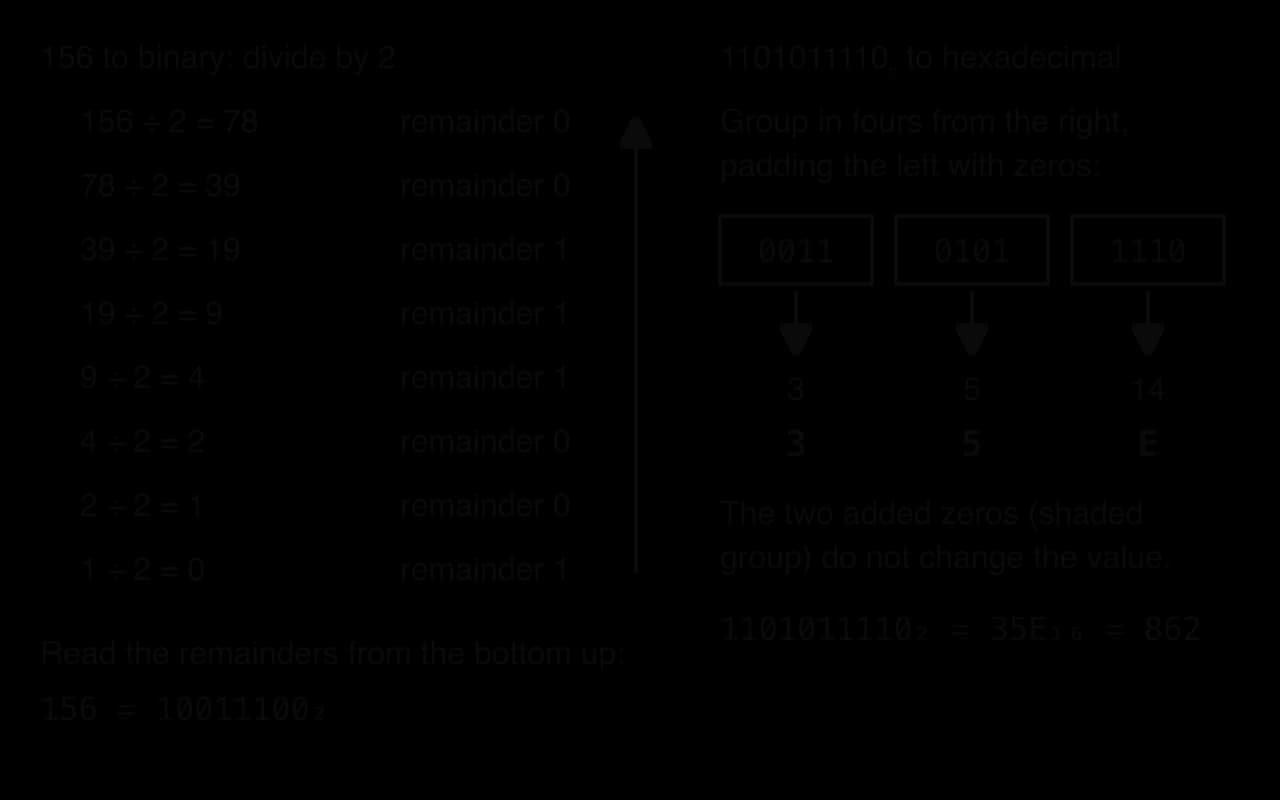
The division method works because each remainder records whether the current number is odd or even, which is exactly the value of its rightmost bit. Dividing by 2 then shifts every remaining bit one place to the right, so the next remainder gives the next bit. The same reasoning with 16 instead of 2 converts denary to hexadecimal, with each remainder (0 to 15) written as one hex digit.
Converting hexadecimal to and from denary
Converting hexadecimal to denary uses place values of 1, 16, 256 and 4096. Each digit is first turned into its value (A = 10 up to F = 15), multiplied by its place value, and the products are added. Converting denary to hexadecimal uses repeated division by 16, or the subtraction method with multiples of 256 and 16.
A subscript shows the base when it might be unclear: , , . Programming languages use prefixes instead, such as 0x2AF for hexadecimal and 0b10011100 for binary in both Python and Java, and web colours use a leading #.
Converting between binary and hexadecimal
Because , one hexadecimal digit corresponds to exactly one nibble. Binary converts to hexadecimal by splitting the bits into groups of four starting from the right, padding the leftmost group with zeros if needed, and replacing each group with its hex digit. Hexadecimal converts to binary by replacing each hex digit with its four bits. No denary arithmetic is needed in either direction, which is why hexadecimal is so convenient for writing binary data.
The range of an n-bit unsigned integer
Hardware stores numbers in a fixed number of bits: an 8-bit register, a 32-bit memory location, a 64-bit word. With bits and no sign, the smallest value is all zeros (0) and the largest is all ones, which is one less than the next power of 2.
Bits | Number of values | Largest unsigned value | Typical use |
|---|---|---|---|
4 | 16 | 15 | one hex digit |
8 | 256 | 255 | one byte; one colour channel of a pixel |
16 | 65,536 | 65,535 | a network port number |
32 | 4,294,967,296 | 4,294,967,295 | an IPv4 address |
64 | about | 18,446,744,073,709,551,615 | a memory address on a 64-bit processor |
The same formula also works backwards. The number of bits needed to give every item a different code is the smallest for which is at least the number of items.
Where hexadecimal appears
Hexadecimal appears wherever people need to read or type raw binary values. In each case the stored data is binary, and hexadecimal is only the written form shown to people.
Colour codes in HTML and CSS:
#FF8800is three bytes, red FF (255), green 88 (136) and blue 00 (0), an orange. Six hex digits are 24 bits, so this format can express colours.MAC addresses of network cards: 48 bits written as twelve hex digits in pairs, such as
3C:22:FB:9A:10:7E.Memory addresses in error messages and debuggers, such as
0x7FFE0000, where eight hex digits replace thirty-two bits.IPv6 addresses: 128 bits written as eight groups of four hex digits.
Character codes: Unicode code points are written in hex, such as U+20AC for the euro sign.
Conversions in code
Python and Java both convert between bases with built-in functions, but hand-written versions show the methods step by step. The Python program converts denary to any base up to 16 by repeated division, and converts back by adding digit × place value from the right.
Python
DIGITS = "0123456789ABCDEF"


def denary_to_base(n, base):
    if n == 0:
        return "0"
    result = ""
    while n > 0:
        remainder = n % base
        result = DIGITS[remainder] + result
        n = n // base
    return result


def base_to_denary(text, base):
    total = 0
    place = 1
    for i in range(len(text) - 1, -1, -1):
        total = total + DIGITS.index(text[i]) * place
        place = place * base
    return total


print(denary_to_base(156, 2), denary_to_base(156, 16))
print(base_to_denary("10011100", 2), base_to_denary("2AF", 16))
print(format(156, "08b"), format(156, "X"), int("2AF", 16))
Java version
Java
public class Convert {
    static final String DIGITS = "0123456789ABCDEF";

    static String denaryToBase(int n, int base) {
        if (n == 0) {
            return "0";
        }
        String result = "";
        while (n > 0) {
            int remainder = n % base;
            result = DIGITS.charAt(remainder) + result;
            n = n / base;
        }
        return result;
    }

    static int baseToDenary(String text, int base) {
        int total = 0;
        int place = 1;
        for (int i = text.length() - 1; i >= 0; i--) {
            total = total + DIGITS.indexOf(text.charAt(i)) * place;
            place = place * base;
        }
        return total;
    }

    public static void main(String[] args) {
        System.out.println(denaryToBase(156, 2) + " " + denaryToBase(156, 16));
        System.out.println(baseToDenary("10011100", 2) + " " + baseToDenary("2AF", 16));
        String padded = String.format("%8s", Integer.toBinaryString(156)).replace(' ', '0');
        System.out.println(padded + " " + Integer.toHexString(156).toUpperCase() + " " + Integer.parseInt("2AF", 16));
    }
}
Each remainder is placed in front of the result built so far, which is how the program reads the remainders "from the bottom up" without storing them. The last line of each version uses the built-ins: Python's format(n, "08b") pads to 8 bits and int(text, 16) converts from hex; Java's Integer.toBinaryString drops leading zeros (hence the padding with String.format), Integer.toHexString returns lower-case letters, and Integer.parseInt(text, 16) converts back. In Java, / between two int values is integer division, the same as // in Python.
Plain text
10011100 9C
156 687
10011100 9C 687How binary stores data
Bits only have meaning through an encoding
A pattern of bits has no meaning on its own. The byte 0100 0001 is the integer 65 to a program expecting a number, the letter A to a program expecting text, and a dark-grey pixel to a program expecting an 8-bit greyscale image. The program that reads the data must therefore know which encoding was used to write it, and each data type in a programming language is an agreement about how many bits a value occupies and what they mean.
This has direct effects on storage and retrieval. A file opened with the wrong encoding shows nonsense characters; a number read as text cannot be used in arithmetic until it is converted; and data written by one system can only be read by another if both follow the same format. File formats such as PNG, WAV and MP4 therefore begin with a header that states how the following bits are to be interpreted.
Units of storage
Storage sizes are counted in bytes with prefixes. Two systems of prefixes exist, which causes confusion in calculations and in the advertised capacity of drives.
Memory chips are built in sizes that are powers of 2, so a second set of prefixes based on 1024 is used for exact binary sizes.
Decimal prefix | Bytes | Binary prefix | Bytes |
|---|---|---|---|
1 kB | 1,000 | 1 KiB | 1,024 |
1 MB | 1,000,000 | 1 MiB | 1,048,576 |
1 GB | 1,000,000,000 | 1 GiB | 1,073,741,824 |
1 TB | 1 TiB | 1,099,511,627,776 |
The gap grows with each step: a gibibyte is about 7% larger than a gigabyte. A drive sold as 1 TB holds bytes, which an operating system that reports in binary units shows as about 931 "GB" (really GiB), so the drive appears smaller than advertised although no space is missing.
Integers and overflow
A whole number that cannot be negative is stored as an unsigned binary number in a fixed number of bytes, chosen in advance by the data type. Using more bits allows larger values but costs more memory for every value stored, so systems choose the smallest width that is safe for the data.
When overflow happens in hardware, the extra carry bit has nowhere to go and is lost, so the stored result "wraps round" to a small number. In an 8-bit register, 200 + 100 = 300 needs nine bits (1 0010 1100); only the lower eight bits (0010 1100 = 44) are kept. The processor records the lost bit in its carry flag, which software can check; a program that ignores the flag continues with a wrong value.
The Year 2038 problem is a real case. Many systems store time as the number of seconds since 00:00:00 UTC on 1 January 1970 in a signed 32-bit integer, whose largest value is . That count is reached at 03:14:07 UTC on 19 January 2038; one second later the value overflows, and affected systems read the date as December 1901. Moving to 64-bit time values removes the problem, which is why operating systems and databases have been changing their time types.
Source: Year 2038 problem, Wikipedia, October 2026.
How each language deals with overflow differs: Java's int is fixed at 32 bits and wraps round, while Python's int grows to any size; subtopic B2.1, Programming fundamentals, shows both in code for the integer data type.
Extension: negative integers and two's complement
This short extension goes beyond unsigned integers. Negative numbers need a different representation, and one method is so widely used that an outline helps explain the signed values in the Year 2038 problem and in Java's int.
In 8-bit two's complement the MSB is worth −128 instead of +128, so 1111 1111 is and the range is −128 to 127. To negate a number, invert every bit and add 1: 5 is 0000 0101, inverting gives 1111 1010, and adding 1 gives 1111 1011, which is −5. The same adder circuit then handles both positive and negative numbers, which is why processors use this method.
Characters and character sets
Text is stored by giving every character a number and storing the number in binary. The keyboard, the program, the file and the screen all have to use the same list of numbers, or the text is shown as the wrong symbols.
The number of bits used for each code limits how many characters a set can contain: bits allow codes. The most influential early set was designed with 7 bits.
Of ASCII's 128 codes, 95 are printable characters (letters, digits, punctuation and the space) and 33 are control characters, such as line feed (code 10), which marks the end of a line, and delete (code 127). The excerpt shows how the codes are laid out.
Character | Denary code | 7-bit binary | Hex |
|---|---|---|---|
line feed (control) | 10 | 000 1010 | 0A |
| 57 | 011 1001 | 39 |
| 63 | 011 1111 | 3F |
| 66 | 100 0010 | 42 |
| 90 | 101 1010 | 5A |
| 98 | 110 0010 | 62 |
| 126 | 111 1110 | 7E |
Source: ASCII, Wikipedia, October 2026.
The layout follows patterns that make processing easier. Letters are in alphabetical order, so comparing codes sorts words; the digits 0 to 9 have codes 48 to 57, so a digit's value is its code minus 48; and each lower-case letter has the bit with place value 32 set, while its capital does not (B is 66 and b is 98). Comparing codes also explains why sorting by code puts every capital before every lower-case letter, so "Zebra" comes before "apple".
Unicode and UTF-8
ASCII has no codes for accented letters, other alphabets, Chinese characters or mathematical symbols. For decades many incompatible 8-bit sets each added 128 extra characters for one region, so a file written in Greece could not be read correctly in Russia. Unicode replaced them with one set for every writing system.
Unicode code points run from U+0000 to U+10FFFF, room for 1,114,112 code points. Version 18.0 assigns 172,808 characters across 175 scripts, so most of the space is still free. The first 128 code points are identical to ASCII, so every ASCII file is also valid Unicode text.
Source: Unicode, Wikipedia, October 2026.
A code point is a number; it still needs a rule for storing it as bytes. A fixed four bytes per character (UTF-32) would work for every character but would quadruple the size of English text. The most widely used encoding avoids that waste by varying the length.
The figure shows how UTF-8 marks the length of each character. A byte that starts with 0 is a complete one-byte character. Otherwise the first byte starts with as many 1s as the character has bytes (110 for two, 1110 for three, 11110 for four), and every following byte starts with 10. The remaining bits, unshaded, hold the code point itself.
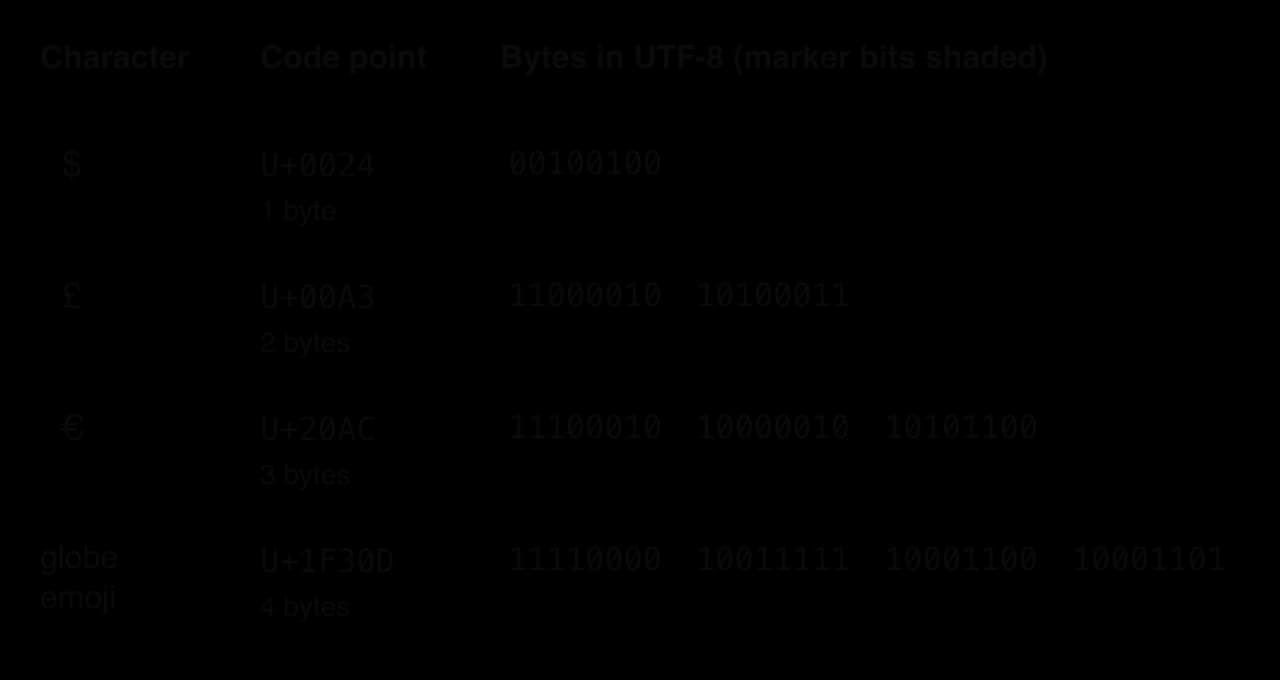
The design has three advantages: English text costs no more than in ASCII, old ASCII files are already valid UTF-8, and a decoder that starts reading in the middle of a file can find the next character boundary by skipping bytes that begin with 10. The cost is that the number of characters can no longer be found from the file size, and characters outside ASCII take two to four bytes, so text in Chinese or Hindi takes more space than in a fixed 16-bit encoding for those scripts.
Strings
A string is stored as a sequence of character codes in consecutive memory locations, together with a way of knowing where it ends: either a stored length or a special terminating code. Every character, including spaces and punctuation, occupies storage, and a digit inside a string is stored as its character code, not as its value. The text "255" is three characters (codes 50, 53, 53), three bytes in ASCII or UTF-8, while the integer 255 fits in a single byte as 1111 1111.
The Python program prints each character of a short string with its code point and its UTF-8 bytes in hexadecimal, then compares the number of characters with the number of bytes.
Python
text = "£4 or €5"
total_bytes = 0
for ch in text:
    code = ord(ch)
    encoded = ch.encode("utf-8")
    total_bytes = total_bytes + len(encoded)
    print(repr(ch), "U+" + format(code, "04X"), encoded.hex(" ").upper(), len(encoded))
print(len(text), "characters,", total_bytes, "bytes")
Java version
Java
import java.nio.charset.StandardCharsets;

public class Chars {
    public static void main(String[] args) {
        String text = "£4 or €5";
        int totalBytes = 0;
        for (int i = 0; i < text.length(); i++) {
            char ch = text.charAt(i);
            byte[] encoded = String.valueOf(ch).getBytes(StandardCharsets.UTF_8);
            totalBytes = totalBytes + encoded.length;
            String hexBytes = "";
            for (int j = 0; j < encoded.length; j++) {
                hexBytes = hexBytes + String.format("%02X ", encoded[j] & 0xFF);
            }
            System.out.println("'" + ch + "' U+" + String.format("%04X", (int) ch) + " "
                    + hexBytes.trim() + " " + encoded.length);
        }
        System.out.println(text.length() + " characters, " + totalBytes + " bytes");
    }
}
ord (Python) and the cast (int) ch (Java) give the code point; encode("utf-8") and getBytes(StandardCharsets.UTF_8) give the stored bytes. Java's byte type is signed, so & 0xFF turns each byte into its unsigned value 0 to 255 before it is printed in hex. Java also stores a char in 16 bits, which is enough for £ and € but not for a character such as the globe emoji, which needs two char values; the Python version has no such limit.
Plain text
'£' U+00A3 C2 A3 2
'4' U+0034 34 1
' ' U+0020 20 1
'o' U+006F 6F 1
'r' U+0072 72 1
' ' U+0020 20 1
'€' U+20AC E2 82 AC 3
'5' U+0035 35 1
8 characters, 11 bytesImages as bitmaps
A digital photograph or screenshot is stored as a grid of tiny squares, each of a single colour. The program that displays the image only needs to know the size of the grid and the colour of every square.
A photo from a phone camera contains millions of pixels, each too small to see on its own at normal viewing distance. Stored in order, row by row, their values make up the image.
Two settings decide how much detail a bitmap holds and how much storage it needs: how many pixels it has, and how many bits describe each pixel.
The figure stores the same small disc at two colour depths. With 1 bit per pixel each pixel can only be black or white, so the curved edge becomes a staircase. With 8 bits per pixel, 256 shades of grey are available, and the edge pixels take in-between shades that make the outline look smooth from a distance. The 8-bit version uses eight times as much storage.
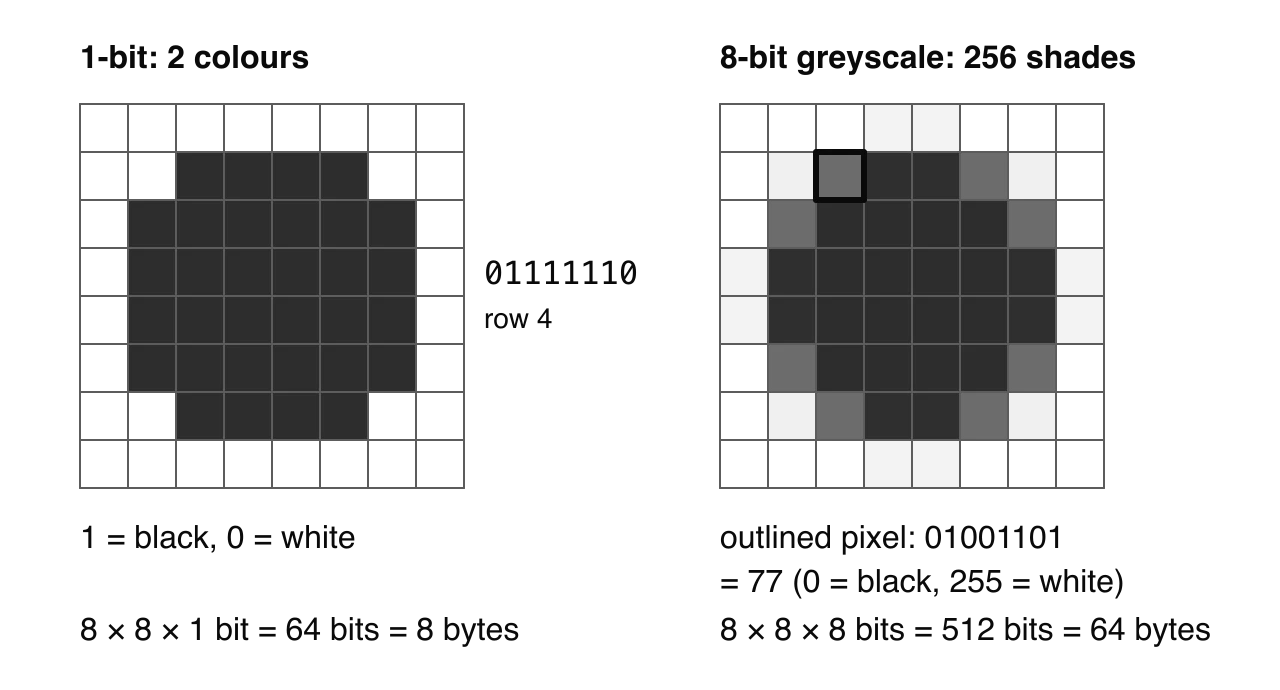
Colour images normally store three values per pixel, the intensities of red, green and blue light (RGB). With one byte per channel the colour depth is 24 bits, enough for colours, which gives smooth shading in photographs. This is the same 24-bit format as the web's hex colour codes: #FF8800 is the pixel value R = 255, G = 136, B = 0.
Colour depth | Colours | Typical use |
|---|---|---|
1 bit | 2 | black-and-white icons, fax |
8 bits | 256 | greyscale photos, simple GIF graphics |
16 bits | 65,536 | older phone and game screens |
24 bits | 16,777,216 | photographs, web colours (#RRGGBB) |
The uncompressed size of a bitmap follows directly from the definitions: every pixel needs as many bits as the colour depth.
Metadata
An image file also stores information about the image, so that software can decode the pixels and organise the files.
Without the width, height and colour depth, a program could not tell where one row of pixels ends or how many bits belong to each pixel, so metadata is essential for retrieval. Photos often also carry EXIF metadata added by the camera: the device model, exposure settings, the date and time, and often GPS coordinates. Sharing a photo with its location data can reveal where someone lives or works, which is why many social media platforms remove this metadata when a photo is uploaded and why phones offer a setting to leave location out.
Vector graphics
Not every image is stored as pixels. Logos, icons, fonts, maps and diagrams are often stored as a list of shapes instead.
Because the shapes are recalculated at display time, a vector graphic can be scaled to any size without becoming blocky, and its file size depends on the number of shapes rather than the number of pixels. Web pages use vector files (SVG) for icons and logos for that reason, so they stay sharp on every screen size. Vectors cannot represent photographs efficiently, because a photo has no simple shapes, only millions of slightly different pixels.
Feature | Bitmap image | Vector graphic |
|---|---|---|
Stored as | colour of every pixel | shapes with coordinates and properties |
File size depends on | resolution × colour depth | number and complexity of shapes |
Enlarging | becomes blocky (pixelated) | stays sharp at any size |
Suited to | photographs, scanned images | logos, icons, fonts, diagrams, maps |
Editing | change individual pixels | move, resize or recolour whole shapes |
Examples of formats | PNG, JPEG, GIF, BMP | SVG, PDF drawings, font outlines |
Sound: from analogue to digital
Sound is a continuous vibration of air pressure. A microphone turns it into an electrical voltage that rises and falls smoothly with the pressure, and can take any value within its range.
Data inside a computer takes the opposite form, built from a fixed set of values.
A computer can only store a finite list of numbers, so the continuous signal must be measured at regular moments, and each measurement rounded to a whole number that fits in a fixed number of bits. The hardware that does this is a converter at the boundary between the analogue world and the computer.
An ADC carries out two steps for every measurement: it captures the signal's value at a fixed moment, then rounds that value to the nearest level it can store in its fixed number of bits.
The waveform shows the process. The smooth curve is the analogue signal; the dashed lines mark the sampling moments; each dot is the stored value, rounded to the nearest of eight levels because each sample has only 3 bits. The stored audio is just the list of sample values.
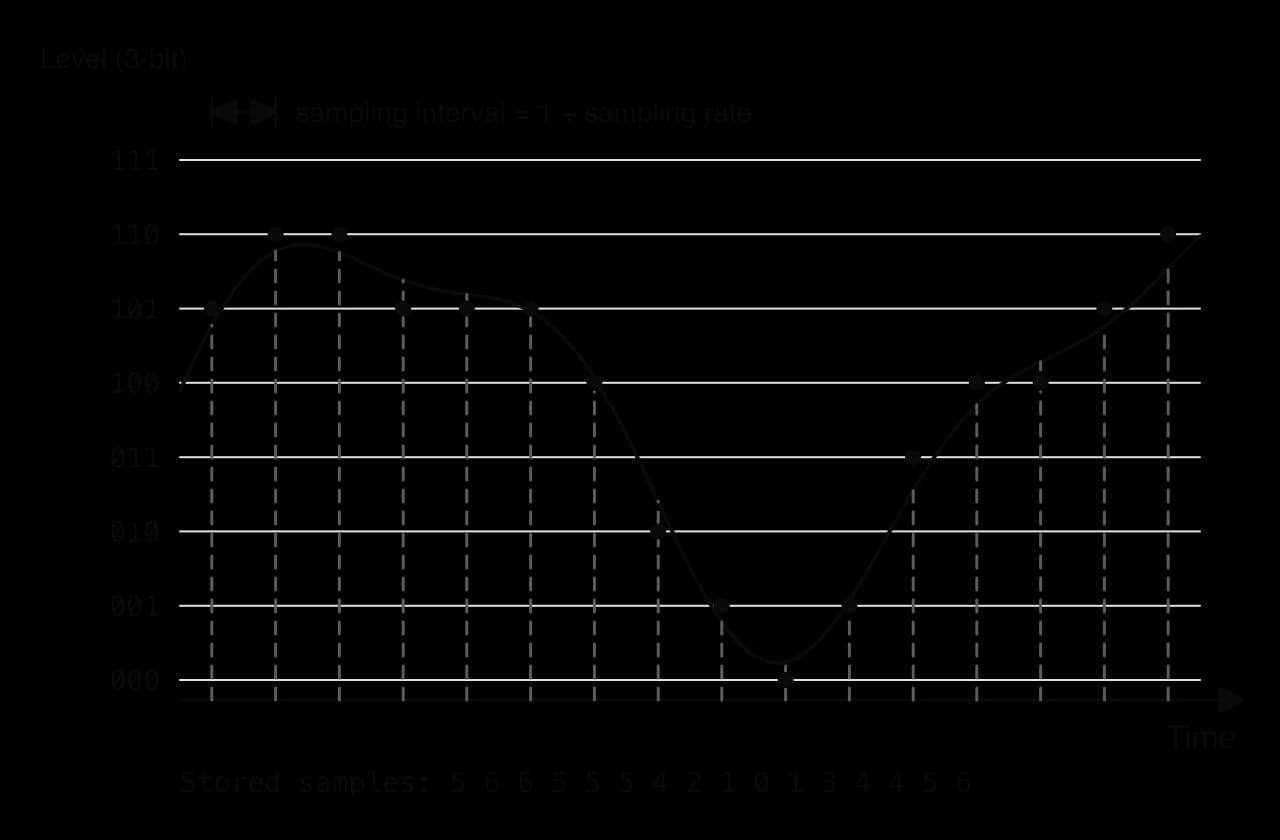
At a sampling rate of 44,100 Hz, every second of sound in each channel becomes 44,100 stored numbers. How precisely each of those numbers is stored is the second setting.
A higher sampling rate captures faster changes, so higher-pitched sounds survive. A sampling rate must be more than twice the highest frequency to be recorded (the Nyquist–Shannon sampling theorem), and human hearing extends to about 20,000 Hz, so music needs a rate above 40,000 Hz. A greater bit depth gives finer levels, so the rounding error (heard as a faint hiss called quantisation noise) becomes smaller and quiet passages keep their detail. Both improvements cost storage in direct proportion: doubling the sampling rate or the bit depth doubles the file size.
Playing the sound reverses the process. The stored numbers are sent to a converter that produces a voltage for each one, smoothed into a continuous wave and fed to a speaker.
The uncompressed size of a recording depends on four values. Stereo sound has two channels (left and right), each sampled separately.
Case study: CD audio and the Red Book standard
The compact disc, launched by Sony and Philips in the early 1980s, stores sound in the format set out in the "Red Book" specification: pulse-code modulation (uncompressed samples) at 44,100 samples per second, 16 bits per sample, two channels, with up to 74 minutes per disc in the original specification. Each choice follows from the ideas of sampling.
Setting | Red Book value | Reason |
|---|---|---|
Sampling rate | 44,100 Hz | more than twice the 20,000 Hz limit of human hearing |
Bit depth | 16 bits | levels, low enough noise for quiet music |
Channels | 2 | stereo: separate left and right signals |
Data rate | 176,400 bytes per second | |
Original playing time | up to 74 minutes |
Source: Compact Disc Digital Audio, Wikipedia, October 2026.
The rate sits about 4,000 Hz above the 40,000 Hz minimum because the analogue filter that removes frequencies above 20,000 Hz before sampling cannot cut off sharply; the margin gives the filter room to work. The exact number was inherited from the equipment used to carry digital audio from studios to CD factories at the time, which recorded samples on video tape. The 16-bit depth was the result of a debate between the two companies, in which Philips had already built a 14-bit converter and Sony pressed for 16 bits.
These numbers show the trade-off that every audio format makes. CD quality is close to the limits of human hearing, but at about 10.6 MB per minute a music library quickly fills a phone, and streaming it would use a lot of network capacity. Formats for streaming and portable players therefore apply lossy compression, which removes sounds a listener is unlikely to notice and stores the same minute in a small fraction of the space; subtopic A1.1, Computer hardware and operation, explains compression in full. Studio recordings go the other way, using 24-bit samples at 48,000 Hz or more, because editing and mixing benefit from the extra precision even if the final release does not keep it.
Video
A video is a sequence of still bitmap images, called frames, shown quickly enough that the eye sees continuous motion, usually together with an audio track.
Common frame rates are 24 fps for cinema, 25 or 30 fps for television and 60 fps for games and sport, where fast motion looks smoother with more frames. The size of uncompressed video combines the bitmap and frame-rate ideas, with the sound added separately.
Uncompressed video is enormous. One minute of 1920 × 1080 video at 24-bit colour and 30 fps needs bytes per frame × 30 frames × 60 seconds = 11,197,440,000 bytes, about 11.2 GB, before any sound. Video is therefore almost always compressed. Consecutive frames are usually very similar, so a video encoder stores some complete frames and, for the frames in between, only what has changed; each frame is also compressed with lossy methods. This often brings the size down by a factor of a hundred or more, at the cost of processing time to encode and decode.
The size calculations in code are three short subprograms, one per formula, each dividing by 8 to give bytes. In Java the parameters are long (64-bit) because the video result for one minute, 89,579,520,000 bits, is far beyond the largest int value of 2,147,483,647 and would overflow.
Python
def image_bytes(width, height, colour_depth):
    return width * height * colour_depth // 8


def audio_bytes(sample_rate, bit_depth, channels, seconds):
    return sample_rate * bit_depth * channels * seconds // 8


def video_bytes(width, height, colour_depth, frame_rate, seconds):
    return image_bytes(width, height, colour_depth) * frame_rate * seconds


print(image_bytes(1920, 1080, 24))
print(audio_bytes(44100, 16, 2, 60))
print(video_bytes(1920, 1080, 24, 30, 60))
Java version
Java
public class Sizes {
    static long imageBytes(long width, long height, long colourDepth) {
        return width * height * colourDepth / 8;
    }

    static long audioBytes(long sampleRate, long bitDepth, long channels, long seconds) {
        return sampleRate * bitDepth * channels * seconds / 8;
    }

    static long videoBytes(long width, long height, long colourDepth, long frameRate, long seconds) {
        return imageBytes(width, height, colourDepth) * frameRate * seconds;
    }

    public static void main(String[] args) {
        System.out.println(imageBytes(1920, 1080, 24));
        System.out.println(audioBytes(44100, 16, 2, 60));
        System.out.println(videoBytes(1920, 1080, 24, 30, 60));
    }
}
Plain text
6220800
10584000
11197440000
The effect of encoding on storage and retrieval
Every encoding decision balances fidelity against size. More bits per value (a larger integer type, a greater colour depth or bit depth) or more values (a higher resolution, sampling rate or frame rate) give a more accurate representation, but the file grows in proportion, takes longer to read from storage, and takes longer to send over a network.
Decision | Benefit of more bits or values | Cost |
|---|---|---|
Integer width (8, 16, 32, 64 bits) | larger range, less risk of overflow | more memory for every value stored |
Character encoding (ASCII vs UTF-8 vs UTF-32) | more languages and symbols | non-ASCII characters take 2–4 bytes; character count no longer equals byte count |
Image resolution and colour depth | finer detail, smoother colour | size grows with width × height × depth |
Audio sampling rate and bit depth | higher pitches kept, less noise | size grows with rate × depth × channels |
Video frame rate | smoother motion | size grows with every extra frame per second |
Retrieval depends on the encoding as much as storage does. The reading program must apply exactly the same rules as the writing program (the same character encoding, the same pixel order and colour depth, the same sample format), which is why formats are standardised and files carry metadata describing their contents.
Logic gates
What logic gates do
Storing bits is only half of what a computer does; it also has to combine them, to add two numbers, compare two values or decide which instruction runs next. These operations are built from circuits that take one or more bits as input and produce a bit as output according to a fixed rule. A high voltage represents 1 (true) and a low voltage represents 0 (false), and each circuit is made from a handful of transistors acting as electrically controlled switches.
The rules that gates follow come from a branch of mathematics that works with only two values, true and false. George Boole set it out in his book The Laws of Thought (1854), long before electronic computers. Claude Shannon's master's thesis of 1937 showed that circuits of relay switches could carry out the same algebra, and that idea underlies every digital circuit built since.
Boolean algebra uses letters for inputs, as ordinary algebra uses letters for numbers, but each letter can only be 0 or 1.
The operators in these expressions are the operations that the gates carry out.
The operators can be written in words or in symbols. Both forms appear in textbooks and questions, and the two programming languages have their own operators for the same ideas. The symbol forms make long expressions shorter, so they are used for algebra; the word forms are clearer in descriptions.
Operator | Word form | Symbol form | Python | Java |
|---|---|---|---|---|
AND | A AND B | or |
|
|
OR | A OR B |
| a || b | |
NOT | NOT A |
|
| |
NAND | A NAND B |
|
| |
NOR | A NOR B |
| !(a || b) | |
XOR | A XOR B |
|
| |
XNOR | A XNOR B |
|
|
The plus sign means OR, not addition: in Boolean algebra . Without brackets, NOT is applied first, then AND, then OR, just as multiplication comes before addition in arithmetic, so means .
Truth tables for the seven gates
Each gate's behaviour can be shown completely by listing its output for every possible combination of inputs.
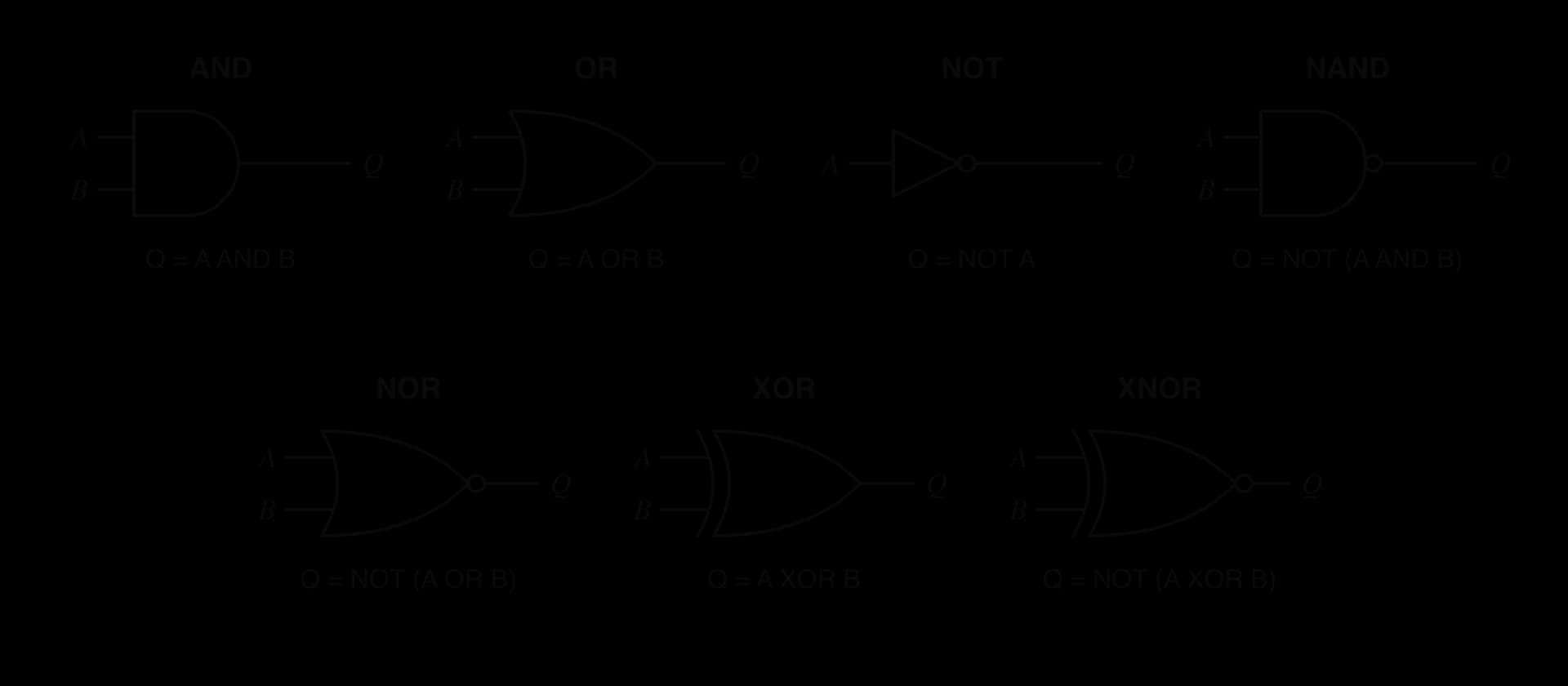
The figure shows the standard distinctive-shape symbol for each of the seven gates, as used on circuit diagrams. The shapes matter: AND has a flat back and a round front, OR has a curved back and a pointed front, a small circle (a "bubble") on an output means the result is inverted, and XOR has an extra curved line behind the OR shape.
A | B | A AND B |
|---|---|---|
0 | 0 | 0 |
0 | 1 | 0 |
1 | 0 | 0 |
1 | 1 | 1 |
An AND gate checks that several conditions hold together, like a door that opens only when a key card is valid AND the time is within opening hours.
A | B | A OR B |
|---|---|---|
0 | 0 | 0 |
0 | 1 | 1 |
1 | 0 | 1 |
1 | 1 | 1 |
OR is "inclusive": the output is also 1 when both inputs are 1. A car's interior light that comes on when either front door is open behaves like an OR gate.
A | NOT A |
|---|---|
0 | 1 |
1 | 0 |
The NOT gate, also called an inverter, is the only one of the seven with a single input.
A | B | A NAND B |
|---|---|---|
0 | 0 | 1 |
0 | 1 | 1 |
1 | 0 | 1 |
1 | 1 | 0 |
NAND is the exact opposite of AND in every row. In standard chip technology (CMOS) it needs four transistors against six for AND, and every other gate can be made from NAND gates alone.
A | B | A NOR B |
|---|---|---|
0 | 0 | 1 |
0 | 1 | 0 |
1 | 0 | 0 |
1 | 1 | 0 |
NOR is the exact opposite of OR. Its output is 1 only when nothing is switched on, which suits a signal such as "all clear: no sensor triggered".
A | B | A XOR B |
|---|---|---|
0 | 0 | 0 |
0 | 1 | 1 |
1 | 0 | 1 |
1 | 1 | 0 |
XOR differs from OR only in the last row. A light controlled by two switches at opposite ends of a staircase is an XOR circuit: flipping either switch changes the state of the light.
A | B | A XNOR B |
|---|---|---|
0 | 0 | 1 |
0 | 1 | 0 |
1 | 0 | 0 |
1 | 1 | 1 |
XNOR is an equality tester for single bits, which makes it the building block of comparators.
 YouTube
Universal gates
NAND and NOR have a special property: each one on its own can produce every other gate. Joining both inputs of a NAND gate turns it into a NOT gate, because . Following a NAND with a NOT (made from another NAND) gives AND. Inverting both inputs and then applying NAND gives OR, by De Morgan's laws.
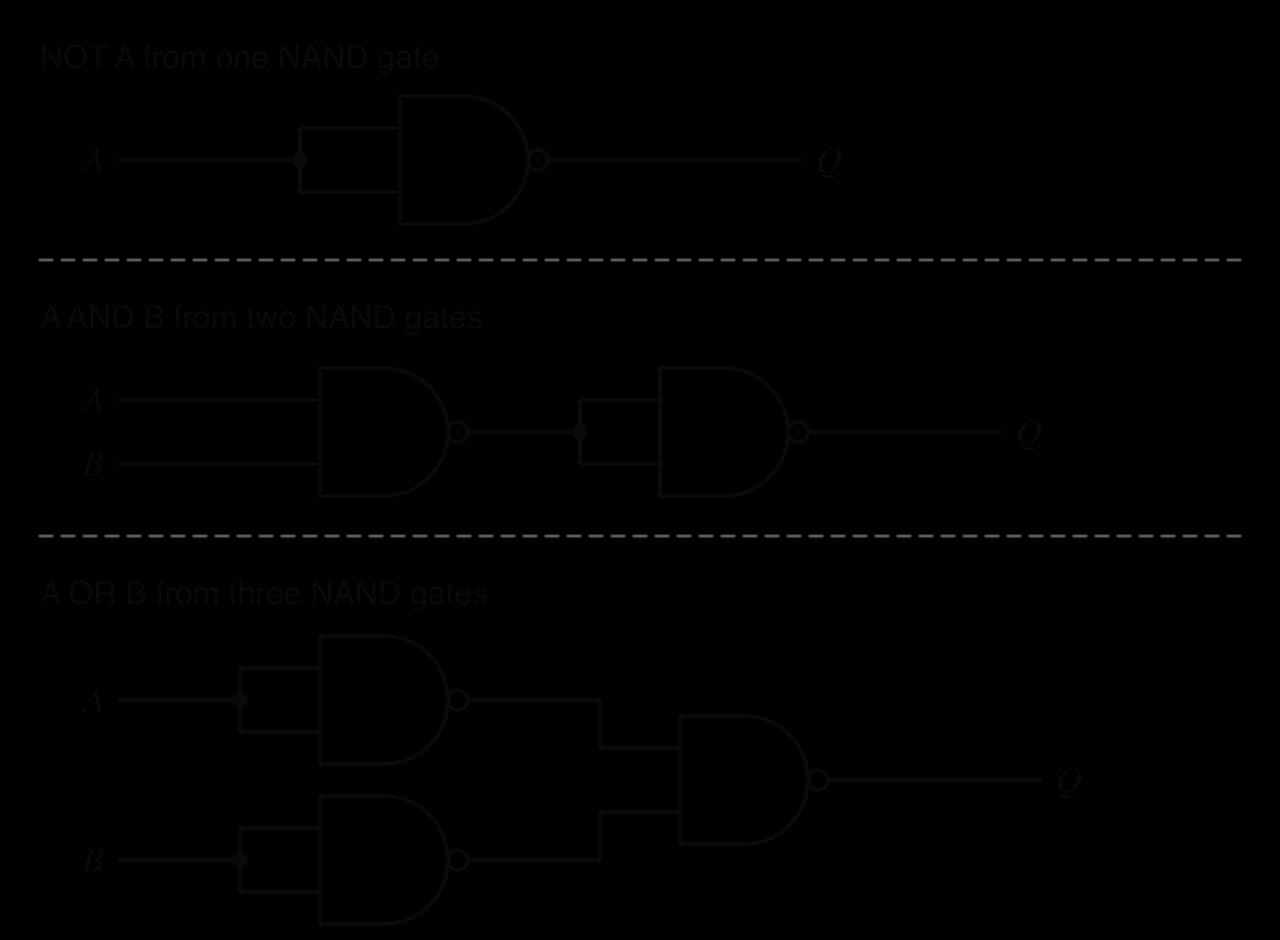
Manufacturers use this property because a chip that repeats one type of gate is simpler to design and make, and a NAND gate needs fewer transistors than an AND gate (an AND gate is a NAND followed by an inverter). NAND flash memory, used in SSDs and memory cards, takes its name from NAND for a related reason: its cells are wired in a NAND-like arrangement that packs them densely.
Applications of logic gates in computer systems
Logic gates are the physical form of every operation a processor performs. The main places they appear:
Arithmetic. The arithmetic logic unit (ALU) adds binary numbers with chains of adder circuits built from XOR, AND and OR gates, and carries out bitwise AND, OR, XOR and NOT on whole registers.
Comparison. An equality comparator applies XNOR to each pair of bits and ANDs the results: two numbers are equal only if every pair of bits matches. Comparisons decide the outcome of every condition in a program.
Memory. A latch, made from two cross-connected NAND or NOR gates, holds one bit for as long as power is supplied. Flip-flops built from latches make up registers, and the memory cells of a cache use the same cross-connected idea.
Control logic. The control unit decodes each instruction's opcode with AND and NOT gates so that exactly one operation is switched on, and selects which register or memory location is connected to the data bus.
Error detection. XOR-ing all the bits of a byte gives its parity bit: the result is 1 when the byte contains an odd number of 1s, so a single flipped bit during transmission changes the parity and can be detected.
Masking. AND with a mask keeps chosen bits and clears the rest, which is how a subnet mask extracts the network part of an IP address.
The half adder
Adding two single bits gives four cases: 0 + 0 = 0, 0 + 1 = 1, 1 + 0 = 1, and 1 + 1 = 2, which is 10 in binary. The result needs two output bits: a sum bit (S) and a carry bit (C) passed to the next column.
A | B | C (carry) | S (sum) |
|---|---|---|---|
0 | 0 | 0 | 0 |
0 | 1 | 0 | 1 |
1 | 0 | 0 | 1 |
1 | 1 | 1 | 0 |
The sum column is exactly the XOR truth table and the carry column is exactly the AND truth table, so the circuit needs just those two gates.
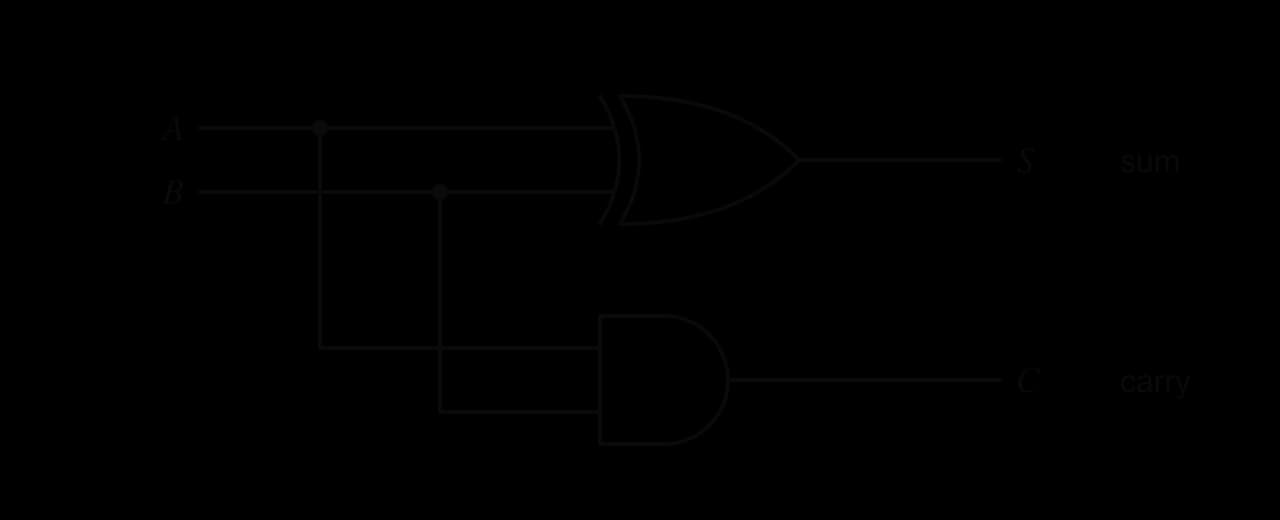
A half adder cannot accept a carry coming in from a previous column, so a full adder combines two half adders and an OR gate to add three bits. Chaining 64 full adders gives a circuit that adds two 64-bit numbers, the basic design of the ALU's adder (real processors add extra carry logic to make it faster). Programs can use the same operations through the bitwise operators ^ (XOR) and & (AND), which exist in both languages.
Python
print("A B | S C")
for a in [0, 1]:
    for b in [0, 1]:
        total = a ^ b
        carry = a & b
        print(a, b, "|", total, carry)
Java version
Java
public class Adder {
    public static void main(String[] args) {
        System.out.println("A B | S C");
        for (int a = 0; a <= 1; a++) {
            for (int b = 0; b <= 1; b++) {
                int total = a ^ b;
                int carry = a & b;
                System.out.println(a + " " + b + " | " + total + " " + carry);
            }
        }
    }
}
Plain text
A B | S C
0 0 | 0 0
0 1 | 1 0
1 0 | 1 0
1 1 | 0 1Truth tables
Constructing a truth table
A truth table lists every combination of inputs exactly once. With inputs there are combinations: 4 rows for two inputs, 8 for three and 16 for four. Writing the inputs in binary counting order (000, 001, 010, … , 111) guarantees that no row is missed or repeated: the rightmost input column alternates 0, 1, 0, 1, the next alternates in pairs, and the leftmost has all 0s in its top half and all 1s in its bottom half.
For any expression more complex than a single gate, add an intermediate column for each sub-expression, working from the innermost brackets outwards, and finish with the output column. Each intermediate column is filled using one gate's truth table, which turns a hard problem into several easy ones and leaves a record that can be checked. For :
A | B | C | A OR B | NOT C | Q |
|---|---|---|---|---|---|
0 | 0 | 0 | 0 | 1 | 0 |
0 | 0 | 1 | 0 | 0 | 0 |
0 | 1 | 0 | 1 | 1 | 1 |
0 | 1 | 1 | 1 | 0 | 0 |
1 | 0 | 0 | 1 | 1 | 1 |
1 | 0 | 1 | 1 | 0 | 0 |
1 | 1 | 0 | 1 | 1 | 1 |
1 | 1 | 1 | 1 | 0 | 0 |
The output is 1 in three rows, those where at least one of A and B is 1 and C is 0.
Predicting the output of a logic circuit
To analyse a circuit, label the output of every gate that feeds another gate (P, R, …), give each label its own column, and work through the gates from the inputs towards the output. The circuit in the figure has three inputs and three gates.
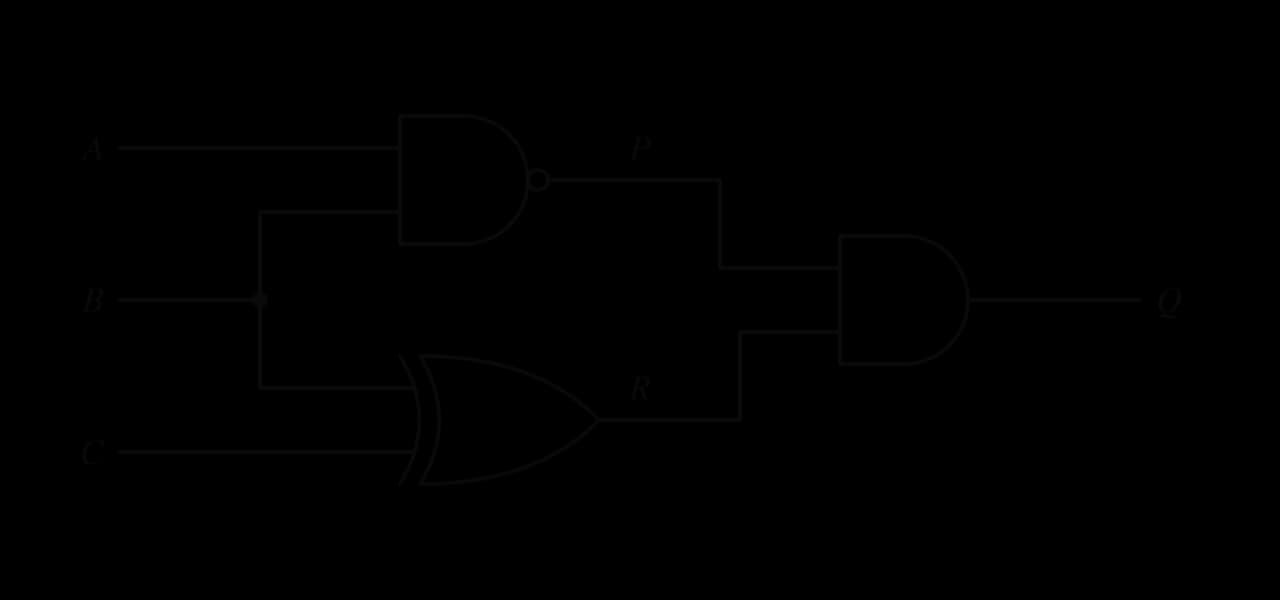
Truth tables from a problem description
Many problems describe the required behaviour in words. The method is to name an input for every condition (1 = true), name the output, then decide the output for every row by reading the description, before writing any expression. Words translate into operators: "and", "both" and "as well as" into AND; "or", "either" and "at least one" into OR; "not", "unless" and "is off" into NOT; "exactly one" or "but not both" into XOR.
The same table can be produced by a program that loops through every input combination, in the same counting order, and evaluates the condition. This is also how the expression would appear as an if condition in software.
Python
print("E S H | Q")
for e in [False, True]:
    for s in [False, True]:
        for h in [False, True]:
            q = (e and not s) or (not e and h)
            print(int(e), int(s), int(h), "|", int(q))
Java version
Java
public class Buzzer {
    public static void main(String[] args) {
        boolean[] values = {false, true};
        System.out.println("E S H | Q");
        for (boolean e : values) {
            for (boolean s : values) {
                for (boolean h : values) {
                    boolean q = (e && !s) || (!e && h);
                    System.out.println(toBit(e) + " " + toBit(s) + " " + toBit(h) + " | " + toBit(q));
                }
            }
        }
    }

    static int toBit(boolean b) {
        if (b) {
            return 1;
        }
        return 0;
    }
}
The nested loops produce the rows in binary counting order, with the outer loop as the leftmost column. Python converts a Boolean to 0 or 1 with int(); Java has no such conversion, so toBit does it with an if.
Plain text
E S H | Q
0 0 0 | 0
0 0 1 | 1
0 1 0 | 0
0 1 1 | 1
1 0 0 | 1
1 0 1 | 1
1 1 0 | 0
1 1 1 | 0
From a truth table to a Boolean expression
Sometimes only the truth table is known, from a description or from testing a circuit. An expression can always be read from it: for each row where the output is 1, write an AND term that is true for that row only (each input as itself if it is 1 in that row, or inverted if it is 0), then OR all those terms together.
For the buzzer, the output is 1 in rows 001, 011, 100 and 101, so the sum of products is:
This expression is correct but long: four three-input AND gates, a four-input OR gate and NOT gates for the inverted inputs. It describes the same behaviour as the two-term expression found from the description, which shows why simplification matters: a sum of products read from a table is rarely the smallest circuit. Boolean algebra and Karnaugh maps are the two tools for shrinking it.
Checking that two expressions are equivalent
Two expressions are equivalent when they give the same output for every combination of inputs. Building the truth table of both, side by side, settles the question: if the two output columns match in every row, the expressions are equivalent; a single differing row disproves it. This is the standard way to check any simplification.
A | B | NOT (A AND B) | NOT A OR NOT B | NOT A AND NOT B |
|---|---|---|---|---|
0 | 0 | 1 | 1 | 1 |
0 | 1 | 1 | 1 | 0 |
1 | 0 | 1 | 1 | 0 |
1 | 1 | 0 | 0 | 0 |
The table proves that NAND equals and is not the same as , which differs in two rows.
Simplifying expressions with Boolean algebra
Why simplify
Every gate in a circuit costs chip area, power and a small delay as the signal passes through it. An expression that gives the same truth table with fewer operators can be built with fewer gates, so it is cheaper, uses less energy and produces its output sooner. Boolean algebra simplifies expressions by applying a small set of laws, each of which can be proved by a truth table. Most laws come in pairs: swapping AND with OR and 0 with 1 in one law gives its partner.
The laws of Boolean algebra
A 1 on one input of an AND gate lets the other input through unchanged, and so does a 0 on an OR gate. The opposite constants force the output, whatever the variable is.
Combining a variable with itself adds no information.
A variable and its inverse are always opposite, so exactly one of them is 1 at any moment.
Inverting twice returns the original value, which is why two NOT gates in a row can be removed.
The order of the inputs to an AND or OR gate does not matter.
Nor does the grouping, when every operator in a chain is the same, which is why a three-input AND gate needs no brackets.
AND distributes over OR exactly as multiplication distributes over addition, which allows a common factor to be taken out of two terms. Unlike ordinary arithmetic, OR also distributes over AND.
A term that contains another term in full is redundant beside it. In , whenever is 1, A is already 1, so the second term never changes the result.
The absorption law can itself be proved from the earlier laws, which is a good model for the step-by-step style of simplification:
De Morgan's laws
The last pair of laws shows how to remove a bar that covers a whole expression. The bar is split over each variable and the operator underneath changes, AND to OR or OR to AND.
In words: "it is not the case that both are true" means "at least one is false", and "it is not the case that either is true" means "both are false". The laws extend to any number of variables, , and they are the reason NAND and NOR can stand in for OR and AND. The phrase "break the bar, change the sign" is a common memory aid.
Law | AND form | OR form |
|---|---|---|
Identity | ||
Null | ||
Idempotent | ||
Complement | ||
Double negation | ||
Commutative | ||
Associative | ||
Distributive | ||
Absorption | ||
De Morgan's |
Two more results follow from these laws and appear so often that they save time when recognised: (factor out A, then complement and identity) and (distributive law in its OR form, then complement and identity).
Simplifying step by step
A reliable order of attack: first remove bars over whole expressions with De Morgan's laws and double negation; then multiply out brackets if needed; then look for common factors, complements () and absorbed terms. Name the law at every step, and check the final answer with a truth table.
Simplifying a circuit
Algebra is often applied to an expression read from an existing circuit. The figure shows a five-gate circuit and the two-gate circuit that replaces it after simplification.

Karnaugh maps
Gray code and adjacency
Algebraic simplification depends on spotting which terms to combine, and it is easy to miss one. A Karnaugh map makes the combinations visible. It is a truth table rearranged as a grid in which neighbouring cells differ in exactly one input, so any two neighbouring 1s share all their inputs but one, and that one input can be removed, just as .
The Gray-code order also wraps around: the last value, 10, differs from the first, 00, in one bit. So the left and right edges of a Karnaugh map are neighbours, as are the top and bottom edges, as if the map were drawn on a tube.
Grouping the 1s
The method has four steps:
Draw the grid: 2 × 2 for two inputs, 2 × 4 for three, 4 × 4 for four. Label rows and columns in Gray-code order (00, 01, 11, 10), never in counting order.
Copy the output for each input combination into its cell.
Loop all the 1s in rectangular groups of 1, 2, 4, 8 or 16 cells (powers of 2 only). Make each group as large as possible, use as few groups as possible, and allow groups to overlap and to wrap around the edges. Every 1 must be in at least one group; no 0 may be inside a group.
For each group, write an AND term of the inputs that stay constant across the group (as the variable if it stays 1, inverted if it stays 0), dropping any input that changes. OR the terms together.
A group of two removes one variable, a group of four removes two and a group of eight removes three. Larger groups therefore give shorter terms, which is the reason for making each group as large as possible.
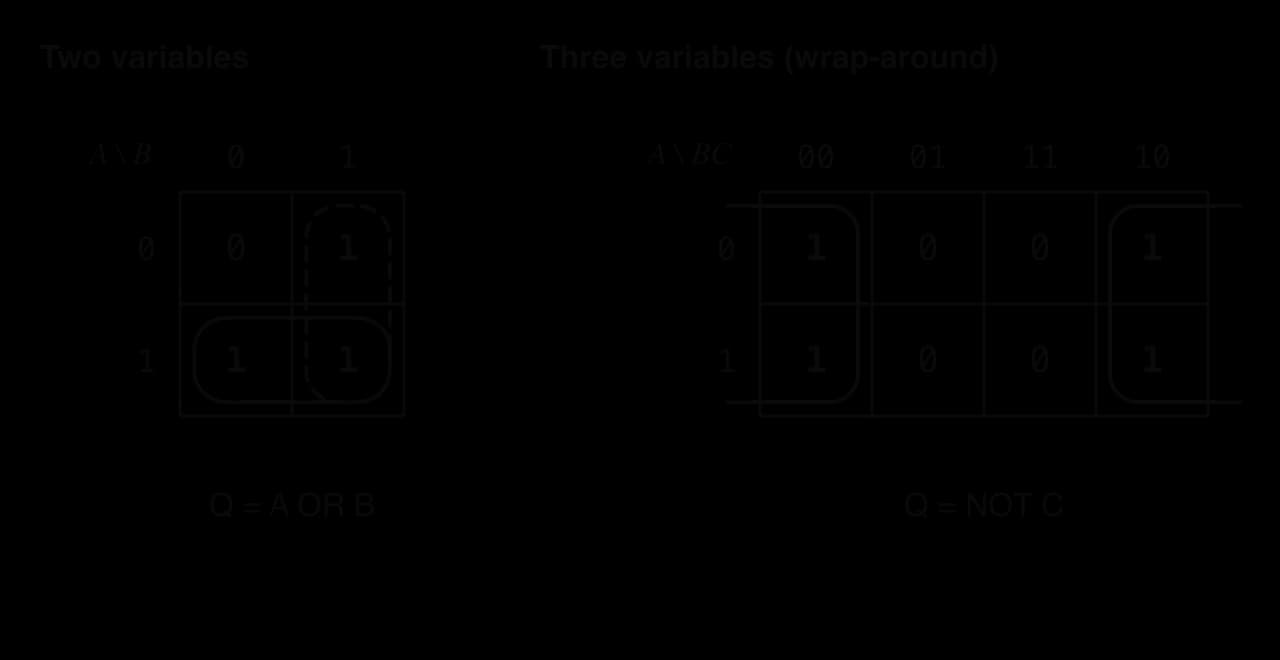
In the two-variable map, the expression has three 1s. The row A = 1 is one group (B changes, so the term is A) and the column B = 1 is another (A changes, so the term is B). The 1 at AB = 11 is used twice, which is allowed, and the result is . In the three-variable map, the 1s are at ABC = 000, 010, 100 and 110; across the group A and B both change and only C stays at 0, so the four terms reduce to .
Four-variable maps and wrap-around
With four inputs the map is 4 × 4, with AB on the rows and CD on the columns, both in Gray-code order. Wrap-around now works in both directions, so the four corner cells are all neighbours of each other and can form a single group of four.
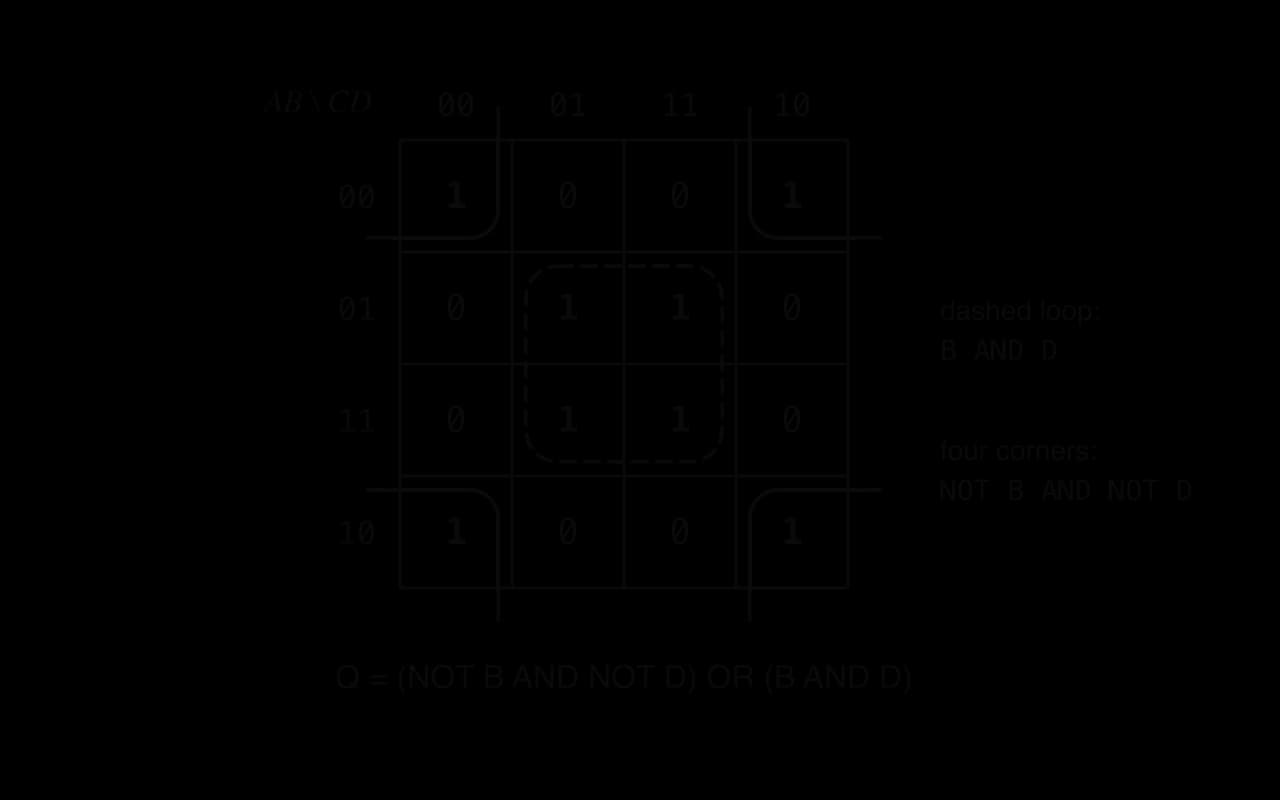
The corners are ABCD = 0000, 0010, 1000 and 1010: A and C change, while B = 0 and D = 0 throughout, so the term is . The central square is 0101, 0111, 1101 and 1111: B = 1 and D = 1 throughout, so the term is . Eight minterms reduce to , which is B XNOR D.
Karnaugh maps or Boolean algebra
The two methods reach the same answer, but each suits different situations.
Boolean algebra | Karnaugh map | |
|---|---|---|
Works from | any expression, including ones with bars over brackets | a truth table or a sum of products |
Number of inputs | any | practical for 2 to 4 (5 and 6 need several maps) |
Finding the simplest form | relies on spotting which law to apply; easy to stop too early | grouping shows the simplest sum of products directly |
Showing the reasoning | each step is named and checkable | the groups are the reasoning |
Typical use | proving two expressions are equal; removing NAND/NOR structures | minimising an output given as a table |
In practice the methods are combined: De Morgan's laws first remove bars over brackets, then a Karnaugh map finds the minimal sum of products, and a truth table confirms the result. Circuit design software does the same job automatically for thousands of inputs with algorithms based on the same idea of combining terms that differ in one variable.
Logic diagrams
Reading and drawing logic diagrams
A circuit is shown on paper as a logic diagram. The conventions are the same whether the diagram is read or drawn: inputs on the left, labelled with their variable names; signals flowing left to right through the gates; and the output on the right, labelled Q or with its own name.
A dot where wires meet shows a junction: the signal splits and goes both ways.
Wires that cross without a dot are not connected.
Each gate output may feed several inputs, but two gate outputs must never be joined directly; they must meet at a gate.
Gates can have more than two inputs: a three-input AND gate gives directly.
To construct a diagram from an expression, follow the order of evaluation: draw a NOT gate for each inverted input, then the AND gates for each product term, then an OR gate combining them, working outwards from the innermost brackets. To derive an expression from a diagram, do the reverse: label each gate's output with its expression, starting next to the inputs, until the output is reached.
Building complex operations from simple gates
Larger operations are combinations of the seven gates. XOR itself can be built from AND, OR and NOT, since its truth table gives the sum of products , and XNOR is . An equality comparator for two 4-bit numbers uses four XNOR gates (one per bit pair) feeding a four-input AND gate. A majority voter for three sensors, whose output follows at least two of them, is : three AND gates and an OR gate. In each case the design follows the same chain: a description in words, a truth table, an expression, a simplification, and finally the diagram.
Exam focus
Data representation and computer logic are examined in Paper 1, Section A, in structured questions that usually set a short scenario and then ask several parts of rising difficulty. Typical shapes are:
Calculate or convert: a binary, denary or hexadecimal value, with working (1–2 marks each part); the largest value or the number of values for a given number of bits (1 mark); the size of an image, sound or video file (2–3 marks).
Describe or explain: how a character, image or sound is stored; why hexadecimal is used; the effect of colour depth or sampling rate on quality and file size (2–4 marks).
Construct: a truth table from a circuit, an expression or a description (3–4 marks); a logic diagram from an expression or a description (3 marks); a simplified expression using Boolean algebra or a Karnaugh map (3–5 marks).
Describe the function of a named gate, or identify the gate from its truth table (1–2 marks).
"Construct" asks for information in diagrammatic or logical form, so the marks go to complete, correct tables and diagrams. "Analyse" in the context of truth tables means deducing the output, or the expression, from the information given. Calculations earn marks for method, so working must be shown, and the final answer needs a unit.
The commonest losses on data representation and logic come from small slips rather than misunderstanding, so a quick check at the end of each part pays off.
In file size calculations, write the formula first, substitute the values and give the unit at every stage. If the question does not say whether 1000 or 1024 is expected, state which you used.
Practice questions
State the number of different values that can be represented with 12 bits, and the largest unsigned integer that 12 bits can hold. [2]
Calculate the denary and hexadecimal values of the binary number 0110 1011. [2]
Calculate the binary and denary values of the hexadecimal number E7. [2]
Explain why the integer 255 and the string "255" need different amounts of storage. [2]
A camera takes photos with a resolution of 4000 × 3000 pixels and a colour depth of 24 bits. Calculate the uncompressed size of one photo in MB. [2]
A podcast is recorded in stereo at a sampling rate of 48,000 Hz with a bit depth of 24 bits. Calculate the uncompressed size of a 3-minute recording in MB. [3]
Describe the function of an XOR gate and identify one use of XOR in a computer system. [2]
Construct the truth table for . [3]
Simplify using Boolean algebra, naming each law. [3]
A circuit with inputs A, B, C and D outputs 1 for exactly these inputs: ABCD = 0000, 0010, 0011, 0111, 1000, 1010, 1011 and 1111. Construct a Karnaugh map and simplify the output expression. [4]
Answers
values [1]; largest 4095 [1].
[1]; 0110 = 6, 1011 = B, so 6B [1].
E = 1110, 7 = 0111, so 1110 0111 [1]; [1].
The integer is stored as one binary number, 1111 1111, which fits in one byte [1]; the string is three characters, each stored as its own character code (50, 53, 53), so it needs three bytes in ASCII or UTF-8 [1].
bits [1]; bytes = 36 MB [1].
bits [1]; bytes [1]; about 51.8 MB [1] (or about 49.4 MiB).
The output is 1 when exactly one of the two inputs is 1 (the inputs differ), and 0 when they are equal [1]. Uses: the sum bit of a half adder / generating a parity bit / comparing bits for difference [1].
Rows ABC from 000 to 111, with = 1, 1, 0, 0, 0, 0, 0, 0 and Q = 1, 0, 0, 1, 0, 1, 0, 1. Award [1] for eight rows in order, [1] for the NOR column, [1] for the Q column.
(distributive) (complement, identity) [1]; [1]; (distributive, complement, identity) [1].
Map with rows AB and columns CD in the order 00, 01, 11, 10 [1]; the whole column CD = 11 is a group of four, giving [1]; the four corners (0000, 0010, 1000, 1010) are a wrap-around group of four, giving [1]; [1].
Summary
A bit is one binary digit; a nibble is 4 bits (one hex digit) and a byte is 8 bits. With bits there are patterns, and an unsigned integer ranges from 0 to .
Binary, denary and hexadecimal are place-value systems with bases 2, 10 and 16. Convert to denary by adding digit × place value; convert from denary by repeated division (remainders read upwards); convert binary to hex by grouping bits in fours from the right.
Overflow happens when a result needs more bits than are available; the extra bit is lost and the stored value wraps round.
Text is stored as character codes: ASCII uses 7 bits for 128 characters; Unicode covers every writing system, and UTF-8 encodes each code point in 1 to 4 bytes, ASCII in one.
A bitmap stores a colour value for every pixel: size in bits = width × height × colour depth. Vector graphics store shapes and scale without losing quality.
Sound is sampled by an ADC: size in bits = sampling rate × bit depth × channels × seconds; a DAC turns samples back into sound. Video is frames × frame rate plus audio, almost always compressed.
More bits or more samples give higher fidelity but proportionally larger files; data can only be read back with the same encoding it was written with.
Logic gates (AND, OR, NOT, NAND, NOR, XOR, XNOR) are transistor circuits that apply Boolean operations; NAND and NOR are universal. Gates build adders (a half adder is XOR + AND), comparators, memory and control logic.
A truth table lists all input rows in counting order; a sum of products is read from the rows with output 1. Boolean algebra laws (including De Morgan's) and Karnaugh maps with Gray-code axes and power-of-2 groups simplify expressions, and a truth table checks the result.
Logic diagrams use standard symbols, flow left to right, mark junctions with dots, and are built from the inside of an expression outwards.
Self-check
- To do:
I can write the place values of an 8-bit binary number and of a 3-digit hexadecimal number.
- To do:
I can convert any integer up to 16 bits between binary, denary and hexadecimal in both directions, with working.
- To do:
I can group bits in fours from the right, padding on the left, to convert binary to hexadecimal.
- To do:
I can state the range of an -bit unsigned integer and work out the bits needed for a given number of values.
- To do:
I can explain overflow with an 8-bit example and describe the Year 2038 problem.
- To do:
I can tell decimal prefixes (kB, MB) from binary prefixes (KiB, MiB) and convert bits to bytes.
- To do:
I can explain how ASCII, Unicode and UTF-8 store characters and calculate the bytes a short string takes in UTF-8.
- To do:
I can calculate the size of a bitmap image, an audio recording and an uncompressed video.
- To do:
I can explain how sampling rate, bit depth, resolution and colour depth affect quality and file size.
- To do:
I can draw the symbol and write the truth table of each of the seven gates.
- To do:
I can construct a truth table from a circuit, an expression or a description, with intermediate columns.
- To do:
I can write a sum-of-products expression from a truth table.
- To do:
I can simplify an expression with the Boolean laws, naming each law, and apply De Morgan's laws correctly.
- To do:
I can simplify an expression with a 2-, 3- or 4-variable Karnaugh map, including wrap-around groups.
- To do:
I can construct a logic diagram from an expression or description, and derive the expression from a diagram.
Questions on A1.2
95 exam-style questions on this subtopic, written in the style of the IB papers. The first has its markscheme open. Counted on
Question 1 · CS-000715 marks
A coastal weather station measures wind speed and humidity. Each reading is stored as an 8-bit unsigned binary integer before it is sent to a central server.
- (a)
The latest wind speed reading is
1011 0110. State this value in decimal.1 mark
Markscheme (a)
182;
- (b)
The latest humidity reading is 203 in decimal. State this value in hexadecimal.
1 mark
Markscheme (b)
CB;
Note: Accept ,
0xCBor lower casecb. - (c)
State the largest value that one reading can hold.
1 mark
Markscheme (c)
255;
Note: Do not accept 256.
- (d)
Outline one reason why the station's engineers display readings in hexadecimal rather than binary when testing the equipment.
2 marks
Markscheme (d)
Award [1] for the reason and [1] for the development, up to [2 max].
Hexadecimal is shorter / more compact (two digits instead of eight);
so it is quicker to read and copy, with fewer transcription errors;
Each hex digit maps to exactly four bits;
so it converts to and from binary easily (unlike decimal);Note: Do not accept "hexadecimal uses less memory": the stored data is still binary.
Question 2 · CS-0007211 marks
A web design studio stores each colour on its clients' websites as a 24-bit RGB value: one byte each for red, green and blue. Colours are written as six hexadecimal digits; for example, the studio's sea green is #2E8B57, where 2E is red, 8B is green and 57 is blue.
- (a)
State the number of bits used to store the red component.
1 mark
- (b)
Convert the green component
8Bto decimal, showing your working.2 marks
- (c)
Convert the blue component
57to 8-bit binary.1 mark
- (d)
Calculate how many different colours can be represented with this 24-bit scheme.
2 marks
- (e)
A client wants a colour with red = 200, green = 16 and blue = 255 (all decimal). Construct the six-digit hexadecimal code for this colour.
2 marks
- (f)
Explain why the studio writes colours in hexadecimal rather than in binary or decimal.
3 marks
Answer it, then compare with the markscheme.Check this one with a free account
Question 3 · CS-000735 marks
A science museum prints a 16-bit visitor number on every annual pass. The number is shown on the pass in hexadecimal; one pass shows 3F2A.
- (a)
Convert
3F2Ato binary.2 marks
- (b)
Convert
3F2Ato decimal, showing your working.2 marks
- (c)
State the number of different visitor numbers that can be stored in 16 bits.
1 mark
Answer it, then compare with the markscheme.Check this one with a free account
Try a quick-fire question
One of 75 short multiple-choice questions on A1.2. Pick an answer to see why it's right or wrong.
The 8 × 8 image is stored with 1 bit per pixel, black = 1 and white = 0, each row from left to right. Which byte stores row 4?

Flashcards for A1.2
The official deck for this part of the syllabus.
A1.2 Data representation and computer logic · front
Why do computers store data using only two states?
A1.2 Data representation and computer logic · front
Give three physical forms in which a computer stores the two states of a bit.
- A1.2 Data representation and computer logic388 cards
Carry on with A1.2 in Augment
With a free account, Augment remembers where you stopped and what you have practiced.