A1 Computer fundamentals
How hardware, data representation, operating systems and translation fit together to make a computer work, which parts are HL only, and how the topic links to the rest of the course.
- IB Computer Science
- SL and HL
What A1 covers
From the subject guide: what you need to know and be able to do.
How a computer works, from the processor and memory to the operating system.
4 subtopics in Computer fundamentals
Each one has its own page once something is published for it.
- A1.1Computer hardware and operation95 questions · notes · 75 quick fire
- A1.2Data representation and computer logic95 questions · notes · 75 quick fire
- A1.3Operating systems and control systems65 questions · notes · 70 quick fire
- A1.4TranslationHL only41 questions · notes · 50 quick fire
An overview of A1 Computer fundamentals
Introduction
Computer fundamentals explains what happens inside a computer between a key being pressed and a result appearing on the screen. It covers the physical parts that store and process data, the binary codes and logic those parts work with, the operating system that shares the hardware between programs, and, at HL, the translators that turn a program's source code into instructions a processor can carry out.
Every later topic rests on this picture. A network carries the same binary data that the central processing unit (CPU) processes, a database lives on secondary storage, machine learning models train on graphics processors, and every Python or Java program finally runs as machine code. Knowing how the hardware works also explains its limits: why a number can overflow its bits, why a program slows down when memory runs short, and why repeated access to the same data is faster than the first.
How the subtopics connect
The four subtopics form layers, each built on the one below it. At the bottom, subtopic A1.2, Data representation and computer logic, shows how integers, text, images and sound are stored in binary and how logic gates combine bits to compute results. Subtopic A1.1, Computer hardware and operation, builds the machine from those parts: the CPU's units, registers and buses, the fetch–decode–execute cycle, primary and secondary memory, compression, and cloud computing services.
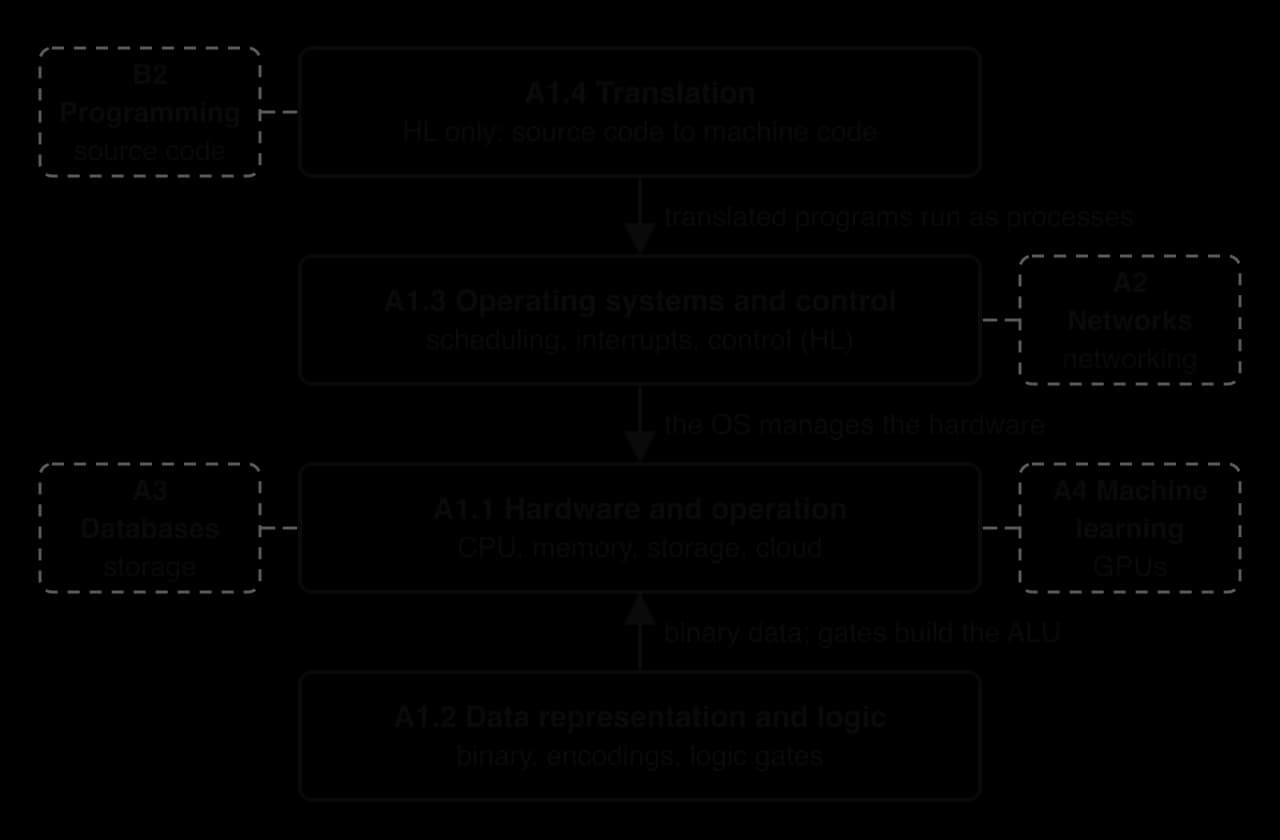
Subtopic A1.3, Operating systems and control systems, sits above the hardware. The operating system (OS) manages memory, files, devices and security, schedules processes on the CPU and responds to interrupts; at HL it also covers multitasking, deadlock and the control systems that read sensors and drive motors. Subtopic A1.4, Translation, completes the stack at HL: a compiler, an interpreter or a just-in-time compiler turns source code into machine code, which the OS loads and runs as a process.
Subtopics at SL and HL
Three of the four subtopics are studied at both levels, but two of them contain statements that only HL students study. HL students study those extra statements inside the SL pages, where each one has a heading marked "(HL only)" and opens with an HL box. SL students can pass over those sections without missing anything the SL statements need.
Subtopic | Level | HL-only statements inside it |
|---|---|---|
A1.1 Computer hardware and operation | SL and HL | A1.1.3: the differences between the CPU and the GPU in design and use. A1.1.6: pipelining (fetch, decode, execute and write-back) in multi-core processors |
A1.2 Data representation and computer logic | SL and HL | None |
A1.3 Operating systems and control systems | SL and HL | A1.3.5: how the OS manages multitasking and resource allocation, including deadlock. A1.3.6: the components of a control system (sensors, actuators, controllers and feedback). A1.3.7: control systems in real applications such as thermostats and autonomous vehicles |
A1.4 Translation | HL only | The whole subtopic: compilers, interpreters, bytecode and just-in-time compilation |
The split inside A1.1 is narrow. SL students still learn what a GPU does and how the fetch–decode–execute cycle works; only the detailed CPU–GPU comparison and pipelining are HL.
Links to other topics
Ideas from computer fundamentals reappear across the course. Binary and hexadecimal from subtopic A1.2 return in IP and MAC addresses in topic A2, Networks, and in the data types and overflow errors of topic B2, Programming. Cloud computing is the starting point for digital infrastructure in subtopic A2.1, and secondary storage holds the databases of topic A3.
Control systems also raise a question of harm. When software reads sensors and moves physical equipment such as brakes or valves, a design error can injure people, which ties subtopic A1.3 to the ethical discussions of subtopic A4.4, Ethical considerations.
Flashcards for A1
The official decks for this part of the syllabus.
- A1.1 Computer hardware and operation394 cards
- A1.2 Data representation and computer logic388 cards
- A1.3 Operating systems and control systems418 cards
- A1.4 Translation198 cards
Carry on with A1 in Augment
With a free account, Augment remembers where you stopped and what you have practiced.