Describe how the CPU, its registers and buses run machine code, explain primary memory and caching, compare storage devices, compress data with RLE and transform coding, and choose between IaaS, PaaS and SaaS.
Each is in the Computer Science glossary, with every other term in the subject.
A register that holds the result of the most recent ALU operation and supplies one of the inputs to the next.
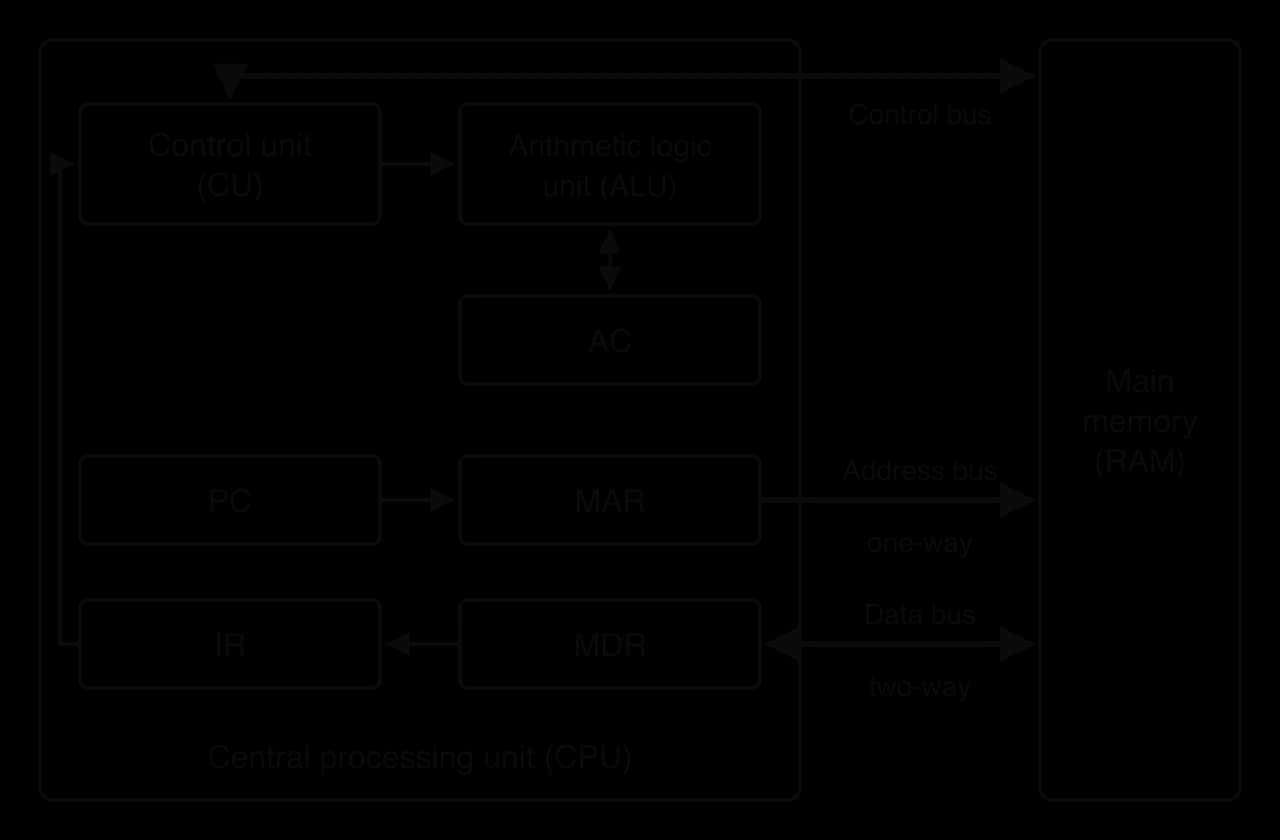
The bus that carries memory addresses from the CPU (from the MAR) to main memory, in one direction only.
A formula that gives the maximum speed-up of a task when part of it is run in parallel on several processors, showing that the part that must run sequentially limits the overall speed-up.
The part of the CPU that performs arithmetic operations, such as addition and subtraction, and logical operations, such as AND, OR, NOT and comparisons.
The firmware program, stored in ROM, that runs when a computer is switched on; it checks the hardware, then loads the operating system from storage into RAM and starts it.
A set of parallel wires that carries signals between components of a computer, one bit per wire at a time.
A small amount of very fast memory, inside or next to the CPU core, that holds copies of the instructions and data from RAM that are most likely to be needed next.
A memory access in which the requested instruction or data is found in the cache, so it is supplied quickly without reading RAM.
Describe the functions and interactions of the CPU's components: the ALU, the CU, the PC, IR, MAR, MDR and AC registers, and the address, data and control buses, in single-core, multi-core and co-processor designs.
Describe the role of a GPU and the architecture that makes it suitable for highly parallel computations.
Explain the differences between the CPU and the GPU, and how the two work together. (HL only)
Explain the purposes of RAM, ROM, cache (L1, L2, L3) and registers, and why cache hits and cache misses matter for performance.
Describe the fetch–decode–execute cycle, naming the registers and buses used at each step.
Describe pipelining in multi-core architectures, including the write-back stage and how cores run in parallel. (HL only)
Describe internal and external secondary storage devices and the scenarios that suit each.
Describe the concept of compression, distinguishing lossy from lossless methods, and apply run-length encoding and transform coding.
Describe SaaS, PaaS and IaaS and how their degrees of control and flexibility affect resource management and availability.
Every computer, from a smartwatch to a supercomputer, is built from the same few kinds of part: a processor that carries out instructions, memory that holds the instructions and data being used, storage that keeps data when the power is off, and connections that move bits between them. Understanding these parts explains why one laptop feels faster than another, why a phone can play a 4K video smoothly but slows down when too many apps are open, and why companies rent servers instead of buying them. The same ideas sit underneath every later topic: an operating system manages this hardware, a network moves its data, a database stores it and a machine learning model trains on it.
95 exam-style questions on this subtopic, written in the style of the IB papers. The first has its markscheme open. Counted on
A games studio uses deep learning to generate realistic textures for its game worlds. Training each model involves billions of multiplications on large grids of numbers. The studio's lead engineer insists that the training machines are fitted with GPUs.
State what the abbreviation GPU stands for.
1 mark
Graphics processing unit;
Explain why GPUs are better suited than CPUs to training these deep learning models.
3 marks
Award [1] per point, up to [3 max].
Training is dominated by matrix / vector operations (multiplications on grids of numbers);
the same operation is repeated on many independent values;
a GPU has thousands of simpler cores whereas a CPU has a few powerful cores;
so the GPU can perform these calculations in parallel;
GPUs also have high memory bandwidth to feed the cores with data;
so training takes hours rather than days / weeks;
Outline one reason why the studio's computers still need a CPU.
2 marks
One of 75 short multiple-choice questions on A1.1. Pick an answer to see why it's right or wrong.
What is the first step of the fetch stage?
The official deck for this part of the syllabus.
What is the central processing unit (CPU)?
What is a transistor?
With a free account, Augment remembers where you stopped and what you have practiced.
A memory access in which the requested instruction or data is not in the cache, so it must be fetched from a slower level (a lower cache level or RAM) and is usually copied into the cache for next time.
The component of a computer that fetches, decodes and executes the instructions of a program, processing data and coordinating the other hardware.
A circuit that produces a steady stream of electrical pulses to synchronise the operations of the CPU; its rate, measured in hertz, is the number of pulses (cycles) per second.
The delivery of computing resources, such as servers, storage, databases, software and processing power, over the internet on demand, with the provider owning and maintaining the hardware and the customer paying according to use.
A processor that supplements the CPU by carrying out one specific type of task, so that the CPU is free for other work.
Encoding data using fewer bits than the original representation, to reduce the storage space it needs or the time it takes to transmit.
The size of the original data divided by the size of the compressed data, usually written as a ratio such as 10 : 1.
The bus that carries control and timing signals between the CPU and other components, such as memory read, memory write, clock pulses and interrupt requests.
The part of the CPU that decodes each instruction and sends control signals that coordinate the other components, directing the flow of data between the registers, the ALU, memory and input/output devices.
An independent processing unit within a processor, with its own control unit, ALU and registers, able to fetch, decode and execute its own stream of instructions.
The bus that carries data and instructions between the CPU (through the MDR) and main memory, in both directions.
A mathematical transform that expresses a block of values, such as 8 × 8 pixels, as a sum of cosine waves of different frequencies, giving one coefficient for each frequency.
Flash storage packaged with its controller in a single chip that is soldered permanently onto a device's circuit board.
The repeated sequence of steps by which the CPU fetches an instruction from main memory, decodes it in the control unit, and executes it, before moving on to the next instruction.
Software stored in non-volatile memory on a hardware device that controls the device at a low level.
Non-volatile memory with no moving parts that stores each bit as electric charge trapped in a memory cell, and that can be electrically erased and rewritten in blocks.
A processor with a very large number of simple cores designed to carry out the same operation on many data items in parallel, originally for rendering graphics and now also for other highly parallel computations.
A secondary storage device that records data magnetically on rapidly spinning disks (platters), using read/write heads on a moving arm.
Memory designed to transfer very large amounts of data per second to a GPU or other processor, using a very wide connection and stacked memory chips placed beside the processor.
A cloud service model in which the provider supplies virtualised computing resources (virtual machines, storage and networking), and the customer installs and manages the operating system, runtime, applications and data.
A register that holds the instruction currently being decoded and executed.
The tendency of programs to access the same memory locations repeatedly within a short time (temporal locality) and to access locations close to ones recently used (spatial locality).
Compression in which no information is lost, so decompressing the data restores an exact copy of the original.
Compression that permanently removes information that people are unlikely to notice, so the decompressed data is only an approximation of the original.
Instructions written as binary patterns that a particular type of CPU can decode and execute directly, without any further translation.
A register that holds the address of the memory location that is about to be read from or written to.
A small, removable flash storage card designed for portable, battery-powered devices.
A register that holds the data or instruction that has just been read from memory, or that is about to be written to memory.
The arrangement of a computer's memory and storage in levels ordered by speed, size and cost per byte, from small, fast, expensive registers at the top to large, slow, cheap secondary storage at the bottom.
A single chip containing two or more cores that can execute separate instruction streams at the same time.
A storage device, usually containing several drives, that connects to a local network so that many users and devices can store and share files on it.
Memory that keeps its contents when the power supply is removed.
The part of a machine-code instruction that specifies the operation to perform, such as load, add, store or jump.
The part of a machine-code instruction that gives the data to be used, or the memory address or register where that data is found.
A device that reads (and sometimes writes) data on optical discs such as CDs, DVDs and Blu-ray discs, using a laser to detect the pattern of tiny pits and flat areas (lands) along a spiral track.
Carrying out several computations at the same time, using more than one processing unit, so that a task finishes sooner or more tasks finish in the same time.
A situation in which the next instruction in a pipeline cannot proceed in the following clock cycle, either because it needs a result that an earlier instruction has not yet written back (a data hazard) or because a branch means the wrong instructions have been fetched (a control hazard).
A technique in which the stages of instruction processing are carried out by separate parts of the processor, so that several instructions are processed at once, each at a different stage.
A cloud service model in which the provider supplies and manages a complete platform (servers, operating system, runtime and development tools), and the customer only develops, deploys and manages their own applications and data.
Memory that the CPU can access directly, holding the instructions and data in current use; it includes registers, cache, RAM and ROM.
A register that holds the memory address of the next instruction to be fetched.
Reducing the precision of values by rounding them to a smaller set of levels, so that many small values become zero.
Volatile primary memory that can be read from and written to, holding the operating system, running programs and the data they are using.
Non-volatile primary memory whose contents are written during manufacture or by a special update process and are not changed during normal use; it holds firmware such as the bootstrap program.
A very small, very fast storage location inside the CPU that holds a single value, such as an instruction, an address or a piece of data, while it is being used.
A lossless compression method that replaces each run of identical consecutive values with a single pair: the number of repetitions and the value.
Non-volatile storage that keeps programs and data permanently, whether or not the computer is switched on; the CPU cannot access it directly, so data is first copied into RAM.
A contract between a service provider and a customer that defines the level of service promised, such as the percentage of time the service will be available, and what compensation is given if it is not met.
A form of parallel processing in which one instruction is applied to many data items at the same time by many processing units.
A processor with one core, which executes one instruction stream at a time.
A cloud service model in which the provider supplies a complete application over the internet, managing everything from the hardware to the software itself, and the customer simply uses it, usually through a web browser or app, for a subscription.
A secondary storage device that stores data in flash memory chips managed by a controller, with no moving parts.
A single integrated circuit that contains most of the components of a computer, typically the CPU cores, GPU, other co-processors, memory controller and input/output controllers.
The amount of work completed per unit of time.
A compression method that converts data into a different representation, usually a set of frequency components, so that the components people perceive least can be stored with less precision or discarded.
A tiny electronic switch, controlled by a voltage, that is either on or off; it is the basic building block of processors and memory chips.
A design in which the CPU, GPU and other processors on a chip share a single pool of RAM, so that data does not have to be copied between separate memories.
A small, portable storage device containing flash memory and a controller, which plugs into a USB port.
A situation in which a customer finds it difficult or expensive to move to a different provider, because their systems and data depend on features, formats or services that only the current provider offers.
Memory that loses its contents when the power supply is removed.
The number of bits a CPU processes or moves as one unit, which is usually the size of its registers and the width of its data bus.
The final stage of a pipelined instruction, in which the result produced by the execute stage is written into its destination register (or memory), where later instructions can use it.
Modern chips pack these components very densely. The Intel 4004 of 1971, the first commercial single-chip CPU, held 2,300 transistors; the Apple M1 of 2020 holds about 16 billion, together with a graphics processor, a neural-network processor and caches on the same piece of silicon, yet both chips fetch, decode and execute instructions in the same way.
A computer program is a long list of very simple instructions: copy this number, add these two numbers, compare this value with zero, jump to that instruction. The processor carries out these instructions one after another, billions of times a second. Everything else in the computer exists to supply it with instructions and data and to store or display its results.
A CPU is an electronic circuit built from millions or billions of tiny switches. Each switch is either on or off, which is why computers work in binary: a bit is stored or processed as the state of one or more switches. Groups of switches form logic gates, gates form adders and comparators (subtopic A1.2, Data representation and computer logic), and those circuits form the units of the processor.
A CPU cannot run a Python or Java program directly. It can decode and execute only its own machine code: binary patterns that each stand for one simple operation. A compiler or interpreter (subtopic A1.4, Translation) turns a high-level program into machine code before or while it runs.
Each machine-code instruction has two parts. The first says what to do; the second says what to do it to.
The opcode for addition, for example, tells the control unit to route two numbers through the adder. The value the operation works on is given separately, either as the number itself or as the address in memory where the number is kept.
Instruction (written in words) | Opcode | Operand | Meaning |
|---|---|---|---|
| LOAD | 10 | Copy the value at memory address 10 into the accumulator |
| ADD | 11 | Add the value at address 11 to the accumulator |
| STORE | 12 | Copy the accumulator into memory address 12 |
| HALT | none | Stop running |
The words LOAD and ADD are only labels for people: inside the computer each opcode is a binary number. The four instructions in the table form a tiny program that adds two numbers from memory and saves the answer, and the same program is traced through the processor step by step in the fetch–decode–execute cycle.
The CPU does its work in steps timed by a clock, a circuit that sends out a regular pulse. Each pulse lets every part of the processor move forward one step at the same moment, so that data arrives where it is needed before the next step uses it.
A higher clock rate means more steps per second, but it is only one factor in speed. How much work the CPU does in each cycle, how many cores it has and how quickly it gets data from memory matter as much. Faster clocks also use more power and produce more heat, which is why clock rates have stayed at a few gigahertz for many years while designers added cores and caches instead.
The other basic measure of a CPU is how many bits it handles in one operation.
A 64-bit CPU can add two 64-bit numbers in one operation, while an 8-bit CPU would need eight separate additions and must carry between them. The Intel 4004 was a 4-bit CPU. Word size is linked to the byte (8 bits): a 64-bit word is 8 bytes.
Inside the CPU, two units do the main work: the control unit directs the other components, and the arithmetic logic unit carries out the calculations.
The control unit runs the fetch–decode–execute cycle. It reads the opcode of the current instruction, works out what it means, and then sends the right sequence of signals: "put this register's value on the bus", "tell memory to read", "tell the ALU to add". The arithmetic itself is always carried out by the ALU.
The ALU is built from logic gates. An adder for two binary numbers is a chain of adder circuits, each one a slightly larger version of the half adder. Comparisons ("is this value zero?", "is A greater than B?") are also ALU operations, and their results let a program make decisions: an if statement in Python or Java becomes a comparison in the ALU followed by a jump to a different instruction.
The ALU needs somewhere to hold the numbers it works on, and the control unit needs somewhere to keep track of which instruction it is running. Fetching these from main memory for every step would be far too slow, so the CPU has a few very fast storage locations of its own.
Each register holds one word. Registers are the fastest memory in a computer because they are built into the processor itself, but there are only a few dozen of them, so they hold only what is needed for the instructions being processed right now. Five registers have special jobs in the fetch–decode–execute cycle.
Programs are stored in consecutive memory locations, so a PC that steps forward by one after each fetch walks through the program in order without any extra information. Loops and if statements work by changing the PC: a jump back to the start of a loop sets it to a smaller address than before.
While an instruction sits in the IR, the control unit splits it into opcode and operand and acts on it. The PC can already point to the next instruction because the current one is safely held in the IR.
The MAR is the register connected to the address bus, so the address it holds is the one main memory responds to. Every read or write therefore begins by placing an address in the MAR.
Every value travelling between the CPU and main memory passes through the MDR, whether it is an instruction being fetched, a number being loaded or a result being stored. The MAR and the MDR always work as a pair: the MAR selects the memory location and the MDR holds the value going to or from it.
The last of the five registers holds the working result of calculations.
The accumulator register is different from an accumulator variable in a program (a variable that builds up a running total; subtopic B2.3, Programming constructs), although the idea behind the name is the same. Real processors also have general-purpose registers and a status register that records whether the last result was zero or negative, but the five registers in the table are enough to explain how an instruction runs.
Register | Holds | Used during |
|---|---|---|
Program counter (PC) | Address of the next instruction | Fetch (copied to the MAR, then incremented) |
Memory address register (MAR) | Address to read from or write to | Fetch and execute |
Memory data register (MDR) | Data or instruction just read, or about to be written | Fetch and execute |
Instruction register (IR) | The current instruction | Decode and execute |
Accumulator (AC) | Result of the latest ALU operation | Execute |
The CPU and main memory are separate chips, joined by groups of wires on the circuit board. Each group carries one kind of signal.
A computer has three buses between the processor and memory. Together they are often called the system bus.
Memory never needs to send an address to the CPU, so the address bus is one-way. Its width sets how many different memory locations the CPU can name: with wires there are different addresses.
A 16-bit address bus can address locations, and a 32-bit address bus . If each location holds one byte, 32 address lines reach 4 GiB (gibibytes), which is why most 32-bit computers were limited to 4 GiB of RAM.
Data travels both ways: into the CPU when an instruction or value is read, and out of the CPU when a result is stored. The width of the data bus usually matches the word size, so a 64-bit data bus moves one 64-bit word in a single transfer.
The control bus tells memory what to do with the address it has received: read the location and put its contents on the data bus, or take the value on the data bus and write it. Signals on the control bus travel both ways: the control unit sends read and write signals, and devices send signals such as an interrupt request back to the CPU (subtopic A1.3, Operating systems and control systems).
The block diagram of the CPU shows how all these parts connect. The PC feeds addresses to the MAR, the MAR drives the address bus, the MDR sits on the data bus, the IR feeds the control unit, and the control unit drives the control bus and the ALU.
 YouTube
The Crash Course video builds a CPU from the ALU, registers and control unit and runs a short program through it, which is a good preparation for the full fetch–decode–execute cycle.
Early processors had one set of control unit, ALU and registers. That complete set is now called a core, and a modern processor chip usually contains several.
A processor with only one core can run only one stream of instructions at any instant. It still appears to run many programs at once because the operating system switches between them many times a second (subtopic A1.3), but at any instant only one instruction stream is being executed.
Raising the clock rate was the main way to make single-core processors faster until the mid-2000s, when the extra heat made further increases impractical. Manufacturers then put several cores on one chip.
On a multi-core processor, different programs, or different threads of one program, run on different cores at the same moment. This is a form of parallel processing.
Parallel processing raises the amount of work done per second, called throughput, while each single instruction takes as long as before.
A quad-core processor can, at best, have four times the throughput of a single core of the same design. In practice the gain is smaller. Some parts of a program must run in order (step 2 needs the result of step 1) and cannot be split between cores; the cores also share memory and the outer cache levels, so they sometimes wait for each other. A program written to use only one thread gains nothing from extra cores at all, although the computer as a whole stays more responsive because other programs can run on the other cores.
Not every processor in a computer is a general-purpose core. Some tasks are so common and so regular that a circuit designed for that one job does them faster and with less energy.
Common co-processors include the graphics processing unit (GPU), audio digital signal processors in phones, cryptographic engines that encrypt storage, and neural engines that run machine learning models. The CPU hands a task to the co-processor and continues with other instructions until the result is ready. Early PCs had an optional floating-point co-processor chip for fast arithmetic on numbers with fractional parts; that circuit has long since been built into the CPU itself.
In phones, tablets and many laptops, the CPU cores, co-processors and memory controllers are placed together on one chip.
Putting everything on one chip shortens the distances signals travel, which saves power and time, and makes the device smaller. On the other hand, no component can be upgraded or replaced separately. The Apple M1 in Mac computers is an SoC of this kind.
Processor type | What it is | Strength | Limitation | Typical use |
|---|---|---|---|---|
Single-core | One core | Simple, cheap, low power | One instruction stream at a time | Simple embedded devices, microcontrollers |
Multi-core | Several cores on one chip | Runs several threads or programs at once | Gain limited by sequential code and shared resources | Laptops, phones, servers |
Co-processor | Specialised processor beside the CPU | Much faster and more efficient at its one task | Useless for general tasks; data must be handed over | Graphics, ML inference, encryption, audio |
Every instruction a CPU runs goes through the same three stages. The control unit fetches the instruction from memory, decodes it to find out what it means, and executes it. Then it starts again with the next instruction, for as long as the computer is switched on.
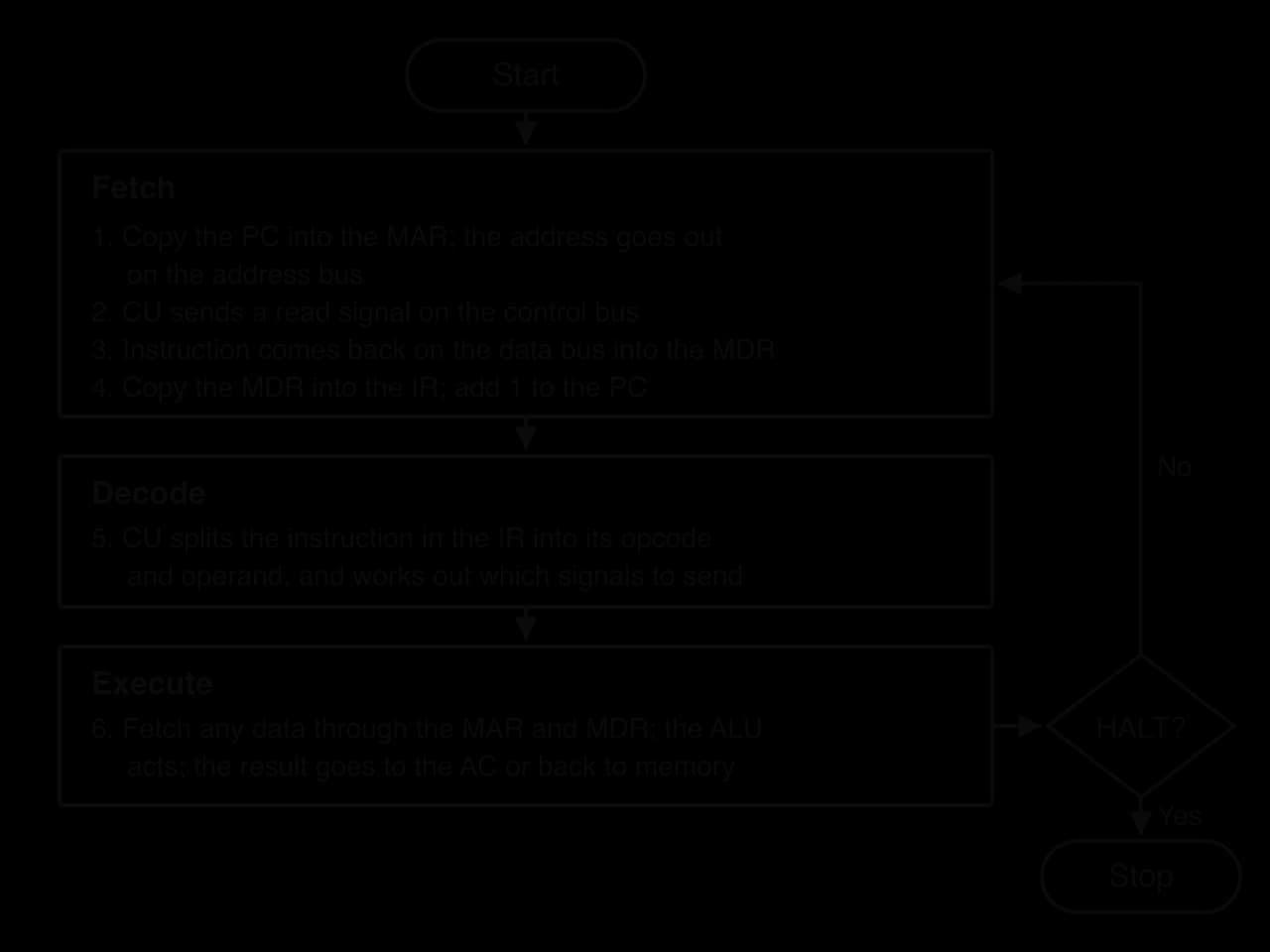
The flowchart of the cycle lists every step with the register and bus it uses. The fetch stage is the same for every instruction; only the execute stage depends on the opcode.
The fetch stage copies the next instruction from main memory into the instruction register.
The address in the PC is copied into the MAR.
The MAR places the address on the address bus, and the control unit sends a memory-read signal on the control bus.
Main memory finds the location and puts its contents (the instruction) on the data bus. The instruction is copied into the MDR.
The instruction is copied from the MDR into the IR. The PC is incremented so that it holds the address of the next instruction.
Incrementing the PC during the fetch stage, rather than at the end, means the PC already holds the address of the next instruction while the current one is still running. If the current instruction turns out to be a jump, the execute stage overwrites the PC with the jump's target address.
The control unit examines the instruction in the IR. It splits it into the opcode and the operand, and uses the opcode to select the sequence of control signals that carries out the operation. If the operand is an address, the control unit prepares to fetch or store the data at that address. Decoding is done by the CU's decoding circuits, which are logic gates arranged so that each opcode switches on a different set of signals.
The control unit sends the signals that carry out the instruction, and when they are complete the cycle returns to the fetch stage. What happens during execution depends on the opcode:
Load (LOAD 10): the operand 10 is copied into the MAR, memory is read, the value arrives in the MDR through the data bus, and it is copied into the accumulator.
Add (ADD 11): the value at address 11 is read into the MDR in the same way, then the ALU adds it to the accumulator, and the sum replaces the accumulator's contents.
Store (STORE 12): the operand 12 is copied into the MAR, the accumulator's value is copied into the MDR, and the control unit sends a memory-write signal so that memory saves the MDR's contents at address 12.
Jump: the operand is copied into the PC, so the next fetch takes the instruction from the new address.
The cycle is an algorithm, so it can be written as a program. The Python program models a tiny computer with 16 memory locations. Each instruction is stored as a three-digit number: the hundreds digit is the opcode (1 = LOAD, 2 = ADD, 3 = STORE, 0 = HALT) and the last two digits are the operand, so 211 means ADD 11. Integer division and the remainder split an instruction into its two parts, which is exactly the job of the decode stage.
memory = [0] * 16
memory[0] = 110   # LOAD 10
memory[1] = 211   # ADD 11
memory[2] = 312   # STORE 12
memory[3] = 0     # HALT
memory[10] = 25
memory[11] = 17

pc = 0
ac = 0
running = True
while running:
    # Fetch: copy the instruction at address PC into the IR
    mar = pc
    mdr = memory[mar]
    ir = mdr
    pc = pc + 1
    # Decode: split the instruction into opcode and operand
    opcode = ir // 100
    operand = ir % 100
    # Execute
    if opcode == 1:      # LOAD: copy a value from memory into the AC
        mar = operand
        mdr = memory[mar]
        ac = mdr
    elif opcode == 2:    # ADD: add a value from memory to the AC
        mar = operand
        mdr = memory[mar]
        ac = ac + mdr
    elif opcode == 3:    # STORE: copy the AC into memory
        mar = operand
        mdr = ac
        memory[mar] = mdr
    else:                # HALT: stop the cycle
        running = False
    print("PC", pc, "MAR", mar, "MDR", mdr, "IR", ir, "AC", ac)
print("memory[12] =", memory[12])public class Fde {
public static void main(String[] args) {
int[] memory = new int[16];
memory[0] = 110; // LOAD 10
memory[1] = 211; // ADD 11
memory[2] = 312; // STORE 12
memory[3] = 0; // HALT
memory[10] = 25;
memory[11] = 17;
int pc = 0;
int ac = 0;
int mar, mdr, ir;
boolean running = true;
while (running) {
// Fetch: copy the instruction at address PC into the IR
mar = pc;
mdr = memory[mar];
ir = mdr;
pc = pc + 1;
// Decode: split the instruction into opcode and operand
int opcode = ir / 100;
int operand = ir % 100;
// Execute
if (opcode == 1) { // LOAD: copy a value from memory into the AC
mar = operand;
mdr = memory[mar];
ac = mdr;
} else if (opcode == 2) { // ADD: add a value from memory to the AC
mar = operand;
mdr = memory[mar];
ac = ac + mdr;
} else if (opcode == 3) { // STORE: copy the AC into memory
mar = operand;
mdr = ac;
memory[mar] = mdr;
} else { // HALT: stop the cycle
running = false;
}
System.out.println("PC " + pc + " MAR " + mar + " MDR " + mdr + " IR " + ir + " AC " + ac);
}
System.out.println("memory[12] = " + memory[12]);
}
}In Python // is integer division; in Java / between two int values already discards the remainder, so ir / 100 gives the opcode. Each line of output shows the registers at the end of one complete cycle.
PC 1 MAR 10 MDR 25 IR 110 AC 25
PC 2 MAR 11 MDR 17 IR 211 AC 42
PC 3 MAR 12 MDR 42 IR 312 AC 42
PC 4 MAR 3 MDR 0 IR 0 AC 42
memory[12] = 42
The PC is always one ahead of the instruction in the IR, and the MAR ends each LOAD, ADD and STORE holding the operand's address, because the execute stage reused it. In the last cycle the MAR still holds 3, the address the HALT instruction was fetched from.
The same program can be traced by hand, step by step. The memory table gives the contents of main memory before the program starts.
Address | Contents |
|---|---|
0 |
|
1 |
|
2 |
|
3 |
|
10 | 25 |
11 | 17 |
12 | 0 |
The CPU can only work on instructions and data that are in memory it can reach directly. That memory is called primary memory. Its levels range from registers, which keep pace with the processor, to RAM, which is much slower but far larger, so each level trades speed for size.
The levels of primary memory differ in two properties that determine what each is used for: whether they keep their contents without power, and whether their contents can be changed.
Registers, cache and RAM are all volatile. Anything that must survive switching off, such as a saved document or the program that starts the computer, has to be kept in non-volatile memory.
Programs and their data are loaded into RAM from storage when they are opened, and stay there while they run. Every variable in a running program, every open browser tab and the operating system itself live in RAM.
"Random access" means that any location can be read in the same time as any other, by sending its address; the memory does not have to be read in order from the start. RAM is much faster than storage but much slower than the CPU: reading one value takes around 100 nanoseconds, during which a 3 GHz core could have completed hundreds of cycles.
More RAM lets more programs and larger files stay loaded at once. When RAM is full, the operating system moves data that has not been used recently out to storage and back again when it is needed (virtual memory, subtopic A1.3). Storage is thousands of times slower than RAM, so a computer that is short of RAM slows down sharply.
When a computer is switched on, its RAM is empty. The CPU needs instructions from somewhere that kept them while the power was off.
Modern "ROM" is usually flash memory that can be rewritten by a firmware update, so the name is historical. It still behaves as read-only in normal use: programs cannot store their data in it, and it is far too small for that anyway.
The most important firmware in a computer is the program that runs first.
The bootstrap program solves a chicken-and-egg problem: the operating system is needed to load programs, but something has to load the operating system. Because the bootstrap program is in non-volatile ROM, it is ready the moment power arrives. The CPU's PC is set at power-on to the address of the bootstrap program in ROM, and the fetch–decode–execute cycle starts from there.
RAM | ROM | |
|---|---|---|
Volatile? | Yes: contents lost at power-off | No: contents kept |
Can programs write to it? | Yes, freely | No (only a special firmware update) |
Holds | OS, running programs, their data | Firmware, bootstrap program |
Typical size | Gigabytes | Megabytes |
When used | All the time while the computer runs | Mainly at start-up |
The CPU runs far faster than RAM can supply data, so a processor that waited for RAM on every access would spend most of its time idle. Cache reduces this waiting by keeping copies of frequently used data close to the cores.
Cache is built from a faster but more expensive kind of memory circuit than RAM, and it sits on the processor chip, close to the cores. Whenever the CPU needs an address, it checks the cache first.
When the value is found in cache, the CPU continues almost at once. When it is not there, the value must come from the next, slower level.
A miss costs much more time than a hit: the processor may stall for hundreds of cycles waiting for RAM. Performance therefore depends on the hit rate, the fraction of accesses that are hits. A hit rate of 95% sounds high, but the 5% of misses can still take most of the waiting time.
Cache only helps if programs tend to reuse what they have used recently, or to use nearby addresses, and real programs do both.
A loop runs the same few instructions thousands of times, and a running total is updated on every pass: temporal locality. Instructions are stored one after another, and the elements of an array or list sit side by side: spatial locality. For this reason a cache fetches not just the one value requested but a whole block of neighbouring addresses (a cache line), so the next few accesses are likely to be hits.
 YouTube
Processors have several levels of cache. Each level is larger and slower than the one before it.
L1 cache is the smallest and fastest, built into each core. It is usually split into an instruction cache and a data cache, so that an instruction and its data can be fetched at the same time. Its size is tens of kilobytes per core.
L2 cache is larger and a little slower. It may belong to one core or be shared by a small group of cores, and holds from hundreds of kilobytes to several megabytes.
L3 cache is the largest and slowest cache, shared by all the cores on the chip. It holds megabytes to tens of megabytes and lets cores share data without going to RAM.
When the CPU needs an address, it checks L1, then L2, then L3, then RAM. Each step down costs more time, and a value found at a lower level is copied up into the faster levels for next time.
Registers, cache, RAM and storage form a hierarchy. Fast memory is expensive per byte and must be close to the CPU, so there is little of it; slow memory is cheap per byte, so there is a lot of it.
The memory hierarchy diagram orders the levels from the registers inside each core down to the drives outside the processor. Each step down is slower, larger and cheaper per byte than the one above it.
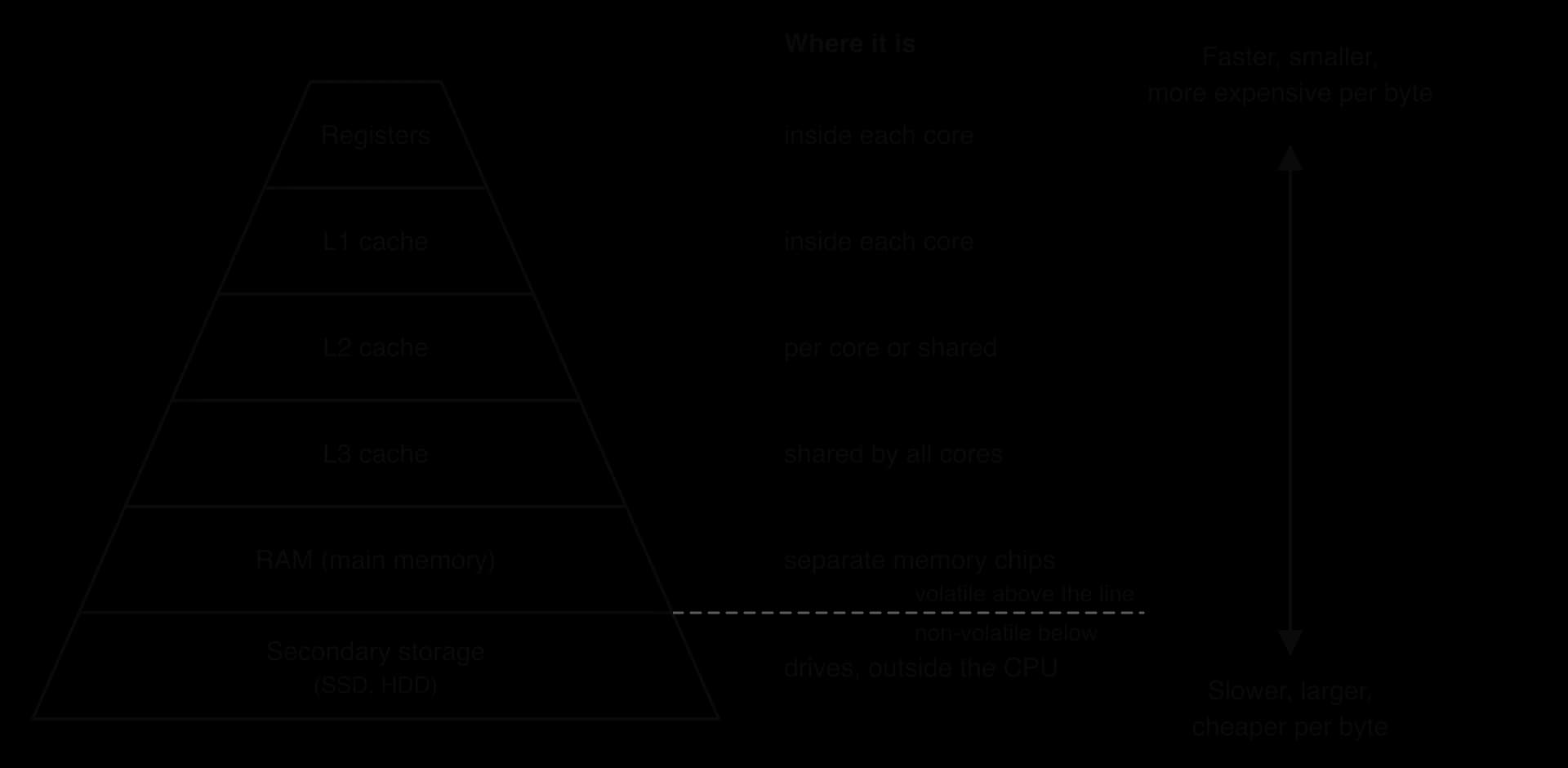
The hierarchy works because of locality. Most of the time the data the CPU needs is already in a fast level, so the computer behaves almost as if all its memory were as fast as the cache and as large as the storage. The CPU interacts with each level to optimise performance in four ways: it keeps the values it is working on in registers, it looks in the cache before RAM, it fetches whole blocks into the cache to exploit spatial locality, and it keeps recently used blocks to exploit temporal locality.
In a processor without pipelining, each instruction finishes completely before the next one starts. While the control unit decodes, the circuits that fetch instructions sit idle; while the ALU executes, the decoder sits idle. Pipelining removes this idle time by starting each instruction before the previous one has finished.
A laundry is a useful comparison. With one washing machine and one dryer, the second load of washing can go into the washer as soon as the first load moves to the dryer, instead of waiting until the first load is dry. Each load takes as long as before, but loads finish more often.
A common pipeline splits each instruction into four stages, each taking one clock cycle:
Fetch (F): the instruction is read from memory (in practice from the L1 instruction cache) into the core.
Decode (D): the control unit identifies the opcode and operands and reads the registers the instruction needs.
Execute (E): the ALU carries out the operation, or the address of a memory operand is calculated.
Write-back (WB): the result is written to its destination register or memory location.
Separating write-back from execute lets the ALU start the next instruction's calculation while the previous result is still being saved. The write-back stage also fixes the moment at which a result becomes visible to later instructions, which matters when one instruction depends on another.
The pipeline timing chart compares the two approaches. Each row is an instruction, each column a clock cycle, and each shaded cell shows which stage that instruction is in during that cycle.
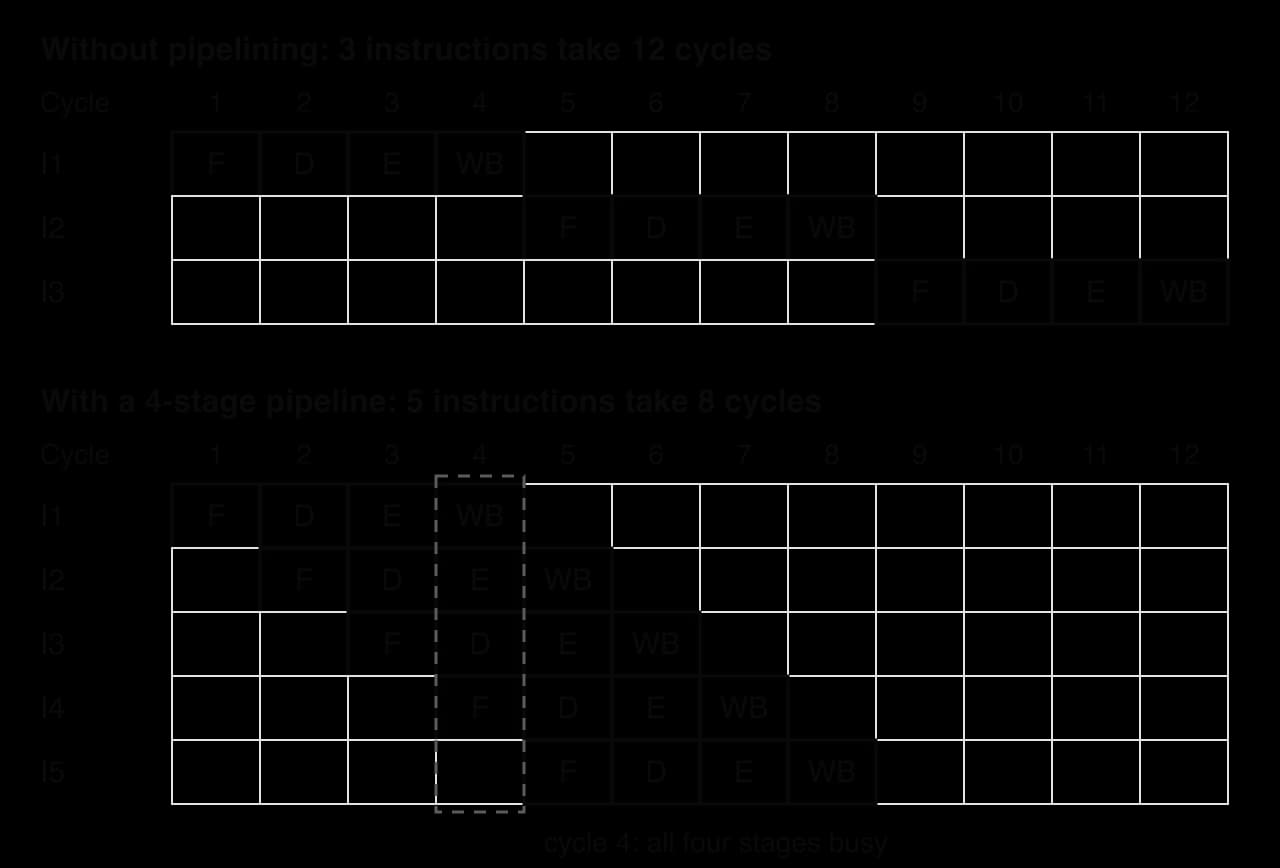
Without pipelining, instructions through stages take cycles. With pipelining, the first instruction takes cycles to come out of the pipeline, and after that one more instruction finishes every cycle.
The latency of one instruction (the time from its fetch to its write-back) does not fall: it is still four cycles. What rises is the throughput, which approaches one instruction per cycle once the pipeline is full. For long instruction sequences the speed-up approaches the number of stages.
The pipeline only stays full if each instruction can start before the previous one has finished, which is not always possible.
A data hazard occurs when, for example, instruction 2 adds 1 to the value that instruction 1 is still calculating. Instruction 2 must wait (stall) until instruction 1 has written its result back, leaving empty slots, called bubbles, in the pipeline. A control hazard occurs at a branch, such as the jump at the end of a loop or an if statement: by the time the branch is executed, the pipeline has already fetched and decoded the instructions after it. If the branch is taken, those instructions are the wrong ones, and the pipeline is flushed (emptied) and refilled from the branch target, wasting several cycles. Programs branch often, so real processors spend a great deal of circuitry predicting which way branches will go.
Pipelining speeds up a single instruction stream. A multi-core processor adds a second, independent kind of parallelism: each core has its own complete pipeline, its own registers and its own L1 and L2 caches, so each core fetches, decodes, executes and writes back its own instructions without waiting for the others.
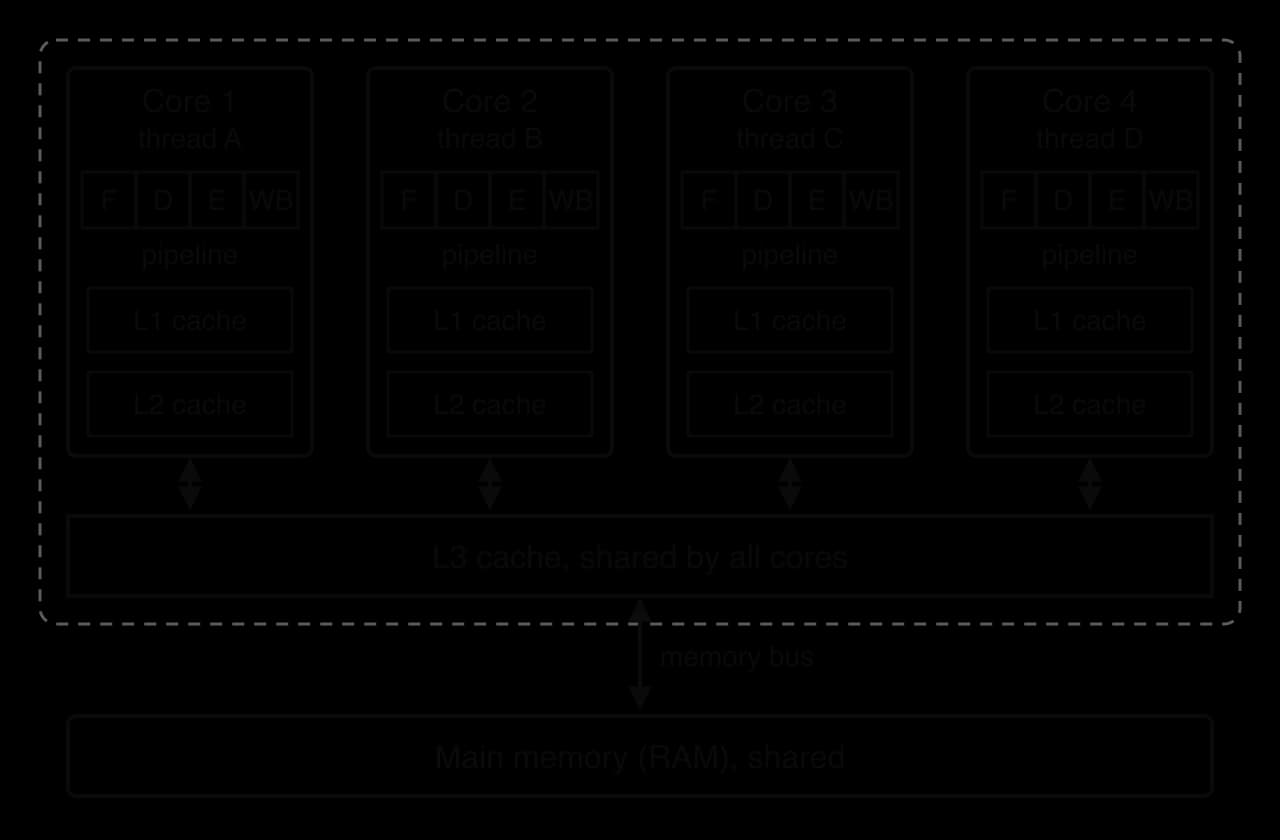
The operating system gives each core a different process or thread to run. Four cores, each with a full four-stage pipeline, can have up to sixteen instructions in progress at once and complete up to four instructions per cycle. The cores work independently because they have separate pipelines and private caches, and they work in parallel because all of them advance on every clock cycle.
The cores are not completely independent. They share the L3 cache, the memory bus and RAM. When two cores need RAM at the same moment, one waits. When two threads update the same data, the copies in each core's private cache must be kept consistent, and that coordination costs time. Programs also contain sequential parts that only one core can run. Each of these limits the speed-up from adding cores.
Amdahl's law, set out by the computer architect Gene Amdahl in 1967, turns the limit set by sequential code into a calculation.
If a fraction of a task can run in parallel and the rest, , must run sequentially, then with cores the speed-up is:
For a video-editing program that is 90% parallel, four cores give , not 4. As grows very large, shrinks towards zero and approaches , so the same program can never run more than times faster, however many cores are used. The 10% sequential part always takes the same time, and beyond a few dozen cores it accounts for almost all of the running time.
A screen showing a 3D game redraws millions of pixels many times a second, and each pixel's colour is calculated by the same short program, applied to different data. A CPU with a few complex cores would have to work through these calculations a handful at a time. A graphics processing unit is designed to do thousands of them at once.
A GPU may be a separate graphics card with its own memory, or part of an SoC that shares memory with the CPU. In both cases it works as a co-processor: the CPU sends it a task and the data, and the GPU returns the results.
Three features make a GPU suitable for complex computations on large amounts of data.
Thousands of simple cores. A GPU core has a small control unit and little cache; most of its area is ALUs. Cores are organised in groups, and all the cores in a group run the same instruction at the same time, each on a different item of data.
SIMD works when the same calculation is needed for many independent items, so that no item has to wait for another's result. Colouring pixels, multiplying the numbers in large tables (matrices) and updating the particles in a physics simulation all have this shape. Each item is worked on by a core that is slower than a CPU core, but so many items are processed together that the total throughput is enormous.
Memory with very high bandwidth. Thousands of cores working at once need huge amounts of data every second. GPUs therefore use memory with very wide connections, placed close to the chip.
The Nvidia H100, a data-centre GPU, has up to 80 GB of HBM3 memory that transfers about 3 TB per second, roughly 44 times the 68 GB per second bandwidth of the Apple M1's memory. The GPU's memory is built for bandwidth (how much data arrives per second); a CPU's memory system is built for latency (how quickly one value arrives).
Source: Nvidia H100 (Hopper) and Apple M1 specifications, via Wikipedia, October 2026.
Hiding delays with more threads. GPU cores have small caches, so many of their memory accesses wait for memory. Instead of waiting, a group of cores switches to another group of threads that is ready to run. With thousands of threads in flight, some are always ready, and the cores stay busy.
Scenario | The parallel work | Why a GPU helps |
|---|---|---|
Video games and 3D graphics | Calculating the colour of every pixel in every frame, and transforming the positions of millions of triangle corners | Each pixel and each corner is independent, so thousands are computed at once |
Artificial intelligence and machine learning | Training and running neural networks, which is mostly multiplying large matrices of numbers | Every element of a matrix product can be calculated independently; GPUs do these multiplications in bulk |
Large scientific simulations | Weather models, protein folding, fluid flow: the same equations applied to every point in a grid or every particle | Each point or particle follows the same rules, so the update is SIMD-shaped |
Video editing and encoding | Applying filters to every pixel of every frame; compressing video | Same operation across all pixels |
Cryptocurrency mining | Calculating the same hash function on billions of different inputs | Independent repeated calculations |
GPUs were designed for graphics, but Nvidia's CUDA platform, released in 2007, let programmers write general-purpose programs for them. Since then, most training of large machine learning models has run on GPUs, because training is dominated by the matrix multiplications that a GPU's SIMD design does well.
The CPU and the GPU are both processors built from the same transistors and logic gates, but each is optimised for a different kind of work. The CPU is designed to finish one task as quickly as possible (low latency). The GPU is designed to finish as many tasks per second as possible (high throughput), even if each one takes longer.

A CPU must run any program well: an operating system, a web browser, a compiler, a game's rules. These programs make constant decisions (branches), jump around in memory and often have steps that depend on the step before. To keep one instruction stream moving quickly, each CPU core has complex control logic that predicts branches and reorders instructions, and large caches that keep the next data close. A GPU gives up this flexibility. Its work is assumed to be regular and parallel, so each core needs little control logic, and the chip area is spent on many more ALUs.
Aspect | CPU | GPU | Consequence |
|---|---|---|---|
Design philosophy | Latency-optimised: finish each task as fast as possible | Throughput-optimised: finish as many tasks per second as possible | CPU for responsiveness; GPU for bulk calculation |
Core architecture | A few (typically 4–24) large, complex cores | Thousands of small, simple cores working in SIMD groups | GPU runs thousands of identical operations at once |
Control logic | Complex: branch prediction, out-of-order execution | Simple: one control unit shared by a group of cores | CPU handles branching code well; GPU slows down when threads in a group take different branches |
Cache | Large caches per core and shared L3 | Small caches per group of cores | CPU keeps latency low; GPU relies on many threads to hide waiting |
Memory access | Low-latency access to RAM | Very high-bandwidth access to HBM or VRAM | GPU can feed thousands of cores; CPU gets single values quickly |
Processing power | High speed per core on sequential work | Far higher total arithmetic per second on parallel work | GPU wins only when the task divides into many independent parts |
Power efficiency | Lower total power; less efficient per operation on parallel work | High total power (hundreds of watts), but more operations per watt on parallel work | GPUs are the efficient choice for ML training despite their power draw |
Typical usage | Operating system, application logic, input/output, sequential algorithms | Graphics, ML training and inference, simulations, video | Most systems use both |
Example figures: the Nvidia GeForce RTX 4090 (released 12 October 2022) has 16,384 CUDA cores and a rated power of 450 W; the Nvidia H100 data-centre GPU has 80 billion transistors and up to 80 GB of HBM3 at 3 TB/s. Source: Nvidia specifications via Wikipedia, October 2026.
In practice the CPU and GPU cooperate, each doing the part of a task it is designed for.
Task division. The CPU runs the operating system, the program's logic and every sequential step, and prepares the work. It hands the large, parallel parts (called kernels) to the GPU.
Data sharing. On a computer with a separate graphics card, the data must be copied from RAM across a connection (PCI Express) into the GPU's own memory, and the results copied back. This copying takes time, so programs try to send data once and keep it on the GPU. In an SoC with unified memory, both processors use the same memory and no copy is needed.
Coordinating execution. The CPU places commands in a queue for the GPU and carries on with other work. When it needs the results, it waits (synchronises) until the GPU signals that the kernel has finished.
Unified memory saves the time and energy of copying, and lets a GPU use far more memory than a graphics card of similar price would have. Its drawbacks are that the CPU and GPU compete for the same memory bandwidth, and that the memory is usually soldered into the package, so it cannot be upgraded later.
Primary memory is fast but mostly volatile, and RAM is far too expensive to hold every file a user owns. Secondary storage keeps programs and data permanently, ready to be loaded into RAM when needed.
Secondary storage is measured by capacity (how much it holds), speed (how fast data can be read and written, and how long the first byte takes to arrive), cost per gigabyte, durability, portability and power use. Devices are either internal (fitted inside the computer) or external (plugged in, carried around or reached over a network).
A hard disk drive stores data magnetically on spinning metal or glass disks.
Each platter is coated with a magnetic material divided into concentric tracks, and each track into sectors. A bit is stored as the direction of magnetisation of a tiny region. To read a file, the arm moves the head to the right track (the seek), and the drive waits until the right sector rotates under the head; then the bits are read as the disk spins past. Consumer drives spin at 5,400 or 7,200 revolutions per minute.
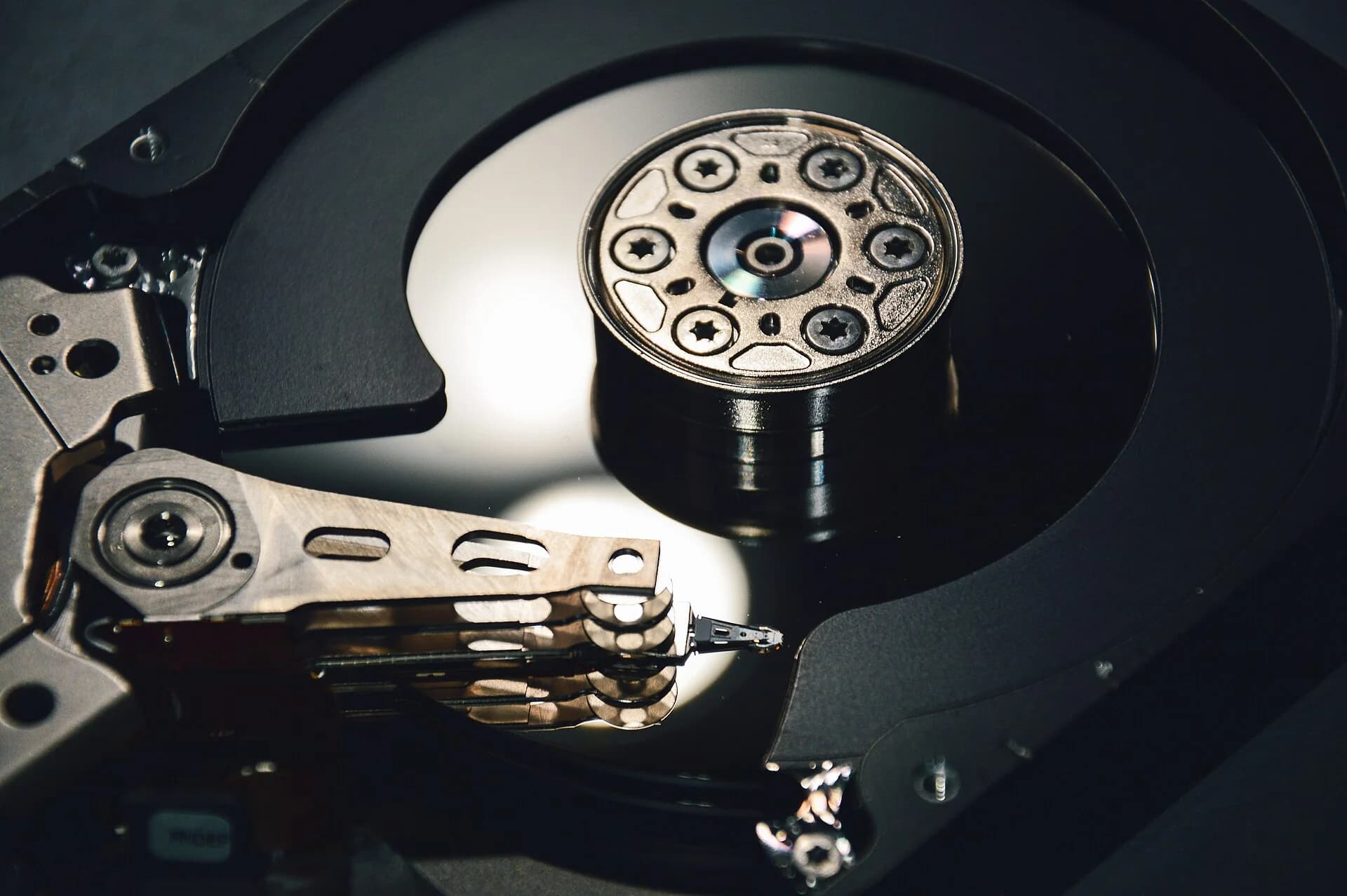
The moving parts explain the HDD's strengths and weaknesses. Mechanical seeking makes each random access take several milliseconds, so loading many small files is slow. Moving parts can be damaged if the drive is dropped while running, and the motor uses power and makes noise. In exchange, HDDs are the cheapest storage per gigabyte, and their capacity keeps growing. The first commercial hard drive, the IBM 350 of 1956, held about 5 million characters on fifty 24-inch disks and took about 600 milliseconds on average to find a record; the highest-capacity drives on sale in 2025 held 36 TB, over seven million times as much.
Sources: Wikipedia, "IBM 305 RAMAC" and "Hard disk drive", October 2026.
Most other modern storage devices use flash memory, which stores bits as electric charge.
Flash cells wear out: each block can be erased and rewritten only a limited number of times before it becomes unreliable. A controller chip spreads the writes evenly over all the blocks (wear levelling), so a modern drive lasts many years of normal use. Flash is also more expensive per gigabyte than an HDD, although the gap has narrowed.
An SSD has no head to move and no platter to wait for, so any block can be reached in microseconds. Computers start, open programs and load files much faster from an SSD than from an HDD. SSDs are also silent, lighter, more resistant to knocks and use less power, which suits laptops and phones. Internal SSDs connect to the board directly or through a cable; external SSDs plug in through USB or Thunderbolt.
Cheap devices often use a simpler form of flash soldered straight onto the circuit board.
eMMC is small, cheap and uses little power, so it is common in budget smartphones, tablets, Chromebooks and embedded devices such as smart TVs. It is slower than an SSD and cannot be replaced or upgraded, because it is soldered in place; if it fails, the whole board must be repaired.
Two small, removable forms of flash storage carry data between devices.
USB flash drives are cheap and convenient for moving files between computers, but they are easily lost, which is a security risk if the data is not encrypted, and they are usually slower and less durable than an SSD.
Memory cards are tiny, light and use very little power, which suits battery-powered devices. Cards are rated by their minimum write speed, so a camera recording high-resolution video needs a card that can store data as fast as the video arrives.
Optical discs store data as patterns read by a laser.
The laser reflects differently from pits and lands, and the drive turns these changes into bits. Shorter laser wavelengths allow smaller pits: a CD holds about 700 MB, a single-layer DVD 4.7 GB, and a Blu-ray disc 25 GB per layer, using a 405-nanometre blue-violet laser. Optical discs are cheap to mass-produce and suit distributing films and software, and pressed discs last a long time. Their capacity is small compared with modern drives, access is slow, and most laptops no longer have an optical drive, so they are now used mainly for films, games consoles and archives.
Storage does not have to be inside, or plugged into, the computer that uses it.
A NAS is a small dedicated computer with its own drives. Family members can share photos, an office can keep its documents in one place, and every computer on the network can back up to it automatically. Many NAS boxes copy data across two or more drives so that the failure of one drive loses nothing. Access is limited by the speed of the network, and a NAS is only reachable while the network is working.
Device | Internal or external | Technology | Speed | Cost per GB | Durability and portability | Typical scenario |
|---|---|---|---|---|---|---|
HDD | Both | Magnetic platters, moving heads | Slow (ms per random access) | Lowest | Moving parts, damaged by drops; heavy | Large archives, backups, cheap bulk storage, servers storing large files |
SSD | Both | Flash, controller | Fast (µs per access) | Medium | No moving parts, shock-resistant, light | Operating system and programs in laptops and desktops; fast portable backups |
eMMC | Internal only | Flash soldered to the board | Slower than SSD | Low | Cannot be removed or upgraded | Budget phones, tablets, Chromebooks, smart TVs |
Optical disc | External (drive may be built in) | Laser reading pits and lands | Slow | Very low for mass-produced discs | Discs scratch; light | Distributing films and games; long-term archives |
USB flash drive | External | Flash | Moderate | Medium | Very portable; easily lost | Moving files between computers |
Memory card | External (removable) | Flash | Moderate (rated write speeds) | Medium | Tiny, light, low power | Cameras, drones, phones, consoles |
NAS | External (on the network) | Several HDDs or SSDs in a networked box | Limited by the network | Medium (box plus drives) | Stays in one place; drives can be mirrored | Shared family or office files, automatic backups |
Files are often much larger than they need to be. A photo straight from a camera sensor, an hour of uncompressed audio or a film stored frame by frame would fill storage quickly and take a long time to send over a network. Compression reduces the number of bits needed.
Compression is possible because most data is predictable. Text repeats words, images contain large areas of similar colour, and sound changes smoothly. A compression method describes the data in a shorter way that takes advantage of these patterns.
A compression ratio of 10 : 1 means the compressed file is a tenth of the original size. A ratio below 1 means the "compressed" version is larger than the original, which can happen when the method does not suit the data.
Compression methods fall into two groups, depending on whether the original can be rebuilt exactly.
Lossless compression is essential where every bit matters. A program with one wrong bit may crash, a spreadsheet with one changed digit gives wrong totals, and a compressed text file must decompress to exactly the same text. ZIP archives, PNG images and FLAC audio are lossless. Ratios are modest, often around 2 : 1 for text, because only genuine repetition can be removed.
Lossy compression can make files far smaller, because it discards detail as well as repetition. Human eyes and ears are much less sensitive to some kinds of detail than others: fine changes in colour, very high pitches, or sounds hidden behind louder ones. JPEG images, MP3 and AAC audio, and H.264 video are lossy. The amount of loss can be chosen: a higher compression setting gives a smaller file and a lower quality.
The JPEG quality comparison shows the same photograph saved at quality settings that decrease from right to left. The right side is close to the original; towards the left, blocks of 8 × 8 pixels become visible and fine detail disappears.

Lossless | Lossy | |
|---|---|---|
Original restored exactly? | Yes | No: an approximation |
Typical compression ratio | Modest (often about 2 : 1) | High (10 : 1 or more) |
What is removed | Repetition and redundancy only | Redundancy and detail people barely perceive |
Can be repeated without further loss? | Yes | No: each re-save loses more quality |
Suitable for | Text, program code, executables, spreadsheets, medical and legal records, images that must stay exact | Photos, music, video, video calls, streaming |
Examples | ZIP, PNG, FLAC | JPEG, MP3, AAC, H.264 |
Run-length encoding is one of the simplest lossless methods, and it shows clearly how compression uses repetition.
A row of pixels from a black-and-white image might be 6 white pixels, 3 black, 11 white and 2 black. Instead of storing all 22 values, RLE stores four (count, value) pairs. The RLE diagram shows the runs and their encoding.
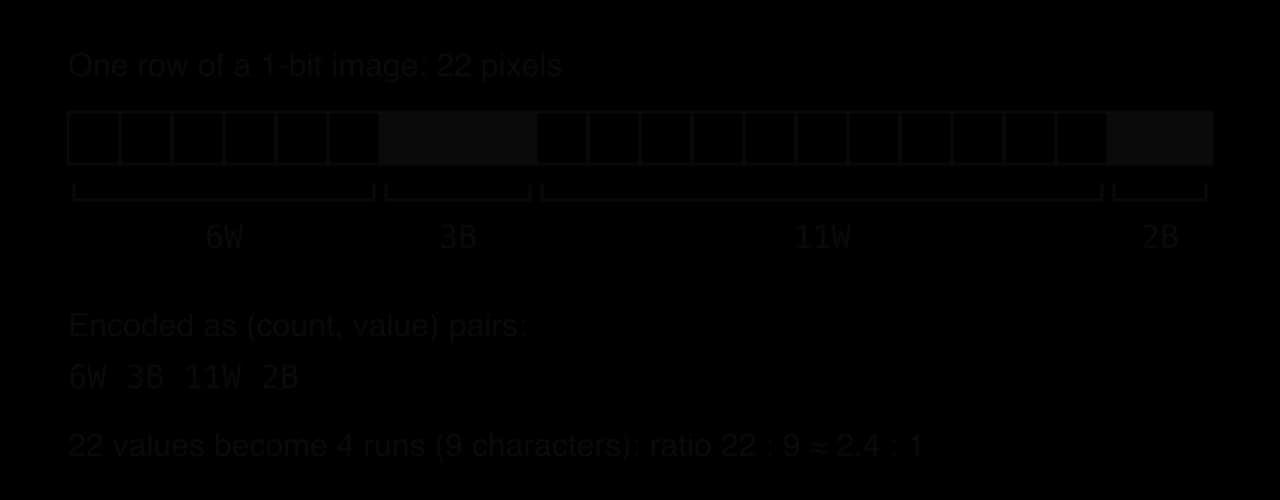
To encode, read the data from the start, counting how many times each value repeats before it changes; when it changes, write the count and the value, and start counting again. To decode, read each pair and write the value the given number of times. Both steps are exact, so RLE is lossless.
RLE works well when data has long runs: simple graphics with large areas of one colour, icons, scanned documents (mostly white), and the long runs of zeros that appear inside other compression methods. Fax machines use run-length-based coding because a faxed page is mostly white space. RLE works badly on photographs and other data where neighbouring values usually differ: every run has length 1, so each value becomes a pair and the "compressed" data can be twice the size.
The two RLE procedures are short algorithms. The Python program encodes a row of pixels written as W and B characters, prints the compressed form and its length, checks that decoding gives back the original exactly, and finally encodes data with no runs. Both functions use hand-written loops; counts can have more than one digit, so the decoder collects digits until it reaches a letter.
def rle_encode(data):
    if data == "":
        return ""
    result = ""
    count = 1
    for i in range(1, len(data)):
        if data[i] == data[i - 1]:
            count = count + 1
        else:
            result = result + str(count) + data[i - 1]
            count = 1
    result = result + str(count) + data[len(data) - 1]
    return result


def rle_decode(code):
    result = ""
    digits = ""
    for ch in code:
        if ch.isdigit():
            digits = digits + ch
        else:
            for _ in range(int(digits)):
                result = result + ch
            digits = ""
    return result


row = "WWWWWWBBBWWWWWWWWWWWBB"
packed = rle_encode(row)
print(packed)
print(len(row), "->", len(packed))
print(rle_decode(packed) == row)
print(rle_encode("WBWBWB"))public class Rle {
public static String rleEncode(String data) {
if (data.isEmpty()) {
return "";
}
String result = "";
int count = 1;
for (int i = 1; i < data.length(); i++) {
if (data.charAt(i) == data.charAt(i - 1)) {
count = count + 1;
} else {
result = result + count + data.charAt(i - 1);
count = 1;
}
}
result = result + count + data.charAt(data.length() - 1);
return result;
}
public static String rleDecode(String code) {
String result = "";
String digits = "";
for (int i = 0; i < code.length(); i++) {
char ch = code.charAt(i);
if (Character.isDigit(ch)) {
digits = digits + ch;
} else {
int count = Integer.parseInt(digits);
for (int j = 0; j < count; j++) {
result = result + ch;
}
digits = "";
}
}
return result;
}
public static void main(String[] args) {
String row = "WWWWWWBBBWWWWWWWWWWWBB";
String packed = rleEncode(row);
System.out.println(packed);
System.out.println(row.length() + " -> " + packed.length());
System.out.println(rleDecode(packed).equals(row));
System.out.println(rleEncode("WBWBWB"));
}
}The Java version compares strings with equals, because == compares references rather than contents, and prints true in lower case where Python prints True. The Python output is:
6W3B11W2B
22 -> 9
True
1W1B1W1B1W1B
The 22-character row shrinks to 9 characters, and decoding restores it exactly. The last line shows the weakness of RLE: 6 characters with no runs become 12.
Lossy methods for photos, audio and video are built on a different idea. Instead of storing the values themselves, they first change (transform) the data into a form in which the important information is concentrated in a few numbers and the unimportant detail in many small ones.
In an image, low frequencies describe gradual changes, such as the smooth shading of a sky; high frequencies describe sharp, fine detail, such as individual hairs. Human vision is much more sensitive to the gradual changes than to small amounts of fine detail. Once an image block is described as a mixture of frequencies, the high-frequency parts can be stored roughly or dropped with little visible effect.
The DCT itself loses nothing, because the original block can be rebuilt exactly from all its coefficients. Information is lost only in the next step, quantisation.
In JPEG the image is cut into 8 × 8 pixel blocks. Each block is transformed with the DCT into 64 frequency coefficients.
The coefficients are then quantised, with large steps for the high frequencies, so most of the high-frequency coefficients become zero. The coefficients are listed in a zigzag order that puts the zeros together, and the long runs of zeros are compressed losslessly with run-length coding, followed by a further lossless code. The quality setting in an image editor controls the quantisation step sizes: larger steps give more zeros, a smaller file and more visible blocks. Typical JPEG compression is about 10 : 1 with a loss of quality that is usually acceptable for photographs. MP3 and AAC audio work the same way with sound frequencies, discarding those the ear cannot hear well.
Step | What happens | Lossless or lossy? |
|---|---|---|
1. Split | The image is divided into 8 × 8 pixel blocks | Lossless |
2. Transform | The DCT turns each block into 64 frequency coefficients | Lossless (reversible) |
3. Quantise | Coefficients are rounded to coarse steps, larger for high frequencies; many become zero | Lossy: this is where detail is lost |
4. Encode | Zigzag ordering, run-length coding of zeros, then a further lossless code | Lossless |
Source: JPEG standard (1992), as summarised by Wikipedia, "JPEG", October 2026.
Lossy compression makes the largest difference to photographs, because a raw image stores every pixel at full precision. Calculating the uncompressed size first shows how much a compression ratio saves.
 YouTube
Running a website, an app or a company's email used to mean buying servers, installing operating systems and employing people to maintain them. Cloud computing lets organisations rent these resources instead, paying only for what they use.
Cloud providers run huge data centres full of servers. Using virtualisation (subtopic A1.3), one physical server is divided into many virtual machines, each rented to a different customer. Customers can add resources within minutes when demand rises and release them when it falls, which is the main advantage over owning hardware: a shop can rent ten times as many servers for the week before a holiday sale and give them back afterwards.
Cloud services are sold at three levels, depending on how much of the system the provider manages. The "who manages what" diagram lists the layers of a computer system, from the network at the bottom to the application at the top, and shades the layers the provider looks after.
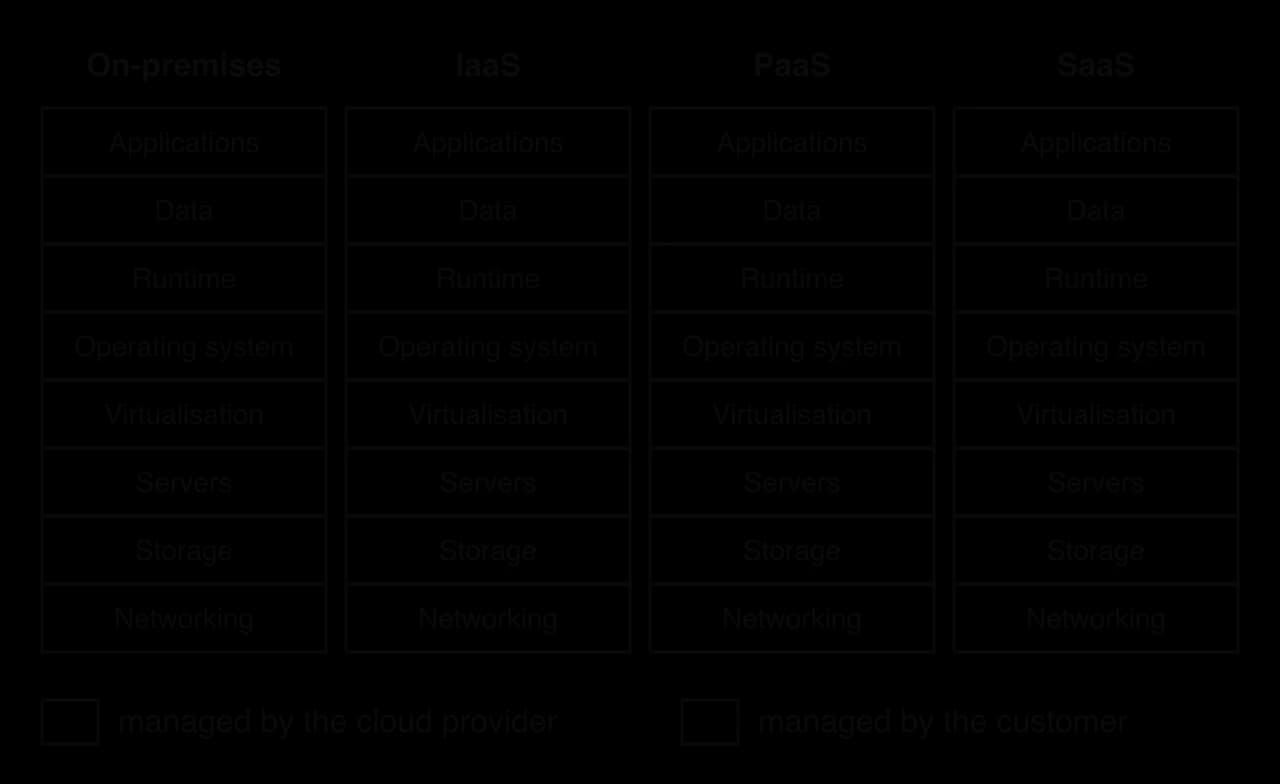
IaaS gives the most control. The customer chooses the operating system, installs any software and configures it exactly as needed, but must also apply security updates, set up backups and fix problems. It suits organisations with technical staff and special requirements: a start-up running its own database software, a research group needing particular GPU drivers, or a company moving existing servers into the cloud without rewriting them.
With PaaS, developers upload their code and the platform runs it, scaling it up automatically when more users arrive. Nobody in the customer's team installs operating systems or patches servers, so a small team can launch an app quickly. In return the customer gives up control, because only the languages, versions and settings the platform supports can be used, and moving the app to another provider may require changes.
SaaS needs no installation and no technical staff. Users log in from any device, updates arrive automatically, and the provider handles security and backups of the system. The customer controls only their own data and settings: they cannot change how the software works, and they depend completely on the provider's decisions about features, prices and data storage.
The three models trade control against convenience. The more layers the provider manages, the less the customer can customise, but the less work and expertise the customer needs.
IaaS | PaaS | SaaS | |
|---|---|---|---|
Customer manages | OS, runtime, applications, data | Applications and data | Only their data and settings |
Control and flexibility | Highest: any OS, any software, any configuration | Medium: any app, within the platform's languages and tools | Lowest: use the software as provided |
Technical skill needed | High (system administration) | Medium (programming) | Low (ordinary users) |
Resource management | Customer chooses and scales VMs and storage, often with automatic rules | Platform scales the app automatically | Provider handles all scaling invisibly |
Resource availability | Depends on the customer's setup as well as the provider | Mostly the provider's responsibility | Entirely the provider's responsibility |
Typical user | IT teams, start-ups with special needs | Software developers | Schools, businesses, individuals |
Example | Amazon EC2 | Google App Engine | Microsoft 365 |
Resource management is about who decides how much computing power, memory and storage is used. With IaaS the customer picks the size and number of virtual machines and pays for them while they run, even if they sit idle; with SaaS the customer pays per user and never sees the servers. Resource availability is about whether the service is there when it is needed. Cloud providers spread services across many data centres, so a failure in one need not stop the service, but customers depend on the provider's internet connection and its reliability. These promises are written into a contract.
Availability is usually stated as a percentage of time. 99.9% sounds close to perfect, but over a year it still allows almost nine hours of downtime.
At 99.99% the allowance falls to about 53 minutes a year. Customers running critical services, such as hospital records or payment systems, look closely at these figures and at what happens when the provider misses them; usually the compensation is service credit, not payment for the business lost.
The cloud's benefits are scalability (resources grow and shrink with demand; see scalability, subtopic A2.2), pay-per-use pricing (no large upfront cost for hardware that may sit unused), availability (services spread over data centres in many countries) and reduced maintenance (the provider replaces failed disks and applies hardware fixes). The risks are dependence on an internet connection, ongoing costs that can exceed the price of owning hardware for steady workloads, the security of data held by another organisation, legal questions about which country's laws apply to data stored abroad (data sovereignty, subtopic A2.1) and the difficulty of leaving a provider.
Lock-in grows with the level of service. An IaaS virtual machine running a standard operating system can usually be moved; an app built on one provider's PaaS tools, or years of documents in one SaaS product, may need major work to move. Organisations reduce the risk by using standard formats, keeping their own backups and avoiding provider-specific features where possible.
AWS shows the scale of the cloud market. Its first services, the S3 storage service and the EC2 virtual machine service, launched in 2006, and by early 2023 AWS held the largest share of the cloud infrastructure market.
Provider | Share of cloud infrastructure market, Q1 2023 |
|---|---|
Amazon Web Services (AWS) | 31% |
Microsoft Azure | 25% |
Google Cloud | 11% |
Source: Synergy Research Group, Q1 2023, via Wikipedia, "Amazon Web Services", October 2026.
Three providers holding about two-thirds of the market means that an outage at one of them affects thousands of companies at once, and that moving away from one is a significant decision, which is the vendor lock-in risk at the scale of a whole industry.
The Apple M1, launched in November 2020 for Mac computers and later used in iPads, is a system on a chip that combines CPU cores, caches, a GPU, a neural-network co-processor, memory and storage controllers on one piece of silicon. It combines multi-core processing, several levels of cache, co-processors and unified memory in one design.
Component | Apple M1 | Concept |
|---|---|---|
Transistors | About 16 billion | Transistor |
CPU cores | 8: 4 high-performance "Firestorm" cores and 4 energy-efficient "Icestorm" cores | Multi-core processor |
Cache, performance cores | 192 KB L1 instruction cache and 128 KB L1 data cache per core; 12 MB L2 shared by the four | Cache levels |
Cache, efficiency cores | 128 KB L1 instruction and 64 KB L1 data cache per core; 4 MB shared L2 | Cache levels |
System-level cache | 8 MB, shared by the CPU cores and the GPU | Shared outer cache (like L3) |
GPU | Up to 8 cores, each with 16 execution units of 8 ALUs: up to 1,024 ALUs | GPU, SIMD |
Neural Engine | 16 cores, up to 11 trillion operations per second | Co-processor |
Memory | 8 GB or 16 GB of LPDDR4X RAM in the same package, shared by all processors (68.25 GB/s) | Unified memory (HL) |
Other controllers | Storage (NVM Express) controller for the SSD, image signal processor, USB4/Thunderbolt controller | SoC |
Source: Wikipedia, "Apple M1", October 2026, citing Apple's specifications.
Heterogeneous cores. The M1 has two kinds of CPU core. The performance cores have large caches and complex control logic to run demanding tasks quickly; the efficiency cores are simpler and use far less power. The operating system sends background tasks, such as checking email, to the efficiency cores and demanding tasks, such as compiling code, to the performance cores. This applies the multi-core idea with cores of different designs, so that battery life and speed are both improved.
Caches. The L1 caches of the performance cores are unusually large: 192 KB for instructions alone. A larger L1 means more cache hits at the fastest level, which lets each core keep its pipeline busy. The 12 MB L2 is shared by the four performance cores, and an 8 MB system-level cache is shared with the GPU, a clear example of the memory hierarchy: small and private close to each core, larger and shared further away.
Co-processors. The GPU handles graphics and parallel calculations, the 16-core Neural Engine runs machine learning models such as photo recognition and speech processing, and the image signal processor handles the camera. Each is far more efficient at its own job than the CPU cores, which are left free for general work.
Evaluation. Integration gave the M1 high performance per watt, as the power measurements of two Mac mini models show.
Computer | Power when idle | Power at maximum load |
|---|---|---|
Mac mini (2020), Apple M1 | about 7 W | about 39 W |
Mac mini (2018), six-core Intel Core i7 | about 20 W | about 122 W |
Source: Wikipedia, "Apple M1", October 2026.
Integration also has costs. Nothing on the chip can be upgraded or repaired separately, a failure of one part means replacing the whole board, and devices that cannot be upgraded tend to be replaced sooner, adding to electronic waste. The M1 shows the general trade-off of an SoC: speed and efficiency gained by placing components close together, at the price of flexibility.
A1.1 is examined in Paper 1 Section A, in extended-response questions built around a scenario, with parts of increasing difficulty. A1.1 questions contain no program code, although you may be asked to trace register contents or encode data by hand. HL papers use the same questions with extra parts on the HL-only statements (CPU vs GPU, pipelining in multi-core architectures).
Describe (AO2) is used for CPU components, the GPU's role, the fetch–decode–execute cycle, secondary storage, compression and cloud services: give a detailed account in a logical order, naming the specific registers, buses or devices. One mark per accurate, relevant point is typical.
Explain (AO3) is used for primary memory and, at HL, CPU vs GPU differences: each point needs a reason or consequence ("so", "because", "this means").
Recurring shapes: identify the registers used in the fetch stage [2]; describe the role of the MAR or MDR [2]; describe the fetch–decode–execute cycle [4–6]; draw or label a CPU block diagram with buses [3–4]; explain how cache improves performance with reference to hits and misses [4]; outline an advantage of one storage device for a scenario [2]; compress a string with RLE [2]; distinguish lossy and lossless compression [2–4]; describe why an organisation would choose IaaS, PaaS or SaaS [3–4]. HL: explain two differences between CPU and GPU architecture [4–6]; describe how pipelining improves throughput [4], possibly with a timing chart.
Calculations appear in "Calculate" parts: address bus capacity, storage sizes, compression ratios, pipeline cycles (HL). Show the working, because method marks are usually available.
The model answers in (b) and (c) follow the same pattern: each mark is a separate, specific step or a cause followed by its effect.
Compression questions often mix the two methods.
State the purpose of the accumulator (AC). [1]
Identify the bus that carries memory addresses, and state its direction. [2]
Outline the difference between a cache hit and a cache miss. [2]
Explain why a computer needs both ROM and RAM. [4]
Construct the run-length encoding of the pixel row BBBBBWWBBBBBBBBW, using the format count then value, and calculate the compression ratio (one character as one unit). [3]
Describe two scenarios in which an HDD would be chosen instead of an SSD. [4]
Describe how transform coding reduces the size of an image file. [4]
A start-up has its own customised database software that needs a specific operating system. Outline why IaaS is more suitable for it than SaaS. [3]
(HL only) A four-stage pipeline (F, D, E, WB) runs 20 instructions with no hazards. Calculate the number of clock cycles needed, and describe one situation that would make the pipeline take longer. [4]
(HL only) Explain two differences between the architecture of a CPU and a GPU. [4]
It holds the result of the most recent ALU operation (and supplies an input to the next operation). [1]
The address bus [1]; one-way, from the CPU (MAR) to memory [1].
A cache hit is when the requested data/instruction is found in the cache [1]; a cache miss is when it is not, so it must be fetched from a slower level such as RAM [1].
ROM is non-volatile, so it keeps the bootstrap program when the power is off [1], which is needed to start the computer and load the OS [1]. RAM is volatile but can be read and written quickly [1], so it holds the OS, running programs and their data while the computer is on [1].
Runs: 5 B, 2 W, 8 B, 1 W, so 5B2W8B1W [2]. Ratio: 16 : 8 = 2 : 1 [1].
Award [1] for the scenario and [1] for the reason, twice: storing large archives or backups (photos, video, surveillance footage), because HDDs have the lowest cost per gigabyte for very large capacities; a NAS or server storing large files that are read sequentially, because high capacity matters more than access time; a desktop computer on a tight budget that needs a lot of storage.
The image is divided into blocks (8 × 8 pixels) [1]; each block is transformed (with the DCT) into frequency components [1]; high-frequency components, which the eye notices least, are quantised/rounded so that many become zero [1]; the remaining values, with long runs of zeros, are encoded compactly (e.g. with run-length coding) [1].
The start-up needs to install its own software and choose the operating system [1]; IaaS gives control of the OS and everything above it [1], whereas SaaS only provides the provider's ready-made application, which cannot be replaced or customised [1].
cycles [2]. A data hazard (an instruction needs a result that an earlier instruction has not yet written back, so it stalls) or a branch that is taken (the pipeline is flushed and refilled) [2].
Award [2] for each explained difference (feature plus consequence), up to [4]: a CPU has a few complex cores with branch prediction, so it runs sequential, branching code quickly, whereas a GPU has thousands of simple cores, so it runs many identical operations in parallel; a CPU has large caches per core to reduce latency, whereas a GPU has small caches and relies on high-bandwidth memory and many threads to keep its cores busy.
The CPU fetches, decodes and executes machine-code instructions. The control unit decodes instructions and sends control signals; the ALU performs arithmetic and logic; registers (PC, IR, MAR, MDR, AC) hold the values being worked on.
The address bus (one-way, CPU to memory) carries addresses, and its width sets the addressable locations; the data bus (two-way) carries data and instructions; the control bus carries read, write, clock and interrupt signals.
In the fetch–decode–execute cycle: PC → MAR → address bus; read signal on the control bus; instruction returns on the data bus to the MDR → IR; PC incremented; CU decodes opcode and operand; execute uses the ALU and the AC or writes back to memory.
Multi-core processors run several instruction streams in parallel; co-processors such as GPUs and neural engines take specialised tasks; an SoC places them on one chip. Gains are limited by sequential code and shared resources.
A GPU has thousands of simple cores working in SIMD fashion with high-bandwidth memory, suiting graphics, machine learning and simulations. (HL) CPUs are latency-optimised and GPUs throughput-optimised; they cooperate through task division, data sharing and coordinated execution.
Primary memory: registers, cache (L1, L2, L3), RAM (volatile, read/write) and ROM (non-volatile, firmware and the bootstrap program). Cache works because of locality of reference; hits are fast, misses fetch from slower levels.
(HL) Pipelining overlaps fetch, decode, execute and write-back so throughput approaches one instruction per cycle; hazards stall or flush the pipeline. Each core of a multi-core processor runs its own pipeline in parallel; shared resources and sequential code limit the speed-up (Amdahl's law, an extension, calculates the limit).
Secondary storage is non-volatile: HDDs (cheap, large, slow, moving parts), SSDs and eMMC (flash, fast, no moving parts), optical discs, USB flash drives, memory cards and NAS, each matched to scenarios.
Lossless compression (such as RLE) restores data exactly; lossy compression (such as JPEG's transform coding with the DCT and quantisation) discards barely noticed detail for much higher compression ratios.
IaaS, PaaS and SaaS hand progressively more of the system to the provider: control and flexibility fall, convenience rises; SLAs define availability, and vendor lock-in is a risk.
I can draw and label a CPU block diagram with the CU, ALU, five named registers and three buses, showing each bus's direction.
I can state what the PC, IR, MAR, MDR and AC each hold, and avoid confusing the MAR with the MDR.
I can calculate the number of addressable locations from the width of an address bus.
I can describe each step of the fetch–decode–execute cycle in order, naming the register and bus used.
I can trace register contents for a short LOAD, ADD, STORE program.
I can explain why more cores do not always make a program proportionally faster.
I can describe what a co-processor and an SoC are, with examples.
I can describe the architecture of a GPU and give three scenarios where it helps, with reasons.
I can explain the purposes of registers, cache, RAM and ROM, and what volatile and non-volatile mean.
I can explain cache hits, cache misses and locality of reference, and calculate an average access time from a hit rate.
I can match HDD, SSD, eMMC, optical, USB flash drive, memory card and NAS storage to suitable scenarios, with reasons.
I can encode and decode data with RLE, calculate a compression ratio, and say when RLE makes data larger.
I can describe how transform coding and quantisation make JPEG files smaller, and why the process is lossy.
I can compare IaaS, PaaS and SaaS in terms of control, flexibility, resource management and availability, and choose one for a scenario.
I can draw a pipeline timing chart, calculate pipelined cycle counts and explain pipeline hazards. (HL only)
I can explain the differences between the CPU and GPU and how they work together, including unified memory. (HL only)
Award [1] for the point and [1] for the development.
The CPU runs the operating system / controls the computer;
and coordinates the GPU / sends it data and instructions;
The CPU handles sequential / branching tasks;
such as loading and preparing the training data, saving results;
A warehouse security camera records colour video. Each frame is an uncompressed bitmap of 1280 × 720 pixels with a colour depth of 24 bits. In this question, 1 MB = 1 000 000 bytes.
Calculate the size, in MB, of one frame.
3 marks
The camera records 25 frames per second. Calculate the storage needed for 10 seconds of this uncompressed video.
2 marks
The manager suggests reducing the colour depth to 8 bits. Explain the effect of this change on the storage needed and on the recorded images.
3 marks
Outline how a video file represents moving images in binary.
2 marks
The company decides to compress the footage. Identify whether lossy or lossless compression is more suitable, and justify your choice.
2 marks
A film streaming service stores its films in Full HD: 1920 × 1080 pixels per frame, 24-bit colour, at 30 frames per second.
State what is meant by the frame rate of a video.
1 mark
Calculate the size, in bytes, of one uncompressed frame.
2 marks
Calculate the data rate, in bits per second, of the uncompressed video (ignore sound).
2 marks
Explain why the service must compress its films before streaming them to customers.
3 marks
Outline how the soundtrack of a film is stored alongside the frames.
2 marks