
Describe the types of computers and how their hardware, interfaces and software work together, explain how coding instructs them, and evaluate how computing has evolved and become ubiquitous in everyday life.
Each is in the Digital Society glossary, with every other term in the subject.
Programs that let users carry out specific tasks, such as writing documents, editing photos, browsing the web or playing games; on mobile devices these are usually called apps.
The part of the CPU that performs calculations, such as addition and comparison, and logical decisions.
The main processor of a computer, which fetches, decodes and executes program instructions and controls the other components.
The number of processing cycles a CPU completes each second, measured in gigahertz; 3 GHz means three billion cycles a second.
Writing instructions for a computer in a programming language, following that language's rules, so that the computer can carry out a task.
A text-based interface in which the user types commands for the computer to carry out.
A program that translates the whole of a program's source code into machine code before it is run, producing a file that can be executed without the source code.
A programmable machine that automatically executes sets of instructions to input, process, store and output data.
A computer built into a larger device to perform one dedicated function, usually with fixed software, such as the controller in a washing machine, a car's brakes or a pacemaker.
Software stored permanently in a device's ROM or flash memory that controls its basic functions, such as starting a computer and loading the operating system.
Stages in the history of computers, each marked by a major change in the underlying technology: vacuum tubes, transistors, integrated circuits, microprocessors and artificial intelligence.
An interface in which users interact with visual elements, such as windows, icons, menus and buttons, using a pointer or touch.
A processor designed to perform many simple calculations at the same time, originally to draw images and video on a screen and now also used to train AI models.
An interface that communicates with the user through the sense of touch, for example through vibration, force or texture, and may also detect the user's touch and movement.
The physical components of a computer system, such as the processor, memory, storage, circuit boards and input and output devices.
A programming language, such as Python or JavaScript, that uses words and structures close to human language and mathematics and must be translated into machine code to run.
Hardware that sends data or commands into a computer, such as a keyboard, mouse, touchscreen, microphone or camera.
A program that translates and executes source code one statement at a time, every time the program runs.
Binary instructions that a CPU can execute directly; every program must be translated into machine code before it can run.
A large, powerful and highly reliable computer designed to process very large numbers of transactions and serve thousands of users at the same time, used by banks, airlines and governments.
Software designed to damage or disrupt a computer system, gain unauthorised access to it, or steal data from it without the owner's consent, such as viruses, worms, trojans, ransomware and spyware.
The observation, made by Gordon Moore in 1965 and revised in 1975, that the number of transistors on a chip doubles about every two years, while the cost per transistor falls.
The main circuit board of a computer, which holds the processor and memory and connects every other component through circuits and sockets.
System software that manages a computer's hardware and resources, provides common services to applications and provides the user interface, such as Windows, macOS, Linux, Android or iOS.
Hardware that presents the results of processing to a user or another system, such as a screen, speaker, printer or vibration motor.
A general-purpose computer intended to be used by one person at a time, such as a desktop or laptop.
Encryption methods designed to stay secure even against attacks by future large quantum computers.
The component that converts electricity from the mains or a battery into the steady, low-voltage direct current that a computer's parts need.
A type of computing that uses the principles of quantum physics, such as superposition and entanglement, to process information in ways that ordinary computers cannot.
The basic unit of information in a quantum computer; unlike a bit, it can exist in a combination (superposition) of 0 and 1 until it is measured.
The computer's main working memory, which holds the programs and data currently in use; it is fast but volatile, so its contents are lost when the power is switched off.
Non-volatile memory whose contents are written during manufacture and are not normally changed, used to hold firmware such as the instructions that start the computer.
An input device that measures a physical property, such as temperature, light, movement, pressure or location, and converts it into data a computer can process.
A computer, or a program running on one, that provides data, resources or services to other computers, called clients, across a network.
A complete computer built on one small circuit board, with its processor, memory and connections all on the board, such as the Raspberry Pi.
A mobile phone with an operating system, apps, sensors and internet access that make it a general-purpose, pocket-sized computer.
The programs, instructions and associated data that tell a computer's hardware what to do.
A storage device that keeps data in flash memory chips with no moving parts, making it faster, quieter and tougher than a hard disk drive.
Hardware that keeps data and programs permanently, even when the power is off, such as a hard disk drive, a solid-state drive or a memory card.
The fastest class of computer, linking thousands of processors to solve one very large problem, such as a weather forecast or a climate model.
A single chip that combines a computer's main components, such as the CPU, GPU and memory controller, used in smartphones, tablets and single-board computers.
A portable, touchscreen computer, larger than a phone and usually without a physical keyboard, controlled mainly by touch.
A tiny semiconductor switch that controls the flow of electricity; transistors are the basic building blocks of every modern processor and memory chip.
The means by which a person and a computer communicate, including what the user sees, hears or feels and the controls they use to give commands.
A glass tube from which air has been removed, used in early electronic computers as a switch or amplifier; tubes were large, used a lot of power, gave off heat and often failed.
Computing devices worn on the body, such as smartwatches, fitness bands, smart rings and smart glasses, that use sensors to collect data about the wearer or their surroundings.
Define a computer and distinguish general-purpose computers from embedded systems.
Identify the main types of computers, from mainframes and servers to smartphones and wearable devices, and outline what each is used for.
Describe the role of each hardware component, including sensors, and explain how the components work together.
Distinguish between command-line, graphical, haptic and voice user interfaces.
Outline the roles of operating systems and application software, and describe the main types of malware.
Explain how coding uses languages and rules to communicate instructions to computers, and distinguish compilers from interpreters.
Describe the generations of computing, explain Moore's law and outline the potential of quantum computing.
Evaluate the impacts and implications of ubiquitous computing for people and communities.
A computer is a machine that automatically carries out sets of instructions to perform specific tasks. Computers sit inside almost every digital system in daily life, from the phone in a pocket to the servers that run a bank, so knowing what they are made of and how they work explains what these systems can and cannot do.
Computers are the physical basis of the content strand of the course. They store and process binary data (3.1), execute algorithms (3.2), connect through networks (3.4), produce digital media (3.5) and run artificial intelligence (3.6) and robots (3.7). Their history is a central example of the concept of change, and decisions about who designs, owns and controls them raise questions of power, values and ethics in every context, from health (4.4) to the environment (4.3).
With a free account, Augment remembers where you stopped and what you have practiced.
Every computer, however large or small, does four things. It takes in data (input), changes that data by following instructions (processing), keeps data and instructions for later (storage) and presents results (output). A school laptop, a supermarket checkout and a car's engine controller all follow this input–process–output–storage pattern.
The key word is programmable. A calculator from the 1970s could only do the arithmetic built into its circuits. A computer can be given new instructions, so the same machine can be a word processor in the morning and a video editor in the afternoon.
Laptops and phones are general-purpose computers: the user can install new software and use them for many different tasks. Far more computers are hidden inside other products as embedded systems, where they do one job and the user never sees them as computers at all.
A modern car contains dozens of embedded computers that control the engine, brakes and airbags, and smart thermostats, traffic lights and infusion pumps contain them too. Because embedded systems are cheap and invisible, they carry computing into places where nobody would put a laptop, which is one reason computers have become ubiquitous.
Computers are often grouped by size, power and purpose. The categories overlap, and a single digital system usually combines several types: a fitness app runs on a wearable, syncs with a smartphone and stores its data on servers.
Type | What it is | Typical users and uses | Real-world example |
|---|---|---|---|
Mainframe | A very large, highly reliable computer that processes huge volumes of transactions for many users at once | Banks, insurers, airlines and governments: payments, reservations, tax records | IBM Z series (z16, 2022) |
Server | A computer that provides data or services to other computers (clients) over a network | Websites, email, cloud storage, streaming, online games | The racks of servers in a cloud data centre |
Supercomputer | The fastest class of computer, linking thousands of processors to solve one large problem | Weather forecasting, climate models, nuclear and medical research | Frontier (USA, 2022), the first computer to pass one quintillion calculations a second |
Personal computer | A general-purpose computer for one user at a time, as a desktop or laptop | Office work, study, design, programming, gaming | Windows laptops, Apple MacBooks, Chromebooks |
Tablet | A portable computer with a large touchscreen and no built-in keyboard | Reading, media, drawing, point-of-sale systems, education | Apple iPad (2010), Samsung Galaxy Tab |
Smartphone | A mobile phone that is also a full general-purpose computer with apps, sensors and internet access | Communication, payments, navigation, photography, social media | Android phones, Apple iPhone (2007) |
Wearable | A small computer worn on the body, usually connected to a smartphone | Fitness and health tracking, notifications, payments, augmented reality | Smartwatches, fitness bands, smart rings, smart glasses |
Embedded system | A computer built into another product for one function | Vehicles, appliances, medical devices, factory machines | A car's engine control unit |
Sources: IBM; TOP500 list, 2022.
Mainframes date from the 1950s and remain in use because they are built never to stop: parts can be replaced while they keep running, and they check their own calculations for errors. For a bank, an hour of downtime would mean millions of failed payments, so reliability matters more than cost.
Servers are the hidden half of almost every online activity. When a student opens a shared document, a server stores the file, checks who may edit it and sends changes to every collaborator. Cloud companies such as Amazon Web Services, Microsoft Azure and Alibaba Cloud run millions of servers in large buildings called data centres, and rent their computing power to other organisations. This model, known as cloud computing, is examined further in 3.4.
The personal computer moved computing from specialist rooms into homes, schools and offices from the late 1970s. Chromebooks, which keep most files and software online, are now common in schools because they are cheap and easy to manage centrally.
Tablets are popular for reading, drawing and as cheap point-of-sale terminals in shops and cafés, but most people's portable computer is a phone.
Smartphones are the most common smart or mobile devices, and for most of the world's people the smartphone is now the main or only computer. In 2024 about 1.24 billion smartphones were shipped worldwide, compared with about 263 million PCs. In many low- and middle-income countries, people went straight to mobile internet without ever owning a PC, a pattern known as leapfrogging. This affects any analysis of access. A student who has a phone but no laptop can watch lessons, but may struggle to write a long essay or learn to code.
Wearables are small, low-power computers that rely heavily on sensors. A smartwatch measures movement with an accelerometer and heart rate with light sensors, then sends the data to a phone app. Their data supports health and fitness tracking (4.4), but it is also intimate and continuous, so it raises questions about who owns it and who can see it (3.1). Smart glasses such as Ray-Ban Meta glasses add cameras and microphones, which affects the privacy of people nearby as well as the wearer.
Hardware is the physical part of a computer: the parts that can be touched. Hardware and software depend on each other: software needs hardware to run on, and hardware needs software to tell it what to do.
The components work as one system. Data enters through input devices and sensors, is processed by the CPU using instructions held in memory, and leaves through output devices, while storage keeps files between sessions and the power supply keeps every part running. The component diagram shows how data moves between them.
The motherboard works like the road network of a city. Its printed copper tracks, called buses, carry data, addresses and power between the processor, memory, storage and ports. In phones and tablets most of these parts are combined into a single chip called a system on a chip (SoC), which saves space and power but makes repair and upgrading much harder.
The CPU is a microprocessor: a single chip containing billions of tiny switches called transistors. It has three main parts.
The control unit reads each instruction and sends signals that tell the other parts what to do.
The arithmetic logic unit (ALU) performs calculations (adding, comparing) and logical decisions (true or false).
Registers and cache are very small, very fast memory areas on the chip that hold the data the CPU is working on right now.
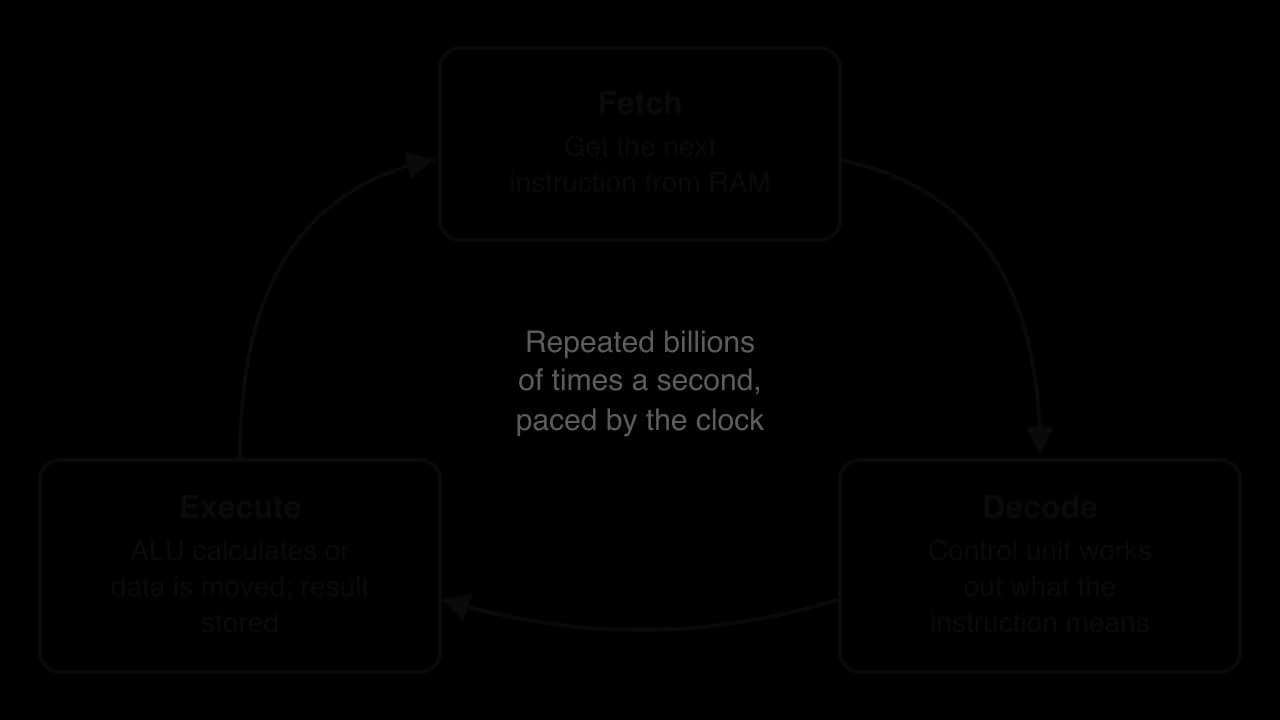
The CPU repeats one simple cycle again and again, as the fetch–decode–execute diagram shows. Each instruction is tiny, such as "add these two numbers" or "copy this value", but a modern CPU completes billions of cycles every second. Its speed depends on the clock speed (measured in gigahertz; 3 GHz is three billion cycles a second) and on the number of cores, independent processing units that can work on different tasks at the same time.
The CrashCourse video explains how a CPU fetches and executes instructions, step by step.
 YouTube
Memory holds the instructions and data a computer is using at this moment. It comes in two main kinds.
When a computer is switched on, RAM is empty. Instructions in ROM, called firmware, check the hardware and load the operating system from storage into RAM. The amount of RAM limits how many programs can run smoothly at once: a laptop with too little RAM slows down when many browser tabs are open, because data has to be swapped back and forth with slower storage.
The table compares the three ways a computer holds data.
RAM | ROM | Storage (SSD or HDD) | |
|---|---|---|---|
Purpose | Holds programs and data in use now | Holds firmware and start-up instructions | Keeps files, apps and the operating system |
Volatile? | Yes: cleared when power is off | No | No |
Typical size in a 2025 laptop | 8–32 GB | A few MB | 256 GB–2 TB |
Speed | Very fast | Fast to read | Slower than RAM; SSDs much faster than HDDs |
Can the user change it? | Contents change constantly | Rarely (firmware updates) | Yes: save, edit, delete files |
A hard disk drive (HDD) stores data magnetically on spinning disks; it is cheap per gigabyte but slow and fragile. A solid-state drive (SSD) stores data in flash memory chips with no moving parts, so it is faster, quieter and tougher, which is why phones and most new laptops use flash storage. Cloud storage keeps files on remote servers instead, which lets people reach them from any device but makes them dependent on an internet connection and on the company that runs the service.
A GPU contains thousands of small cores, while a CPU has a few powerful ones. A screen image is made of millions of pixels, and each can be calculated separately, so a GPU suits graphics. The same parallel design suits training AI models, which need billions of similar calculations. This is why Nvidia, a GPU maker, became one of the world's most valuable companies during the AI boom of the 2020s, and why access to GPUs has become a question of economic and political power between countries (4.2, 4.6).
Sound components, usually a chip on the motherboard, convert digital audio into signals for speakers and convert microphone signals into digital data.
A desktop PSU converts alternating current from the wall socket into direct current. Laptops, phones and wearables rely on batteries and charging circuits, and battery life shapes how they are designed. Power use connects computers to the environmental context (4.3): data centres need constant power and cooling, and batteries depend on mined materials such as lithium and cobalt.
Output devices turn processed data back into a form that people, or other machines, can use.
Some devices are both. A touchscreen is an output device (it displays images) and an input device (it detects touch). Assistive technologies are input and output devices designed for people with disabilities: eye-tracking cameras let people with limited movement type, and refreshable braille displays let blind users read screen text with their fingertips.
Sensors let computers respond to the physical world without a human typing anything. A typical smartphone contains an accelerometer (movement and tilt), a gyroscope (rotation), a magnetometer (compass direction), a GPS receiver (location), an ambient light sensor, a proximity sensor (which turns the screen off near the ear), a fingerprint or face sensor and several microphones and cameras.
In many systems, sensor data leads directly to an action. A smart thermostat reads the room temperature, the processor compares it with the target, and a signal switches the heating on or off. Devices that act on the physical world in this way are called actuators, and the sense–process–act pattern is the basis of robots and autonomous technologies (3.7). Because sensors collect data continuously and often without the user noticing, they are also central to debates about surveillance (3.1, 4.6).
A user interface translates between human intentions and machine instructions. The history of interfaces is largely a history of making computers accessible to more people and communities.
Early personal computers, such as those running MS-DOS in the 1980s, used a command-line interface. The user had to remember exact commands, such as copy report.txt backup, and a single typing error produced an error message. Command lines are still widely used by programmers and system administrators because they are fast, precise and easy to automate, but they are hard for beginners.
The GUI was developed at Xerox's Palo Alto Research Center, whose Alto computer (1973) used windows, icons and a mouse. Apple brought the idea to a mass market with the Macintosh in 1984, and Microsoft followed with Windows. Smartphones then replaced the mouse with the finger: the iPhone (2007) made multi-touch gestures such as pinching and swiping the main way billions of people use computers.
Through the concept of change, the GUI was a turning point. Users no longer needed to learn commands, so computers moved from specialists to office workers, children and older adults. The shift also concentrated influence in the companies whose interface designs became standard: Apple and Google decide how most of the world's smartphone screens look and behave.
Haptic feedback is everywhere in small ways: a phone vibrates when a key is pressed, a game controller rumbles during an explosion, and a smartwatch taps the wrist to give walking directions without the user looking at a screen. More advanced haptic systems apply force, so a trainee surgeon using a simulator can feel the resistance of tissue. For blind and partially sighted users, vibration patterns and braille displays turn information into touch, which makes haptics important for accessibility (4.4).
Interface | How the user gives commands | Strengths | Limitations | Example |
|---|---|---|---|---|
Command-line | Typing text commands | Fast, precise, easy to automate | Hard to learn; errors from small typing mistakes | Linux terminal, Windows PowerShell |
Graphical | Pointing, clicking, touching icons and menus | Easy to learn; visual and intuitive | Uses more processing power; hard for blind users without a screen reader | Windows, macOS, Android, iOS |
Haptic | Touch and movement; receives vibration or force | Works without looking; adds realism; supports accessibility | Limited range of information; specialised hardware can be expensive | Smartwatch taps, game controllers, surgical simulators |
Voice | Speaking commands; hears spoken replies | Hands-free; helps people with limited movement or literacy | Struggles with some accents and noisy places; privacy concerns about listening devices | Siri, Alexa, Google Assistant |
Voice interfaces, used by virtual assistants, and gesture control in virtual reality headsets continue the move towards the ways people already communicate.
Software is usually divided into system software, which runs the computer itself, and application software, which lets users carry out tasks. Firmware sits between hardware and the operating system. The layer diagram shows how a user's request passes down through each layer to the hardware and how the results return.
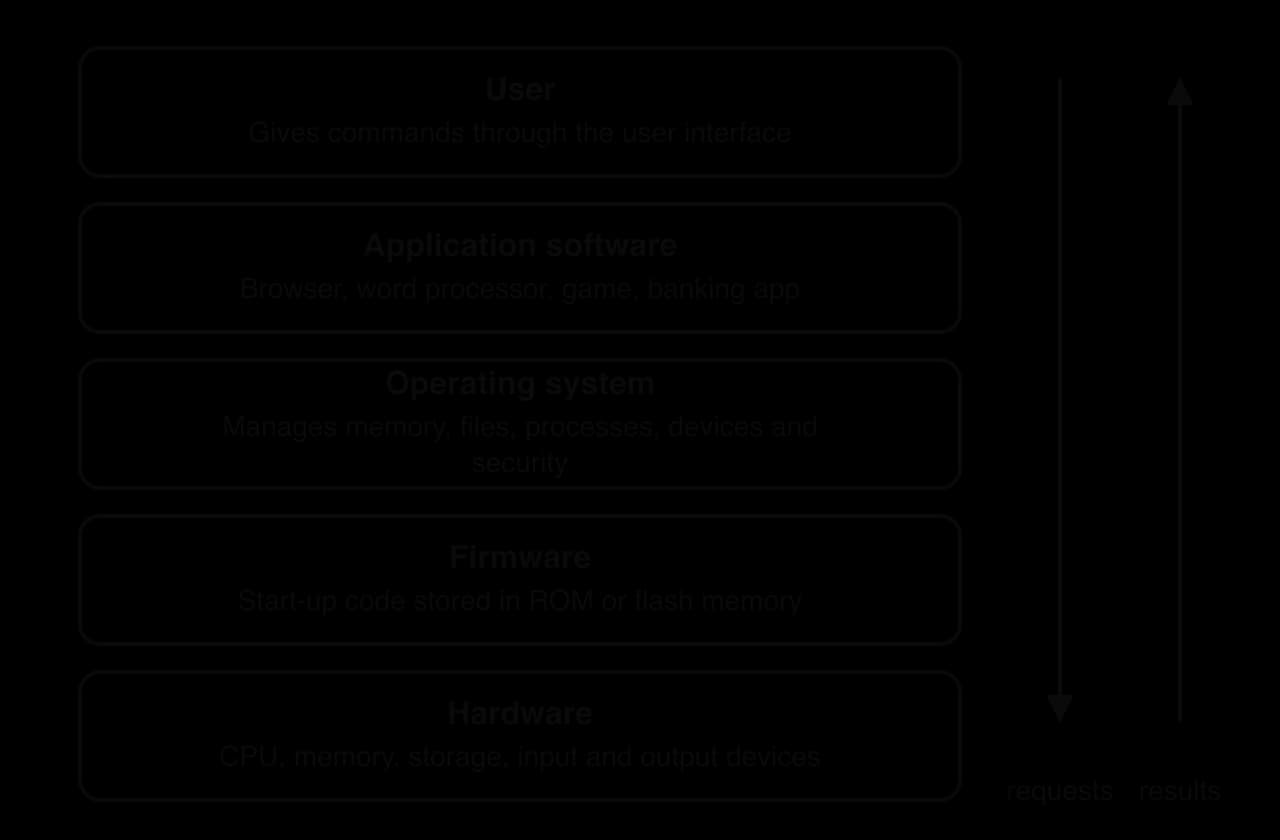
The operating system is the most important piece of software on a computer, because every other program depends on it. Its main jobs are:
Process management: deciding which program uses the CPU and when, so several programs appear to run at once (multitasking).
Memory management: giving each program its own part of RAM and stopping programs from interfering with each other.
File management: organising storage into files and folders, and controlling who can open them.
Device management: communicating with hardware such as printers and cameras through small programs called device drivers.
Security: user accounts, passwords, permissions and updates that fix weaknesses.
User interface: providing the desktop, home screen or command line.
Windows, macOS and Linux run most personal computers; Android and iOS run almost all smartphones. Linux, which is open source, also runs most of the world's servers and supercomputers. Through the concept of power, control of an operating system is a strong position. Google and Apple decide which apps their systems allow, take a commission on many app sales, and choose which data apps may collect. Regulators such as the European Union now treat these companies as gatekeepers because so many people and businesses depend on their platforms.
Application software ranges from general-purpose programs used by billions, such as web browsers and word processors, to specialist software such as hospital record systems or architectural design tools. Some software is bespoke, written for one organisation, while most is sold or given away to many users.
Mobile apps reach users through app stores, while web applications such as Google Docs run in the browser and store their data on servers. Many apps are free to download and earn money from advertising and the data they collect, which links application software to questions about privacy and platform business models (3.1, 4.2).
Malware (short for malicious software) is software written to harm, and it uses the same features as legitimate software: it runs on the CPU, uses the operating system's services and spreads through networks and storage. The main types differ in how they spread and what they do.
Type | How it spreads or gets in | What it does |
|---|---|---|
Virus | Attaches to a legitimate file or program and runs when that file is opened | Copies itself into other files; may delete or corrupt data |
Worm | Spreads by itself across networks by exploiting security weaknesses, with no user action | Uses up bandwidth; often carries other malware |
Trojan | Disguised as a useful program that the user installs willingly | Opens a hidden "back door" for attackers |
Ransomware | Usually arrives through a phishing email or an unpatched weakness | Encrypts files and demands payment for the key |
Spyware | Hidden in apps or installed through a security weakness | Secretly records activity, messages, location or keystrokes |
Adware | Bundled with free software | Shows unwanted advertisements and tracks browsing |
Spyware shows how malware can become a political tool. Pegasus, sold by the Israeli company NSO Group to government clients, could infect a phone through a "zero-click" attack, without the owner tapping anything, and then read messages and switch on the microphone. In 2021 a group of journalists working with Amnesty International published an investigation, the Pegasus Project, which found evidence of its use against journalists, activists and politicians in several countries. The wider dilemmas of hacking, ransomware and cybercrime are examined in 3.4.
A computer's processor understands only very simple instructions written in binary. Coding is the process of writing instructions in a form that can be translated into those binary instructions. Coding and programming are often used as synonyms; programming usually also includes designing the solution, testing it and fixing errors.
Every programming language has strict rules. Syntax is the set of rules about how instructions must be written (spelling, punctuation, order). Semantics is what each correctly written instruction means. A human reader can understand a sentence with a spelling mistake, but a computer cannot guess: a missing bracket stops a program from running. This is why coding demands precision, and why it is often described as communicating with a machine that takes every word literally.
Languages are grouped by how close they are to the hardware.
Machine code is binary instructions that the CPU executes directly, such as 10110000 01100001. It is fast but almost impossible for humans to write.
Assembly language replaces binary with short abbreviations such as MOV and ADD. Each line still matches one machine instruction.
High-level languages such as Python, JavaScript, Java and C++ use words and structures closer to English and mathematics. One line can stand for many machine instructions, and the same program can run on different types of computer.
Programmers write high-level source code, but the CPU can only execute machine code. Translator programs, compilers and interpreters, bridge the gap, as the translation diagram shows.
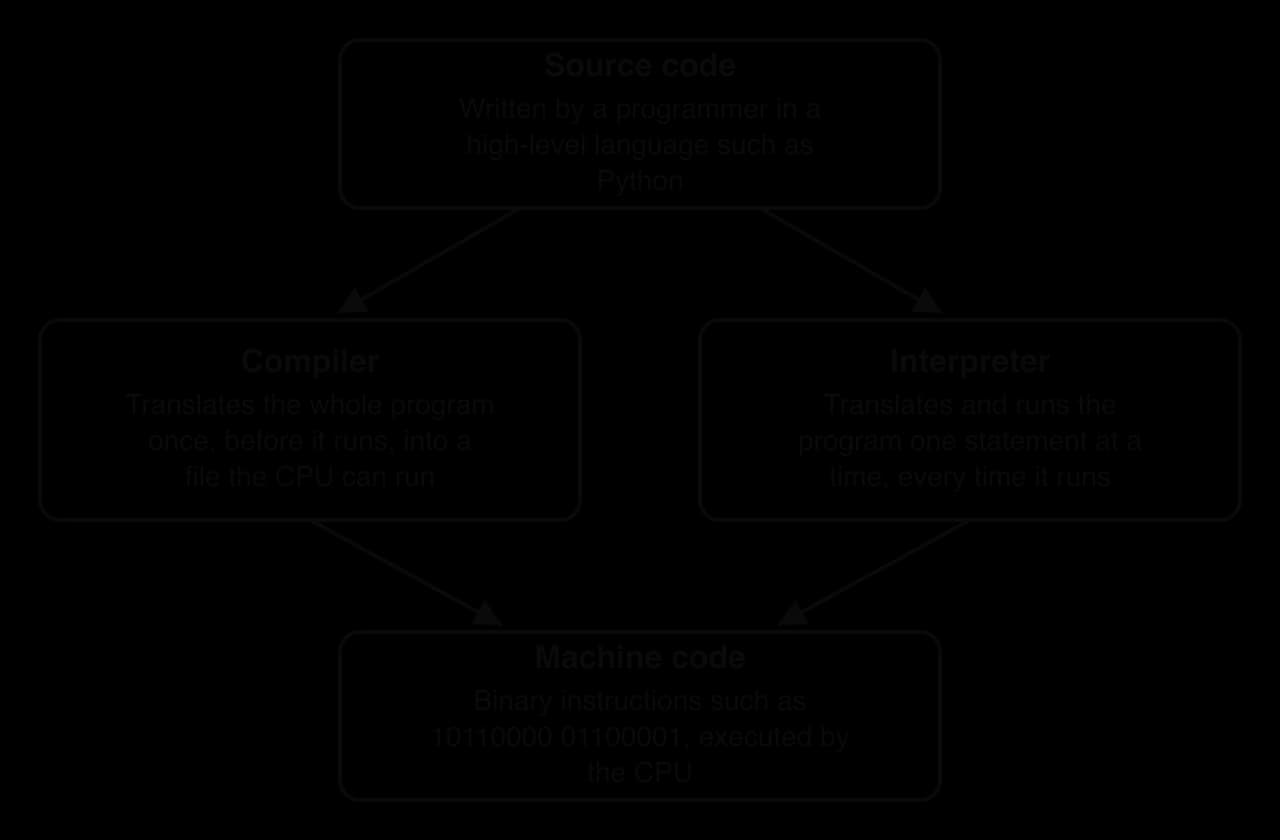
The other translator works while the program is running.
A compiler produces fast programs, and companies can distribute the compiled file without revealing their source code. An interpreter is slower, but it shows errors immediately and the same code runs on any computer that has the interpreter installed, which makes it popular for learning and for quick experiments. C and C++ are usually compiled, Python is usually interpreted, and JavaScript in web browsers uses a mix of both.
Coding takes several forms, suited to different users and purposes.
Form | How code is written | Who uses it | Example |
|---|---|---|---|
Text-based coding | Typing code in a high-level language | Professional developers, data scientists, students | Python, JavaScript, Java, C++ |
Block-based coding | Dragging and snapping visual blocks that stand for instructions, so syntax errors are impossible | Young learners and beginners | Scratch (MIT, 2007), MakeCode |
Low-code and no-code tools | Building apps with visual editors and ready-made components | Businesses and non-programmers | Spreadsheet formulas, website builders |
AI-assisted coding | Describing what is wanted in natural language; an AI model suggests code | Developers and, increasingly, beginners | GitHub Copilot, chat-based assistants |
Block-based tools lower the barrier to entry: a ten-year-old can make an animation in Scratch in an hour. AI-assisted coding changes who can produce software, but it also raises a question for education. If a large language model writes the code, the human still needs to understand it well enough to check that it is correct and secure.
Coding is used wherever digital systems are built or changed: websites and apps, embedded software in cars and medical devices, data analysis, video games, scientific simulations and AI models. It is also a tool outside the technology industry: journalists write code to analyse leaked data sets, and biologists to process genetic data.
Through the concept of values and ethics, code carries the choices of the people who write it. Whoever writes the code decides what a system will and will not allow: which options appear in a form, how a welfare system checks eligibility, or what an app records about its users. The legal scholar Lawrence Lessig described this in 1999 with the phrase "code is law", meaning that software rules can regulate behaviour as strongly as laws do. This is why the diversity of the people who write code matters for the people and communities who use it.
Computers have changed more rapidly than almost any other technology. Historians group this change into generations, each defined by the main switching technology inside the processor.
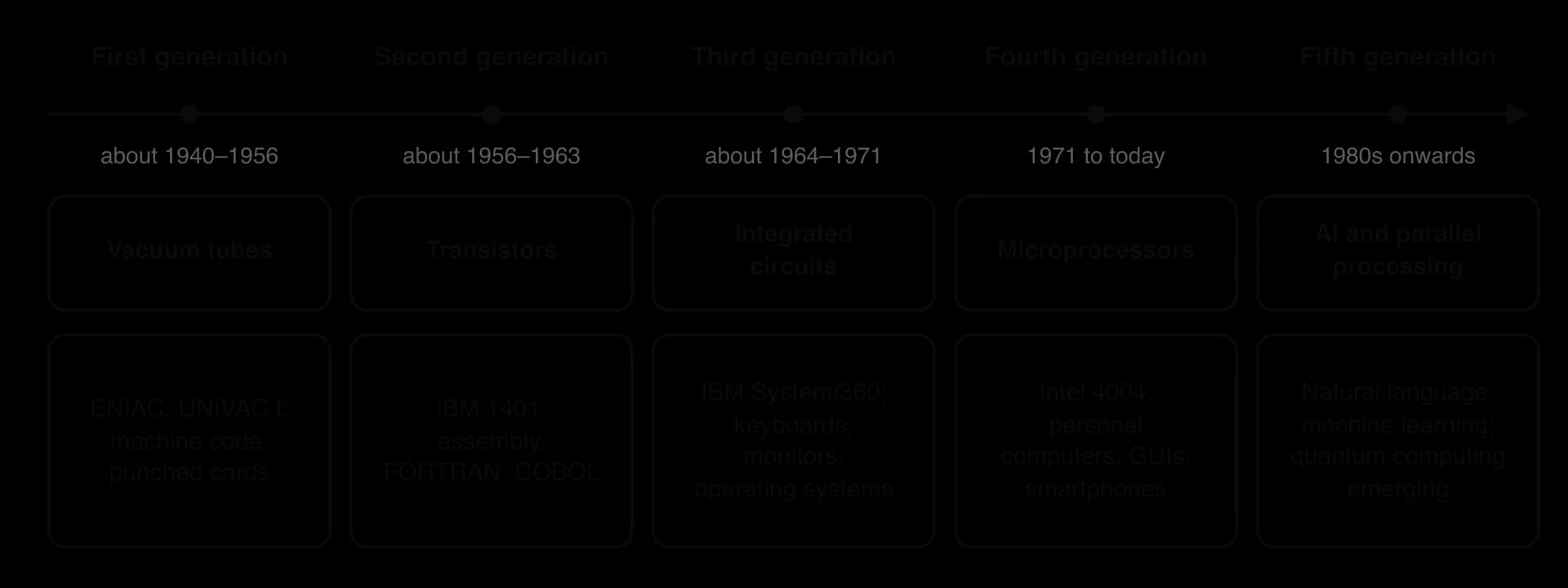
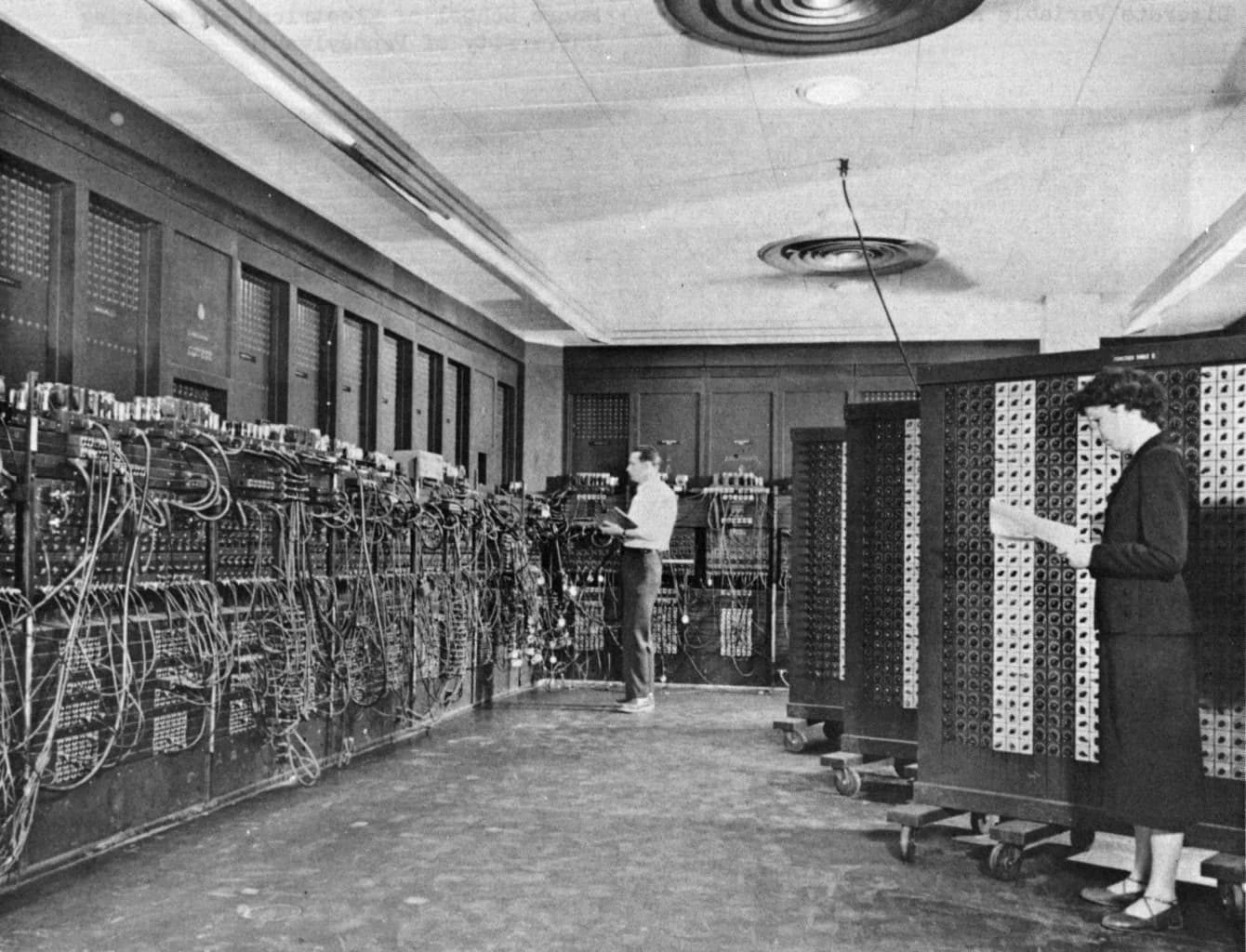
The first electronic computers used thousands of vacuum tubes as switches. ENIAC, completed in 1945 at the University of Pennsylvania for the US Army, contained about 18,000 tubes, weighed about 27 tonnes and filled a large room. It was programmed by setting switches and plugging cables, and the people who did this work were mainly women mathematicians, including Betty Snyder (later Holberton), Kay McNulty and Jean Jennings. UNIVAC I (1951), bought by the US Census Bureau, was one of the first computers sold commercially. Programs were written in machine code and data was entered on punched cards.
The transistor, invented at Bell Labs in 1947, did the same job as a vacuum tube but was smaller, cooler, cheaper and far more reliable. Transistor computers from the late 1950s, such as the IBM 1401, were bought by thousands of businesses for accounting and payroll. Programmers began to use assembly language and the first high-level languages: FORTRAN (1957) for science and COBOL (1959) for business. COBOL is still used in some banking and government systems today.
An integrated circuit puts many transistors and their connections onto one small chip of silicon. Third-generation computers of the mid-1960s used these chips, which made them smaller and faster again. The IBM System/360 (1964) was a family of compatible computers: a business could move to a larger model without rewriting its software. Users began to interact through keyboards and monitors, and operating systems let one computer run several programs at once.
The microprocessor placed a whole CPU on one chip. The Intel 4004 (1971) is usually taken as the start of the fourth generation, which continues today. Microprocessors made personal computers possible in the late 1970s and 1980s, then laptops, the GUI, the internet's mass growth, smartphones and wearables.
The fifth generation is defined less by a new switch and more by new aims: computers that can reason, understand natural language and learn. In 1982 Japan's government launched the Fifth Generation Computer Systems project, a ten-year programme to build AI-based computers. It produced useful research but did not reach its main goals. Many of those aims have since been met in other ways, through machine learning running on GPUs and huge data centres (3.6), while quantum computing is emerging as a possible next step.
The CrashCourse video traces how computing began, long before electronic machines.
 YouTube
Gordon Moore, who later co-founded Intel, noticed in 1965 that the number of components on a chip had doubled every year. In 1975 he revised his estimate to about every two years. Moore's law describes a trend rather than a law of nature, and the chip industry treated it as a target for planning research. The transistor-count chart plots real chips on a logarithmic scale, where each labelled step up the axis is a thousand times larger than the last, so steady doubling appears as a straight line.
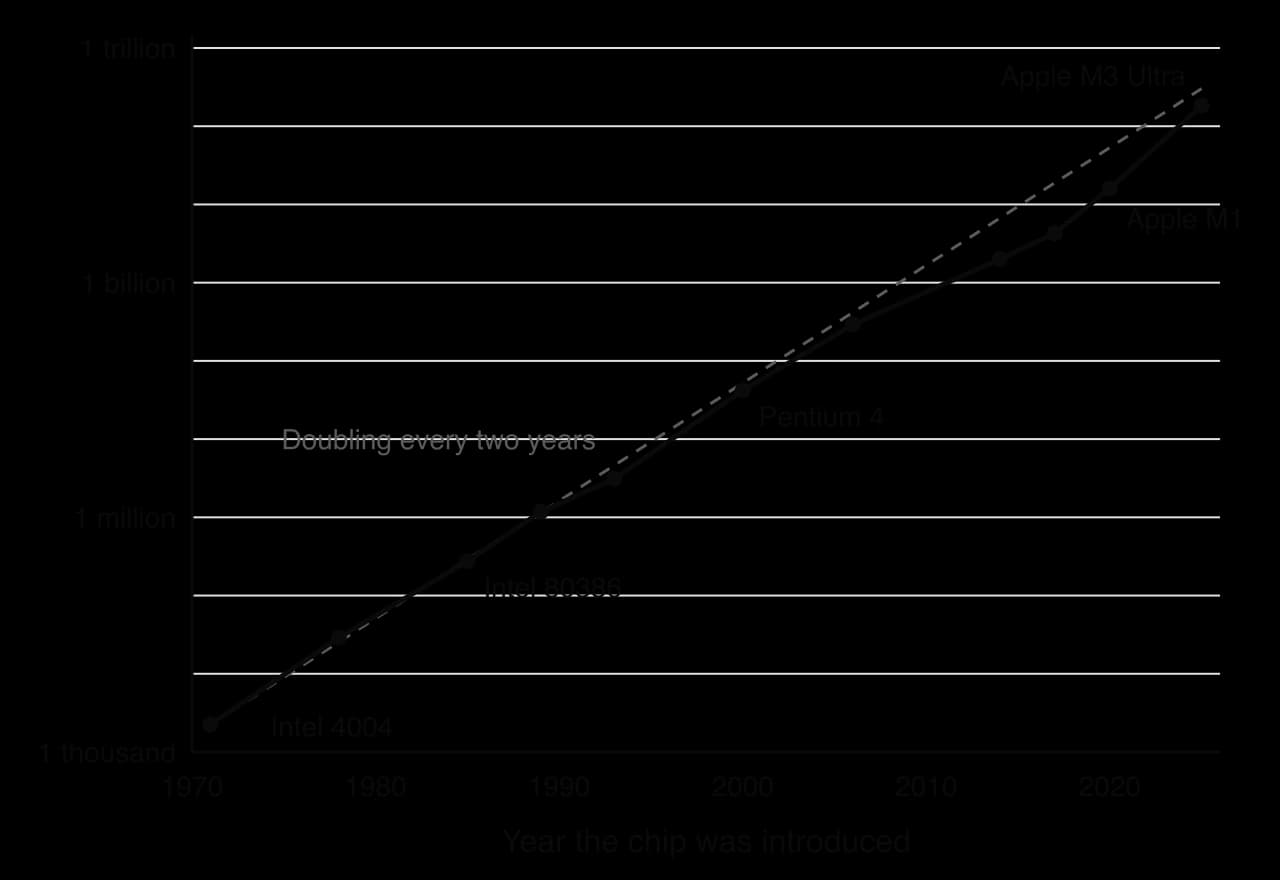
Doubling every two years gives exponential growth, which can be modelled as , where is the starting number of transistors and is the time in years. On an ordinary (linear) scale, the same growth produces a curve that stays flat for a long time and then rises steeply.
More transistors in the same space meant faster, cheaper and more energy-efficient computers. A smartphone in 2025 has far more processing power than a 1990s supercomputer and costs a tiny fraction of the price. This steady fall in the cost of computing is what made computers ubiquitous: it put processors into toys, light bulbs and greeting cards.
The trend is now slowing. Transistors are only a few dozen atoms wide, so shrinking them further is very difficult and each new factory costs tens of billions of dollars. Clock speeds stopped rising in the mid-2000s because faster chips produced too much heat, so manufacturers added more cores and specialised processors instead.
Moore's law also has implications beyond engineering. Rapid improvement encourages people to replace devices every few years, which adds to e-waste and is linked to debates about planned obsolescence (4.3). Only a few companies, such as TSMC in Taiwan, Samsung in South Korea and Intel in the USA, can make the most advanced chips, so access to them has become a matter of national security and global trade.
An ordinary computer stores information as bits, each either 0 or 1. A quantum computer uses qubits.
Two quantum effects give quantum computers their potential. Superposition lets a qubit represent 0 and 1 at the same time in a weighted combination. Entanglement links qubits so that the state of one is connected to the others. For some types of problem, such as simulating molecules or searching certain very large sets of possibilities, a quantum computer could in theory find answers that an ordinary computer would need thousands of years to reach.
Qubits are extremely fragile. Heat, vibration or stray electromagnetic signals destroy their quantum state, causing errors, so many quantum computers must be cooled to close to absolute zero (about −273 °C). In 2019 Google reported that its Sycamore processor, with 53 working qubits, had completed a specialised calculation in about 200 seconds that it estimated would take the best supercomputer 10,000 years; IBM argued that a supercomputer could do it in a few days. In 2024 Google's Willow chip, with 105 qubits, showed that errors could be reduced as more qubits were added, a key step towards useful machines.
Possible uses | Risks and limitations |
|---|---|
Designing new medicines by simulating molecules | Could break widely used encryption, threatening banking and private messages |
Discovering new materials for batteries and solar panels | Very expensive; only a few governments and companies can build them |
Optimising complex systems such as logistics and power grids | Error rates are still high; most useful applications are years away |
Advancing scientific research in physics and chemistry | Risk of a "quantum divide" between countries with and without access |
The threat to encryption has already led to action. Much online security relies on mathematical problems that would take ordinary computers far too long to solve but that a large quantum computer might solve quickly. In 2024 the US National Institute of Standards and Technology (NIST) published the first standards for post-quantum cryptography, encryption methods designed to resist quantum attack. Governments and companies are now replacing their encryption before such computers exist, because data stolen today could be decrypted later.
Computing has moved from a few rooms of machines to billions of devices carried, worn and embedded everywhere. Ubiquitous computing describes this situation, in which computers are built into so many objects and places that people stop noticing them. Its impacts are uneven: the same devices bring opportunities to some people and communities and risks to others.
The table summarises how computers play out across contexts.
Context | Opportunities | Risks | Concept lens |
|---|---|---|---|
Health (4.4) | Wearables detect irregular heart rhythms; embedded systems run insulin pumps and pacemakers | Health data can be sold or leaked; faults in embedded medical software can endanger patients | Values and ethics |
Economic (4.2) | Mainframes and servers run global payments; smartphones let small traders sell online | Automation by computers changes or removes jobs; a few chip and cloud firms dominate markets | Power |
Environmental (4.3) | Supercomputers model climate change; sensors monitor air quality and forests | Mining for components, energy use in data centres, and e-waste from short device lifespans | Systems |
Human knowledge (4.5) | Low-cost computers and online tools spread coding and learning | Students without devices or connections fall further behind | Change |
Political (4.6) | Computers support election administration and digital public services | Spyware and sensor data enable surveillance of journalists and activists | Power |
Social (4.7) | Phones keep families and migrants in contact; accessible interfaces include disabled users | Older adults or people with low digital skills may be excluded as services go digital-only | Identity |
Cheaper hardware has spread computing widely, but access remains unequal. The digital divide is about more than owning a device. A family may share one smartphone between several children; a rural school may have computers but no reliable electricity; a person may own a laptop but lack the skills or confidence to use it. Through the concept of space, ubiquitous computing is far from evenly spread: it is concentrated in wealthy cities and thinner in rural and low-income areas.
Through the concept of systems, the more society relies on computers, the further a single failure can spread: a fault or malware attack on one bank's or hospital's servers can disrupt millions of people. Ubiquitous embedded systems also expand the "attack surface": each connected camera, smart lock or medical device is another computer that must be secured and updated, often by manufacturers who stop providing updates after a few years.
In the mid-2000s, staff at the University of Cambridge's computer science department noticed that fewer students were applying, and that applicants had less programming experience than in the 1990s. They believed one cause was that home computers had become closed consumer devices. Earlier machines, such as the BBC Micro of the 1980s, started with a programming prompt, so many children learned to code by accident. Games consoles and locked-down PCs gave children no such opportunity.
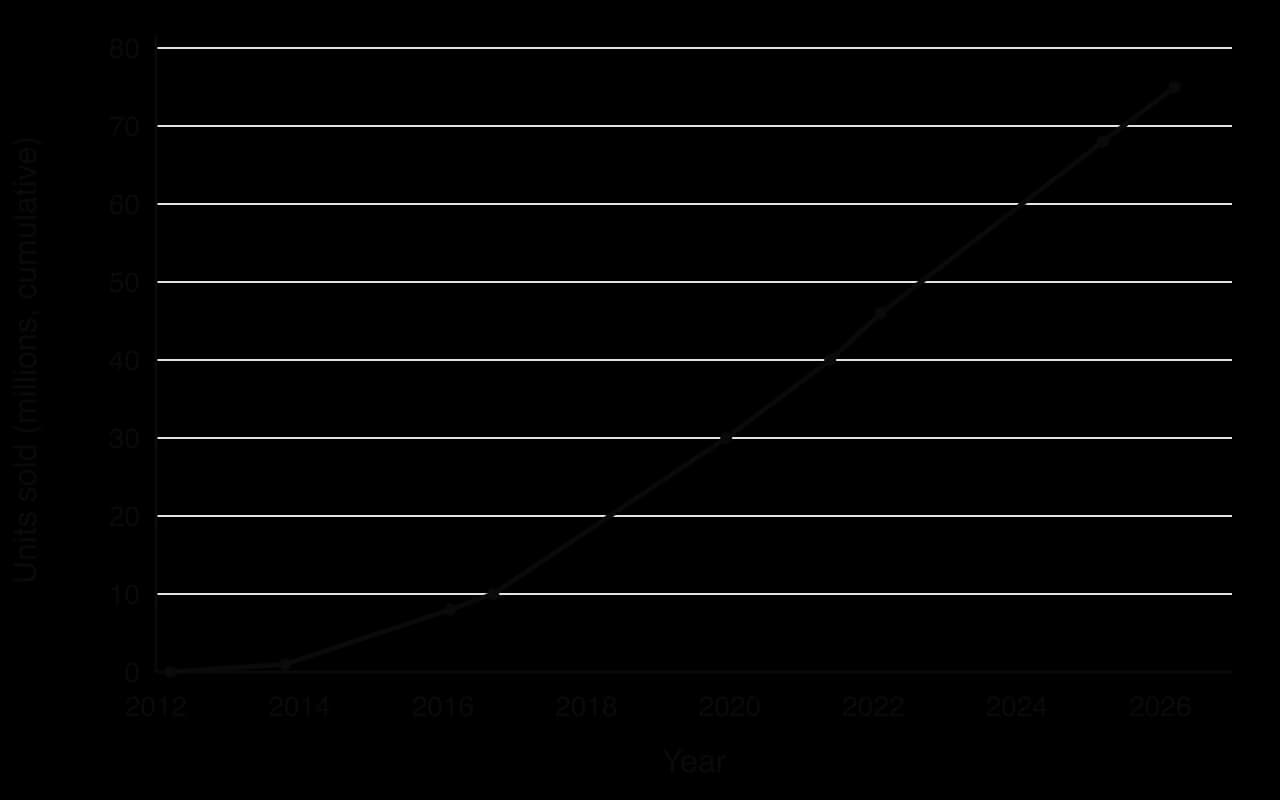
In 2008 a group including Eben Upton set up the Raspberry Pi Foundation, a UK educational charity, with the aim of building a computer cheap enough for every child to own and experiment with. The first Raspberry Pi went on sale on 29 February 2012 for US$35. Demand far exceeded expectations, from schools but also from hobbyists and engineers.
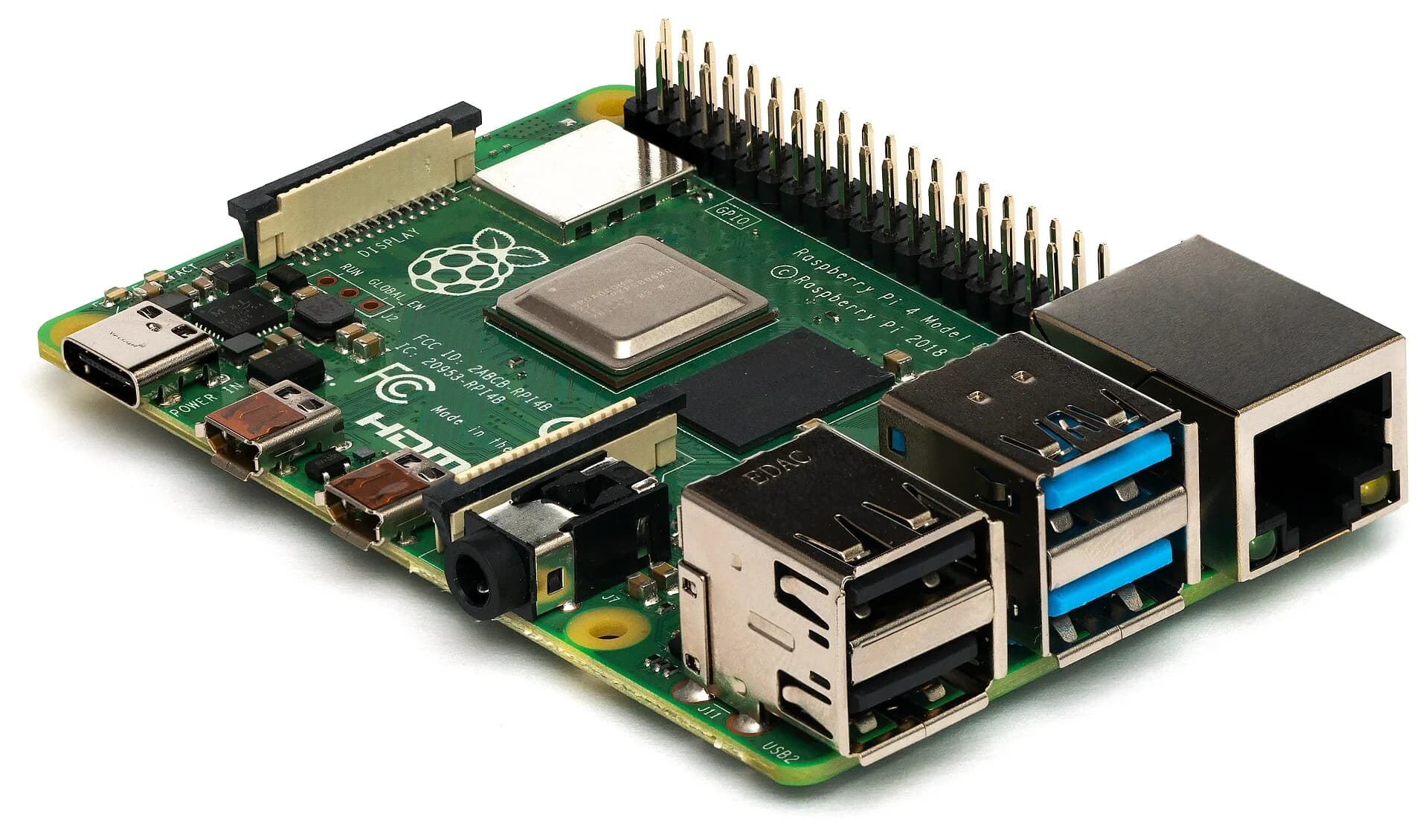
A Raspberry Pi is a single-board computer: every component of a computer sits on one small circuit board. A system on a chip combines a CPU and GPU, alongside RAM, USB ports, video output and networking. There is no built-in storage drive; the operating system and files live on a removable microSD card, so a student who breaks the software can simply copy a fresh system onto the card.
The user adds a keyboard, mouse and screen, often ones the school already owns. The Pi runs Raspberry Pi OS, a free, open-source version of Linux, which comes with Scratch and Python for learning to code. Its most distinctive feature is a row of general-purpose input/output (GPIO) pins. Students can connect sensors, buttons, lights and motors and write code to control them, which makes it a practical way to learn about hardware, sensors and embedded systems as well as software.
The range has grown to include the Raspberry Pi Zero (2015, US$5), the Raspberry Pi 400 (2020), a computer built into a keyboard, the Raspberry Pi 5 (2023) and the Raspberry Pi Pico (2021, US$4), a microcontroller for simple embedded projects.
Students and teachers. The Raspberry Pi Foundation runs free coding clubs and curriculum resources alongside the hardware. Code Clubs are active in more than 100 countries, and more than 2 million young people have taken part since the first clubs opened. Through the European Astro Pi Challenge, run with the European Space Agency, young people write code that runs on Raspberry Pi computers aboard the International Space Station; in 2022/23 programs written by more than 15,000 young people ran in space.
Evidence of learning. A randomised controlled trial of Code Clubs in English primary schools, published in 2017, found that attending for a year significantly improved pupils' coding skills in Scratch, HTML/CSS and Python, but did not improve their computational thinking more than in pupils who did not attend. The results suggest that cheap hardware and good materials help students learn to code, but that wider problem-solving skills need longer or more structured teaching.
Industry and inventors. The Pi's largest group of buyers turned out to be businesses, not schools. By 2024, the year of its stock market listing, about 70% of its sales went to industrial and embedded customers, who build Pis into factory machines, digital signs and monitoring equipment.
Tensions. During the global chip shortage of 2021–2022, Raspberry Pis were scarce, and the company chose to prioritise business and industrial customers, which frustrated educators and hobbyists. In June 2024 the trading company listed on the London Stock Exchange as Raspberry Pi Holdings. The Foundation remains the main shareholder, but some users questioned whether investors' expectations would compete with the educational mission.
Stakeholder | Claim or perspective |
|---|---|
Raspberry Pi Foundation | Low-cost, open hardware and free resources widen access to coding education |
Teachers | The Pi supports practical computing, but needs training, time and accessories to use well |
Students | Being able to experiment without fear of breaking an expensive device encourages creativity |
Industrial customers | The Pi is a cheap, reliable, well-supported computer to build into products |
Investors (since 2024) | Expect growth and profit from industrial sales |
Critics | Hardware alone does not close the digital divide; without trained teachers, devices bought for learning may go unused |
Through the concept of change, the Raspberry Pi shows both continuity and discontinuity. It deliberately revived the 1980s idea of a programmable home computer that invites experimentation, but it did so with fourth-generation technology that Moore's law had made cheap: a credit-card-sized board with more power than the desktop PCs of the early 2000s. It also changed the market in an unplanned way, creating a new category of low-cost single-board computers for industry.
Through the concept of power, the Pi challenges and depends on existing power structures. It gives learners control over their own computer: they can open it, change its software and connect it to the physical world, unlike locked phones and tablets controlled by large platforms. Yet the project depends on chips designed and made by large semiconductor companies, and the 2021–2022 shortage showed that, when supply is limited, paying business customers take priority over schools.
Through the concept of systems, the Pi's educational effect depends on far more than the board. A Pi needs a screen, keyboard, electricity and, most importantly, a teacher who knows how to use it. This explains why England's national computing curriculum (from 2014), teacher training and free online projects matter as much as the hardware's price.
The Raspberry Pi has widened access to coding education for many young people in many countries, through both cheap hardware and free clubs and resources. Its impact is strongest where it is combined with teacher support and structured projects, as in Code Clubs and Astro Pi, and weakest where it is treated as a device that will teach coding by itself. The evidence from the 2017 trial supports this judgement: coding skills improved, but broader thinking skills did not change more than in other pupils.
Its commercial turn is a trade-off. Industrial sales fund the educational charity and keep prices low, but they also mean that schools compete with businesses for supply. The case shows that ubiquitous, cheap computing creates opportunities for people and communities only when the surrounding system (teachers, curriculum, connectivity and support) is in place.
The second question uses a short source, in the style of Paper 2.
I can define a computer and explain the input–process–output–storage pattern.
I can distinguish general-purpose computers from embedded systems, with an example of each.
I can identify and describe mainframes, servers, personal computers, tablets, smartphones and wearable devices, and outline what each is used for.
I can describe the role of the motherboard, CPU, RAM, ROM, storage, GPU, sound components and power supply.
I can explain the fetch–decode–execute cycle and how components work together to complete a task.
I can distinguish between memory and storage, and between input devices, output devices and sensors.
I can distinguish command-line, graphical, haptic and voice interfaces, with a strength and a limitation of each.
I can outline the functions of an operating system and give examples of application software.
I can describe the main types of malware and explain how they affect people and organisations.
I can explain how coding uses languages and rules, distinguish compilers from interpreters, and describe different forms of coding.
I can describe the five generations of computing and the technology that defines each.
I can explain Moore's law, use it to make a simple prediction, and outline why it is slowing.
I can outline how quantum computing differs from ordinary computing, and its opportunities and risks.
I can evaluate the impacts and implications of ubiquitous computing for specific people and communities, using concepts as lenses.
I can analyse the Raspberry Pi case study through at least two concepts and reach a supported judgement.