 YouTube
Use SQL to define, query and change a relational database (joins, filters, patterns, grouping, updates and indexes) and, at HL, calculate with aggregate functions, use views and protect data with ACID transactions.
Each is in the Computer Science glossary, with every other term in the subject.
The four properties that a DBMS guarantees for every transaction so that transactions are processed reliably: atomicity, consistency, isolation and durability.
An SQL function that takes the values of a column from many rows (a whole table or one group) and returns a single summary value; the standard ones are AVG, COUNT, MAX, MIN and SUM.
The property that a transaction is all or nothing: either every one of its changes is applied, or, if any part fails, none of them is.
The result of combining two tables so that every row of the first is paired with every row of the second, giving (rows in first) × (rows in second) rows.
One part of an SQL statement, starting with a keyword such as SELECT, FROM, WHERE or ORDER BY, that does one job in the statement.
A temporary name given to a column of the result set, or to a table within one query, using the keyword AS.
The TCL command that ends a transaction successfully, making all its changes permanent and visible to other transactions.
Outline the differences between the data definition language (DDL) and the data manipulation language (DML) in SQL.
Construct SQL queries on one or two tables that select, filter, match patterns, join and sort data.
Construct queries that group rows with GROUP BY and filter the groups with HAVING.
Explain how INSERT, UPDATE and DELETE change the data in a database.
Explain how updating indexed columns affects performance, and why indexes are rebuilt or reorganised after large changes.
Construct calculations with the aggregate functions AVG, COUNT, MAX, MIN and SUM on grouped data. (HL only)
Describe virtual and materialised views and the roles views play in a database. (HL only)
Describe how transactions, the ACID properties and the commands BEGIN TRANSACTION, COMMIT and ROLLBACK maintain data integrity. (HL only)
A relational database is only useful if people and programs can put data into it, change it and get answers out of it. Structured Query Language (SQL) is the language almost every relational database management system (DBMS) uses for all three jobs. One SQL statement can find the evening screenings of a film among millions of rows, raise the price of every Saturday ticket, or count how many seats each film has sold, and the DBMS works out how to do it.
98 exam-style questions on this subtopic, written in the style of the IB papers. The first has its markscheme open. Counted on
An online pharmacy lets customers search for medicines on its website. The web server sends each search to a database server. The firewall allows inbound traffic to the web server on port 443 only, and allows the web server to connect to the database server.
Outline one strength of the firewall configuration for the database server.
2 marks
Award [1] for the strength and [1] for the development.
The database server cannot be reached directly from the internet;
only the web server is allowed to connect to it, so attackers must first get past the web application;
The search box puts the customer's text directly into an SQL query. Describe how an attacker could use SQL injection against this website, and why the firewall does not stop it.
4 marks
Award [4 max].
The attacker types SQL code (e.g. ' OR '1'='1 or '; DROP TABLE ...) into the search box;
the text becomes part of the query that the web server sends to the database;
so the database runs the attacker's command, e.g. returning all customer records / changing or deleting data;
the request arrives as normal HTTPS traffic on port 443, which the firewall allows;
the query reaches the database from the web server, which is an allowed connection;
One of 70 short multiple-choice questions on A3.3. Pick an answer to see why it's right or wrong.
A table Member has the fields MemberID, FirstName and Town; Town has no default value and no NOT NULL constraint. A program runs with the values 16 and 'Zoe'. What is stored in Town for the new row?
The official deck for this part of the syllabus.
What is SQL (Structured Query Language)?
What is a declarative language?
With a free account, Augment remembers where you stopped and what you have practiced.
The property that a transaction takes the database from one valid state to another, so that every constraint and rule holds after the transaction commits.
The part of SQL whose statements create, change and remove the structure of a database, such as tables, views and indexes, rather than the data in them.
The part of SQL whose statements read, add, change and remove the data stored in the tables, leaving the structure unchanged.
A separate data structure, kept by the DBMS, that stores the values of one or more columns in sorted order with a pointer to each matching row, so that rows can be found without reading the whole table.
A programming language in which the programmer states what result is wanted, and the system works out how to produce it.
The property that once a transaction has been committed, its changes are permanent and survive a later crash or power failure.
The clause that collects the rows of a result with equal values in the named columns into groups, so that the query returns one row for each group.
The clause that filters groups made by GROUP BY, keeping only the groups for which its condition is true.
A programming language in which the programmer writes the sequence of steps, such as assignments, loops and selections, that the computer carries out in order.
The process of recreating an index from the current data, or reorganising its pages, so that it is compact and in order again after many changes to the table.
The property that concurrent transactions do not see each other's unfinished changes, so the result is the same as if the transactions had run one after another.
An operation that combines rows from two tables into one result set by pairing each row of one table with the rows of the other that satisfy a join condition, usually that a foreign key equals the primary key it refers to.
A view whose result rows are computed once and physically stored, then refreshed periodically or on demand, so reading it is fast but its data may be out of date (stale) between refreshes.
The clause that sorts the rows of a result set by one or more columns, each in ascending (ASC, the default) or descending (DESC) order.
A request to a database for data that meets stated conditions, written in SQL as a SELECT statement.
An operator that compares two values and gives true or false, such as =, <>, <, >, <= and >=.
The table of rows and columns that a query returns.
The TCL command that cancels a transaction, undoing every change it made since BEGIN TRANSACTION, so that the database returns to its state before the transaction started.
The standard language for defining, querying and changing the data in a relational database.
The part of SQL whose statements start and end transactions: BEGIN TRANSACTION starts one, COMMIT makes its changes permanent, and ROLLBACK cancels it.
A file on non-volatile storage to which the DBMS writes a record of every change, and every commit, before applying them to the database, so that after a failure committed transactions can be redone and unfinished ones undone.
A view through which rows can be inserted, updated or deleted, with the changes passed on to its base table; a view that does not allow this is read-only.
A named query stored in the database whose result can be used in other queries as if it were a table.
A view that stores only its defining query; each time the view is used, the DBMS runs the query against the base tables, so the result is always up to date.
The clause of an SQL statement that filters rows, keeping only those for which its condition is true.
A character in a LIKE pattern that stands for other characters; % matches any sequence of zero or more characters.
SQL grew out of SEQUEL, a language built at IBM in the early 1970s for its System R research database. Oracle V2, released in June 1979, was one of the first commercial SQL products. SQL became an ANSI standard in 1986 and an ISO standard in 1987, and the standard has been revised many times since, most recently in 2023. Every major DBMS still adds its own extensions and leaves some features out, so a statement that runs on one system may need small changes on another.
YouTubeThe queries throughout run against one small, hypothetical database for a cinema called the Riverside Picturehouse. It has four tables. Each film is stored once in Film; each showing of a film at a date and time is a row in Screening; each customer is a row in Customer; and each purchase of seats is a row in Booking. In the table definitions, the primary key is in bold and each foreign key is marked with an asterisk.
Table | Fields |
|---|---|
| FilmID, Title, Genre, AgeRating, RunMins |
| ScreeningID, FilmID*, ScreenNo, ShowDate, StartTime, Price, SeatsLeft |
| CustomerID, FirstName, LastName, Email, MemberSince |
| BookingID, ScreeningID*, CustomerID*, Seats, BookedOn |
The relationships are one-to-many: one film has many screenings, one screening has many bookings, and one customer makes many bookings. SeatsLeft is derived data (it could be worked out from the screen's capacity and the bookings), kept in the table so the box office can check availability without adding up bookings every time. Keeping it correct is one of the jobs of the transactions studied at HL.
The Film table holds seven films. The Last Lighthouse has no screenings yet, which matters when tables are joined.
FilmID | Title | Genre | AgeRating | RunMins |
|---|---|---|---|---|
1 | The Silent Orbit | Sci-fi | 12 | 128 |
2 | Paper Lanterns | Drama | PG | 104 |
3 | Night Shift | Thriller | 15 | 117 |
4 | Sunny Side Up | Comedy | PG | 96 |
5 | Starfall | Sci-fi | 12 | 141 |
6 | The Last Lighthouse | Drama | 12 | 110 |
7 | Pixel Pets | Animation | U | 88 |
The Screening table lists ten showings over three days. Dates are written YYYY-MM-DD and times HH:MM, so sorting them as text also sorts them in time order. Screening 106 is sold out.
ScreeningID | FilmID | ScreenNo | ShowDate | StartTime | Price | SeatsLeft |
|---|---|---|---|---|---|---|
101 | 1 | 1 | 2026-11-06 | 18:00 | 9.50 | 34 |
102 | 1 | 1 | 2026-11-06 | 20:45 | 11.00 | 12 |
103 | 2 | 2 | 2026-11-06 | 17:30 | 8.00 | 40 |
104 | 3 | 3 | 2026-11-06 | 21:00 | 11.00 | 3 |
105 | 4 | 2 | 2026-11-07 | 14:00 | 7.50 | 52 |
106 | 5 | 1 | 2026-11-07 | 19:00 | 12.50 | 0 |
107 | 7 | 3 | 2026-11-07 | 10:30 | 6.00 | 61 |
108 | 3 | 3 | 2026-11-07 | 22:15 | 11.00 | 25 |
109 | 5 | 1 | 2026-11-08 | 16:00 | 10.00 | 48 |
110 | 7 | 2 | 2026-11-08 | 11:00 | 6.00 | 70 |
The Customer table has six members. Elena Santos gave no email address, so her Email field holds NULL, the marker SQL uses for "no value". Farah Smithson has not booked anything yet.
CustomerID | FirstName | LastName | MemberSince | |
|---|---|---|---|---|
201 | Amira | Haddad | amira.h@example.com | 2023-02-14 |
202 | Ben | Okafor | ben.ok@example.com | 2024-09-01 |
203 | Wei | Chen | wei.chen@example.com | 2022-06-30 |
204 | Daniel | Smith | dsmith@example.com | 2025-01-10 |
205 | Elena | Santos | NULL | 2026-03-22 |
206 | Farah | Smithson | farah.s@example.com | 2026-10-02 |
The Booking table records twelve bookings. Seats is the number of seats bought in one booking, and BookedOn is the date it was made.
BookingID | ScreeningID | CustomerID | Seats | BookedOn |
|---|---|---|---|---|
1 | 101 | 201 | 2 | 2026-10-30 |
2 | 101 | 202 | 4 | 2026-10-31 |
3 | 102 | 203 | 1 | 2026-11-01 |
4 | 103 | 201 | 2 | 2026-11-01 |
5 | 104 | 204 | 2 | 2026-11-02 |
6 | 104 | 205 | 3 | 2026-11-02 |
7 | 105 | 202 | 5 | 2026-11-03 |
8 | 106 | 203 | 2 | 2026-11-03 |
9 | 106 | 204 | 2 | 2026-11-04 |
10 | 107 | 205 | 4 | 2026-11-04 |
11 | 108 | 201 | 1 | 2026-11-05 |
12 | 109 | 202 | 2 | 2026-11-05 |
SQL works differently from Python or Java. A Python or Java program lists the steps the computer must follow: start at the first item, test it, move to the next, and so on. An SQL statement describes the result that is wanted (which rows, which columns, in what order) and leaves the steps to the DBMS. Inside the DBMS, a component called the query optimiser selects how to find the rows, for example whether to read the whole table or to use an index.
The contrast is easiest to see with one task done both ways. The Python program finds every film longer than 120 minutes by visiting each element of two parallel lists in turn and testing it.
titles = ["The Silent Orbit", "Paper Lanterns", "Night Shift", "Sunny Side Up",
          "Starfall", "The Last Lighthouse", "Pixel Pets"]
run_mins = [128, 104, 117, 96, 141, 110, 88]

for i in range(len(titles)):
    if run_mins[i] > 120:
print(titles[i], run_mins[i])public class LongFilms {
public static void main(String[] args) {
String[] titles = {"The Silent Orbit", "Paper Lanterns", "Night Shift", "Sunny Side Up",
"Starfall", "The Last Lighthouse", "Pixel Pets"};
int[] runMins = {128, 104, 117, 96, 141, 110, 88};
for (int i = 0; i < titles.length; i++) {
if (runMins[i] > 120) {
System.out.println(titles[i] + " " + runMins[i]);
}
}
}
}The program prints the two long films. It works, but the programmer chose the loop, the index variable and the order of the tests.
The Silent Orbit 128
Starfall 141The SQL version states only the result: the title and running time of each film whose RunMins is greater than 120. There is no loop, no counter and no index variable, and the same statement still works when the table holds a million films and the query optimiser selects an index instead of reading every row.
SELECT Title, RunMins
FROM Film
WHERE RunMins > 120;
Title | RunMins |
|---|---|
The Silent Orbit | 128 |
Starfall | 141 |
SQL statements fall into groups by what they act on. Some statements change the structure of the database, the schema: which tables exist, which fields each has, their data types, keys and rules. Others work on the data stored inside that structure. The first group is the data definition language.
The CREATE TABLE statements that built the cinema database show DDL at work. Each statement names the table, lists every field with its data type (such as VARCHAR, DECIMAL and DATE), and adds rules called integrity constraints: PRIMARY KEY, FOREIGN KEY … REFERENCES, NOT NULL and CHECK.
CREATE TABLE Film (
    FilmID    INTEGER PRIMARY KEY,
    Title     VARCHAR(60) NOT NULL,
    Genre     VARCHAR(20) NOT NULL,
    AgeRating VARCHAR(3)  NOT NULL,
    RunMins   INTEGER     NOT NULL
);

CREATE TABLE Screening (
    ScreeningID INTEGER PRIMARY KEY,
    FilmID      INTEGER NOT NULL,
    ScreenNo    INTEGER NOT NULL,
    ShowDate    DATE    NOT NULL,
    StartTime   TIME    NOT NULL,
    Price       DECIMAL(5,2) NOT NULL,
    SeatsLeft   INTEGER NOT NULL CHECK (SeatsLeft >= 0),
    FOREIGN KEY (FilmID) REFERENCES Film (FilmID)
);

CREATE TABLE Customer (
    CustomerID  INTEGER PRIMARY KEY,
    FirstName   VARCHAR(30) NOT NULL,
    LastName    VARCHAR(30) NOT NULL,
    Email       VARCHAR(80),
    MemberSince DATE NOT NULL
);

CREATE TABLE Booking (
    BookingID   INTEGER PRIMARY KEY,
    ScreeningID INTEGER NOT NULL,
    CustomerID  INTEGER NOT NULL,
    Seats       INTEGER NOT NULL CHECK (Seats > 0),
    BookedOn    DATE    NOT NULL,
    FOREIGN KEY (ScreeningID) REFERENCES Screening (ScreeningID),
    FOREIGN KEY (CustomerID) REFERENCES Customer (CustomerID)
);
The constraints are part of the structure, so they belong to DDL. Once CHECK (SeatsLeft >= 0) exists, the DBMS refuses any change that would make SeatsLeft negative, whichever program makes it. Email has no NOT NULL, so it is the only field that may be left empty.
Two more DDL statements change or remove structure that already exists. ALTER TABLE adds, removes or changes a field; DROP TABLE deletes a whole table, its structure and every row in it. The three statements show the pattern: adding a Phone field to Customer, then removing it, then removing a whole (hypothetical) Promotion table.
ALTER TABLE Customer ADD Phone VARCHAR(20);

ALTER TABLE Customer DROP COLUMN Phone;

DROP TABLE Promotion;
CREATE INDEX and CREATE VIEW are DDL statements too, because they add an index or a view to the schema rather than rows to a table.
DML is where almost all day-to-day work happens. The cinema's website runs SELECT statements to list screenings, INSERT to record a booking, UPDATE to change the seats left, and DELETE to cancel a booking. None of these changes a table's fields, data types or constraints. Some books put SELECT in a separate group called the data query language (DQL), because it only reads data; the more common two-way split, DDL and DML, counts SELECT as DML alongside the statements that change data.
Data definition language (DDL) | Data manipulation language (DML) | |
|---|---|---|
Acts on | The structure (schema): tables, fields, data types, keys, constraints, indexes, views | The data: the rows stored in the tables |
Main statements |
|
|
Example |
|
|
Who uses it, and how often | Database designers and administrators, mostly when the database is built or redesigned | Users and application programs, constantly |
Effect of a mistake | Can remove or reshape a whole table for every user | Usually affects some rows |
Two further groups of SQL statements complete the picture. The transaction control language (TCL) groups several DML statements into one unit that succeeds or fails as a whole (BEGIN TRANSACTION, COMMIT, ROLLBACK); TCL is HL only. The data control language (DCL) gives and removes permissions, for example GRANT SELECT ON Film TO box_office; and REVOKE. DCL shows that SQL also handles access control.
A SELECT statement is built from parts, each starting with a keyword. SELECT Title, RunMins names the columns, FROM Film names the table and WHERE RunMins > 120 sets the condition. Each part is a clause, and the order in which clauses are written is fixed: SELECT, FROM, JOIN … ON, WHERE, GROUP BY, HAVING, ORDER BY. Only SELECT and FROM are compulsory. SQL keywords are not case sensitive, but writing them in capitals and putting each clause on its own line makes a query far easier to read and check.
The answer to a query is not stored anywhere. The DBMS builds it as a temporary table for that query alone and discards it once the rows have been sent back.
The SELECT clause lists the columns of the result set, separated by commas and in the order wanted. SELECT * returns every column. Listing only the columns needed is better practice: less data is sent, and the query keeps working in the same way if fields are later added to the table.
A result set can contain repeated rows. Asking for the Genre of every film returns seven rows, one per film, so Sci-fi and Drama each appear twice.
SELECT Genre
FROM Film;
Genre |
|---|
Sci-fi |
Drama |
Thriller |
Comedy |
Sci-fi |
Drama |
Animation |
Adding DISTINCT straight after SELECT removes repeated rows from the result set, leaving each genre once.
SELECT DISTINCT Genre
FROM Film;
Genre |
|---|
Sci-fi |
Drama |
Thriller |
Comedy |
Animation |
DISTINCT applies to the whole row of the result set, not to the first column only. With two columns, a row is removed only if both values repeat another row. Sci-fi with rating 12 appears once (The Silent Orbit and Starfall collapse into one row), but Drama appears twice, because one drama is rated PG and the other 12.
SELECT DISTINCT Genre, AgeRating
FROM Film;
Genre | AgeRating |
|---|---|
Sci-fi | 12 |
Drama | PG |
Thriller | 15 |
Comedy | PG |
Drama | 12 |
Animation | U |
Most queries need only some rows. The WHERE clause holds a condition that the DBMS tests against every row; a row is kept in the result set only if the condition is true for it.
Conditions compare a field with a value or with another field, using the relational operators. Text and dates go in single quotes ('Drama', '2026-11-07'); numbers do not.
Operator | Meaning | Example condition | True for |
|---|---|---|---|
| equal to |
| Paper Lanterns, The Last Lighthouse |
| not equal to (many systems also accept |
| every film not rated PG |
| less than |
| screenings 105, 107, 110 |
| greater than |
| The Silent Orbit, Starfall |
| less than or equal to |
| screenings 104 and 106 |
| greater than or equal to |
| screenings 105 to 110 |
Comparisons work on text and dates as well as numbers. Text is compared character by character, so 'Chen' < 'Haddad' is true. Dates stored as YYYY-MM-DD compare correctly as text, because the most significant part (the year) comes first.
Conditions are joined with the Boolean operators AND, OR and NOT, which work exactly as in logic and in Python and Java. AND needs both conditions to be true, OR needs at least one, and NOT reverses a condition. As in Boolean algebra, NOT is applied first, then AND, then OR. Forgetting that AND binds more tightly than OR is a common source of wrong results.
The cinema manager wants sci-fi or drama films shorter than 115 minutes. Written without brackets, the condition is read as "Sci-fi, or (Drama and shorter than 115 minutes)", so both long sci-fi films slip in.
SELECT Title, Genre, RunMins
FROM Film
WHERE Genre = 'Sci-fi' OR Genre = 'Drama' AND RunMins < 115;
Title | Genre | RunMins |
|---|---|---|
The Silent Orbit | Sci-fi | 128 |
Paper Lanterns | Drama | 104 |
Starfall | Sci-fi | 141 |
The Last Lighthouse | Drama | 110 |
Brackets make the OR happen first, so the length test applies to both genres and only the two short dramas remain.
SELECT Title, Genre, RunMins
FROM Film
WHERE (Genre = 'Sci-fi' OR Genre = 'Drama') AND RunMins < 115;
Title | Genre | RunMins |
|---|---|---|
Paper Lanterns | Drama | 104 |
The Last Lighthouse | Drama | 110 |
NOT reverses the condition that follows it. To find the films suitable for a children's party (neither 12 nor 15), NOT is applied to a bracketed OR:
SELECT Title, AgeRating
FROM Film
WHERE NOT (AgeRating = '12' OR AgeRating = '15');
Title | AgeRating |
|---|---|
Paper Lanterns | PG |
Sunny Side Up | PG |
Pixel Pets | U |
The same rows come from WHERE AgeRating <> '12' AND AgeRating <> '15', an example of De Morgan's law from subtopic A1.2.
BETWEEN low AND high tests whether a value lies in a range, and it is inclusive: both end values count. Price BETWEEN 8.00 AND 11.00 means Price >= 8.00 AND Price <= 11.00, so screenings priced exactly 8.00 and 11.00 are included.
SELECT ScreeningID, ShowDate, Price
FROM Screening
WHERE Price BETWEEN 8.00 AND 11.00;
ScreeningID | ShowDate | Price |
|---|---|---|
101 | 2026-11-06 | 9.50 |
102 | 2026-11-06 | 11.00 |
103 | 2026-11-06 | 8.00 |
104 | 2026-11-06 | 11.00 |
108 | 2026-11-07 | 11.00 |
109 | 2026-11-08 | 10.00 |
BETWEEN works for dates and text too. ShowDate BETWEEN '2026-11-07' AND '2026-11-08' returns the six screenings on 7 and 8 November. The lower value must come first: BETWEEN 11.00 AND 8.00 returns no rows.
Sometimes only part of a value is known: names beginning with "Smith", titles containing "night". The = operator compares whole values, so LastName = 'Smith%' looks for a surname that really is the six characters Smith% and returns nothing. Pattern matching needs the LIKE operator and a wildcard.
The position of % determines what is matched:
Pattern | Matches values that… | Customer or film matched |
|---|---|---|
| start with Smith | Smith, Smithson |
| end with son | Smithson |
| contain ight anywhere | Night Shift, The Last Lighthouse |
| start with S | Santos, Smith, Smithson |
The query for customers whose surname begins with "Smith" returns both Daniel Smith and Farah Smithson, because % can match zero characters as well as many.
SELECT FirstName, LastName
FROM Customer
WHERE LastName LIKE 'Smith%';
FirstName | LastName |
|---|---|
Daniel | Smith |
Farah | Smithson |
Standard SQL also has the _ wildcard, which matches exactly one character ('Sm_th' matches Smith and Smyth). Case sensitivity differs between systems: in SQLite and in MySQL with its usual settings, LIKE 'smith%' matches Smith, whereas in PostgreSQL it does not. Writing the pattern with the same capitals as the stored data works everywhere.
The rows of a result set have no guaranteed order unless the query asks for one. A DBMS often returns rows in the order they were stored, but it is free to return them in any order, especially after rows have been updated or an index has been used.
ORDER BY RunMins DESC lists films from longest to shortest. Leaving out ASC or DESC gives ascending order, so ORDER BY Title sorts titles from A to Z.
SELECT Title, RunMins
FROM Film
ORDER BY RunMins DESC;
Title | RunMins |
|---|---|
Starfall | 141 |
The Silent Orbit | 128 |
Night Shift | 117 |
The Last Lighthouse | 110 |
Paper Lanterns | 104 |
Sunny Side Up | 96 |
Pixel Pets | 88 |
With several sort keys, the DBMS sorts by the first, and uses the second only to order rows that tie on the first. Each key has its own direction. Sorting by genre A–Z and then, within each genre, by length from longest to shortest puts The Last Lighthouse (110) above Paper Lanterns (104) inside Drama.
SELECT Title, Genre, RunMins
FROM Film
ORDER BY Genre ASC, RunMins DESC;
Title | Genre | RunMins |
|---|---|---|
Pixel Pets | Animation | 88 |
Sunny Side Up | Comedy | 96 |
The Last Lighthouse | Drama | 110 |
Paper Lanterns | Drama | 104 |
Starfall | Sci-fi | 141 |
The Silent Orbit | Sci-fi | 128 |
Night Shift | Thriller | 117 |
A query is written in one order but processed in another. The DBMS first builds the rows it is working on (FROM and any JOIN), then filters them (WHERE), then forms groups (GROUP BY) and filters the groups (HAVING), and only then chooses the columns (SELECT) and sorts the result (ORDER BY). The processing order diagram shows the six steps.
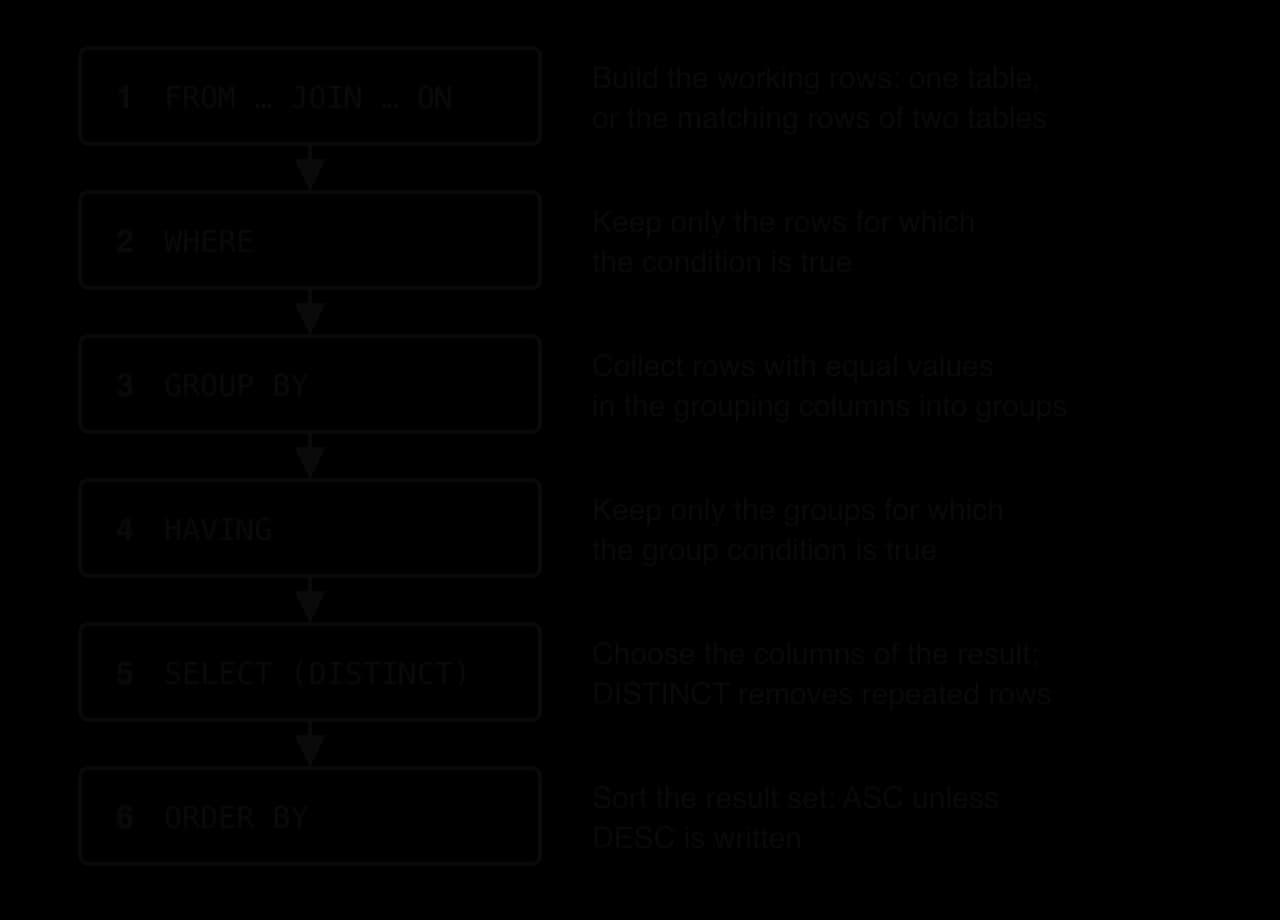
The processing order explains several rules that otherwise look arbitrary. WHERE can only test single rows, because groups do not exist yet when it runs. ORDER BY can sort by a name given to a column in SELECT, because it runs afterwards. The DBMS may in practice carry out the work in a cleverer order, but the result is always the same as if it followed these steps.
Many useful requests need data from more than one table. "Which films are showing on 7 November?" needs Title from Film and ShowDate from Screening. The two tables are linked by the foreign key Screening.FilmID, which holds the primary key of a film. A join uses that link to put matching rows side by side.
When two tables are listed in FROM with nothing to link them, SQL pairs every row of the first table with every row of the second.
Most of those 70 rows are nonsense. The first rows pair The Silent Orbit with every screening, including screening 103, which is a showing of Paper Lanterns:
SELECT Film.Title, Screening.ScreeningID
FROM Film, Screening;
Title | ScreeningID |
|---|---|
The Silent Orbit | 101 |
The Silent Orbit | 102 |
The Silent Orbit | 103 |
The Silent Orbit | 104 |
… (66 more rows) | … |
A join keeps only the meaningful pairs: those where the foreign key in one row equals the primary key in the other. For the cinema tables, that means Film.FilmID = Screening.FilmID.
In SQL the join is written in the FROM clause: FROM Film INNER JOIN Screening ON Film.FilmID = Screening.FilmID. The word INNER is optional, since JOIN on its own means an inner join. The matching diagram shows which pairs survive.
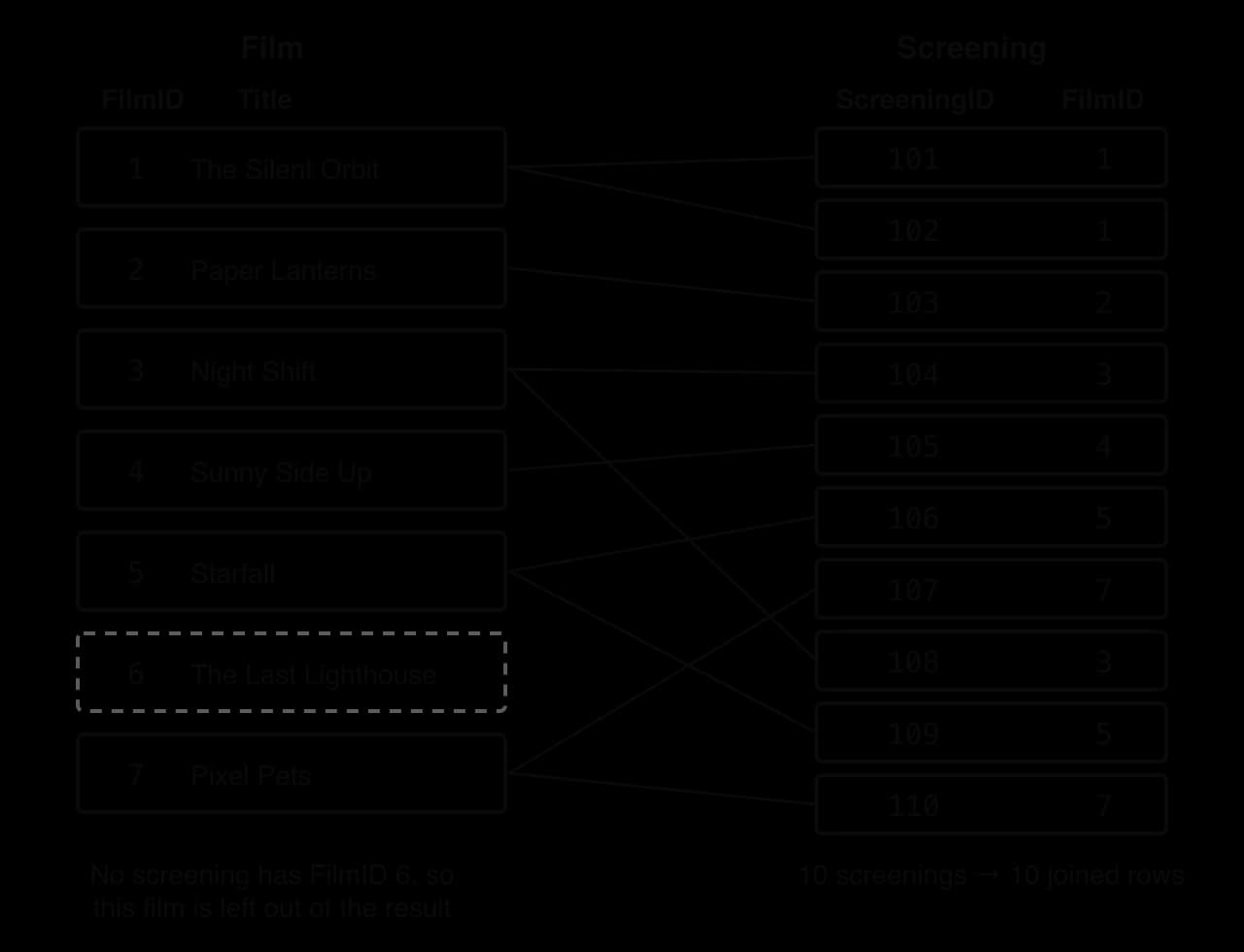
The full inner join returns ten rows: films with two screenings appear twice, and The Last Lighthouse is missing because no screening refers to it.
SELECT Film.Title, Screening.ScreeningID, Screening.ShowDate
FROM Film
INNER JOIN Screening ON Film.FilmID = Screening.FilmID
ORDER BY Film.FilmID;
Title | ScreeningID | ShowDate |
|---|---|---|
The Silent Orbit | 101 | 2026-11-06 |
The Silent Orbit | 102 | 2026-11-06 |
Paper Lanterns | 103 | 2026-11-06 |
Night Shift | 104 | 2026-11-06 |
Night Shift | 108 | 2026-11-07 |
Sunny Side Up | 105 | 2026-11-07 |
Starfall | 106 | 2026-11-07 |
Starfall | 109 | 2026-11-08 |
Pixel Pets | 107 | 2026-11-07 |
Pixel Pets | 110 | 2026-11-08 |
Once the tables are joined, every other clause works on the joined rows exactly as on a single table. The query for the screening times of sci-fi films filters on a Film column and sorts on two Screening columns.
SELECT Film.Title, Screening.ShowDate, Screening.StartTime
FROM Film
INNER JOIN Screening ON Film.FilmID = Screening.FilmID
WHERE Film.Genre = 'Sci-fi'
ORDER BY Screening.ShowDate, Screening.StartTime;
Title | ShowDate | StartTime |
|---|---|---|
The Silent Orbit | 2026-11-06 | 18:00 |
The Silent Orbit | 2026-11-06 | 20:45 |
Starfall | 2026-11-07 | 19:00 |
Starfall | 2026-11-08 | 16:00 |
DISTINCT is often needed after a join, because a row of one table can match several rows of the other. Listing the films showing on 7 November without DISTINCT would list a film twice if it had two screenings that day.
SELECT DISTINCT Film.Title
FROM Film
INNER JOIN Screening ON Film.FilmID = Screening.FilmID
WHERE Screening.ShowDate = '2026-11-07'
ORDER BY Film.Title;
Title |
|---|
Night Shift |
Pixel Pets |
Starfall |
Sunny Side Up |
When both tables have a field with the same name, such as FilmID, the name alone is ambiguous and the DBMS reports an error. Writing Table.Field (a qualified name) says which one is meant. Qualifying every field in a join query, even unambiguous ones, also shows the reader where each value comes from.
Long table names make joins wordy, so SQL lets a query give a table or a computed column a short temporary name with AS.
The query lists screenings priced between 9.00 and 12.00 inclusive of films not rated 15, most expensive first, using the table aliases f and s.
SELECT f.Title, s.ShowDate, s.Price
FROM Film AS f
INNER JOIN Screening AS s ON f.FilmID = s.FilmID
WHERE s.Price BETWEEN 9.00 AND 12.00 AND NOT f.AgeRating = '15'
ORDER BY s.Price DESC, f.Title ASC;
Title | ShowDate | Price |
|---|---|---|
The Silent Orbit | 2026-11-06 | 11.00 |
Starfall | 2026-11-08 | 10.00 |
The Silent Orbit | 2026-11-06 | 9.50 |
Column aliases are useful with calculations. A SELECT list may contain arithmetic on fields, which is worked out for each row. The cost of each booking for 6 November is the number of seats times the ticket price, named Cost and used to sort the result.
SELECT Booking.BookingID, Booking.Seats, Screening.Price,
       Booking.Seats * Screening.Price AS Cost
FROM Booking
INNER JOIN Screening ON Booking.ScreeningID = Screening.ScreeningID
WHERE Screening.ShowDate = '2026-11-06'
ORDER BY Cost DESC;
BookingID | Seats | Price | Cost |
|---|---|---|---|
2 | 4 | 9.50 | 38.00 |
6 | 3 | 11.00 | 33.00 |
5 | 2 | 11.00 | 22.00 |
1 | 2 | 9.50 | 19.00 |
4 | 2 | 8.00 | 16.00 |
3 | 1 | 11.00 | 11.00 |
An older style of join, still common in existing code, lists both tables in FROM (which on its own gives the Cartesian product) and puts the join condition in WHERE. This query returns the same title and date pairs as the INNER JOIN version of the sci-fi query:
SELECT Film.Title, Screening.ShowDate
FROM Film, Screening
WHERE Film.FilmID = Screening.FilmID AND Film.Genre = 'Sci-fi';
The older form is still accepted by the major DBMSs and is worth recognising. The JOIN … ON form is clearer because it keeps the link between the tables apart from the filtering conditions, so a missing join condition is easier to spot.
An inner join drops rows that have no match, which is sometimes not wanted. A LEFT JOIN keeps every row of the first (left) table and fills the columns of the second with NULL where there is no match. The result shows the difference clearly: The Last Lighthouse now appears with no screening.
SELECT Film.Title, Screening.ScreeningID
FROM Film
LEFT JOIN Screening ON Film.FilmID = Screening.FilmID
WHERE Film.Genre = 'Drama';
Title | ScreeningID |
|---|---|
Paper Lanterns | 103 |
The Last Lighthouse | NULL |
Query P lists the genres of the more expensive screenings.
SELECT DISTINCT Film.Genre
FROM Film
INNER JOIN Screening ON Film.FilmID = Screening.FilmID
WHERE Screening.Price >= 10.00
ORDER BY Film.Genre DESC;Choosing which tables to join starts from the fields. List every field the request mentions, note which table holds each one, and join exactly those tables on their key. A request about bookings in one screen, for example, needs Booking for the seats and Screening for the screen number.
Many requests are about groups rather than single rows: how many films there are in each genre, how many screenings each film has. GROUP BY collects the rows that share a value into one group, and the query then returns one row per group.
The function COUNT(*) counts the rows in each group. It is the simplest of the aggregate functions, which all summarise a group into one value; the full set (AVG, COUNT, MAX, MIN, SUM) is HL only. The grouping diagram shows how the seven film rows become five result rows.

SELECT Genre, COUNT(*) AS Films
FROM Film
GROUP BY Genre;
Genre | Films |
|---|---|
Animation | 1 |
Comedy | 1 |
Drama | 2 |
Sci-fi | 2 |
Thriller | 1 |
After grouping, each result row stands for a whole group. A column in SELECT must therefore have one value per group: either it is a grouping column (every row in the group has the same Genre) or it is a summary such as COUNT(*). Asking for Title in this query makes no sense, because the Drama group holds two different titles.
WHERE cannot filter groups, because it runs before the groups exist. A second filter, HAVING, runs after grouping and tests each group as a whole.
SELECT Genre, COUNT(*) AS Films
FROM Film
GROUP BY Genre
HAVING COUNT(*) > 1;
Genre | Films |
|---|---|
Drama | 2 |
Sci-fi | 2 |
A query can use both filters. WHERE removes rows before grouping; HAVING removes groups after it. The query counts the evening screenings (starting at 18:00 or later) on each date, then keeps only the dates with at least two.
SELECT ShowDate, COUNT(*) AS Evening
FROM Screening
WHERE StartTime >= '18:00'
GROUP BY ShowDate
HAVING COUNT(*) >= 2
ORDER BY ShowDate;
ShowDate | Evening |
|---|---|
2026-11-06 | 3 |
2026-11-07 | 2 |
The WHERE clause first removes the daytime screenings. Of the five evening screenings that remain, three are on 6 November (101, 102, 104) and two on 7 November (106, 108); 8 November has none left, so it never forms a group. HAVING then keeps both groups, since each has at least two rows.
|
| |
|---|---|---|
Filters | Individual rows | Groups |
Runs | Before | After |
Can test an aggregate such as | No | Yes |
Can be used without | Yes | Rarely (the whole table is then one group) |
Grouping works on joined tables too. The query counts the screenings of each film and keeps the films shown at least twice. It groups by Film.FilmID as well as Film.Title, because two different films could share a title, while the key identifies each film uniquely.
SELECT Film.Title, COUNT(*) AS Screenings
FROM Film
INNER JOIN Screening ON Film.FilmID = Screening.FilmID
GROUP BY Film.FilmID, Film.Title
HAVING COUNT(*) >= 2
ORDER BY Film.Title;
Title | Screenings |
|---|---|
Night Shift | 2 |
Pixel Pets | 2 |
Starfall | 2 |
The Silent Orbit | 2 |
Real applications rarely send SQL typed by a person. A program written in a general-purpose language (the host language) connects to the database through a driver, sends SQL statements as strings, and receives the result set as rows it can loop over. Python's standard library includes the sqlite3 module for SQLite databases; Java programs use JDBC (Java Database Connectivity) with a driver for the chosen DBMS.
The program lists the screenings of one genre. The genre is not pasted into the SQL string: the statement contains a placeholder ?, and the value is passed separately. This is a parameterised query, and it means a value typed by a user is always treated as data, never as part of the SQL command, which blocks SQL injection attacks.
import sqlite3

conn = sqlite3.connect("cinema.db")
genre = "Sci-fi"  # in a real app this value comes from the user
rows = conn.execute(
    "SELECT Film.Title, Screening.ShowDate, Screening.StartTime "
    "FROM Film INNER JOIN Screening ON Film.FilmID = Screening.FilmID "
    "WHERE Film.Genre = ? "
    "ORDER BY Screening.ShowDate, Screening.StartTime",
    (genre,))
for row in rows:
    print(row[0], row[1], row[2])
conn.close()import java.sql.Connection;
import java.sql.DriverManager;
import java.sql.PreparedStatement;
import java.sql.ResultSet;
import java.sql.SQLException;
public class FindFilms {
public static void main(String[] args) throws SQLException {
Connection conn = DriverManager.getConnection("jdbc:sqlite:cinema.db");
String genre = "Sci-fi"; // in a real app this value comes from the user
PreparedStatement query = conn.prepareStatement(
"SELECT Film.Title, Screening.ShowDate, Screening.StartTime "
+ "FROM Film INNER JOIN Screening ON Film.FilmID = Screening.FilmID "
+ "WHERE Film.Genre = ? "
+ "ORDER BY Screening.ShowDate, Screening.StartTime");
query.setString(1, genre);
ResultSet rows = query.executeQuery();
while (rows.next()) {
System.out.println(rows.getString("Title") + " " + rows.getString("ShowDate")
+ " " + rows.getString("StartTime"));
}
conn.close();
}
}Both versions print the same four rows. In Python, (genre,) is a tuple holding one value for the one placeholder, and each row is a tuple read by index. In Java, setString(1, genre) fills placeholder number 1, and rows.next() moves to the next row of the result set, returning false when none are left. The Java version needs the SQLite JDBC driver on the class path.
The Silent Orbit 2026-11-06 18:00
The Silent Orbit 2026-11-06 20:45
Starfall 2026-11-07 19:00
Starfall 2026-11-08 16:00SELECT only reads. Three DML statements change the stored data: INSERT INTO adds new rows, UPDATE … SET changes values in existing rows, and DELETE FROM removes rows. The examples run one after another on a copy of the cinema database; every other query uses the original tables.
INSERT INTO names the table, lists the fields being filled in brackets, and gives the values in the same order after VALUES. Text and dates go in single quotes.
INSERT INTO Customer (CustomerID, FirstName, LastName, Email, MemberSince)
VALUES (207, 'Gita', 'Rao', 'gita.rao@example.com', '2026-11-05');
A field left out of the list is set to NULL (or to a default value if the table defines one). Hugo Moreau joins without giving an email address:
INSERT INTO Customer (CustomerID, FirstName, LastName, MemberSince)
VALUES (208, 'Hugo', 'Moreau', '2026-11-05');
CustomerID | FirstName | LastName | MemberSince | |
|---|---|---|---|---|
207 | Gita | Rao | gita.rao@example.com | 2026-11-05 |
208 | Hugo | Moreau | NULL | 2026-11-05 |
The field list can be left out (INSERT INTO Customer VALUES (…)) if a value is given for every field in the order the table defines them. Naming the fields is safer: the statement still works if the table's fields are later reordered or a new optional field is added.
UPDATE names the table, SET gives each field its new value, and WHERE chooses the rows to change. A new value can be calculated from the old one. A 50-cent rise on every screening on 8 November changes two rows:
UPDATE Screening
SET Price = Price + 0.50
WHERE ShowDate = '2026-11-08';
ScreeningID | ShowDate | Price |
|---|---|---|
109 | 2026-11-08 | 10.50 |
110 | 2026-11-08 | 6.50 |
Several fields can be changed in one statement, separated by commas. When Elena Santos gives an email address and changes her surname, the WHERE clause uses the primary key so that exactly one row is changed:
UPDATE Customer
SET Email = 'elena.santos@example.com', LastName = 'Santos-Reyes'
WHERE CustomerID = 205;
CustomerID | FirstName | LastName | MemberSince | |
|---|---|---|---|---|
205 | Elena | Santos-Reyes | elena.santos@example.com | 2026-03-22 |
DELETE FROM names the table and WHERE chooses the rows to remove. Whole rows are removed; to clear a single value, UPDATE sets it to NULL instead.
DELETE FROM Booking
WHERE BookingID = 11;
A condition can match many rows at once. DELETE FROM Customer WHERE MemberSince > '2026-11-01'; removed the two customers added earlier in the sequence (207 and 208) and nobody else.
Every change is checked against the constraints in the table definitions, and a change that would break one is rejected with an error. This is how data integrity is enforced inside the database rather than trusted to each program that uses it. The table shows four rejected statements and the messages SQLite gave.
Statement | Constraint broken | SQLite's message |
|---|---|---|
| Primary key: customer 203 already exists (entity integrity) |
|
| Foreign key: there is no screening 999 (referential integrity) |
|
| Foreign key: screenings 101 and 102 still refer to film 1 |
|
|
|
|
By contrast, DELETE FROM Film WHERE FilmID = 6; succeeds, because no screening refers to The Last Lighthouse. The rule protects only rows that other rows depend on. SQLite checks foreign keys only after PRAGMA foreign_keys = ON; has been run on the connection, an example of how DBMSs differ.
Without help, the only way to find the customers called Smith is to read every row of Customer and test it, a linear search. With six customers that is instant; with ten million it means reading the whole table for every search. An index solves this the way the index at the back of a textbook does: a separate, sorted list of key values, each with a pointer to where the full entry is stored.
The index diagram shows an index on LastName beside the table it points into. The table is stored in CustomerID order; the index holds the same surnames sorted alphabetically.
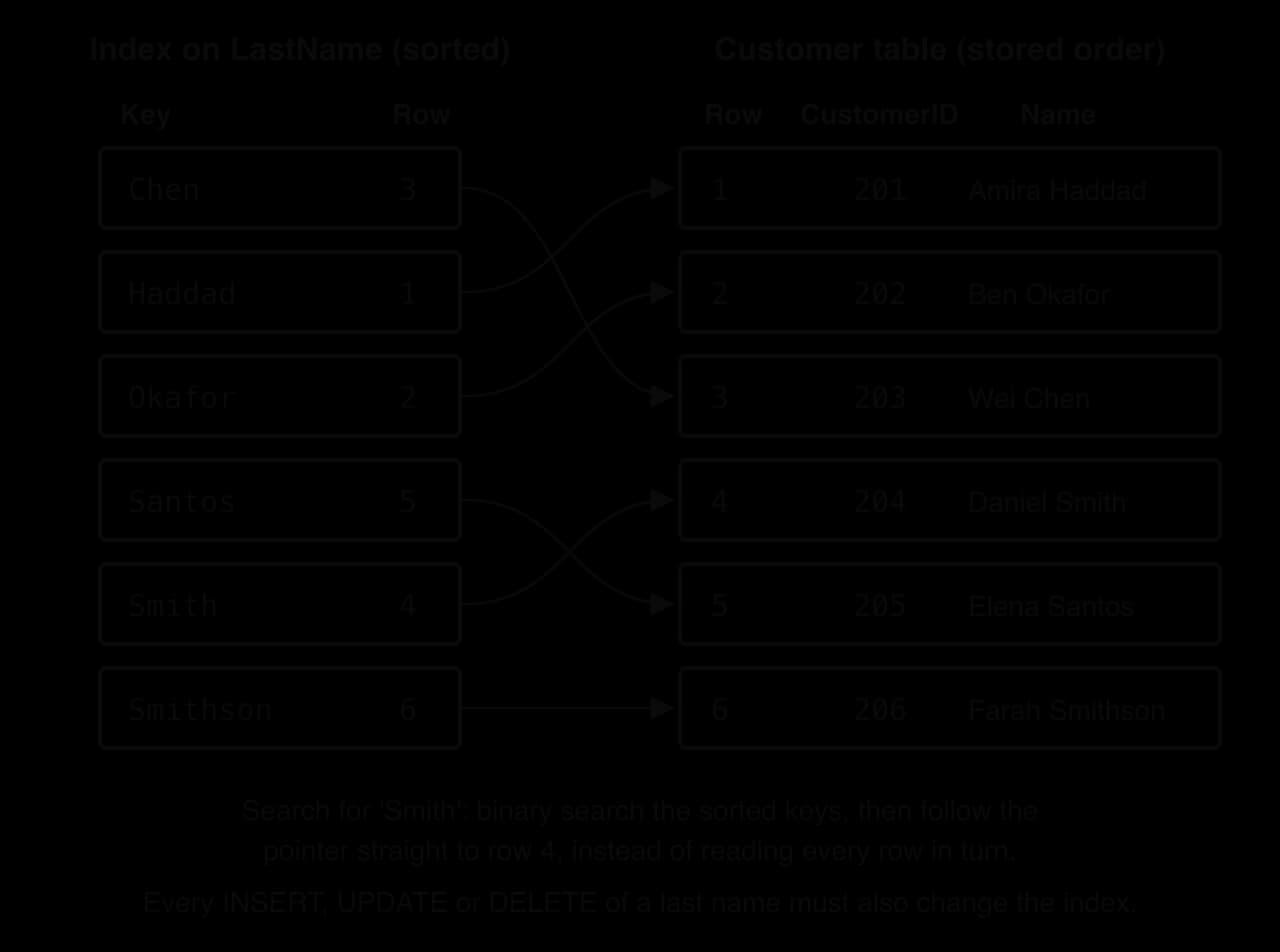
Because the keys are sorted, the DBMS can find a value by repeatedly halving the range to search, as a binary search does, instead of checking every row. Real DBMSs store most indexes as a B-tree, a balanced tree whose wide nodes fit disk pages, so even a table of millions of rows needs only a few page reads to reach any key. The DBMS creates an index on every primary key automatically, which is why looking up a row by its ID is fast. Other indexes are added with a DDL statement:
CREATE INDEX idx_customer_lastname ON Customer (LastName);An index is used automatically: queries are written exactly as before, and the query optimiser selects the index only when it helps. SQLite's EXPLAIN QUERY PLAN shows the decision. Before the index exists, a search by surname reads the whole table (SCAN); afterwards, it searches the index (SEARCH … USING INDEX).
Query | Plan without the index | Plan with the index |
|---|---|---|
|
|
|
|
|
|
The second row shows a limit of indexes. A pattern that starts with % can begin anywhere in the value, so the sorted order does not help and every entry must still be checked; SQLite reads the smaller index instead of the table, but it still scans. Indexes also speed up ORDER BY on the indexed column, since the values are already sorted, and joins, since the DBMS can look up the matching row for each foreign key.
An index is a copy of some of the data, so every change to that data must also change the index. Inserting a customer adds an entry to the LastName index in the right sorted place; deleting one removes an entry; updating a surname moves the entry to a new position. A table with five indexes has six structures to change for every new row. The extra work makes writes slower, and the indexes take extra storage space.
The program measures both effects. It fills a table of 200,000 tickets twice, once with no extra index and once with three, then times 200 searches by customer on each table. SQLite runs in memory (":memory:") so that disk speed does not affect the times, and time.perf_counter() (Java: System.nanoTime()) reads a precise clock before and after each task.
import random
import sqlite3
import time

ROWS = 200000


def create_table(with_indexes):
    conn = sqlite3.connect(":memory:")
    conn.execute("CREATE TABLE Ticket (TicketID INTEGER PRIMARY KEY, "
                 "CustomerID INTEGER, ScreeningID INTEGER, Seat TEXT)")
    if with_indexes:
        conn.execute("CREATE INDEX idx_customer ON Ticket (CustomerID)")
        conn.execute("CREATE INDEX idx_screening ON Ticket (ScreeningID)")
        conn.execute("CREATE INDEX idx_seat ON Ticket (Seat)")
    return conn


def time_inserts(conn):
    random.seed(1)
    start = time.perf_counter()
    for i in range(ROWS):
        conn.execute("INSERT INTO Ticket VALUES (?, ?, ?, ?)",
                     (i, random.randint(1, 50000), random.randint(1, 5000),
                      "R" + str(random.randint(1, 400))))
    conn.commit()
    return (time.perf_counter() - start) * 1000


def time_lookups(conn):
    start = time.perf_counter()
    for customer in range(1, 201):
        conn.execute("SELECT TicketID FROM Ticket WHERE CustomerID = ?",
                     (customer,)).fetchall()
    return (time.perf_counter() - start) * 1000


plain = create_table(False)
indexed = create_table(True)
print(f"Insert {ROWS} rows, no extra index:  {time_inserts(plain):.0f} ms")
print(f"Insert {ROWS} rows, three indexes:   {time_inserts(indexed):.0f} ms")
print(f"200 lookups by CustomerID, no index: {time_lookups(plain):.0f} ms")
print(f"200 lookups by CustomerID, indexed: {time_lookups(indexed):.1f} ms")import java.sql.Connection;
import java.sql.DriverManager;
import java.sql.PreparedStatement;
import java.sql.ResultSet;
import java.sql.SQLException;
import java.sql.Statement;
import java.util.Random;
public class IndexCost {
static final int ROWS = 200000;
static Connection createTable(boolean withIndexes) throws SQLException {
Connection conn = DriverManager.getConnection("jdbc:sqlite::memory:");
Statement st = conn.createStatement();
st.execute("CREATE TABLE Ticket (TicketID INTEGER PRIMARY KEY, "
+ "CustomerID INTEGER, ScreeningID INTEGER, Seat TEXT)");
if (withIndexes) {
st.execute("CREATE INDEX idx_customer ON Ticket (CustomerID)");
st.execute("CREATE INDEX idx_screening ON Ticket (ScreeningID)");
st.execute("CREATE INDEX idx_seat ON Ticket (Seat)");
}
return conn;
}
static double timeInserts(Connection conn) throws SQLException {
conn.setAutoCommit(false);
Random random = new Random(1);
PreparedStatement insert = conn.prepareStatement("INSERT INTO Ticket VALUES (?, ?, ?, ?)");
long start = System.nanoTime();
for (int i = 0; i < ROWS; i++) {
insert.setInt(1, i);
insert.setInt(2, random.nextInt(50000) + 1);
insert.setInt(3, random.nextInt(5000) + 1);
insert.setString(4, "R" + (random.nextInt(400) + 1));
insert.executeUpdate();
}
conn.commit();
return (System.nanoTime() - start) / 1000000.0;
}
static double timeLookups(Connection conn) throws SQLException {
PreparedStatement query = conn.prepareStatement("SELECT TicketID FROM Ticket WHERE CustomerID = ?");
long start = System.nanoTime();
for (int customer = 1; customer <= 200; customer++) {
query.setInt(1, customer);
ResultSet rows = query.executeQuery();
while (rows.next()) {
rows.getInt(1);
}
}
return (System.nanoTime() - start) / 1000000.0;
}
public static void main(String[] args) throws SQLException {
Connection plain = createTable(false);
Connection indexed = createTable(true);
System.out.printf("Insert %d rows, no extra index: %.0f ms%n", ROWS, timeInserts(plain));
System.out.printf("Insert %d rows, three indexes: %.0f ms%n", ROWS, timeInserts(indexed));
System.out.printf("200 lookups by CustomerID, no index: %.0f ms%n", timeLookups(plain));
System.out.printf("200 lookups by CustomerID, indexed: %.1f ms%n", timeLookups(indexed));
}
}One run of the Python version on a laptop printed the times shown. Exact times change from run to run and machine to machine, but the pattern was the same in every run, in both languages: with the three indexes, loading the table took about one and a half to two and a half times as long, while each search became thousands of times faster.
Insert 200000 rows, no extra index:  1041 ms
Insert 200000 rows, three indexes:   2424 ms
200 lookups by CustomerID, no index: 4335 ms
200 lookups by CustomerID, indexed:  0.4 ms
Without an index, each of the 200 searches read all 200,000 rows, about 22 ms per search. With the index, each search went straight to the right entries. An index therefore adds work to every insert, update and delete on its columns and saves work on every search that can use it. The best columns to index are those searched, joined or sorted often and changed rarely, such as a foreign key or a surname; a column that changes constantly and is seldom searched, such as SeatsLeft, is a poor choice.
Column | Read often? | Changed often? | Index it? |
|---|---|---|---|
| Yes: staff search by name | Rarely | Yes |
| Yes: used in every join with | Only when a booking is made | Yes |
| Occasionally | On every booking | No |
| Only at log-in | Rarely | Yes, if members log in by email |
 YouTube
An index stays correct after every change, but not always efficient. Large numbers of inserts, updates and deletes leave gaps and half-empty pages in a B-tree, and the pages of the index end up scattered across the disk instead of stored in order. This is index fragmentation: the index takes more space than it needs and reading it takes more disk operations. The DBMS also keeps statistics about each index (how many rows, how many distinct values) to help the query optimiser choose a plan, and after a big change those statistics are out of date, so the optimiser may choose a slow plan.
The commands depend on the DBMS, a clear case of syntax varying between systems.
DBMS | Rebuild an index | Refresh statistics |
|---|---|---|
SQLite |
|
|
PostgreSQL |
|
|
SQL Server |
|
|
Oracle |
|
|
A full rebuild can lock the table or slow it down while it runs, so it is scheduled when few users are active. For a very large one-off load, a common alternative is to drop the indexes, load the data, and create the indexes again: building an index once from sorted data is faster than updating it millions of times. That approach is only safe if nothing else needs the indexes during the load.
A manager rarely needs every booking; they need totals, averages and extremes: how many seats were sold, what an average ticket costs, which film earns most. An aggregate function turns many rows into one summary value.
Function | Returns | Works on | Example on the cinema data | Result |
|---|---|---|---|---|
| The number of rows | Any rows |
| 6 |
| The number of non- | Any type |
| 5 |
| The total of the values | Numbers |
| 30 |
| The mean of the values | Numbers |
| 9.25 |
| The smallest value | Numbers, text, dates |
| 6.00 |
| The largest value | Numbers, text, dates |
| 12.50 |
The average price is the sum of the ten prices divided by ten:
Several aggregates can appear in one SELECT, each with a column alias so the result has readable headings:
SELECT MIN(Price) AS MinPrice, MAX(Price) AS MaxPrice, AVG(Price) AS AvgPrice
FROM Screening;
MinPrice | MaxPrice | AvgPrice |
|---|---|---|
6.00 | 12.50 | 9.25 |
COUNT(*) counts rows, whatever they contain. COUNT(Email) counts only the rows where Email has a value, so it returns 5 because Elena's email is NULL. Every aggregate except COUNT(*) ignores NULL values: AVG divides by the number of non-NULL values, not by the number of rows. Asking how many customers have an email address is therefore one query with two counts:
SELECT COUNT(*) AS Customers, COUNT(Email) AS WithEmail
FROM Customer;
Customers | WithEmail |
|---|---|
6 | 5 |
MIN and MAX work on any type that can be ordered. On dates they give the earliest and latest (the first member joined on 2022-06-30, the newest on 2026-10-02); on text, the first and last in alphabetical order. A WHERE clause filters rows before they are summarised, so this query summarises only the six bookings made from 1 to 3 November inclusive:
SELECT COUNT(*) AS Bookings, SUM(Seats) AS SeatsSold, AVG(Seats) AS AvgSeats
FROM Booking
WHERE BookedOn BETWEEN '2026-11-01' AND '2026-11-03';
Bookings | SeatsSold | AvgSeats |
|---|---|---|
6 | 15 | 2.5 |
The six bookings (3 to 8) hold 1 + 2 + 2 + 3 + 5 + 2 = 15 seats, and 15 ÷ 6 = 2.5. Some DBMSs (SQL Server, for example) return a whole number when AVG is applied to an integer column, which would cut 2.5 down to 2; multiplying by 1.0 first, as in AVG(Seats * 1.0), avoids that.
Aggregate functions become a reporting tool when combined with GROUP BY: the function is then calculated once per group. Joined with Screening, the bookings give the number of seats sold and the ticket revenue for each film. Revenue for one booking is Seats * Price, and SUM adds those up within each film's group.
SELECT Screening.FilmID, SUM(Booking.Seats) AS SeatsSold,
       SUM(Booking.Seats * Screening.Price) AS Revenue
FROM Booking
INNER JOIN Screening ON Booking.ScreeningID = Screening.ScreeningID
GROUP BY Screening.FilmID
ORDER BY Revenue DESC;
FilmID | SeatsSold | Revenue |
|---|---|---|
5 | 6 | 70.00 |
1 | 7 | 68.00 |
3 | 6 | 66.00 |
4 | 5 | 37.50 |
7 | 4 | 24.00 |
2 | 2 | 16.00 |
The result supports a decision. The Silent Orbit (film 1) sold the most seats, but Starfall (film 5) earned the most, because its screenings cost 12.50 and 10.00. Film 6 is missing: it has no screenings, so the inner join gives it no rows. Showing titles here needs a third table (Film), which adds a second INNER JOIN … ON clause written in the same way.
HAVING filters on the aggregate. The query finds the genres whose average ticket price is above 9.00, joining Film (for the genre) with Screening (for the price):
SELECT Film.Genre, COUNT(*) AS Screenings, AVG(Screening.Price) AS AvgPrice
FROM Film
INNER JOIN Screening ON Film.FilmID = Screening.FilmID
GROUP BY Film.Genre
HAVING AVG(Screening.Price) > 9.00
ORDER BY AvgPrice DESC;
Genre | Screenings | AvgPrice |
|---|---|---|
Thriller | 2 | 11.00 |
Sci-fi | 4 | 10.75 |
The Sci-fi average is (9.50 + 11.00 + 12.50 + 10.00) ÷ 4 = 43.00 ÷ 4 = 10.75. Drama (8.00), Comedy (7.50) and Animation (6.00) fail the HAVING condition.
A daily report for the cinema's owner combines COUNT, SUM and a calculated SUM for each date:
SELECT Screening.ShowDate, COUNT(*) AS Bookings, SUM(Booking.Seats) AS SeatsSold,
       SUM(Booking.Seats * Screening.Price) AS Revenue
FROM Screening
INNER JOIN Booking ON Screening.ScreeningID = Booking.ScreeningID
GROUP BY Screening.ShowDate
ORDER BY Screening.ShowDate;
ShowDate | Bookings | SeatsSold | Revenue |
|---|---|---|---|
2026-11-06 | 6 | 14 | 139.00 |
2026-11-07 | 5 | 14 | 122.50 |
2026-11-08 | 1 | 2 | 20.00 |
Sunday 8 November has sold only 2 seats so far, worth 20.00 in total: a signal to advertise those screenings or move them to a smaller screen. Reports like this, run regularly over far larger tables, are the starting point for the data warehouses and business intelligence tools of subtopic A3.4.
Three rules prevent most errors in grouped queries.
Every column in SELECT must be either in GROUP BY or inside an aggregate function. Each result row stands for a group, so a plain column must have one value per group.
Aggregates cannot go in WHERE. WHERE filters rows before groups exist; conditions on an aggregate go in HAVING.
Aggregates ignore NULL, except COUNT(*), which counts rows.
Rule 1 is enforced strictly by PostgreSQL and SQL Server, which reject SELECT Genre, Title, MAX(RunMins) FROM Film GROUP BY Genre;. SQLite and some MySQL settings accept it and fill Title with a value from one row of each group, which can mislead. Following the rule keeps a query correct on every system.
The box office runs the same join of Film and Screening dozens of times a day. Instead of writing it every time, the join can be saved in the database under a name and then used as if it were a table.
The view ScreeningGuide packages the join, keeping only the columns the box office needs:
CREATE VIEW ScreeningGuide AS
SELECT Film.Title, Film.AgeRating, Screening.ShowDate, Screening.StartTime, Screening.Price
FROM Film
INNER JOIN Screening ON Film.FilmID = Screening.FilmID;
A query on the view needs no join and no knowledge of foreign keys. Listing Sunday's screenings becomes a one-table query:
SELECT Title, StartTime, Price
FROM ScreeningGuide
WHERE ShowDate = '2026-11-08'
ORDER BY StartTime;
Title | StartTime | Price |
|---|---|---|
Pixel Pets | 11:00 | 6.00 |
Starfall | 16:00 | 10.00 |
The tables that actually hold the data (Film, Screening, Customer, Booking) are called base tables, to distinguish them from views. A view can be built on base tables, on other views, or on both.
There are two ways a DBMS can provide a view's rows, and the difference affects freshness, speed and storage. The view diagram compares them.

A virtual view uses no storage for rows and can never be out of date. Its cost is time: the full query, joins and all, runs every time the view is read. For a view that joins and aggregates millions of rows, that can take seconds or minutes per use.
PostgreSQL creates one with CREATE MATERIALIZED VIEW FilmSales AS SELECT …; and brings it up to date with REFRESH MATERIALIZED VIEW FilmSales;. SQLite and MySQL have no materialised views; the same effect is produced by saving a query's result in a table. The experiment uses that method in SQLite to show staleness. FilmSales is a virtual view of seats sold per film; FilmSalesSnapshot is a stored copy made from it. A new booking of 3 seats for Pixel Pets (film 7) is then added.
CREATE VIEW FilmSales AS
SELECT Screening.FilmID, SUM(Booking.Seats) AS SeatsSold
FROM Booking
INNER JOIN Screening ON Booking.ScreeningID = Screening.ScreeningID
GROUP BY Screening.FilmID;

CREATE TABLE FilmSalesSnapshot AS SELECT * FROM FilmSales;

INSERT INTO Booking VALUES (13, 110, 206, 3, '2026-11-06');
Source read for film 7 | SeatsSold |
|---|---|
| 7 |
| 4 |
| 7 |
The result of the virtual view included the new booking immediately, while the stored copy still held 4 until it was rebuilt. Whether staleness matters depends on the use. A monthly sales dashboard can be refreshed overnight; the seat count shown to a customer at the moment of booking must never be stale.
Virtual view | Materialised view | |
|---|---|---|
What is stored | The query only | The query and a copy of the result rows |
Freshness | Always current | Current only as of the last refresh |
Read speed | As slow as the underlying query | Fast: rows are read directly |
Storage | None for rows | Extra space for the copy |
Cost of changes to base tables | None | The refresh must be run, which takes time |
Suits | Data that changes often; simple queries; security filters | Expensive reports read often, where slightly old data is acceptable |
Views serve several purposes at once, and one view often serves more than one.
Hiding complexity and simplifying queries. ScreeningGuide hides a join; a user writes FROM ScreeningGuide without knowing how the tables are linked. Long queries can be built from simpler views.
Data consistency. If "revenue" is defined once in a view, every report that uses the view calculates it the same way, instead of each analyst writing a slightly different formula.
Data independence. Programs written against a view keep working when the base tables change. If Film were split into two tables, only the view's defining query would need rewriting; every program using ScreeningGuide would be unaffected. This is logical data independence.
Security. A view can expose only some columns and rows. Box office staff can be given permission to read a view of bookings with customer names but not email addresses, and no permission on the base table at all.
Performance. A materialised view stores the result of an expensive query, so frequent reads are fast. (A virtual view brings no speed gain: its query still runs in full.)
Read-only or updatable data. A view can let users read data without being able to change it, or, if it is simple enough, allow changes that pass through to the base table.
The security role in practice: the CustomerList view shows names but never emails.
CREATE VIEW CustomerList AS
SELECT CustomerID, FirstName, LastName
FROM Customer;A view is easiest to update when each of its rows corresponds to exactly one row of one base table, so every change to the view maps to exactly one stored row. CustomerList meets that condition and is automatically updatable in PostgreSQL, MySQL and SQL Server. FilmSales does not: its row "film 7, 7 seats" summarises two bookings, and changing it to 9 has no meaning in the base tables. Views that join tables fall in between and the rules differ by DBMS: PostgreSQL refuses changes through them unless extra rules are written, while MySQL and SQL Server accept a change that affects the columns of only one base table. SQLite treats every view as read-only (unless a trigger is written to say how a change should be applied), so UPDATE CustomerList SET LastName = 'Smyth' WHERE CustomerID = 204; fails with "cannot modify CustomerList because it is a view". Read-only access is also a deliberate design choice: a user given permission only to SELECT from a report view cannot use it to change the data.
Booking two seats for screening 104 changes two tables: a row is added to Booking, and SeatsLeft for the screening drops by 2. Both changes describe one real event, so they must happen together. If the program inserts the booking and then crashes before updating SeatsLeft, the database claims more free seats than there are; if the update happens without the insert, seats vanish. Either way the data no longer matches reality, a failure of data consistency.
The solution is to group the statements into one transaction, a single logical unit of work that the DBMS treats as indivisible. The guarantees a DBMS gives for transactions are summed up by the acronym ACID, coined by Andreas Reuter and Theo Härder in 1983, building on Jim Gray's earlier work on transactions.
Atomicity is what makes the booking safe. The DBMS records every change a transaction makes so that it can undo them. When something goes wrong (a constraint is broken, the program detects a problem, the power fails), every change since the start of the transaction is reversed and the database is back exactly where it was. "Atomic" means "cannot be split". The same word describes the atomic values required by first normal form in subtopic A3.2, but the two ideas are unrelated: an atomic value cannot be divided into smaller data items, while an atomic transaction cannot be partly carried out.
The DBMS enforces consistency through the constraints in the schema: primary keys, foreign keys, NOT NULL and CHECK. Rules that are too complex for a constraint (for example, "the number of seats booked plus SeatsLeft must equal the screen's capacity") are the responsibility of the transaction's own logic. During a transaction, the database may pass through states that break a rule, such as the moment after the booking is inserted but before SeatsLeft is updated. Consistency requires only that the state at COMMIT is valid; isolation makes sure that no other user reads the in-between states.
When many customers book at the same moment, their transactions run concurrently. Without control, they can interfere. The isolation diagram follows two customers each trying to book 2 of the last 3 seats for screening 104, in a program that reads SeatsLeft, checks it, and then writes the new value.
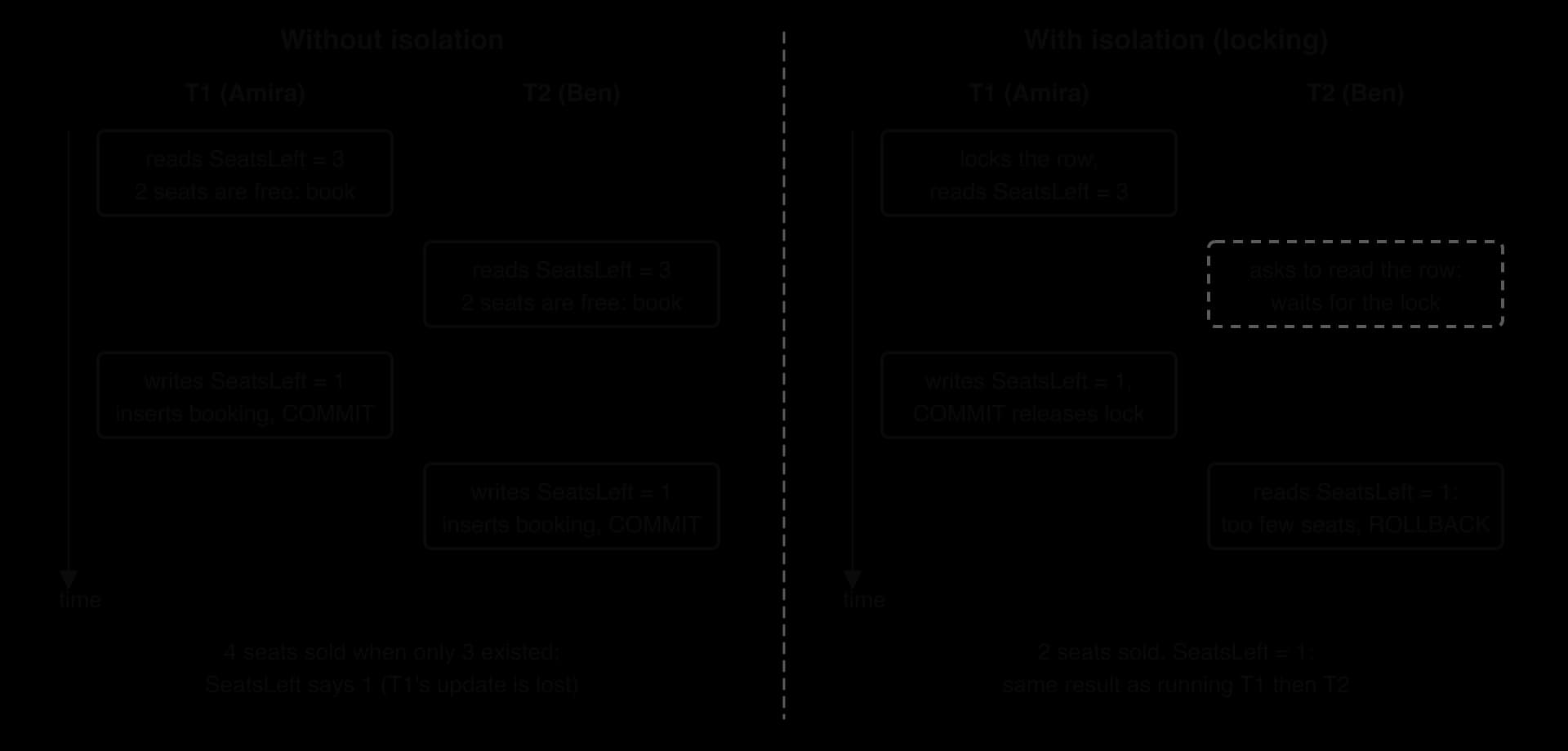
On the left, each transaction reads 3, finds that 2 seats are available, and writes 3 − 2 = 1. Four seats have been sold for three places, and SeatsLeft says 1: Amira's update has been overwritten and lost. This is a lost update, one form of race condition.
On the right, Amira's transaction locks the row while it works. Ben's transaction must wait; when it reads the row, the value is the committed 1, the check fails, and his transaction rolls back cleanly. The outcome is exactly what would have happened if Amira had booked first and Ben second. This is the concurrency control introduced in subtopic A3.1. Stronger isolation is safer but makes transactions wait for one another, so DBMSs offer several isolation levels that trade safety for speed; choosing between them is a decision for the database administrator.
Changes held only in RAM would be lost in a power cut, so a DBMS makes them durable by writing them to non-volatile storage before it confirms a commit. The usual method is a log.
The log serves both atomicity and durability. After a crash, the DBMS reads the log: a transaction with a commit record is redone in full, even if its changes had not yet reached the data files, and a transaction with no commit record is undone. A booking that was committed one millisecond before the power failed is kept; one that had not committed disappears entirely.
The name "transaction" is shared with the general idea from subtopic A3.1: a transaction is the unit of work, and TCL is the set of commands that marks where that unit begins and ends. The successful booking of two seats for screening 104 by Farah (customer 206) runs as a single transaction:
BEGIN TRANSACTION;
UPDATE Screening SET SeatsLeft = SeatsLeft - 2 WHERE ScreeningID = 104;
INSERT INTO Booking (BookingID, ScreeningID, CustomerID, Seats, BookedOn)
VALUES (13, 104, 206, 2, '2026-11-05');
COMMIT;
After the commit, screening 104 has 1 seat left and booking 13 is stored. Both changes became visible to other users at the same instant, at COMMIT.
Wei (customer 203) then tries to book 2 seats for the same screening. The insert succeeds, but the update would make SeatsLeft equal to 1 − 2 = −1, which breaks the CHECK constraint. SQLite printed the error, and a SELECT inside the still-open transaction showed that booking 14 was still there: the failed statement was undone, but the earlier insert was not.
BEGIN TRANSACTION;
INSERT INTO Booking (BookingID, ScreeningID, CustomerID, Seats, BookedOn)
VALUES (14, 104, 203, 2, '2026-11-05');
UPDATE Screening SET SeatsLeft = SeatsLeft - 2 WHERE ScreeningID = 104;
-- Error: CHECK constraint failed: SeatsLeft >= 0
ROLLBACK;After ROLLBACK, booking 14 no longer exists, the Booking table holds 13 rows, and SeatsLeft is still 1. The flowchart of a transaction shows the two possible endings.

The SQLite run shows why the program must decide to roll back: a DBMS that rejects one statement does not always cancel the whole transaction by itself. In application code, the decision sits in exception handling. The Python and Java programs try both statements, commit if both succeed, and roll back if either raises an error.
import sqlite3

conn = sqlite3.connect("book.db", isolation_level=None)
conn.execute("PRAGMA foreign_keys = ON")


def book(booking_id, screening_id, customer_id, seats, booked_on):
    try:
        conn.execute("BEGIN TRANSACTION")
        conn.execute("INSERT INTO Booking VALUES (?, ?, ?, ?, ?)",
                     (booking_id, screening_id, customer_id, seats, booked_on))
        conn.execute("UPDATE Screening SET SeatsLeft = SeatsLeft - ? "
                     "WHERE ScreeningID = ?", (seats, screening_id))
        conn.execute("COMMIT")
        print("Booking", booking_id, "committed")
    except sqlite3.IntegrityError as error:
        conn.execute("ROLLBACK")
        print("Booking", booking_id, "rolled back:", error)


book(13, 104, 206, 2, "2026-11-05")
book(14, 104, 203, 2, "2026-11-05")
seats_left = conn.execute("SELECT SeatsLeft FROM Screening "
                          "WHERE ScreeningID = 104").fetchone()[0]
bookings = conn.execute("SELECT COUNT(*) FROM Booking").fetchone()[0]
print("Seats left for screening 104:", seats_left)
print("Bookings stored:", bookings)import java.sql.Connection;
import java.sql.DriverManager;
import java.sql.PreparedStatement;
import java.sql.ResultSet;
import java.sql.SQLException;
public class BookSeats {
static Connection conn;
static void book(int bookingId, int screeningId, int customerId, int seats, String bookedOn)
throws SQLException {
try {
conn.setAutoCommit(false); // the next statement begins a transaction
PreparedStatement insert = conn.prepareStatement(
"INSERT INTO Booking VALUES (?, ?, ?, ?, ?)");
insert.setInt(1, bookingId);
insert.setInt(2, screeningId);
insert.setInt(3, customerId);
insert.setInt(4, seats);
insert.setString(5, bookedOn);
insert.executeUpdate();
PreparedStatement update = conn.prepareStatement(
"UPDATE Screening SET SeatsLeft = SeatsLeft - ? WHERE ScreeningID = ?");
update.setInt(1, seats);
update.setInt(2, screeningId);
update.executeUpdate();
conn.commit();
System.out.println("Booking " + bookingId + " committed");
} catch (SQLException error) {
conn.rollback();
System.out.println("Booking " + bookingId + " rolled back: " + error.getMessage());
}
}
public static void main(String[] args) throws SQLException {
conn = DriverManager.getConnection("jdbc:sqlite:book.db?foreign_keys=on");
book(13, 104, 206, 2, "2026-11-05");
book(14, 104, 203, 2, "2026-11-05");
conn.setAutoCommit(true);
ResultSet seatsLeft = conn.createStatement().executeQuery(
"SELECT SeatsLeft FROM Screening WHERE ScreeningID = 104");
seatsLeft.next();
System.out.println("Seats left for screening 104: " + seatsLeft.getInt(1));
ResultSet bookings = conn.createStatement().executeQuery("SELECT COUNT(*) FROM Booking");
bookings.next();
System.out.println("Bookings stored: " + bookings.getInt(1));
conn.close();
}
}The first booking commits; the second rolls back, so the database keeps 13 bookings and 1 free seat. Python's sqlite3 is opened with isolation_level=None so that the program sends BEGIN TRANSACTION, COMMIT and ROLLBACK itself. JDBC uses method calls instead of TCL statements: setAutoCommit(false) starts a transaction, and commit() and rollback() end it. Java's error message also names SQLite's error code.
Booking 13 committed
Booking 14 rolled back: CHECK constraint failed: SeatsLeft >= 0
Seats left for screening 104: 1
Bookings stored: 13
ACID property | What it guarantees for the booking | How the DBMS provides it |
|---|---|---|
Atomicity | The booking row and the new | Records changes so they can be undone; |
Consistency |
| Constraints checked on every change; rollback on failure |
Isolation | Two customers cannot both buy the last seats | Locks make conflicting transactions wait |
Durability | A confirmed booking survives a crash | The transaction log on non-volatile storage, written before |
Database programming is examined in Paper 1, Section A, usually inside a question built around one scenario with sample tables printed in the paper. HL papers add extra parts on aggregates, views and transactions to the same scenario as the SL parts.
Command term | Statements | What it demands |
|---|---|---|
Outline | DDL and DML | A brief account of each, with an example statement; about 2 marks |
Construct | Queries; (HL) aggregate calculations | A working SQL statement written from an English request; typically 3–5 marks, awarded clause by clause |
Explain | Updating data; indexes | What happens and why, with a reason for each point; 3–4 marks |
Describe | (HL) Views; transactions | A detailed account of features or steps; 2–6 marks |
Questions may also ask you to state the output of a given query, which is answered by tracing it in processing order, or to correct a faulty query.
Expect the sample data to be small enough to trace by hand. Write SQL with one clause per line, keywords in capitals and text values in single quotes; small syntax slips are not normally penalised if the logic is clear, but a missing join condition or a condition in the wrong clause is.
The most common lost marks in SQL questions come from putting a condition in the wrong place. Before writing a condition, ask whether it is about one row (WHERE) or about a group or a total (HAVING), and whether it compares whole values (=) or a pattern (LIKE).
State one statement from the data definition language and one from the data manipulation language, and outline what each acts on. [2]
State the result set of the query. [2]
SELECT Title FROM Film WHERE Title LIKE 'The%' OR AgeRating = 'U' ORDER BY Title;
Construct an SQL query that lists the title, genre and running time of every film that is not a drama and lasts from 90 to 120 minutes inclusive, shortest first. [4]
Construct an SQL query that lists the first name of each customer who booked screening 101 or screening 106, with the number of seats and the booking date, in order of booking date. [5]
A student writes SELECT Film.Title, Screening.ShowDate FROM Film, Screening; to list each film with its screening dates. Explain why the output is wrong, and construct a corrected query. [4]
Construct a statement that increases by 1.00 the price of every screening in screen 3, and explain what would happen if the WHERE clause were left out. [3]
Explain one advantage and one disadvantage of adding an index on Booking.CustomerID. [4]
(HL only) Construct an SQL query that shows the customer ID and the total amount spent (seats × price) by each customer who has spent more than 50.00, the highest spender first. [5]
(HL only) Distinguish between a virtual view and a materialised view, and suggest, with a reason, which suits a revenue report that the owner reads each morning. [4]
(HL only) Describe how the isolation property of transactions prevents two customers from buying the same last seat. [3]
DDL, for example CREATE TABLE, acts on the structure of the database (tables, fields, constraints) [1]; DML, for example UPDATE, acts on the data stored in the rows [1].
Pixel Pets; The Last Lighthouse; The Silent Orbit (three rows, in this order). [1] for the three titles, [1] for the order. Pixel Pets is included because it is rated U.
[1] each for fields and table, NOT Genre = 'Drama' (or Genre <> 'Drama'), BETWEEN 90 AND 120, ORDER BY RunMins ASC: SELECT Title, Genre, RunMins FROM Film WHERE NOT Genre = 'Drama' AND RunMins BETWEEN 90 AND 120 ORDER BY RunMins ASC; Result: Sunny Side Up (Comedy, 96); Night Shift (Thriller, 117).
[1] each for fields, both tables, join on Customer.CustomerID = Booking.CustomerID, the OR condition on Booking.ScreeningID, ORDER BY Booking.BookedOn: SELECT Customer.FirstName, Booking.Seats, Booking.BookedOn FROM Customer INNER JOIN Booking ON Customer.CustomerID = Booking.CustomerID WHERE Booking.ScreeningID = 101 OR Booking.ScreeningID = 106 ORDER BY Booking.BookedOn; Result: Amira 2 2026-10-30; Ben 4 2026-10-31; Wei 2 2026-11-03; Daniel 2 2026-11-04.
There is no join condition, so the result is the Cartesian product [1]: all 7 × 10 = 70 pairs, so every film appears with every screening date, including dates of other films [1]. Correction [2]: SELECT Film.Title, Screening.ShowDate FROM Film INNER JOIN Screening ON Film.FilmID = Screening.FilmID;
UPDATE Screening SET Price = Price + 1.00 WHERE ScreenNo = 3; [2] (changes screenings 104, 107 and 108). Without WHERE, every screening's price would rise by 1.00 [1].
Advantage: finding or joining a customer's bookings is faster [1], because the DBMS searches the sorted index instead of scanning every booking [1]. Disadvantage: each new booking (and any change to CustomerID) is slower / uses extra storage [1], because the index must be updated as well as the table [1].
[1] each for the join on ScreeningID, SUM(Booking.Seats * Screening.Price), GROUP BY Booking.CustomerID, HAVING … > 50, ORDER BY … DESC: SELECT Booking.CustomerID, SUM(Booking.Seats * Screening.Price) AS Spent FROM Booking INNER JOIN Screening ON Booking.ScreeningID = Screening.ScreeningID GROUP BY Booking.CustomerID HAVING SUM(Booking.Seats * Screening.Price) > 50 ORDER BY Spent DESC; Result: 202 spent 95.50; 205 spent 57.00.
A virtual view stores only its query and runs it on every use, so it is always current but can be slow [1]; a materialised view stores a copy of the result rows, so it is fast to read but stale until refreshed [1]. A materialised view refreshed overnight suits the report [1], because it is read often, the query is expensive, and figures as of last night are acceptable [1].
While one transaction is using the screening's row, the DBMS locks it so that the other transaction must wait [1]; the second transaction then reads the committed value (no seats left) rather than the old one [1]; so its check fails and it rolls back, and the result is the same as if the two had run one after the other [1].
SQL is a declarative language: a statement says what result is wanted and the DBMS works out how to produce it; Python and Java are imperative.
DDL (CREATE, ALTER, DROP) defines and changes the structure of the database; DML (SELECT, INSERT, UPDATE, DELETE) reads and changes the data.
A query is written SELECT … FROM … JOIN … ON … WHERE … GROUP BY … HAVING … ORDER BY … and processed in the order FROM/JOIN, WHERE, GROUP BY, HAVING, SELECT, ORDER BY.
WHERE filters rows with relational operators, AND, OR (with brackets), NOT, inclusive BETWEEN and LIKE with the % wildcard; DISTINCT removes repeated result rows; ORDER BY sorts, ascending by default.
An inner join pairs rows whose foreign key matches the primary key; without the join condition the result is the Cartesian product.
GROUP BY returns one row per group; HAVING filters groups, after grouping, while WHERE filters rows before it.
INSERT INTO, UPDATE … SET and DELETE FROM change data; constraints reject changes that would break integrity; a missing WHERE changes every row.
An index is a sorted structure with pointers that speeds searching, joining and sorting but slows every insert, update and delete on its columns and uses storage; after large changes, indexes are rebuilt or reorganised.
(HL) AVG, COUNT, MAX, MIN and SUM summarise a table or each group; they ignore NULL except COUNT(*), and conditions on them go in HAVING.
(HL) A view is a stored query used like a table: a virtual view is always current but recomputed on each use; a materialised view stores its result, is fast but can be stale. Views hide complexity, give consistency, independence and security, and may be updatable or read-only.
(HL) Transactions group statements into one unit; ACID (atomicity, consistency, isolation, durability) guarantees reliable processing, controlled by BEGIN TRANSACTION, COMMIT and ROLLBACK, with a transaction log for recovery.
I can explain the difference between a declarative and an imperative language, using SQL and Python or Java.
I can classify any SQL statement as DDL or DML and say what it acts on.
I can write a SELECT query with DISTINCT, WHERE, BETWEEN, LIKE, AND, OR, NOT and ORDER BY from an English request.
I can use brackets to control how AND and OR combine.
I can join two tables with INNER JOIN … ON, qualifying field names.
I can explain why a missing join condition produces a Cartesian product and how many rows it has.
I can group rows with GROUP BY and filter groups with HAVING COUNT(*), and say when to use WHERE instead.
I can trace a query on sample data and write its result set in the right order.
I can write INSERT INTO, UPDATE … SET and DELETE FROM statements and predict which constraint stops an invalid change.
I can explain why an index speeds up searches but slows down updates, and why indexes are rebuilt after major changes.
I can use AVG, COUNT, MAX, MIN and SUM on a table and on groups, including with a join. (HL only)
I can explain the difference between COUNT(*) and COUNT(column). (HL only)
I can create a view and compare virtual and materialised views on freshness, speed and storage. (HL only)
I can describe each role of a view, including security and updatability. (HL only)
I can describe each ACID property and write a transaction with BEGIN TRANSACTION, COMMIT and ROLLBACK. (HL only)
Describe how input validation could protect the pharmacy against SQL injection.
2 marks
Award [2 max].
The input is checked before it is used in a query;
using a whitelist of allowed characters (e.g. letters, digits, spaces) and rejecting anything else;
or filtering/escaping special characters such as quotes and semicolons;
limiting the length of the input;
Note: Accept parameterised queries/prepared statements as a related measure.
Discuss the importance of regular security testing for the pharmacy.
4 marks
Award [1] per relevant point, up to [3 max], and [1] for a conclusion.
Security testing (e.g. penetration testing, vulnerability scanning) finds weaknesses such as SQL injection before attackers do;
the website changes often, so new weaknesses can be introduced by updates;
new vulnerabilities are discovered all the time, so a one-off test becomes out of date;
the pharmacy holds sensitive medical and payment data, so a breach has serious legal and reputational costs;
testing checks that firewall rules and countermeasures are actually working as intended;
however, testing costs money and needs skilled testers / may disrupt the live service;
Conclusion (example):
regular testing is essential because the cost of a breach of medical data far outweighs the cost of testing;
A school library stores data in a relational database. Sample data from three tables is shown.
Member
MemberID | MemberName | Form |
|---|---|---|
M01 | Aisha Rahman | 11B |
M02 | Ben Carter | 12A |
M03 | Chloe Martin | 11B |
M04 | Diego Ruiz | 13C |
Book
BookID | Title | Author |
|---|---|---|
B201 | Salt and Stars | N. Achebe |
B202 | Harbour Lights | F. Moreno |
B203 | The Clockmaker | J. Lund |
B204 | A River in Winter | S. Park |
Loan
LoanID | MemberID | BookID | DateOut |
|---|---|---|---|
301 | M03 | B204 | 2026-03-02 |
302 | M01 | B201 | 2026-03-04 |
303 | M03 | B202 | 2026-03-09 |
304 | M02 | B204 | 2026-03-16 |
305 | M03 | B201 | 2026-03-20 |
Identify the two foreign keys in the Loan table.
2 marks
State the names of the members who have borrowed A River in Winter.
1 mark
Describe the relationship between the Member and Book tables, and how the Loan table implements it.
2 marks
Construct an SQL query that lists the titles of all books borrowed by member M03, in alphabetical order.
3 marks
The librarian tries to delete member M03 from the Member table.
Explain why the database might refuse this deletion.
3 marks
A logistics company stores its depots and lorries in a relational database.
Depot
DepotID | DepotName | Phone |
|---|---|---|
D1 | Northfield | 0161 220 4410 |
D2 | Southgate | 0161 388 9021 |
D3 | Eastbank | 0161 507 3376 |
Truck
Reg | Model | Capacity_t | DepotID |
|---|---|---|---|
LK23 RTA | Volvo FH | 26 | D2 |
MN21 PQE | DAF LF | 7 | D2 |
YT22 HBW | Scania R | 18 | D1 |
WR24 KLD | Iveco S-Way | 12 | D2 |
PV20 SXC | DAF LF | 7 | D3 |
BD25 FGN | MAN TGX | 24 | D1 |
Identify the primary key of the Truck table.
1 mark
Outline the relationship between Depot and Truck.
2 marks
Southgate depot changes its phone number to 0161 388 9555.
Explain why this change is simple to make and keeps the data consistent.
3 marks
Construct an SQL query that lists the registration and model of every truck at the Southgate depot with a capacity of more than 10 tonnes, largest capacity first.
4 marks