Describe conceptual, logical and physical schemas, construct ERDs in crow's foot notation and well-defined tables, choose data types, normalise a database to 3NF and evaluate when to denormalise it.
IB Computer Science
Part of A3 Databases
SL and HL
Key terms introduced here
Each is in the Computer Science glossary, with every other term in the subject.
A value that cannot be split into smaller parts that the database needs to use separately, so that each field of each record holds exactly one such value.
A high-level description of the data an organisation needs, as entities, their attributes and the relationships between them, independent of any database management system or storage method.
A way of drawing ERDs in which entities are boxes, relationships are lines between them, and a pair of symbols at each end of a line shows the cardinality and modality at that end.
A table that documents every field in a database, giving its name, data type, size or format, key status, whether it may be left empty, its validation rules and a description of what it holds.
Notes on A3.2 Database design
64 min readLast reviewed
Learning objectives
Describe the conceptual, logical and physical schemas of a database and the data independence they give.
Construct entity–relationship diagrams (ERDs) in crow's foot notation, showing cardinality and modality at each end of every relationship.
Outline the data types used in relational databases, why they must be consistent, and the effects of choosing the wrong one.
Construct tables for a relational database with primary, foreign, composite and concatenated keys and integrity constraints.
Explain the differences between first, second and third normal form in terms of atomicity, unique identification and functional, partial and transitive dependencies.
Construct a database normalised to third normal form (3NF) from an unnormalised set of data for a real-world scenario.
Evaluate the need to denormalise a database, weighing faster and simpler reads against redundancy and the risk of inconsistent data.
Introduction
The design of a relational database decides how reliable and useful it is. Before a single record is stored, a designer decides which things the database describes, which facts are kept about each one, how the tables are linked and what type of value each field may hold. A poor design stores the same fact in many places, lets contradictory values creep in and makes simple questions hard to answer; a good design stores each fact once, rejects invalid data and still answers every question the organisation needs to ask.
Database design moves from the abstract to the concrete. It starts with a picture of the data (an entity–relationship diagram), turns that picture into tables with keys and data types, tests the tables against the rules of normalisation, and finally decides whether some redundancy should be put back deliberately so that the database reads faster. Each step builds on subtopic A3.1, Database fundamentals, which introduced tables, records, fields and keys.
Questions on A3.2
91 exam-style questions on this subtopic, written in the style of the IB papers. The first has its markscheme open. Counted on
Question 1 · CS-000355 marks
A secondary school records the grade each student achieves in each course. Students who fail a course may retake it in a later term. Sample data from the Result table is shown.
StudentID
CourseCode
Term
Grade
S2231
CHEM1
2025-T1
3
S2231
CHEM1
2025-T3
5
S2231
HIST2
2025-T1
6
S2304
CHEM1
2025-T1
4
S2304
HIST2
2025-T3
7
(a)
Explain why StudentID cannot be the primary key of the Result table on its own.
[2]2 marks
Markscheme (a)
Award [1] for the reason and [1] for evidence from the table. A primary key must have a unique value in every record;
Try a quick-fire question
One of 60 short multiple-choice questions on A3.2. Pick an answer to see why it's right or wrong.
The table shows music lesson data in unnormalised form. It is converted to 1NF as one table, with one row for each instrument a student learns. How many rows does the table have?
Flashcards for A3.2
The official deck for this part of the syllabus.
A3.2 Database design · front
What is a database schema?
A3.2 Database design · front
How does the rate of change of a database's schema compare with the rate of change of its data?
A3.2 Database design278 cards
Carry on with A3.2 in Augment
With a free account, Augment remembers where you stopped and what you have practiced.
A formal description of the structure of a database: its tables, the fields in each table, their data types, the keys and relationships that link the tables, and the constraints the data must obey.
Data types that store calendar dates (DATE), times of day (TIME) or both together (DATETIME or TIMESTAMP) in a standard form that the DBMS can validate, compare, sort and use in date arithmetic.
The deliberate introduction of redundancy into a normalised database, by combining tables or storing copies or precomputed values, so that data can be read faster or with simpler queries.
A diagram that models the data of a system as entities, the attributes of each entity and the relationships between entities, including how many instances of each entity may take part in each relationship.
The state of a table in which every field holds a single atomic value, there are no repeating groups, and every record is uniquely identified by a primary key.
A relationship between fields in which each value of one field, or set of fields (the determinant), is always associated with exactly one value of another field, written determinant → dependent field.
A fault in a poorly designed table where a fact cannot be recorded without also recording an unrelated fact, because part of the primary key would otherwise be empty.
A table that resolves a many-to-many relationship between two tables by holding their primary keys as foreign keys, usually combined to form its own composite primary key.
A description of the data as relational tables, giving every field with a generic data type, the primary and foreign keys and the integrity constraints, without detail of how a particular DBMS stores the data.
The minimum number of instances of one entity that must be related to a single instance of another entity in a relationship, recorded as zero (the relationship is optional) or one (it is mandatory).
A situation in which one field determines a set of values in each of two or more other fields that are independent of each other, so that storing them in one table forces every combination of the values to be recorded.
The process of organising the fields of a relational database into tables so that each fact is stored once, by removing repeating groups and unwanted dependencies according to a series of rules called normal forms.
A description of how a particular DBMS stores the data: the files and their organisation, the indexes, the exact data types and sizes, and where data is placed on storage devices.
A pattern of use in which data is read far more often than it is changed; the opposite, a write-intensive workload, is dominated by frequent inserts and updates.
A field or set of fields that occurs more than once for a single record, either as several values packed into one field or as a set of numbered columns.
A fault in a poorly designed table where one fact is stored in several records, so changing it means updating every copy, and missing one leaves the data inconsistent.
A text data type, written VARCHAR(n), that stores up to n characters, using only as much space as each value needs plus a small marker recording its length.
Database schemas
Every database has two parts that change at very different rates. The data itself (the records) changes all the time as members join, books are borrowed and loans are returned. The structure that holds the data (which tables exist, which fields each has and how they relate) changes rarely and only by deliberate redesign. That structure is the database's schema.
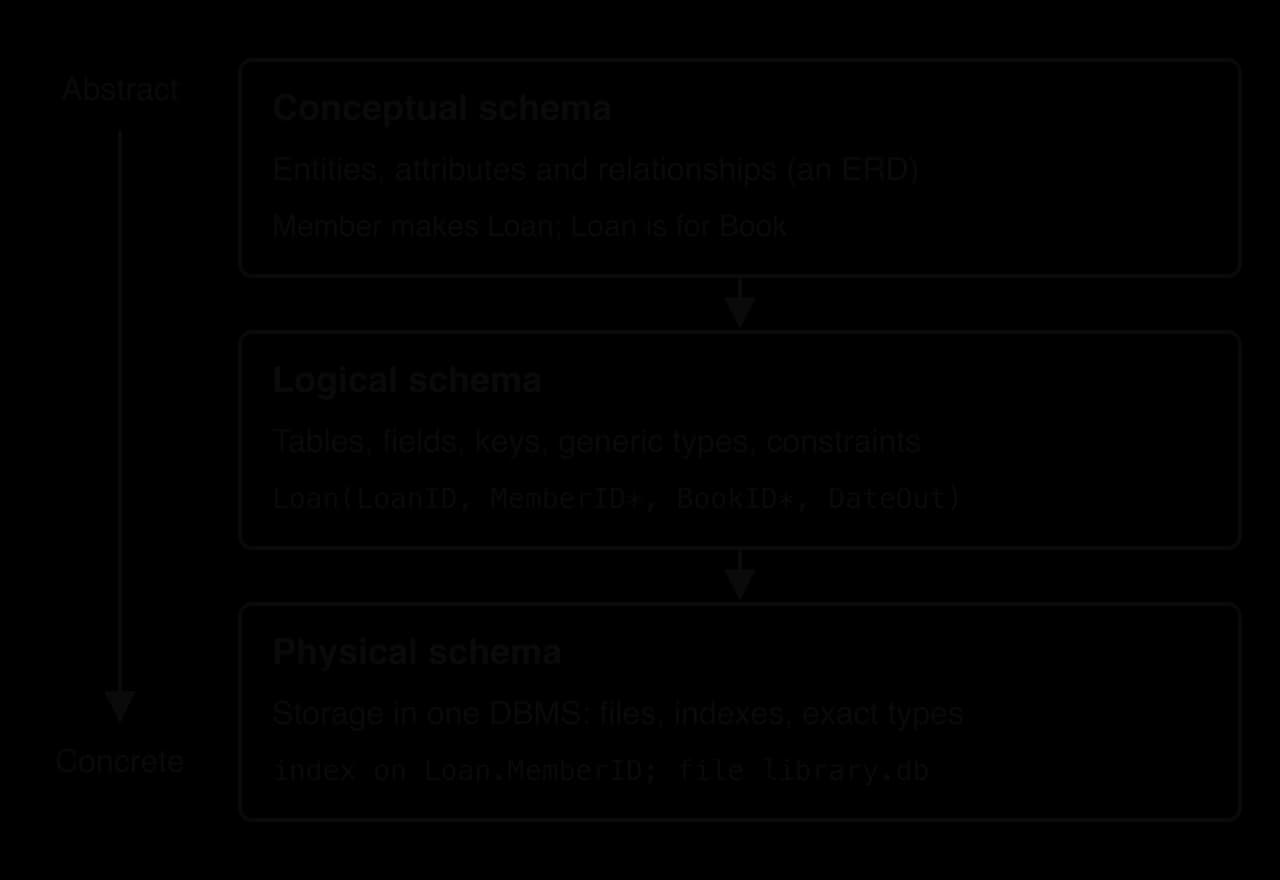
A schema can be described at different levels of detail, each for a different audience. A school librarian wants to know that the system records members, books and loans; a database designer needs the exact tables and keys; a database administrator needs to know which files hold the data and which indexes speed up searches. Database design therefore produces three schemas, each an abstraction of the one beneath it.
The three levels of schema
The highest level describes the data in the terms the organisation uses, with no mention of tables or software.
The middle level turns the entities into tables that a relational database management system (DBMS) could hold, but still says nothing about how a particular product stores them.
The lowest level is specific to one DBMS running on particular hardware.
The diagram of the three schema levels for a school library shows each level adding detail to the level before it.
The same library data at three levels: each level adds detail and depends more on a particular DBMS and its hardware.
Level
What it describes
Main users
Library example
Typical change
Conceptual
Entities, attributes, relationships and business rules
Client, users, designer
A member makes loans; each loan is for one book
The library starts lending laptops as well as books
Logical
Tables, fields, generic data types, keys, constraints
An index on Loan.MemberID; data file library.db on an SSD
The database moves to a faster server
Data independence
Separating the levels has a practical benefit. A program that asks the database for "all loans made by member 42" is written against the logical schema: it names the Loan table and the MemberID field. If the administrator later adds an index or moves the data file to a new disk, the logical schema has not changed, so the program keeps working without being edited.
Physical data independence is the easier kind to achieve, and modern DBMSs provide it almost completely: indexes can be added and data moved without any change to queries. Logical data independence is harder. Adding a new field to a table rarely breaks existing programs, but splitting a table in two, as normalisation often does, breaks every query that named the old table unless the DBMS presents the old shape through a view (subtopic A3.3, Database programming, for HL students). Good design at the conceptual and logical levels therefore saves effort later, because changes there are the most expensive.
Entity–relationship diagrams
An entity–relationship diagram turns a written description of a system into a picture of the data it needs. Drawing one comes before building any table, because mistakes are far cheaper to fix on paper. A missing entity or a misunderstood rule found in an ERD is corrected by redrawing a box or a line, whereas the same error found after the database holds thousands of records means restructuring the tables and moving every record into the new design.
An ERD matters for three reasons. It is a shared language: a librarian who has never written SQL can read "each loan is for exactly one book" and say whether it is true. It forces the designer to make each business rule explicit, such as whether a member may exist with no loans. And it maps almost directly onto tables: each entity becomes a table, each attribute a field, and each relationship a foreign key. An ERD is tailored to its application; a school library and a bookshop both store books, but only the bookshop needs suppliers and prices, and only the library needs loans and due dates.
Entities, attributes and relationships
An entity is a thing about which data is stored: a member, a book, a loan. In crow's foot ERDs each entity is drawn as a box with its name (a singular noun) at the top and its attributes listed underneath. The primary key is marked PK and each foreign key FK. A relationship is drawn as a line between two boxes, labelled with a verb so that it reads as a sentence: "Member makes Loan".
Relationships are classified by the largest number of instances at each end.
Relationship
Meaning
Example
How it is built
One-to-one (1:1)
Each A is linked to at most one B, and each B to at most one A
A student and a locker, if each student has at most one locker
A foreign key in either table, declared UNIQUE
One-to-many (1:M)
Each A is linked to many B, but each B to only one A
A member makes many loans
A foreign key in the table at the many end
Many-to-many (M:N)
Each A is linked to many B, and each B to many A
A book has several authors; an author writes several books
A link table between the two tables
Cardinality and modality
A line between two entities says that they are related, but not how many instances take part. Two numbers are needed at each end of every relationship: the most and the fewest.
The maximum alone does not tell a designer whether a relationship is required. A member who has never borrowed a book is still a member, but a loan that belongs to no member makes no sense. The minimum captures that difference.
Crow's foot notation
Several notations exist for drawing ERDs. Peter Chen's original 1976 notation draws relationships as diamonds and attributes as ovals; it is good for teaching the ideas but becomes crowded quickly. Most database designers use crow's foot notation, which grew from an article by Gordon Everest in 1976 and puts all the information about a relationship at the ends of its line.
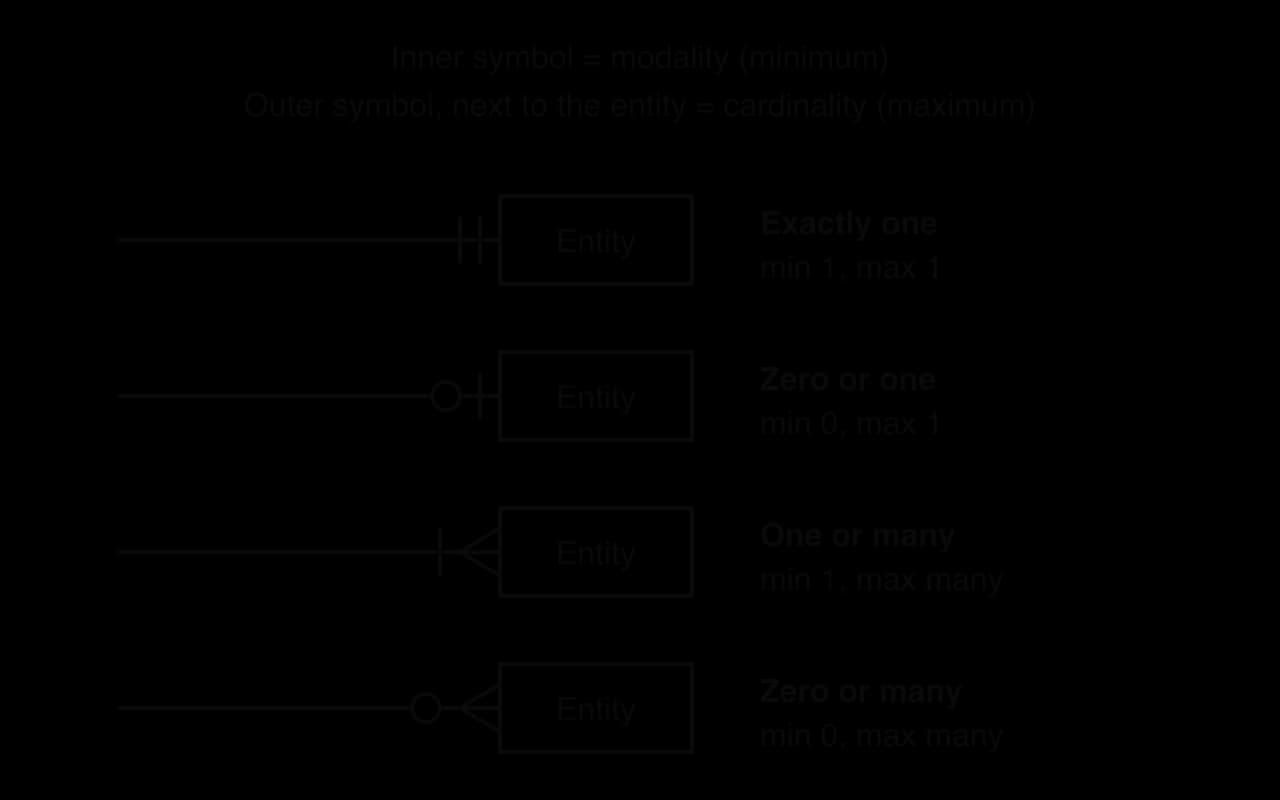
Each end of a line carries two symbols. The one next to the entity box shows the cardinality: a bar for one, or a three-pronged "crow's foot" for many. The one further from the box shows the modality: a circle for zero, or a bar for one. The legend shows the four combinations that result.
Read each end from the box outwards: the symbol touching the box is the maximum (cardinality), the next one the minimum (modality).
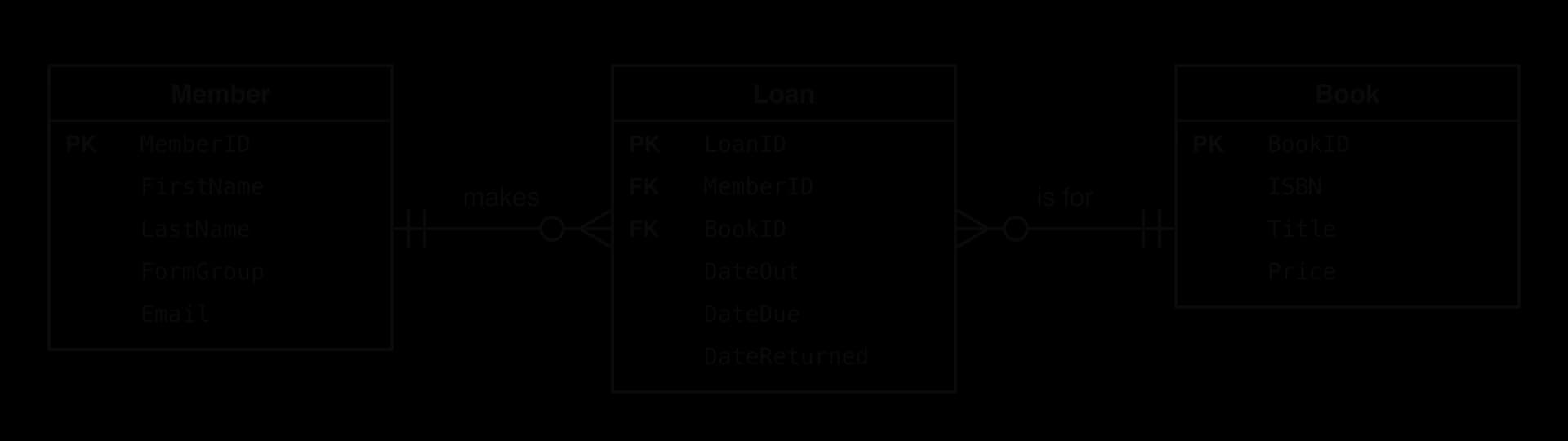
The symbols at an end describe the entity at that end, counted from the point of view of one instance at the other end. To read a relationship, start at one entity, travel along the line and read the symbols at the far end. The ERD for a school library shows how this works with real business rules.
Each foreign key sits in the table at the many end of its relationship: Loan holds MemberID and BookID.
Reading each end of each line in turn gives four business rules, one per end.
Start at
Read the symbols at
Business rule
Member
the Loan end (circle, crow's foot)
Each member makes zero or many loans.
Loan
the Member end (bar, bar)
Each loan is made by exactly one member.
Loan
the Book end (bar, bar)
Each loan is for exactly one book.
Book
the Loan end (circle, crow's foot)
Each book is lent in zero or many loans.
The foreign key always goes in the table at the many end of a one-to-many relationship. One loan belongs to one member, so Loan can hold a single MemberID; one member has many loans, so Member could not hold all its LoanID values in one field without breaking the rule of one value per field.
Resolving many-to-many relationships
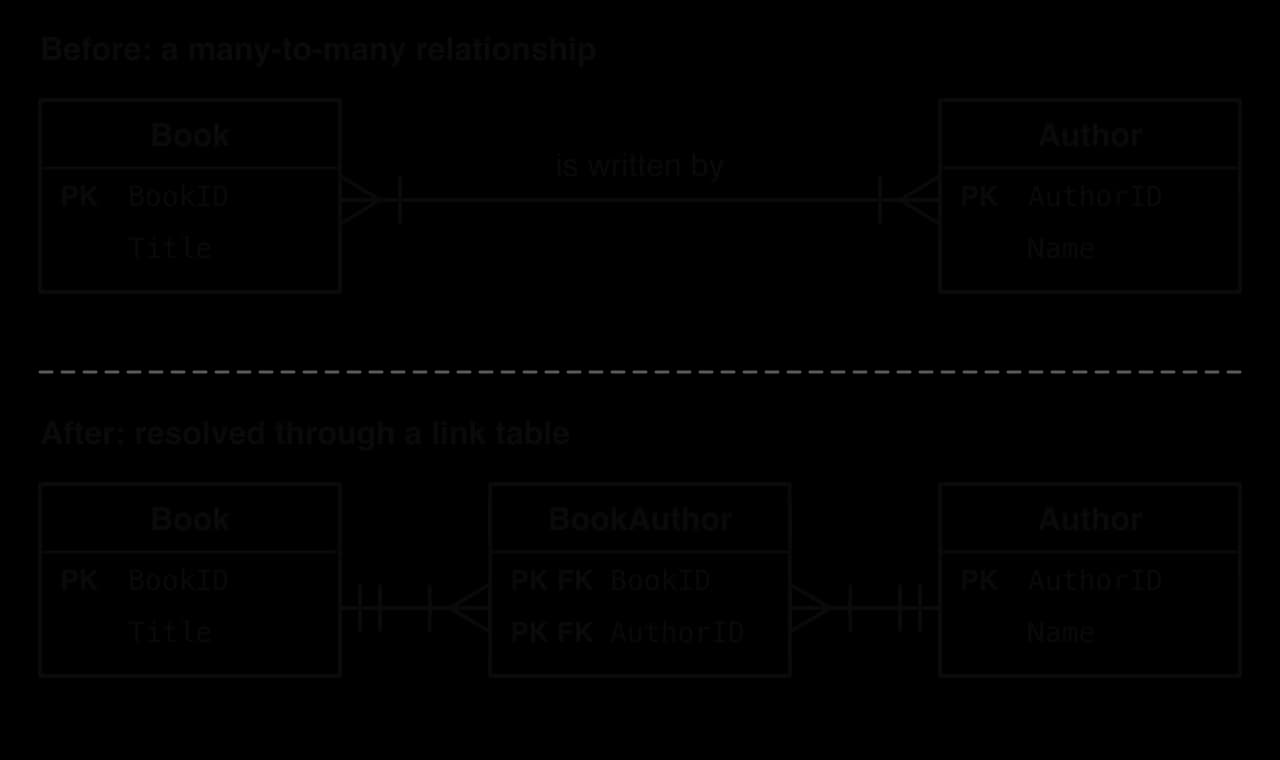
A many-to-many relationship is acceptable in a conceptual ERD but cannot be built directly as tables. If a book can have several authors, the Book table would need either a list of author IDs in one field or a fixed set of columns Author1, Author2, Author3; both break the rules of normalisation and both make queries such as "all books by this author" awkward. The solution is a new table between the two.
The many-to-many relationship between Book and Author becomes two one-to-many relationships through the link table BookAuthor.
The crow's feet move to the link table: each BookAuthor record pairs exactly one book with exactly one author.
The primary key of BookAuthor is the composite key (BookID, AuthorID): neither field is unique on its own, since a book appears once per author, but the pair is. A link table often carries attributes of its own that belong to the pairing rather than to either entity. In a school, the link table Enrolment between Student and Course is the natural place for the grade, because a grade belongs to one student in one course; in a shop, OrderLine between Order and Product holds the quantity ordered.
YouTube
CS50, “CS50 SQL – Lecture 1 – Relating”: entity–relationship diagrams, primary and foreign keys, and one-to-many and many-to-many relationships built as linked tables.
Constructing an ERD from a scenario
Building an ERD from a written description follows a fixed method.
Underline the nouns in the description. Things the system must store several facts about become entities; single facts (a name, a date) become attributes.
Give each entity a primary key, adding an ID field where no natural key exists.
Find the verbs that link entities ("books", "is treated by", "works in"). Each becomes a relationship.
For each relationship, decide the cardinality and modality at both ends, using one sentence per direction.
Replace every many-to-many relationship with a link table and two one-to-many relationships.
Add each foreign key to the entity at the many end, and check every business rule in the description against the finished diagram.
Data types in relational databases
Every field in a relational table has a data type, fixed in the schema. The type decides which values the field accepts, how much storage each value takes, how values are compared and sorted, and which operations are possible on them. Choosing types is part of the logical schema (generic types such as "text" or "date") and the physical schema (the exact type and size in a particular DBMS).
The names and details vary between DBMSs, but the same core set appears in all of them.
Type
Holds
Example value
Typical use
INTEGER (INT)
Whole numbers
4021
IDs, counts, quantities
DECIMAL(p, s) (NUMERIC)
Exact decimal numbers
12.50
Money, measurements that must not round
FLOAT / REAL
Approximate decimal numbers
9.81
Scientific readings where tiny rounding errors do not matter
CHAR(n)
Text of exactly n characters
'12B'
Codes of fixed length
VARCHAR(n)
Text of up to n characters
'Ana Silva'
Names, emails, titles
TEXT
Long text of no fixed limit
a book review
Descriptions, comments
DATE, TIME, DATETIME / TIMESTAMP
Dates, times of day, or both
'2026-09-15'
Dates of birth, due dates, log entries
BOOLEAN
TRUE or FALSE
TRUE
Yes/no flags such as IsOverdue
BLOB
Raw binary data
a photo
Images, audio, documents
The integer, floating-point and Boolean types work as they do in programming languages: see integers, floating-point numbers and Booleans in subtopic B2.1, Programming fundamentals. The types particular to databases need closer attention.
Text: CHAR and VARCHAR
Text in a database is stored as a string of characters, but SQL offers two ways to store it.
CHAR suits values that always have the same length, such as a three-character form group ('12B'), a two-letter country code or a 13-digit ISBN. Every value takes the same space, which makes the storage simple and predictable.
For values whose length varies, such as names, VARCHAR saves a great deal of space. Storing 10,000 surnames that average 12 characters in CHAR(50) takes 10,000 × 50 = 500,000 bytes, whereas VARCHAR(50) takes about 10,000 × (12 + 1) = 130,000 bytes, assuming one byte per character and a one-byte length marker. The limit n still matters in VARCHAR: it is a form of validation, rejecting a 300-character "surname" that is clearly a mistake.
Numbers: exact and approximate
Floating-point types store numbers in binary and cannot hold most decimal fractions exactly, so sums of money drift by tiny amounts. The fix is a type that stores the decimal digits themselves.
The program adds ten library fines of 0.10 each, first as floating-point numbers and then as exact decimals. Python's standard decimal module provides a Decimal type that behaves like SQL's DECIMAL; Java's equivalent is the BigDecimal class, whose add method returns a new total. The values are created from strings ("0.10") so that they start exact.
Python
from decimal import Decimal
# Ten fines of 0.10 each, added as floating-point numbers
float_total = 0.0for i inrange(10):
float_total = float_total + 0.10print("Float total:", float_total)
print("Equal to 1.00?", float_total == 1.00)
# The same fines added as exact decimal values
decimal_total = Decimal("0.00")
for i inrange(10):
decimal_total = decimal_total + Decimal("0.10")
print("Decimal total:", decimal_total)
print("Equal to 1.00?", decimal_total == Decimal("1.00"))
Java version
Java
import java.math.BigDecimal;
publicclassMoney {
publicstaticvoidmain(String[] args) {
// Ten fines of 0.10 each, added as floating-point numbersdoublefloatTotal=0.0;
for (inti=0; i < 10; i++) {
floatTotal = floatTotal + 0.10;
}
System.out.println("Float total: " + floatTotal);
System.out.println("Equal to 1.00? " + (floatTotal == 1.00));
// The same fines added as exact decimal valuesBigDecimaldecimalTotal=newBigDecimal("0.00");
for (inti=0; i < 10; i++) {
decimalTotal = decimalTotal.add(newBigDecimal("0.10"));
}
System.out.println("Decimal total: " + decimalTotal);
System.out.println("Equal to 1.00? " + (decimalTotal.compareTo(newBigDecimal("1.00")) == 0));
}
}
The floating-point total falls just short of 1, so a check such as "has this member paid exactly 1.00?" fails. The decimal total is exact. (Java prints false and true in lower case; otherwise the output is the same.)
Plain text
Float total: 0.9999999999999999
Equal to 1.00? False
Decimal total: 1.00
Equal to 1.00? True
Dates, times and binary data
Dates look like text, but storing them as text loses everything that makes them dates.
A DATE field rejects 31 February, sorts chronologically, and lets a query find every loan due within the next seven days. Some data is not text or numbers at all: a member's photo or a scanned permission slip.
A BLOB can be stored and retrieved but not searched or sorted in any meaningful way, and large BLOBs make a database slow to back up. Many systems therefore store the file itself elsewhere (a file server or cloud storage) and keep only its path or address in a VARCHAR field.
Data type consistency
The same attribute must have the same data type everywhere it appears. The rule matters most for a foreign key and the primary key it references: if Member.MemberID is an INTEGER, then Loan.MemberID must also be an INTEGER. When the types differ, comparing the two fields in a join needs a type conversion on every row. Some DBMSs refuse the comparison altogether (PostgreSQL will not compare an INTEGER with a VARCHAR without an explicit conversion); others convert silently, which is slower, can stop the DBMS using an index, and can match values wrongly, since the text '042' and the number 42 are not the same.
Consistency also matters across tables that are not directly linked. If one table stores phone numbers as VARCHAR(20) and another as INTEGER, the same number appears in two different forms and a search for a phone number has to handle both. Consistent types allow correct comparisons, sorting, joins and validation, and make the schema predictable for every programmer who uses it.
The effects of choosing the wrong data type
A wrong type is not always rejected at once: many mistakes appear only later, when data is sorted, compared or used in a calculation. The SQL statements create a table that stores phone numbers as integers and dates of birth as text, then sort it by date of birth.
SQL
CREATE TABLE Contact (
Name VARCHAR(40),
Phone INTEGER,
Born VARCHAR(10)
);
INSERT INTO Contact VALUES ('Ana', 07700900123, '10/02/2009');
INSERT INTO Contact VALUES ('Ben', 07700900456, '9/12/2008');
INSERT INTO Contact VALUES ('Chen', 07700900789, '25/01/2009');
SELECT Name, Phone, Born
FROM Contact
ORDERBY Born;
The result shows both problems at once. Every phone number has lost its leading zero, and the dates come out in text order (compared character by character, so '1…' comes before '2…' and '9…') instead of date order. The oldest contact, Ben, born in December 2008, should be first.
Plain text
Name  Phone       Born
----  ----------  ----------
Ana   7700900123  10/02/2009
Chen  7700900789  25/01/2009
Ben   7700900456  9/12/2008
Wrong choice
Effect
Better choice
Phone number as INTEGER
Leading zeros are lost; +44 and spaces cannot be stored; arithmetic on phone numbers is meaningless
VARCHAR(20)
Date as VARCHAR
Sorts as text; impossible dates such as '31/02/2026' are accepted; no date arithmetic; mixed formats ('9/12/2008', '2008-12-09')
DATE
Money as FLOAT
Rounding errors in totals and comparisons
DECIMAL(8, 2)
Numbers as VARCHAR
'10' sorts before '9'; totals and averages need conversion first
INTEGER or DECIMAL
Names as CHAR(50)
Every name padded to 50 characters, wasting storage
VARCHAR(50)
Too small an integer type, such as a 2-byte SMALLINT for order numbers
Overflow once values pass 32,767
INTEGER
Yes/no as free text
'Y', 'yes' and 'Yes' all mean the same but compare as different
BOOLEAN
Constructing tables
An ERD becomes a database when each entity is written out as a table with its fields, data types and keys. A well-defined table describes exactly one entity, holds one atomic value in each field, gives every field an appropriate data type, has a primary key, and declares the constraints its data must obey. Each of these properties protects data integrity: the DBMS itself refuses data that breaks the rules, instead of relying on every program and every user to be careful.
Choosing keys
Often more than one field, or combination of fields, could identify each record. In the Book table, both BookID and ISBN are unique for every book (if the library holds one copy of each title); in a Member table, both MemberID and Email might be.
Choosing between candidate keys involves trade-offs. A natural key such as an ISBN or an email address already exists in the real world, but it can change (a member changes email address) or turn out not to be unique (the library buys a second copy of a book, and both copies share an ISBN). For that reason many designs add an artificial key.
A surrogate key never changes, is short (so foreign keys referencing it are small and joins fast) and is guaranteed unique. Its weakness is that it guarantees nothing about the real data: two records for the same member with different surrogate keys look like two different people, so natural candidate keys such as Email should still be declared UNIQUE.
A primary key made of two or more fields is a composite key (subtopic A3.1). Link tables nearly always have one, such as (BookID, AuthorID) in BookAuthor. A related idea is a key built by joining several values into one.
A concatenated key is readable and can be printed on a library card or an invoice, but it repeats data held in other fields (the branch code is stored twice, once on its own and once inside the key), and if the branch code ever changes, the key must change too. A composite key keeps the parts as separate fields, which avoids both problems.
Writing table definitions
A compact notation lists each table with its fields in brackets. On screen the primary key is often shown in bold (it is underlined when written by hand), and each foreign key is marked with an asterisk, as in the library tables.
The notation shows the structure but not the data types or rules. Those are recorded in a data dictionary.
A data dictionary is written for the people who build and maintain the system. The entry for the Loan table shows the information it holds.
Field
Data type
Size or format
Key
Required
Validation
Description
LoanID
INTEGER
PK
Yes
Unique; generated by the DBMS
Identifies one loan
MemberID
INTEGER
FK → Member.MemberID
Yes
Must exist in Member
The member who borrowed the book
BookID
INTEGER
FK → Book.BookID
Yes
Must exist in Book
The book that was lent
DateOut
DATE
YYYY-MM-DD
Yes
Not after today
Date the book was lent
DateDue
DATE
YYYY-MM-DD
Yes
Later than DateOut
Date the book must be returned
DateReturned
DATE
YYYY-MM-DD
No
Not before DateOut
Empty while the book is still on loan
Building the tables in SQL
The same definitions can be written in the data definition language (DDL) part of Structured Query Language (SQL), taught in full in subtopic A3.3, Database programming. Each CREATE TABLE statement names the fields and their types, declares the primary key and links each foreign key to the table it references. The NOT NULL, UNIQUE and CHECK integrity constraints turn rules from the data dictionary into rules the DBMS enforces.
The constraints were tested by adding one valid member, book and loan, then trying five invalid inserts: a loan for member 7, who does not exist; a loan due before it was taken out; a second member with MemberID 1; a second member with an email address already in use; and a book with a price of −1. The DBMS rejected all five.
Each rejection protects a different kind of integrity. The primary key enforces entity integrity (every record unique and identifiable). The foreign keys enforce referential integrity (no loan for a member or book that does not exist). The data types and CHECK constraints enforce domain integrity (every value within its allowed range). Constraints can only test whether a value is allowed, so a due date that is possible but wrong is still accepted.
Normal forms
A database built straight from a form or a spreadsheet usually stores the same fact many times. A school that records enrolments in one big table, with every student's name, tutor group, courses and teachers on each row, finds that the table works for viewing but fails as soon as data changes. The process of fixing this is called normalisation.
Normalisation was introduced by E. F. Codd, who defined first normal form in 1970 and second and third normal forms in 1971. Further normal forms exist (Boyce–Codd normal form, defined by Codd and Raymond Boyce in 1974, and fourth and fifth normal forms), but most practical databases aim for third normal form.
What goes wrong without normalisation
The table holds a school's enrolment data with one row per student per course, keyed on the pair (StudentID, CourseCode).
StudentID
StudentName
TutorGroup
TutorName
CourseCode
CourseTitle
TeacherID
TeacherName
Grade
S101
Maya Patel
12A
Mr Hughes
COMP
Computer science
T07
Ms Reyes
6
S101
Maya Patel
12A
Mr Hughes
MATH
Maths AA
T03
Mr Lin
5
S101
Maya Patel
12A
Mr Hughes
ECON
Economics
T11
Ms Novak
7
S102
Tom Becker
12B
Ms Osei
COMP
Computer science
T07
Ms Reyes
5
S102
Tom Becker
12B
Ms Osei
PHYS
Physics
T07
Ms Reyes
6
S103
Lena Kim
12A
Mr Hughes
MATH
Maths AA
T03
Mr Lin
7
S103
Lena Kim
12A
Mr Hughes
PHYS
Physics
T07
Ms Reyes
4
Ms Reyes's name appears four times, Mr Hughes's five times and Maya Patel's three times. This redundancy wastes space, but the bigger cost is three kinds of fault, called anomalies, that appear when the data changes.
A new course, Biology, taught by Ms Novak, cannot be added until at least one student enrols on it: the primary key includes StudentID, and a primary key may not be empty. The school is forced either to wait or to invent a dummy student, whose made-up details are a form of missing data that every later query must know to ignore.
If Ms Reyes becomes Dr Reyes, four rows must change. A program that updates only the rows for Computer science leaves her with two different names, and the database no longer agrees with itself: its data consistency is lost.
Maya Patel is the only student taking Economics. If she leaves the school and her rows are deleted, the database also loses the fact that the course exists and that Ms Novak (T11) teaches it.
All three anomalies arise because the table holds facts about several different things (students, tutor groups, courses, teachers and enrolments) in one place. Normalisation separates them so that each table holds facts about one thing.
Functional dependencies
The rules of normalisation are stated in terms of which fields determine which others.
In the enrolment table, StudentID → StudentName, TutorGroup → TutorName, CourseCode → TeacherID, and the pair (StudentID, CourseCode) → Grade, because a grade belongs to one student in one course. The reverse of a dependency need not hold: TeacherID does not determine CourseCode, because Ms Reyes teaches two courses. A dependency also need not hold just because the current rows happen to fit it; it must follow from the rules of the organisation. Two students called Maya Patel could enrol next year, so StudentName → StudentID is not a dependency even if the current data shows no counter-example.
Sample data can therefore disprove a dependency but never prove one. The function dependency_holds checks a list of rows: it records the first value of column b seen for each value of column a, and returns False as soon as one value of a appears with two different values of b.
In Java the rows are a two-dimensional array of strings, so the grades are stored as text, and a HashMap<String, String> plays the role of Python's dictionary. Both versions print the same four results (Java in lower case):
TeacherID -> CourseCode fails because T07 appears with both COMP and PHYS, and StudentID -> Grade fails because S101 has three different grades. The two True results show only that the sample contains no counter-example; the designer must still confirm each rule with the school.
Unnormalised form and first normal form
Data collected from a paper form or a report usually starts with groups of fields that repeat for one record.
The school's original record cards are in UNF: each card shows one student's details once, followed by a list of their courses. Lines inside a cell show the values packed into one record.
StudentID
StudentName
TutorGroup
TutorName
CourseCode
CourseTitle
TeacherID
TeacherName
Grade
S101
Maya Patel
12A
Mr Hughes
COMP
MATH
ECON
Computer science
Maths AA
Economics
T07
T03
T11
Ms Reyes
Mr Lin
Ms Novak
6
5
7
S102
Tom Becker
12B
Ms Osei
COMP
PHYS
Computer science
Physics
T07
T07
Ms Reyes
Ms Reyes
5
6
S103
Lena Kim
12A
Mr Hughes
MATH
PHYS
Maths AA
Physics
T03
T07
Mr Lin
Ms Reyes
7
4
The five course fields form a block that occurs several times for each student.
Repeating groups cause two problems. Packed values cannot be searched or joined reliably (finding every student taking Physics means searching inside text), and numbered columns such as Course1, Course2 and Course3 set an arbitrary limit (a student with seven courses does not fit six columns) while leaving most of them empty for students with fewer. The rule that fixes this concerns the values in each field.
Whether a value is atomic depends on how the data is used. A full address stored in one field is atomic for a system that only prints labels, but not for one that must find every member living in a particular town; that system needs Street, Town and Postcode as separate fields. Likewise, a StudentName field is fine for the school here, but a system that sorts by surname needs FirstName and LastName.
To move from UNF to 1NF, each value of the repeating group gets its own row, and the non-repeating fields (the student's details) are copied onto each row. The result is the seven-row enrolment table whose anomalies were described in "What goes wrong without normalisation". A primary key must then be chosen, which is the "unique identification" requirement of 1NF. StudentID alone is not unique (S101 appears three times), nor is CourseCode (MATH appears twice), but the pair (StudentID, CourseCode) is, provided a student cannot take the same course twice. The 1NF table is therefore:
A second, equally valid route to 1NF moves the repeating group straight into its own table, with a copy of the key of the record it came from: Student(StudentID, StudentName, TutorGroup, TutorName) and StudentCourse(StudentID*, CourseCode, CourseTitle, TeacherID, TeacherName, Grade). Both routes lead to the same 3NF result. The single-table route is used here because it makes the next two steps easier to see.
Second normal form
The 1NF table has no repeating groups, but every anomaly of the enrolment table is still present. The cause is that most of its fields depend on only half of its two-part key.
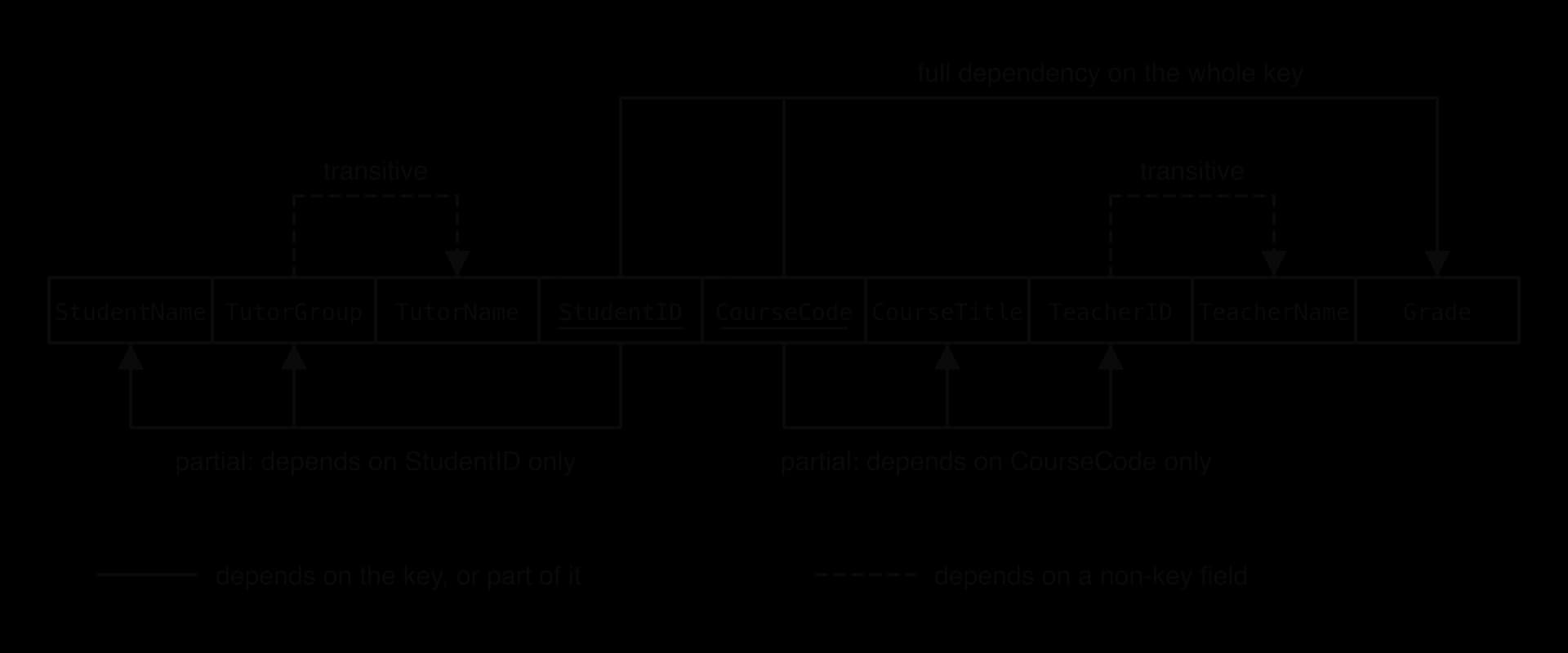
Asking of each non-key field "which part of the key does this depend on?" sorts the fields into three groups, which the dependency diagram draws as arrows over the table's headings.
Only Grade depends on the whole key. Solid arrows under the headings are partial dependencies (removed for 2NF); dashed arrows over them are transitive dependencies (removed for 3NF).
Non-key field
Depends on
Kind of dependency
Grade
(StudentID, CourseCode)
Full: needs the whole key
StudentName, TutorGroup
StudentID only
Partial
TutorName
TutorGroup, so only indirectly on StudentID
Partial (through TutorGroup) and transitive
CourseTitle, TeacherID
CourseCode only
Partial
TeacherName
TeacherID, so only indirectly on CourseCode
Partial (through TeacherID) and transitive
To reach 2NF, each group of fields that depends on part of the key moves to a new table whose primary key is that part. The fields that depend on the whole key stay with the whole key. The original table keeps both parts of the key, which are now also foreign keys pointing at the new tables.
Now Student holds three rows (one per student), Course four rows (one per course) and Enrolment seven rows of three short fields. Biology can be added to Course without any student, and Maya Patel's name is stored once. The definition also means that a table in 1NF whose primary key is a single field is automatically in 2NF, because a key with one part has no "part" for a field to depend on.
Third normal form
The 2NF tables still contain redundancy. In Student, Mr Hughes's name is stored once for every student in 12A; in Course, Ms Reyes's name is stored once for each course she teaches. Both come from a field that depends on another non-key field.
A transitive dependency stores a fact about the determinant (the tutor group) once for every record that shares it (every student in the group), which is exactly the redundancy that causes update anomalies. The rule that removes it completes the three normal forms.
The computer scientist William Kent summed up the three normal forms in one sentence, which works as a checklist for every non-key field: "the key" is 1NF, "the whole key" 2NF, and "nothing but the key" 3NF.
A non-key field must provide a fact about the key, the whole key, and nothing but the key. (William Kent)
To reach 3NF, each transitive dependency moves to a new table whose primary key is the determinant (the non-key field that the others depend on). The determinant stays behind in the original table as a foreign key, so the tables can still be joined.
Student(StudentID, StudentName, TutorGroup*)
TutorGroup(TutorGroup, TutorName)
Course(CourseCode, CourseTitle, TeacherID*)
Teacher(TeacherID, TeacherName)
Enrolment(StudentID*, CourseCode*, Grade)
Each of the five tables now describes one thing, and each fact about a teacher, tutor group, student or course is stored once. The three anomalies have gone: a new course needs only a row in Course; renaming Ms Reyes changes one row in Teacher; and deleting Maya Patel's enrolments leaves the Economics course and Ms Novak untouched. The SQL statements add Biology, rename teacher T07 once and then join Course with Teacher to list every course with its teacher.
SQL
INSERT INTO Course VALUES ('BIOL', 'Biology', 'T11');
UPDATE Teacher
SET TeacherName ='Dr Reyes'WHERE TeacherID ='T07';
SELECT Course.CourseTitle, Teacher.TeacherName
FROM Course
INNERJOIN Teacher ON Course.TeacherID = Teacher.TeacherID
ORDERBY Course.CourseTitle;
One update has changed the teacher's name for both of her courses, and Biology exists with no students enrolled.
Plain text
CourseTitle       TeacherName
----------------  -----------
Biology           Ms Novak
Computer science  Dr Reyes
Economics         Ms Novak
Maths AA          Mr Lin
Physics           Dr Reyes
Normalising by these rules loses no information, because each split follows a functional dependency and keeps the determinant behind as a foreign key. Joining the five tables on their keys rebuilds exactly the seven rows of the original 1NF table, so the decomposition is said to be lossless.
Normal form
Condition (on top of the previous form)
Problem it removes
Question to ask of each field
1NF
Atomic values, no repeating groups, a primary key
Repeating groups and packed values
Does each field hold one value, and is each record uniquely identified?
2NF
No partial dependencies
Facts about part of a composite key
Does this field need the whole key?
3NF
No transitive dependencies
Facts about a non-key field
Does this field depend on nothing but the key?
YouTube
Decomplexify, “Learn Database Normalization – 1NF, 2NF, 3NF, 4NF, 5NF”: a clear worked normalisation with the anomalies each form removes. Stop after third normal form; the later forms go beyond the course.
Multi-valued dependencies and missing data
Not every normalisation problem is a functional dependency. Sometimes one field determines a whole set of values in another field, and a second, unrelated set in a third.
A school records the subjects each teacher can teach and the clubs each teacher runs. Ms Reyes teaches Computer science and Physics and runs Robotics and Chess. The two lists have nothing to do with each other, but in one table every subject must be paired with every club.
TeacherID
Subject
Club
T07
Computer science
Robotics
T07
Computer science
Chess
T07
Physics
Robotics
T07
Physics
Chess
Two subjects and two clubs need 2 × 2 = 4 rows; adding a third club means adding two more rows, one per subject, and forgetting one suggests a link between a subject and a club that does not exist. The fix is to store each independent list in its own table, TeacherSubject(TeacherID*, Subject) and TeacherClub(TeacherID*, Club), which needs only 2 + 2 = 4 rows now and grows by one row per new subject or club. Formally this is fourth normal form, which lies beyond 3NF; in practice a careful 3NF design that gives each many-to-many relationship its own link table avoids the problem.
Normalisation also reduces missing data. A table with columns Course1 to Course6, or with fields that do not apply to every record, fills up with empty values (nulls), and an empty field is ambiguous: it might mean "none", "unknown" or "not yet entered". Insertion anomalies push designers towards the same problem, since recording a course with no students means leaving the student fields empty. In a normalised design each table holds only facts that exist, so far fewer fields are left empty.
Normalising a database to 3NF
The worked enrolment example follows a method that works for any scenario, from library management to police crime reporting.
UNF. List every field on the form or report. Mark the repeating group and choose a key for the non-repeating part.
1NF. Give each occurrence of the repeating group its own row (or move the group to its own table with a copy of the key). Split any non-atomic fields. State a primary key that identifies every row, which is usually composite at this stage.
2NF. For each non-key field in a table with a composite key, find which part of the key it depends on. Move each group that depends on part of the key into a new table keyed on that part, leaving the part in the original table as a foreign key.
3NF. For each non-key field, check whether it depends on another non-key field. Move each such group into a new table keyed on the determinant, leaving the determinant as a foreign key.
Check. Every table has a primary key; every non-key field is a fact about the key, the whole key and nothing but the key; every split has left a foreign key so that the tables can be joined back together; no derived data is stored.
Not every 1NF table has a composite key. Many designs give a table a surrogate key as soon as it is created, and then the work moves from 2NF to 3NF, since a table with a single-field key cannot contain a partial dependency. Identifying the normal form of a table that is already partly designed is a common task.
Splitting too far is a mistake as well. Breaking every table into one-field tables, or separating fields that depend on the same key (putting CourseTitle and TeacherID in different tables, both keyed on CourseCode), adds joins without removing any redundancy, so the design is no closer to 3NF. Fields that are facts about the same key belong in the same table.
Denormalisation
A fully normalised database stores each fact once, which is ideal for keeping data correct. The price is paid when reading: a question that touches several entities needs the tables joined back together each time it is asked. A product page in an online shop might combine the product, its category, its brand and a count of its reviews, which means joining four tables and counting thousands of review records every time any customer opens the page.
Whether denormalisation pays off depends on how the database is used.
In a read-intensive system, the extra work of keeping a copy up to date happens rarely (when the data changes), while the saving happens constantly (every time it is read). In a write-intensive system the balance reverses: every change must now update several places, so writes become slower and more likely to go wrong. A common form of denormalisation stores values that could be calculated.
Storing a precomputed count
A shop's Product table can hold a ReviewCount field: a copy of the number of matching rows in Review. For every product with at least one review, both queries return the same count (the inner join leaves out products with none, while the stored field holds 0 for them). The first must join and count the reviews each time it runs; the second reads one stored number. GROUP BY with COUNT(*) (subtopic A3.3) counts the rows for each product.
SQL
-- Normalised: count the reviews on every readSELECT Product.ProductName, COUNT(*) AS Reviews
FROM Product
INNERJOIN Review ON Product.ProductID = Review.ProductID
GROUPBY Product.ProductID, Product.ProductName;
-- Denormalised: read the stored copySELECT ProductName, ReviewCount
FROM Product;
The cost appears when data is written. Adding a review now takes two statements instead of one, and if the second is forgotten or fails, ReviewCount disagrees with the review records. This is an update anomaly, accepted deliberately in exchange for faster reads.
SQL
INSERT INTO Review VALUES (4, 1, 2);
UPDATE Product
SET ReviewCount = ReviewCount +1WHERE ProductID =1;
Real systems keep such copies consistent with application code that always performs both steps, with database triggers (rules that run automatically when a table changes) or by running both statements inside one transaction, so that either both happen or neither does.
Advantages and disadvantages
Aspect
Normalised (3NF)
Denormalised
Redundancy
Each fact stored once
Some facts stored several times
Anomalies
Insertion, update and deletion anomalies prevented
Copies can disagree unless extra code keeps them in step
Storage
Smaller
Larger
Reading data
Often needs joins and calculations; slower for complex reports
Fewer joins, precomputed values; faster reads
Query complexity
Longer queries joining several tables
Shorter, simpler queries
Writing data
One change in one place; fast and safe
Every copy must be changed; slower and riskier
Flexibility
Any new question can be answered by joining tables
Optimised for the queries it was designed for
Best suited to
Write-intensive systems where accuracy is paramount (orders, payments, bookings)
Denormalisation helps most where the same expensive query runs constantly and the underlying data changes rarely. Typical cases are reporting and dashboards that summarise large tables; counters such as likes, followers or review counts that are displayed far more often than they change; product and news pages read millions of times between edits; and data warehouses, which copy data out of the working database into a deliberately denormalised star schema designed for analysis (subtopic A3.4, HL). It helps least, and is most dangerous, in systems where every write must be correct, such as a bank's ledger or a booking system.
Denormalisation is also not the first tool to reach for. A database index often speeds up a slow join without any redundancy at all, and a normalised design with good indexes is fast enough for most systems. The usual practice is to normalise first, measure which queries are actually slow, and then denormalise only those parts, keeping the normalised tables as the authoritative source of truth.
Design choices also have an ethical side. Every denormalised copy of a personal detail, such as a customer's email copied into an orders summary, is another place that must be secured and another place that must be found when a person asks for their data to be deleted, as the right to erasure in the EU's General Data Protection Regulation allows. Collecting and copying only the fields a system genuinely needs is the principle of data minimisation (subtopic A4.4, Ethical considerations), and a normalised schema with each personal fact stored once makes it far easier to follow.
Exam focus
Database design is examined in Paper 1, Section A, usually as a scenario-based question (a library, school, shop, hospital or warehouse) whose parts rise in difficulty. Expect to describe a schema level (2–3 marks), outline the consequences of a data type choice (2–4 marks), construct an ERD, table definitions or a set of 3NF tables (4–8 marks), explain why a given table is not in 2NF or 3NF (2–4 marks) and evaluate a proposal to denormalise (4–6 marks). Construct answers earn marks for each correct component (each entity, each relationship end, each table with its keys), so partial credit is available for a design that is mostly right.
Part (d) is the core skill of the subtopic, and it is where most marks are lost through small omissions rather than wrong ideas.
Practice questions
Define the term modality in an ERD. [1]
Distinguish between a conceptual schema and a physical schema. [2]
Outline why money should be stored as DECIMAL rather than FLOAT. [2]
An Employee table has the fields EmployeeID, PassportNumber, Email, Name and DeptID. Identify two candidate keys other than EmployeeID. [2]
Explain why a table in 1NF with a single-field primary key is always in 2NF. [2]
Students are taught by many teachers, and each teacher teaches many students. Explain how this relationship is implemented in a relational database. [3]
A police force records crimes. Each crime is reported by exactly one officer, and an officer may have reported none or many crimes. A crime may have no known suspects or many, and a suspect may be linked to one or more crimes. Construct an ERD in crow's foot notation for officers, crimes and suspects. [5]
The table Employee(EmployeeID, Name, DeptID, DeptName) is in 2NF. Explain why it is not in 3NF. [2]
A company records employees and the projects they work on in UNF: Employee(EmployeeID, Name, DeptID, DeptName, {ProjectID, ProjectName, HoursWorked}). Each employee belongs to one department, and HoursWorked is the number of hours the employee has worked on that project. Construct a set of tables in 3NF, showing all keys. [6]
A social media platform stores each "like" as a record in a Like table. Evaluate storing a LikeCount field in the Post table. [6]
Answers
The minimum number of instances of one entity that must be related to an instance of the other entity in a relationship (zero, optional; or one, mandatory).
A conceptual schema describes the data as entities, attributes and relationships, independent of any DBMS [1]; a physical schema describes how one DBMS actually stores the data, such as files, indexes and exact types [1].
FLOAT stores approximations in binary, so values such as 0.10 cannot be held exactly and totals drift (ten lots of 0.10 add up to 0.9999999999999999) [1]; DECIMAL stores the exact decimal digits, so sums and comparisons of money are correct [1].
PassportNumber [1]; Email [1] (each is unique to one employee). Name and DeptID are not, since two employees can share them.
2NF forbids non-key fields depending on part of the primary key [1]; a single-field key has no parts, so every field that depends on the key depends on the whole of it [1].
A many-to-many relationship cannot be stored directly, since a field would have to hold a list [1]. A link table, for example Teaching, is created [1] with foreign keys StudentID and TeacherID that together form its composite primary key, turning the relationship into two one-to-many relationships [1].
Entities Officer (PK OfficerID), Crime (PK CrimeID, FK OfficerID), Suspect (PK SuspectID) and a link entity CrimeSuspect (PK and FKs CrimeID, SuspectID) [1]. Officer–Crime: exactly one at the Officer end, zero or many at the Crime end [1]. Crime–CrimeSuspect: exactly one at the Crime end, zero or many at the CrimeSuspect end [1]. Suspect–CrimeSuspect: exactly one at the Suspect end, one or many at the CrimeSuspect end [1]. Many-to-many between Crime and Suspect resolved through the link entity, with keys shown [1].
DeptName depends on DeptID, which is a non-key field [1]; this is a transitive dependency, so DeptName is stored once per employee and should move to a Department table keyed on DeptID [1].
Department(DeptID, DeptName) [1]; Employee(EmployeeID, Name, DeptID*) [1] with DeptID as a foreign key [1]; Project(ProjectID, ProjectName) [1]; EmployeeProject(EmployeeID*, ProjectID*, HoursWorked) [1] with the composite key made of both foreign keys [1].
Strengths: likes are displayed far more often than they are added (read-intensive) [1]; reading one stored number is faster than counting many Like records for every post view [1]. Limitations: LikeCount is derived data duplicating the Like records [1]; every like and unlike needs a second update, and a missed or failed one makes the count wrong [1]. Conclusion: justified for a popular platform, because the count is read constantly and a slightly wrong count does little harm, provided both updates are made together, for example in one transaction [2].
Summary
A database schema describes a database's structure. The conceptual schema shows entities and relationships, the logical schema tables, keys, types and constraints, and the physical schema files, indexes and storage; separating them gives data independence.
An ERD models entities, attributes and relationships. In crow's foot notation the symbol next to an entity shows cardinality (one or many) and the symbol further from it modality (zero or one).
Many-to-many relationships are resolved with a link table whose composite key is made of the foreign keys of the two tables it links; foreign keys always sit at the many end.
Fields need appropriate, consistent data types: CHAR for fixed-length codes, VARCHAR for variable text, DECIMAL for money, DATE for dates, BLOB for binary files. Wrong types lose leading zeros, sort wrongly, round money and break joins.
Well-defined tables have a primary key (chosen from the candidate keys, often a surrogate key), foreign keys and constraints such as NOT NULL, UNIQUE and CHECK, which enforce entity, referential and domain integrity.
Unnormalised data contains repeating groups. 1NF requires atomic values, no repeating groups and a primary key; 2NF removes partial dependencies on part of a composite key; 3NF removes transitive dependencies on non-key fields.
Normalisation removes insertion, update and deletion anomalies and reduces missing data; every split keeps a foreign key so no information is lost.
Denormalisation deliberately adds redundancy, such as stored totals or merged tables, to speed up reads in read-intensive systems, at the cost of storage, slower writes and the risk of inconsistent copies.
Self-check
To do:
I can describe the conceptual, logical and physical schemas of a given database and say who uses each.
To do:
I can explain physical and logical data independence with an example.
To do:
I can draw the four crow's foot end symbols and say which shows cardinality and which modality.
To do:
I can read every business rule from a crow's foot ERD, one end at a time.
To do:
I can construct an ERD from a written scenario and resolve each many-to-many relationship with a link table.
To do:
I can choose a suitable data type for a field and outline the consequences of a wrong choice.
To do:
I can explain why a foreign key must have the same data type as the primary key it references.
To do:
I can identify the candidate keys in a table and justify the choice of a natural or surrogate primary key.
To do:
I can distinguish a composite key from a concatenated key.
To do:
I can write table definitions in notation and as CREATE TABLE statements with primary keys, foreign keys and constraints.
To do:
I can identify the functional dependencies in a table and classify each as full, partial or transitive.
To do:
I can give an example of an insertion, an update and a deletion anomaly in an unnormalised table.
To do:
I can identify the highest normal form of a table and explain why it is not in the next one.
To do:
I can normalise an unnormalised scenario step by step through 1NF, 2NF and 3NF, stating the dependency removed at each step.
To do:
I can evaluate a proposal to denormalise a database, reaching a judgement for a read-intensive or write-intensive context.
S2231 / S2304 appears in more than one record / a student has results for several courses;
so StudentID alone does not identify a single result;
(b)
Identify a suitable composite primary key for the Result table and justify your choice.
[3]3 marks
Markscheme (b)
Award [1] for the key and [2] for the justification. StudentID + CourseCode + Term; StudentID + CourseCode is not enough because a student can retake a course / S2231 has two CHEM1 records; adding Term makes every combination unique / a student takes a course at most once per term; Grade should not be part of the key because it describes the result rather than identifying it / two results could have the same grade;
Note: Award [1 max] for StudentID + CourseCode with a valid reason. Do not accept a key that includes Grade.
Question 2 · CS-0004212 marks
A hospital stores admissions in a relational database. Sample data from three tables is shown.
Patient
PatientID
Surname
DateOfBirth
70412
Baptiste
1958-03-11
70988
Kowalski
2001-09-27
71035
Osei
1990-12-02
Ward
WardCode
WardName
Floor
CAR
Cardiology
3
ORT
Orthopaedics
2
Admission
PatientID
AdmitDate
WardCode
Consultant
70412
2026-02-03
CAR
Dr Iyer
70988
2026-02-03
ORT
Dr Moreau
70412
2026-04-19
ORT
Dr Moreau
71035
2026-05-07
CAR
Dr Iyer
The primary key of Admission is the composite key (PatientID, AdmitDate).
(a)
Define the term composite key.
[1]1 mark
(b)
Identify the two foreign keys in the Admission table.
[2]2 marks
(c)
Outline why (PatientID, AdmitDate) is a suitable primary key for the Admission table.
[2]2 marks
(d)
A clerk tries to add the record (72200, 2026-05-09, ICU, Dr Iyer) to the Admission table. There is no patient 72200 and no ward ICU.
Explain how the relational database protects data integrity in this situation.
[3]3 marks
(e)
The hospital is considering keeping all admissions in one wide table that also stores each patient's surname and date of birth and each ward's name and floor in every admission record.
Explain two disadvantages of this design compared with the current three tables.