Calculate the Big O efficiency of algorithms, write and trace linear search, binary search, bubble sort and selection sort without built-ins, and (HL) explain recursion and quicksort and write simple recursive subprograms.
IB Computer Science
Part of B2 Programming
SL and HL
Key terms introduced here
Each is in the Computer Science glossary, with every other term in the subject.
The expected number of steps an algorithm performs over all possible inputs of size n, assuming each input is equally likely, and the complexity this gives.
A way of describing the time or space complexity of an algorithm by the term that grows fastest as the input size n
Notes on B2.4 Programming algorithms
83 min readLast reviewed
Learning objectives
Describe the time and space complexity of an algorithm by calculating its Big O notation.
Describe how Big O notation is used to analyse scalability and to choose between algorithms.
Construct and trace a linear search and a binary search.
Compare linear search and binary search and choose the right one for a given data set.
Construct and trace bubble sort and selection sort.
Evaluate bubble sort and selection sort in terms of their time and space complexity on different data sets.
Explain the concept of recursion, the call stack, and the advantages and limitations of recursive solutions (HL only).
Explain how quicksort, binary tree traversal and fractals use recursion (HL only).
Construct and trace simple non-branching recursive algorithms (HL only).
Introduction
Searching and sorting are among the most common jobs a computer does. A phone looks up a contact by name, a shop's website lists products from cheapest to most expensive, and a database finds one customer among millions. Several different algorithms can do each of these jobs, and they all give the same answer, but some finish in a fraction of a second while others would take days on the same data. The difference comes from how the number of steps grows as the amount of data grows.
Computer scientists measure that growth with Big O notation, which turns "this algorithm is faster" into a precise statement that can be calculated from the code. Linear search, binary search, bubble sort and selection sort are the standard algorithms for learning to reason this way: each is short enough to write and trace by hand, and together they show the main patterns of growth. Recursion (HL), in which a
Questions on B2.4
181 exam-style questions on this subtopic, written in the style of the IB papers. The first has its markscheme open. Counted on
Question 1 · CS-009516 marks
A fitness app stores a user's daily step counts in a list (Python) or array (Java) called steps, holding n values. The app uses the four functions/methods below.
Python
Python
deffirst_day(steps):
return steps[0]
deftotal_steps(steps):
total = 0for s in steps:
total = total + s
return total
defcount_beaten(steps):
count = 0for i inrange(len(steps)):
for j inrange(len(steps)):
if steps[i] > steps[j]:
count = count + 1
count
():
k =
count =
k < (steps):
k = k *
count = count +
count
Try a quick-fire question
One of 75 short multiple-choice questions on B2.4. Pick an answer to see why it's right or wrong.
What does the Python code print?
Flashcards for B2.4
The official deck for this part of the syllabus.
B2.4 Programming algorithms · front
Define algorithmic efficiency.
B2.4 Programming algorithms · front
Why is an algorithm's efficiency not measured by timing it with a stopwatch?
B2.4 Programming algorithms327 cards
Carry on with B2.4 in Augment
With a free account, Augment remembers where you stopped and what you have practiced.
A search algorithm for a sorted list that compares the target with the middle element of the part still being searched and discards the half that cannot contain it, repeating until the target is found or no elements remain.
A sorting algorithm that makes repeated passes through a list, comparing each pair of adjacent elements and swapping them if they are in the wrong order, until a pass makes no swaps.
A stack maintained by the running program that holds one entry for each subprogram call that has started but not yet returned, with the most recent call on top.
An algorithm design strategy that divides a problem into smaller sub-problems of the same type, solves each sub-problem recursively, and combines their solutions to solve the original problem.
The power to which a base must be raised to give a number, so that log2n=k means 2k=n; in computer science, log2n is the number of times n can be halved before reaching 1.
A complexity in which the number of steps grows in proportion to the logarithm of the input size, so that doubling the input adds only a constant amount of work.
Recursion in which each call of the subprogram makes at most one recursive call, so the calls form a single chain from the first call to the base case.
In quicksort, the step that rearranges part of a list so that all elements smaller than the pivot come before it and all others come after it, leaving the pivot in its final sorted position.
A divide-and-conquer sorting algorithm that chooses a pivot element, partitions the list so that smaller elements come before the pivot and the others after it, and then sorts the two parts recursively.
A technique in which a subprogram solves a problem by calling itself on a smaller or simpler instance of the same problem, until it reaches an instance simple enough to solve directly.
The part of a recursive subprogram that calls the subprogram again with an argument that is closer to the base case, and uses the result of that call to build its own result.
A sorting algorithm that repeatedly finds the smallest element in the unsorted part of a list and swaps it with the first element of the unsorted part, so that the sorted part grows by one element per pass.
The entry on the call stack for one subprogram call, holding its parameters, its local variables and the return address where execution continues when the call finishes.
The phase of recursion after the base case is reached, in which each call returns its result to the call below it and its stack frame is popped, until the original call returns.
The input of a given size n for which an algorithm performs the most steps, and the complexity on that input.
subprogram
solves a problem by calling itself on a smaller version of the same problem, adds a second way to express repetition and leads to faster sorting algorithms such as quicksort.
YouTube
Computerphile, “Getting Sorted & Big O Notation”: compares how sorting algorithms slow down as lists get longer. Watch for the idea that the shape of the growth matters more than the time on any one machine.
Algorithmic efficiency and Big O notation
Why efficiency is measured by counting steps
Two programs that solve the same problem correctly can still differ greatly in how much time and memory they use. Measuring that difference with a stopwatch is unreliable: the same program runs faster on a new laptop than on an old phone, slower when other programs are busy, and at different speeds in Python and Java. A fairer measure counts the basic steps an algorithm performs, such as comparisons, assignments and swaps, and asks how that count changes as the input gets bigger.
The size of the input is written n. For a search, n is the number of items in the list; for a sort, the number of items to be sorted; for a program that reads a file, the number of lines. Efficiency is then described as a relationship between n and the work done, in two separate dimensions.
Time complexity ignores the actual seconds taken. If one algorithm does n comparisons and another does n2, the second slows down far more as n grows, whatever the hardware. Memory use is described the same way.
A sort that rearranges a list inside the list it was given needs only a few extra variables, however long the list is. A sort that copies the data into a second list of the same length needs extra memory proportional to n. Both may take the same time, but the second uses far more memory on a large data set.
Counting steps in code
The function count_comparisons contains a nested loop in which the inner loop starts one place after the outer loop's current position. It counts how many times the inner loop body runs for three sizes of n, the same pattern of work that comparing every item in a list with every later item produces.
Python
defcount_comparisons(n):
comparisons = 0for i inrange(n):
for j inrange(i + 1, n):
comparisons = comparisons + 1return comparisons
for n in [10, 100, 1000]:
print(n, count_comparisons(n), n * n)
The output shows two things. When n is multiplied by 10, the count is multiplied by about 100, so the work grows with the square of n. The exact count is 2n(n−1), always a little less than half of n2, because the inner loop runs n−1 times, then n−2, down to 0:
(n−1)+(n−2)+⋯+1+0=2n(n−1)=21n2−21n
For n=1000 that is 21000×999=499500, matching the program.
Big O notation
An exact formula such as 21n2−21n is more detail than is needed to compare algorithms. As n becomes large, the n2 term dominates: at n=1000 the 21n term contributes only 500 out of 499,500. The constant 21 does not change the shape of the growth either, since doubling n still multiplies the work by four. Big O notation keeps only the part that decides the shape.
Big O is an upper bound on growth: it says the work grows no faster than the stated function once n is large. It does not give a time in seconds, and it does not say that an O(n) algorithm is faster than an O(n2) one for every input; for very small n, an algorithm with a worse Big O but less work per step can win. What Big O guarantees is that, as n keeps growing, the algorithm with the slower-growing function eventually wins and keeps winning by more.
Three rules turn a step count into Big O notation:
Keep only the fastest-growing term.n2+5n+20 becomes n2, because the other terms become negligible as n grows.
Drop constant multipliers.3n becomes n, and 21n2 becomes n2. The constant depends on the language and the machine; the shape does not.
A fixed number of steps, however many, is O(1). Five assignments or five hundred are both constant, because neither number depends on n.
Best, average and worst case
For many algorithms the number of steps depends on the particular data as well as on n. A search through a list of 1,000 names might find its target at the first position or not at all. Three cases describe this spread.
The best case is rarely used to choose an algorithm, because a program cannot rely on always receiving its most convenient input. It does show when an algorithm can finish early, which matters for data that is often already in order.
The average case describes typical behaviour on random data. For many algorithms it has the same Big O as the worst case, only with a smaller constant: a linear search for an item that is present checks about half the list on average, 2n items, which is still O(n).
The worst case is the usual basis for comparison because it is a guarantee: whatever data arrives, the algorithm will not do more work than this. A system that must always respond quickly, such as a cash machine checking a card or a game redrawing the screen sixty times a second, is designed around its worst case.
The common complexity classes
A small number of growth patterns appear again and again. Each has a name, and each comes from a recognisable shape of code.
Reading the element at a known index of an array is O(1): the address is calculated directly from the index, so element 5 and element 5,000,000 take the same time. Adding two numbers, swapping two elements and returning a value are also O(1).
The next class needs one piece of mathematics. A logarithm answers the question "how many times must a number be halved to get down to 1?" For n=16, the halvings are 16, 8, 4, 2, 1: four halvings, so log216=4.
When n is not a power of 2 the logarithm is not a whole number: log21000≈9.97 and log21000000≈19.93. Logarithms grow extremely slowly. Doubling n adds only 1 to log2n, so a million items need only about 20 halvings and a billion about 30.
In Big O notation the base of the logarithm is not written, because changing the base only multiplies the value by a constant. The base is still 2 whenever the data is halved.
A single loop that visits every element once, such as a traversal that totals a list or finds its largest value, is O(n). Linear time is the best possible for any task that must look at every item at least once.
O(nlogn) appears when an algorithm does about n steps of work at each of about log2n levels, for example by repeatedly splitting a list in half and doing a linear amount of work on every level. It grows only a little faster than linear time.
Two nested loops that each run up to n times give O(n2), as count_comparisons showed. Bubble sort and selection sort are quadratic. Ten times more data means a hundred times more work, which is why quadratic algorithms become impractical for large data sets.
Exponential algorithms are only usable for very small inputs. An algorithm that tries every possible subset of n items does 2n steps: 210=1024 is fine, but 260 steps at a billion steps per second would take about 37 years. A recursive function that calls itself twice for each value, such as the naive Fibonacci function in the HL section on recursion, grows in this way.
The growth curves show the classes together. For small n they are close; as n grows they separate quickly.
O(1)
O(log n)
O(n)
O(n log n)
O(n²)
O(2ⁿ)
By n = 16 the curves have separated: O(log n) needs 4 steps, O(n) 16, O(n log n) 64, while O(n²) already reached 64 steps at n = 8 and O(2ⁿ) left the graph at n = 7.
The table gives the step counts for three sizes of input. The last column assumes, for illustration, a computer that performs one step per microsecond (a million steps per second).
Big O
Name
Typical code
n=10
n=1000
n=1000000
Time at n=1000000
O(1)
Constant
Access by index
1
1
1
1 µs
O(logn)
Logarithmic
Halving loop (binary search)
3.3
10
20
20 µs
O(n)
Linear
One loop over the data (linear search)
10
1000
1,000,000
1 second
O(nlogn)
Linearithmic
Efficient sorts (quicksort on average)
33
9,966
about 20 million
about 20 seconds
O(n2)
Quadratic
Two nested loops (bubble sort)
100
1,000,000
1012
about 11.6 days
O(2n)
Exponential
Trying every subset
1,024
a number with 302 digits
far larger
far longer than the age of the universe
Calculating Big O from code
Big O can be read from the structure of the code without counting every step. The rules work from the inside out.
Code structure
Steps
Big O
A fixed sequence of statements with no loop over the data
a constant
O(1)
One loop that runs n times (or n/2, or n−1) with O(1) work inside
about n
O(n)
A loop whose variable is halved (or doubled) each time
about log2n
O(logn)
A loop inside a loop, each running up to n times
about n×n
O(n2)
A loop that runs n times, containing a halving loop
about nlog2n
O(nlogn)
Two loops one after the other, each O(n)
n+n=2n
O(n)
An O(n) loop followed by an O(n2) nested loop
n+n2
O(n2)
Loops in sequence add their costs, and the larger term wins. Loops that are nested multiply their costs. A loop that calls a subprogram multiplies its own count by the cost of that call: calling an O(n) linear search inside a loop that runs n times gives O(n2).
The halving rule needs a closer look, because the loop is easy to misread as linear. The loop in halvings divides n by 2 with integer division until it reaches 1 and counts the passes.
Python
defhalvings(n):
count = 0while n > 1:
n = n // 2
count = count + 1return count
print(halvings(16), halvings(1000), halvings(1000000))
The program prints 4 9 19: the loop runs ⌊log2n⌋ times, so it is O(logn). Java's / on two int values already performs integer division, which Python writes as //.
Space complexity in practice
Space complexity counts only the extra memory an algorithm needs while it runs, not the memory already holding its input. The rules are the same as for time: a fixed number of extra variables is O(1); an extra list that grows with the input is O(n); an extra two-dimensional grid of n by n values is O(n2).
Algorithm
Extra memory
Space complexity
Find the largest value in a list with a loop
one variable for the largest so far, one loop counter
O(1)
Reverse a list by building a new reversed list
a second list of n elements
O(n)
Reverse a list in place by swapping ends inwards
one temporary variable and two indexes
O(1)
Bubble sort or selection sort
one temporary variable and loop counters
O(1)
A recursive subprogram that calls itself n deep (HL)
one stack frame per active call
O(n)
Time and space often trade against each other. Storing extra data, such as an index or a copy sorted in a different order, can make searches faster at the cost of memory. On a device with little memory, such as a sensor or a smartwatch, an O(1)-space algorithm can be the right choice even when a faster one exists.
Scalability and choosing an algorithm
Scalability is the ability of a system to keep working well as its load grows. For an algorithm, the load is n, and Big O predicts what happens when n increases: an O(n) algorithm handles ten times more data with ten times more work, an O(n2) algorithm needs a hundred times more, and an O(logn) algorithm needs only a few more steps. Choosing an algorithm therefore means asking how large n will become, not only how fast the program runs on today's test data.
Several factors decide the choice besides the Big O of the worst case:
The size of the data. For a list of 20 items any algorithm finishes instantly, so the simplest correct one is the best choice. For millions of items the growth rate dominates.
The state of the data. Some algorithms need sorted data (binary search) and some run much faster on data that is already nearly in order (bubble sort with an early exit).
How often the task runs. Sorting a list once so that it can then be searched thousands of times is worth the cost; sorting it to perform a single search is not.
Memory limits. An algorithm that needs O(n) extra memory may not fit on a small device.
Simplicity. A simple algorithm is easier to write correctly, test and maintain, which matters when its speed is good enough.
Searching: linear search and binary search
A search algorithm looks for a target value in a collection and reports where it is, usually by returning its index, or reports that it is absent. By convention a search that fails returns -1, a value that can never be a valid index. Both search algorithms work on a one-dimensional array in Java or a list in Python, and both are written without the built-in tools that would do the job in one line: Python's in operator and index method, and Java's contains, indexOf and Arrays.binarySearch.
Linear search
The simplest way to find something is to look at every item in turn, starting from the first, until the target turns up or the items run out.
Linear search makes no assumptions about the data. The list can be in any order, can contain repeated values, and can hold any data type that can be compared for equality. The diagram of a linear search for the value 5 shows each comparison in turn.
Linear search compares the target with one element at a time from the start. It stops at the first match, so the element at index 4 is never examined.
The function linear_search returns the index of the first element equal to target, or -1 if there is none. The Python version keeps its own index counter instead of using len, so it works without that built-in.
Python
deflinear_search(items, target):
index = 0for item in items:
if item == target:
return index
index = index + 1return -1
scores = [12, 7, 31, 5, 19]
print(linear_search(scores, 5))
print(linear_search(scores, 8))
The program prints 3 (the index of 5) and then -1 (8 is not in the list). The return -1 statement sits after the loop: it is reached only when every element has been checked without a match. In Java, items.length is a field of the array that stores its length, not a method that counts the elements.
A trace table records the search step by step, with one row for each pass of the loop. For linear_search(scores, 5):
index
item
item == target
Returned
0
12
False
1
7
False
2
31
False
3
5
True
3
Some programmers prefer a search with a single exit point at the end of the subprogram. That version uses a conditional loop that stops as soon as a Boolean flag called found becomes true, or when the index passes the last element.
Python
deflinear_search(items, target):
index = 0
found = Falsewhilenot found and index < len(items):
if items[index] == target:
found = Trueelse:
index = index + 1if found:
return index
return -1
Java version
Java
staticintlinearSearch(int[] items, int target) {
intindex=0;
booleanfound=false;
while (!found && index < items.length) {
if (items[index] == target) {
found = true;
} else {
index = index + 1;
}
}
if (found) {
return index;
}
return -1;
}
Both versions give the same results and have the same efficiency. The test index < items.length in the while condition is what stops a failed search: without it, the body would go on to read items[5] in a five-element array, and Java would throw an ArrayIndexOutOfBoundsException exception (Python an IndexError).
Efficiency of linear search
The work done by a linear search is the number of comparisons with the target.
Best case: the target is the first element. One comparison, whatever the length of the list: O(1).
Worst case: the target is the last element or is not in the list at all. Every one of the n elements is compared: O(n).
Average case: if the target is present and equally likely to be at any position, the search checks about 2n+1 elements on average. Dropping the constant gives O(n).
The space complexity is O(1): the search needs only the index variable and, in the second version, the flag, however long the list is. Because the work grows in direct proportion to n, a list ten times longer takes ten times longer to search in the worst case.
Binary search
Finding a name in a printed phone book by linear search would mean reading from "Aaron" onwards. Nobody does this, because the book is in alphabetical order: opening it near the middle shows at once which half holds the name, and the other half can be ignored. Repeating the step on the remaining half finds any name in a few dozen openings at most.
The algorithm keeps two indexes, low and high, marking the first and last positions of the part of the list that might still contain the target. At each step it calculates the middle position mid and compares the element there with the target:
Set low to 0 and high to the last index, n−1.
While low is less than or equal to high:
Set mid to (low+high) divided by 2, rounded down.
If the element at mid equals the target, return mid.
If the element at mid is less than the target, the target can only be to its right: set low to mid + 1.
Otherwise the target can only be to its left: set high to mid - 1.
If the loop ends because low has passed high, the target is not in the list: return -1.
The flowchart of binary search shows the same steps with the standard symbols from subtopic B1.1, Approaches to computational thinking. A flowchart describes an algorithm without tying it to either programming language.
Each pass of the loop either finds the target or moves low or high past mid, so the part still to be searched shrinks every time and the loop must end.
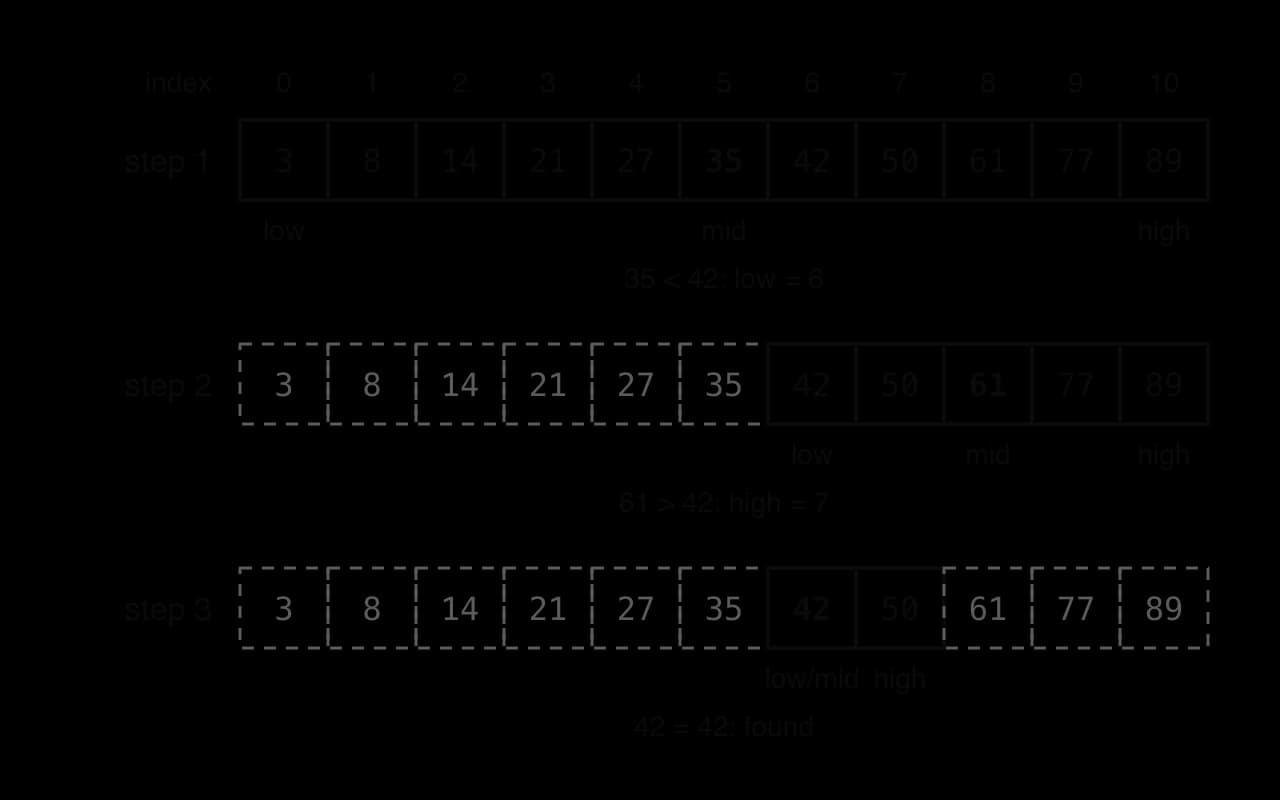
The diagram of a search for 42 in a list of 11 sorted codes shows the part still being searched shrinking at each step.
Each comparison discards about half of the remaining elements (dashed). Eleven elements need at most four comparisons.
The function binary_search follows the steps exactly. It assumes items is sorted in ascending order.
The program prints 6 and then -1. Python's // rounds the midpoint down; Java's / on two integers does the same. The Java version calculates the midpoint as low + (high - low) / 2, which always gives the same value as (low + high) / 2 for valid indexes but avoids an overflow bug that affected real libraries for years.
The trace table for binary_search(codes, 42) has one row per pass of the loop:
low
high
mid
items[mid]
Comparison
Action
0
10
5
35
35 < 42
low = 6
6
10
8
61
61 > 42
high = 7
6
7
6
42
42 = 42
return 6
Three comparisons were needed; a linear search would have needed seven.
Why every detail of the loop matters
Binary search is short, but small changes break it. Each detail has a reason:
low <= high, not low < high. When low equals high, one element is left and it still has to be checked. With <, a search for the last remaining candidate (such as 89 in codes) would stop one comparison early and wrongly return -1.
low = mid + 1 and high = mid - 1, not low = mid or high = mid. The element at mid has already been checked, so it is excluded. Setting low = mid can leave low and mid unchanged forever when high = low + 1, an infinite loop.
high = len(items) - 1, not len(items). Indexes run from 0 to n−1. Starting high at n lets mid reach n and read past the end of the list.
Integer division for mid. An index must be a whole number. In Python, / gives a float such as 5.0, which cannot be used as an index.
Efficiency of binary search
Every pass of the loop either finds the target or halves the number of candidates. Starting from n elements, after one comparison about 2n remain, after two about 4n, and after k comparisons about 2kn. The search must end once fewer than one element remains, so the largest number of comparisons is the number of halvings that take n down to 1, plus one for the final check:
worst-case comparisons=⌊log2n⌋+1
Best case: the target is at the first middle position. One comparison: O(1).
Worst case: the target is found on the last possible comparison or is absent: ⌊log2n⌋+1 comparisons, O(logn).
Average case: also O(logn), only about one comparison fewer than the worst case, because half of all positions are reached only on the last comparison.
Space:O(1) for the loop version (three index variables). The recursive version for HL uses O(logn) memory for its stack frames.
Number of sorted items n
Linear search, worst case
Binary search, worst case
11
11
4
1,000
1,000
10
1,000,000
1,000,000
20
1,000,000,000
1,000,000,000
30
8,000,000,000
8,000,000,000
33
Searching a sorted list with an entry for every person on Earth would need at most 33 comparisons. The graph compares the worst-case comparisons of the two searches.
Linear search: n
Binary search: ⌊log₂ n⌋ + 1
Binary search's worst case rises by one comparison each time n doubles, so its line is almost flat; linear search's worst case rises one for one with n.
YouTube
CS50 Shorts, “Binary Search”: steps through a binary search on a sorted array, updating the start and end of the search after each comparison. Watch for the check that ends an unsuccessful search.
Case study: the binary search midpoint bug
Binary search looks so simple that a bug in it lay unnoticed in famous code for decades. Jon Bentley's book Programming Pearls (1986) presented a binary search that he had proved correct and tested. Joshua Bloch, who wrote the binary search in Java's standard library (java.util.Arrays) using the same approach, reported in 2006 that both contained the same bug: the Java version had been "lying in wait for nine years or so" until it broke a real program.
The fault was the line int mid = (low + high) / 2;. A Java int holds values only up to 231−1=2147483647. In an array of more than about a billion (230) elements, low and high can both be large enough for their sum to exceed that limit. The sum then suffers integer overflow and wraps round to a negative number, so mid becomes negative and reading items[mid] throws an ArrayIndexOutOfBoundsException. The program Midpoint shows the effect with two large values.
The Java program prints -397483648 and then 1750000000; the Python version prints 1750000000 twice. The two languages differ because a Python int grows to whatever size a value needs and never overflows, while a Java int has a fixed 32 bits. The usual fix, low + (high - low) / 2, never forms the large sum: high - low is at most the length of the array, so the result always fits.
Source: Joshua Bloch, “Extra, Extra – Read All About It: Nearly All Binary Searches and Mergesorts are Broken”, Google Research Blog, 2 June 2006.
The case shows three things. An algorithm can be correct while its implementation is wrong, because the code runs on real hardware with fixed-size integers that the mathematical version ignores. Bugs that appear only at extreme sizes are hard to find by ordinary testing, which uses small inputs; this one needed arrays far larger than any computer of 1986 could hold. Choosing data types is part of choosing an algorithm: the same line is safe in Python and dangerous in Java.
Choosing between linear search and binary search
Binary search is far faster on large data, but it is not always the right choice. Its requirement for sorted data has a cost, and for some data it is impossible.
Feature
Linear search
Binary search
Data must be sorted
No
Yes, in the order being searched
Best case
O(1): target first
O(1): target at the first middle
Worst case
O(n)
O(logn)
Extra memory (loop version)
O(1)
O(1)
Works on a structure without direct access by index, such as a linked list
Yes
No: reaching the middle element takes O(n) steps
Simplicity
Very simple
Easy to get the bounds wrong
Finds the first of several equal values
Yes
Not necessarily: it finds one of them
Sorting data first so that it can be searched costs O(nlogn) with an efficient sort, more than a single linear search's O(n). Sorting is worth it only when the data will be searched many times, or when it is kept sorted anyway, as a database index is.
A printed phone book shows both sides of the choice. Its entries are sorted by surname, so finding a person's number from their name is a binary-search problem. Finding whose number 555 0193 is means a linear search through every entry, because the book is not sorted by number. A program in the same position has two options: search linearly, or keep a second copy of the data sorted by number (more memory and more work on every update) so that binary search can be used for both questions.
Sorting: bubble sort and selection sort
Sorted data is easier for both people and programs to use. A sorted list can be searched with binary search, its smallest and largest values are at the ends, duplicates sit next to each other, and a report in order of date or score is easier to read.
Bubble sort and selection sort are built from two operations: comparing two elements, and exchanging them when they are in the wrong order.
A swap needs three assignments. Writing items[0] = items[1] first would overwrite the value at index 0 before it had been saved, so the old value is copied into temp first.
The output is [3, 6, 8]. Python also allows items[0], items[1] = items[1], items[0], which swaps in one line; the three-line version works in both languages and shows exactly what happens.
Both sorts also share two properties that describe how a sorting algorithm uses memory and treats equal values.
Bubble sort and selection sort are both in place: they rearrange the list they are given using one temporary variable and a few counters. The built-in sorted function in Python is not, because it builds and returns a new list.
Stability matters when records are sorted by one field after another. If a class list is first sorted by name and then sorted by grade with a stable sort, students with the same grade stay in alphabetical order. An unstable sort may mix them up.
Bubble sort
Bubble sort repeatedly walks along the list comparing each pair of neighbouring elements and swapping any pair that is in the wrong order. On each walk, the largest unsorted value is carried along by successive swaps until it reaches its final place at the end, like a bubble rising to the surface.
Each walk along the list has its own name.
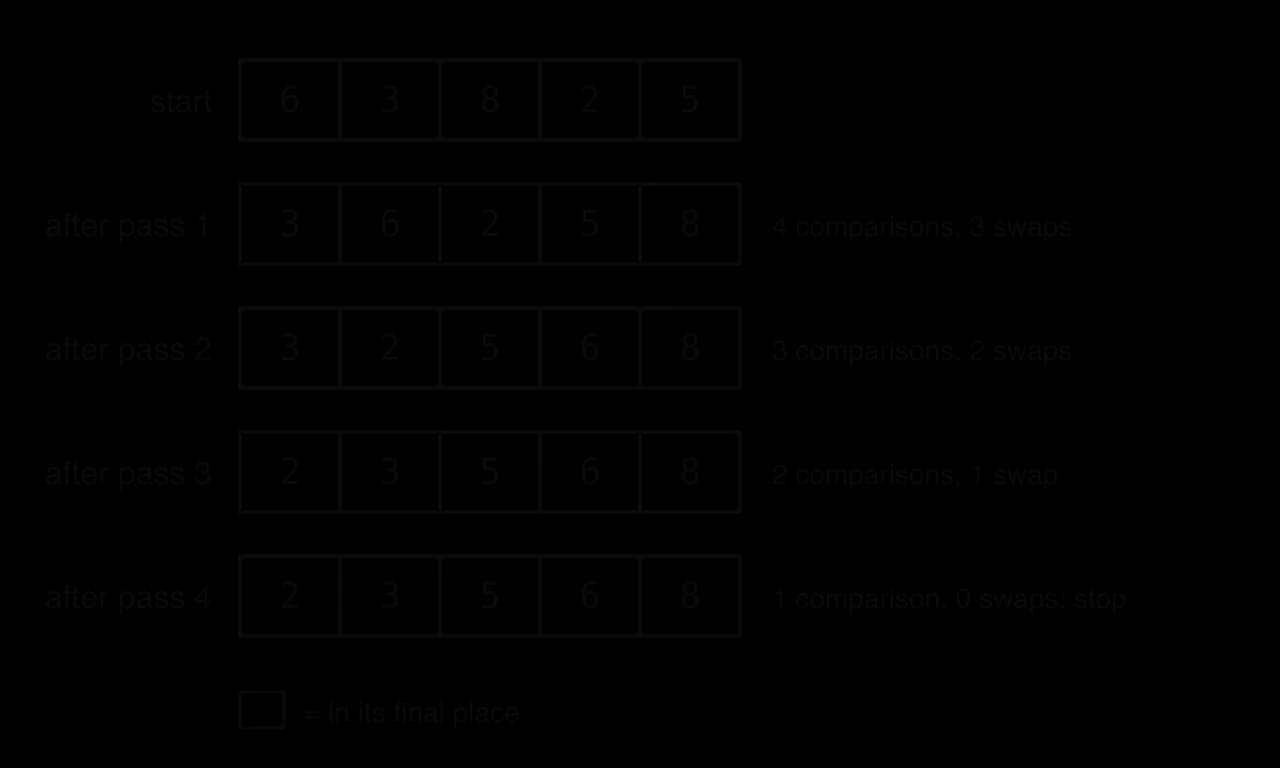
After the first pass of bubble sort, the largest value is at the end. After the second pass, the two largest are in place, and so on. A list of n elements therefore needs at most n−1 passes, and each pass can stop one position earlier than the one before, because the end of the list is already sorted. The diagram of bubble sort on [6, 3, 8, 2, 5] shows the list after each pass.
Each pass carries the largest remaining value to the end of the unsorted part (shaded cells are in their final place), so each pass is one comparison shorter than the last.
The basic version uses a counted loop for the passes and a nested counted loop for the comparisons. The inner loop runs to n - 1 - p, so it never compares into the sorted part and never reads past the end.
Python
defbubble_sort(items):
n = len(items)
for p inrange(n - 1):
for j inrange(n - 1 - p):
if items[j] > items[j + 1]:
temp = items[j]
items[j] = items[j + 1]
items[j + 1] = temp
heights = [6, 3, 8, 2, 5]
bubble_sort(heights)
print(heights)
The program prints [2, 3, 5, 6, 8]. The function returns nothing: it changes the list it was given. In both languages a list or array is passed to a subprogram as a reference, so the caller's heights is the list that gets sorted.
The basic version always makes all n−1 passes, even when the list became sorted early. If a whole pass makes no swaps, every adjacent pair is in order and the list is sorted, so the algorithm can stop. The improved version records this with a flag called swapped and uses a conditional loop for the passes.
A full trace of a sort records every comparison. For pass 1 of the improved version on [6, 3, 8, 2, 5]:
Pass
j
items[j]
items[j + 1]
Swap?
List after the step
swapped
1
0
6
3
Yes
[3, 6, 8, 2, 5]
True
1
1
6
8
No
[3, 6, 8, 2, 5]
True
1
2
8
2
Yes
[3, 6, 2, 8, 5]
True
1
3
8
5
Yes
[3, 6, 2, 5, 8]
True
2
0
3
6
No
[3, 6, 2, 5, 8]
False
2
1
6
2
Yes
[3, 2, 6, 5, 8]
True
2
2
6
5
Yes
[3, 2, 5, 6, 8]
True
3
0
3
2
Yes
[2, 3, 5, 6, 8]
True
3
1
3
5
No
[2, 3, 5, 6, 8]
True
4
0
2
3
No
[2, 3, 5, 6, 8]
False
At the start of each pass swapped is reset to False; it becomes True at the first swap of the pass. Pass 4 makes no swap, so swapped stays False and the while loop ends. In total the sort made 10 comparisons and 6 swaps. A shorter pass-by-pass table, with the list after each pass, is often enough when a question asks only for the state of the list:
After pass
List
Comparisons
Swaps
1
[3, 6, 2, 5, 8]
4
3
2
[3, 2, 5, 6, 8]
3
2
3
[2, 3, 5, 6, 8]
2
1
4
[2, 3, 5, 6, 8]
1
0
Efficiency of bubble sort
The number of comparisons in pass 1 is n−1, in pass 2 n−2, down to 1 in the last pass. In the worst case, a list in reverse order, every pass is needed and every comparison leads to a swap:
(n−1)+(n−2)+⋯+1=2n(n−1) comparisons and swaps
Worst case: reverse order. 2n(n−1) comparisons and the same number of swaps: O(n2).
Average case: random order. About the same number of comparisons and about half as many swaps: still O(n2).
Best case (improved version): already sorted. The first pass makes n−1 comparisons and no swaps, so the loop stops: O(n). The basic version without the flag makes all 2n(n−1)
Space:O(1); bubble sort is in place.
Stability: stable, because it swaps only when items[j] > items[j + 1], never when two values are equal, so equal values never pass each other.
Bubble sort's reputation is poor. Donald Knuth wrote in The Art of Computer Programming that it "seems to have nothing to recommend it, except a catchy name and the fact that it leads to some interesting theoretical problems". When Google's chief executive Eric Schmidt asked the presidential candidate Barack Obama in a 2007 interview how to sort a million integers, Obama answered: "I think the bubble sort would be the wrong way to go." For a million integers in random order, bubble sort needs about 5×10¹¹ comparisons.
Selection sort
Selection sort builds the sorted list from the left. On each pass it searches the unsorted part for the smallest value and swaps it into the first unsorted position. After pass 1 the smallest value is at index 0, after pass 2 the second smallest is at index 1, and so on.
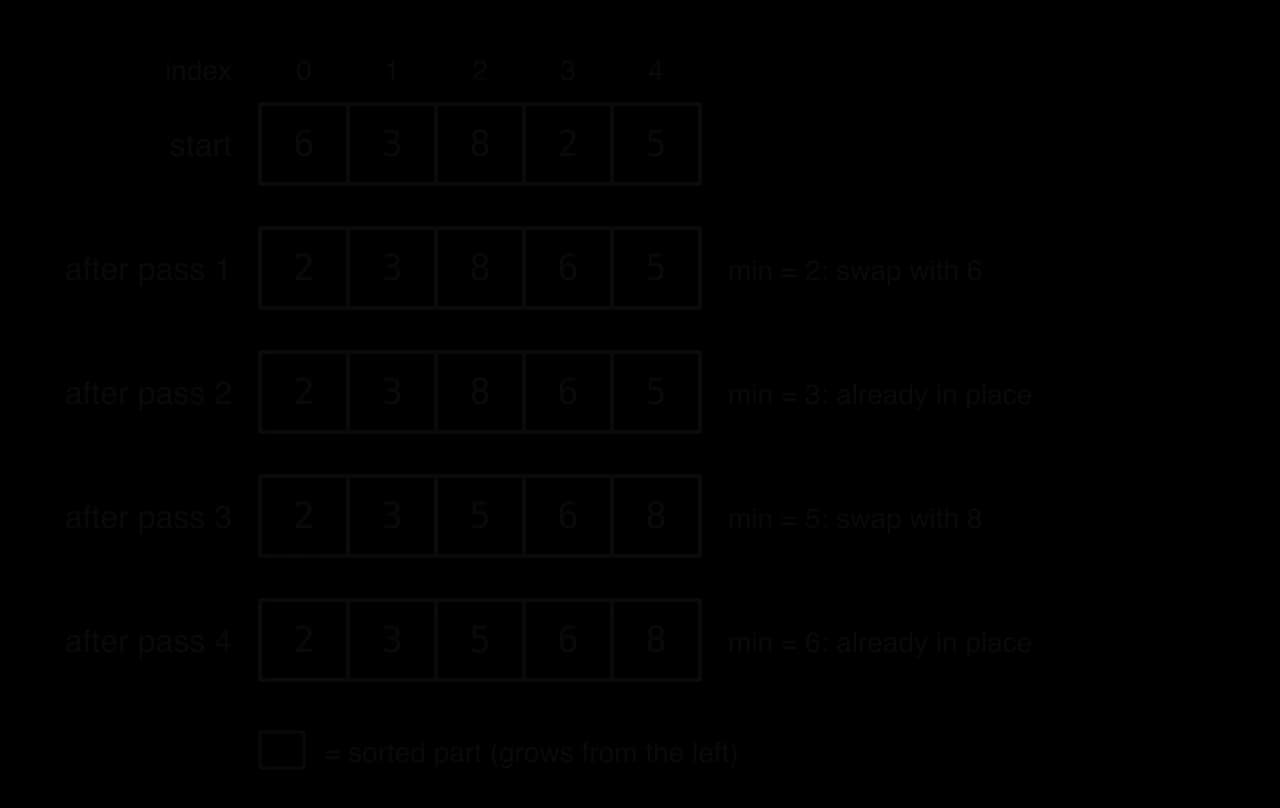
The diagram of selection sort on the same list, [6, 3, 8, 2, 5], shows the sorted part growing from the left.
Each pass makes at most one swap, placing the smallest remaining value at the left edge of the unsorted part; passes 2 and 4 find the minimum already in place and swap nothing.
Finding the minimum is itself a small algorithm: assume the first unsorted element is the smallest, then compare it with each later element and remember the index of any smaller one. Selection sort repeats this for each position. The code finds the minimum itself instead of calling Python's min or Java's Collections.min.
Python
defselection_sort(items):
n = len(items)
for i inrange(n - 1):
min_index = i
for j inrange(i + 1, n):
if items[j] < items[min_index]:
min_index = j
if min_index != i:
temp = items[i]
items[i] = items[min_index]
items[min_index] = temp
heights = [6, 3, 8, 2, 5]
selection_sort(heights)
print(heights)
The program prints [2, 3, 5, 6, 8]. The test if min_index != i skips a pointless swap of an element with itself; the sort is still correct without it, but it would then always make exactly n−1 swaps.
Tracing selection sort
The trace table records min_index as the inner loop moves through the unsorted part. For [6, 3, 8, 2, 5]:
i
j
items[j]
items[min_index] before
min_index after
Swap at end of pass
List at end of pass
0
1
3
6
1
0
2
8
3
1
0
3
2
3
3
0
4
5
2
3
index 0 with 3
[2, 3, 8, 6, 5]
1
2
8
3
1
1
3
6
3
1
1
4
5
3
1
none
[2, 3, 8, 6, 5]
2
3
6
8
3
2
4
5
6
4
index 2 with 4
[2, 3, 5, 6, 8]
3
4
8
6
3
none
[2, 3, 5, 6, 8]
The sort made 10 comparisons and 2 swaps: the same number of comparisons as bubble sort on this list, but a third of the swaps.
Efficiency of selection sort
Pass 1 compares the first element's candidate with the other n−1 elements, pass 2 makes n−2 comparisons, and so on. Unlike bubble sort, selection sort has no way to finish early: it cannot know that the rest of the list is in order without scanning it for the minimum. Every input of size n therefore costs exactly
(n−1)+(n−2)+⋯+1=2n(n−1) comparisons
Best, average and worst case:2n(n−1) comparisons, O(n2), even on a list that is already sorted.
Swaps: at most one per pass, so at most n−1: O(n). On sorted data it makes none.
Space:O(1); selection sort is in place.
Stability: not stable in this array form. A swap can jump an element over others with the same key: sorting the records (Ana, 4), (Ben, 4), (Cy, 1) by grade swaps (Cy, 1) with (Ana, 4) on the first pass, giving (Cy, 1), (Ben, 4), (Ana, 4), so Ana and Ben change order.
The small number of swaps is selection sort's one real advantage. When writing to memory is much more expensive than reading, as with flash memory, where every write wears the cells a little, or when each element is a large record that is slow to move, n−1 swaps instead of up to 2n(n−1) can matter more than the comparisons.
Comparing bubble sort and selection sort
Both algorithms are quadratic in the worst case and use constant extra memory, so on large data sets both are slow. They differ in how they respond to the starting order of the data and in how many writes they make.
Property
Bubble sort (with swapped flag)
Selection sort
Idea
Swap adjacent pairs; the largest value moves to the end each pass
Find the minimum; swap it to the front each pass
Comparisons, best case (sorted)
n−1: O(n)
2n(n−1): O(n2)
Comparisons, average case
about 2n(n−1): O(n2)
2n(n−1)
Comparisons, worst case (reverse order)
2n(n−1): O(n2)
2n(n−1)
Swaps, worst case
2n(n−1): O(n2)
n−1
Extra memory
O(1), in place
O(1), in place
Stable
Yes
No (array version)
Can stop early
Yes, after a pass with no swaps
No
Counting the operations on real runs of the two Python functions shows how the starting order changes the picture. The "nearly sorted" lists have one pair of neighbouring values exchanged.
Data (n)
Bubble sort comparisons
Bubble sort swaps
Selection sort comparisons
Selection sort swaps
Sorted (10)
9
0
45
0
Nearly sorted (10)
17
1
45
1
Random (10)
42
25
45
9
Reverse order (10)
45
45
45
5
Sorted (1,000)
999
0
499,500
0
Random (1,000)
498,069
247,734
499,500
994
Reverse order (1,000)
499,500
499,500
499,500
500
Counts from the two Python functions with counters added for comparisons and swaps; each random list is one run with a fixed seed.
The counts lead to a clear evaluation. On sorted or nearly sorted data, bubble sort with a flag is far faster, finishing in one or two passes, while selection sort still makes every comparison. On random or reverse-ordered data both make about the same number of comparisons, but bubble sort makes hundreds of times more swaps on the large lists, so selection sort usually runs faster. On a reverse-ordered list selection sort makes only 2n swaps, because each swap puts two values in their final places. For lists of a few dozen items the difference is unimportant, and both are easy to write correctly.
The graph compares the comparison counts as n grows. Selection sort follows the quadratic curve for every input; bubble sort follows it for random and reversed data but drops to the straight line on sorted data.
Bubble worst, selection all cases: n(n−1)/2
Bubble best (sorted): n − 1
Efficient sort: n log₂ n
Both sorts make n(n−1)/2 comparisons on unsorted data, a curve that leaves an n log n sort far behind; only bubble sort on sorted data stays on the straight line.
What the built-in sorts do
Python's sorted and list.sort, and Java's Arrays.sort and Collections.sort, are not bubble or selection sorts. Python used Timsort, written by Tim Peters in 2002, from version 2.3 until version 3.11 replaced it with a closely related algorithm called Powersort; Java SE 7 adopted Timsort for sorting arrays of objects, and Android uses it too. Timsort is a hybrid of insertion sort and merge sort that finds runs of data already in order and merges them, giving O(nlogn) in the worst case and close to O(n) on nearly sorted data. For arrays of primitive values such as int[], Java's Arrays.sort uses a dual-pivot quicksort.
Sources: Wikipedia, “Timsort”; Oracle, Java SE 21 API documentation for java.util.Arrays.
The built-ins are the right choice in real programs. Bubble sort and selection sort are studied because they are simple enough to write, trace and analyse by hand, and because they show clearly what makes an algorithm quadratic.
Recursion (HL only)
Solving a problem with a smaller copy of itself
Some problems contain smaller versions of themselves. The factorial of 4, written 4!, is 4×3×2×1=24, but it can also be described as 4×3!: four times the factorial of a smaller number. In the same way 3!=3×2!, 2!=2×1!, and 1!=1 needs no further work. A subprogram can follow this description directly by calling itself.
Every correct recursive subprogram has two parts. The first stops the recursion.
For factorial, the base case is n≤1, where the answer is 1. Without a base case, or with one the calls never reach, the subprogram would call itself forever. The second part does the self-reference.
The function factorial contains both parts, and factorial_loop computes the same value with a counted loop, for comparison.
Python
deffactorial(n):
if n <= 1:
return1return n * factorial(n - 1)
deffactorial_loop(n):
result = 1for k inrange(2, n + 1):
result = result * k
return result
print(factorial(4), factorial_loop(4))
print(factorial(20), factorial_loop(20))
Java version
Java
publicclassFactorial {
staticlongfactorial(int n) {
if (n <= 1) {
return1;
}
return n * factorial(n - 1);
}
staticlongfactorialLoop(int n) {
longresult=1;
for (intk=2; k <= n; k++) {
result = result * k;
}
return result;
}
publicstaticvoidmain(String[] args) {
System.out.println(factorial(4) + " " + factorialLoop(4));
System.out.println(factorial(20) + " " + factorialLoop(20));
}
}
Both lines of output show equal results: 24 24, then 2432902008176640000 2432902008176640000. The Java version returns a long, because 20! is far larger than the largest int; 21! would overflow even a long, while Python's integers simply grow.
A correct recursive subprogram needs a base case, recursive calls that move closer to it (here n - 1 is smaller than n), and a recursive case that uses the returned value (n * the result). Designing one is an example of algorithmic design: the programmer trusts that the call on the smaller problem returns the right answer and only has to decide how to combine it.
YouTube
Computerphile, “What on Earth is Recursion?”: explains recursion with factorial and shows how each call waits for the one it made. Watch for the role of the stack in keeping track of the waiting calls.
How recursion runs: the call stack
When factorial(4) calls factorial(3), the first call has not finished: it is waiting to multiply 4 by whatever comes back. The computer must remember that n was 4 in the first call while n is 3 in the second, and where to continue when the second call returns. It does this with a stack, the last-in, first-out structure from subtopic B2.2, Data structures.
The call stack is a different thing from a stack data structure that a program creates for itself, although both work in the same last-in, first-out way. Each entry on it has its own name.
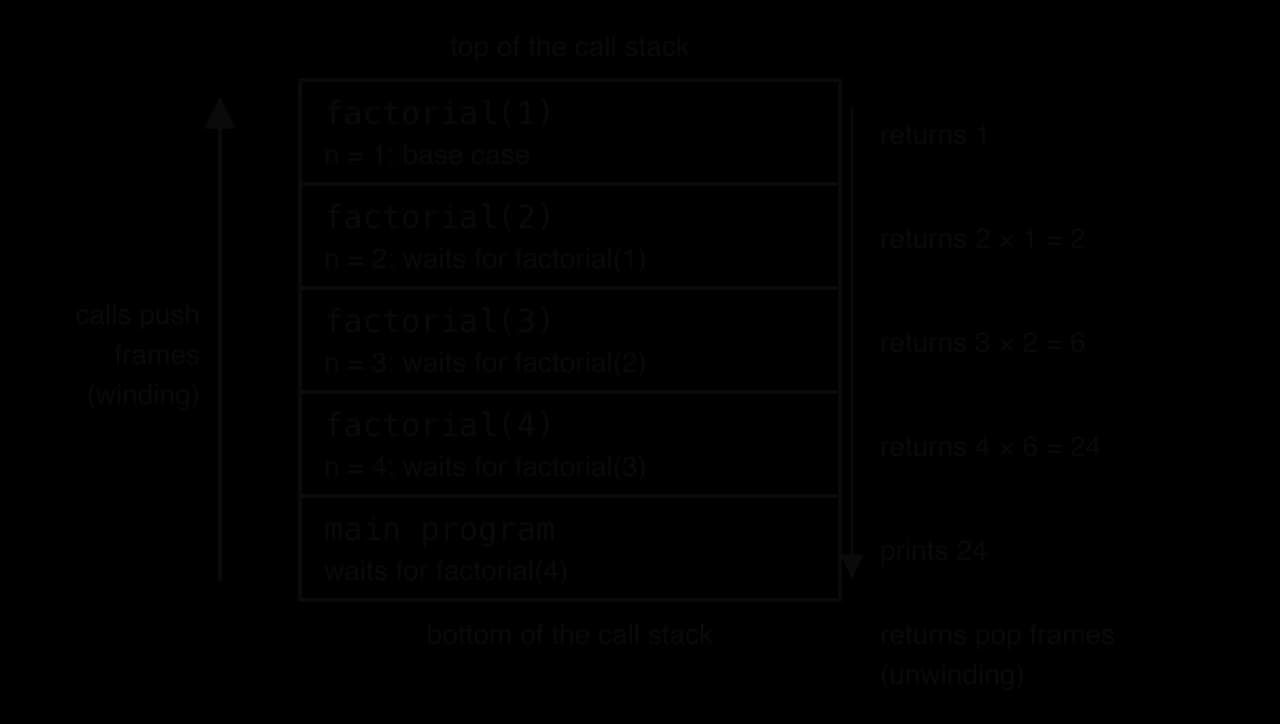
Each call gets its own frame, so the n in factorial(4) and the n in factorial(3) are separate variables that do not interfere. The diagram of the call stack for factorial(4) shows the frames at the moment the base case is reached.
Calls push frames until the base case is on top; then each return pops a frame and hands its value to the frame below, which can finally finish its multiplication.
The process has two phases. In the winding phase, each call pushes a new frame, until the base case is reached with four factorial frames on the stack. Nothing has been multiplied yet. In the second phase the calls finish in reverse order.
During unwinding, factorial(1) returns 1 to factorial(2), which returns 2×1=2 to factorial(3), which returns 3×2=6 to factorial(4), which returns 4×6=24 to the main program. All the multiplications happen on the way back.
The call stack has a limited size. A recursion that is too deep, or has no reachable base case, pushes frames until the space runs out: a stack overflow, the same idea as pushing onto a full stack applied to subprogram calls. The function count_down has no base case.
The Python program prints 3, 2, 1, 0, −1 and onwards down to −995, 999 lines in all, then stops with an error:
Plain text
RecursionError: maximum recursion depth exceeded
CPython limits the depth of calls to 1,000 by default (sys.getrecursionlimit() returns 1000) and raises a RecursionError rather than letting the real stack overflow and crash the interpreter. Java has no fixed count: the JVM throws a StackOverflowError when the thread's stack memory is full. In test runs of NoBase with the default stack size, this happened after between about 42,000 and 46,000 calls; the depth depends on the stack size and on how much each frame holds, and varies between runs.
Source: Python documentation, sys.getrecursionlimit; runs with CPython 3.13 and OpenJDK 25.
Non-branching and branching recursion
The recursive subprograms so far make at most one recursive call each time they run, so the calls form a single chain.
A non-branching recursion that reduces n by 1 each time makes n calls and has n frames on the stack at its deepest: O(n) time and O(n) space. Some problems split into two or more smaller problems instead.
The Fibonacci sequence 0, 1, 1, 2, 3, 5, 8, … is defined by F(n)=F(n−1)+F(n−2), with F(0)=0 and F(1)=1. Written directly as code, each call makes two more calls. The function counts how many calls it makes; in Python the global statement is needed to change the variable calls from inside the function.
Python
calls = 0deffib(n):
global calls
calls = calls + 1if n <= 1:
return n
return fib(n - 1) + fib(n - 2)
for n in [5, 10, 20, 30]:
calls = 0print(n, fib(n), calls)
Computing F(30) takes more than 2.6 million calls, because the same values are calculated again and again: fib(30) calls fib(28) once directly and again inside fib(29), and the repetition multiplies at every level. Each increase of n by one multiplies the number of calls by about 1.6, so this function runs in exponential time, usually written O(2n) as an upper bound. A loop that keeps the last two values computes F(30) in 29 additions. The graph compares the calls made by this branching function with the n calls of a non-branching one such as factorial.
Non-branching (factorial): n calls
The calls made by the branching fib function (points, counted by running it) grow by a factor of about 1.6 each step, while a non-branching recursion makes only n calls.
Advantages and limitations of recursion
Anything that can be written recursively can also be written with loops, sometimes with an explicit stack data structure to replace the call stack. The choice is about clarity, efficiency and the shape of the problem.
Recursion
Iteration (loops)
Fits problems that
contain smaller copies of themselves: trees, nested structures, divide and conquer, fractals
repeat a step a known or conditional number of times
Code length and clarity
often shorter and closer to the mathematical definition
can be longer for tree-shaped problems, which need a manual stack
Memory
one stack frame per active call: O(depth) extra space
usually O(1) extra space
Speed
each call has overhead (creating and removing a frame), so usually slower
branching recursion can repeat work, as in fib, giving exponential time
repetition is usually visible in the loop
The advantages are strongest for problems that branch. Visiting every node of a tree, drawing a fractal, or sorting by splitting a list into parts are short and natural with recursion and awkward with loops. For a simple chain such as factorial, a sum or a countdown, a loop is usually the better engineering choice: it is at least as clear, uses constant memory and cannot overflow the stack.
Divide and conquer and quicksort
Several of the fastest algorithms use the same strategy: split a problem into smaller independent problems of the same kind, solve each one recursively, then combine the results.
Binary search is a simple case: it divides the list, then continues in only one half, so it needs only non-branching recursion. Quicksort, developed by Tony Hoare in 1959 while he was a visiting student at Moscow State University and needed to sort Russian words for a machine translation project, divides a list and then sorts both parts. It was published in 1961.
The algorithm needs two further terms. The first is the value that everything is compared with.
The pivot can be any element: the first, the last, the middle, or a random one. Simple versions use the last element of the part being sorted. The rearrangement around it is the core of the algorithm.
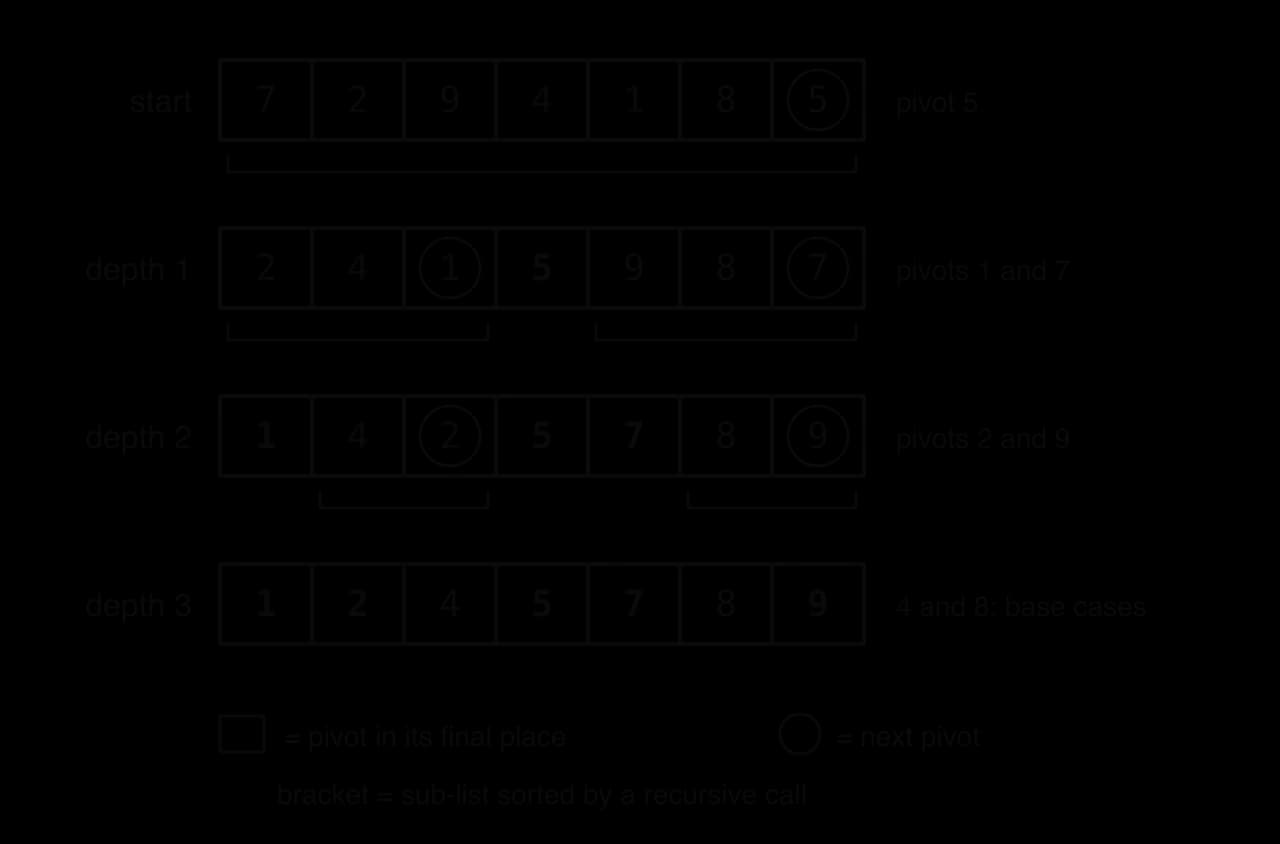
After one partition the pivot never moves again, and no element ever needs to cross it. Quicksort then calls itself on the part to the left of the pivot and on the part to the right. A part with zero or one element is already sorted: that is the base case. The diagram of quicksort on [7, 2, 9, 4, 1, 8, 5] shows each level of the recursion.
Each partition fixes its pivot (shaded) in its final place and splits the rest into two sub-lists, each sorted by its own recursive call; one-element sub-lists need no work.
The partition scheme in partition, often credited to Nico Lomuto, takes the last element as the pivot. Index i marks where the next element smaller than the pivot should go; index j scans the part from left to right. Hoare's original scheme scans inwards from both ends and makes fewer swaps, but is harder to follow. Reading the code is optional: the trace of partition and the diagram show everything the algorithm does, and quicksort is explained rather than written by hand.
Optional: quicksort in Python and Java
Python
defpartition(items, low, high):
pivot = items[high]
i = low
for j inrange(low, high):
if items[j] < pivot:
temp = items[i]
items[i] = items[j]
items[j] = temp
i = i + 1
temp = items[i]
items[i] = items[high]
items[high] = temp
return i
defquicksort(items, low, high):
if low < high:
p = partition(items, low, high)
quicksort(items, low, p - 1)
quicksort(items, p + 1, high)
marks = [7, 2, 9, 4, 1, 8, 5]
quicksort(marks, 0, len(marks) - 1)
print(marks)
Java:
Java
import java.util.Arrays;
publicclassQuickSort {
staticintpartition(int[] items, int low, int high) {
intpivot= items[high];
inti= low;
for (intj= low; j < high; j++) {
if (items[j] < pivot) {
inttemp= items[i];
items[i] = items[j];
items[j] = temp;
i = i + 1;
}
}
inttemp= items[i];
items[i] = items[high];
items[high] = temp;
return i;
}
staticvoidquicksort(int[] items, int low, int high) {
if (low < high) {
intp= partition(items, low, high);
quicksort(items, low, p - 1);
quicksort(items, p + 1, high);
}
}
publicstaticvoidmain(String[] args) {
int[] marks = {7, , , , , , };
quicksort(marks, , marks.length - );
System.out.println(Arrays.toString(marks));
}
}
Both programs print [1, 2, 4, 5, 7, 8, 9].
The trace of the first call, partition(marks, 0, 6) on marks = [7, 2, 9, 4, 1, 8, 5] with pivot 5, shows how the small values collect at the left:
j
items[j]
items[j] < 5?
Action
i after
List after the step
0
7
No
none
0
[7, 2, 9, 4, 1, 8, 5]
1
2
Yes
swap index 0 and 1
1
[2, 7, 9, 4, 1, 8, 5]
2
9
No
none
1
[2, 7, 9, 4, 1, 8, 5]
3
4
Yes
swap index 1 and 3
2
[2, 4, 9, 7, 1, 8, 5]
4
1
Yes
swap index 2 and 4
3
[2, 4, 1, 7, 9, 8, 5]
5
8
No
none
3
[2, 4, 1, 7, 9, 8, 5]
end
swap pivot (index 6) with index 3
[2, 4, 1, 5, 9, 8, 7]
partition returns 3. Then quicksort(marks, 0, 2) sorts [2, 4, 1] and quicksort(marks, 4, 6) sorts [9, 8, 7], each by the same steps. Quicksort is branching recursion: each call that partitions can make two further calls, so the calls form a tree, as the quicksort diagram shows level by level.
Efficiency of quicksort
Each level of the recursion partitions all the elements still unsorted, which takes about n comparisons per level. The number of levels depends on how evenly the pivots split the lists.
Best and average case: the pivots split each list into two parts of roughly equal size, so the list is halved at each level and there are about log2n levels. About n comparisons on each of log2n levels gives O(nlogn).
Worst case: each pivot is the smallest or largest element, so one part is empty and the other holds everything else. With the last element as pivot this happens on data that is already sorted or in reverse order. The levels then number n, with n−1, n−2, … comparisons: 2n(n−1)
Space: quicksort partitions in place, but its recursive calls use the call stack: O(logn) frames deep on average, O(n) in the worst case.
Stability: not stable, because partitioning swaps elements over long distances.
Runs of the optional Python code, with counters added, show both behaviours. On 1,000 values in random order, quicksort made 11,508 comparisons with a deepest recursion of 22 calls, close to 1000log21000≈9966. On 1,000 values already in order it made 499,500 comparisons, exactly 21000×999, and its recursion went 1,000 calls deep; that run needed a raised recursion limit, because with CPython's default limit the same call stops with a RecursionError. Library versions avoid the worst case by choosing the pivot more carefully, for example as the median of the first, middle and last elements, or at random.
Worst case (sorted input): n(n−1)/2
Average case: about n log₂ n
Measured comparisons for quicksort with a last-element pivot: random data sits near n log₂ n, while already sorted data hits the n(n−1)/2 worst case, the same as bubble and selection sort.
Traversing binary trees
A binary tree is a recursive structure: each node holds a value and up to two smaller binary trees, its left and right subtrees. Processing the whole tree therefore follows the same pattern at every node. An in-order traversal of a binary search tree visits the left subtree, then the node itself, then the right subtree, and so produces the values in sorted order. The base case is an empty subtree, where there is nothing to visit.
Each node makes two recursive calls, one per subtree, so tree traversal is branching recursion. It shows recursion at its most useful: the recursive version is three lines long, while a loop version must manage its own stack of nodes still to visit. Subtopic B4.1 describes trees, their traversals and binary search trees in full.
Fractals
Recursion also produces images. A shape drawn by replacing each part of it with smaller copies of the whole, repeated at smaller and smaller scales, has the same structure as a recursive subprogram: the drawing step calls itself on each smaller piece, and a minimum size or a depth counter is the base case.
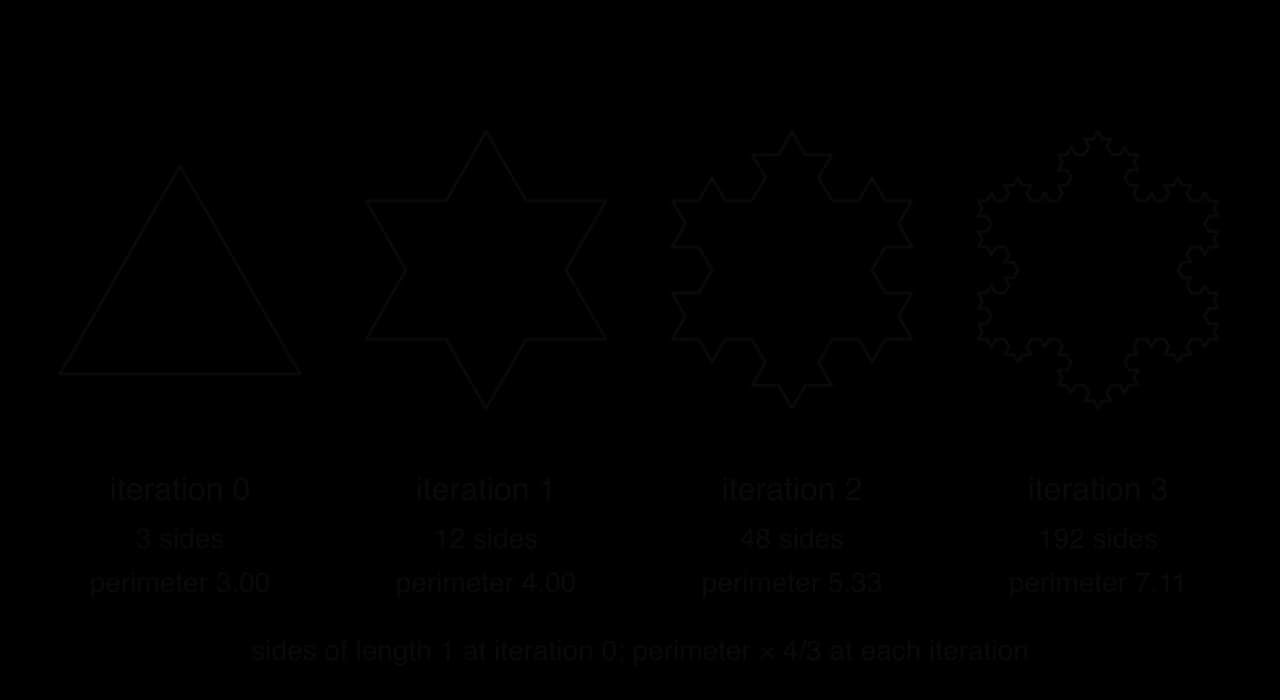
The Koch curve, described by the Swedish mathematician Helge von Koch in 1904, starts from a straight line segment. Each iteration divides every segment into three equal parts and replaces the middle third with two sides of an equilateral triangle pointing outwards, so each segment becomes four segments, each one-third as long. Three Koch curves on the sides of an equilateral triangle form the Koch snowflake.
Each iteration replaces every side with four sides one-third as long, so the number of sides is multiplied by 4 and the perimeter by 4/3, while the enclosed area grows by smaller and smaller amounts.
The recursive structure leads to an unusual property. Every iteration multiplies the perimeter by 34, so it grows without limit, while the added triangles become so small that the area approaches a fixed value, 58 of the original triangle's area. A recursive drawing subprogram takes a segment and a depth: if the depth is 0 (the base case) it draws the segment; otherwise it calls itself four times on the four smaller segments with the depth reduced by 1. This is branching recursion, and a depth of d produces 3×4d segments, so the work grows exponentially with the depth.
Source: Wikipedia, “Koch snowflake”.
Constructing and tracing recursive algorithms (HL only)
A method for writing a recursive subprogram
Writing a recursive subprogram is easier with a fixed sequence of four decisions:
Find the smallest version of the problem and its answer. This gives the base case: an empty list sums to 0; any number to the power 0 is 1; a string of length 0 or 1 is its own reverse.
Describe the problem using a smaller version of itself. The sum of a list is its first element plus the sum of the rest; be=b×be−1; the reverse of a string is the reverse of everything after its first character, followed by that first character.
Make sure every call moves towards the base case. The index moves one place along the list; the exponent falls by 1; the string loses a character.
Return or use the result of the recursive call. The recursive case must return the combined value.
Three subprograms built this way are sum_list, power and reverse_text. To avoid copying the list at each step, sum_list takes the index of the first element still to add as a second parameter.
Python
defsum_list(items, index):
if index == len(items):
return0return items[index] + sum_list(items, index + 1)
defpower(base, exponent):
if exponent == 0:
return1return base * power(base, exponent - 1)
defreverse_text(text):
iflen(text) <= 1:
return text
return reverse_text(text[1:]) + text[0]
print(sum_list([4, 9, 2, 7], 0))
print(power(3, 4))
print(reverse_text("loop"))
The output is 22, 81 and pool. Python's text[1:] and Java's text.substring(1) both give the string without its first character.
Tracing with a call table
A recursive trace records each call with its parameters, what it is waiting for, and what it finally returns. The calls are listed in the order they start (winding), and the return values are filled in from the bottom up (unwinding). For reverse_text("loop"):
Call
text
Base case?
Waits for
Returns
1
"loop"
No
reverse_text("oop") + "l"
"poo" + "l" = "pool"
2
"oop"
No
reverse_text("op") + "o"
"po" + "o" = "poo"
3
"op"
No
reverse_text("p") + "o"
"p" + "o" = "po"
4
"p"
Yes
(nothing)
"p"
Call 4 returns first, then call 3, then 2, then 1, the reverse of the order in which they started. The original call returns "pool". A call table with the "Returns" column filled in from the bottom row upwards is the clearest way to show unwinding.
Recursive search algorithms
Both searches can be written recursively. Binary search suits it well, because each step continues with only one half of the list: one recursive call, so it is non-branching. The part still being searched is passed in through the parameters low and high, and the base case low > high means that no elements remain.
The output is 6 and -1, the same as the loop version. The call table for the search for 42 has three calls, and the answer is passed back unchanged through each one:
Call
low
high
mid
items[mid]
Next step
Returns
1
0
10
5
35
35 < 42: call with low = 6
6
2
6
10
8
61
61 > 42: call with high = 7
6
3
6
7
6
42
found
6
The recursive version has the same O(logn) time as the loop, but uses O(logn) space for its stack frames instead of O(1). For linear search, a recursive version (check items[index], otherwise search from index + 1) would need one frame per element, O(n) space, and would fail with a RecursionError on any Python list of more than about 1,000 items: a clear case where the loop is the better design.
The function sum_to is meant to add the whole numbers from 1 to n, but its recursive case has no return.
Python
defsum_to(n):
if n == 0:
return0
n + sum_to(n - 1)
Java version
Java
staticintsumTo(int n) { // does not compileif (n == 0) {
return0;
}
inttotal= n + sumTo(n - 1);
} // error: missing return statement
The function mystery builds a string as the calls unwind. Its structure, a recursive call made before the current call adds its own part, means the results are assembled in reverse order.
Python
defmystery(n):
if n == 0:
return""return mystery(n // 2) + str(n % 2)
print(mystery(13))
The greatest common divisor (GCD) of two numbers has a short recursive definition found by Euclid: the GCD of a and b equals the GCD of b and the remainder of a divided by b, and the GCD of a and 0 is a.
Python
defgcd(a, b):
if b == 0:
return a
return gcd(b, a % b)
print(gcd(84, 36))
Java version
Java
publicclassGcd {
staticintgcd(int a, int b) {
if (b == 0) {
return a;
}
return gcd(b, a % b);
}
publicstaticvoidmain(String[] args) {
System.out.println(gcd(84, 36));
}
}
The program prints 12. The calls are gcd(84, 36), gcd(36, 12) (because 84mod36=12) and gcd(12, 0) (because 36mod12=0), which is the base case and returns 12; the value is passed back unchanged through the other two calls. When the recursive call is the very last action and its result is returned unchanged, as here and in recursive binary search, the recursion can be rewritten as a simple while loop that updates the parameters.
Exam focus
Programming algorithms are examined on Paper 2, in the version of the paper for your language, Python or Java. Questions set the algorithm in a context (a list of scores, readings or product codes) and move through parts of rising demand:
State a Big O value or the output of a search (1 mark each).
Describe or calculate efficiency: count comparisons, read the Big O from loop structure, or explain why one algorithm scales better (2–4 marks).
Trace a search or a sort in a trace table: low, high and mid for binary search; the list after each pass for a sort (3–5 marks). Marks go to correct rows in order, so show every change.
Construct a search or sort, often "without using built-in functions" such as sort, sorted, max, min, index or in (4–6 marks). Marks are awarded for features: initialisation, loop bounds, the comparison, the swap or update, and the return value.
Evaluate or compare algorithms for given data, such as bubble sort against selection sort on nearly sorted data, or linear against binary search (4–6 marks), with a justified conclusion.
The compulsory algorithmic-thinking question has no code: a search or sort may appear as a flowchart, as numbered steps, or as a process with cards or objects, to be traced or described in words. HL papers add recursion: construct a short non-branching recursive subprogram, trace a recursive call with a call table, explain limitations of recursion, or explain how quicksort sorts a given list.
The command term decides the shape of a "compare" or "evaluate" answer. Each point should name both algorithms and link a property to a consequence for the data in the question.
Binary search questions often hinge on a single row, the one where the loop ends.
The HL questions on recursion have their own routine.
Practice questions
State the worst-case time complexity of binary search and the best-case time complexity of selection sort. [2]
Explain why a binary search of a sorted list of 1,000,000 items needs at most 20 comparisons. [2]
Determine the time complexity of this Python fragment, where n is the size of the input, and justify your answer: for i in range(n): containing j = n and while j > 1: j = j // 2. [2]
Trace the basic bubble sort (no swapped flag) on [9, 4, 7, 1], giving the list after each pass and the number of swaps in each pass. [3]
Construct a function count_occurrences(items, target) (Java: countOccurrences(int[] items, int target)) that returns how many times target appears in items, without using built-in functions such as count. [3]
Compare linear search and binary search. [4]
Explain, using an example, why selection sort is not a stable sort. [3]
(HL only) Construct a recursive function count_char(text, ch) (Java: countChar(String text, char ch)) that returns the number of times the character ch appears in the string text. [4]
(HL only) The function show(n) is defined as: if n > 0, print "down" and n, call show(n - 1), then print "up" and n. State the output of show(3) and explain the order in terms of the call stack. [4]
(HL only) Explain why quicksort with the last element as the pivot takes O(n2) time on a list that is already sorted, and suggest one way to avoid this. [4]
Answers
Binary search worst case O(logn) [1]; selection sort best case O(n2) [1].
Each comparison discards half of the remaining items [1]; 1,000,000 can be halved about 20 times before one item remains: ⌊log21000000⌋+1=20 [1].
O(nlogn) [1]: the outer loop runs n times and the inner loop halves j each time, running about log2n times; nested loops multiply [1].
After pass 1: [4, 7, 1, 9], 3 swaps; after pass 2: [4, 1, 7, 9], 1 swap; after pass 3: [1, 4, 7, 9], 1 swap. [1] per correct pass.
Award [1] for initialising a counter to 0, [1] for a loop comparing each element with target and adding 1 on a match, [1] for returning the counter after the loop. In Python:
Python
defcount_occurrences(items, target):
count = 0for item in items:
if item == target:
count = count + 1return count
Java:
Java
staticintcountOccurrences(int[] items, int target) {
intcount=0;
for (inti=0; i < items.length; i++) {
if (items[i] == target) {
count = count + 1;
}
}
return count;
}
count_occurrences([3, 7, 3, 1, 3], 3) returns 3.
Both find the position of a target or report it absent and both use O(1) extra memory (loop versions) [1]. Linear search works on unsorted data, binary search needs data sorted by the search key [1]. Linear search's worst case is O(n), binary search's O(logn), so binary search is much faster on large lists [1]. Linear search is simpler and better for small or unsorted lists searched once, since sorting first costs O(nlogn)
count_char("banana", "a") returns 3. Only one of the two recursive calls runs each time, so this is non-branching recursion.
Output: down 3, down 2, down 1, up 1, up 2, up 3 [2]. Each call prints "down" before its recursive call, while winding [1]; it prints "up" only after the deeper call has returned, so the "up" lines appear as frames are popped, in reverse order (unwinding) [1].
The last element of a sorted list is its largest value, so every other element is smaller and goes to one side [1]; one part is empty and the other has n−1 elements, so each level removes only the pivot [1]; there are n levels with n−1,n−2,…
Summary
Time complexity describes how the number of steps grows with input size n; space complexity describes how extra memory grows. Big O keeps the fastest-growing term and drops constants, usually for the worst case.
The common classes in increasing order of growth are O(1)<O(logn)<O(n)<O(nlogn)<O(n2)<O(2n). Loops in sequence add; nested loops multiply; a halving loop is O(logn).
Linear search checks every element in turn: works on unsorted data, O(1) best case, O(n) worst case, O(1) space.
Binary search needs data sorted by the search key and halves the search range with low, high and mid: O(logn) worst case, at most ⌊log2n⌋+1 comparisons.
Bubble sort swaps adjacent out-of-order pairs; with a swapped flag it is O(n) on sorted data and O(n2) otherwise; it is in place and stable.
Selection sort swaps the minimum of the unsorted part into place: always 2n(n−1) comparisons, O(n2), but at most n−1
Built-in sorts use O(nlogn) algorithms (Timsort and its successors, dual-pivot quicksort); hand-written searches and sorts are needed when built-ins are prohibited.
(HL) A recursive subprogram has a base case and a recursive case that moves towards it; each call gets a stack frame on the call stack, and results are combined as the stack unwinds. Too deep a recursion causes a stack overflow (RecursionError at depth 1,000 in CPython, StackOverflowError in Java).
(HL) Recursion suits self-similar problems (divide and conquer, tree traversal, fractals) but uses more memory and call overhead than loops, and branching recursion can repeat work exponentially.
(HL) Quicksort partitions around a pivot and sorts both parts recursively: O(nlogn) on average, O(n2) when pivots split badly, as with sorted data and a last-element pivot.
Self-check
To do:
I can define time complexity, space complexity and Big O notation.
To do:
I can work out the Big O of code by reading its loops: sequence, nesting and halving.
To do:
I can put O(1), O(logn), O(n), O(nlogn), O(n2) and O(2n) in order and give an example of each.
To do:
I can explain the best, average and worst case of linear search, binary search, bubble sort and selection sort.
To do:
I can write a linear search that returns an index or -1 without in, index or contains.
To do:
I can write a binary search and trace low, high and mid, including an unsuccessful search.
To do:
I can explain why binary search needs sorted data and when linear search is the better choice.
To do:
I can write bubble sort with a swapped flag and trace it pass by pass.
To do:
I can write selection sort and trace min_index through each pass, and say whether each sort is in place and stable.
To do:
I can evaluate bubble sort and selection sort for sorted, nearly sorted, reversed and random data.
To do:
I can explain base case, recursive case, stack frame, call stack and unwinding with factorial (HL only).
To do:
I can explain how quicksort partitions a list around a pivot, and its average and worst cases (HL only).
To do:
I can explain how tree traversal and fractals such as the Koch snowflake use branching recursion (HL only).
To do:
I can explain the advantages and limitations of recursion, including stack overflow (HL only).
To do:
I can write and trace a non-branching recursive function with a call table (HL only).
return
def
doublings
steps
1
0
while
len
2
1
return
Java
Java
publicstaticintfirstDay(int[] steps) {
return steps[0];
}
publicstaticinttotalSteps(int[] steps) {
inttotal=0;
for (int s : steps) {
total = total + s;
}
return total;
}
publicstaticintcountBeaten(int[] steps) {
intcount=0;
for (inti=0; i < steps.length; i++) {
for (intj=0; j < steps.length; j++) {
if (steps[i] > steps[j]) {
count = count + 1;
}
}
}
return count;
}
publicstaticintdoublings(int[] steps) {
intk=1;
intcount=0;
while (k < steps.length) {
k = k * 2;
count = count + 1;
}
return count;
}
(a)
State the time complexity, in Big O notation, of each of the four functions/methods.
[4]4 marks
Markscheme (a)
Award [1] for each correct complexity, up to [4 max]. first_day / firstDay: O(1); total_steps / totalSteps: O(n); count_beaten / countBeaten: O(n2); doublings: O(logn);
Note: Accept O(log2n) for doublings. Accept "constant", "linear", "quadratic", "logarithmic" if clearly matched to each function.
(b)
Identify which function/method would scale least well as the user keeps recording steps for several years, and outline why.
[2]2 marks
Markscheme (b)
Award [1] for identifying the function and [1] for the outline. count_beaten / countBeaten; its nested loops each run n times, so the number of comparisons grows with n2 / doubling the number of days multiplies the work by about four;
Note: Allow FT from part (a) only if the function identified has the highest complexity given in (a).
Question 2 · CS-009525 marks
A school's timetabling program uses an algorithm with time complexity O(n2), where n is the number of students. Timetabling 200 students takes 3 seconds.
(a)
Calculate the approximate time needed to timetable 800 students, showing your working.
[2]2 marks
(b)
A rival program uses an O(n) algorithm that also takes 3 seconds for 200 students. State its approximate time for 800 students.
[1]1 mark
(c)
Explain why the times calculated in parts (a) and (b) are only estimates.
A weather buoy stores the last n water temperatures in a list (Python) or array (Java) called temps. Two functions/methods have been written to put the readings in reverse order.
Python
Python
defreversed_copy(temps):
result = []
for i inrange(len(temps) - 1, -1, -1):
result.append(temps[i])
return result
defreverse_in_place(temps):
left = 0
right = len(temps) - 1while left < right:
hold = temps[left]
temps[left] = temps[right]
temps[right] = hold
left = left + 1
right = right - 1
Java
Java
publicstaticint[] reversedCopy(int[] temps) {
int[] result = newint[temps.length];
for (inti=0; i < temps.length; i++) {
result[i] = temps[temps.length - 1 - i];
}
return result;
}
publicstaticvoidreverseInPlace(int[] temps) {
intleft=0;
intright= temps.length - 1;
while (left < right) {
inthold= temps[left];
temps[left] = temps[right];
temps[right] = hold;
left = left + 1;
right = right - 1;
}
}
(a)
Outline what is meant by the space complexity of an algorithm.
[2]2 marks
(b)
State the space complexity of reversed_copy / reversedCopy and of reverse_in_place / reverseInPlace.
[2]2 marks
(c)
Both functions/methods have a time complexity of O(n). Explain why reverse_in_place / reverseInPlace is more suitable for the buoy, which has very little memory and stores a million readings.
: at 200,000 records each search needs at most 18 comparisons, about 36,000 in total, plus one efficient sort. Approach 2 scales far better, because its cost per search barely changes as the library grows.
comparisons even on sorted data, so its best case is
O(n2)
.
:
O(n2)
:
O(n2)
:
O(n)
2
9
4
1
8
5
0
1
, which is
O(n2)
.
cm.
even on sorted data;
selection sort makes at most n−1 swaps, an advantage only if writes are expensive;
both are in place / O(1) extra memory, so memory does not separate them;
conclusion: bubble sort (with the flag) is the better choice for this data.
[1].
Selection sort swaps the minimum with the first unsorted element, which can jump that element past others with an equal key [1]. Example: sorting (Ana, 4), (Ben, 4), (Cy, 1) by grade swaps Cy with Ana [1], giving (Cy, 1), (Ben, 4), (Ana, 4), so Ana and Ben, equal on the key, have changed order [1].
Award [1] base case (empty string returns 0), [1] checking the first character, [1] recursive call on the rest of the string, [1] adding 1 only on a match and returning the result:
comparisons, totalling
2n(n−1)
,
O(n2)
[1]. Avoid it by choosing the pivot at random or as the median of the first, middle and last elements [1].

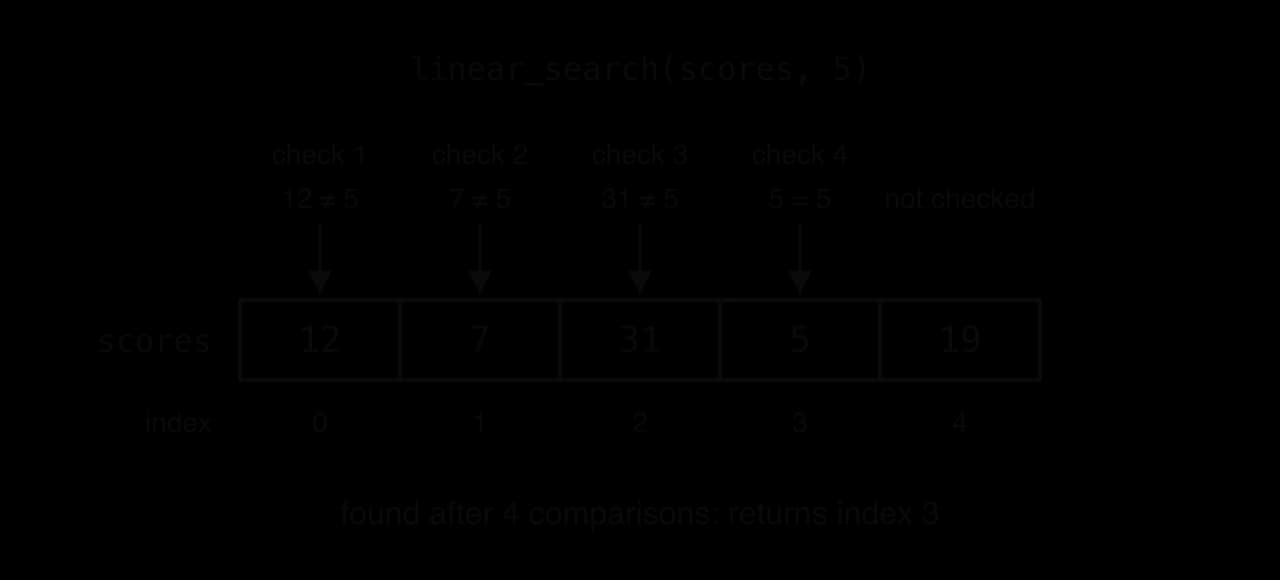
![Flowchart: Start; low = 0, high = n − 1; decision low ≤ high? No leads to return −1. Yes: mid = (low + high) // 2; decision a[mid] = target? Yes leads to return mid. No: decision a[mid] < target? Yes: low = mid + 1; no: high = mid − 1; both loop back to low ≤ high?](/_next/image?url=https%3A%2F%2Fmedia.augment-education.com%2Fnotes%2F2026%2F10%2F152e703a-bbea-4eff-be5c-2299f61b1360.webp&w=3840&q=75)