 YouTube
Write Python and Java programs that open text files in read, write and append mode, read them whole or line by line to the end of the file, parse records, write and append lines, close files safely and handle file errors.
Each is in the Computer Science glossary, with every other term in the subject.
An area of main memory that holds data temporarily while it is moved between a program and a slower device such as secondary storage.
A character or sequence of characters that marks the boundary between fields in a line of text, such as a comma, a tab or a colon.
The condition reached when the file pointer has passed the last character of a file, so that no data is left to read.
A named collection of data held in secondary storage, which the operating system stores, finds and protects as a single unit.
A reference, returned when a file is opened, that a program uses to read from, write to and close that file.
The setting chosen when a file is opened that fixes which operations are allowed and how the existing contents are treated: read, write (replacing the contents) or append (adding to the end).
The location of a file in a file system, written as the sequence of directories leading to it followed by the file name, either from the root of the file system (absolute) or from the current working directory (relative).
The position in an open file at which the next read or write operation will start; it moves forward automatically after every read or write.
Explain why programs store data in files, and how a text file holds lines, records and fields.
State the effect of opening a sequential file in read, write and append mode, including what happens when the file does not exist.
Construct code that reads a whole text file, a single line, or every line until the end of the file, using open(), read() and readline() in Python and Scanner and BufferedReader in Java.
Construct code that splits each line into fields and converts them to numbers in order to process the records in a file.
Construct code that writes and appends lines to a text file with write() in Python and FileWriter in Java, including the newline characters.
Explain why a file must be closed, and construct code that closes files automatically with with and try-with-resources.
Describe how exceptions can occur during file processing, and construct code that handles them.
Trace file-processing code, recording the file pointer, the variables and the output.
Every value a program stores in a variable disappears when the program ends. A game loses its high score, a register loses its attendance record and a shop loses the day's sales, unless the program copies the data into a file before it stops and reads it back the next time it starts. File processing is the set of operations that do this: opening a file, reading from it, writing to it, adding to the end of it and closing it again.
53 exam-style questions on this subtopic, written in the style of the IB papers. The first has its markscheme open. Counted on
An unattended river-level sensor writes one reading per line to a text file. The function/method below returns the mean reading in a file.
def average_reading(filename):
    total = 0.0
    count = 0
    file = open(filename, "r")
    for line in file:
        total = total + float(line)
        count = count + 1
    file.close()
return total / countpublic static double averageReading(String filename) throws IOException {
double total = ;
;
( (filename));
reader.readLine();
(line != ) {
total = total + Double.parseDouble(line);
count = count + ;
line = reader.readLine();
}
reader.close();
total / count;
}One of 50 short multiple-choice questions on B2.5. Pick an answer to see why it's right or wrong.
What is a file handle?
The official deck for this part of the syllabus.
Why is data held in a program's variables lost when the program ends?
Where must a program copy data that has to survive after the program ends?
With a free account, Augment remembers where you stopped and what you have practiced.
To write all data waiting in an output buffer to the file on secondary storage, emptying the buffer.
An invisible control character that marks the end of a line in a text file, written \n in Python and Java strings.
Analysing a string to break it into its component parts, such as the fields of a record, and converting them into data the program can use.
Storage that keeps data after the program that created it has ended and after the power is switched off.
A file whose records are read or written one after another in order, from the start of the file towards the end.
A file whose contents are a sequence of characters in a character set, organised into lines, which can be read and edited by a person with a text editor.
A statement that opens one or more resources, such as files, for the duration of a block of code and closes them automatically when the block ends, whether it ends normally or because of an exception.
Text files are the simplest and most widely shared kind of file. Spreadsheets export their tables as comma-separated text, web servers record every request as one more line in a log, and settings files, source code and data sets for machine learning are all stored as plain text. A program that can read such a file line by line, split each line into its parts and write results to a new file can exchange data with almost any other program.
YouTubeWhile a program runs, its variables, lists and arrays live in random-access memory (RAM). RAM is volatile: its contents are lost when the program ends or the power goes off. Data that must survive has to be copied to secondary storage, such as a solid-state drive or a hard disk drive, which is non-volatile.
Secondary storage is organised into files, which the operating system (OS) keeps track of through its file system. A program never writes directly to the surface of a disk. It asks the OS to open a named file, and the OS finds where the file's data is stored, checks that the program is allowed to use it and passes data between the device and the program.
A file is a sequence of bytes. In a text file, every byte or group of bytes stands for a character according to a character set, usually UTF-8, so the file can be opened and read in any text editor. Other files, such as photos, music and compiled programs, are binary files: their bytes are numbers or machine instructions with no meaning as characters, and an editor shows them as nonsense.
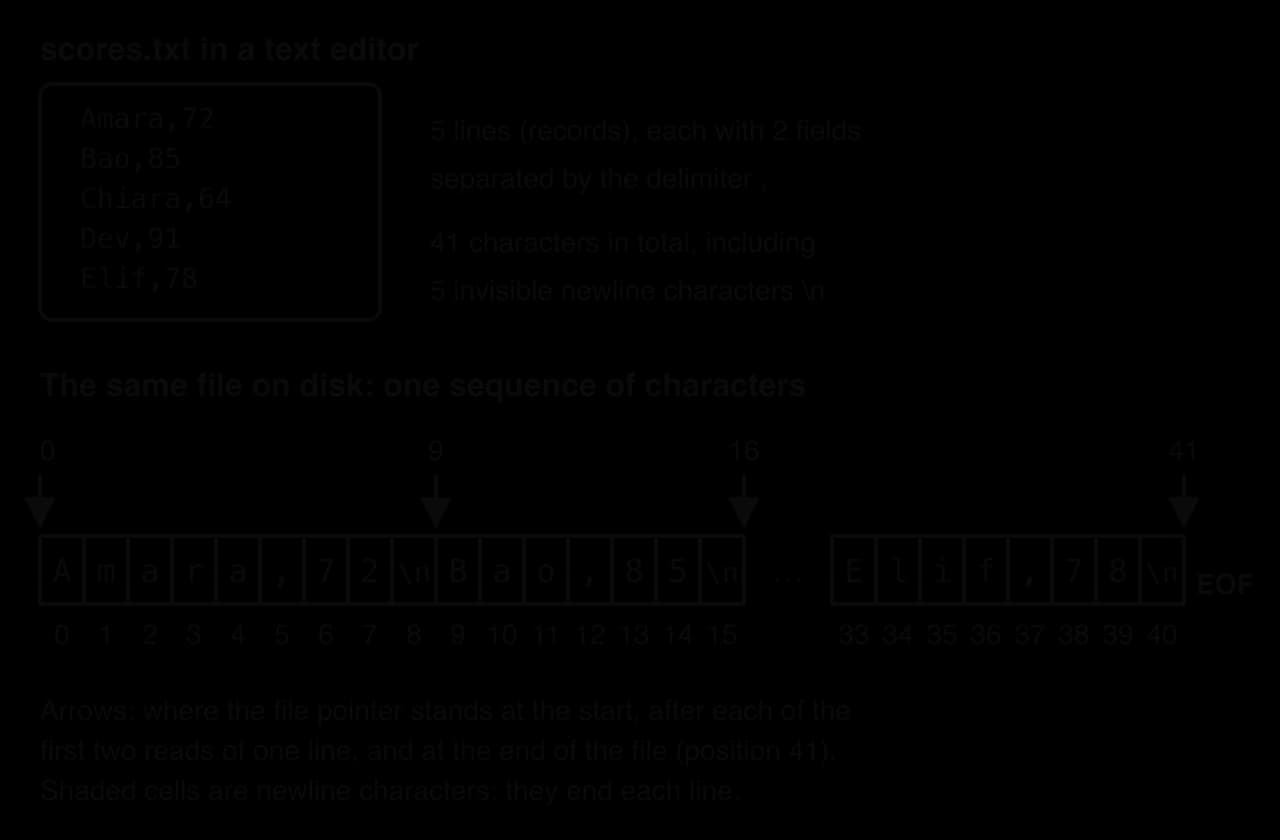
A text editor shows a text file as lines one below another, but on disk there are no lines, only one long row of characters. The end of each line is marked by an invisible character that tells the editor, and the program, to start a new line.
The diagram of scores.txt shows the same file twice: as an editor displays it, and as the 41 characters actually stored. Each of the five lines ends in a newline character, so "Amara,72" is 8 visible characters plus 1 newline, 9 in total. The positions under the cells are counted from 0, like string indices.
The program read_whole.py confirms the count. It opens the file, reads every character into one string and prints the string and its length.
file = open("scores.txt", "r")
contents = file.read()
file.close()

print(contents)
print("Characters read:", len(contents))import java.io.File;
import java.io.FileNotFoundException;
import java.util.Scanner;
public class ReadWhole {
public static void main(String[] args) throws FileNotFoundException {
Scanner file = new Scanner(new File("scores.txt"));
String contents = "";
while (file.hasNextLine()) {
contents = contents + file.nextLine() + "\n";
}
file.close();
System.out.println(contents);
System.out.println("Characters read: " + contents.length());
}
}Run against scores.txt, both versions print the five lines followed by a blank line and the count. The blank line appears because the last character of the file is a newline, and print (or println) then adds one of its own.
Amara,72
Bao,85
Chiara,64
Dev,91
Elif,78

Characters read: 41Most data files are organised the same way as a database table. Each line holds one record, the data about one item, and each record is split into fields. In scores.txt, each line is one student's record and each record has two fields, a name and a score. A character that never appears inside the data, here the comma, separates the fields.
The delimiter must be a character that cannot occur in a field. A comma works for names and scores, but not for addresses ("12 High Street, Leeds") or numbers written with thousands separators. Real CSV files solve this by putting such fields in double quotes, as the common description of the format sets out.
Rule for CSV files | Example |
|---|---|
Each record is on its own line |
|
The first line may be a header naming the fields |
|
Every record should have the same number of fields | 2 fields on every line |
A field containing a comma is enclosed in double quotes |
|
Source: RFC 4180, "Common Format and MIME Type for Comma-Separated Values (CSV) Files", October 2005.
The last rule is why a simple split on commas is not enough for every real CSV file: "Smith, Jo",88 would be split into three pieces. For files whose fields never contain the delimiter, such as scores.txt, splitting on the delimiter is correct; Python's csv module and similar libraries exist for files that follow the full rules.
A text file is read in the same direction as a person reads a page: from the first character to the last. To reach the fourth line, a program must read past the first three, because lines have different lengths and there is no way to calculate where line 4 starts without counting the characters before it.
Sequential access fits tasks that use every record anyway: totalling, counting, finding the highest value, copying selected records to a new file. Finding one record is a linear search, so the time it takes grows in proportion to the number of records. Changing one record in the middle is harder still: the usual method is to read the whole file, change the data in memory and write the whole file again. Systems that look up and update single records many times a second use a database instead.
A program names a file by its path. A name such as "scores.txt" on its own is a relative path: the OS looks for it in the program's current working directory, usually the folder the program was started from. A path that starts from the top of the file system, such as /home/amara/school/scores.txt on Linux and macOS or C:\Users\Amara\school\scores.txt on Windows, is an absolute path and points to one place whatever the working directory.
Relative paths are a frequent source of errors. A program that works when started from its own folder fails with "file not found" when an IDE runs it from a different working directory, although the file has not moved. In a Java string, a Windows backslash must be doubled ("C:\\data\\scores.txt") because a single backslash starts an escape sequence such as \n; forward slashes work on every system in both languages.
Before a program can use a file, it must open it. Opening asks the OS to find the file, check the program's access rights, prepare memory for transferring data and, for writing, create the file if necessary. The OS then gives the program a reference through which every later operation goes.
A file handle holds none of the file's data. It works like a library ticket, which identifies a borrowed book without containing it: the handle identifies one open file, and the OS records against it the program's current position in that file. The OS keeps a table of every file each program has open, and each entry uses memory, so a program can hold only a limited number of files open at once.
Each open file has a current position, the place where the next read or write will happen. When a file is opened for reading, the position starts at character 0. Every read moves it forward past the characters just read, which is why two calls to the same read operation return different lines.
The arrows in the diagram of scores.txt mark the file pointer at positions 0, 9 and 16 as the first two lines are read, and at position 41 when every character has been read. Python can report the position with file.tell(); reading scores.txt line by line gives the positions 9, 16, 26, 33 and 41.
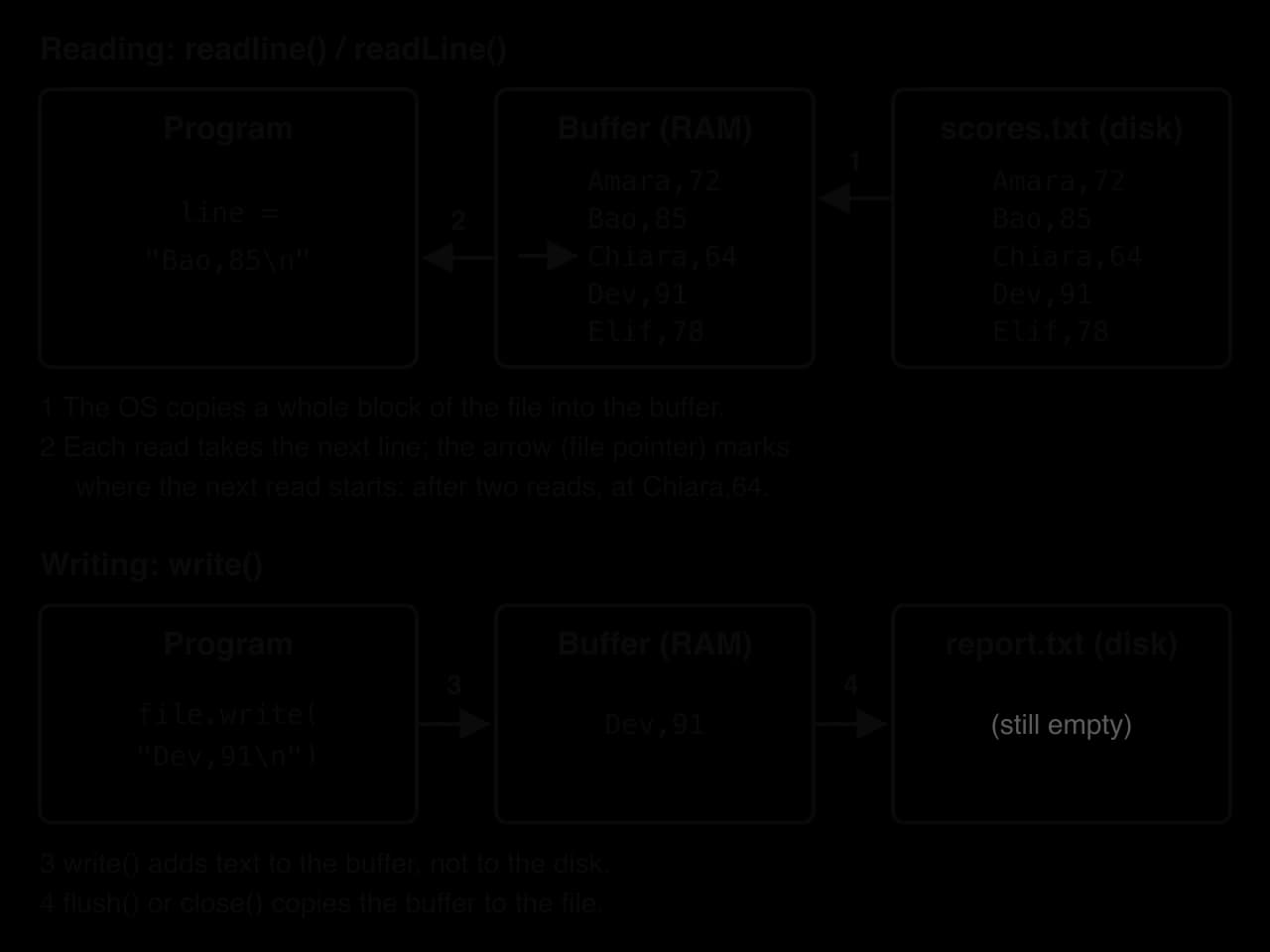
Reading or writing secondary storage is many thousands of times slower than working in RAM, and a device transfers data most efficiently in large blocks. So the OS and the language's file classes do not fetch one character at a time. When a program reads the first line, a whole block of the file, several thousand characters, is copied into an area of RAM, and later reads take their lines from there.
The diagram of buffered reading and writing shows both directions. On the reading side, the OS copies the file into the buffer (1) and each readline() takes the next line from it (2). On the writing side, write() only places text in the buffer (3); nothing reaches the disk until the buffer is full, the program asks for it to be emptied, or the file is closed (4).
Buffering makes file processing fast, but it means written data is not safe until it has been flushed. The program buffer_demo.py writes a line, reads the same file through a second handle before and after closing the first, and prints what the second handle finds.
writer = open("draft.txt", "w")
writer.write("Saved line\n")

reader = open("draft.txt", "r")
print("Before close:", repr(reader.read()))
reader.close()

writer.close()

reader = open("draft.txt", "r")
print("After close: ", repr(reader.read()))
reader.close()import java.io.BufferedReader;
import java.io.BufferedWriter;
import java.io.FileReader;
import java.io.FileWriter;
import java.io.IOException;
public class BufferDemo {
public static void main(String[] args) throws IOException {
BufferedWriter writer = new BufferedWriter(new FileWriter("draft.txt"));
writer.write("Saved line\n");
BufferedReader reader = new BufferedReader(new FileReader("draft.txt"));
System.out.println("Before close: " + reader.readLine());
reader.close();
writer.close();
reader = new BufferedReader(new FileReader("draft.txt"));
System.out.println("After close: " + reader.readLine());
reader.close();
}
}Before the writer is closed, the file on disk is still empty, so Python reads an empty string (repr shows it as '') and Java's readLine() returns null. Closing the writer flushes its buffer, and the second reader then finds the saved line.
Before close: ''
After close:  'Saved line\n'
The Java version prints Before close: null and After close: Saved line. The same effect causes real data loss. A Java program that writes a line with FileWriter and ends without calling close() leaves a file of 0 bytes, because the text was still in the buffer when the program stopped. Python usually flushes open files when a program ends normally, but loses buffered data if the program crashes or is stopped.
A program states what it intends to do with a file when it opens it. The choice decides whether the program may read or write, what happens to data already in the file, where the file pointer starts and what happens if the file does not exist.
Read | Write | Append | |
|---|---|---|---|
Operations allowed | Read only | Write only | Write only |
File already exists | Opened unchanged | Emptied (all old data lost) | Opened unchanged |
File pointer starts at | The beginning | The beginning of the now empty file | The end |
File does not exist | Error: file not found | Created, empty | Created, empty |
Typical use | Loading data, processing records | Saving a report or a fresh copy of data | Adding records, writing log entries |
The diagram of the three modes shows the same two-line file opened each way, then the effect of writing the record Dev,91. Write mode keeps only the new line; append mode keeps the old lines and adds the new one after them; in read mode the attempt to write fails with an error.
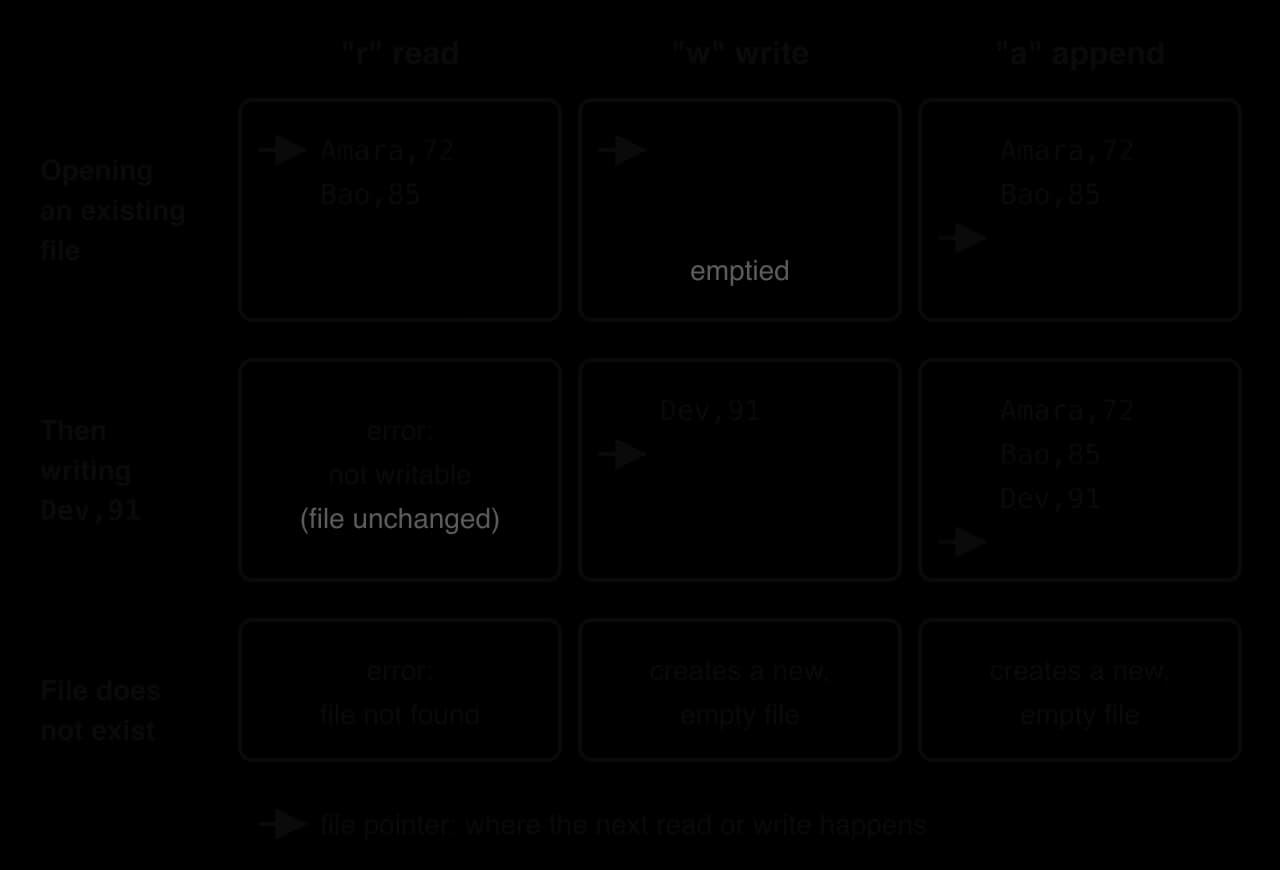
Write mode empties the file at the moment it is opened, before the first write() runs. A program that opens an existing file in "w" mode and then crashes, or never writes, still leaves the file empty. That is the reason to open in write mode only when the whole file is meant to be replaced.
Python uses one built-in function, open(path, mode), for every mode. It returns a file handle with methods for reading (read(), readline(), readlines()), writing (write()) and closing (close()). If the mode is left out, it is "r".
reader = open("scores.txt", "r")    # read: file must exist
writer = open("report.txt", "w")    # write: create or empty the file
logger = open("log.txt", "a")       # append: create or add to the end
Two further details complete the picture. Python also has an "x" mode, which creates a new file and fails if one already exists, and modes with + that allow reading and writing together; neither is needed for sequential processing. When no character encoding is given, Python 3.15 (October 2026) and later use UTF-8 on every operating system. Versions up to 3.14 use the computer's locale encoding instead, which on many Windows computers is not UTF-8, so programs that must run on older versions and share files between computers add encoding="utf-8" to the call.
Java has no single open function. A program opens a file by creating an object of a class designed for one job, and the choice of class is the choice of mode.
Purpose | Java code | Python equivalent |
|---|---|---|
Read, token or line at a time |
|
|
Read, line at a time (buffered) |
|
|
Write, replacing the file |
|
|
Append to the end |
|
|
The second argument of FileWriter is a boolean: true means append, and leaving it out (or passing false) means overwrite. The classes live in the packages java.io (File, FileReader, BufferedReader, FileWriter, IOException) and java.util (Scanner), so a program must import them. Since JDK 18 (March 2022), these classes use UTF-8 by default on every operating system.
The program modes_demo.py shows the difference directly. It opens a file in write mode twice, writing one line each time, then does the same with a second file in append mode, and prints the lines in each.
def show(filename):
    file = open(filename, "r")
    print(filename, file.readlines())
    file.close()


for attempt in range(2):
    file = open("w_mode.txt", "w")
    file.write("run " + str(attempt + 1) + "\n")
    file.close()

for attempt in range(2):
    file = open("a_mode.txt", "a")
    file.write("run " + str(attempt + 1) + "\n")
    file.close()

show("w_mode.txt")
show("a_mode.txt")import java.io.File;
import java.io.FileWriter;
import java.io.IOException;
import java.util.Scanner;
public class ModesDemo {
static void show(String filename) throws IOException {
Scanner file = new Scanner(new File(filename));
String lines = "";
while (file.hasNextLine()) {
lines = lines + "[" + file.nextLine() + "] ";
}
file.close();
System.out.println(filename + " " + lines);
}
public static void main(String[] args) throws IOException {
for (int attempt = 0; attempt < 2; attempt++) {
FileWriter file = new FileWriter("w_mode.txt");
file.write("run " + (attempt + 1) + "\n");
file.close();
}
for (int attempt = 0; attempt < 2; attempt++) {
FileWriter file = new FileWriter("a_mode.txt", true);
file.write("run " + (attempt + 1) + "\n");
file.close();
}
show("w_mode.txt");
show("a_mode.txt");
}
}The second write-mode opening wiped out "run 1", while append mode kept both lines. The Java version prints w_mode.txt [run 2] and a_mode.txt [run 1] [run 2].
w_mode.txt ['run 2\n']
a_mode.txt ['run 1\n', 'run 2\n']Python and Java offer three ways to read a text file: all of it at once, one line on request, or every line in turn with a loop. All three move the file pointer forward, and all three must be preceded by opening the file and followed by closing it.
Python's read() returns every character from the file pointer to the end as a single string, newlines included, as read_whole.py showed. It is the simplest method when the program needs the text as one block: to count characters, to search for a word anywhere, or to display the file. Its drawback is memory: a 2 GB log file read with read() needs at least 2 GB of RAM for the string. Java's Scanner and BufferedReader have no single method in the course for reading a whole file, so a Java program builds the string from its lines, as the Java version of read_whole.py does. Each nextLine() drops the newline, so the loop adds "\n" back to rebuild the original text.
A second call to read() does not start again from the beginning. The first call moved the file pointer to the end, so there is nothing left to read, and the program read_twice.py shows the result.
file = open("scores.txt", "r")
first_read = file.read()
second_read = file.read()
file.close()

print(len(first_read), len(second_read))
print(repr(second_read))import java.io.BufferedReader;
import java.io.FileReader;
import java.io.IOException;
public class ReadTwice {
public static void main(String[] args) throws IOException {
BufferedReader file = new BufferedReader(new FileReader("scores.txt"));
int firstCount = 0;
while (file.readLine() != null) {
firstCount = firstCount + 1;
}
int secondCount = 0;
while (file.readLine() != null) {
secondCount = secondCount + 1;
}
file.close();
System.out.println(firstCount + " " + secondCount);
}
}The first read returns all 41 characters and the second returns an empty string. In Java, the first loop counts 5 lines and the second loop counts 0 (output 5 0).
41 0
''Python's readline() returns the characters from the file pointer up to and including the next newline, then leaves the pointer at the start of the following line. Java's BufferedReader.readLine() and Scanner.nextLine() do the same, with one difference that matters: Java removes the newline from the string it returns, Python keeps it. The program read_lines.py reads the first two lines of scores.txt and then examines the first one.
file = open("scores.txt", "r")
first = file.readline()
second = file.readline()
file.close()

print(first)
print(second)
print(len(first), len(first.strip()))
print(first.strip() == "Amara,72")import java.io.BufferedReader;
import java.io.FileReader;
import java.io.IOException;
public class ReadLines {
public static void main(String[] args) throws IOException {
BufferedReader file = new BufferedReader(new FileReader("scores.txt"));
String first = file.readLine();
String second = file.readLine();
file.close();
System.out.println(first);
System.out.println(second);
System.out.println(first.length());
System.out.println(first.equals("Amara,72"));
}
}In the Python output, each name is followed by a blank line: the newline kept at the end of the string, plus the one print adds. The first line is 9 characters long with its newline and 8 after strip(), which removes spaces, tabs and newlines from both ends of a string.
Amara,72

Bao,85

9 8
True
The Java version prints no blank lines, gives the length as 8, and prints true, because readLine() has already dropped the newline.
Most file processing reads every record. The number of lines in the file is not known in advance, so the program cannot use a counted loop; it uses a conditional loop that keeps reading until there is nothing left.
No special character is stored at the end of a text file. The end of file is a state, reached when there are no more characters to read. Each language reports it in its own way, and the loop condition must test for exactly that signal.
Method | Returns for a normal line | Returns for an empty line in the file | At end of file |
|---|---|---|---|
Python | the line with |
|
|
Java | the line without |
|
|
Java |
|
|
|
The table explains why Python can test for an empty string and Java cannot. In Python, even an empty line in the middle of a file comes back as "\n", so "" can only mean the end of the file. In Java, an empty line comes back as "", so the end of the file needs the different value null, which is the absence of any string.
The flowchart of the reading loop shows the pattern used by both languages: read one line before the loop (a priming read), test whether it signals the end of the file, and at the bottom of the loop read the next line before testing again.
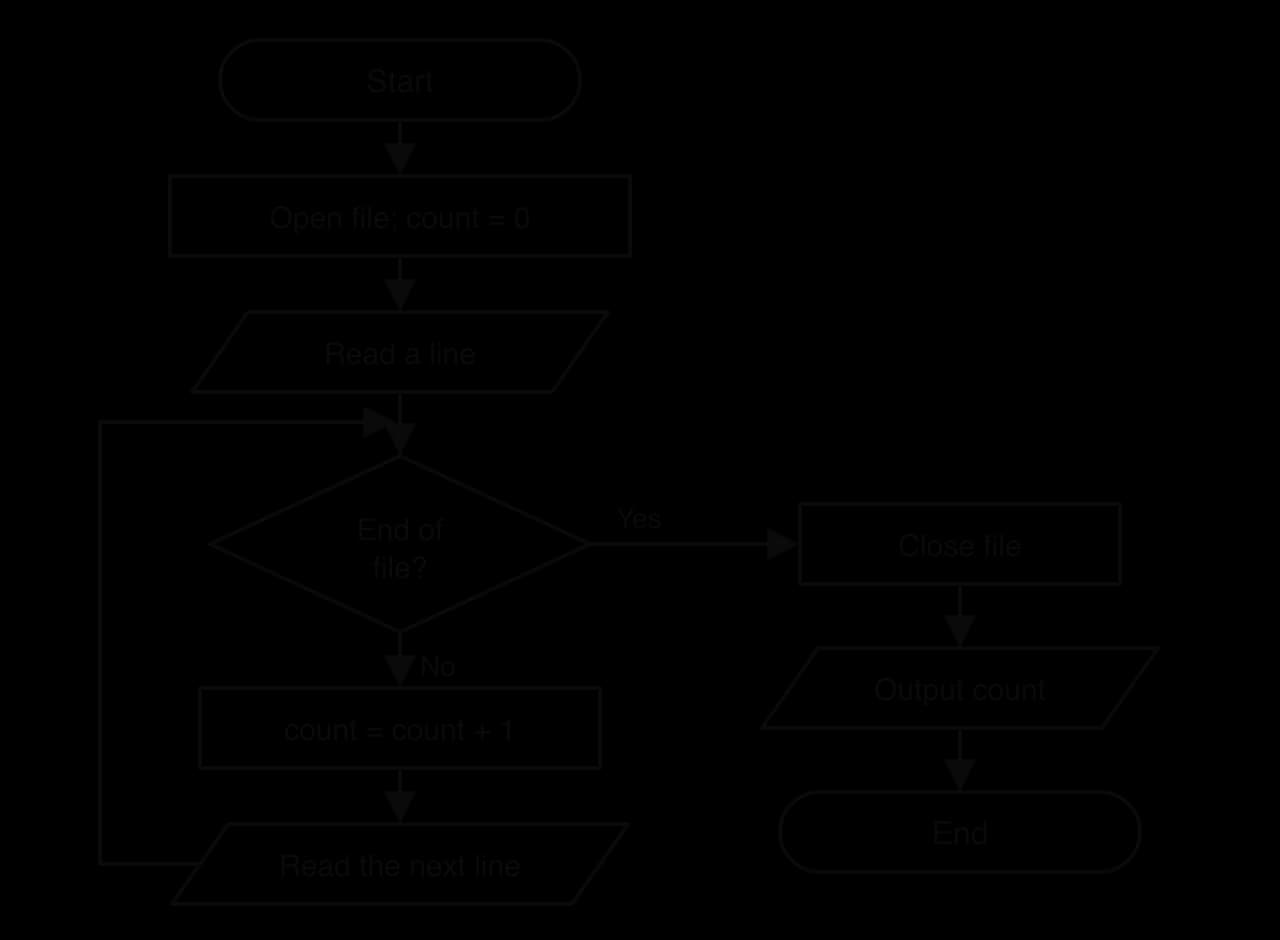
The program read_until_eof.py turns the flowchart into code: it numbers and prints every line, then reports how many there were.
file = open("scores.txt", "r")
count = 0
line = file.readline()
while line != "":
    count = count + 1
    print(count, line.strip())
    line = file.readline()
file.close()
print("Lines:", count)import java.io.BufferedReader;
import java.io.FileReader;
import java.io.IOException;
public class ReadUntilEof {
public static void main(String[] args) throws IOException {
BufferedReader file = new BufferedReader(new FileReader("scores.txt"));
int count = 0;
String line = file.readLine();
while (line != null) {
count = count + 1;
System.out.println(count + " " + line);
line = file.readLine();
}
file.close();
System.out.println("Lines: " + count);
}
}Both versions print the same output for scores.txt.
1 Amara,72
2 Bao,85
3 Chiara,64
4 Dev,91
5 Elif,78
Lines: 5Python lets a for loop traverse a file handle directly: for line in file: reads one line per pass, with its newline, and stops at the end of the file without any test written by the programmer. Java's Scanner gives the matching pattern with hasNextLine(), which checks whether another line exists before nextLine() reads it.
file = open("scores.txt", "r")
for line in file:
    print(line.strip())
file.close()import java.io.File;
import java.io.FileNotFoundException;
import java.util.Scanner;
public class ForLines {
public static void main(String[] args) throws FileNotFoundException {
Scanner file = new Scanner(new File("scores.txt"));
while (file.hasNextLine()) {
System.out.println(file.nextLine());
}
file.close();
}
}Both print the five lines of scores.txt, one per line. The while line != "" and while (line != null) loops remain useful, because they show the end-of-file test explicitly, and that test is what a trace table of the loop records.
Some tasks need the records more than once, for example to compute an average and then list everyone below it. Reading the file once into a list, and then working on the list, avoids reading the file twice. Python's readlines() returns every remaining line as a list of strings; in Java, an ArrayList<String> is filled one line at a time.
file = open("scores.txt", "r")
lines = file.readlines()
file.close()

print(lines)
names = []
for line in lines:
    names.append(line.strip())
print(names)
print("Last line:", names[len(names) - 1])import java.io.File;
import java.io.FileNotFoundException;
import java.util.ArrayList;
import java.util.Scanner;
public class IntoList {
public static void main(String[] args) throws FileNotFoundException {
Scanner file = new Scanner(new File("scores.txt"));
ArrayList<String> lines = new ArrayList<String>();
while (file.hasNextLine()) {
lines.add(file.nextLine());
}
file.close();
System.out.println(lines);
System.out.println("Last line: " + lines.get(lines.size() - 1));
}
}The Python output shows the newlines that readlines() keeps and the clean strings after strip(); the Java list prints as [Amara,72, Bao,85, Chiara,64, Dev,91, Elif,78].
['Amara,72\n', 'Bao,85\n', 'Chiara,64\n', 'Dev,91\n', 'Elif,78\n']
['Amara,72', 'Bao,85', 'Chiara,64', 'Dev,91', 'Elif,78']
Last line: Elif,78
Loading everything into memory is fast and convenient for a class list, but uses memory in proportion to the size of the file. For very large files, such as a server log with millions of lines, processing one line at a time keeps memory use constant, because only the current line is held.
Java's two reading classes overlap. Scanner is designed to break input into pieces: besides nextLine(), it has nextInt(), nextDouble() and next() (one word), and the same class reads from the keyboard (new Scanner(System.in)). BufferedReader does one job, reading lines quickly through a large buffer.
|
| |
|---|---|---|
Created with |
|
|
Read a line |
|
|
End-of-file test |
|
|
Read a number directly |
| No; read a line and convert it |
Exception when opening a missing file |
|
|
Exceptions from reading | None declared |
|
Typical use | Small files, mixed words and numbers, keyboard input | Large files read line by line |
For small files of records, either class works. A Scanner is the shorter choice when lines contain numbers to read; a BufferedReader is the usual choice for long files, and its readLine() loop matches Python's readline() loop step for step.
A line read from a file is a single string, whatever it contains. To use a record, the program must divide the line into its fields and convert each field to the right data type.
Both languages split a string with a method called split, which takes the delimiter and returns the fields in order. Python returns a list and Java returns an array of String, indexed from 0 in both.
Step | Python | Java |
|---|---|---|
Line read |
|
|
Remove the newline |
| not needed ( |
Split at the delimiter |
|
|
Text field |
|
|
Number field |
|
|
The final step is type conversion. The field "85" is a string of two characters, not a number, so adding it to a total either fails (Python raises a TypeError when adding a string to an integer) or produces concatenation instead of addition (in Java, 0 + "85" is the string "085"). Converting with int() or Integer.parseInt() before any arithmetic avoids both problems; float() and Double.parseDouble() convert decimal fields.
The program top_score.py processes every record in scores.txt: it keeps a running total and a count to calculate the mean, and stores the highest score so far with the name that goes with it. It finds the maximum with a comparison inside the loop instead of the built-in max(), the version to use whenever built-in functions are not available.
file = open("scores.txt", "r")
best_name = ""
best_score = -1
total = 0
count = 0
for line in file:
    fields = line.strip().split(",")
    name = fields[0]
    score = int(fields[1])
    total = total + score
    count = count + 1
    if score > best_score:
        best_score = score
        best_name = name
file.close()

print("Top:", best_name, best_score)
print("Mean:", total / count)import java.io.File;
import java.io.FileNotFoundException;
import java.util.Scanner;
public class TopScore {
public static void main(String[] args) throws FileNotFoundException {
Scanner file = new Scanner(new File("scores.txt"));
String bestName = "";
int bestScore = -1;
int total = 0;
int count = 0;
while (file.hasNextLine()) {
String[] fields = file.nextLine().split(",");
String name = fields[0];
int score = Integer.parseInt(fields[1]);
total = total + score;
count = count + 1;
if (score > bestScore) {
bestScore = score;
bestName = name;
}
}
file.close();
System.out.println("Top: " + bestName + " " + bestScore);
System.out.println("Mean: " + (double) total / count);
}
}The scores 72, 85, 64, 91 and 78 total 390, and . The Java version casts total to double before dividing; without the cast, int division would discard any fractional part of the mean.
Top: Dev 91
Mean: 78.0
Starting best_score at −1 works because no valid score is negative, so the first record always replaces it. A safer general method sets the best to the first record's values and compares the rest, which also works for data that may be negative. The total is an accumulator and count a counter, the two patterns behind most file statistics.
Real files contain surprises: a blank line at the end, a missing field, a score typed as a word. A program that assumes every line is perfect crashes on the first bad one. int("sixty") raises a ValueError in Python, Integer.parseInt("sixty") throws a NumberFormatException in Java, and indexing fields[1] on a blank line raises an IndexError or ArrayIndexOutOfBoundsException, because splitting an empty string gives a single empty field.
Robust programs apply validation to each record before using it. They check that the line has the expected number of fields and catch the conversion exception for that line only, so that one bad record is skipped and counted instead of ending the whole run. The class gradebook program uses both checks. Whether skipping is acceptable depends on the purpose: a report can skip a corrupt line and say so, but a payroll program that silently skipped an employee would be worse than one that stopped with a clear error.
Writing reverses reading. The program opens the file in write or append mode, calls a write method once for each piece of text, and closes the file to flush the buffer. Python's write() and Java's FileWriter.write() both take a single string and add it at the file pointer. The program write_report.py writes a heading and one line per student from two parallel lists, then reads the file back to show what was saved.
names = ["Amara", "Bao", "Chiara"]
scores = [72, 85, 64]

file = open("report.txt", "w")
file.write("Report\n")
for i in range(len(names)):
    file.write(names[i] + ": " + str(scores[i]) + "\n")
file.close()

check = open("report.txt", "r")
print(check.read())
check.close()import java.io.File;
import java.io.FileWriter;
import java.io.IOException;
import java.util.Scanner;
public class WriteReport {
public static void main(String[] args) throws IOException {
String[] names = {"Amara", "Bao", "Chiara"};
int[] scores = {72, 85, 64};
FileWriter file = new FileWriter("report.txt");
file.write("Report\n");
for (int i = 0; i < names.length; i++) {
file.write(names[i] + ": " + scores[i] + "\n");
}
file.close();
Scanner check = new Scanner(new File("report.txt"));
while (check.hasNextLine()) {
System.out.println(check.nextLine());
}
check.close();
}
}The file report.txt now holds four lines, and running the program again replaces them with the same four lines, because write mode empties the file each time.
Report
Amara: 72
Bao: 85
Chiara: 64Two details cause errors in many first file-writing programs. First, write() writes exactly the characters it is given and nothing more: unlike print() or System.out.println(), it never adds a newline. Records written without "\n" run together into a single line, as no_newline.py shows.
file = open("broken.txt", "w")
file.write("Amara,72")
file.write("Bao,85")
file.close()

check = open("broken.txt", "r")
print(check.readlines())
check.close()// Inside main (throws IOException); same effect with FileWriter
FileWriter file = new FileWriter("broken.txt");
file.write("Amara,72");
file.write("Bao,85");
file.close();
// broken.txt now contains the single line: Amara,72Bao,85The file holds one line instead of two, and a program reading it later would split it into the fields Amara, 72Bao and 85.
['Amara,72Bao,85']Second, Python's write() accepts only strings. file.write(72) raises a TypeError, so numbers are converted with str() and joined with +, as in str(scores[i]). Java converts numbers automatically when a string is joined to them with + (names[i] + ": " + scores[i]), but FileWriter.write() called with a single int writes the character with that code, not the digits: file.write(72) writes the letter H. Building the whole line as a string first avoids both traps.
Append mode adds records without disturbing what is already there. The file pointer starts at the end of the file, so each write lands after the last existing character. If the file does not exist yet, it is created, which means the same code works on the first run and on every later run.
The most common use of appending is a log: a file to which a program adds one line each time something happens, and from which nothing is ever removed. Web servers, operating systems and apps all keep logs to record activity and to investigate faults afterwards. The Apache HTTP Server, for example, appends one line per request to its access log in the "Common Log Format": the client's address, the user, the time, the request, the status code and the size of the reply.
127.0.0.1 - frank [10/Oct/2000:13:55:36 -0700] "GET /apache_pb.gif HTTP/1.0" 200 2326Source: Apache HTTP Server Version 2.4 documentation, "Log Files" (example entry).
Each entry is a record whose fields are separated by spaces, with quotes and brackets around fields that themselves contain spaces. A server that opened its log in write mode would destroy the history of every earlier request each time it restarted, which is why logs are always written in append mode. The program append_log.py adds a logout entry to a small log file of a school app and prints the result.
file = open("log.txt", "a")
file.write("2026-10-12 09:20 logout amara\n")
file.close()

check = open("log.txt", "r")
print(check.read())
check.close()import java.io.File;
import java.io.FileWriter;
import java.io.IOException;
import java.util.Scanner;
public class AppendLog {
public static void main(String[] args) throws IOException {
FileWriter file = new FileWriter("log.txt", true);
file.write("2026-10-12 09:20 logout amara\n");
file.close();
Scanner check = new Scanner(new File("log.txt"));
while (check.hasNextLine()) {
System.out.println(check.nextLine());
}
check.close();
}
}Before the program ran, log.txt held the first two entries; the third is the one just appended. Running the program a second time would add a fourth line identical to the third.
2026-10-12 09:15 login amara
2026-10-12 09:17 upload essay.docx
2026-10-12 09:20 logout amara
Appending relies on the file already ending with a newline. If the last line of an existing file has no newline (a file typed by hand often doesn't), the first appended record is joined onto it. Programs that write every record with a trailing "\n" never create this problem for the next program.
Closing a file ends the program's use of it. close() in Python and in each of Java's file classes does three things in order:
It flushes any data still waiting in the output buffer to the file, so everything written is saved.
It releases the file handle, telling the OS to remove the file from its table of open files and free the memory and buffers that went with it.
It lets other programs use the file. Some operating systems, Windows in particular, stop other programs from changing, renaming or deleting a file while it is open, and another program reading the file sees only what has been flushed.
After close(), the file handle can no longer be used: a further read or write raises an error (ValueError: I/O operation on closed file in Python; IOException: Stream closed from a Java BufferedReader or FileWriter, and IllegalStateException: Scanner closed from a Scanner). A file opened for reading should be closed too: no data is lost if it is left open, but the handle and its buffer stay allocated until the program ends, and a long-running program, such as a server, that opens files without closing them eventually reaches the OS limit on open files and can open no more.
Calling close() by hand has a weakness. If an exception is thrown between opening and closing, for example a ValueError while converting a bad score, the program jumps straight to the exception handler and the close() line never runs. One fix is to put close() in a finally block, which runs whether or not an exception occurred. Both languages offer a shorter and safer statement that does this automatically.
Python 2.5 added the with statement in September 2006 to replace the common try/finally pattern, and Java SE 7 added try-with-resources in July 2011. The program with_read.py reads one line inside a with block and checks the handle's closed attribute inside and after the block.
with open("scores.txt", "r") as file:
    first = file.readline().strip()
    print("Inside:", first, file.closed)

print("After: ", file.closed)import java.io.BufferedReader;
import java.io.FileReader;
import java.io.IOException;
public class WithRead {
public static void main(String[] args) throws IOException {
try (BufferedReader file = new BufferedReader(new FileReader("scores.txt"))) {
String first = file.readLine();
System.out.println("Inside: " + first);
}
System.out.println("After: file closed automatically");
}
}Inside the block the file is open; as soon as the indented block ends, Python has closed it, without any close() call in the code.
Inside: Amara,72 False
After:  True
The table compares the three ways to make sure a file is closed. The last two are the same idea in different syntax, and both are the standard way to work with files in modern code.
Method | Python | Java | Closed if an exception occurs? |
|---|---|---|---|
Explicit |
|
| No: the line is skipped |
|
|
| Yes |
Automatic |
|
| Yes |
In Java, a try-with-resources statement can open several resources at once, separated by semicolons, as the FilterCopy program did with its reader and writer; they are closed in reverse order. It may have catch and finally blocks of its own, or none, as in WithRead, where the throws IOException on main passes any exception on.
File operations depend on things outside the program: the file system, the device and other users. That makes them one of the most common sources of runtime errors in real programs, and the reason the Java compiler requires programs to handle them.
Problem | Python exception | Java exception |
|---|---|---|
The file does not exist (read mode), or the folder in the path does not exist (any mode) |
|
|
The program is not allowed to open the file |
|
|
The path names a folder, not a file |
|
|
The device fails or is full during reading or writing |
|
|
A field cannot be converted to a number |
|
|
A line has fewer fields than expected |
|
|
In Python, FileNotFoundError, PermissionError and IsADirectoryError are all kinds of OSError, so except OSError catches every file-system problem at once. In Java, FileNotFoundException is a kind of IOException. In both languages a handler for the specific exception must come before the handler for the general one, or the specific one is never reached.
Without a handler, the exception ends the program with an error message. The two-line program crash.py opens a mistyped file name.
file = open("scroes.txt", "r")
print(file.read())// Inside main (throws FileNotFoundException)
Scanner file = new Scanner(new File("scroes.txt"));
System.out.println(file.nextLine());
// Exception in thread "main" java.io.FileNotFoundException: scroes.txt (No such file or directory)Python stops at the first line with a traceback naming the exception (the file path is shortened here):
Traceback (most recent call last):
  File "crash.py", line 1, in <module>
    file = open("scroes.txt", "r")
FileNotFoundError: [Errno 2] No such file or directory: 'scroes.txt'Exception handling lets the program respond to the problem instead of crashing: report it clearly, ask for another file name, or carry on with default data. Python's try/except statement wraps the operation that may fail; the optional else block runs only if no exception occurred, and finally runs in every case.
filename = "scroes.txt"
try:
    file = open(filename, "r")
except FileNotFoundError:
    print("Cannot find", filename)
else:
    print(file.read())
    file.close()
finally:
print("Finished")import java.io.File;
import java.io.FileNotFoundException;
import java.util.Scanner;
public class MissingFile {
public static void main(String[] args) {
String filename = "scroes.txt";
try {
Scanner file = new Scanner(new File(filename));
while (file.hasNextLine()) {
System.out.println(file.nextLine());
}
file.close();
} catch (FileNotFoundException e) {
System.out.println("Cannot find " + filename);
} finally {
System.out.println("Finished");
}
}
}With the misspelt name, both versions print the same two lines; with the correct name scores.txt, they print the five records and then Finished.
Cannot find scroes.txt
Finished
Java has no else clause, so the code that uses the file goes inside the try block, after the line that opens it. That code is skipped automatically when opening fails, because the exception jumps straight to catch.
Java divides exceptions into two groups. Most errors caused by faulty logic, such as NumberFormatException or ArrayIndexOutOfBoundsException, are unchecked: the compiler does not require them to be handled. File errors are different. IOException and FileNotFoundException are checked exceptions, and any method that can throw one must either catch it or declare it with throws in its header. A program that does neither does not compile.
import java.io.File;
import java.util.Scanner;

public class NoCatch {
    public static void main(String[] args) {
        Scanner file = new Scanner(new File("scores.txt"));
        System.out.println(file.nextLine());
        file.close();
    }
}
Compiling NoCatch.java fails before the program can run, even though scores.txt exists:
NoCatch.java:6: error: unreported exception FileNotFoundException; must be caught or declared to be thrown
        Scanner file = new Scanner(new File("scores.txt"));
                       ^
1 error
There are two fixes. Adding throws FileNotFoundException (or throws IOException) to the header of main, as most of the short Java programs for reading and writing do, passes the exception up to the caller, and from main that means the program ends with an error message if the file is missing. Wrapping the code in try/catch, as MissingFile does, handles the problem inside the method. Short examples use throws to keep the code readable; finished programs catch the exception and tell the user what went wrong. Python has no checked exceptions: the programmer decides whether to handle file errors, and a forgotten handler shows up only when the error actually happens.
A complete file-processing program usually combines every operation: it reads existing data, adds to it, calculates results and writes a report. The gradebook program does this for a teacher's file results.txt, which, like many hand-edited files, contains two lines that do not fit the format: a score written as a word and a blank line.
Amara,72
Bao,85
Chiara,sixty
Dev,91

Elif,78
The program is decomposed into three subprograms, one per file operation, plus a main part that calls them inside one exception handler. add_result appends a new record, load_results reads every valid record into two lists and counts the lines it skips, and write_report overwrites report.txt with the number of students, the mean and the top student.
def load_results(filename, names, scores):
    """Read name,score lines into the two lists; return the number of lines skipped."""
    skipped = 0
    with open(filename, "r") as file:
        for line in file:
            fields = line.strip().split(",")
            if len(fields) != 2:
                skipped = skipped + 1
            else:
                try:
                    score = int(fields[1])
                    names.append(fields[0])
                    scores.append(score)
                except ValueError:
                    skipped = skipped + 1
    return skipped


def add_result(filename, name, score):
    with open(filename, "a") as file:
        file.write(name + "," + str(score) + "\n")


def write_report(filename, names, scores):
    total = 0
    best = 0
    for i in range(len(scores)):
        total = total + scores[i]
        if scores[i] > scores[best]:
            best = i
    with open(filename, "w") as file:
        file.write("Students: " + str(len(scores)) + "\n")
        file.write("Mean: " + str(round(total / len(scores), 1)) + "\n")
        file.write("Top: " + names[best] + " (" + str(scores[best]) + ")\n")


try:
    add_result("results.txt", "Farid", 88)
    names = []
    scores = []
    skipped = load_results("results.txt", names, scores)
    write_report("report.txt", names, scores)
    print("Loaded", len(names), "records, skipped", skipped)
    with open("report.txt", "r") as report:
        print(report.read())
except FileNotFoundError:
    print("results.txt is missing")
except OSError as error:
print("File error:", error)import java.io.BufferedReader;
import java.io.FileNotFoundException;
import java.io.FileReader;
import java.io.FileWriter;
import java.io.IOException;
import java.util.ArrayList;
public class Gradebook {
// Read name,score lines into the two lists; return the number of lines skipped.
static int loadResults(String filename, ArrayList<String> names,
ArrayList<Integer> scores) throws IOException {
int skipped = 0;
try (BufferedReader file = new BufferedReader(new FileReader(filename))) {
String line = file.readLine();
while (line != null) {
String[] fields = line.trim().split(",");
if (fields.length != 2) {
skipped = skipped + 1;
} else {
try {
int score = Integer.parseInt(fields[1]);
names.add(fields[0]);
scores.add(score);
} catch (NumberFormatException e) {
skipped = skipped + ;
}
}
line = file.readLine();
}
}
skipped;
}
IOException {
( (filename, )) {
file.write(name + + score + );
}
}
IOException {
;
;
( ; i < scores.size(); i++) {
total = total + scores.get(i);
(scores.get(i) > scores.get(best)) {
best = i;
}
}
Math.round( * total / scores.size()) / ;
( (filename)) {
file.write( + scores.size() + );
file.write( + mean + );
file.write( + names.get(best) + + scores.get(best) + );
}
}
{
{
addResult(, , );
ArrayList<String> names = <String>();
ArrayList<Integer> scores = <Integer>();
loadResults(, names, scores);
writeReport(, names, scores);
System.out.println( + names.size() + + skipped);
( ( ())) {
report.readLine();
(line != ) {
System.out.println(line);
line = report.readLine();
}
}
} (FileNotFoundException e) {
System.out.println();
} (IOException e) {
System.out.println( + e.getMessage());
}
}
}After Farid,88 is appended, the file holds seven lines. Five are valid (72, 85, 91, 78 and 88), and two are skipped: Chiara,sixty fails the conversion and the blank line splits into one field instead of two. The total is , and .
Loaded 5 records, skipped 2
Students: 5
Mean: 82.8
Top: Dev (91)
Each design choice in the program applies a file-processing idea. The three modes appear once each: append to keep every past result, read to load them, write to replace the old report. Every file is closed by with or try-with-resources, so even a crash in load_results leaves no file open. The validation inside load_results turns two lines that would have crashed a simpler program into a count the teacher can act on. One limitation remains: the report counts Chiara's lost result only as "skipped", so a fuller version would also write the rejected lines to a separate file for checking.
Text files are easy to read, which makes data easy to share but gives private data no protection of its own. Anyone who can open a file in a text editor can read every record in it: a gradebook, a list of email addresses or a file of passwords offers no protection beyond the operating system's file permissions. Personal data stored in plain text files has been exposed many times when a laptop was lost, a folder was shared too widely or a file was uploaded by mistake.
Programs that store personal data in files therefore apply several safeguards: they store only the fields they need, restrict who can open the file through the OS's access control, use encryption for sensitive data, and never write passwords themselves, only values derived from them that cannot be reversed. Log files raise the same issues: an access log that records every user's address and every page they visited is personal data, and keeping it longer than needed is a privacy risk as well as a storage cost.
File processing is examined on Paper 2, in the student's own language (Python or Java), and its one content statement uses the command term Construct. Expect a file to appear inside a larger programming question: a scenario gives the file's name and the format of its lines (often name,value), and the parts rise from short recall to writing code.
State or identify (1–2 marks): the effect of a mode (write empties the file, append adds to the end), which line opens the file, what readline() returns at the end of the file.
Explain (2–3 marks): why a file should be closed, why append mode is needed, why a value read from a file must be converted before arithmetic.
Describe (2–3 marks): how an exception could occur when opening or reading a file and how it is handled.
Construct (4–8 marks): read a file line by line and output a total, count, average, maximum or filtered list; copy selected records to a new file; append a validated record. Built-in functions such as max(), len() or sum() may be banned in such a part.
Trace (2–4 marks): a reading loop, recording the line read, the variables and the output for a given file.
The Java example in part (b) is a fragment inside a main method declared throws IOException, with java.io.BufferedReader and java.io.FileReader imported. In an answer, imports and the class header are usually not required unless the question asks for a complete program, but the loop, the conversion and the end-of-file test always are.
State what happens to the existing contents of a file when it is opened in write mode. [1]
State the value returned by Python's readline() and by Java's BufferedReader.readLine() when the end of the file has been reached. [2]
Outline the purpose of a buffer when a program writes to a file. [2]
A file temps.txt contains one whole-number temperature per line. Construct code that outputs how many temperatures are below 0. [4]
Explain why a program that reads "85" from a file must convert it before adding it to a total. [2]
Distinguish between a relative and an absolute file path. [2]
The file notes.txt contains the four lines Files keep data safe, after a program ends., an empty line, and A text file holds lines of characters.. Construct code that outputs the number of lines, the number of blank lines and the number of words in the file. [5]
Explain one advantage of using with (Python) or try-with-resources (Java) instead of calling close() at the end of the code. [2]
A program appends a record to log.txt each time a user logs in. Suggest why append mode is used, and identify one privacy risk of keeping the log. [3]
Trace the Python loop line = f.readline() / while line != "": / n = n + len(line.strip()) / line = f.readline(), with n starting at 0, for a file containing the three lines ab, cde and f. Give line and n after each read. [3]
The file is emptied (truncated) as soon as it is opened, so all existing data is lost; a new file is created if none exists.
Python's readline() returns an empty string ""; Java's readLine() returns null.
Written data is collected in an area of RAM [1] and copied to secondary storage in large blocks when it is full, flushed or the file is closed, which is much faster than one disk write per write() call [1].
Award marks for opening, looping to the end of the file, converting, counting with a condition and output. Python: count = 0 / with open("temps.txt", "r") as f: / for line in f: / if int(line.strip()) < 0: / count = count + 1 / then print(count). Java: int count = 0; / try (Scanner sc = new Scanner(new File("temps.txt"))) { while (sc.hasNextLine()) { if (Integer.parseInt(sc.nextLine().trim()) < 0) { count = count + 1; } } } / System.out.println(count);.
Everything read from a text file is a string [1]; adding a string to a number causes an error in Python, or joins the characters in Java (0 + "85" gives "085"), so it must be converted with int() / Integer.parseInt() to get the value 85 [1].
A relative path is interpreted from the program's current working directory (for example data/scores.txt), whereas an absolute path gives the full location from the root of the file system (for example /home/amara/data/scores.txt), so it refers to the same file wherever the program runs.
Python: lines = 0, words = 0, blank = 0; with open("notes.txt", "r") as file: / for line in file: / lines = lines + 1 / parts = line.split() / if len(parts) == 0: blank = blank + 1 / words = words + len(parts); then print the three counts. Java: in a while (file.hasNextLine()) loop, String line = file.nextLine().trim();, add 1 to lines, and if line.equals("") add 1 to blank, else add line.split("\\s+").length to words ("\\s+" means "one or more spaces or tabs"). Output for the given file: Lines: 4, Blank lines: 1, Words: 15.
The file is closed automatically when the block ends, even if an exception is thrown inside it [1], whereas an explicit close() at the end is skipped when an exception occurs, leaving the file open and buffered data unsaved [1].
Append mode keeps every earlier entry and adds the new one at the end, so the history of logins builds up; write mode would erase it on every login [1–2]. Privacy risk: the log records who logged in and when, which is personal data that could be read by anyone with access to the file / kept for longer than needed [1].
Read 1: line = "ab\n", n = 2. Read 2: line = "cde\n", n = 5. Read 3: line = "f\n" (or "f" if the file has no final newline), n = 6. Read 4: line = "", the loop ends with n = 6.
Data in variables is lost when a program ends; files in secondary storage give persistent storage. A text file is a sequence of characters split into lines by newline characters (\n).
Each line of a data file usually holds one record whose fields are separated by a delimiter such as a comma; text files are sequential, read from the start towards the end.
Opening a file returns a file handle. Read mode ("r") fails if the file is missing; write mode ("w", new FileWriter(name)) empties or creates the file; append mode ("a", new FileWriter(name, true)) creates the file or adds to its end.
Python reads with read() (whole file), readline() (one line, with its newline, "" at end of file), readlines() or for line in file. Java reads with Scanner (hasNextLine(), nextLine()) or BufferedReader (readLine(), null at end of file); both drop the newline.
Every read moves the file pointer forward, so a second read() returns nothing; the end-of-file test must match the language's signal.
Lines are parsed with split(","), strip() removes Python's newline, and numeric fields are converted with int() / Integer.parseInt() before arithmetic.
write() adds no newline and Python's write() accepts only strings; every record written must end with "\n".
Written data waits in a buffer until it is flushed; close() flushes the buffer, releases the file handle and lets other programs use the file. with and try-with-resources close files automatically, even after an exception.
Missing files, permissions and device faults raise FileNotFoundError / OSError in Python and FileNotFoundException / IOException in Java; Java's file exceptions are checked, so they must be caught or declared with throws.
I can explain why data in variables is lost when a program ends and how a file gives persistent storage.
I can describe a text file as a sequence of characters, and count the characters in a line including its newline.
I can identify the records, fields and delimiter in a data file, and explain why the delimiter must not appear inside a field.
I can state, for read, write and append mode, what happens to an existing file, where the file pointer starts and what happens if the file is missing.
I can write the Python open() call and the Java object creation for each mode, including new FileWriter(name, true).
I can read a whole file, one line, and every line until the end of the file in Python, and with Scanner and BufferedReader in Java.
I can state the end-of-file signal for readline(), readLine() and hasNextLine(), and explain why Java tests for null.
I can trace a reading loop, recording the line read, the file pointer, the variables and the output.
I can split a line into fields, remove the newline in Python and convert numeric fields before arithmetic.
I can find a total, count, mean and maximum from a file without built-in functions such as max() or sum().
I can write and append records, each ending with a newline, and copy selected records to a new file.
I can explain what a buffer is, what flushing does and why a file that is not closed may be empty.
I can use with and try-with-resources, and explain why they are safer than calling close() at the end.
I can describe how a file exception occurs and handle it with try/except or try/catch, and explain what a checked exception is.
I can validate the records in a file so that one bad line is skipped and counted instead of crashing the program.
State the data type of total and of count.
2 marks
total: decimal / float / double;count: integer;
Identify three potential points of failure in this function/method.
3 marks
Award [1] per point, up to [3 max].
the file does not exist / cannot be opened (FileNotFoundError / FileNotFoundException);
a line is not a valid number, e.g. ERR or a blank line (ValueError / NumberFormatException);
the file is empty so count is 0 (division by zero: ZeroDivisionError in Python; NaN result in Java);
the storage device fails while reading (IOException);
the file is not closed if an exception happens part-way through;
Describe the role of a finally block in this function/method.
2 marks
Award [1] per point, up to [2 max].
code in finally runs whether or not an exception occurs;
it is used to close the file;
so the file is not left open / locked / the resource is released even after an error;
Construct, in Python or Java, an improved version that:
returns −1 if the file cannot be opened
skips any line that is not a valid number and outputs a message
returns −1 if there are no valid readings
always closes the file once it is open.
6 marks
Award [1] per point, up to [6 max].try around opening the file;
catches the file-not-found exception and returns −1;
inner try around the conversion of each line;
catches ValueError / NumberFormatException and outputs a message (without stopping the loop);count increased only for valid readings;
closes the file in finally (or with / try-with-resources);
checks count is 0 and returns −1;
returns total / count otherwise;
Note: Accept any structure that meets all four requirements.
Example answer (Python):
def average_reading(filename):
    try:
        file = open(filename, "r")
    except FileNotFoundError:
        return -1
    total = 0.0
    count = 0
    try:
        for line in file:
            try:
                total = total + float(line)
                count = count + 1
            except ValueError:
                print("Skipped:", line.strip())
    finally:
        file.close()
    if count == 0:
         -
total / countExplain why exception handling matters more for this program than for a program a person runs on a desktop computer.
2 marks
Award [1] per point, up to [2 max].
the sensor runs unattended, so no one is there to restart it after a crash;
readings / data would be lost until someone notices;
handling the error lets the program continue with the next reading / file;
and record the problem (in a log) for later;
A language-learning website measures the vocabulary of a student's essay as the number of different words it uses. Each essay is saved in a text file. Words are separated by single spaces, there is no punctuation, and the same word in different letter cases counts once.
For example, a file containing these three lines has 6 different words: the, cat, sat, on, mat and ran (the two later uses of the and the word Cat on the last line are repeats).
The cat sat
on the mat
the Cat ranConstruct a function/method count_unique(filename) (Python) or countUnique(filename) (Java) that returns the number of different words in the file. You may assume the file exists.
6 marks
Outline why a set is a more suitable structure than a list for this task.
2 marks
A climbing gym records every member who enters the building. Each visit is stored as one line of the text file visits.txt, and the program adds a new line each time a member scans their card at the door.
State the file mode that the program should use when it opens visits.txt to record a new visit.
1 mark
A programmer opens the file in write mode instead, using open("visits.txt", "w") (Python) or new FileWriter("visits.txt") (Java). Explain the effect this has on the records already stored in the file.
2 marks
Outline why the program should close visits.txt as soon as the new visit has been written.
2 marks
Example answer (Java):
public static double averageReading(String filename) {
    BufferedReader reader;
    try {
        reader = new BufferedReader(new FileReader(filename));
    } catch (FileNotFoundException e) {
        return -1;
    }
    double total = 0.0;
    int count = 0;
    try {
        String line = reader.readLine();
        while (line != null) {
            try {
                total = total + Double.parseDouble(line);
                count = count + 1;
            } catch (NumberFormatException e) {
                System.out.println("Skipped: " + line);
            }
            line = reader.readLine();
        }
    } catch (IOException e) {
        return -1;
    } finally {
        try {
            reader.close();
        } catch (IOException e) {
            System.out.println("Could not close file");
        }
    }
    if (count == 0) {
        return -1;
    }
    return total / count;
}