Declare and trace variables of every basic data type, use local and global scope, extract and change substrings, handle exceptions with try, catch or except and finally, and debug programs in Python and Java.
IB Computer Science
Part of B2 Programming
SL and HL
Key terms introduced here
Each is in the Computer Science glossary, with every other term in the subject.
Test data at the limits of the valid range, and just outside them, used to check that the program accepts and rejects values at exactly the right point.
A named value that is set once and cannot be changed while the program runs.
Notes on B2.1 Programming fundamentals
73 min readLast reviewed
Learning objectives
Construct programs that declare, assign and convert variables and constants of the Boolean, char, decimal (floating-point), integer and string data types.
Trace programs that use global and local variables, recording every change in a trace table.
Explain how scope determines where a variable can be used, including shadowing, in Python and Java.
Construct programs that extract substrings and alter, concatenate and replace parts of strings, with and without built-in methods.
Describe how programs use exception handling with try/except (Python), try/catch (Java) and finally to deal with unexpected input, unavailable resources and logic errors.
Distinguish between syntax errors, runtime errors and logic errors.
Construct and use debugging techniques: trace tables, print statements, breakpoints and step-by-step execution.
Select normal, boundary and erroneous test data for a program.
Introduction
Every program, from a calculator app to a flight control system, is built from the same small set of parts: named values stored in memory, a type that says what each value is and what can be done with it, operations on text, and a plan for what happens when something goes wrong. How well a programmer handles them determines whether a program gives the right answer, whether it survives bad input, and how quickly a fault can be found when it does not. The difference between a 32-bit and a 64-bit integer, or between halting on an error and handling it, has cost real systems millions of dollars.
Questions on B2.1
164 exam-style questions on this subtopic, written in the style of the IB papers. The first has its markscheme open. Counted on
Question 1 · CS-00101HL only · 6 marks
A ticket kiosk program has 60 lines. Line 2 displays a welcome message. Line 35 contains a syntax error (a missing bracket). Line 18 contains a logic error: it adds the booking fee twice.
(a)
The program is run by a pure line-by-line interpreter, and the user's choices cause every line from 1 to 35 to be reached.
Deduce what the user sees.
[2]2 marks
Markscheme (a)
Award [1] per point, up to [2 max].
The welcome message (and any other output from lines 1–34) is displayed; then execution stops at line 35 with a syntax error message; the total shown before line 35 (if any) includes the fee twice / is wrong, with no error message for it;
(b)
The same program is instead passed to a compiler.
Deduce what happens.
[2]2 marks
Markscheme (b)
Award [1] per point, up to [2 max].
The compiler reports the syntax error at line 35; no executable/object code is produced; so the program cannot run at all / the welcome message is never displayed;
Note: Accept that the compiler may report other syntax errors at the same time.
(c)
Try a quick-fire question
One of 70 short multiple-choice questions on B2.1. Pick an answer to see why it's right or wrong.
The following Java methods are inside one class. What is printed when main runs?
Flashcards for B2.1
The official deck for this part of the syllabus.
B2.1 Programming fundamentals · front
What is a variable?
B2.1 Programming fundamentals · front
Where are a program's variables stored, and how does the programmer refer to each one?
B2.1 Programming fundamentals374 cards
Carry on with B2.1 in Augment
With a free account, Augment remembers where you stopped and what you have practiced.
A tool, usually part of an IDE, that runs a program under the programmer's control, pausing it and showing the values of its variables so that errors can be located.
An event during the running of a program that disrupts the normal flow of instructions, represented by an object that records the type of error and a message.
A technique in which code that might fail is placed in a block that is monitored for exceptions, and handler code runs if a matching exception occurs, so the program can recover instead of stopping.
A block attached to a try statement whose code always runs when the try statement ends, whether or not an exception occurred, typically to release resources such as open files.
A debugging technique in which temporary output statements are added to a program to display the values of variables, or which parts of the code run, while it executes.
The situation in which a local variable has the same identifier as a variable in an outer scope, so the outer variable is hidden inside the inner scope.
Running a program with planned input data and comparing the actual results with the expected results, to find errors and show that the program meets its requirements.
A variable or expression chosen by the programmer whose current value the debugger displays and updates each time the paused program advances.
Scope: The IB course covers variables of the Boolean, char, decimal, integer and string types, global and local variables, constructing and tracing programs that use them, extracting and manipulating substrings, describing exception handling (unexpected inputs, resource unavailability and logic errors; try/catch in Java, try/except in Python and the finally block), and debugging with trace tables, breakpoints, print statements and step-by-step execution. How values are stored in binary is subtopic A1.2; regular expressions and custom exception class hierarchies are not required.
Python and Java handle these fundamentals in different ways. In Python, types belong to values and are checked while the program runs, and there is one numeric type for whole numbers that never overflows; Java fixes every variable's type before the program runs and stores whole numbers in a fixed number of bits. The same algorithm can therefore behave differently in the two languages, and those differences matter as much as the shared ideas.
Variables, constants and assignment
A program needs somewhere to keep the values it works with: a score, a name, a running total. It stores each one in random-access memory (RAM), and the programmer refers to the storage location by a name instead of a memory address.
The name itself is called an identifier. Python and Java have similar rules for identifiers: a name is made of letters, digits and underscores, cannot start with a digit, cannot contain spaces, and cannot be a keyword of the language such as for, if or class. Names are case-sensitive, so total, Total and TOTAL are three different identifiers.
Good identifiers describe what the value means (hours_worked, not h or x2). Python programmers write identifiers in snake_case (student_name), Java programmers in camelCase (studentName), and both write constants in capitals (MAX_SEATS). These conventions are not enforced by either language, but they make code far easier to read and debug.
Declaring and assigning
Before a variable can be used, the program has to create it. In Java this is an explicit step called a declaration, which states the variable's type and name, for example int age;. Python has no separate declaration: a variable comes into existence the first time a value is assigned to it.
Assignment is the operation that stores a value in a variable. Both languages use a single equals sign, read as "becomes", not "equals": age = age + 1 means "work out age + 1, then store the result in age". The right-hand side is always evaluated first, using the old value, and the old value is then overwritten.
Java lets a declaration and the first assignment be combined (int age = 17;), which is called initialising the variable. The Java compiler rejects a program that reads a local variable before it has been given a value, while Python raises a NameError when the program runs. Either way, every variable needs a value before it is used.
Constants
Some values must never change while a program runs: the number of seats in a room, the VAT rate, the value of π. Storing such a value in a named constant means it is written once, its name explains its meaning, and changing it later (a bigger room) needs an edit in one place only.
The program creates one variable of each of the five basic data types, plus a constant, and then reassigns age.
Python
MAX_SEATS = 30# constant: written in capitals and never reassigned
student_name = "Amira"# string
initial = "A"# a one-character string (Python has no char type)
age = 17# integer
fee = 12.50# floating-point number
is_member = True# Boolean
age = age + 1# assignment replaces the old valueprint(student_name, initial, age, fee, is_member, MAX_SEATS)
print(type(initial), type(age), type(fee), type(is_member))
Java version
Java
publicclassVariables {
publicstaticvoidmain(String[] args) {
finalintMAX_SEATS=30; // constant: final stops reassignmentStringstudentName="Amira"; // stringcharinitial='A'; // char: single quotesintage=17; // integerdoublefee=12.50; // floating-point numberbooleanisMember=true; // Boolean
age = age + 1; // assignment replaces the old value
System.out.println(studentName + " " + initial + " " + age + " "
+ fee + " " + isMember + " " + MAX_SEATS);
}
}
The Python version prints the values and then the type Python has given each one; the Java version prints the same values (Java writes Booleans in lower case).
Adding the line MAX_SEATS = 31; to the Java program stops it compiling with the message cannot assign a value to final variable MAX_SEATS. The same line in Python runs without any error, which is why Python programmers rely on the capital-letter convention and on never writing such a line.
Data types
Inside the computer every value is a pattern of binary digits. The same 32 bits could be a whole number, part of a decimal number or four characters of text. The data type determines how the bits are interpreted and which operations make sense on them.
The five basic data types are integer, decimal, Boolean, char and string. The first four are primitive data types in Java: simple values built into the language and stored directly. A Java String is an object of a class, which is why it starts with a capital letter and has methods such as length(). In Python every value is an object, but int, float, bool and str still play the role of the basic built-in types.
Type
Python
Java
Example values
Typical use
Integer
int (no size limit)
int (32-bit); long (64-bit)
17, -4, 0
Counts, ages, scores, indexes
Decimal
float
double (64-bit); float (32-bit)
12.5, -0.03, 3.0
Measurements, averages, prices
Boolean
bool: True, False
boolean: true, false
True / true
Flags, results of conditions
Char
no separate type: a str of length 1
char (16-bit, single quotes)
'A', '7', '?'
Grades, initials, single keys
String
str (single or double quotes)
String (double quotes, an object)
"Amira", "+44 7700"
Names, messages, codes
The basic data types in Python and Java. Java also has the byte, short and long types for integers of other sizes.
Integers
An integer is a whole number, positive, negative or zero. Integers are exact: 7 + 5 is always exactly 12, which makes them the right choice for anything that is counted.
A Java int is stored in 32 bits, so it can only hold values from −2,147,483,648 to 2,147,483,647. When a calculation goes past the top of that range, Java does not report an error: the value wraps round to the most negative number, an example of overflow. Python's int grows to as many bits as the value needs, so it never overflows; the only limit is the memory available.
Python
views = 2147483647# the largest value a Java int can hold
views = views + 1print(views)
print(2 ** 63 - 1) # the largest value a Java long can holdprint(2 ** 100)
Java version
Java
publicclassOverflow {
publicstaticvoidmain(String[] args) {
intviews=2147483647; // Integer.MAX_VALUE
views = views + 1; // no error: the value wraps round
System.out.println(views);
longbigViews=2147483647L; // a 64-bit long has room to spare
bigViews = bigViews + 1;
System.out.println(bigViews);
System.out.println(Long.MAX_VALUE);
}
}
Python prints 2147483648, then 9,223,372,036,854,775,807 and the 31-digit value of 2100. Java prints -2147483648 for the int, a nonsense result produced with no warning, and then the correct values for the long.
Plain text
-2147483648
2147483648
9223372036854775807
This limit has caught out real systems. On 1 December 2014 YouTube announced that the music video "Gangnam Style" had been viewed more than 2,147,483,647 times, the largest value a 32-bit signed integer can store, and that it had moved its view counters to 64-bit integers, whose limit is 263−1, about 9.2×10¹⁸.
Source: YouTube announcement, 1 December 2014, reported in Wikipedia, "Gangnam Style".
Floating-point numbers
A number with a fractional part, such as a price or a temperature, needs a different type, often called "decimal" or "real". Both languages store such numbers as floating-point values: Python's float and Java's double each use 64 bits and give about 15 to 17 significant digits.
Floating-point values are stored in binary, and many simple decimal fractions, including 0.1, have no exact binary form, in the same way that one third has no exact decimal form (0.333…). Each value is rounded to the nearest number the format can hold, and the tiny rounding errors can show up in results.
Python
total = 0.1 + 0.2print(total)
print(total == 0.3)
print(abs(total - 0.3) < 0.000001) # compare with a tolerance instead
price_cents = 10 + 20# store money as whole centsprint(price_cents / 100)
Both programs print the same four lines (Java in lower case), showing that the sum is not exactly 0.3.
Plain text
0.30000000000000004
False
True
0.3
The listing shows the two standard ways round the problem. Floating-point results are compared with a small tolerance instead of ==, and money is kept as a whole number of cents (an integer) and only divided by 100 for display. Python's decimal module and Java's BigDecimal class store decimal fractions exactly, at the cost of speed, and banking software uses them; for most programs, a tolerance or integer cents is enough.
Booleans
A Boolean has only two possible values: true and false. Every condition in a program, such as age >= 18, produces a Boolean, and a Boolean variable can store that result to use later.
Python writes the values True and False with capitals; Java writes true and false. A Boolean variable used as a flag, such as is_member or found, is usually named as a yes/no question so that code like if is_member: reads naturally. Boolean variables are the input to selection and to loops that run while a condition holds.
Characters
A single letter, digit or symbol is a character. Java has a dedicated char type, written in single quotes ('A'), which stores the character's numeric code from the Unicode character set in 16 bits. Python has no separate character type: a single character is just a string of length 1.
Because a char is stored as a number, Java can do arithmetic on it: 'B' + 1 gives the integer 67, and casting back with (char) ('B' + 1) gives 'C'. Python reaches the same codes with the functions ord() (character to code) and chr() (code to character).
Python
grade = "B"# a string of length 1 stands in for a charprint(len(grade))
print(ord(grade)) # the character's codeprint(chr(ord(grade) + 1)) # the next characterprint("7" + "7", 7 + 7)
Java version
Java
publicclassChars {
publicstaticvoidmain(String[] args) {
chargrade='B';
System.out.println((int) grade); // the character's code
System.out.println((char) (grade + 1)); // the next character
System.out.println(grade + 1); // char + int gives an int
System.out.println("7" + "7");
System.out.println(7 + 7);
}
}
The Python version prints 1, 66, C and then 77 14; the Java version prints 66, C, 67 (a char plus an int gives an int), 77 and 14. In both, the character "7" joined to another "7" makes the text 77, while the integer 7 added to 7 makes 14. The digit character '7' and the number 7 are different values of different types.
Strings
Most text a program handles, such as names, messages, codes and lines from a file, is longer than one character. A string stores a sequence of characters in order, and each character has a numbered position.
Data that looks like a number is often better stored as a string. A phone number such as "+44 7700 900123" contains a plus sign and spaces, may start with a zero that an integer would drop, and is never added or multiplied. The test for choosing between a number type and a string is whether arithmetic will ever be done on the value.
Static and dynamic typing
Java and Python check types at different times. In Java, every variable is declared with a type, the compiler checks every assignment and operation against those types before the program runs, and a variable can never hold a value of another type.
Python attaches the type to the value instead of the variable. The same variable can hold an integer on one line and a string on the next, and type errors only appear when the line that causes them runs.
Each approach has costs and benefits. Static typing catches mistakes such as int n = 4.99; or String s = 5; before the program ever runs (the compiler reports possible lossy conversion from double to int and int cannot be converted to String), and it documents what each variable is for. Dynamic typing makes short programs quicker to write, but a mistake such as "Age: " + 17 is only reported as TypeError: can only concatenate str (not "int") to str when that line runs, which could be months later in a rarely used branch of the code.
Type casting
Data often arrives as the wrong type. Python's input() and Java's Scanner.nextLine() always return a string, even when the user types digits, so the input must be converted before any arithmetic is done with it.
Python converts by calling the type as a function: int(), float(), str() and bool(). Java converts strings with Integer.parseInt() and Double.parseDouble(), and converts between number types with a cast written as the type in brackets, such as (int) 4.99. Converting to a type that can hold every value of the original is called widening and is safe, so Java does it automatically (an int stored in a double). Converting the other way, called narrowing, can lose information, so Java insists on an explicit cast.
Python
age_text = "17"# input() always returns a string
age = int(age_text) # explicit conversion to an integerprint(age + 1)
print(age_text + "1") # string + string joins them
price = float("4.99")
print(int(price)) # int() truncates towards zeroprint(round(price))
print(str(age) + " years old")
print(7 / 2, 7 // 2) # / always gives a float in Python
Java version
Java
publicclassCasting {
publicstaticvoidmain(String[] args) {
StringageText="17"; // nextLine() returns a Stringintage= Integer.parseInt(ageText); // parse the text as an int
System.out.println(age + 1);
System.out.println(ageText + "1");
doubleprice= Double.parseDouble("4.99");
System.out.println((int) price); // narrowing cast truncates
System.out.println(Math.round(price));
System.out.println(age + " years old"); // int joined to a String
System.out.println(7 / 2 + " " + (double) 7 / 2);
doublewide= age; // widening: automatic
System.out.println(wide);
}
}
The Python version prints the following. The Java version prints the same first five lines, then 3 3.5 (Java's order is reversed on that line) and 17.0 for the widened value.
Plain text
18
171
4
5
17 years old
3.5 3
Converting to an integer truncates: it cuts off the fractional part instead of rounding, so 4.99 becomes 4 and −3.7 becomes −3. Rounding needs round() in Python or Math.round() in Java. A conversion can also fail: int("4.99") raises ValueError: invalid literal for int() with base 10: '4.99' because the text is not a whole number, and Integer.parseInt("abc") throws a NumberFormatException. Such failures are runtime errors, which programs deal with through exception handling.
Arithmetic operators
Both languages share the familiar operators for addition, subtraction and multiplication, and follow the usual precedence: multiplication, division and remainder are done before addition and subtraction, and brackets override both, so 2 + 3 * 4 is 14 and (2 + 3) * 4 is 20.
Operation
Python
Java
17 and 5 in Python
17 and 5 in Java (both int)
Addition
+
+
22
22
Subtraction
-
-
12
12
Multiplication
*
*
85
85
Division
/
/
3.4
3 (integer division)
Integer division
//
/ with two ints
3
3
Modulo (remainder)
%
%
2
2
Power
**
Math.pow(a, b)
289
289.0 (a double)
Division is where the two languages differ most. Python's / always produces a floating-point result, and a separate operator // gives the whole-number quotient. Java uses one symbol, /, and the types of the operands determine the result: if both are integers, Java performs integer division and discards the remainder; if either is a double, it performs ordinary division. So in Java 17 / 5 is 3 but 17.0 / 5 and (double) 17 / 5 are 3.4.
The remainder that integer division throws away is found with the modulo operator, % in both languages. Together, integer division and modulo split a number into "how many whole groups" and "how many left over": 17 sweets shared among 5 children gives each child 17 // 5 = 3 with 17 % 5 = 2 left.
Modulo has many everyday uses in programs. n % 2 == 0 tests whether n is even; n % 10 gives the last digit of n and n // 10 removes it; minute % 60 wraps a count of minutes round a clock face. With negative numbers the two languages give different answers, because Python's // rounds down while Java's / rounds towards zero: Python gives -17 // 5 = -4 and -17 % 5 = 3, but Java gives -17 / 5 = -3 and -17 % 5 = -2. Programs that might meet negative values should be tested in the language they are written in.
Scope: global and local variables
A large program can contain hundreds of variables. If every part of the program could read and change every one of them, a fault in one subprogram could corrupt data used by any other, and two programmers could not safely use the name count in different places. Programming languages solve this by limiting where each name can be used.
Local variables
A variable created inside a subprogram (a function in Python, a method in Java) belongs to that subprogram alone. It is created when the subprogram is called, can only be used by the code inside it, and is destroyed when the subprogram returns, so the next call starts with a fresh copy. A parameter behaves in the same way: it is a local variable that receives its first value from the call.
Local variables keep subprograms independent. Two functions can each have a local called total without interfering, and a function can be understood, tested and reused by reading it alone, because nothing outside it can change its locals.
Global variables
A variable created outside every subprogram is visible to the whole program and lasts until the program ends. In Python this means a variable assigned at the top level of the file (the module). Java has no variables outside classes, so its equivalent of a global is a static variable (a static field) of the class, declared inside the class but outside every method and visible to all of its methods.
Reading a global inside a function works in both languages without any extra code. Changing one is different in Python: an assignment inside a function creates a new local variable unless the function first declares the name with the keyword global. Java needs no keyword, because a method that assigns to a name that is not a local or parameter is assigning to the field.
Shadowing
When a subprogram declares a local variable with the same identifier as a global, the local one takes priority inside that subprogram. The global still exists and keeps its value, but it cannot be reached by that name inside the subprogram.
The program keeps a global score. The function add_points changes it through the global keyword and uses a local bonus; the function show creates a local score that shadows the global.
Python
score = 0# global variable: created outside any functiondefadd_points(points):
global score # assign to the global, not a new local
bonus = points // 10# local variable: exists only during the call
score = score + points + bonus
defshow():
score = 99# a new local that shadows the globalprint("inside show:", score)
add_points(25)
add_points(40)
show()
print("global score:", score)
Java version
Java
publicclassScope {
staticintscore=0; // static field: Java's equivalent of a globalstaticvoidaddPoints(int points) {
intbonus= points / 10; // local variable: exists only during the call
score = score + points + bonus;
}
staticvoidshow() {
intscore=99; // a local that shadows the static field
System.out.println("inside show: " + score);
}
publicstaticvoidmain(String[] args) {
addPoints(25);
addPoints(40);
show();
System.out.println("global score: " + score);
}
}
The first call adds 25 + 2 and the second 40 + 4, so the global ends at 71. Setting the local score to 99 inside show leaves the global untouched.
Plain text
inside show: 99
global score: 71
The nested-box diagram shows the scopes in this program for both languages. Code in an inner box can use every name declared in the boxes around it, but code outside a box can never see the names declared inside it.
Scopes nest: inner code sees outward, never inward. Python creates a new scope only for each function, while Java also gives every { } block its own scope; a local with the same name as the global (in Java, the static field) shadows it.
Function scope in Python, block scope in Java
The two languages draw the innermost boxes differently. In Python, a loop or an if statement does not create a new scope: a variable first assigned inside a loop belongs to the whole function and still exists after the loop ends. In Java, every pair of braces { } is a block with its own scope, so a variable declared inside a loop body, including the loop counter declared in a for header, disappears when the block ends.
Python
for i inrange(3):
square = i * i
print(i, square) # both still exist after the loop
Java version
Java
publicclassBlock {
publicstaticvoidmain(String[] args) {
for (inti=0; i < 3; i++) {
intsquare= i * i;
}
System.out.println(i + " " + square); // does not compile
}
}
Python prints 2 4, the values from the last pass of the loop. The Java version does not compile: the compiler reports cannot find symbol for both i and square, because both went out of scope at the closing brace of the loop. Java also does not allow a local variable to shadow another local in an enclosing block (declaring a second int x inside an if block in the same method gives variable x is already defined); it only allows a local to shadow a field.
Evaluating global variables
Global variables are convenient for values that the whole program genuinely shares, such as a configuration setting, a constant or a running high score. Their cost is that any subprogram can change them, so when a global holds a wrong value, every subprogram that writes to it is a suspect. A function that depends on a global also gives different results for the same arguments depending on what happened earlier, which makes it harder to test and to reuse in another program.
Local variables
Global variables
Where it can be used
Only inside its subprogram (or block in Java)
Anywhere in the program (the whole class in Java)
Lifetime
Created on each call, destroyed on return
The whole run of the program
Memory
Freed when the subprogram ends
Held until the program ends
Risk of accidental change
Low: only its own subprogram can change it
High: any subprogram can change it
Testing and reuse
Easy: the subprogram depends only on its parameters
Harder: results depend on the global's current value
Good uses
Loop counters, intermediate results, parameters
Constants, settings shared by the whole program
The usual guidance follows from the table. Values are passed into subprograms as arguments and returned as return values, globals are kept for constants and genuinely shared state, and a constant global (final in Java, capitals in Python) carries none of the risk, because nothing can change it.
Tracing programs with variables
To trace a program is to follow it line by line, as the computer would, recording the value of every variable after each change. The record is kept in a trace table: one column per variable (and, where useful, one for the condition being tested and one for the output), with a new row each time a value changes. Subtopic B1.1, Approaches to computational thinking, introduces trace tables for flowcharts; the same layout works for code. Tracing finds the output of unfamiliar code, checks code before it runs, and finds the exact step at which a program goes wrong.
The program uses a global total and three locals inside process: the parameter n, the counter count and digit. It walks through the digits of a number from right to left using % and integer division, adding the even digits to the global.
Python
total = 0defprocess(n):
global total
count = 0while n > 0:
digit = n % 10if digit % 2 == 0:
total = total + digit
count = count + 1
n = n // 10return count
evens = process(4825)
print(evens, total)
Java version
Java
publicclassTrace {
staticinttotal=0;
staticintprocess(int n) {
intcount=0;
while (n > 0) {
intdigit= n % 10;
if (digit % 2 == 0) {
total = total + digit;
count = count + 1;
}
n = n / 10;
}
return count;
}
publicstaticvoidmain(String[] args) {
intevens= process(4825);
System.out.println(evens + " " + total);
}
}
Strings and substrings
Programs constantly take text apart and put it back together: splitting an email address into a username and a domain, reading a date such as 14-10-2026, building initials from a name, or checking a code. All of these tasks rely on the numbered position that every character in a string has.
Both languages number the characters from 0, so in a string of length 9 the first character has index 0 and the last has index 8. Python reads a single character with square brackets, word[0]; Java uses the method word.charAt(0). Python also allows negative indexes that count from the end: word[-1] is the last character and word[-2] the one before it. Java has no negative indexes; the last character is word.charAt(word.length() - 1).
Extracting a substring
Part of a string is called a substring. Python extracts one with a slice, word[start:end], and Java with word.substring(start, end). In both, the character at start is included and the character at end is not, so the substring has exactly end - start characters.
The index diagram shows the string "COMPUTING" with the indexes of each character and the slice that extracts "PUT". The boundaries of the slice fall between characters, which is why the end index is the first character not taken.
Indexes start at 0 and a substring runs from the start index up to but not including the end index, so word[3:6] holds 6 − 3 = 3 characters.
Leaving out an index in a Python slice means "from the start" or "to the end": word[:3] is "COM" and word[6:] is "ING". Java's one-argument form word.substring(6) also runs to the end. Python slices tolerate bounds outside the string (a slice that runs past the end simply stops, and word[6:3] is the empty string), but Java throws a StringIndexOutOfBoundsException for any index outside the string, as does Python for a single index such as word[9] (an IndexError).
Task
Python
Java
Result for word = "COMPUTING"
Length
len(word)
word.length()
9
One character
word[4]
word.charAt(4)
U
Last character
word[-1]
word.charAt(word.length() - 1)
G
Substring
word[3:6]
word.substring(3, 6)
PUT
From index 6 to the end
word[6:]
word.substring(6)
ING
Position of a substring
word.find("PUT")
word.indexOf("PUT")
3 (−1 if not found)
Change case
word.lower()
word.toLowerCase()
computing
Replace
word.replace("ING", "ER")
word.replace("ING", "ER")
COMPUTER
Join
"CLOUD " + word
"CLOUD " + word
CLOUD COMPUTING
Compare contents
word == "COMPUTING"
word.equals("COMPUTING")
True
Python
word = "COMPUTING"print(len(word)) # 9print(word[0], word[8], word[-1]) # first, last, last againprint(word[3:6]) # characters 3, 4 and 5print(word[:3], word[6:]) # start omitted, end omittedprint(word.find("PUT")) # position of the first matchprint(word.find("XYZ")) # -1 when there is no matchprint(word.lower())
print(word.replace("ING", "ER"))
print("CLOUD " + word)
9
C G G
PUT
COM ING
3
-1
computing
COMPUTER
CLOUD COMPUTING
Finding a position and using it
Many extraction tasks combine two steps: find where a marker character is, then slice either side of it. find (Python) and indexOf (Java) return the index of the first match, or −1 if there is none, so a program should check for −1 before slicing.
Strings cannot be changed in place
Strings in both Python and Java are immutable. A program can read any character but cannot replace it: word[0] = "K" raises TypeError: 'str' object does not support item assignment in Python, and Java's String class has no method that changes a character. Every operation that seems to alter a string, such as replace, upper or +, builds and returns a new string and leaves the original as it was.
The consequence for programs is that the result must be stored. word.replace("ING", "ER") on its own changes nothing; word = word.replace("ING", "ER") makes word refer to the new string. To change one character, a program builds a new string from the pieces: word = "K" + word[1:] in Python or word = "K" + word.substring(1); in Java.
Concatenation
Joining strings end to end is called concatenation and uses + in both languages. Java converts a number to text automatically when one side of + is a string ("Age: " + 17 gives "Age: 17"), but Python raises a TypeError and needs str(17).
Because strings are immutable, each + creates a new string and copies both parts into it. Concatenating inside a loop of thousands of passes therefore copies the growing text again and again. Java provides the mutable StringBuilder class for this (its append method adds to the end without copying, and toString() produces the final string), and Python programs often collect the pieces in a list and join them once at the end. For a handful of short strings, plain + is fine.
String algorithms without built-in methods
Built-in methods hide the algorithm that does the work, and some environments or tasks rule them out, so each string operation can also be written as a loop over the indexes. The loop visits each character in turn with text[i] (Java text.charAt(i)) and builds a result one character at a time. The two functions reverse a string and find the first position of a character without find or indexOf.
Python
defreverse(text):
result = ""for ch in text: # visit each character in order
result = ch + result # put it in front of what is built so farreturn result
defposition_of(text, target):
for i inrange(len(text)):
if text[i] == target:
return i # stop at the first matchreturn -1# no match anywhereprint(reverse("STRESSED"))
print(position_of("riverside", "s"))
print(position_of("riverside", "z"))
Java version
Java
publicclassLoops {
static String reverse(String text) {
Stringresult="";
for (inti=0; i < text.length(); i++) {
result = text.charAt(i) + result;
}
return result;
}
staticintpositionOf(String text, char target) {
for (inti=0; i < text.length(); i++) {
if (text.charAt(i) == target) {
return i;
}
}
return -1;
}
publicstaticvoidmain(String[] args) {
System.out.println(reverse("STRESSED"));
System.out.println(positionOf("riverside", 's'));
System.out.println(positionOf("riverside", 'z'));
}
}
The programs print DESSERTS, 5 and -1. In reverse, putting each new character in front of the result turns the order round; in position_of, the return inside the loop stops it at the first match, and the return -1 after the loop runs only if no character matched. Python's text[::-1] reverses a string in one step, but writing the loop shows the algorithm itself.
Replacing characters without replace follows the same build-a-new-string pattern: copy each character to the result, but copy the replacement whenever the character matches. The function turns the date 14-10-2026 into 14/10/2026.
Python
defreplace_char(text, old, new):
result = ""for ch in text:
if ch == old:
result = result + new
else:
result = result + ch
return result
print(replace_char("14-10-2026", "-", "/"))
Java version
Java
publicclassReplace {
static String replaceChar(String text, char oldCh, char newCh) {
Stringresult="";
for (inti=0; i < text.length(); i++) {
charch= text.charAt(i);
if (ch == oldCh) {
result = result + newCh;
} else {
result = result + ch;
}
}
return result;
}
publicstaticvoidmain(String[] args) {
System.out.println(replaceChar("14-10-2026", '-', '/'));
}
}
A palindrome reads the same forwards and backwards. Checking one is a classic programming exercise because it combines case conversion, skipping characters and two indexes that move towards each other. The function removes spaces, then compares the outermost pair of characters and moves inwards until the indexes meet.
Python
defis_palindrome(phrase):
letters = ""for ch in phrase.lower():
if ch != " ": # ignore spaces
letters = letters + ch
left = 0
right = len(letters) - 1while left < right:
if letters[left] != letters[right]:
returnFalse
left = left + 1
right = right - 1returnTrueprint(is_palindrome("Never odd or even"))
print(is_palindrome("Computer"))
Java version
Java
publicclassPalindrome {
staticbooleanisPalindrome(String phrase) {
Stringlower= phrase.toLowerCase();
Stringletters="";
for (inti=0; i < lower.length(); i++) {
if (lower.charAt(i) != ' ') {
letters = letters + lower.charAt(i);
}
}
intleft=0;
intright= letters.length() - 1;
while (left < right) {
if (letters.charAt(left) != letters.charAt(right)) {
returnfalse;
}
left = left + 1;
right = right - 1;
}
returntrue;
}
publicstaticvoidmain(String[] args) {
System.out.println(isPalindrome("Never odd or even"));
System.out.println(isPalindrome("Computer"));
}
}
For "Never odd or even", the cleaned string is neveroddoreven (14 characters). The pairs compared are indexes (0, 13), (1, 12) and so on up to (6, 7), every pair matches, and the loop stops when left becomes 7 and right 6, so the function returns true. For "Computer", the first pair is c and r, so it returns false at once.
Errors and exceptions
Programs fail in three different ways, and each is found at a different stage and fixed in a different way. Telling them apart is the first step in both exception handling and debugging.
Syntax, runtime and logic errors
A syntax error breaks the grammar rules of the language: a missing bracket, a misspelt keyword, a missing colon in Python or semicolon in Java. The program cannot be translated, so it never starts. Java's compiler lists syntax errors before the program runs (error: ';' expected); the Python interpreter checks a whole file before running it and reports, for example, SyntaxError: '(' was never closed.
A runtime error happens while the program is running, when a statement that is grammatically correct asks for something impossible: dividing by zero, reading index 9 of a 9-character string, converting "abc" to an integer, or opening a file that does not exist. The program stops at that statement unless it handles the error.
A logic error is the hardest to find. The program runs to the end without any error message but produces the wrong result, because the algorithm or a detail of the code is wrong: < where <= was needed, a loop starting at 1 instead of 0, or average = a + b / 2 instead of (a + b) / 2. Nothing tells the programmer that a logic error exists; it only shows up when someone compares the output with the right answer.
Syntax error
Runtime error
Logic error
Cause
Code breaks the language's grammar
A valid statement cannot be carried out
The algorithm or code does the wrong thing
When it is found
Before the program runs (by the compiler or interpreter)
While the program runs, when the statement is reached
Only by testing: comparing output with expected results
Effect
Program does not start
Program stops with an error message, unless handled
Program runs but gives wrong output
Example
print("Hi" or int x = 5 with no semicolon
10 / 0, int("abc"), a missing file
range(1, n) skips the first item
Main tool
The error message and line number
Exception handling, validation
Trace tables, debugger, test data
Exceptions
When a runtime error happens, the language does not simply crash. It creates an exception, an object describing what went wrong (its type, such as ValueError or NumberFormatException, and a message), and interrupts the normal order of execution to look for code that can deal with it.
If the statement that fails is inside a subprogram that does not handle the exception, the exception passes back to the code that called it, then to that code's caller, and so on. If nothing handles it, the program stops and prints the chain of calls that led to the error: a traceback in Python, a stack trace in Java. The programs call a function average from a function report with a count of 0.
publicclassUncaught {
staticintaverage(int total, int count) {
return total / count;
}
staticvoidreport(int total, int count) {
System.out.println("Average: " + average(total, count));
}
publicstaticvoidmain(String[] args) {
report(0, 0);
}
}
Python's traceback lists the calls from the outermost to the innermost and ends with the exception type and message (recent versions also mark the failing expression with ^ characters, left out here); Java's stack trace starts with the exception and lists the methods from the innermost outwards.
Plain text
Traceback (most recent call last):
  File "uncaught.py", line 9, in <module>
    report(0, 0)
  File "uncaught.py", line 6, in report
    print("Average:", average(total, count))
  File "uncaught.py", line 2, in average
    return total / count
ZeroDivisionError: division by zero

Exception in thread "main" java.lang.ArithmeticException: / by zero
	at Uncaught.average(Uncaught.java:3)
	at Uncaught.report(Uncaught.java:7)
	at Uncaught.main(Uncaught.java:11)
A traceback is the most useful clue a programmer gets for a runtime error, because it names the type of problem and the exact line. The two languages do not always agree on what counts as an error: Java only throws an ArithmeticException for integer division by zero, while 5.0 / 0 with doubles quietly gives Infinity and 0.0 / 0 gives NaN ("not a number"). Python raises ZeroDivisionError for both kinds of division.
Where programs can fail
Robust programs are designed around the places where things can go wrong. There are three main sources of failure.
Unexpected inputs. Users type letters where numbers are expected, leave fields empty, enter negative ages or paste in far too much text; files and network messages can contain damaged or wrongly formatted data. Converting such input raises ValueError in Python or NumberFormatException in Java (Java's Scanner.nextInt() throws InputMismatchException).
Resource unavailability. A program depends on things outside its control: a file that has been moved or deleted (FileNotFoundError / FileNotFoundException), a full disk, a printer that is offline, a network connection or server that does not respond, or a lack of memory. None of these can be prevented by writing correct code, so the program must be ready for them.
Logic errors. A mistake in the program's own code can lead to an impossible operation, such as an index that runs one past the end of a string (IndexError / StringIndexOutOfBoundsException) or a division by a count that should never be zero. More often a logic error raises no exception at all and just gives a wrong answer, so exception handling is not a cure for logic errors.
Exception handling lets a program catch an exception and respond to it instead of stopping. The code that might fail goes in a try block. If a statement in the try block raises an exception, the rest of the try block is skipped and control jumps to a handler for that type of exception: an except block in Python, a catch block in Java. If no exception happens, the handlers are skipped.
Each handler names the type of exception it deals with, so a program can respond differently to different problems, and the error message can be used through a variable (except ValueError as error: in Python, catch (NumberFormatException e) with e.getMessage() in Java). Python adds an optional else block, which runs only if the try block finished without an exception; Java has no else block.
The finally block completes the structure. It runs after the try block and any handler, in every case: when the try block succeeds, when an exception is caught, when an exception is not caught and is about to pass to the caller, and even when the try block or a handler executes return.
The flowchart traces the order in which the blocks run.
An exception skips the rest of the try block. Exactly one of the handler or the else block runs, the finally block runs on every path, and an exception that no handler matches passes to the caller after finally.
The function read_age uses all four blocks. Both calls run the finally block, even though each path leaves the function through a return statement.
Python
defread_age(text):
try:
age = int(text) # may raise ValueErrorexcept ValueError:
print("Not a whole number:", text)
return -1else:
print("Read", age) # runs only if try succeededreturn age
finally:
print("Finished checking", text) # runs in every caseprint(read_age("17"))
print(read_age("seventeen"))
Both versions print the same six lines. The finally message appears before each returned value is printed, because finally runs as the function is leaving, before the caller receives the result.
Plain text
Read 17
Finished checking 17
17
Not a whole number: seventeen
Finished checking seventeen
-1
Handling unexpected input
The commonest use of exception handling is a loop that keeps asking until the user gives valid input. The conversion is attempted inside try; if it fails, the handler explains the problem and the loop asks again. A range check is added by throwing an exception for values that convert correctly but are not allowed.
Python
whileTrue:
try:
quantity = int(input("How many tickets? "))
if quantity < 1or quantity > 10:
raise ValueError("must be between 1 and 10")
break# valid: leave the loopexcept ValueError as error:
print("Invalid:", error)
print("Booking", quantity, "tickets")
Java version
Java
import java.util.Scanner;
publicclassTickets {
publicstaticvoidmain(String[] args) {
Scannerin=newScanner(System.in);
intquantity=0;
booleanvalid=false;
while (!valid) {
System.out.print("How many tickets? ");
try {
quantity = Integer.parseInt(in.nextLine());
if (quantity < 1 || quantity > 10) {
thrownewIllegalArgumentException("must be between 1 and 10");
}
valid = true;
} catch (NumberFormatException e) {
System.out.println("Invalid: not a whole number");
} catch (IllegalArgumentException e) {
System.out.println("Invalid: " + e.getMessage());
}
}
System.out.println("Booking " + quantity + " tickets");
}
}
A run of the Python version in which the user types two, then 12, then 3 (the user's typing is shown after each prompt):
Plain text
How many tickets? two
Invalid: invalid literal for int() with base 10: 'two'
How many tickets? 12
Invalid: must be between 1 and 10
How many tickets? 3
Booking 3 tickets
Java checks catch blocks in order and runs the first one whose type matches. NumberFormatException is a special kind (a subclass) of IllegalArgumentException, so it must come first: with the order reversed, the compiler rejects the program with exception NumberFormatException has already been caught. The same rule of "most specific first" applies to Python's except blocks, although Python does not enforce it.
Checking a value against rules such as "between 1 and 10" is validation. Validation with an if statement and exception handling work together: validation tests values that are possible but not allowed, while exception handling deals with operations that cannot be carried out at all, such as converting "two". Where a simple test can prevent a problem cheaply (checking that a count is not zero before dividing), testing first is usually clearer than waiting for the exception.
YouTube
CS50, “CS50P – Lecture 3 – Exceptions”: syntax errors and runtime errors, then try, except and else used to keep asking until the user types a valid integer.
Handling unavailable resources
A program that opens a file must expect that the file may be missing, and it must close the file whatever happens, so that the operating system can release it and any data waiting to be written is saved. The finally block guarantees the closing step. Reading and writing text files is covered fully in subtopic B2.5, File processing.
Python
file = Nonetry:
file = open("scores.txt", "r") # may raise FileNotFoundError
first_line = file.readline()
print("First line:", first_line.strip())
except FileNotFoundError:
print("scores.txt is missing: starting with no scores")
finally:
if file isnotNone: # only close a file that opened
file.close()
print("File closed")
Java version
Java
import java.io.BufferedReader;
import java.io.FileNotFoundException;
import java.io.FileReader;
import java.io.IOException;
publicclassScores {
publicstaticvoidmain(String[] args) {
BufferedReaderreader=null;
try {
reader = newBufferedReader(newFileReader("scores.txt"));
System.out.println("First line: " + reader.readLine());
} catch (FileNotFoundException e) {
System.out.println("scores.txt is missing: starting with no scores");
} catch (IOException e) {
System.out.println("scores.txt could not be read");
} finally {
if (reader != null) { // only close a file that openedtry {
reader.close();
System.out.println("File closed");
} catch (IOException e) {
System.out.println("scores.txt could not be closed");
}
}
}
}
}
With a file whose first line is 87,92,78, both programs print First line: 87,92,78 and then File closed. With no file, they print only the "missing" message, because the file never opened and there is nothing to close. Both languages also offer a shorter form that closes the file automatically, Python's with statement and Java's try-with-resources, which subtopic B2.5 uses.
Checked and unchecked exceptions in Java
Java divides exceptions into two groups. Checked exceptions, such as IOException and FileNotFoundException, represent problems outside the program's control that a well-written program should always plan for. The compiler forces every method that can cause one either to catch it or to declare it with throws in its header; without either, the program does not compile.
Writing FileReader reader = new FileReader("scores.txt"); in main with no try and no throws gives the compile-time message unreported exception FileNotFoundException; must be caught or declared to be thrown. Unchecked exceptions usually signal mistakes in the program itself (dividing by zero, a bad index) or bad input, and Java leaves the choice of handling them to the programmer. Python has no checked exceptions: any exception may be handled or left to stop the program, so Python programmers must remember the resource failures without help from the language.
Raising exceptions for logic errors
A subprogram can protect itself against being used wrongly by checking its own inputs and throwing an exception when they make no sense. The calling code then handles the problem, and a logic error elsewhere in the program is reported at the moment it happens instead of producing a wrong result much later.
Python
defdiscounted_price(price, percent):
if percent < 0or percent > 100:
raise ValueError("percent must be from 0 to 100")
return price * (100 - percent) / 100defcheckout(price, percent):
try:
print("To pay:", discounted_price(price, percent))
except ValueError as error:
print("Discount refused:", error)
checkout(80.0, 25)
checkout(80.0, 250)
Java version
Java
publicclassDiscount {
staticdoublediscountedPrice(double price, int percent) {
if (percent < 0 || percent > 100) {
thrownewIllegalArgumentException("percent must be from 0 to 100");
}
return price * (100 - percent) / 100;
}
staticvoidcheckout(double price, int percent) {
try {
System.out.println("To pay: " + discountedPrice(price, percent));
} catch (IllegalArgumentException e) {
System.out.println("Discount refused: " + e.getMessage());
}
}
publicstaticvoidmain(String[] args) {
checkout(80.0, 25);
checkout(80.0, 250);
}
}
The first call prints To pay: 60.0. The second prints Discount refused: percent must be from 0 to 100, where without the check it would have printed a negative price of −120.0 and carried on. Both languages also have an assert statement that throws an error when a condition the programmer believes must be true turns out false; it is a debugging aid, and Java only checks assertions when the program is started with the -ea option.
The role of exception handling in developing programs
Exception handling shapes the structure of a program from the start. It separates the normal path through the code from the error-handling code, so the main logic stays readable. It lets a program recover (ask again, use a default value, try a backup server), fail gracefully (save the user's work and explain the problem in plain words instead of showing a traceback), and record what went wrong in a log for the developers. In safety-critical systems, the choice of handler determines whether a fault in one part brings down the whole system.
Exception handling also has costs and limits. A handler that catches every exception, except: or except Exception: in Python and catch (Exception e) in Java, hides real bugs: a typing mistake in a variable name or a wrong index is silently swallowed, and the program carries on with bad data. Handlers that do nothing (an empty catch block) are worse, because the evidence of the fault disappears. Good practice is to catch the narrowest exception type that can actually occur, in the part of the program that can respond sensibly, such as the code that talks to the user.
Debugging techniques
Finding and correcting errors takes much of a programmer's time. Syntax errors are reported with a line number, and runtime errors with a traceback, but logic errors give no message at all, so the programmer needs techniques that make the program's hidden behaviour visible.
The word "bug" for a defect was engineering slang long before computers existed, and a famous log entry from early computing shows the term already in use. In September 1947 operators of the Harvard Mark II, a computer Grace Hopper worked on, traced a fault to a moth trapped in relay number 70 and taped it into the log book.
The 1545 entry reads “Relay #70 Panel F (moth) in relay. First actual case of bug being found.”; the joke depends on “bug” already meaning a fault. Photo: Courtesy of the Naval Surface Warfare Center, Dahlgren, VA, 1988 (U.S. Naval Historical Center photograph NH 96566-KN), public domain, via Wikimedia Commons.
Debugging follows a cycle: reproduce the error with an input that shows it, locate the statement where the program's behaviour first differs from what is expected, work out why, correct it, and test again with the same input and with the tests that passed before (a correction can break something else). The four techniques that follow all serve the "locate" step.
Trace tables
A trace table is a debugging tool as well as a way of predicting output. The programmer works out by hand what each variable should hold at each step, and the row at which the real behaviour differs from the expected behaviour points to the faulty line. Tracing needs no computer and works on printed code, but it is slow for long programs and depends on the person tracing reading each line correctly.
The function largest is meant to return the biggest value in a list. It passes a first test but fails a second.
Python
deflargest(values):
biggest = 0for value in values:
if value > biggest:
biggest = value
return biggest
print(largest([4, 19, 7]))
print(largest([-8, -3, -12]))
The quickest technique on any computer is to add temporary print statements (Java System.out.println) that show the values of variables at chosen points. Running the program then produces a log of what actually happened, which can be compared with what should have happened.
The function is meant to return the mean of a list of marks, but returns 56.67 for [70, 80, 90], whose mean is 80. A diagnostic print inside the loop shows the index and running total on every pass.
Python
defaverage(marks):
n = len(marks)
total = 0for i inrange(1, n):
total = total + marks[i]
print("DEBUG i =", i, "total =", total) # temporary diagnostic printreturn total / n
print(average([70, 80, 90]))
Java version
Java
publicclassDebugAvg {
staticdoubleaverage(int[] marks) {
intn= marks.length;
inttotal=0;
for (inti=1; i < n; i++) {
total = total + marks[i];
System.out.println("DEBUG i = " + i + " total = " + total);
}
return (double) total / n;
}
publicstaticvoidmain(String[] args) {
System.out.println(average(newint[] {70, 80, 90}));
}
}
The output shows the fault at once: the first line has i = 1 and a total of 80, so the mark at index 0 was never added.
Plain text
DEBUG i = 1 total = 80
DEBUG i = 2 total = 170
56.666666666666664
Changing the loop to start at 0 (range(n) in Python, int i = 0 in Java) gives 80.0. The diagnostic print is then removed, because if left in it would clutter the output. Print debugging needs no special tools and works in any environment, including programs running on a server, but each new question means editing and re-running the program, and forgotten debug lines can leak into the finished product. In the Java version, the cast (double) total matters too: without it, total / n would be integer division and return 56.
Breakpoints, stepping and watches
Most programmers write code in an integrated development environment, which combines an editor, a way to run the program, and tools for finding errors. IDLE and Thonny for Python, and IntelliJ IDEA, Eclipse, BlueJ and Visual Studio Code for Java (and Python), are widely used examples.
The central tool among them is the debugger. Instead of running the program at full speed from start to finish, a debugger can pause it at any line, show the value of every variable at that moment, and run it one line at a time while the programmer watches what each line does.
A breakpoint marks the line where the debugger should pause, usually set by clicking in the margin beside the line number. The program runs normally until it reaches that line, then stops before executing it. Breakpoints let the programmer skip quickly past code that is known to work and examine the part that is suspected.
Once paused, the programmer controls execution with the stepping commands. Step over runs the current line, including any subprogram it calls, and pauses at the next line. Step into goes inside a subprogram called on the current line and pauses at its first line. Step out finishes the current subprogram and pauses back in the caller. Continue runs at full speed until the next breakpoint.
While the program is paused, the debugger's variables panel shows every variable currently in scope. A watch adds an expression of the programmer's choice, such as marks[i] or i < n, which the debugger re-evaluates after every step. Watches are useful for values that are not stored in any single variable.
The sketch of a debugger shows the average function paused at a breakpoint on its second pass through the loop.
Paused before line 5 on the second pass, the variables panel already shows total = 80 with i = 2: the mark at index 0 (70) was never added, the same bug the diagnostic print found, with no code changed.
Python programs can also be debugged without an IDE: calling the built-in function breakpoint() on a line pauses the program there in Python's text-based debugger, pdb, where n steps over, s steps into, p total prints a variable and c continues. Java's equivalent, jdb, is rarely used directly, because every Java IDE has a graphical debugger.
Technique
How it works
Strengths
Limitations
Trace table
Follow the code by hand, recording each variable change
Needs no computer; shows exactly why a value is wrong; usable on paper
Slow for long code; the tracer can make mistakes
Print statements
Add temporary output of variable values
Quick; works anywhere, even without an IDE
Must edit and re-run for each new question; debug lines must be removed
Breakpoints
Pause the running program at a chosen line
Skips quickly to the suspect code; shows all variables in scope
Needs a debugger; little use for problems that depend on timing
Step-by-step execution and watches
Run one statement at a time, re-evaluating chosen expressions
Shows the exact statement where behaviour goes wrong; can step into subprograms
Slow for long loops (combine with a breakpoint)
YouTube
CS50, “Debugging – CS50P Shorts”: ways of finding and fixing bugs in a Python program, to compare with trace tables, print statements and breakpoints.
Testing with normal, boundary and erroneous data
Testing is the process that finds errors in the first place, before debugging locates and corrects them. A test runs the program with chosen input and compares the actual output with the expected output, which is worked out beforehand.
Testing every possible input is impossible, so programmers choose test data from three categories, each designed to expose a different kind of fault. The first is typical, valid data that the program should accept and process correctly.
Errors cluster at the edges of the valid range, where < and <= are easily confused, so the second category tests the limits themselves and the values just beyond them.
The third category checks that the program rejects input it must not accept, without crashing: values outside the range, the wrong type, or nothing at all.
The function valid_quantity checks a ticket quantity typed as text, which must be a whole number from 1 to 10. It combines exception handling (for text that is not a number) with a range check.
Python
defvalid_quantity(text):
try:
quantity = int(text)
except ValueError:
returnFalsereturn quantity >= 1and quantity <= 10
tests = ["5", "1", "10", "0", "11", "abc", "4.5", ""]
for value in tests:
print(repr(value), valid_quantity(value))
Test plan for the ticket quantity check, with the actual results from running both versions.
Testing also exposes differences between languages. Python's int(" 7 ") ignores the spaces and returns 7, but Java's Integer.parseInt(" 7 ") throws a NumberFormatException, so the same test input is accepted by one version and rejected by the other. A Java version that should accept it calls trim() on the text first.
Case study: Ariane 5 flight 501
On 4 June 1996, the first Ariane 5 rocket veered off course 37 seconds after launch, broke up under aerodynamic forces and was destroyed by its own self-destruct system, together with the four Cluster science satellites it carried. The loss was more than US$370 million. An inquiry board traced the cause to a few lines of software and to decisions about data types and exception handling.
What went wrong
The rocket's inertial reference system, which measures its position and movement, reused software written for the smaller Ariane 4. To keep the computer's workload within its target, the programmers had protected only four of seven critical variables against overflow; the other three relied on assumptions that were true for Ariane 4 but not for Ariane 5. The chain of events ran as follows.
Stage
Event
1
Ariane 5 flew a faster early trajectory than Ariane 4, so a value called the horizontal bias grew larger than any Ariane 4 had produced
2
A routine converted this value from a 64-bit floating-point number to a 16-bit signed integer, which can only hold whole numbers from −32,768 to 32,767
3
The conversion overflowed and the hardware raised an exception
4
As its specification required, the software halted the processor of the inertial reference unit; the identical backup unit, running the same software, failed in the same way
5
The active unit sent a diagnostic bit pattern to the main flight computer, which read it as flight data and swung the engine nozzles to full deflection
6
The rocket veered off course, began to break up, and its self-destruct system destroyed it
Source: Ariane 501 Inquiry Board report (J.-L. Lions, chair), July 1996, summarised in Wikipedia, "Ariane flight V88".
The programming concepts involved
Concept
What happened on flight 501
Data types and type casting
A 64-bit floating-point value was narrowed to a 16-bit signed integer, a conversion that can only work when the value is within range
Overflow
The value exceeded 32,767, the largest 16-bit signed integer
Exception handling
The exception was detected, but the handler halted the processor instead of keeping the unit working
Logic errors and assumptions
The range assumption was correct for Ariane 4 but never checked for Ariane 5
Testing
The system was never tested with Ariane 5 trajectory data, so the boundary case was never tried
The two functions model the problem in miniature with an invented reading. to_int16 converts a value and raises an exception when it does not fit in 16 bits; safe_int16 handles that exception by returning the nearest value that does fit, a "best estimate" of the kind the inquiry board suggested the computers could have continued to provide.
Python
defto_int16(value):
result = int(value) # drop the fractional partif result < -32768or result > 32767: # outside the 16-bit signed rangeraise OverflowError("value does not fit in 16 bits")
return result
defsafe_int16(value):
try:
return to_int16(value)
except OverflowError:
if value > 0: # keep flying on a best estimatereturn32767return -32768print(safe_int16(1234.6))
print(safe_int16(40000.7))
Java version
Java
publicclassAriane {
staticshorttoInt16(double value) {
longresult= (long) value; // drop the fractional partif (result < -32768 || result > 32767) { // outside the 16-bit signed rangethrownewArithmeticException("value does not fit in 16 bits");
}
return (short) result;
}
staticshortsafeInt16(double value) {
try {
return toInt16(value);
} catch (ArithmeticException e) {
if (value > 0) { // keep flying on a best estimatereturn32767;
}
return -32768;
}
}
publicstaticvoidmain(String[] args) {
System.out.println(safeInt16(1234.6));
System.out.println(safeInt16(40000.7));
System.out.println((short) 40000.7); // a plain cast wraps silently
}
}
Both versions print 1234 and then 32767. The Java version's last line shows the opposite danger: a plain cast (short) 40000.7 raises no exception at all and quietly produces −25,536, because the value wraps round. Ariane's software was written in Ada, which raised an exception on the overflow; Java would have carried on with a wildly wrong number. Neither outcome is safe without a range check and a deliberate decision about what to do when the check fails.
Evaluation
No single typing mistake caused the failure. The code did what its specification said, and the exception was detected and handled exactly as specified. The faults lay in the assumptions behind the data type (the value would always fit), in the choice of handler (stop the processor, which suits a random hardware fault but not a design error that affects both identical units), and in testing that never used the new rocket's real data. The inquiry board recommended that software be assumed faulty until accepted best-practice methods show it to be correct. For programmers, the general lessons are that every type conversion has a range, every handler needs a sensible recovery, and boundary data has to come from the real conditions the program will meet.
Exam focus
Programming fundamentals are examined on Paper 2, which is printed in a Python version and a Java version, with every question set in the same context in both. Code you write is marked on its logic, so equivalent correct approaches all score and small slips such as a missing colon are not usually penalised, but a wrong index or comparison is. The statements use three command terms, each with its own demand:
Construct (AO3): write working code that meets the requirement, such as extracting part of a string, converting input or adding a try block. Questions may ban built-in methods such as find, count, replace or len, and then expect a loop.
Trace (AO2): follow given code and record every change of every variable in a trace table, then state the output exactly as printed.
Describe (AO2): give a detailed account of how exception handling works in the given program: what goes in each block and what happens when an error occurs.
Other recurring shapes are state the most appropriate data type for an item of data (1 mark each), outline the difference between a local and a global variable (2 marks), identify the error in a given line and correct it (2 marks), and distinguish between types of error. Expect 1–6 marks per part, with whole questions built round one context such as a booking system or a list of codes.
A hypothetical school library labels each book with a code such as SCI-0457-B: a three-letter subject, a hyphen, a four-digit book number, a hyphen and a copy letter. The function check_digit calculates a check value for a code, and the exam-style question that follows is about it.
Python
defcheck_digit(code):
total = 0for i inrange(4, 8):
total = total + int(code[i]) * (i - 3)
return total % 11
Java version
Java
staticintcheckDigit(String code) {
inttotal=0;
for (inti=4; i < 8; i++) {
total = total + Integer.parseInt(code.substring(i, i + 1)) * (i - 3);
}
return total % 11;
}
The fully working version of part (d) runs as follows. Python's slice of a code that is too short returns an empty string, which int also rejects with a ValueError; Java's substring throws a StringIndexOutOfBoundsException for a short code, which a complete answer would catch as well.
Both versions print 457, then Invalid book code: SCI-04X7-B and -1.
Some questions add a restriction such as "without using find" or "without using len", to test whether you can write the loop that the built-in hides. The string loops for reversing, finding, replacing and counting are the ones to practise.
Practice questions
State the most appropriate data type for each of the following: (a) a student's middle initial; (b) a temperature in °C recorded to one decimal place; (c) whether a door is locked. [3]
State the output of print(23 // 5, 23 % 5, 23 / 5) in Python, or of System.out.println(23 / 5 + " " + 23 % 5 + " " + 23.0 / 5); in Java. [3]
Outline the difference between a local variable and a global variable. [2]
A program should print the last three characters of s = "IB2027". It uses s[len(s) - 3:len(s) - 1] in Python, or s.substring(s.length() - 3, s.length() - 1) in Java. Identify the error and construct a correction. [2]
Distinguish between a syntax error and a logic error. [2]
Construct a function that returns the number of times a given character appears in a string, without using the built-in count method. [4]
Describe the purpose of a finally block, with an example of code that belongs in one. [3]
Explain why a program that adds 0.1 to a total ten times and then tests total == 1.0 may find the test false. [3]
Construct a program that asks the user for a number, prints its square, and displays a helpful message instead of stopping if the input is not a number. [4]
Describe how a breakpoint, stepping and a watch could be used together to find a logic error in a loop. [4]
Answers
(a) char (a one-character string in Python); (b) floating-point / float / double; (c) Boolean.
4 3 4.6 in both languages: integer division gives 4, the remainder is 3, and real division gives 4.6.
A local variable is declared inside a subprogram (or block) and can only be used there, existing only while it runs; a global variable is declared outside all subprograms (a static field in Java), can be used anywhere in the program and exists for the whole run.
The end index is excluded, so the slice stops one character early and gives "02". Correction: s[len(s) - 3:] (or s[-3:]) in Python; s.substring(s.length() - 3) in Java, giving "027".
A syntax error breaks the grammar rules of the language, so the program does not translate or run at all; a logic error is in a program that runs normally but produces incorrect output, and is only found by testing.
Award [1] each for: initialising a counter to 0; a loop over every character; comparing each character with the target; incrementing and returning the count. Code for answers 6 and 9 follows the list.
The finally block runs after the try block and any except/catch block whether or not an exception occurred [1], so it is used for clean-up that must always happen [1], for example closing a file that was opened in the try block so it is released and its data saved [1].
Floating-point numbers are stored in binary with a limited number of digits [1]; 0.1 has no exact binary representation, so each addition adds a small rounding error [1]; the total is 0.9999999999999999, not exactly 1.0, so == is false (compare with a tolerance instead) [1].
Award [1] each for: reading the input; converting it inside a try block; printing the square; catching ValueError / NumberFormatException and printing a message.
A breakpoint is placed on a line inside the loop, so the program runs normally and pauses there [1]. Stepping (step over) then runs one statement at a time, so the programmer sees the effect of each line [1]. A watch on a key variable or expression (such as the running total or the loop index) shows its value after each step [1]. Comparing these values with the expected values from a hand trace shows the exact pass and statement at which the program goes wrong [1].
Answer 6 in Python:
Python
defcount_char(text, target):
count = 0for ch in text:
if ch == target:
count = count + 1return count
Answer 6 in Java:
Java
staticintcountChar(String text, char target) {
intcount=0;
for (inti=0; i < text.length(); i++) {
if (text.charAt(i) == target) {
count = count + 1;
}
}
return count;
}
Answer 9 in Python:
Python
try:
    number = float(input("Enter a number: "))
    print("Square:", number * number)
except ValueError:
    print("That was not a number.")
Answer 9 in Java (inside main, with import java.util.Scanner;):
Java
Scannerin=newScanner(System.in);
System.out.print("Enter a number: ");
try {
doublenumber= Double.parseDouble(in.nextLine());
System.out.println("Square: " + number * number);
} catch (NumberFormatException e) {
System.out.println("That was not a number.");
}
Summary
A variable is a named storage location whose value can change; a constant is set once (final in Java; capitals by convention in Python). Assignment evaluates the right-hand side, then overwrites the variable.
The five basic data types are integer (int), floating-point "decimal" (float / double), Boolean, char (Java char; a one-character str in Python) and string. Java's int overflows silently above 2,147,483,647; Python's int never overflows. Floating-point values are approximations, so they are compared with a tolerance.
Java is statically typed (types declared and checked before running); Python is dynamically typed (types belong to values and are checked as each line runs). Input arrives as a string and must be cast with int() / Integer.parseInt().
/ in Python always gives a float and // gives integer division; Java's / does integer division when both operands are integers. % gives the remainder in both.
Scope is where an identifier can be used. Locals exist only inside their subprogram (or Java block); globals last the whole run (a static field in Java). A local with the same name shadows a global; Python needs global to assign to one.
Strings are indexed from 0; slices s[a:b] and substring(a, b) exclude the end index. Strings are immutable, so every change builds a new string. Java compares string contents with equals, not ==.
Syntax errors stop a program translating, runtime errors stop it while running, and logic errors give wrong output with no message.
Exceptions are handled with try and except (Python) or catch (Java); finally always runs and releases resources; programs can raise / throw their own exceptions. Java's checked exceptions must be caught or declared.
Debugging techniques are trace tables, print statements, breakpoints, stepping and watches in an IDE debugger. Testing uses normal, boundary and erroneous data with expected results worked out in advance.
Self-check
To do:
I can declare and assign a variable of each data type in my course language, and make a constant.
To do:
I can choose and justify the most appropriate data type for a given item of data.
To do:
I can explain why Java's int overflows and Python's int does not.
To do:
I can explain why 0.1 + 0.2 == 0.3 is false and how to compare floating-point values safely.
To do:
I can convert between strings and numbers, and say what happens when the conversion fails.
To do:
I can predict the result of /, // and % in Python, and of / and % on integers and doubles in Java.
To do:
I can explain local and global scope, shadowing, Python's global keyword and Java's block scope.
To do:
I can trace a program with global and local variables into a trace table and state its exact output.
To do:
I can extract a substring with the correct start and end indexes and find a character's position.
To do:
I can reverse, count, replace and check a palindrome with a loop instead of built-in methods.
To do:
I can distinguish between syntax, runtime and logic errors and give an example of each.
To do:
I can describe what the try, except/catch, else and finally blocks do and the order in which they run.
To do:
I can write a loop that keeps asking for input until it is valid, using exception handling.
To do:
I can describe how breakpoints, stepping and watches help to locate a logic error.
To do:
I can choose normal, boundary and erroneous test data for a range and state the expected results.
Explain why neither translator reports the error on line 18.
[2]2 marks
Markscheme (c)
Award [1] for the point and [1] for the explanation.
Line 18 is valid code / follows the syntax rules of the language; translators check whether code can be translated, not whether it does what the programmer intended / the result is wrong only in meaning;
Note: Accept "it is a logic error" for [1] only if not developed.
Markscheme notes
Real-world interpreters for some languages parse the whole file first, so a syntax error would stop the program before any output. Part (a) says "pure line-by-line interpreter" to make the model explicit; accept an answer to (a) that explains this nuance correctly.
Question 2 · CS-00109HL only · 3 marks
A university's online judge tests students' programming assignments by compiling each submission and then running it against hidden test data.
(a)
State one kind of error that would stop a submission from compiling.
[1]1 mark
(b)
Explain why a submission that compiles successfully can still crash when the judge runs it.
A university runs a first-year programming course for 400 students. The lecturers are choosing between a language that is usually interpreted and one that is compiled to bytecode before running on a virtual machine.
(a)
State what is meant by source code.
[1]1 mark
(b)
Identify two differences between the files a student would hand in with each language if asked to submit a runnable program.
[2]2 marks
(c)
Explain how the time at which errors are detected differs between the two languages, and why this matters for a beginner.
[3]3 marks
(d)
Discuss which language the lecturers should choose for this course.


![The string COMPUTING in nine boxes with indexes 0 to 8 above and Python's negative indexes −9 to −1 below. Boxes 3, 4 and 5 (P, U, T) are shaded; a bracket runs from start 3 to end 6 (excluded). Caption line: word[3:6] and word.substring(3, 6) give PUT.](/_next/image?url=https%3A%2F%2Fmedia.augment-education.com%2Fnotes%2F2026%2F10%2F144f0395-217a-4aed-9db1-79d3f50d5d17.webp&w=3840&q=75)
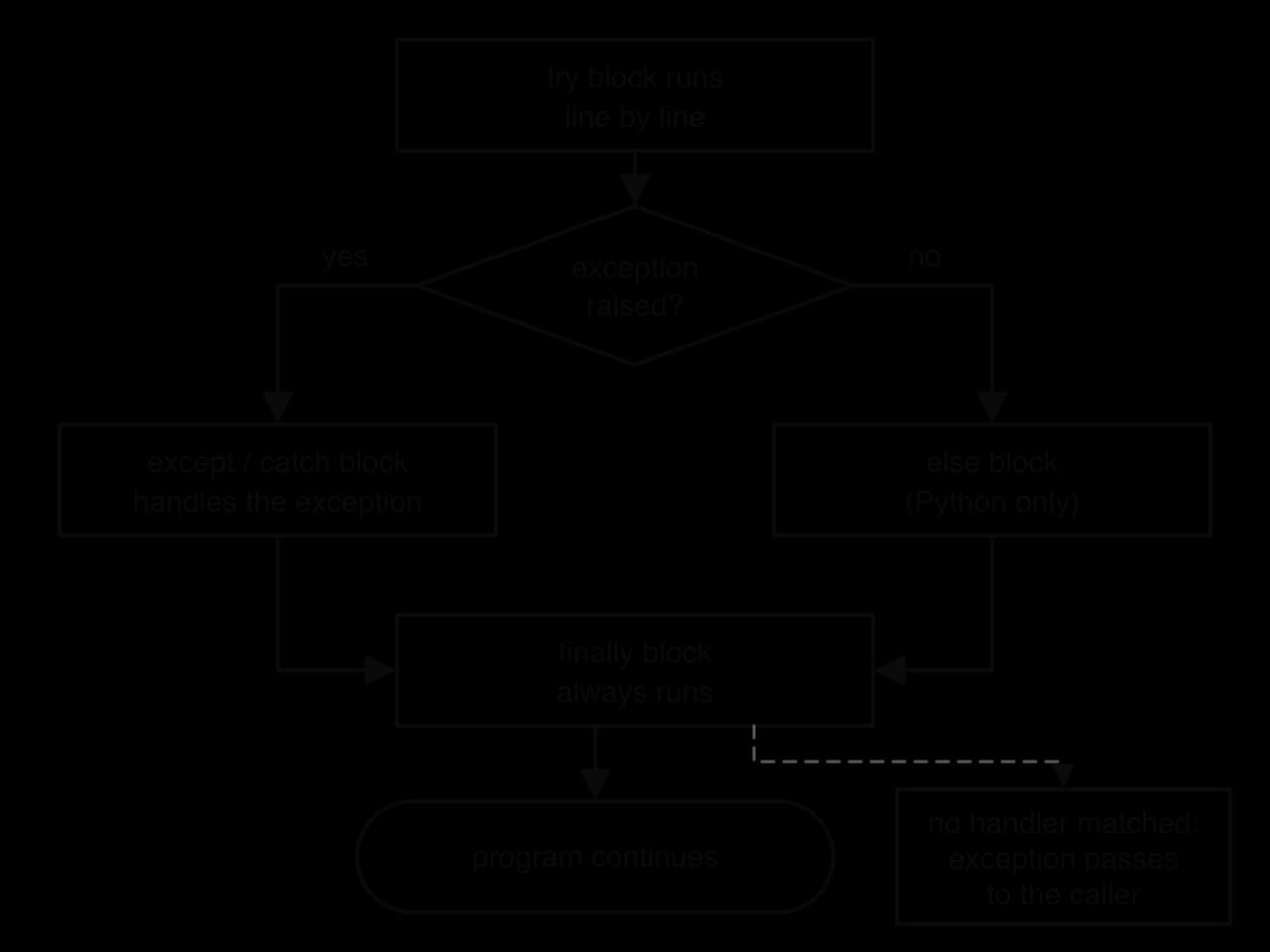

![Debugger window with Continue, Step over, Step into, Step out buttons. Code of average(marks) paused at a breakpoint on line 5, total = total + marks[i]. Variables: marks = [70, 80, 90], n = 3, total = 80, i = 2. Watch: marks[i] = 90, i < n = True.](/_next/image?url=https%3A%2F%2Fmedia.augment-education.com%2Fnotes%2F2026%2F10%2F5e5504b7-6c39-483a-ac9e-8ec601083410.webp&w=3840&q=75)
